sensor TOYOTA SIENNA HYBRID 2021 (in English) Workshop Manual
[x] Cancel search | Manufacturer: TOYOTA, Model Year: 2021, Model line: SIENNA HYBRID, Model: TOYOTA SIENNA HYBRID 2021Pages: 601, PDF Size: 32.07 MB
Page 312 of 601
3114-5. Using the driving support systems
4
Driving
■The system can be operated
when
●The power switch is in ON.
●Intuitive parking assist function is
on.
●The vehicle speed is less than
about 6 mph (10 km/h).
●The shift lever is in a position
other than P.
■If “Parking Assist Unavailable
Clean Parking Assist Sensor” is
displayed on the multi-informa-
tion display
A sensor may be co vered with ice,
snow, dirt, etc. Remove the ice,
snow, dirt, etc., from the sensor to
return the system to normal.
Also, due to ice forming on a sensor
at low temperatures, a warning
message may be displayed or the
sensor may not be able to detect an
object. Once the ice melts, the sys-
tem will return to normal.
If a warning message is displayed
even if the sensor i s clean, there
may be a sensor malfunction. Have
the vehicle insp ected by your
Toyota dealer.
■If “Parking Assist Unavailable”
is displayed on the multi-infor-
mation display
Water may be continuously flowing
over the sensor surface, such as in
a heavy rain. When the system
determines that it is normal, the sys-
tem will return to normal.
■Sensor detection information
●The sensor’s detection areas are
limited to the areas around the
vehicle’s front and rear bumpers.
●The following situations may occur
during use.
• Depending on the shape of the object and other factors, the
detection distance may shorten,
or detection may be impossible.
• Detection may be impossible if
static objects draw too close to the
WARNING
●A backlit license plate is
installed.
■When using the intuitive park-
ing assist
In the following situations, the
system may not function correctly
due to a sensor mal function, etc.
Have the vehicle checked by your
Toyota dealer.
●The intuitive parking assist
operation display flashes or
shows continuously, and a
buzzer sounds when no objects
are detected.
●If the area around a sensor col-
lides with something, or is sub-
jected to strong impact.
●If the bumper or grille collides
with something.
●If the display flashes or is dis-
played continuously and a
buzzer does not sound, except
when the mute function has
been turned on.
■Notes when washing the vehi-
cle
Do not apply intensive bursts of
water or steam to the sensor
area.
Doing so may result in the sensor
malfunctioning.
●When using a high pressure
washer to wash the vehicle, do
not spray the sensors directly,
as doing so may cause a sensor
to malfunction.
●When using steam to clean the
vehicle, do not direct steam too
close to the sensors as doing so
may cause a sens or to malfunc-
tion.
Page 313 of 601
3124-5. Using the driving support systems
sensor.
• There will be a short delay
between static object detection
and display (warning buzzer
sounds). Even at low speeds,
there is a possibilit y that the object
will come within approximately
11.9 in. (30 cm) before the display
is shown and the warning buzzer
sounds.
• It might be difficult to hear the buzzer due to the volume of the
audio system or air flow noise of
the air conditioning system.
• It may be difficult to hear the
sound of this system due to the
buzzers of other systems.
■Conditions under which the
function may not function cor-
rectly
Certain vehicle conditions and the
surrounding environment may affect
the ability of a sensor to correctly
detect objects. Particular instances
where this may occur are listed
below.
●There is dirt, snow or ice on a sen-
sor. (Cleaning the sensors will
resolve this problem.)
●A sensor is frozen. (Thawing the
area will resolve this problem.)
In especially cold weather, if a
sensor is frozen the sensor dis-
play may be displayed abnor-
mally, or objects, such as a wall,
may not be detected.
●A sensor is covered in any way.
●When a sensor or the area around
a sensor is extremely hot or cold.
●On an extremely bumpy road, on
an incline, on gravel, or on grass.
●The vicinity of the vehicle is noisy
due to vehicle horns, motorcycle
engines, air brakes of large vehi-
cles, or other l oud noises produc-
ing ultrasonic waves.
●There is another vehicle equipped
with parking assist sensors in the
vicinity.
●A sensor is coated with a sheet of spray or heavy rain.
●If a sensor is hit by a large amount
of water, such as when driving on
a flooded road.
●If the vehicle is significantly tilted.
●The vehicle is approaching a tall
or curved curb.
●If objects draw too close to the
sensor.
■Objects which may not be prop-
erly detected
The shape of the object may pre-
vent the sensor from detecting it.
Pay particular atte ntion to the fol-
lowing objects:
●Wires, fences, ropes, etc.
●Cotton, snow and other materials
that absorb sound waves
●Sharply-angled objects
●Low objects
●Tall objects with upper sections
projecting outwards in the direc-
tion of your vehicle
People may not be detected if they
are wearing certain types of cloth-
ing.
Page 314 of 601
3134-5. Using the driving support systems
4
Driving
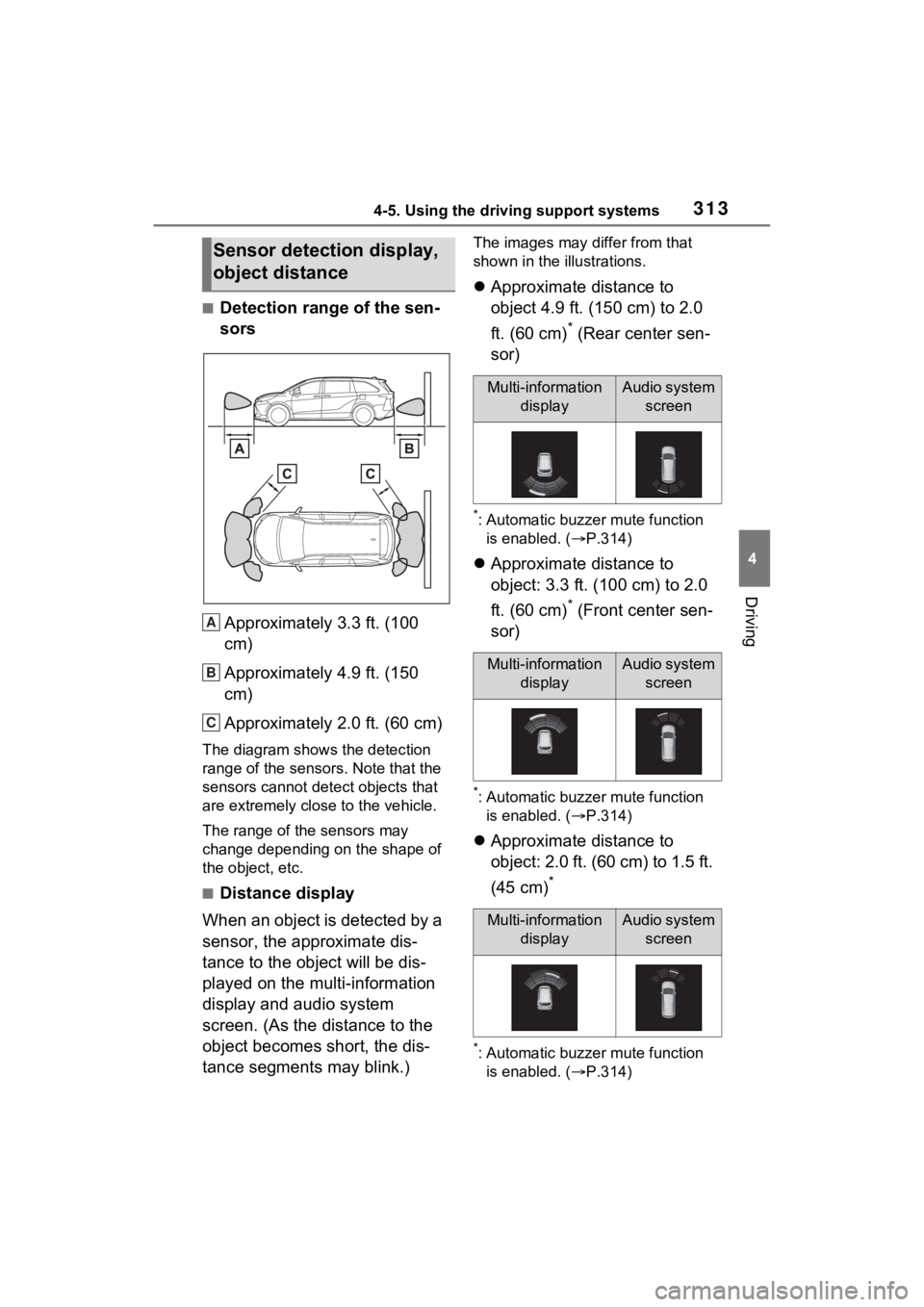
■Detection range of the sen-
sorsApproximately 3.3 ft. (100
cm)
Approximately 4.9 ft. (150
cm)
Approximately 2.0 ft. (60 cm)
The diagram shows the detection
range of the sensors. Note that the
sensors cannot detect objects that
are extremely close to the vehicle.
The range of the sensors may
change depending on the shape of
the object, etc.
■Distance display
When an object is detected by a
sensor, the approximate dis-
tance to the object will be dis-
played on the multi-information
display and audio system
screen. (As the distance to the
object becomes short, the dis-
tance segments may blink.)
The images may differ from that
shown in the illustrations.
Approximate distance to
object 4.9 ft. (150 cm) to 2.0
ft. (60 cm)
* (Rear center sen-
sor)
*: Automatic buzze r mute function
is enabled. ( P.314)
Approximate distance to
object: 3.3 ft. (100 cm) to 2.0
ft. (60 cm)
* (Front center sen-
sor)
*: Automatic buzze r mute function
is enabled. ( P.314)
Approximate distance to
object: 2.0 ft. (60 cm) to 1.5 ft.
(45 cm)
*
*: Automatic buzze r mute function
is enabled. ( P.314)
Sensor detection display,
object distance
A
B
C
Multi-information
displayAudio system screen
Multi-information displayAudio system screen
Multi-information displayAudio system screen
Page 315 of 601
3144-5. Using the driving support systems
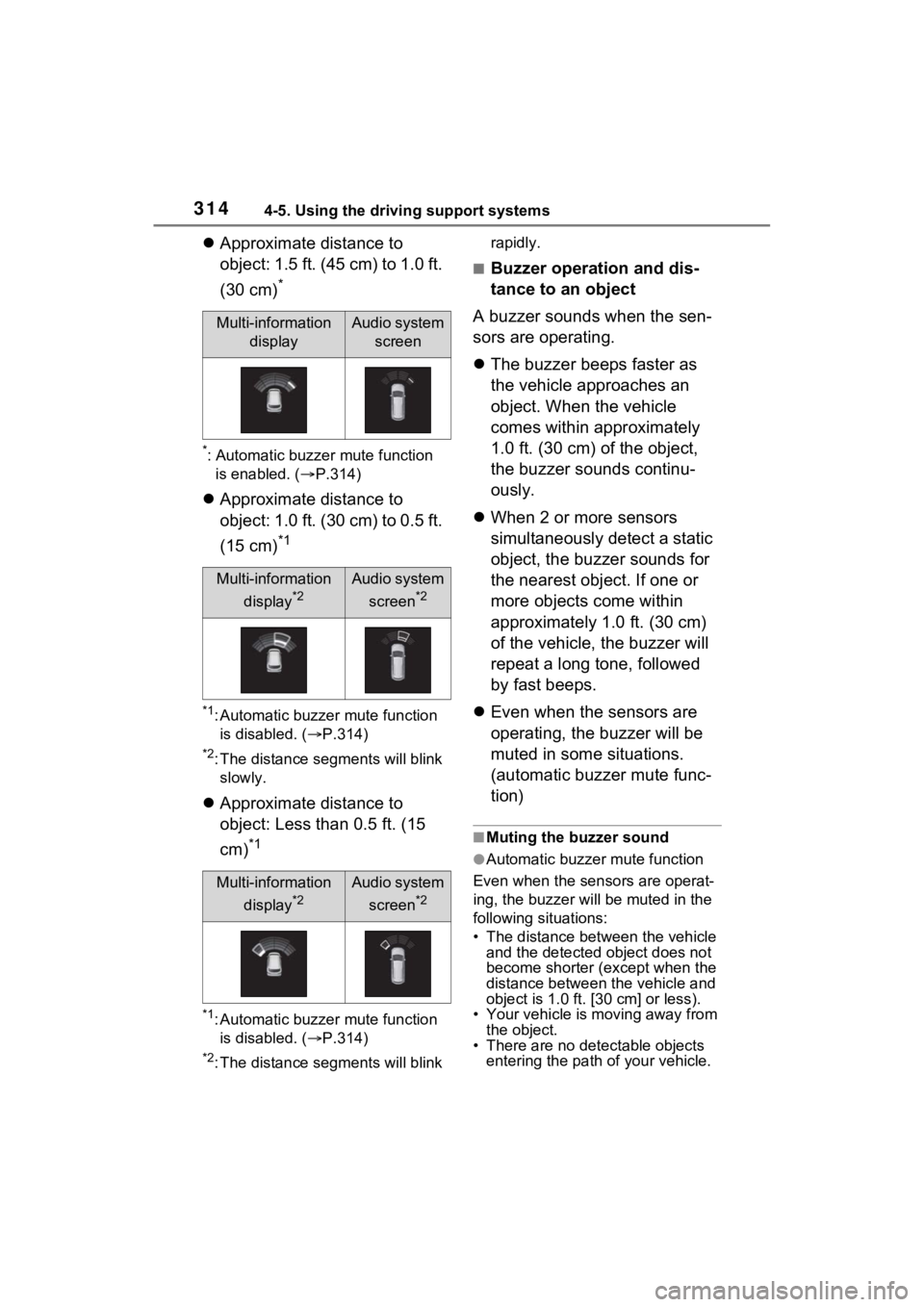
Approximate distance to
object: 1.5 ft. (45 cm) to 1.0 ft.
(30 cm)
*
*: Automatic buzzer mute function
is enabled. ( P.314)
Approximate distance to
object: 1.0 ft. (30 cm) to 0.5 ft.
(15 cm)
*1
*1: Automatic buzzer mute function
is disabled. ( P.314)
*2: The distance se gments will blink
slowly.
Approximate distance to
object: Less than 0.5 ft. (15
cm)
*1
*1: Automatic buzzer mute function
is disabled. ( P.314)
*2: The distance se gments will blink rapidly.
■Buzzer operation and dis-
tance to an object
A buzzer sounds when the sen-
sors are operating.
The buzzer beeps faster as
the vehicle approaches an
object. When the vehicle
comes within approximately
1.0 ft. (30 cm) of the object,
the buzzer sounds continu-
ously.
When 2 or more sensors
simultaneously detect a static
object, the buzzer sounds for
the nearest object. If one or
more objects come within
approximately 1.0 ft. (30 cm)
of the vehicle, the buzzer will
repeat a long tone, followed
by fast beeps.
Even when the sensors are
operating, the buzzer will be
muted in some situations.
(automatic buzzer mute func-
tion)
■Muting the buzzer sound
●Automatic buzzer mute function
Even when the sensors are operat-
ing, the buzz er will be muted in the
following situations:
• The distance between the vehicle and the detected object does not
become shorter (except when the
distance between the vehicle and
object is 1.0 ft. [30 cm] or less).
• Your vehicle is moving away from the object.
• There are no detectable objects entering the path o f your vehicle.
Multi-information
displayAudio system screen
Multi-information
display
*2
Audio system screen
*2
Multi-information display
*2
Audio system screen
*2
Page 316 of 601
3154-5. Using the driving support systems
4
Driving
However, if another object is
detected or the situation changes
while the buzzer is muted, the
buzzer begins sounding again.
●To mute the buzzer sound
The buzzer can be temporarily
muted by pressing “OK” of the meter
control switches w hile a suggestion
that says mute is available is shown
on the multi-info rmation display.
●When the mute is canceled
Mute will be automat ically canceled
in the followin g situations.
• When the shift position is changed
• When the vehicle speed has reached or excee ded a certain
speed
●When there is a malfunction in a
sensor or the system is temporar-
ily unavailable.
• When the Intuitive parking assist
is turned off once and turned on
again
• When the power switch is turned
off once and tur ned to ON again
■Customization
The buzzer volume can be adjusted
on the multi-inform ation display.
( P.551)
*: If equipped
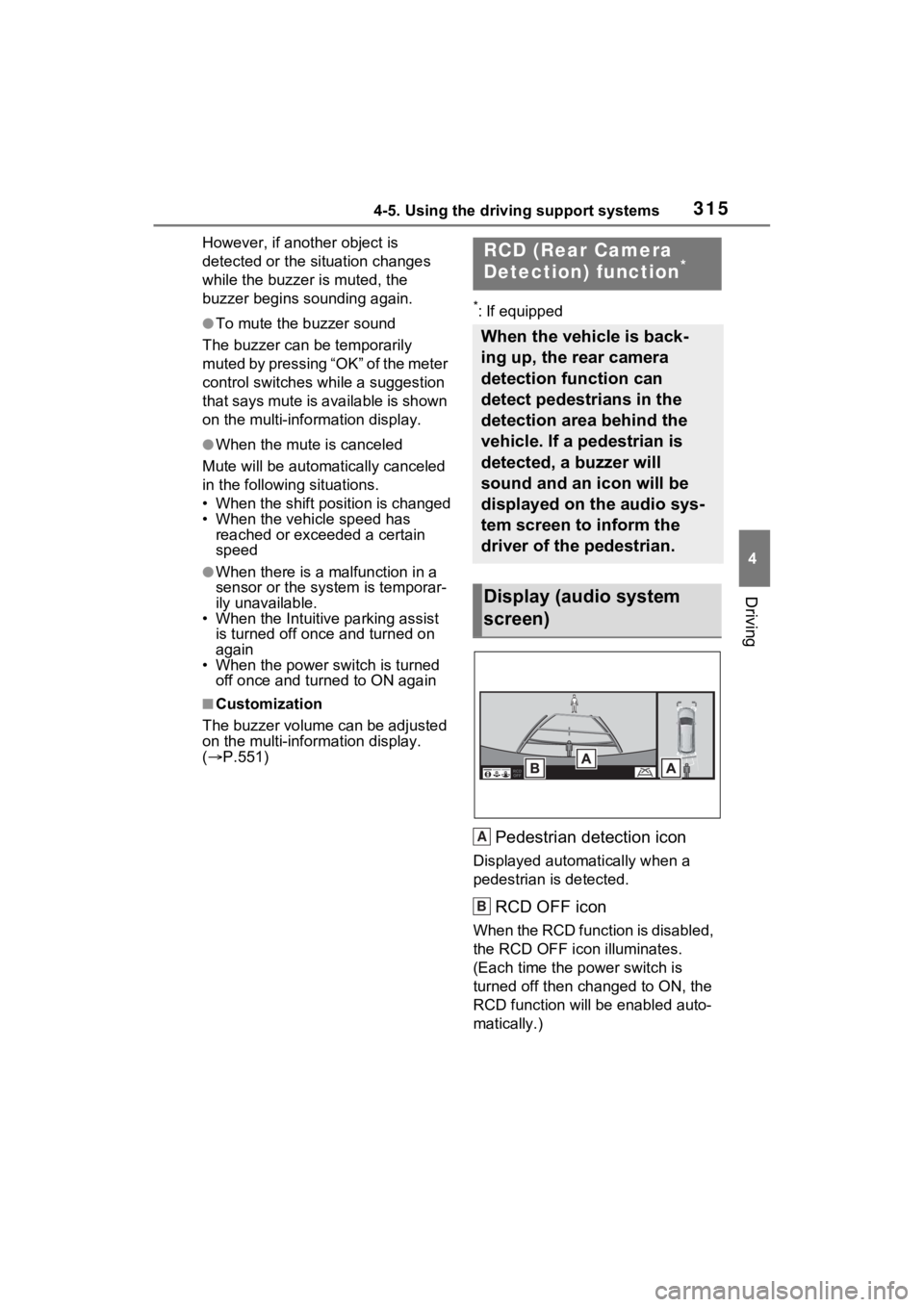
Pedestrian detection icon
Displayed automatically when a
pedestrian is detected.
RCD OFF icon
When the RCD function is disabled,
the RCD OFF icon illuminates.
(Each time the power switch is
turned off then ch anged to ON, the
RCD function will be enabled auto-
matically.)
RCD (Rear Camera
Detection) function*
When the vehicle is back-
ing up, the rear camera
detection function can
detect pedestrians in the
detection area behind the
vehicle. If a pedestrian is
detected, a buzzer will
sound and an icon will be
displayed on the audio sys-
tem screen to inform the
driver of the pedestrian.
Display (audio system
screen)
A
B
Page 321 of 601
3204-5. Using the driving support systems
The Parking Support Brake can
be enabled/disabled on the
screen of the multi-information
display. All of the Parking Sup-
port Brake functions (static
objects and rear-crossing vehi-
cles) are enabled/disabled
simultaneously. (P.112)
When the Parking Support Brake is
disabled, the PKSB OFF indicator
( P.95) illuminates on the multi-
information display.
To re-enable the system, select
on the multi-inform ation display,
select and turn it on.
If the system is disabled, it will
remain off even if the power switch
is turned to ON after the power
switch has been turned off.
If the hybrid system output
restriction control or brake con-
trol operates, a buzzer will
sound and a message will be
displayed on the multi-informa-
tion display or audio system
screen to alert the driver.
On vehicles with head-up dis-
play, the head-up display will
display the same message as
the multi-information display.
Depending on the situation, hybrid
system output restriction control will
operate to either limit acceleration
or restrict output as much as possi-
ble.
Hybrid system output restric-
tion control is operating
(acceleration restriction)
Acceleration greater than a certain
amount is restric ted by the system.
Audio system screen: No warning
displayed
Multi-information display: “Object
Detected Acceleration Reduced”
PKSB OFF indicator: Not illumi-
nated
Buzzer: Does not sound
Hybrid system output restric-
tion control is operating (out-
put restricted as much as
possible)
The system has determined that
stronger-than-normal brake opera-
NOTICE
■If “Parking Support Brake
Unavailable” is displayed on
the multi-information display
and the PKSB OFF indicator
illuminates
If this message is displayed
immediately after the power
switch is changed to ON, operate
the vehicle carefully, paying atten-
tion to your surroundings. It may
be necessary to drive the vehicle
for a certain amount of time
before the system returns to nor-
mal. (If the system does not return
to normal after driving for a while,
clean the sensors and their sur-
rounding area on the bumpers.)
Enabling/Disabling the
Parking Support Brake
Display and buzzer for
hybrid system output
restriction control and
brake control
Page 323 of 601
3224-5. Using the driving support systems
(System determines that pos-
sibility of collision with
detected object is high)
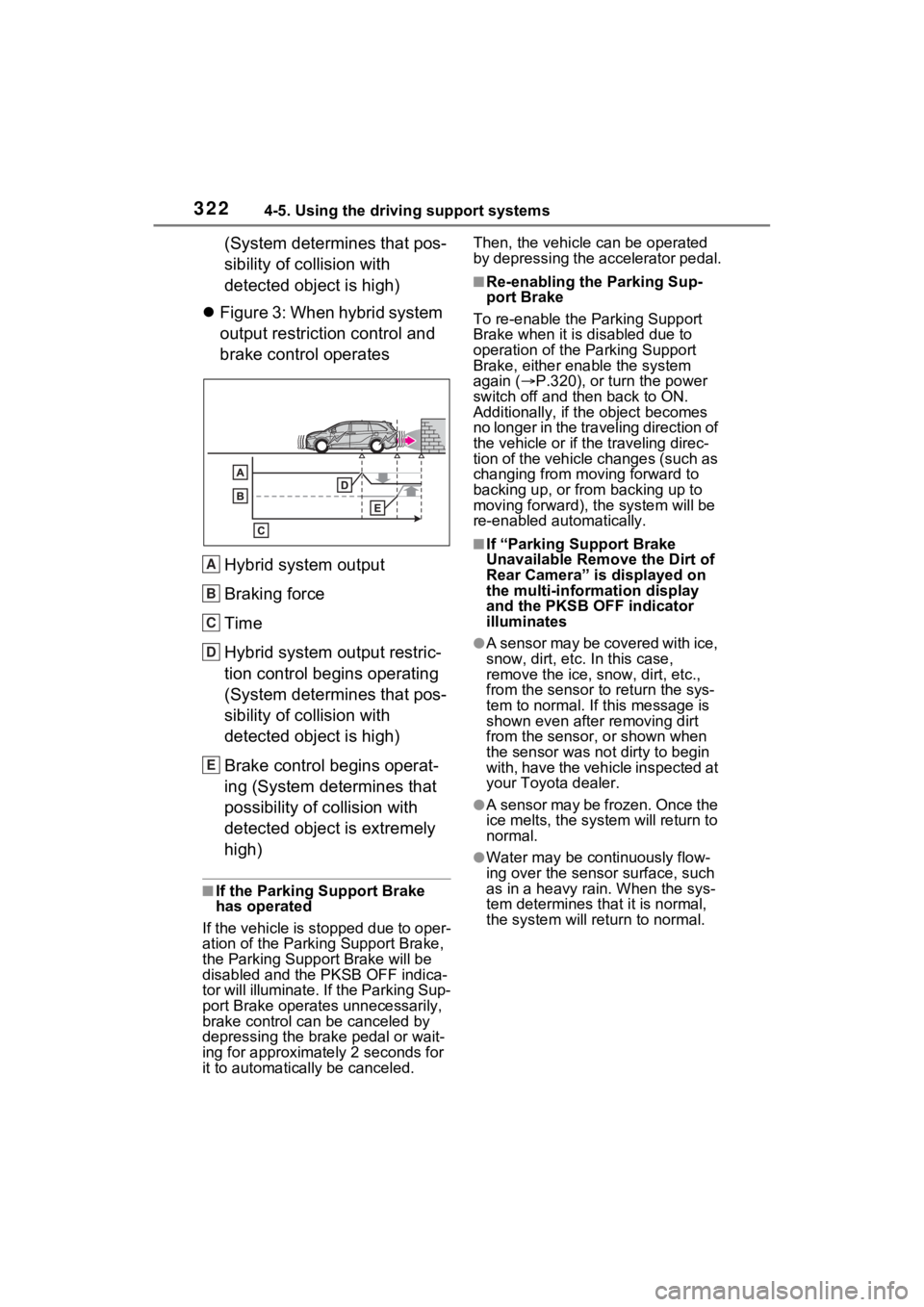
Figure 3: When hybrid system
output restriction control and
brake control operates
Hybrid system output
Braking force
Time
Hybrid system output restric-
tion control begins operating
(System determines that pos-
sibility of collision with
detected object is high)
Brake control begins operat-
ing (System determines that
possibility of collision with
detected object is extremely
high)
■If the Parking Support Brake
has operated
If the vehicle is stopped due to oper-
ation of the Parki ng Support Brake,
the Parking Suppor t Brake will be
disabled and the PKSB OFF indica-
tor will illuminate. If the Parking Sup-
port Brake operates unnecessarily,
brake control can be canceled by
depressing the brake pedal or wait-
ing for approximately 2 seconds for
it to automatically be canceled. Then, the vehicle can be operated
by depressing the accelerator pedal.
■Re-enabling the Parking Sup-
port Brake
To re-enable the Parking Support
Brake when it is disabled due to
operation of the Parking Support
Brake, either enable the system
again ( P.320), or turn the power
switch off and then back to ON.
Additionally, if the object becomes
no longer in the traveling direction of
the vehicle or if the traveling direc-
tion of the vehicle changes (such as
changing from moving forward to
backing up, or from backing up to
moving forward), t he system will be
re-enabled automatically.
■If “Parking Support Brake
Unavailable Remo ve the Dirt of
Rear Camera” is displayed on
the multi-information display
and the PKSB OFF indicator
illuminates
●A sensor may be covered with ice,
snow, dirt, etc. In this case,
remove the ice, snow, dirt, etc.,
from the sensor t o return the sys-
tem to normal. If this message is
shown even after removing dirt
from the sensor, or shown when
the sensor was not dirty to begin
with, have the vehicle inspected at
your Toyota dealer.
●A sensor may be frozen. Once the
ice melts, the sys tem will return to
normal.
●Water may be continuously flow-
ing over the sensor surface, such
as in a heavy rain. When the sys-
tem determines that it is normal,
the system will retu rn to normal.
A
B
C
D
E
Page 324 of 601
3234-5. Using the driving support systems
4
Driving
*: If equipped
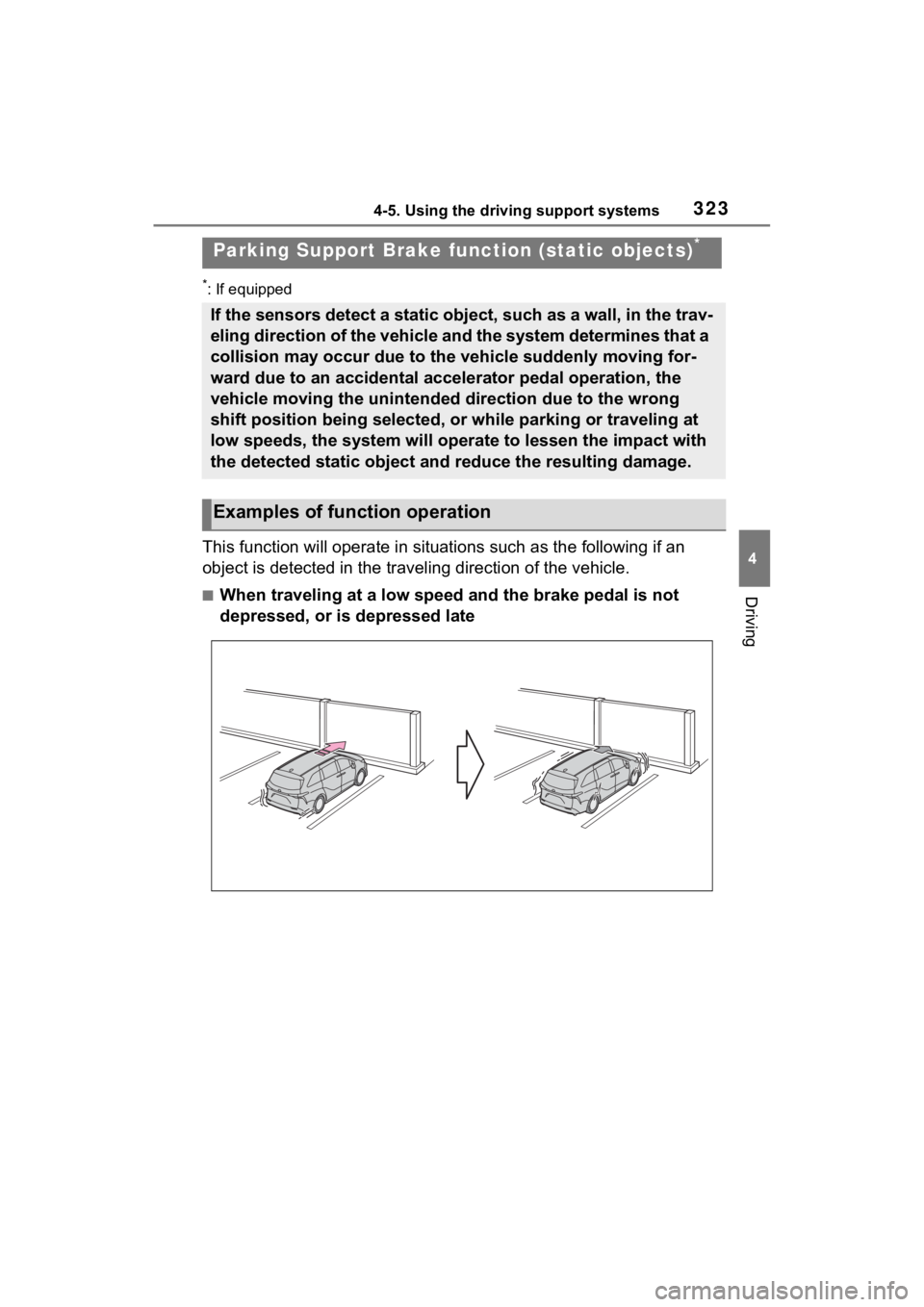
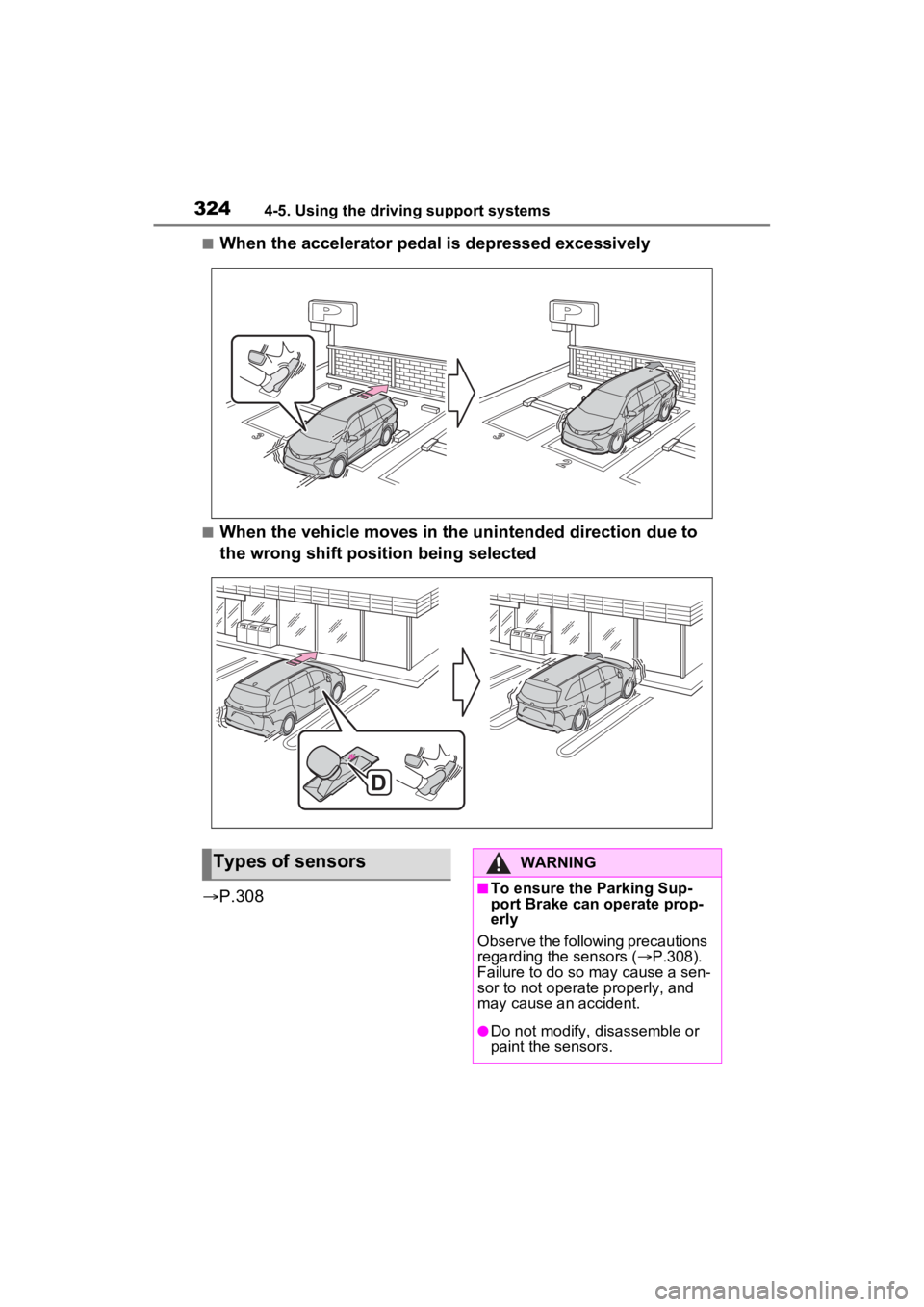
This function will operate in situations such as the following if an
object is detected in the traveling direction of the vehicle.
■When traveling at a low speed and the brake pedal is not
depressed, or is depressed late
Parking Support Brake fu nction (static objects)*
If the sensors detect a static object, such as a wall, in the t rav-
eling direction of the vehicle and the system determines that a
collision may occur due to the vehicle suddenly moving for-
ward due to an accidental accelerator pedal operation, the
vehicle moving the unintended direction due to the wrong
shift position being selected, or while parking or traveling at
low speeds, the system will operate to lessen the impact with
the detected static object and reduce the resulting damage.
Examples of function operation
Page 325 of 601
3244-5. Using the driving support systems
■When the accelerator pedal is depressed excessively
■When the vehicle moves in the unintended direction due to
the wrong shift position being selected
P.308
Types of sensorsWARNING
■To ensure the Parking Sup-
port Brake can operate prop-
erly
Observe the following precautions
regarding the sensors ( P.308).
Failure to do so may cause a sen-
sor to not operate properly, and
may cause an accident.
●Do not modify, disassemble or
paint the sensors.
Page 326 of 601
3254-5. Using the driving support systems
4
Driving
WARNING
●Do not replace a sensor with a
part other than a genuine part.
●Do not subject a sensor or its
surrounding area to a strong
impact.
●Do not damage the sensors,
and always keep them clean.
●If the area around a radar sen-
sor is subjected to an impact,
the system may not operate
properly due to a sensor mal-
function. Have the vehicle
inspected by your Toyota
dealer.
■Handling the suspension
Do not modify the suspension, as
changes to the height or inclina-
tion of the vehicle may prevent
the sensors from detecting
objects correctly or cause the sys-
tem to not operate or operate
unnecessarily.
■If the Parking Support Brake
function (static objects) oper-
ates unnecessarily, such as
at a railroad crossing
In the event that the Parking Sup-
port Brake function (static objects)
operates unnecessarily, such as
at a railroad cross ing, brake con-
trol will be cancele d after approxi-
mately 2 seconds, allowing you to
proceed forward and leave the
area, brake control can also be
canceled by depressing the brake
pedal. Depressing the accelera-
tor pedal after brake control is
canceled will allow you to proceed
forward and leave the area.
■Notes when washing the vehi-
cle
Do not apply intensive bursts of
water or steam to the sensor
area.
Doing so may result in the sensor
malfunctioning.
●When using a high pressure
washer to wash the vehicle, do
not spray the sensors directly,
as doing so may cause a sensor
to malfunction.
●When using steam to clean the
vehicle, do not direct steam too
close to the sensors as doing so
may cause a sensor to malfunc-
tion.
■When to disable the Parking
Support Brake
In the following situations, disable
the Parking Suppor t Brake as the
system may opera te even though
there is no possibility of a colli-
sion.
●When inspecting the vehicle
using a chassis roller, chassis
dynamo or free roller
●When loading the vehicle onto a
boat, truck or other transport
vessel
●If the suspension has been
modified or tires of a size other
than specified are installed
●If the front of the vehicle is
raised or lowered due to the
carried load
●When equipment that may
obstruct a sensor is installed,
such as a bumper protector (an
additional trim strip, etc.), hitch-
mounted bicycle carrier, or
snow plow
●When using an automatic car
wash