back door TOYOTA SIENNA HYBRID 2023 User Guide
[x] Cancel search | Manufacturer: TOYOTA, Model Year: 2023, Model line: SIENNA HYBRID, Model: TOYOTA SIENNA HYBRID 2023Pages: 602, PDF Size: 14.9 MB
Page 63 of 602
631-2. Child safety
1
For safety and security
A child restraint system for a
small child or baby must itself be
properly restrained on the seat
with the lap portion of the
lap/shoulder belt.
■Installing child restraint
system using a seat belt
(child restraint lock func-
tion belt)
Install the child restraint system
in accordance to the operation
WARNING
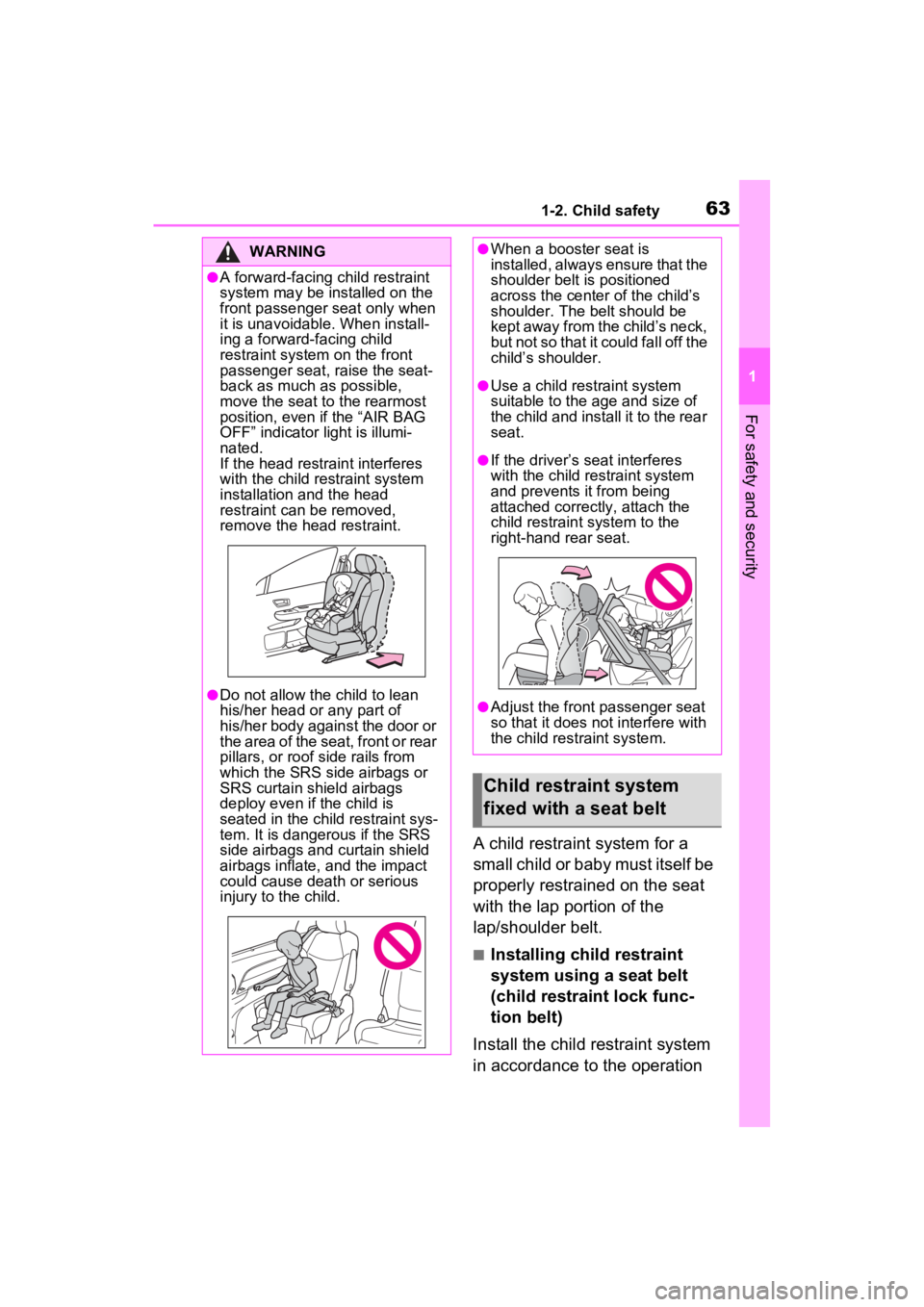
●A forward-facing child restraint
system may be installed on the
front passenger seat only when
it is unavoidable. When install-
ing a forward-facing child
restraint system on the front
passenger seat, raise the seat-
back as much as possible,
move the seat to the rearmost
position, even if the “AIR BAG
OFF” indicator light is illumi-
nated.
If the head restraint interferes
with the child restraint system
installation and the head
restraint can be removed,
remove the head restraint.
●Do not allow the child to lean
his/her head or any part of
his/her body against the door or
the area of the seat, front or rear
pillars, or roof side rails from
which the SRS side airbags or
SRS curtain shield airbags
deploy even if the child is
seated in the child restraint sys-
tem. It is dangerous if the SRS
side airbags and curtain shield
airbags inflate, and the impact
could cause death or serious
injury to the child.
●When a booster seat is
installed, always ensure that the
shoulder belt is positioned
across the center of the child’s
shoulder. The belt should be
kept away from the child’s neck,
but not so that it could fall off the
child’s shoulder.
●Use a child restraint system
suitable to the age and size of
the child and install it to the rear
seat.
●If the driver’s seat interferes
with the child restraint system
and prevents it from being
attached correctly, attach the
child restraint system to the
right-hand rear seat.
●Adjust the front passenger seat
so that it does not interfere with
the child restraint system.
Child restraint system
fixed with a seat belt
Page 81 of 602
811-4. Hybrid system
1
For safety and security
hybrid system, contact your Toyota
dealer.
■Charging the 12-volt battery
P.506
■After the 12-volt battery has dis-
charged or when the terminal
has been removed and installed
during exchange, etc.
The gasoline engine may not stop
even if the vehicle is being driven by
the hybrid battery (traction battery).
If this continues for a few days, con-
tact your To yota dealer.
■Sounds and vibrations specific
to a Hybrid Electric Vehicle
There may be no engine sound or
vibration even though the vehicle is
able to move with the “READY” indi-
cator is illuminate d. For safety,
make sure to shift the shift lever to P
and apply the parking brake when
parked.
The following sounds or vibrations
may occur when the hybrid system
is operating and are not a malfunc-
tion:
●Motor sounds may be heard from
the engine compartment.
●Sounds may be heard from the
hybrid battery (traction battery)
under the front seats when the
hybrid system starts or stops.
●Relay operating sounds such as a
snap or soft clank will be emitted
from the hybrid battery (traction
battery), under the front seats,
when the hybrid system is started
or stopped.
●Sounds from the hybrid system
may be heard when the back door
is open.
●Sounds may be heard from the
transmission when the gasoline
engine starts or stops, when driv-
ing at low speeds, or during idling.
●Engine sounds may be heard
when accelerating sharply.
●Sounds may be heard due to regenerative braking when the
brake pedal is depressed or as
the accelerator pedal is released.
●Vibration may be felt when the
gasoline engine starts or stops.
●Cooling fan sounds may be heard
from the air intake vent under the
front seat.
■Maintenance, repair, recycling,
and disposal
Contact your Toyota dealer regard-
ing maintenance, repair, recycling
and disposal. Do n ot dispose of the
vehicle yourself.
When driving with the gasoline
engine stopped, a sound, which
changes in accordance with the
driving speed, will be played in
order to warn people nearby of
the vehicle’s approach. The
sound will stop when the vehicle
speed exceeds approximately
22 mph (35 km/h).
■Acoustic Vehicle Alerting Sys-
tem
In the following cases, the Acoustic
Vehicle Alerting System may be dif-
ficult for surrounding people to hear.
●In very noisy areas
●In the wind or the rain
■If “Acoustic Vehicle Alerting
System Malfunction Visit Your
Dealer” is displayed on the
multi-information display
The system may be malfunctioning.
Have the vehicle inspected by your
Toyota dealer.
Acoustic Vehicle Alerting
System
Page 90 of 602
901-5. Theft deterrent system
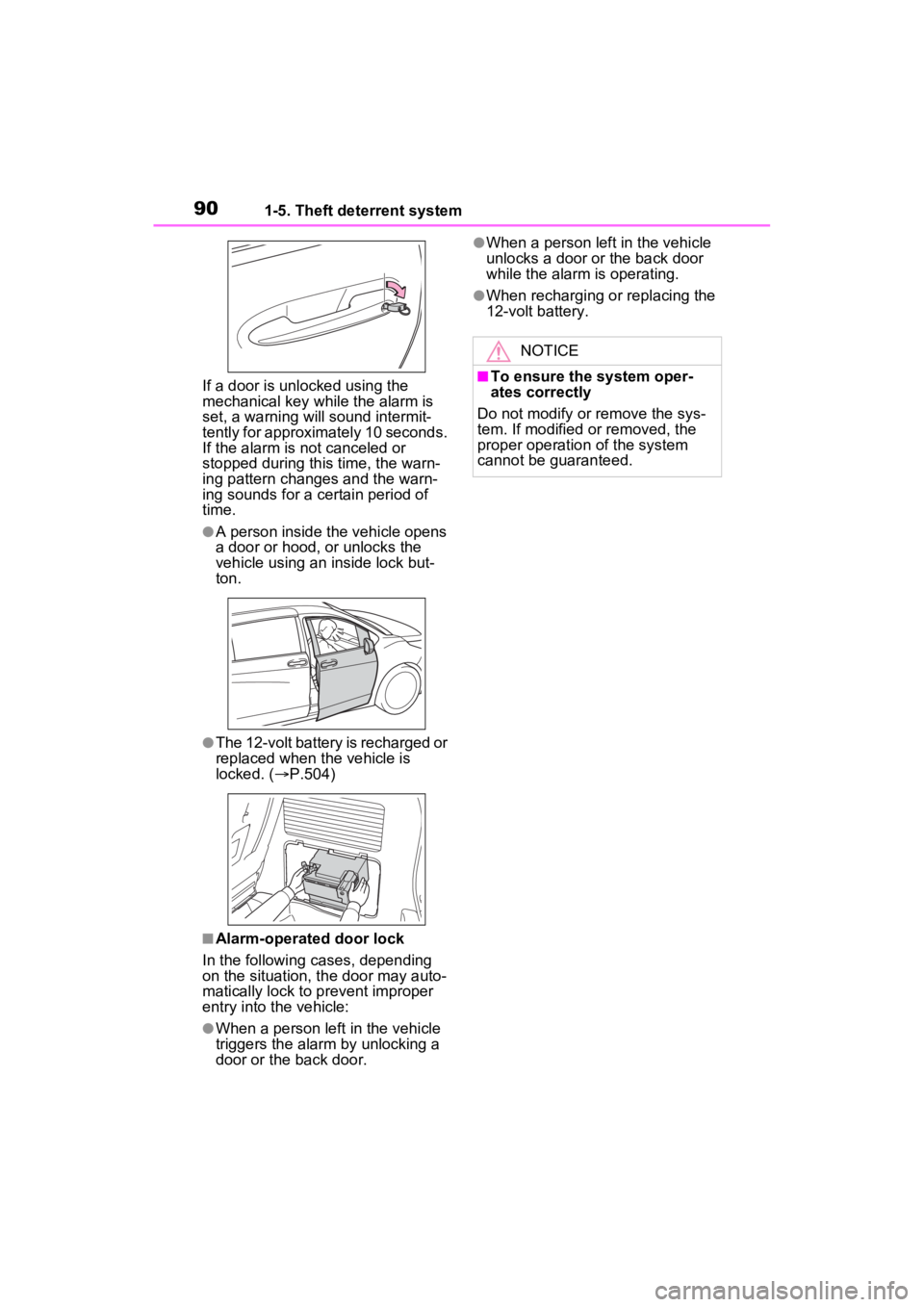
If a door is unlocked using the
mechanical key while the alarm is
set, a warning will sound intermit-
tently for approximately 10 seconds.
If the alarm is not canceled or
stopped during this time, the warn-
ing pattern change s and the warn-
ing sounds for a certain period of
time.
●A person inside the vehicle opens
a door or hood, or unlocks the
vehicle using an inside lock but-
ton.
●The 12-volt battery is recharged or
replaced when the vehicle is
locked. ( P.504)
■Alarm-operated door lock
In the following cases, depending
on the situation, th e door may auto-
matically lock to p revent improper
entry into the vehicle:
●When a person left in the vehicle
triggers the alarm by unlocking a
door or the back door.
●When a person lef t in the vehicle
unlocks a door or the back door
while the alarm is operating.
●When recharging or replacing the
12-volt battery.
NOTICE
■To ensure the system oper-
ates correctly
Do not modify or remove the sys-
tem. If modified or removed, the
proper operation of the system
cannot be guaranteed.
Page 115 of 602

1152-1. Instrument cluster
2
Vehicle status information and indicators
Select to change each notification
method used to warn the driver
when the system recognizes
excess speed, no overtaking and
no-entry sign.
• “Notification Level”
Select to change e ach notification
level used to warn the driver when
the system recognizes a speed limit
sign.
RCD (Rear Camera
Detection) (if equipped)
( P.320)
• RCD (Rear Camera Detection)
on/off
Select to enable/disable the RCD
function.
•“Volume”
Select to change the RCD buzzer
volume.
■ Vehicle Settings
PSD (Power Sliding
Doors) ( P.137)
Select to set up the following items.
• “Left Hands Free PSD” (if
equipped)
Select to enable/disable the left-
hand power sliding door kick sen-
sor.
• “Right Hands F ree PSD” (if
equipped)
Select to enable/d isable the right-
hand power sliding door kick sen-
sor.
• “Left PSD Alert Volume”
Select to set the volume of the
buzzer which sounds when the left-
hand power sliding door system operates.
• “Right PSD Alert Volume”
Select to set the volume of the
buzzer which sounds when the
right-hand power sliding door sys-
tem operates.
PBD (Power Back Door)
(if equipped) ( P.153)
Select to set up t he following items.
• PBD (Power Back Door) on/off
Select to enable/disable the power
back door system.
• “Hands Free”
Select to enable/disable the kick
sensor.
• “PBD Opening Adjustment”
Select the open position when
power back door is fully open.
•“Volume”
Select to set the volume of the
buzzer which sounds when the
power back door system operates.
Rear Seat Reminder
( P.134)
Select to enable/disable the rear
seat reminder function.
“TPWS Setting” (Tire Pres-
sure Warning System)
( P.424)
• “Setting Pressure”
Select to initialize the tire pressure
warning system.
• “Identifying Each Wheel & Posi- tion”
Select to register the ID codes of
the tire pressure se nsors to the tire
pressure warning system.
Page 129 of 602
127
3
3
Before driving
Before driving
3-1. Key informationKeys ............................ 128
3-2. Opening, closing and locking the doors
Front doors.................. 132
Sliding doors ............... 137
Back door .................... 150
Smart key system ....... 165
3-3. Adjusting the seats Front seats .................. 170
Rear seats................... 172
Driving position memory .................................. 179
Head restraints............ 183
3-4. Adjusting the steering wheel and mirrors
Steering wheel ............ 186
Inside rear view mirror 187
Digital Rear-view Mirror .................................. 189
Outside rear view mirrors .................................. 199
3-5. Opening, closing the win- dows and moon roof
Power windows ........... 202
Moon roof .................... 205
Page 132 of 602
1303-1. Key information
The electronic keys are
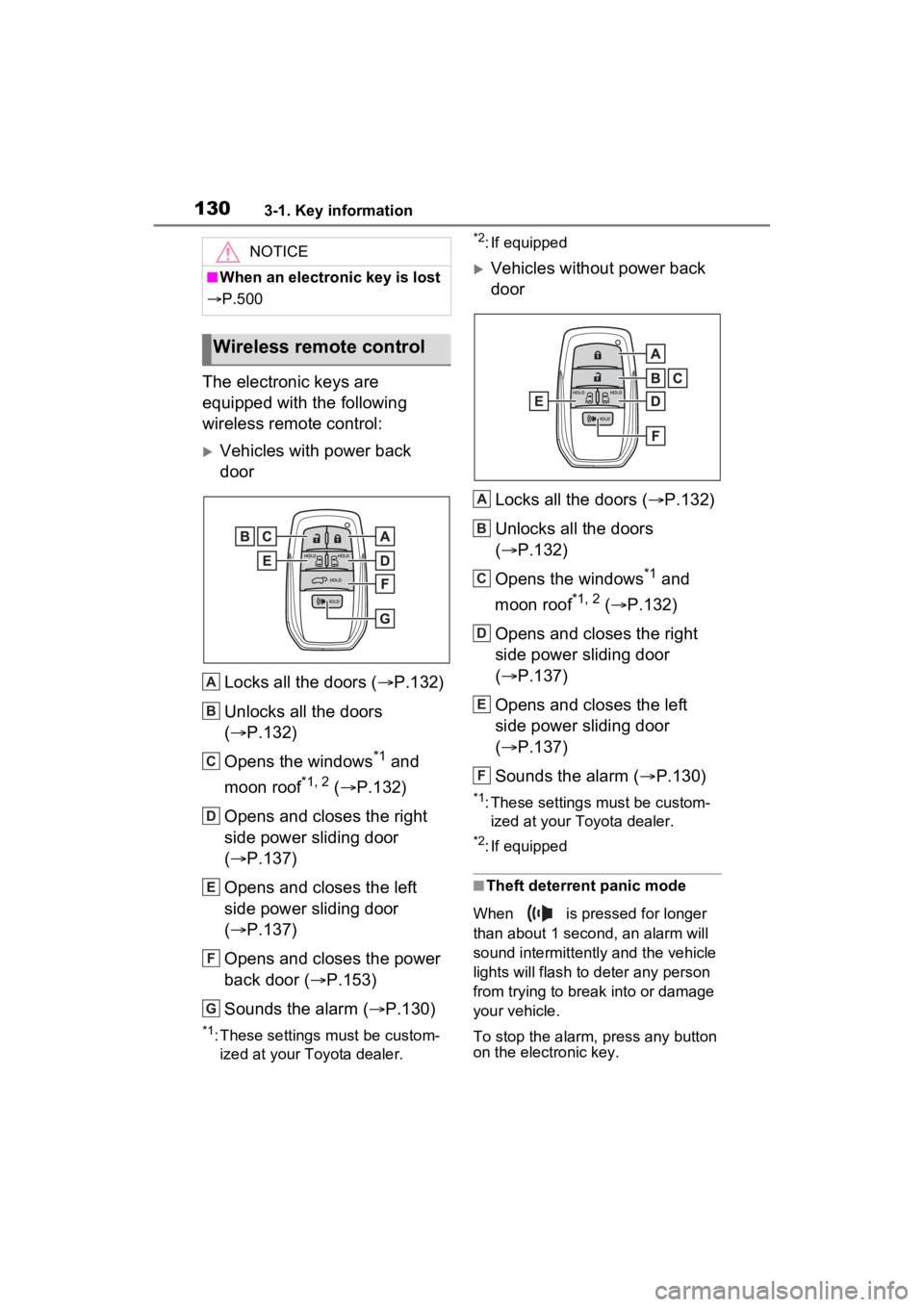
equipped with the following
wireless remote control:
Vehicles with power back
doorLocks all the doors ( P.132)
Unlocks all the doors
( P.132)
Opens the windows
*1 and
moon roof
*1, 2 ( P.132)
Opens and closes the right
side power sliding door
( P.137)
Opens and closes the left
side power sliding door
( P.137)
Opens and closes the power
back door ( P.153)
Sounds the alarm ( P.130)
*1: These settings must be custom-
ized at your Toyota dealer.
*2: If equipped
Vehicles without power back
door
Locks all the doors ( P.132)
Unlocks all the doors
( P.132)
Opens the windows
*1 and
moon roof
*1, 2 ( P.132)
Opens and closes the right
side power sliding door
( P.137)
Opens and closes the left
side power sliding door
( P.137)
Sounds the alarm ( P.130)
*1: These settings must be custom-
ized at your Toyota dealer.
*2: If equipped
■Theft deterrent panic mode
When is pressed for longer
than about 1 second, an alarm will
sound intermittently and the vehicle
lights will flash to deter any person
from trying to break into or damage
your vehicle.
To stop the alarm, press any button
on the electronic key.
NOTICE
■When an electronic key is lost
P.500
Wireless remote control
A
B
C
D
E
F
G
A
B
C
D
E
F
Page 134 of 602
1323-2. Opening, closing and locking the doors
3-2.Opening, closing and locking the doors
■Using the entry function (if
equipped)
Carry the electronic key to
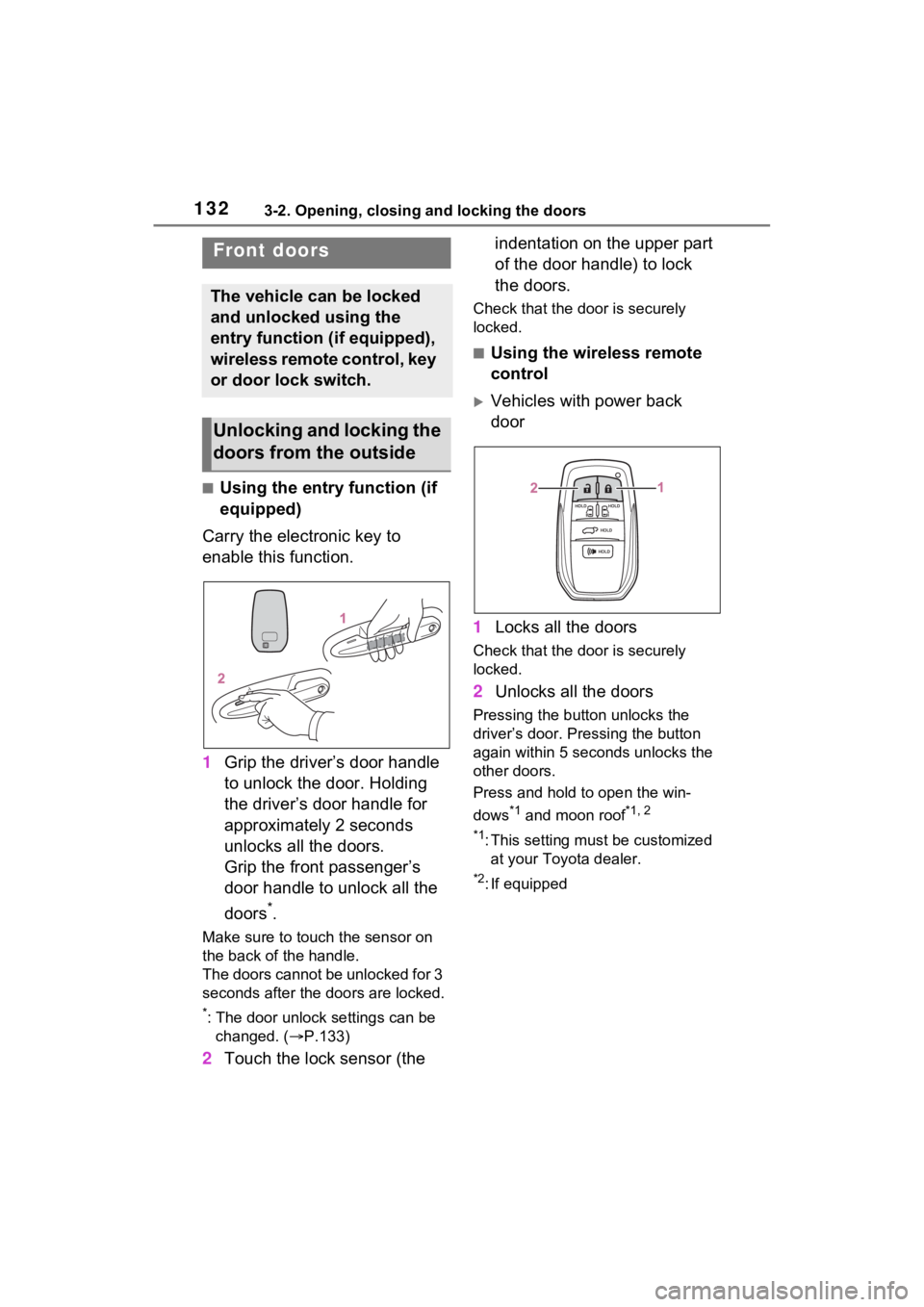
enable this function.
1 Grip the driver’s door handle
to unlock the door. Holding
the driver’s door handle for
approximately 2 seconds
unlocks all the doors.
Grip the front passenger’s
door handle to unlock all the
doors
*.
Make sure to touch the sensor on
the back of the handle.
The doors cannot be unlocked for 3
seconds after the doors are locked.
*: The door unlock settings can be
changed. ( P.133)
2 Touch the lock sensor (the indentation on the upper part
of the door handle) to lock
the doors.
Check that the d
oor is securely
locked.
■Using the wireless remote
control
Vehicles with power back
door
1 Locks all the doors
Check that the d oor is securely
locked.
2 Unlocks all the doors
Pressing the button unlocks the
driver’s door. Pressing the button
again within 5 seconds unlocks the
other doors.
Press and hold to open the win-
dows
*1 and moon roof*1, 2
*1
: This setting must be customized at your Toyo ta dealer.
*2: If equipped
Front doors
The vehicle can be locked
and unlocked using the
entry function (if equipped),
wireless remote control, key
or door lock switch.
Unlocking and locking the
doors from the outside
Page 135 of 602
1333-2. Opening, closing and locking the doors
3
Before driving
Vehicles without power back
door
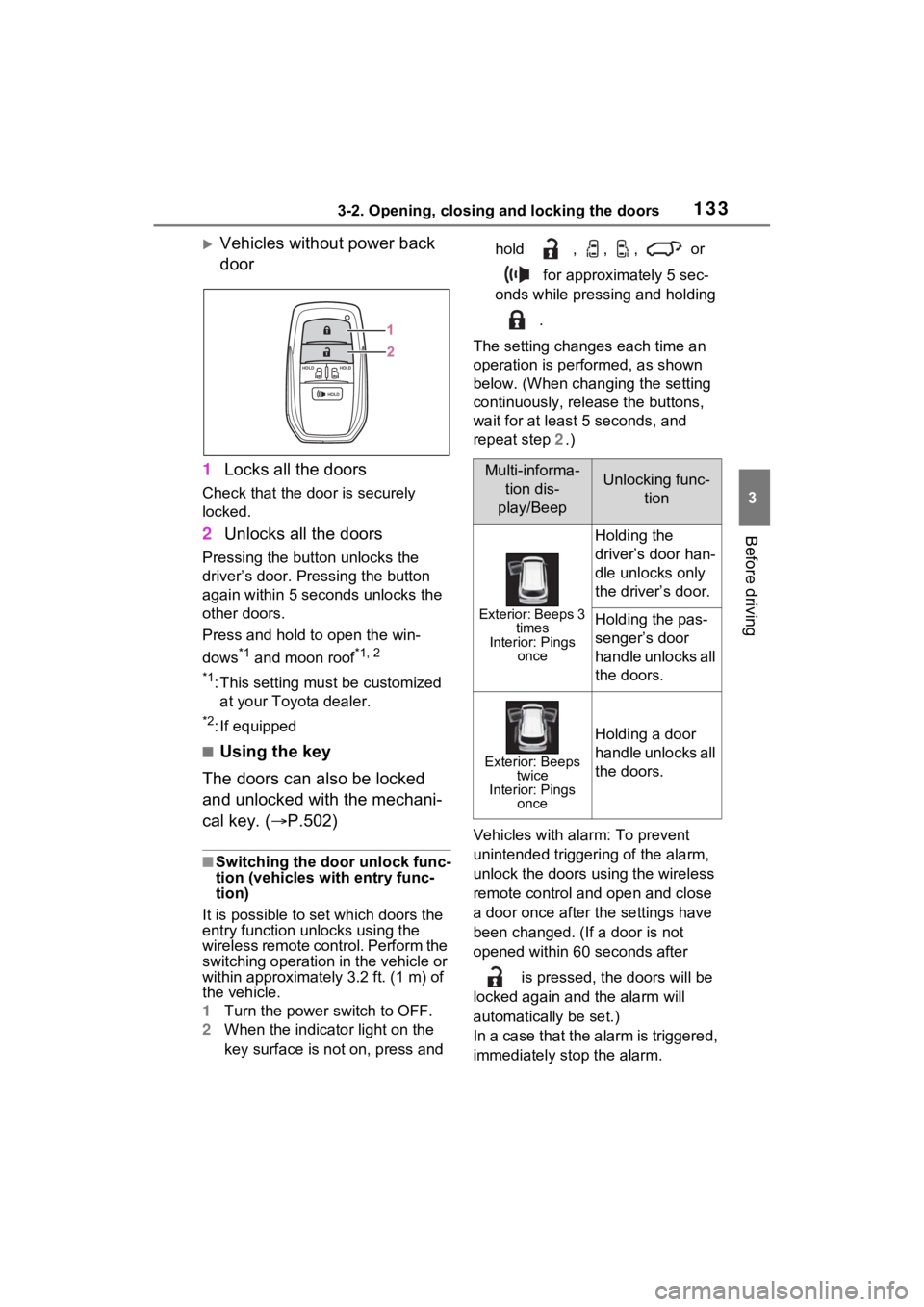
1 Locks all the doors
Check that the door is securely
locked.
2Unlocks all the doors
Pressing the button unlocks the
driver’s door. Pressing the button
again within 5 seconds unlocks the
other doors.
Press and hold to open the win-
dows
*1 and moon roof*1, 2
*1
:This setting mu st be customized
at your Toyota dealer.
*2: If equipped
■Using the key
The doors can also be locked
and unlocked with the mechani-
cal key. ( P.502)
■Switching the door unlock func-
tion (vehicles with entry func-
tion)
It is possible to set which doors the
entry function unlocks using the
wireless remote control. Perform the
switching operation in the vehicle or
within approximately 3.2 ft. (1 m) of
the vehicle.
1 Turn the power switch to OFF.
2 When the indicator light on the
key surface is not on, press and hold , , , or
for approximately 5 sec-
onds while pressing and holding
.
The setting changes each time an
operation is per formed, as shown
below. (When changing the setting
continuously, release the buttons,
wait for at least 5 seconds, and
repeat step 2 .)
Vehicles with alarm: To prevent
unintended triggeri ng of the alarm,
unlock the doors using the wireless
remote control and open and close
a door once after the settings have
been changed. (If a door is not
opened within 60 seconds after
is pressed, the doors will be
locked again and the alarm will
automatically be set.)
In a case that the alarm is triggered,
immediately stop the alarm.
Multi-informa- tion dis-
play/BeepUnlocking func- tion
Exterior: Beeps 3 times
Interior: Pings once
Holding the
driver’s door han-
dle unlocks only
the driver’s door.
Holding the pas-
senger’s door
handle unlocks all
the doors.
Exterior: Beeps twice
Interior: Pings once
Holding a door
handle unlocks all
the doors.
Page 141 of 602
1393-2. Opening, closing and locking the doors
3
Before driving
■Using wireless remote con-
trol
Vehicles with power back
door
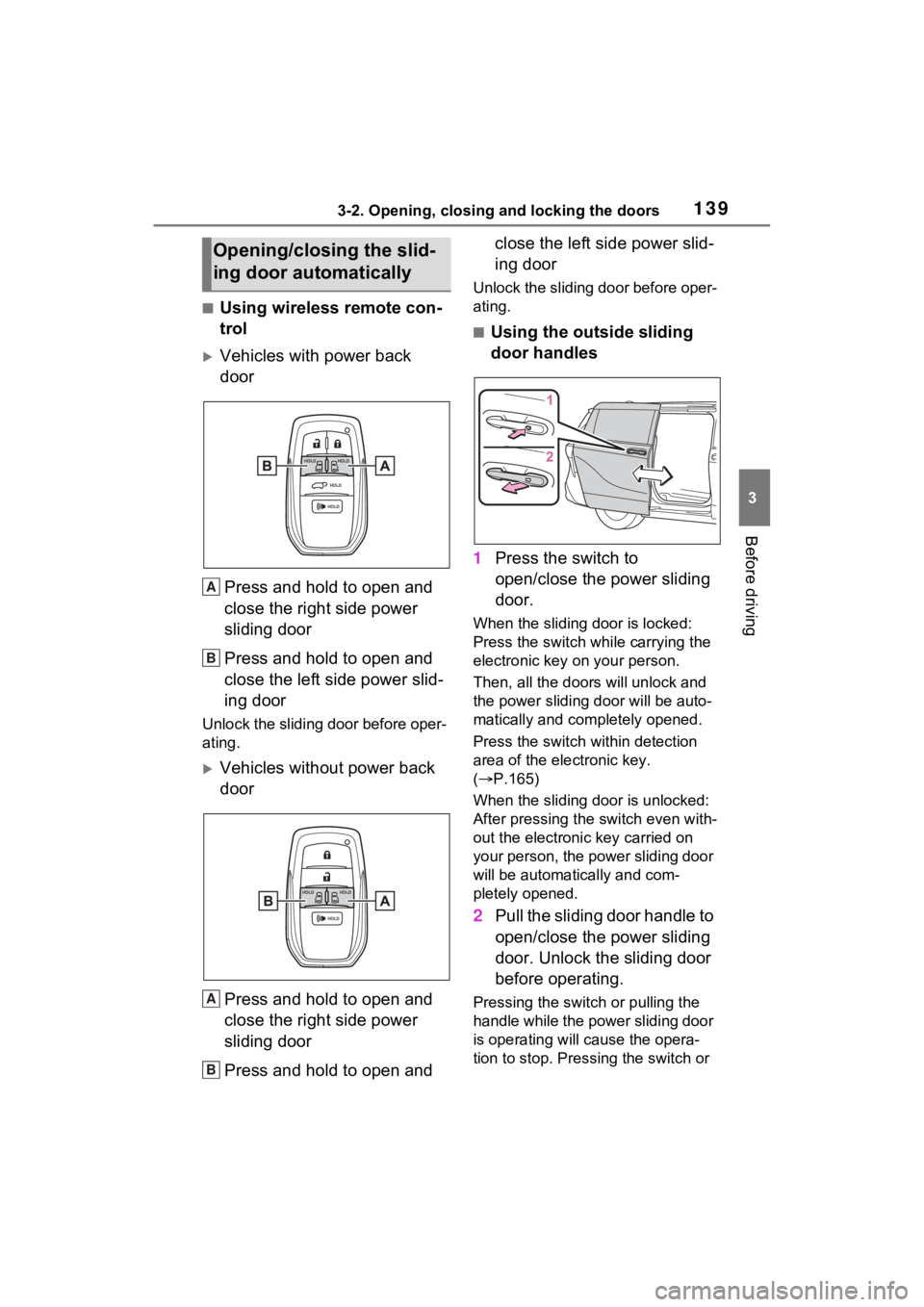
Press and hold to open and
close the right side power
sliding door
Press and hold to open and
close the left side power slid-
ing door
Unlock the sliding door before oper-
ating.
Vehicles without power back
doorPress and hold to open and
close the right side power
sliding door
Press and hold to open and close the left side power slid-
ing door
Unlock the sliding door before oper-
ating.
■Using the outside sliding
door handles
1 Press the switch to
open/close the power sliding
door.
When the sliding door is locked:
Press the switch while carrying the
electronic key on your person.
Then, all the door s will unlock and
the power sliding door will be auto-
matically and completely opened.
Press the switch within detection
area of the electronic key.
( P.165)
When the sliding door is unlocked:
After pressing the switch even with-
out the electronic key carried on
your person, the power sliding door
will be automatically and com-
pletely opened.
2 Pull the sliding door handle to
open/close the power sliding
door. Unlock the sliding door
before operating.
Pressing the swit ch or pulling the
handle while the power sliding door
is operating will cause the opera-
tion to stop. Pressing the switch or
Opening/closing the slid-
ing door automatically
A
B
A
B
Page 143 of 602
1413-2. Opening, closing and locking the doors
3
Before driving
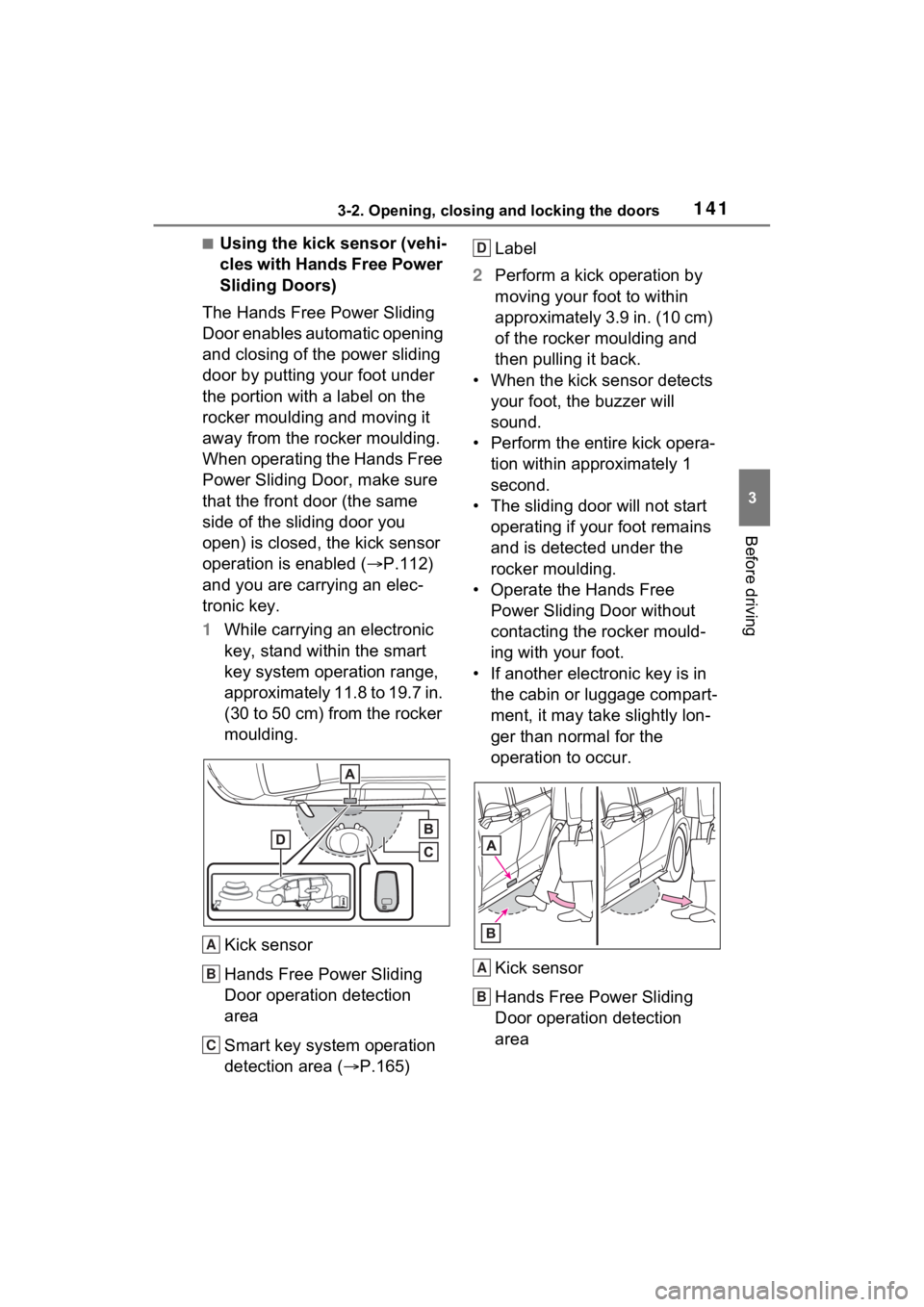
■Using the kick sensor (vehi-
cles with Hands Free Power
Sliding Doors)
The Hands Free Power Sliding
Door enables automatic opening
and closing of the power sliding
door by putting your foot under
the portion with a label on the
rocker moulding and moving it
away from the rocker moulding.
When operating the Hands Free
Power Sliding Door, make sure
that the front door (the same
side of the sliding door you
open) is closed, the kick sensor
operation is enabled ( P.112)
and you are carrying an elec-
tronic key.
1 While carrying an electronic
key, stand within the smart
key system operation range,
approximately 11.8 to 19.7 in.
(30 to 50 cm) from the rocker
moulding.
Kick sensor
Hands Free Power Sliding
Door operation detection
area
Smart key system operation
detection area ( P.165) Label
2 Perform a kick operation by
moving your foot to within
approximately 3.9 in. (10 cm)
of the rocker moulding and
then pulling it back.
• When the kick sensor detects your foot, the buzzer will
sound.
• Perform the entire kick opera- tion within approximately 1
second.
• The sliding door will not start operating if your foot remains
and is detected under the
rocker moulding.
• Operate the Hands Free Power Sliding Door without
contacting the rocker mould-
ing with your foot.
• If another electronic key is in
the cabin or luggage compart-
ment, it may take slightly lon-
ger than normal for the
operation to occur.
Kick sensor
Hands Free Power Sliding
Door operation detection
area
A
B
C
D
A
B