belt TOYOTA SIENNA HYBRID 2023 Service Manual
[x] Cancel search | Manufacturer: TOYOTA, Model Year: 2023, Model line: SIENNA HYBRID, Model: TOYOTA SIENNA HYBRID 2023Pages: 602, PDF Size: 14.9 MB
Page 94 of 602
942-1. Instrument cluster
*1: These lights turn on when the power switch is turned to ON to
indicate that a system check is
being performed. They will turn
off after the hybr id system is on,
or after a few seconds. There
may be a malfunction in a sys-
tem if the light does not come on,
or turn off. Have the vehicle
inspected by your Toyota dealer.
*2: This light illuminates on the multi-informatio n display with a
message.
*3: Intuitive parking assist OFF indi- cator turns on when the power
switch is turned to ON while the
Intuitive parking assist function is
on. It will turn off after a few sec-
onds.
*4: This light illumi nates on the cen-
ter panel.
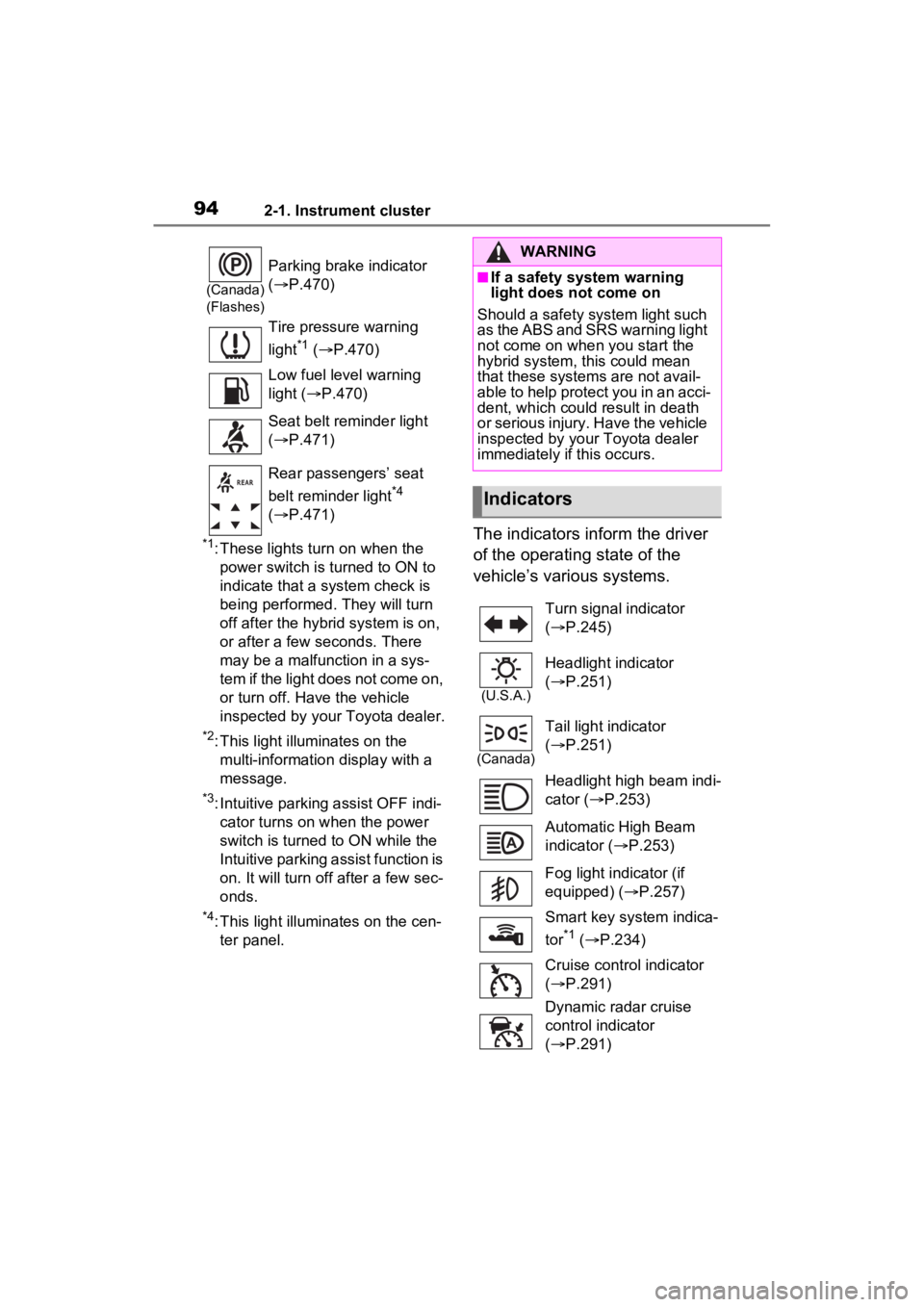
The indicators inform the driver
of the operating state of the
vehicle’s various systems.
(Canada)
(Flashes)
Parking brake indicator
( P.470)
Tire pressure warning
light
*1 ( P.470)
Low fuel level warning
light ( P.470)
Seat belt reminder light
( P.471)
Rear passengers’ seat
belt reminder light
*4
( P.471)
WARNING
■If a safety system warning
light does not come on
Should a safety system light such
as the ABS and SRS warning light
not come on when you start the
hybrid system, this could mean
that these system s are not avail-
able to help protect you in an acci-
dent, which could result in death
or serious injury. Have the vehicle
inspected by your Toyota dealer
immediately if this occurs.
Indicators
Turn signal indicator
( P.245)
(U.S.A.)
Headlight indicator
( P.251)
(Canada)
Tail light indicator
( P.251)
Headlight high beam indi-
cator ( P.253)
Automatic High Beam
indicator ( P.253)
Fog light indicator (if
equipped) ( P.257)
Smart key system indica-
tor
*1 ( P.234)
Cruise control indicator
( P.291)
Dynamic radar cruise
control indicator
( P.291)
Page 173 of 602
1713-3. Adjusting the seats
3
Before driving
■Power easy access system (if
equipped)
The driver’ seat and steering wheel
move in accordance with power
switch mode and the driver’ seat
belt condition. ( P.179)
■Jam protection function (vehi-
cles with driving position mem-
ory)
While the driving position is recalled
or the power easy access system is
operating, if an object is stuck
behind the front sea t, the front seat
will stop and then slightly move for-
ward.
When the jam protection function
operates, the seat stops at a posi-
tion other than the set seat position.
Check the seat position.
WARNING
■When adjusting the seat posi-
tion
●Take care when adjusting the
seat position to ensure that
other passengers are not
injured by the moving seat.
●Do not put your hands under the
seat or near the moving parts to
avoid injury.
Fingers or hands may become
jammed in the seat mechanism.
●Make sure to leave enough
space around the feet so they
do not get stuck.
■Seat adjustment
●To reduce the risk of sliding
under the lap bel t during a colli-
sion, do not recline the seat
more than necessary.
If the seat is too reclined, the lap
belt may slide past the hips and
apply restraint forces directly to
the abdomen, or your neck may
contact the shoulder belt,
increasing the risk of death or
serious injury in the event of an
accident.
Adjustments should not be
made while driving as the seat
may unexpectedly move and
cause the driver to lose control
of the vehicle.
●Manual seat only: After adjust-
ing the seat, make sure that the
seat is locked in position.
Page 175 of 602
1733-3. Adjusting the seats
3
Before driving
lever
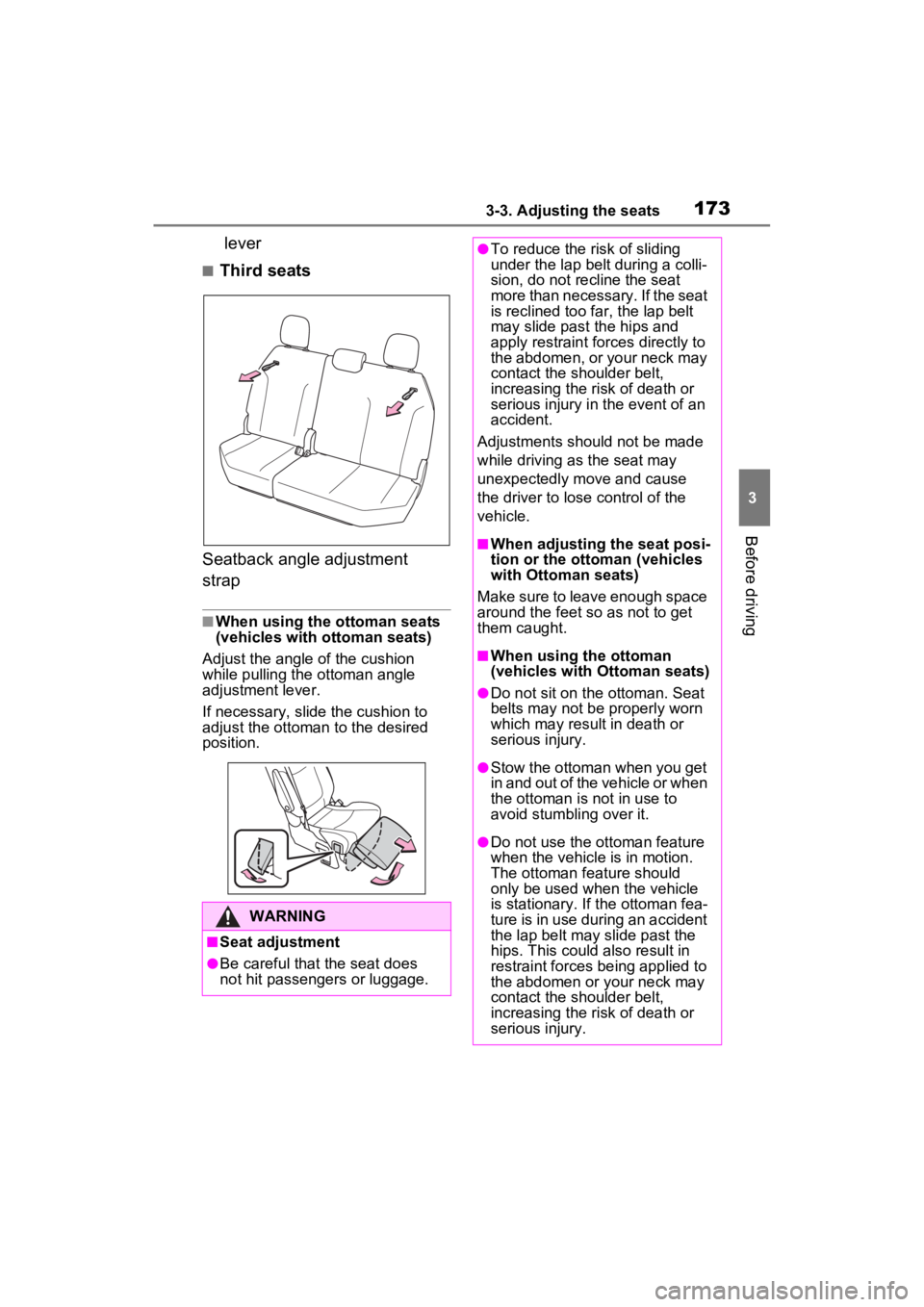
■Third seats
Seatback angle adjustment
strap
■When using the ottoman seats
(vehicles with o ttoman seats)
Adjust the angle of the cushion
while pulling the ottoman angle
adjustment lever.
If necessary, sli de the cushion to
adjust the ottoman to the desired
position.
WARNING
■Seat adjustment
●Be careful that the seat does
not hit passengers or luggage.
●To reduce the risk of sliding
under the lap bel t during a colli-
sion, do not recline the seat
more than necessary. If the seat
is reclined too far, the lap belt
may slide past the hips and
apply restraint forces directly to
the abdomen, or your neck may
contact the shoulder belt,
increasing the risk of death or
serious injury in the event of an
accident.
Adjustments should not be made
while driving as the seat may
unexpectedly move and cause
the driver to lose control of the
vehicle.
■When adjusting the seat posi-
tion or the ottoman (vehicles
with Ottoman seats)
Make sure to leave enough space
around the feet so as not to get
them caught.
■When using the ottoman
(vehicles with Ottoman seats)
●Do not sit on the ottoman. Seat
belts may not be properly worn
which may result in death or
serious injury.
●Stow the ottoman when you get
in and out of the vehicle or when
the ottoman is n ot in use to
avoid stumbling over it.
●Do not use the ottoman feature
when the vehicle is in motion.
The ottoman feature should
only be used when the vehicle
is stationary. If the ottoman fea-
ture is in use during an accident
the lap belt may slide past the
hips. This could also result in
restraint forces being applied to
the abdomen or your neck may
contact the shoulder belt,
increasing the risk of death or
serious injury.
Page 178 of 602
1763-3. Adjusting the seats
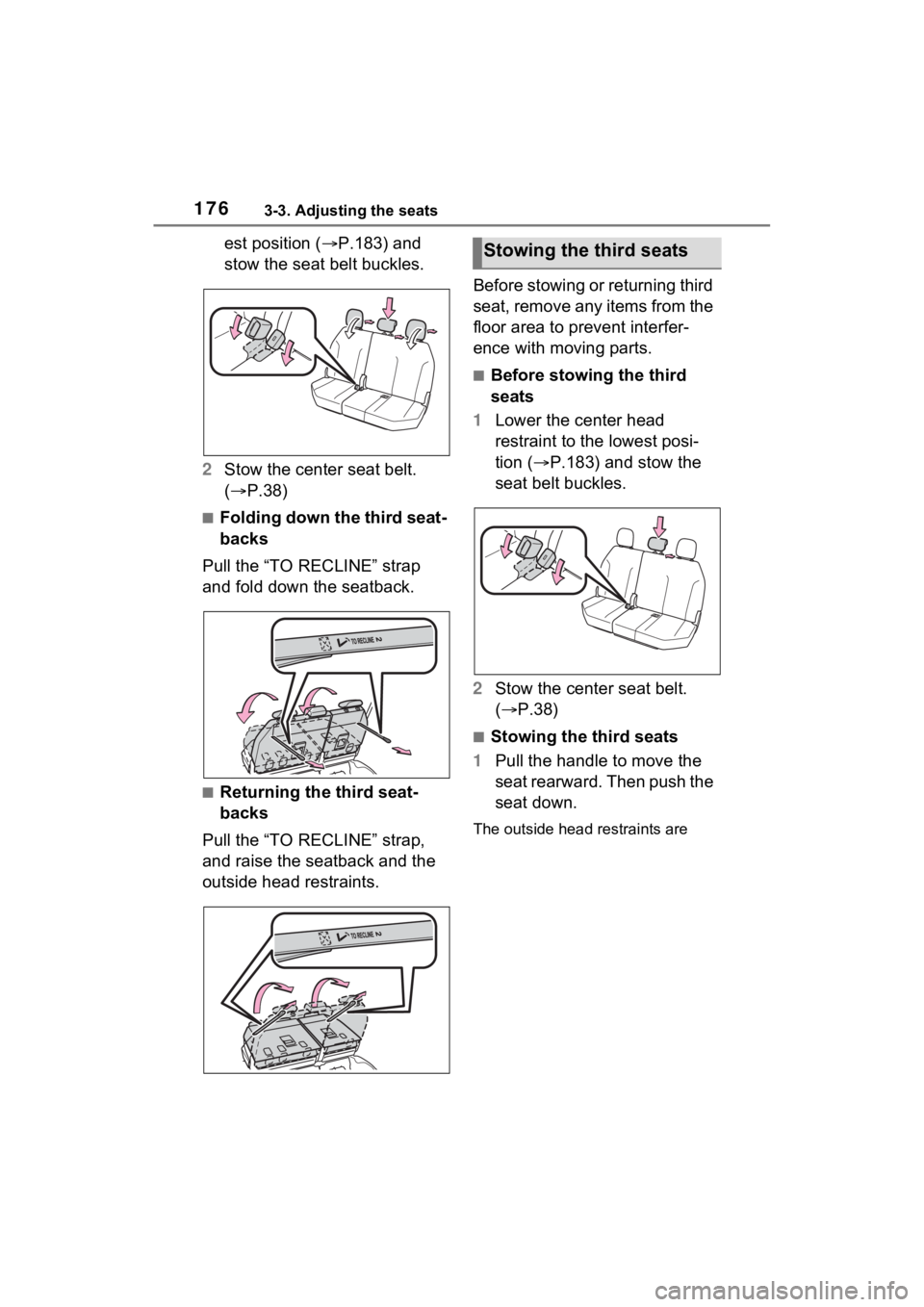
est position (P.183) and
stow the seat belt buckles.
2 Stow the center seat belt.
( P.38)
■Folding down the third seat-
backs
Pull the “TO RECLINE” strap
and fold down the seatback.
■Returning the third seat-
backs
Pull the “TO RECLINE” strap,
and raise the seatback and the
outside head restraints. Before stowing or returning third
seat, remove any items from the
floor area to prevent interfer-
ence with moving parts.
■Before stowing the third
seats
1 Lower the center head
restraint to the lowest posi-
tion ( P.183) and stow the
seat belt buckles.
2 Stow the center seat belt.
( P.38)
■Stowing the third seats
1 Pull the handle to move the
seat rearward. Then push the
seat down.
The outside head r estraints are
Stowing the third seats
Page 180 of 602
1783-3. Adjusting the seats
WARNING
●Do not allow anyone to sit on a
folded seatback or in the lug-
gage compartment while driv-
ing.
●Do not allow child ren to enter
the luggage compartment.
●Be careful not to get any part of
your body pinched by a seat.
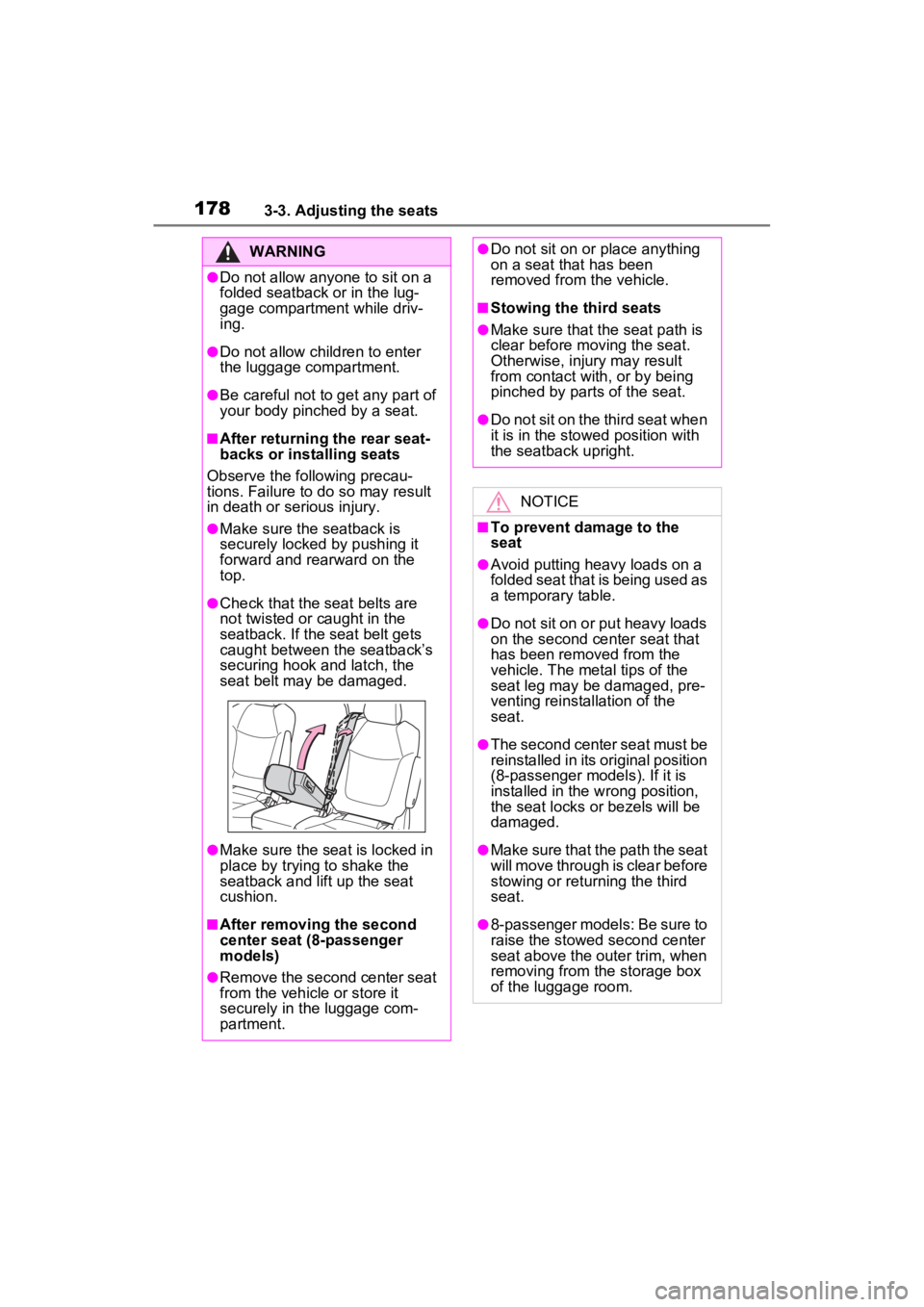
■After returning the rear seat-
backs or installing seats
Observe the following precau-
tions. Failure to do so may result
in death or serious injury.
●Make sure the seatback is
securely locked by pushing it
forward and rearward on the
top.
●Check that the seat belts are
not twisted or caught in the
seatback. If the seat belt gets
caught between the seatback’s
securing hook and latch, the
seat belt may be damaged.
●Make sure the seat is locked in
place by trying to shake the
seatback and lift up the seat
cushion.
■After removi ng the second
center seat (8-passenger
models)
●Remove the second center seat
from the vehicle or store it
securely in the luggage com-
partment.
●Do not sit on or place anything
on a seat that has been
removed from the vehicle.
■Stowing the third seats
●Make sure that the seat path is
clear before moving the seat.
Otherwise, injury may result
from contact with, or by being
pinched by parts of the seat.
●Do not sit on the third seat when
it is in the stowed position with
the seatback upright.
NOTICE
■To prevent damage to the
seat
●Avoid putting heavy loads on a
folded seat that is being used as
a temporary table.
●Do not sit on or put heavy loads
on the second center seat that
has been removed from the
vehicle. The metal tips of the
seat leg may be damaged, pre-
venting reinstallation of the
seat.
●The second center seat must be
reinstalled in its original position
(8-passenger models). If it is
installed in the w rong position,
the seat locks or bezels will be
damaged.
●Make sure that the path the seat
will move through is clear before
stowing or returning the third
seat.
●8-passenger models: Be sure to
raise the stowed second center
seat above the outer trim, when
removing from the storage box
of the luggage room.
Page 181 of 602
1793-3. Adjusting the seats
3
Before driving
*: If equipped
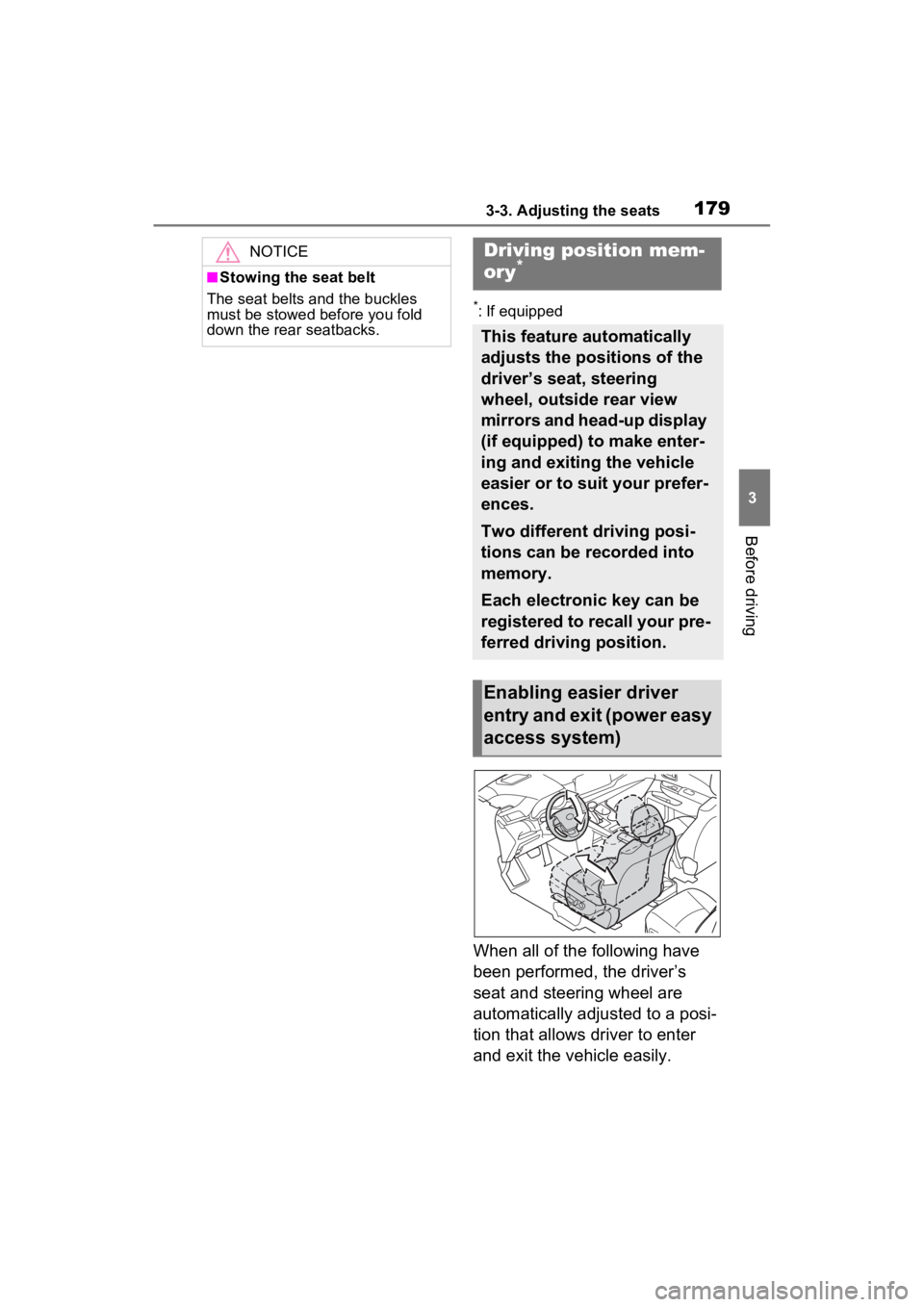
When all of the following have
been performed, the driver’s
seat and steering wheel are
automatically adjusted to a posi-
tion that allows driver to enter
and exit the vehicle easily.
NOTICE
■Stowing the seat belt
The seat belts and the buckles
must be stowed before you fold
down the rear seatbacks.
Driving position mem-
ory*
This feature automatically
adjusts the positions of the
driver’s seat, steering
wheel, outside rear view
mirrors and head-up display
(if equipped) to make enter-
ing and exiting the vehicle
easier or to suit your prefer-
ences.
Two different driving posi-
tions can be recorded into
memory.
Each electronic key can be
registered to recall your pre-
ferred driving position.
Enabling easier driver
entry and exit (power easy
access system)
Page 182 of 602
1803-3. Adjusting the seats
The shift lever has been
shifted to P.
The power switch has been
turned off.
The driver’ seat belt has been
unfastened.
When any of the following has
been performed, the driver’ seat
and steering wheel automati-
cally return to their original posi-
tions.
The power switch has been
turned to ACC or ON.
The driver’ seat belt has been
fastened.
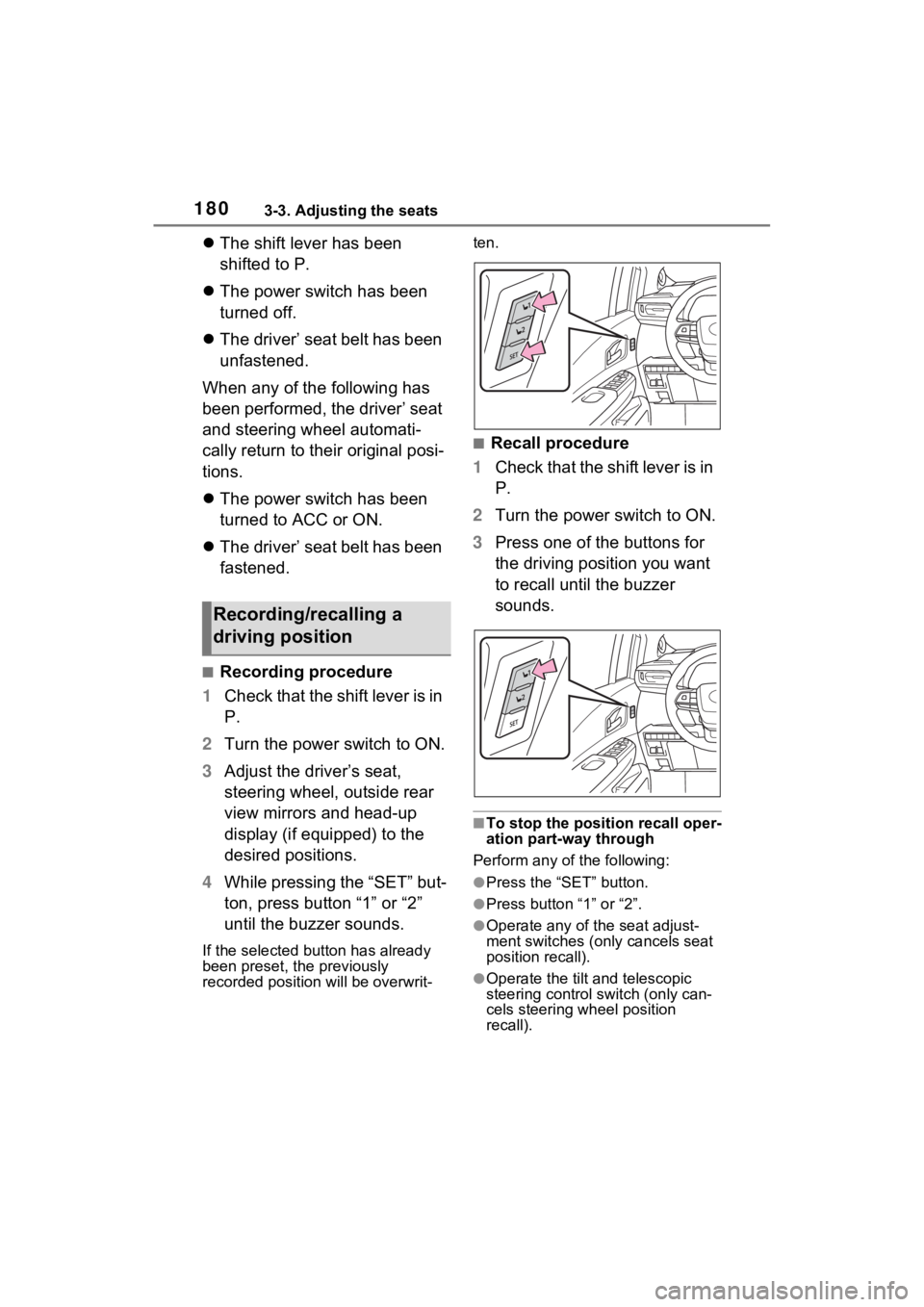
■Recording procedure
1 Check that the shift lever is in
P.
2 Turn the power switch to ON.
3 Adjust the driver’s seat,
steering wheel, outside rear
view mirrors and head-up
display (if equipped) to the
desired positions.
4 While pressing the “SET” but-
ton, press button “1” or “2”
until the buzzer sounds.
If the selected button has already
been preset, the previously
recorded position will be overwrit- ten.
■Recall procedure
1 Check that the shift lever is in
P.
2 Turn the power switch to ON.
3 Press one of the buttons for
the driving position you want
to recall until the buzzer
sounds.
■To stop the position recall oper-
ation part-way through
Perform any of the following:
●Press the “SET” button.
●Press button “1” or “2”.
●Operate any of t he seat adjust-
ment switches (only cancels seat
position recall).
●Operate the tilt and telescopic
steering control switch (only can-
cels steering wheel position
recall).
Recording/recalling a
driving position
Page 184 of 602
1823-3. Adjusting the seats
■Recall procedure
1 Make sure that the doors are
locked before recalling the
driving position. Carry the
electronic key that has been
registered to the driving posi-
tion, and then unlock and
open the driver’s door using
the smart key system or wire-
less remote control.
The driving positi on will move to the
recorded position (not including the
steering wheel and head-up display
[if equipped]). However, the seat
will move to a position slightly
behind the recorded position in
order to make entering the vehicle
easier.
If the driving position is in a position
that has already been recorded, the
seat will not move.
2 Turn the power switch to
ACC or ON, or fasten a seat
belt.
The seat, steering wheel and head-
up display (if equipped) will move to
the recorded position.
■Cancelation procedure
Carry only the key you want to
cancel and then close the
driver’s door.
If 2 or more keys are in the vehi-
cle, the driving position cannot
be canceled properly.
1 Check that the shift lever is in
P.
2 Turn the power switch to ON.
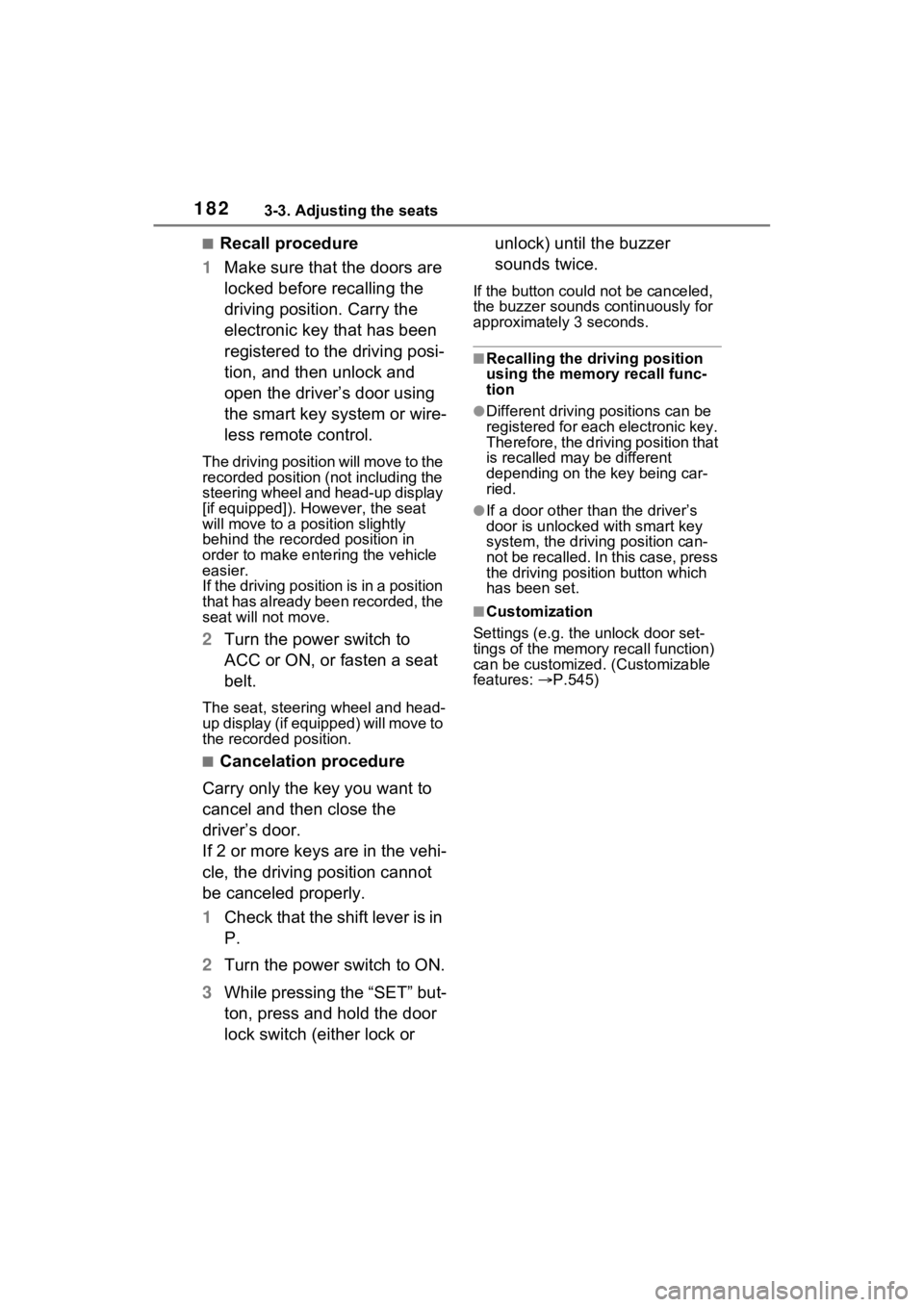
3 While pressing the “SET” but-
ton, press and hold the door
lock switch (either lock or unlock) until the buzzer
sounds twice.
If the button could not be canceled,
the buzzer sounds c
ontinuously for
approximately 3 seconds.
■Recalling the driving position
using the memory recall func-
tion
●Different driving p ositions can be
registered for each electronic key.
Therefore, the driving position that
is recalled may be different
depending on the key being car-
ried.
●If a door other than the driver’s
door is unlocked with smart key
system, the driving position can-
not be recalled. In this case, press
the driving position button which
has been set.
■Customization
Settings (e.g. the unlock door set-
tings of the memory recall function)
can be customized. (Customizable
features: P.545)
Page 188 of 602
1863-4. Adjusting the steering wheel and mirrors
3-4.Adjusting the steering wheel and mirrors
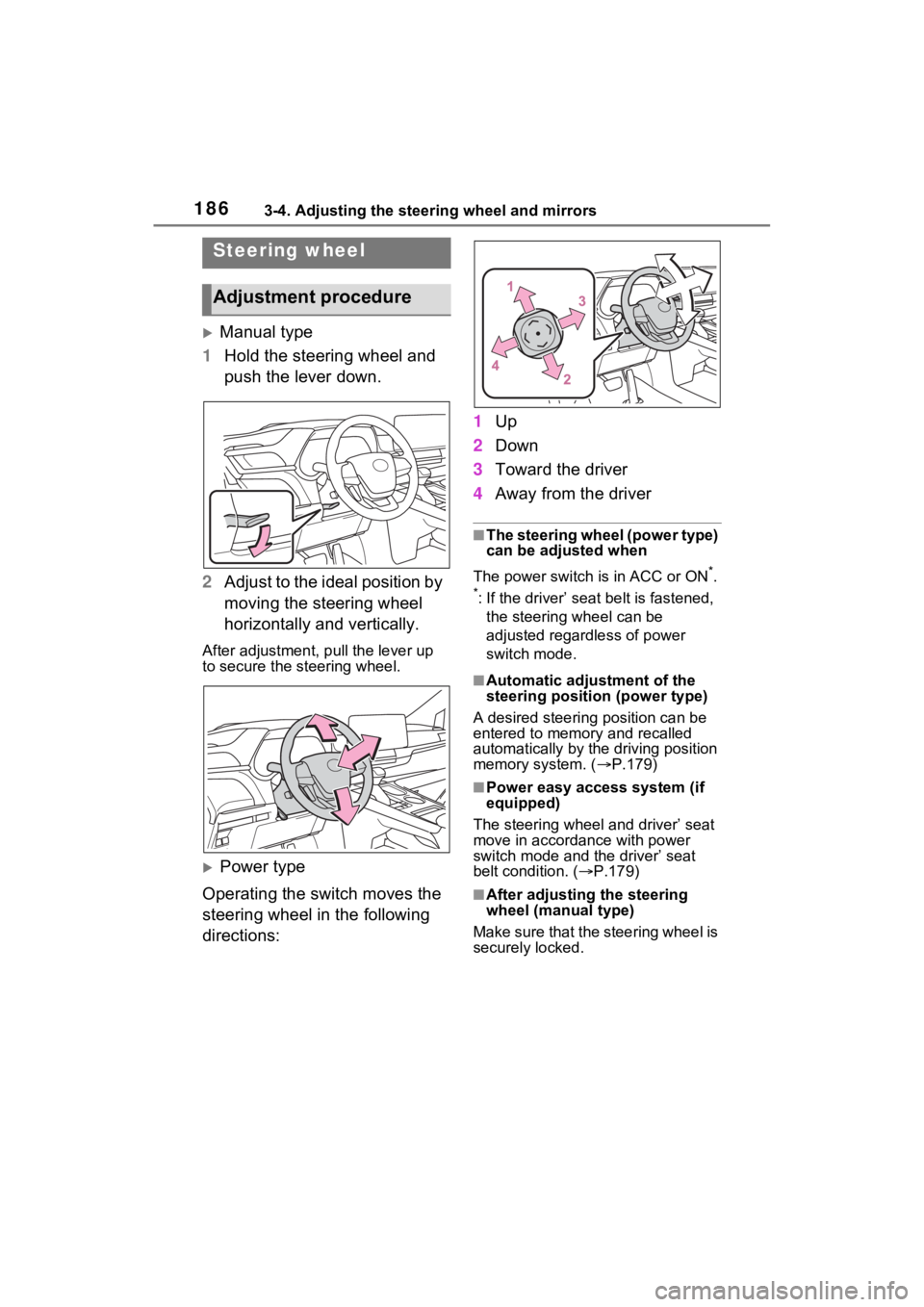
Manual type
1 Hold the steering wheel and
push the lever down.
2 Adjust to the ideal position by
moving the steering wheel
horizontally and vertically.
After adjustment, pull the lever up
to secure the steering wheel.
Power type
Operating the switch moves the
steering wheel in the following
directions: 1
Up
2 Down
3 Toward the driver
4 Away from the driver
■The steering wheel (power type)
can be adjusted when
The power switch is in ACC or ON
*.
*: If the driver’ seat belt is fastened, the steering wheel can be
adjusted regardless of power
switch mode.
■Automatic adjustment of the
steering position (power type)
A desired steering position can be
entered to memory and recalled
automatically by the driving position
memory system. ( P.179)
■Power easy access system (if
equipped)
The steering wheel and driver’ seat
move in accordance with power
switch mode and the driver’ seat
belt condition. ( P.179)
■After adjusting the steering
wheel (manual type)
Make sure that the steering wheel is
securely locked.
Steering wheel
Adjustment procedure
Page 219 of 602
2174-1. Before driving
4
DrivingCargo capacity depends on the
total weight of the occupants.
(Cargo capacity) = (Total load
capacity) - (Total weight of occu-
pants)
Steps for Determining Correct
Load Limit
(1) Locate the statement “The
combined weight of occupants
and cargo should never exceed
XXX kg or XXX lbs.” on your
vehicle’s placard.
(2) Determine the combined
weight of the driver and passen-
gers that will be riding in your
vehicle.
(3) Subtract the combined
weight of the driver and passen-
gers from XXX kg or XXX lbs.
(4) The resulting figure equals
the available amount of cargo
and luggage load capacity.
Cargo and luggage
Take notice of the following
information about storage
precautions, cargo capacity
and load.
WARNING
■Things that must not be car-
ried in the luggage compart-
ment
The following things may cause a
fire if loaded in the luggage com-
partment:
●Receptacles co ntaining gaso-
line
●Aerosol cans
■Storage precautions
Observe the following precau-
tions. Failure to do so may pre-
vent the pedals from being
depressed properly, may block
the driver’s vision, or may result in
items hitting the d river or passen-
gers, possibly causing an acci-
dent.
●Stow cargo and luggage in the
luggage compartment when-
ever possible.
●Do not stack anything in the lug-
gage compartment higher than
the seatbacks.
●Do not place cargo or luggage
in or on the following locations.
• At the feet of the driver
• On the front passenger or rear seats (when stacking items)
• On the instrument panel
• On the dashboard
• On the auxiliary box or tray that has no lid
●Secure all items in the occupant
compartment.
●When you fold down the rear
seats, long items should not be
placed directly behind the front
seats.
●Never allow anyon e to ride in
the luggage compartment. It is
not designed for passengers.
They should ride in their seats
with their seat belts properly
fastened. Otherw ise, they are
much more likely to suffer death
or serious bodily injury, in the
event of sudden braking, sud-
den swerving or an accident.
Capacity and distribution