interior lights TOYOTA SUPRA 2021 (in English) User Guide
[x] Cancel search | Manufacturer: TOYOTA, Model Year: 2021, Model line: SUPRA, Model: TOYOTA SUPRA 2021Pages: 360, PDF Size: 10.41 MB
Page 156 of 360
1563-1. CONTROLS
Supra Owner's Manual_U (from Jul. '20 Prod.)
traffic or half-obscured
oncoming traffic on highways.
In poorly-lit towns and cities
or in the presence of highly
reflective signs.
When the windshield in front
of the interior mirror is fogged
over, dirty or covered with
stickers, etc.
The parking lights or low beams
must be switched on to adjust
the brightness.
Depending on the equipment
version, interior lights, footwell
lights and door entry lighting are
automatically controlled. To switch off permanently: press
the button and hold for approx. 3
seconds.
Instrument lighting
Functional requirement
Settings
Adjust the brightness
with the thumbwheel.
Interior lights
General information
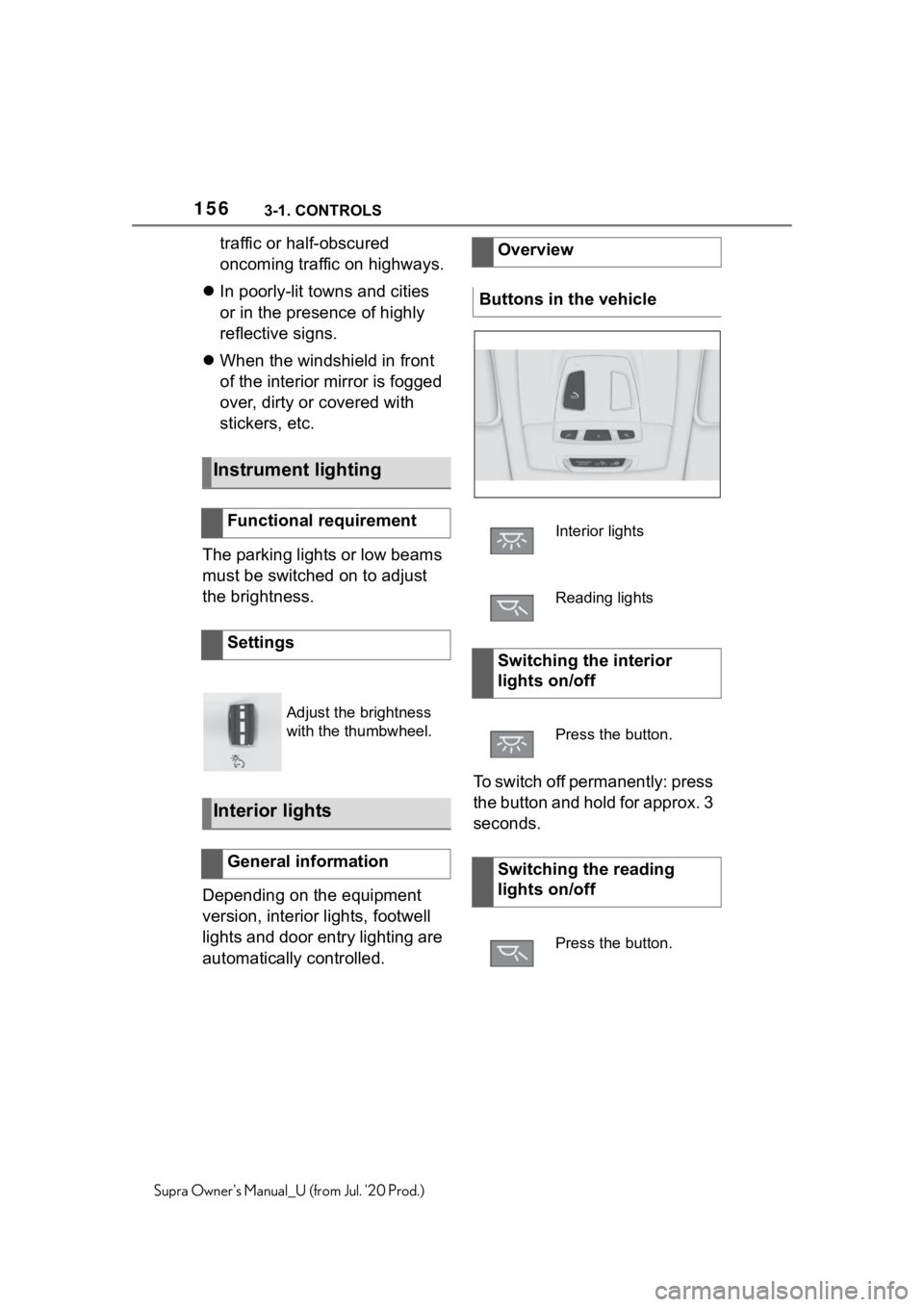
Overview
Buttons in the vehicle
Interior lights
Reading lights
Switching the interior
lights on/off
Press the button.
Switching the reading
lights on/off
Press the button.
Page 187 of 360
1873-1. CONTROLS
3
CONTROLS
Supra Owner's Manual_U (from Jul. '20 Prod.)
light, for instance from the sun
low in the sky.
If the field of view of the cam-
era or the windshield is dirty
or covered in the area of the
interior mirror.
If the camera has overheated
and been temporarily
switched off due to exces-
sively high temperatures.
Up to 10 seconds after the
start of the engine via the
Start/Stop button.
During calibration of the cam-
era immediately after vehicle
delivery.
A vehicle message may be dis-
played when the system is not
fully functional.
*: if equipped
Blind spot monitor detects vehi-
cles in the blind spot or vehicles
approaching from behind in the
adjacent lane. A warning is
issued in various gradations in
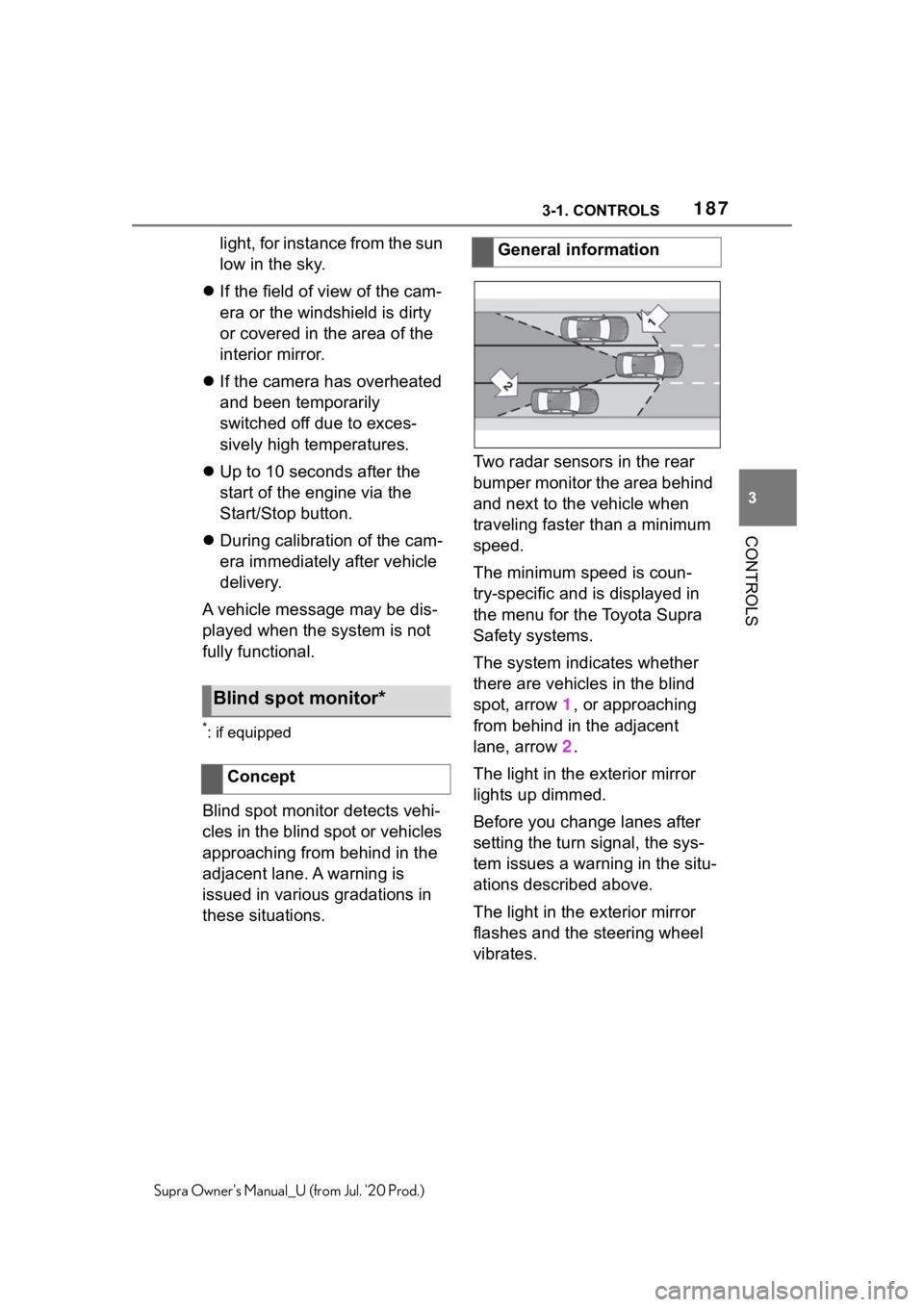
these situations. Two radar sensors in the rear
bumper monitor the area behind
and next to the vehicle when
traveling faster than a minimum
speed.
The minimum speed is coun-
try-specific and is displayed in
the menu for the Toyota Supra
Safety systems.
The system indicates whether
there are vehicles in the blind
spot, arrow 1, or approaching
from behind in the adjacent
lane, arrow
2.
The light in the exterior mirror
lights up dimmed.
Before you change lanes after
setting the turn signal, the sys-
tem issues a warning in the situ-
ations described above.
The light in the exterior mirror
flashes and the steering wheel
vibrates.
Blind spot monitor*
Concept
General information
Page 236 of 360
2363-1. CONTROLS
Supra Owner's Manual_U (from Jul. '20 Prod.)
Additional questions are
answered by:
Your Toyota dealer.
www.homelink.com on the
Internet.
HomeLink is a registered trade-
mark of Gentex Corporation.
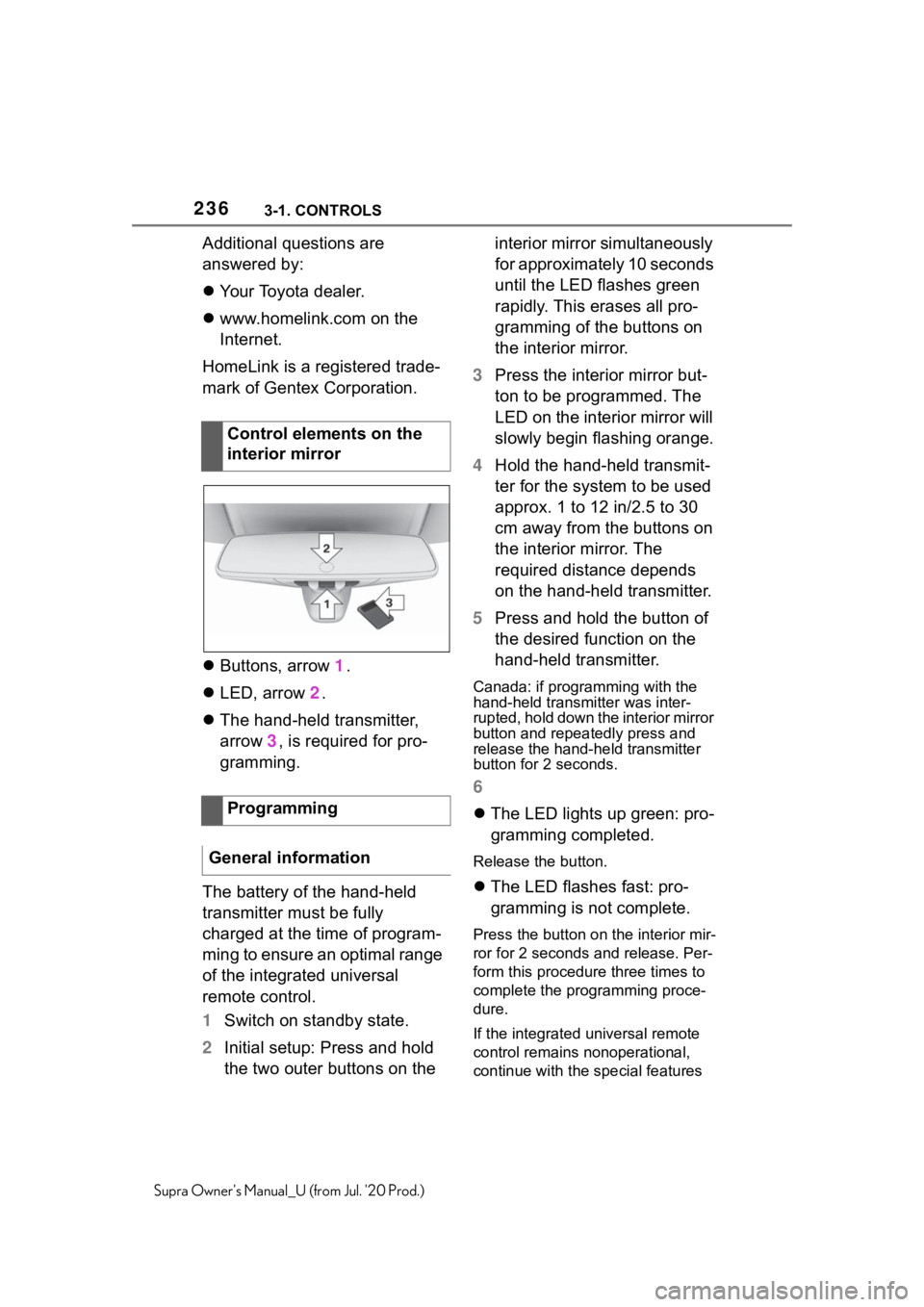
Buttons, arrow 1.
LED, arrow 2.
The hand-held transmitter,
arrow 3, is required for pro-
gramming.
The battery of the hand-held
transmitter must be fully
charged at the time of program-
ming to ensure an optimal range
of the integrated universal
remote control.
1 Switch on standby state.
2 Initial setup: Press and hold
the two outer buttons on the interior mirror simultaneously
for approximately 10 seconds
until the LED flashes green
rapidly. This erases all pro-
gramming of the buttons on
the interior mirror.
3 Press the interior mirror but-
ton to be programmed. The
LED on the interior mirror will
slowly begin flashing orange.
4 Hold the hand-held transmit-
ter for the system to be used
approx. 1 to 12 in/2.5 to 30
cm away from the buttons on
the interior mirror. The
required distance depends
on the hand-held transmitter.
5 Press and hold the button of
the desired function on the
hand-held transmitter.
Canada: if programming with the
hand-held transmitter was inter-
rupted, hold down the interior mirror
button and repeat edly press and
release the hand-held transmitter
button for 2 seconds.
6
The LED lights up green: pro-
gramming completed.
Release the button.
The LED flashes fast: pro-
gramming is not complete.
Press the button on the interior mir-
ror for 2 seconds and release. Per-
form this procedure three times to
complete the programming proce-
dure.
If the integrated universal remote
control remains nonoperational,
continue with the special features
Control elements on the
interior mirror
Programming
General information
Page 238 of 360
2383-1. CONTROLS
Supra Owner's Manual_U (from Jul. '20 Prod.)hand-held transmitter was inter-
rupted, hold down the interior mirror
button and repeatedly press and
release the hand-held transmitter
button for 2 seconds.
6
The LED can light up in dif-
ferent ways.
The LED lights up green: the
programming procedure is
completed.
Release the button.
The LED flashes fast: the
hand-held transmitter was
detected but programming is
not complete.
Press the button on the interior mir-
ror for 2 seconds and release. Per-
form this procedure three times to
complete the programming proce-
dure.
If the universal remote control
remains nonoperational, continue
with the special features for change
code wireless systems.
LED does not flash green
after 60 seconds: program-
ming not completed.
Repeat steps 3 to 6.
If the programming procedure is
not completed, the previous pro-
gramming will remain
unchanged. The system, such as the garage
door, can be operated using the
button on the interior mirror
while the drive-ready or standby
state is switched on. To do this,
hold down the button within
receiving range of the system
until the function is activated.
The interior mirror LED stays lit
while the wireless signal is being
transmitted.
All stored functions will be
deleted. The functions cannot
be deleted individually.
Press and hold the two outer
buttons on the interior mirror
simultaneously for approxi-
mately 10 seconds until the LED
on the interior mirror flashes
green rapidly.Operation
WA R N I N G
The operation of remote-con-
trolled systems wit
h the integrated
universal remote control, such as
the garage door, may result in
injury, for example, body parts
becoming jammed in a garage
door. There is a ri sk of injury or
risk of damage to property. Make
sure that the area of movement of
the respective system is clear
during programming and opera-
tion. Also follow the safety infor-
mation of the hand-held
transmitter.
Deleting stored functions
Page 311 of 360
3115-1. MOBILITY
5
MOBILITY
Supra Owner's Manual_U (from Jul. '20 Prod.)
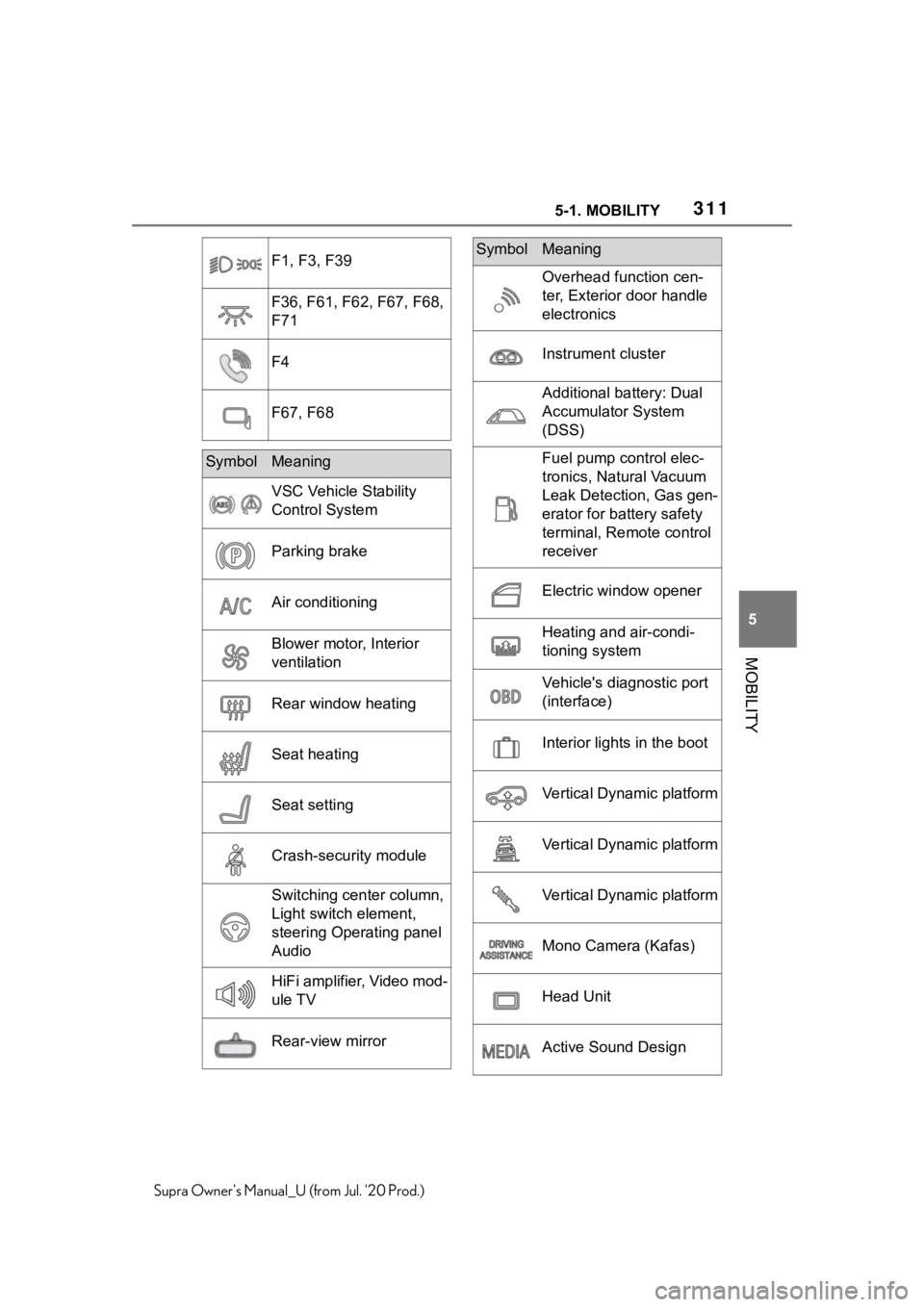
F1, F3, F39
F36, F61, F62, F67, F68,
F71
F4
F67, F68
SymbolMeaning
VSC Vehicle Stability
Control System
Parking brake
Air conditioning
Blower motor, Interior
ventilation
Rear window heating
Seat heating
Seat setting
Crash-security module
Switching center column,
Light switch element,
steering Operating panel
Audio
HiFi amplifier, Video mod-
ule TV
Rear-view mirror
Overhead function cen-
ter, Exterior door handle
electronics
Instrument cluster
Additional battery: Dual
Accumulator System
(DSS)
Fuel pump control elec-
tronics, Natural Vacuum
Leak Detection, Gas gen-
erator for battery safety
terminal, Remote control
receiver
Electric window opener
Heating and air-condi-
tioning system
Vehicle's diagnostic port
(interface)
Interior lights in the boot
Vertical Dynamic platform
Vertical Dynamic platform
Vertical Dynamic platform
Mono Camera (Kafas)
Head Unit
Active Sound Design
SymbolMeaning
Page 312 of 360
3125-1. MOBILITY
Supra Owner's Manual_U (from Jul. '20 Prod.)
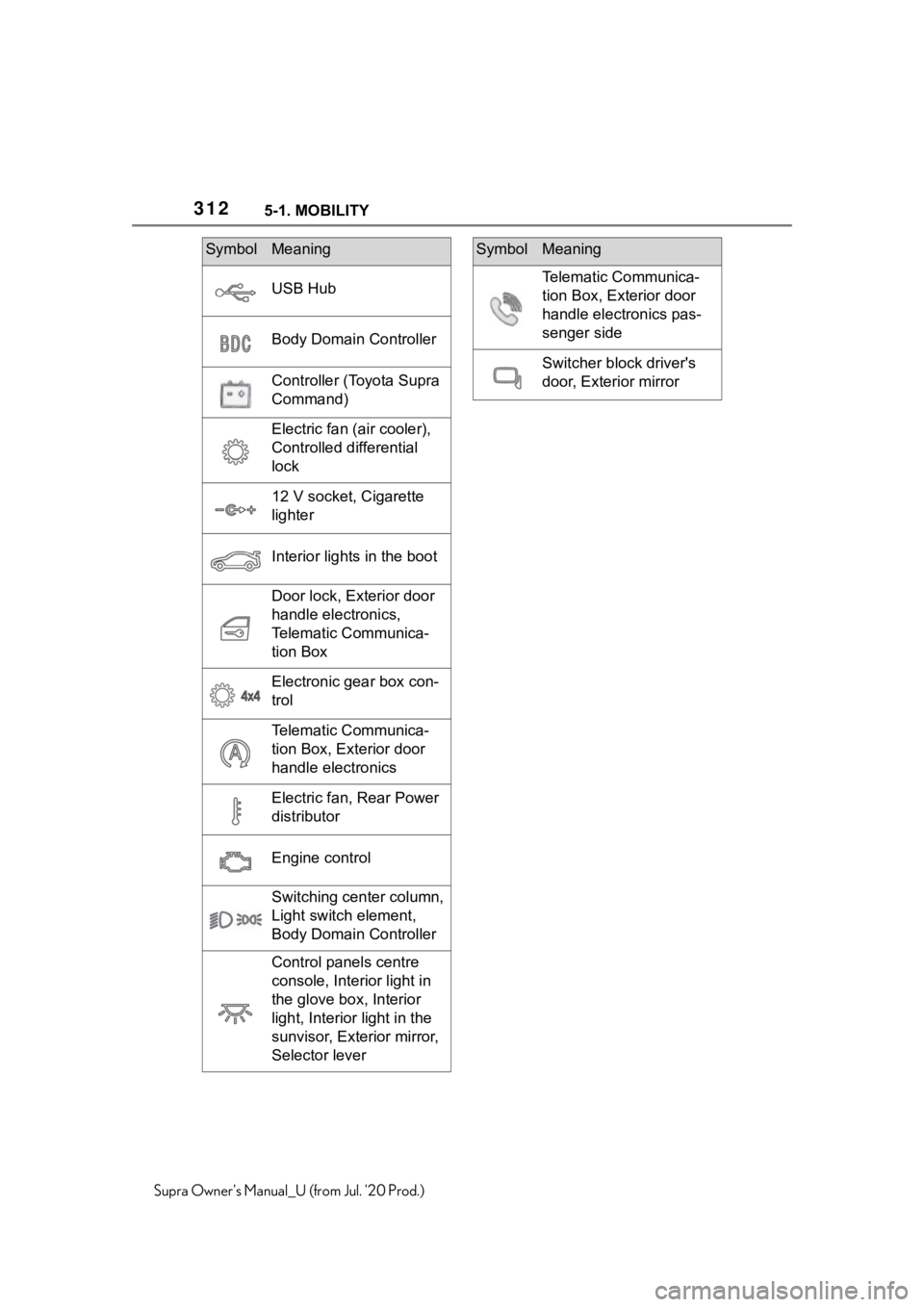
USB Hub
Body Domain Controller
Controller (Toyota Supra
Command)
Electric fan (air cooler),
Controlled differential
lock
12 V socket, Cigarette
lighter
Interior lights in the boot
Door lock, Exterior door
handle electronics,
Telematic Communica-
tion Box
Electronic gear box con-
trol
Telematic Communica-
tion Box, Exterior door
handle electronics
Electric fan, Rear Power
distributor
Engine control
Switching center column,
Light switch element,
Body Domain Controller
Control panels centre
console, Interior light in
the glove box, Interior
light, Interior light in the
sunvisor, Exterior mirror,
Selector lever
SymbolMeaning
Telematic Communica-
tion Box, Exterior door
handle electronics pas-
senger side
Switcher block driver's
door, Exterior mirror
SymbolMeaning
Page 349 of 360
349Alphabetical Index
Supra Owner's Manual_U (from Jul. '20 Prod.)Hand-held transmitter, alternat-
ing code ................................ 237
Hazard warning flashers ........ 315
Head restraints, front ............. 101
Headlight control, automatic . 151
Headlight courtesy delay feature ............................................... 153
Headlight courtesy delay feature, switching on ........................... 78
Headlight flasher .................... 119
Headlight glass ....................... 305
Headlights, care ..................... 323
Headlights, see Lights and bulbs
............................................... 304
Head-up Display ..................... 148
Head-up Display, care ............ 328
Head-up Display, see Memory function ................................. 104
Head-up Display, standard view ............................................... 148
Heavy cargo, stowing cargo.. 248
Height, vehicle ........................ 330
High beams ............................. 119
High beams/low beams, see Automatic high-beam .......... 154
Hill start assista nt, see Hill-start
assist control ........................ 194
Hills .......................................... 256
Hill-start assist control .......... 194
Hill-start assist control, see VSC ............................................... 194
Holder for beverages, see Cup holders .................................. 246
HomeLink, see Integrated Uni- versal Remote Control ......... 235
Hood ........................................ 291
Horn ........................................... 36
Hot exhaust gas system ........ 253
Humidity in the headlight, see Headlight glass..................... 305
Hydroplaning .......................... 255
I
Ice warning, see External tem- perature .................................138
Icy roads, see External tempera- ture .........................................138
Identification marks, tires ......268
Identification number, see Vehi- cle identification number .......12
Idle state, standby state, and drive-ready state .....................41
Indicator and warning lights, see Vehicle messages .................131
Individual air dist ribution.......231
Inflation pressure monitor, see Tire Pressure Monitor TPM ..280
Inflation pressure, tires ..........264
Information ..................................4
Initialize, Tire Pressure Monitor TPM ........................................283
Instrument cluster ..................130
Instrument lighting .................156
Integrated key ...........................80
Integrated Universal Remote Control ...................................235
Intelligent emergency call......316
Intended use ...............................5
Interior equipment ..................235
Interior lights...........................156
Interior lights during unlocking .................................................75
Interior lights wi th the vehicle
locked ......................................77
Interior mirror, automatic dim- ming feature ..........................103
Interior motion sensor .............90
Intersection warning, see Front collision mitigation ...............172
Interval display , see Service
requirements .........................139