transmission TOYOTA SUPRA 2021 Owners Manual (in English)
[x] Cancel search | Manufacturer: TOYOTA, Model Year: 2021, Model line: SUPRA, Model: TOYOTA SUPRA 2021Pages: 360, PDF Size: 10.41 MB
Page 26 of 360
262-1. QUICK REFERENCE
Supra Owner's Manual_U (from Jul. '20 Prod.)
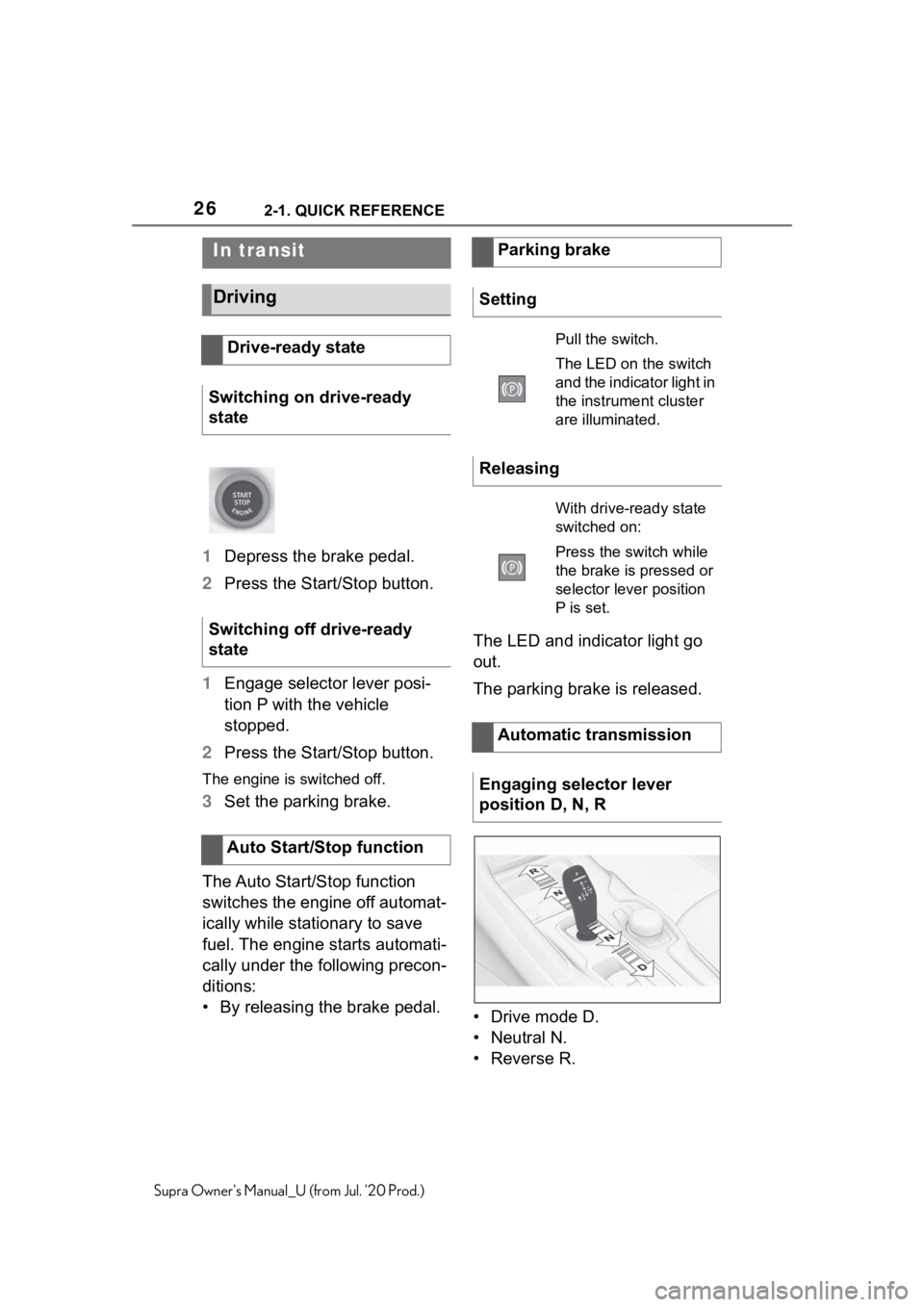
1Depress the brake pedal.
2 Press the Start/Stop button.
1 Engage selector lever posi-
tion P with the vehicle
stopped.
2 Press the Start/Stop button.
The engine is switched off.
3Set the parking brake.
The Auto Start/Stop function
switches the engine off automat-
ically while stationary to save
fuel. The engine starts automati-
cally under the following precon-
ditions:
• By releasing the brake pedal. The LED and indicator light go
out.
The parking brake is released.
• Drive mode D.
• Neutral N.
•Reverse R.
In transit
Driving
Drive-ready state
Switching on drive-ready
state
Switching off drive-ready
state
Auto Start/Stop function
Parking brake
Setting
Pull the switch.
The LED on the switch
and the indicator light in
the instrument cluster
are illuminated.
Releasing
With drive-ready state
switched on:
Press the switch while
the brake is pressed or
selector lever position
P is set.
Automatic transmission
Engaging selector lever
position D, N, R
Page 27 of 360
272-1. QUICK REFERENCE
2
QUICK REFERENCE
Supra Owner's Manual_U (from Jul. '20 Prod.)
With the driver's safety belt fas-
tened, briefly push the selector
lever in the desired direction,
past a resistance point, if
needed. The selector lever
returns to the center position in
each case.
To prevent the vehicle from
creeping after you select a drive
mode or reverse, maintain pres-
sure on the brake pedal until
you are ready to start.
A selector lever lock prevents
the inadvertent shifting to selec-
tor lever position R or the inad-
vertent shifting from selector
lever position P.
Engage selector lever position R
only when the vehicle is station-
ary.
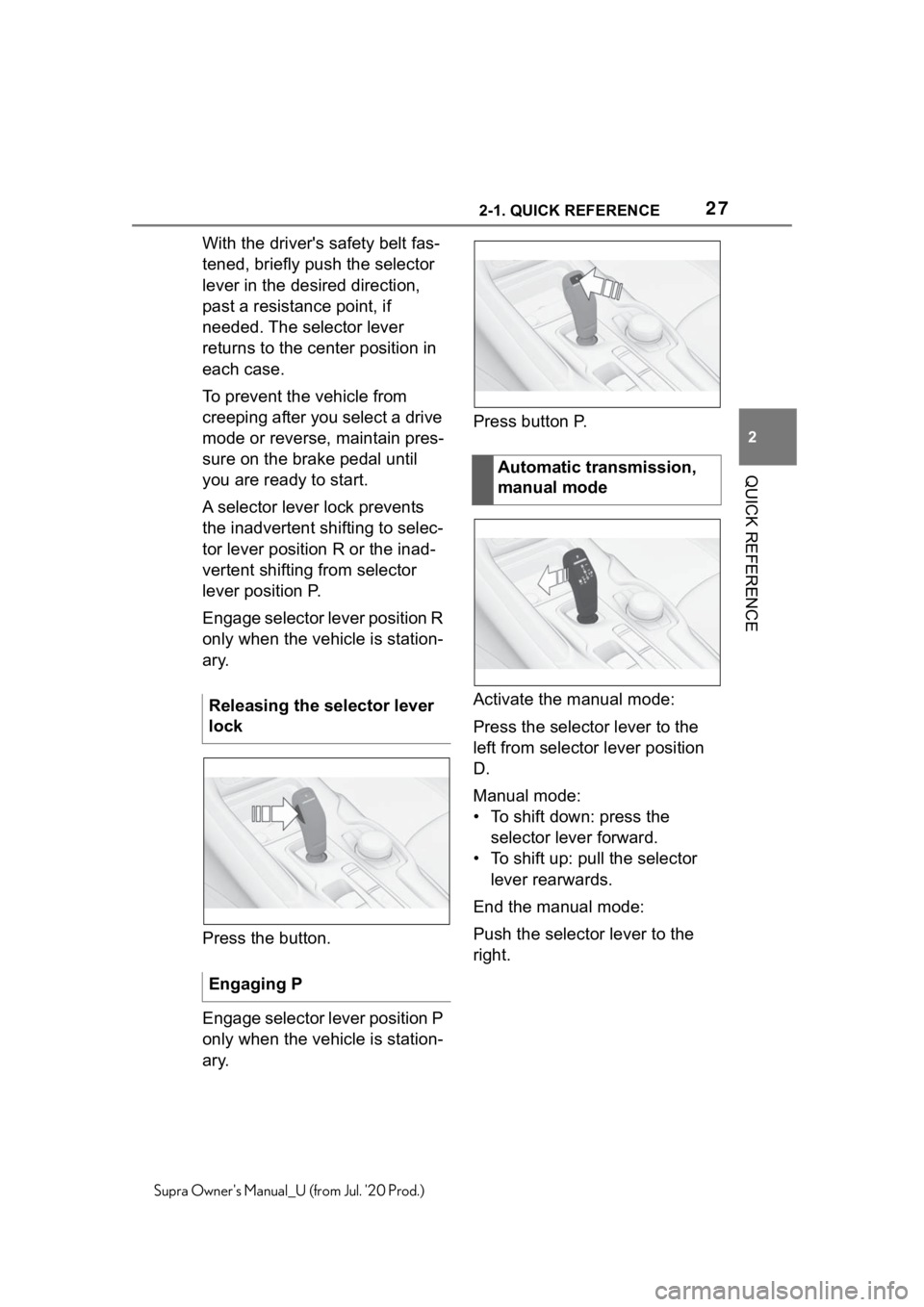
Press the button.
Engage selector lever position P
only when the vehicle is station-
ary.Press button P.
Activate the manual mode:
Press the selector lever to the
left from selector lever position
D.
Manual mode:
• To shift down: press the
selector lever forward.
• To shift up: pull the selector lever rearwards.
End the manual mode:
Push the selector lever to the
right.
Releasing the selector lever
lock
Engaging P
Automatic transmission,
manual mode
Page 39 of 360
393-1. CONTROLS
3
CONTROLS
Supra Owner's Manual_U (from Jul. '20 Prod.)
9 Parking brake P.116
10 Automatic transmission
selector lever P.123 11
Switch drive-ready
state on/off P.112
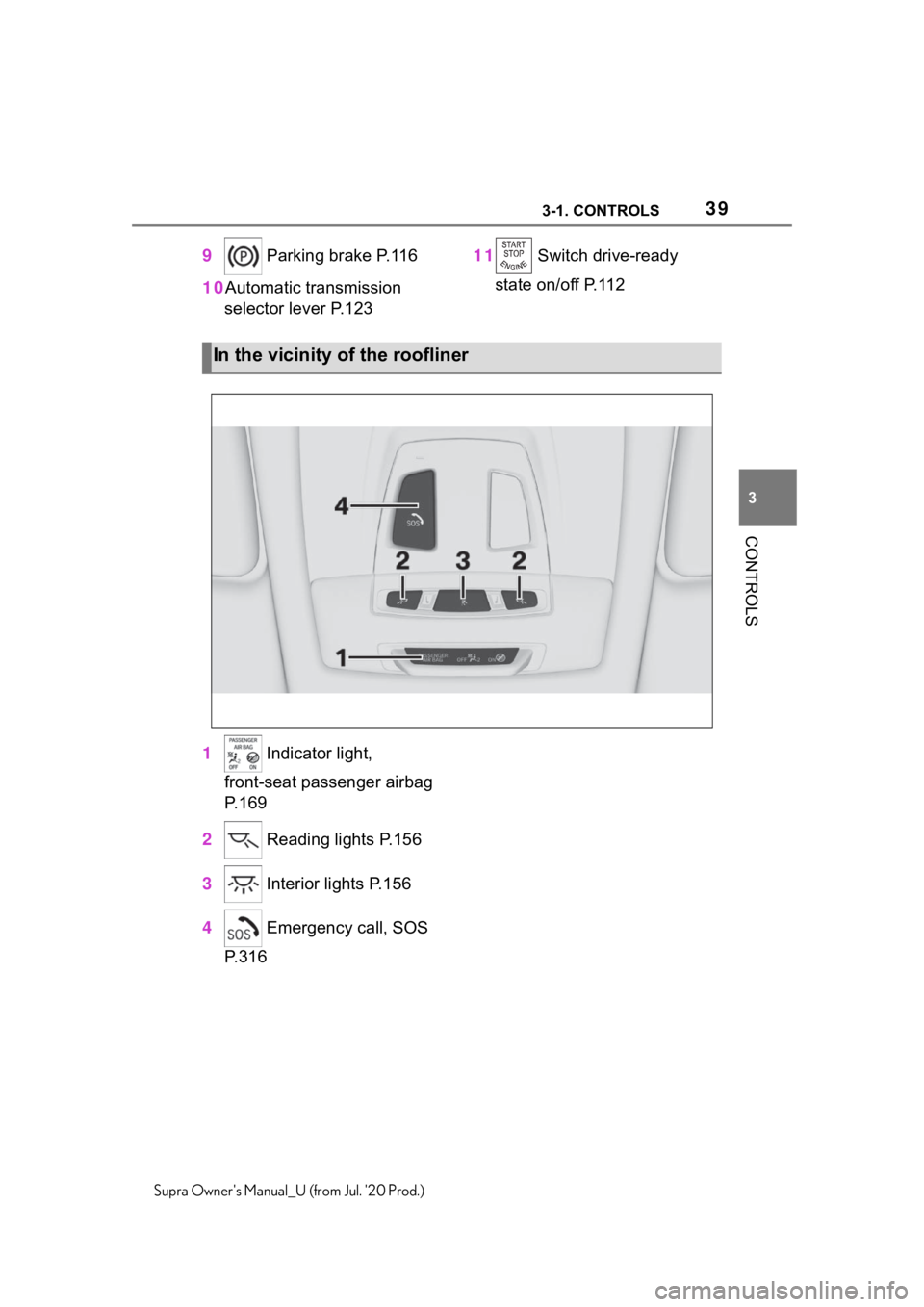
1 Indicator light,
front-seat passenger airbag
P.169
2 Reading lights P.156
3 Interior lights P.156
4 Emergency call, SOS
P.316
In the vicinity of the roofliner
Page 69 of 360
693-1. CONTROLS
3
CONTROLS
Supra Owner's Manual_U (from Jul. '20 Prod.)Do not subject the
mobile phone to
extreme ambient temperatures.
Why can phone functions not be
used via Toyota Supra Com-
mand?
• The mobile phone may not be
properly configured, for
instance as Bluetooth audio
device.
Connect the mobile phone with the
telephone or additional phone func-
tion.
Why are no or not all phone
book entries displayed or why
are they incomplete?
• Transmission of the phone book entries is not yet com-
plete.
• It is possible that only the phone book entries of the
mobile phone or the SIM card
are transmitted.
• It may not be possible to dis- play phone book entries with
special characters.
• It may not be possible to transmit contacts from social
networks.
• The number of phone book entries to be stored is too
high.
• Data volume of the contact too large, for instance due to
stored information such as
notes.
Reduce the data volume of the con-
tact.
• A mobile phone can only be connected as audio source or
as telephone.
Configure the mobile phone and
connect it with the telephone or
additional phone function.
How can the phone connection
quality be improved?
• Adjust the strength of the Bluetooth signal on the mobile
phone, depending on the
mobile phone.
• Insert mobile phone into the wireless charging tray.
• Adjust the volume of the microphone and loudspeak-
ers separately in the sound
settings.
If all points in this list have been
checked and the required func-
tion is still not available, contact
the Toyota dealer.
Mobile devices with a USB port
are connected to the USB port.
• Mobile phones.
• Audio devices such as MP3 players.
• USB storage devices.
Common file systems are sup-
ported. FAT32 and exFAT are the
recommended formats.
A connected USB storage
device will be supplied with
charge current via the USB port
if the device supports this. Fol-
low the maximum charge cur-
rent of the USB port.
USB connection
General information
Page 79 of 360
793-1. CONTROLS
3
CONTROLS
Supra Owner's Manual_U (from Jul. '20 Prod.)
4Insert a type CR 2032 battery
with the positive side facing
up.
5 Press the cover closed.
6 Push the integrated key into
the vehicle key until the inte-
grated key engages.
Additional remote controls are
available from your Toyota
dealer.
A lost remote control can be
blocked and replaced by your
Toyota dealer.
If the lost remote control has an
assigned driver profile, refer to
page 62, the connection to this
remote control must be deleted.
A new remote control can then
be assigned to the driver profile.
A vehicle message, refer to
page 131, is displayed.
Remote control detection by the
vehicle may malfunction under the following circumstances:
• The battery of the vehicle key
is discharged. For replacing
the battery, refer to page 78.
• Interference of the radio con- nection from transmission
towers or other equipment
with high transmitting power.
• Shielding of the remote con- trol due to metal objects.
Do not transport the remote control
together with metal objects.
• Interference of the radio con-nection from mobile phones
or other electronic devices in
direct proximity to the remote
control.
Do not transport the remote control
together with electronic devices.
• Interference of radio transmis-sion by a charging process of
mobile devices, for instance
charging of a mobile phone.
• The remote control is in direct proximity of the wireless
charging tray.
Place the remote control down at a
different location.
In the case of interference, the
vehicle can be unlocked and
locked from the outside with the
integrated key, refer to page 80.
Have old batteries dis-
posed of by your Toyota
dealer or take them to a
collection point.
Additional remote controls
Loss of the remote con-
trols
Malfunction
General information
Page 123 of 360
1233-1. CONTROLS
3
CONTROLS
Supra Owner's Manual_U (from Jul. '20 Prod.)
1Fold the wipers back down
onto the windshield.
2 Switch on standby state and
press and hold the wiper
lever down again.
3 Wipers return to their resting
position and are ready again
for operation.
The Automatic transmission
combines the functions of man-
ual shifting, if needed. Selector lever position for nor-
mal vehicle operation. All gears
for forward travel are activated
automatically.
Engage selector lever position R
only when the vehicle is station-
ary.
The vehicle may be pushed or
roll without power, for instance
in vehicle washes, refer to page
125, in selector lever position N.
Selector lever position, for
instance for parking the vehicle.
The transmission blocks the
drive wheels in selector lever
position P.
Engage selector lever position P
only when the vehicle is station-
ary.
■P is engaged automatically
Selector lever position P is
engaged automatically in situa-
tions such as the following:
After the drive-ready state is
switched off and selector
lever position R, D or M is
Automatic transmission
Concept
Safety information
WA R N I N G
An unsecured vehicle can begin
to move and possibly roll away.
There is a risk of an accident.
Before exiting, secure the vehicle
against rolling.
In order to ensure that the vehicle
is secured again st rolling away,
follow the following:
●Set the parking brake.
●On uphill grades or on a down-
hill slope, turn t he front wheels
in the direction of the curb.
●On uphill grades or on a down-
hill slope, also secure the vehi-
cle, for instance with a wheel
chock.
Selector lever positions
Drive mode D
Reverse R
Neutral N
Parking position P
Page 126 of 360
1263-1. CONTROLS
Supra Owner's Manual_U (from Jul. '20 Prod.)
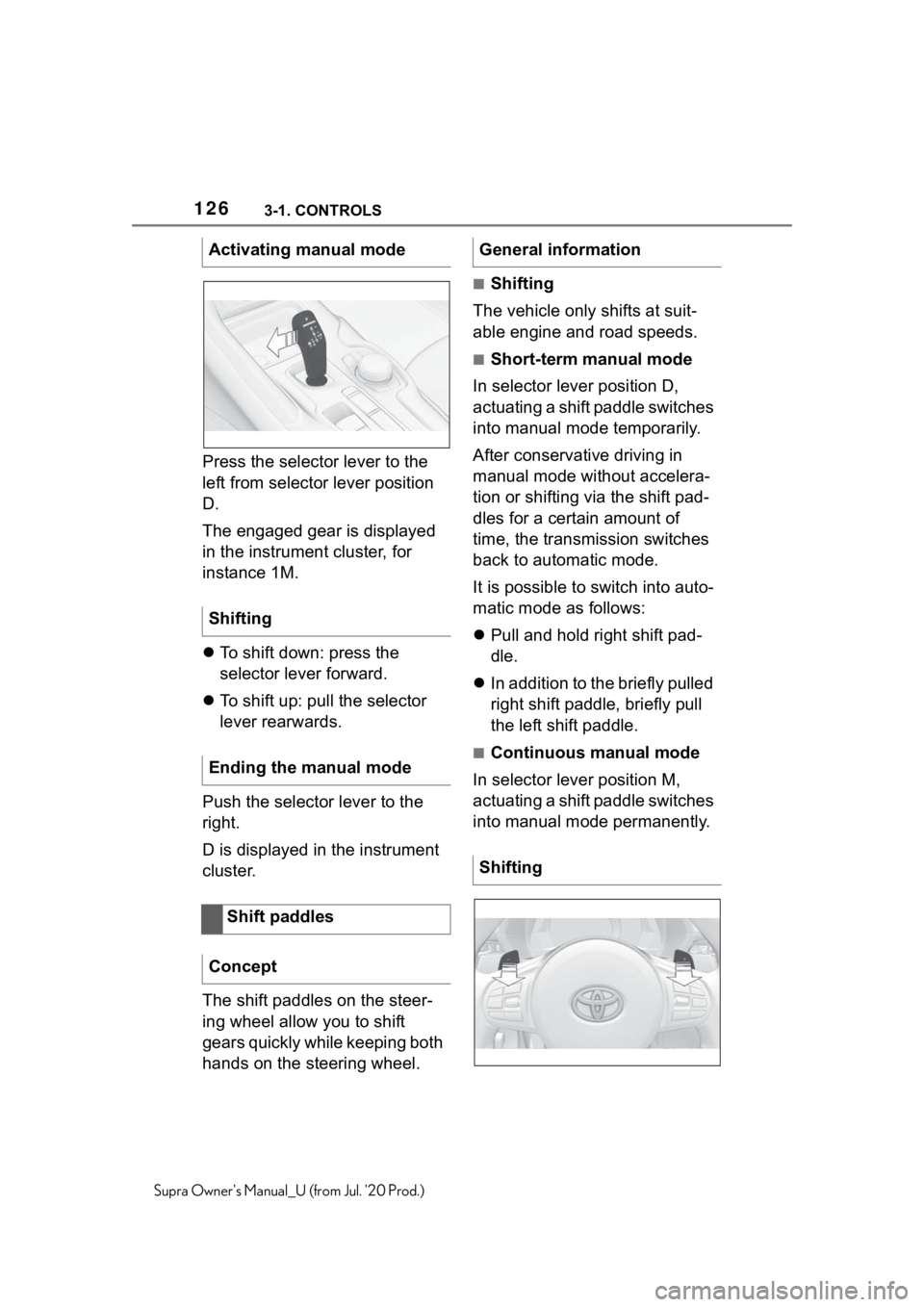
Press the selector lever to the
left from selector lever position
D.
The engaged gear is displayed
in the instrument cluster, for
instance 1M.
To shift down: press the
selector lever forward.
To shift up: pull the selector
lever rearwards.
Push the selector lever to the
right.
D is displayed in the instrument
cluster.
The shift paddles on the steer-
ing wheel allow you to shift
gears quickly while keeping both
hands on the steering wheel.
■Shifting
The vehicle only shifts at suit-
able engine and road speeds.
■Short-term manual mode
In selector lever position D,
actuating a shift paddle switches
into manual mode temporarily.
After conservative driving in
manual mode without accelera-
tion or shifting via the shift pad-
dles for a certain amount of
time, the transmission switches
back to automatic mode.
It is possible to switch into auto-
matic mode as follows:
Pull and hold right shift pad-
dle.
In addition to the briefly pulled
right shift paddle, briefly pull
the left shift paddle.
■Continuous manual mode
In selector lever position M,
actuating a shift paddle switches
into manual mode permanently.
Activating manual mode
Shifting
Ending the manual mode
Shift paddles
Concept
General information
Shifting
Page 127 of 360
1273-1. CONTROLS
3
CONTROLS
Supra Owner's Manual_U (from Jul. '20 Prod.)
Shifting up: pull the right shift
paddle.
Shifting down: pull left shift
paddle.
Downshifting to the lowest
possible gear: keep the left
shift paddle pulled.
The selected gear is briefly dis-
played in the instrument cluster,
followed by the current gear.
Electronically unlock the trans-
mission lock to maneuver vehi-
cle from a danger area.
Unlocking is possible, if the
starter can spin the engine.
Before unlocking the transmis-
sion lock, set the parking brake
to prevent the vehicle from roll-
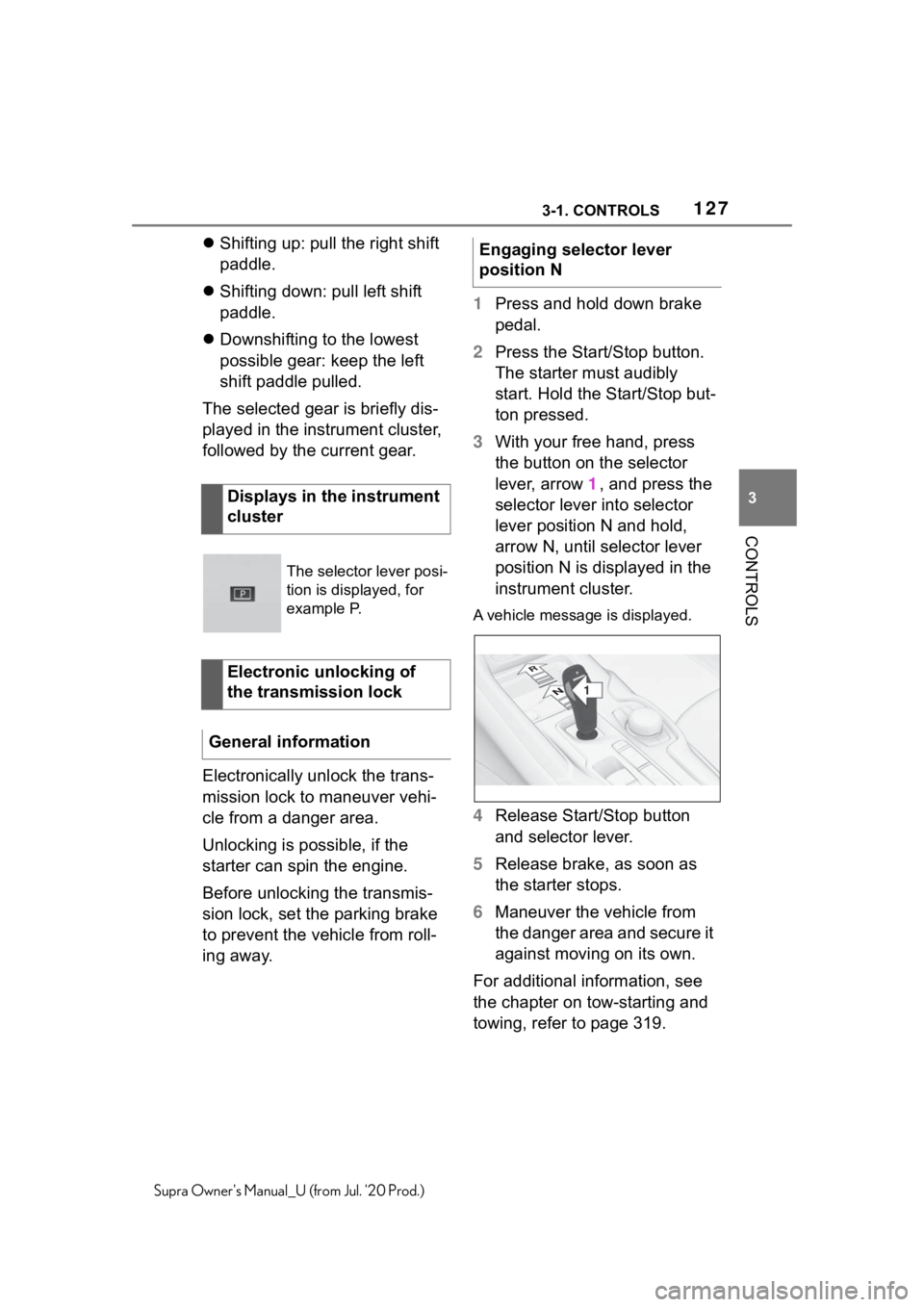
ing away. 1
Press and hold down brake
pedal.
2 Press the Start/Stop button.
The starter must audibly
start. Hold the Start/Stop but-
ton pressed.
3 With your free hand, press
the button on the selector
lever, arrow 1, and press the
selector lever into selector
lever position N and hold,
arrow N, until selector lever
position N is displayed in the
instrument cluster.
A vehicle messag e is displayed.
4Release Start/Stop button
and selector lever.
5 Release brake, as soon as
the starter stops.
6 Maneuver the vehicle from
the danger area and secure it
against moving on its own.
For additional information, see
the chapter on tow-starting and
towing, refer to page 319.
Displays in the instrument
cluster
The selector lever posi-
tion is displayed, for
example P.
Electronic unlocking of
the transmission lock
General information
Engaging selector lever
position N
1
R
N
Page 128 of 360
1283-1. CONTROLS
Supra Owner's Manual_U (from Jul. '20 Prod.)
Launch Control enables opti-
mum acceleration on surfaces
with good traction under dry sur-
rounding conditions.
The use of Launch Control
causes premature component
wear since this function rep-
resents a very heavy load for
the vehicle.
Do not use Launch Control
during the break-in, refer to
page 252, period.
Do not steer the steering wheel
when driving off with Launch
Control.
Launch Control is available
when the engine is at operating
temperature. The engine is at
operating temperature after an
uninterrupted trip of at least 6
miles/10 km.
1Switch on drive-ready state.
2 Press the sport button.
SPORT will be dis played on the
instrument cluster, indicating sport
mode has been selected.
3 Press the button.
TRACTION will be displayed on the
instrument cluster and the VSC
OFF indicator la mp will illuminate.
4Select the D selector lever
position.
5 Firmly depress the brake
pedal with your left foot.
6 Fully depress and hold the
accelerator pedal at the kick-
down position.
A flag symbol will be shown in the
instrument cluster.
7The engine speed will be
adjusted for launching.
Release the brake pedal
within 3 seconds.
After Launch Control has been
used, the transmission must
cool down for approx. 5 minutes
before Launch Control can be
used again. Launch Control
adjusts to the surrounding con-
ditions, when used again.
To increase vehicle stability,
activate VSC Vehicle Stability
Control System again as soon
as possible.
An experienced driver may be
able to achieve better accelera-
tion values in VSC OFF mode.
Launch Control
Concept
General information
Functional requirements
Start with launch control
Repeated use during a trip
After using Launch Control
System limits
Page 129 of 360
1293-1. CONTROLS
3
CONTROLS
Supra Owner's Manual_U (from Jul. '20 Prod.)
The Sport mode button influ-
ences the driving dynamics
properties of the vehicle.
The following systems are
affected, for instance:
Engine characteristics.
Automatic transmission.
Adaptive variable suspension.
Steering.
Display in the instrument clus-
ter.
Cruise control. When drive-ready state is
switched on, the NORMAL driv-
ing mode is selected automati-
cally.
■Concept
Balanced tuning between
dynamic and efficient driving.
■Concept
Dynamic tuning for higher agility
with an optimized chassis and
suspension.
■Switching on
■Concept
Customize settings can be
Sport mode button
Concept
General information
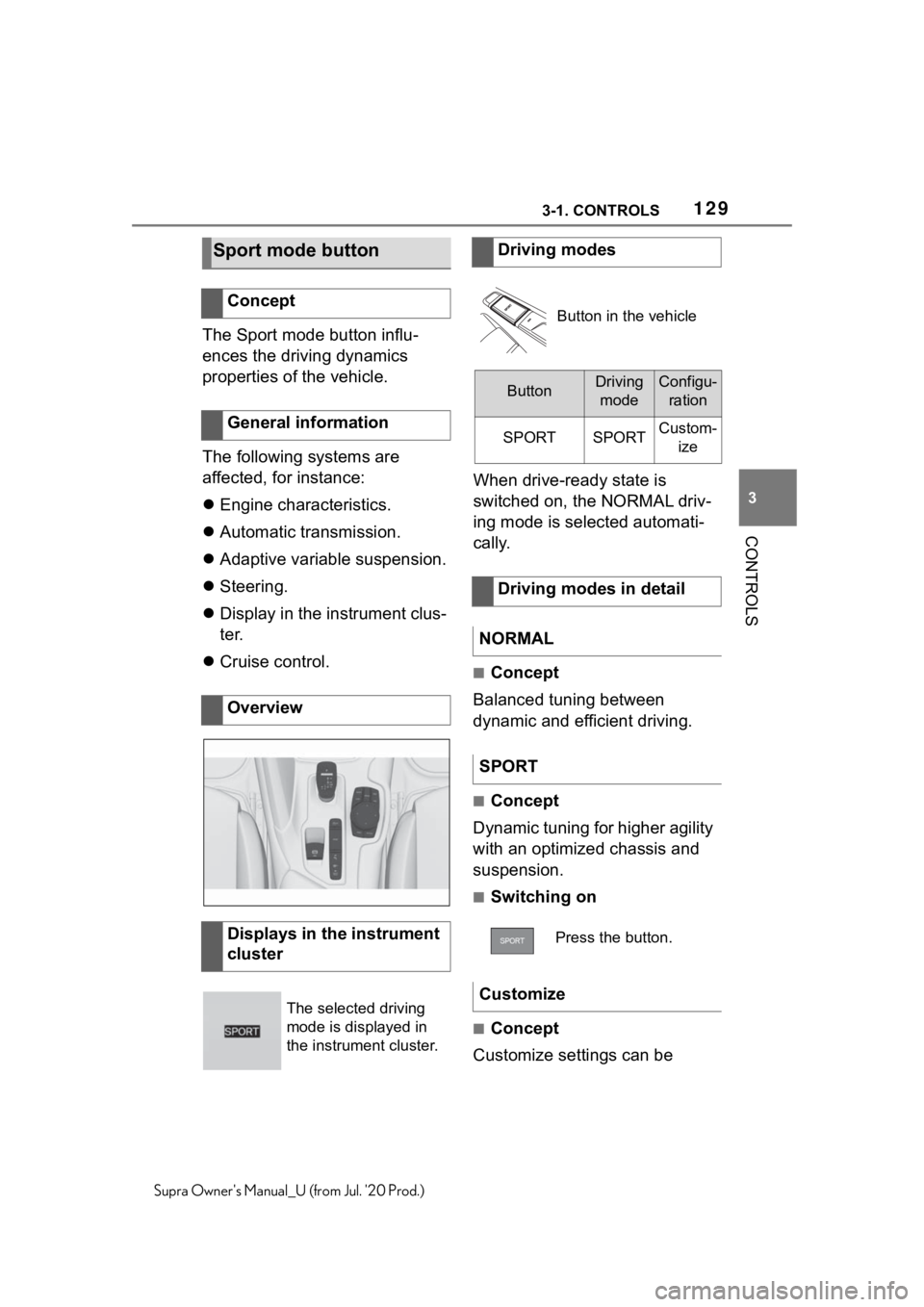
Overview
Displays in the instrument
cluster
The selected driving
mode is displayed in
the instrument cluster.
Driving modes
Button in the vehicle
ButtonDriving modeConfigu- ration
SPORTSPORTCustom- ize
Driving modes in detail
NORMAL
SPORT
Press the button.
Customize