glove box TOYOTA TACOMA 2009 Owners Manual (in English)
[x] Cancel search | Manufacturer: TOYOTA, Model Year: 2009, Model line: TACOMA, Model: TOYOTA TACOMA 2009Pages: 520, PDF Size: 10.75 MB
Page 4 of 520
TABLE OF CONTENTSIndex
4
3-5. Using the storage features ........................... 296
List of storage features....... 296
• Glove box ......................... 296
• Console boxes ................. 297
• Cup holders ...................... 298
• Bottle holders ................... 300
• Auxiliary boxes ................. 302
• Overhead console ............ 304
3-6. Other interior features ..... 305 Sun visors .......................... 305
Vanity mirrors ..................... 306
Clock .................................. 307
Outside temperature display (vehicles with accessory
meter) ............................... 308
Cigarette lighter .................. 309
Power outlet (12V DC) ....... 310
Power outlet (if 115V AC equipped) ......................... 311
Seatback table ................... 317
Floor mat ............................ 318
Luggage compartment features ............................ 319
Garage door opener box .... 328
Compass (vehicles with accessory meter).............. 332
4-1. Maintenance and care...... 338 Cleaning and protecting the vehicle exterior ........... 338
Cleaning and protecting the vehicle interior ............ 340 4-2. Maintenance ...................... 343
Maintenance requirements .................... 343
General maintenance ......... 345
Emission inspection and maintenance (I/M)
programs .......................... 348
4-3. Do-it-yourself maintenance ................... 349
Do-it-yourself service precautions ....................... 349
Hood ................................... 353
Engine compartment .......... 355
Tires.................................... 373
Tire inflation pressure ......... 381
Wheels................................ 386
Air conditioning filter ........... 388
Wireless remote control battery .............................. 391
Checking and replacing fuses ................................. 393
Light bulbs .......................... 403
5-1. Essential information ....... 414 If your vehicle needs to be towed ................................ 414
If you think something is wrong ................................ 420
Fuel pump shut off system .............................. 421
Event data recorder ............ 422
4Maintenance and care
5When trouble arises
Page 12 of 520

12
Pictorial indexInterior
Seat belts P. 56
SRS driver airbag P. 81
Head restraints P. 54
Bottle holders2 P. 300
Seatback table1 P. 317
SRS side airbags P. 81
Floor mats P. 318
SRS front
passenger
airbag
P. 81
Rear seats2 P. 50
Front seats P. 45
Glove box P. 296
Front console box2 P. 297
Page 40 of 520
40
1-2. Opening, closing and locking the doors
Tailgate
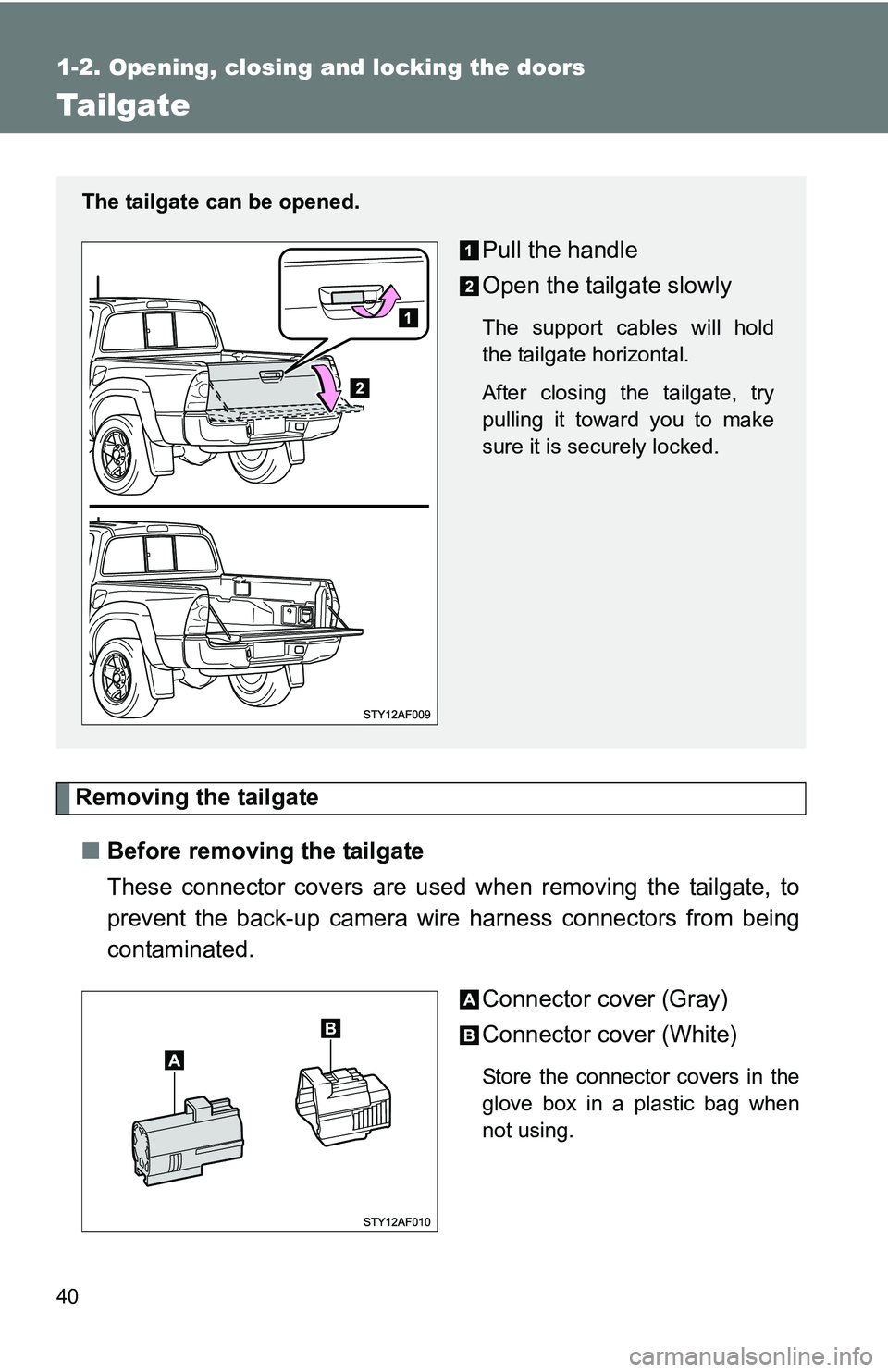
Removing the tailgate■ Before removing the tailgate
These connector covers are used when removing the tailgate, to
prevent the back-up camera wire harness connectors from being
contaminated.
Connector cover (Gray)
Connector cover (White)
Store the connector covers in the
glove box in a plastic bag when
not using.
The tailgate can be opened.
Pull the handle
Open the tailgate slowly
The support cables will hold
the tailgate horizontal.
After closing the tailgate, try
pulling it toward you to make
sure it is securely locked.
Page 120 of 520

120 1-7. Safety information
Swing the seatback forward
slightly (P. 46) and remove the
anchor bracket covers.
Installing position:
Right side passenger seat
Center passenger seat
Store the removed cover in a safe
place such as the glove box.
Right side passenger seat
Route the top strap through
the routing device as shown in
the illustration.
Make sure the top strap is not
twisted.
Latch the hook onto the
anchor bracket.
Return the seatback to its orig-
inal position.
Make sure the seatback is
securely locked by pushing for-
ward and rearward on the top of
the seatback.
Page 122 of 520
122 1-7. Safety information
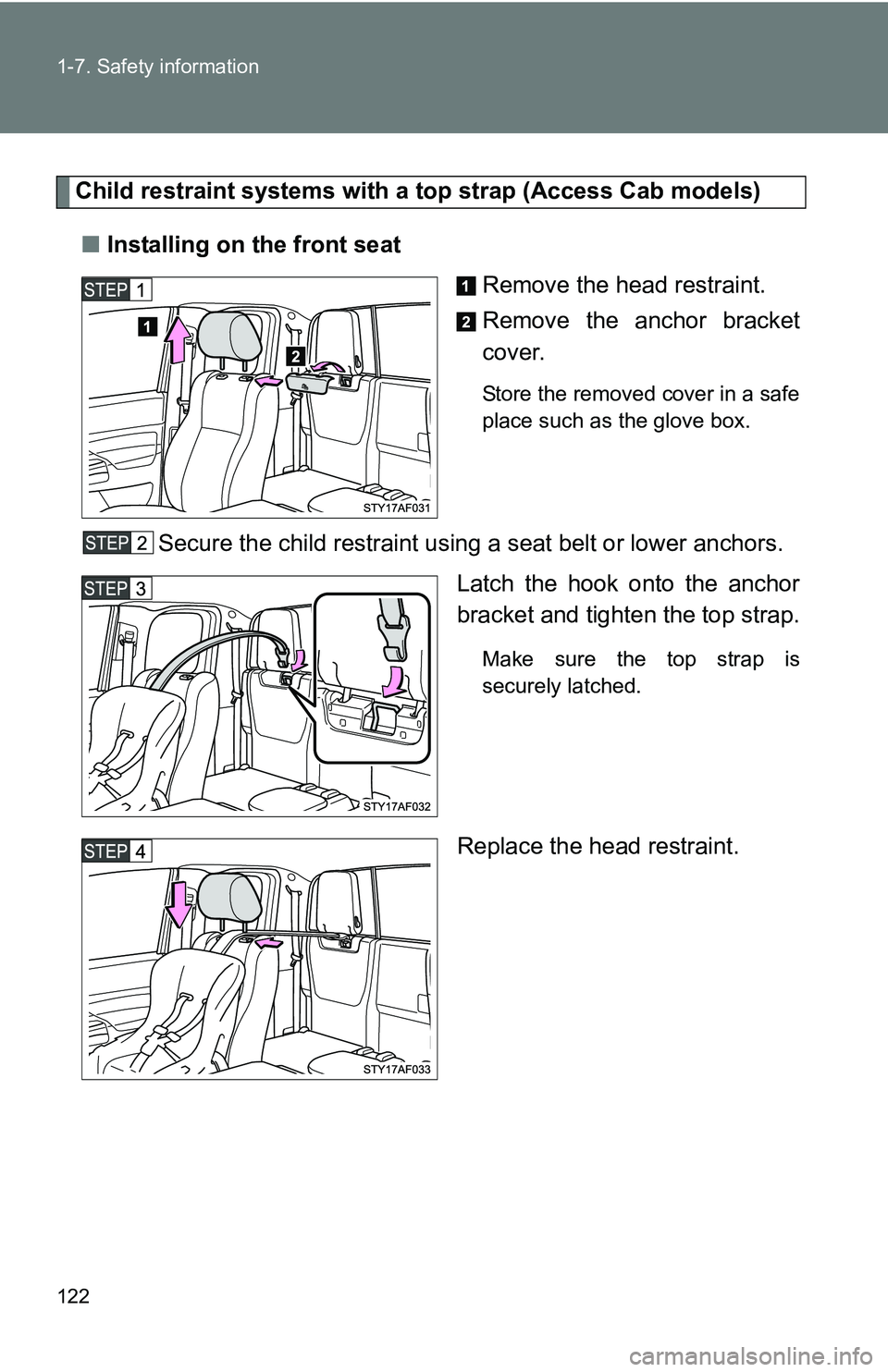
Child restraint systems with a top strap (Access Cab models)■ Installing on the front seat
Remove the head restraint.
Remove the anchor bracket
cover.
Store the removed cover in a safe
place such as the glove box.
Secure the child restraint using a seat belt or lower anchors.Latch the hook onto the anchor
bracket and tighten the top strap.
Make sure the top strap is
securely latched.
Replace the head restraint.
Page 123 of 520
123
1-7. Safety information
1
Before driving
■
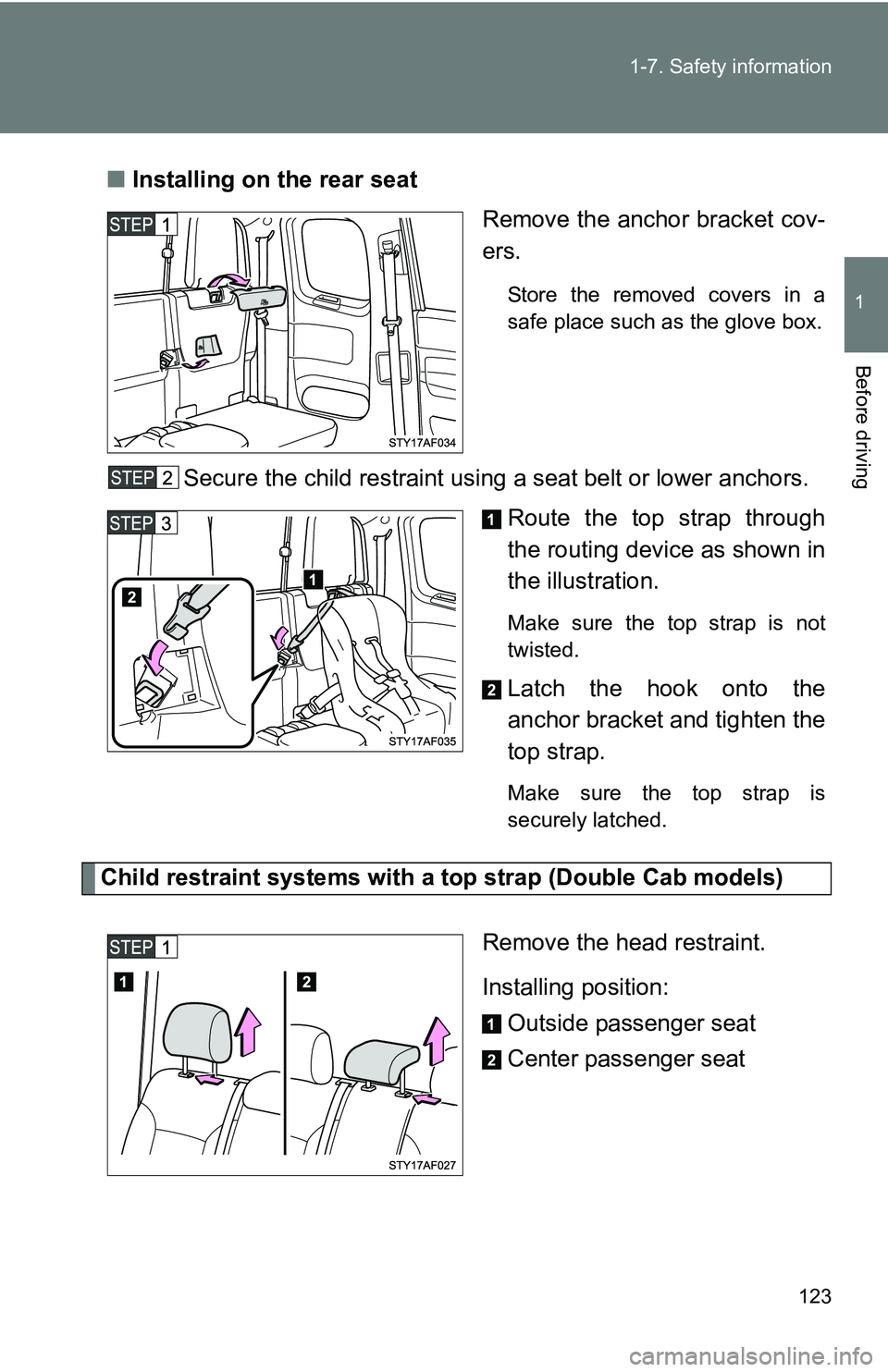
Installing on the rear seat
Remove the anchor bracket cov-
ers.
Store the removed covers in a
safe place such as the glove box.
Secure the child restraint using a seat belt or lower anchors.Route the top strap through
the routing device as shown in
the illustration.
Make sure the top strap is not
twisted.
Latch the hook onto the
anchor bracket and tighten the
top strap.
Make sure the top strap is
securely latched.
Child restraint systems with a top strap (Double Cab models)
Remove the head restraint.
Installing position:Outside passenger seat
Center passenger seat
Page 219 of 520
Interior and exterior features3
219
3-1. Using the air conditioning
system and
defogger ....................... 220
Air conditioning system .... 220
3-2. Using the audio system .......................... 228
Audio system types .......... 228
Using the radio ................. 231
Using the CD player ......... 237
Playing back MP3 and WMA discs ..................... 244
Optimal use of the audio system ........................... 253
Operating the sub woofer (on some Access Cab
models) .......................... 256
Using the AUX adapter .... 257
Using the steering wheel audio switches ............... 259
3-3. Using the hands-free phone system (for
cellular phone) ............. 262
Hands-free phone system (for cellular phone) ......... 262
Using the hands-free phone system ................ 266
Making a phone call ......... 274
Setting a cellular phone ... 279
Security and system setup .............................. 284
Using the phone book ...... 287 3-4. Using the interior
lights ............................. 294
Interior lights list ............... 294
• Interior light .................... 295
• Personal lights ............... 295
3-5. Using the storage features ......................... 296
List of storage features .... 296
• Glove box....................... 296
• Console boxes ............... 297
• Cup holders ................... 298
• Bottle holders ................. 300
• Auxiliary boxes ............... 302
• Overhead console .......... 304
3-6. Other interior features ......................... 305
Sun visors ........................ 305
Vanity mirrors ................... 306
Clock ................................ 307
Outside temperature display (vehicles with
accessory meter) ........... 308
Cigarette lighter................ 309
Power outlet (12V DC) ..... 310
Power outlet (if 115V AC equipped) ....................... 311
Seatback table ................. 317
Floor mat .......................... 318
Luggage compartment features .......................... 319
Garage door opener box ................................. 328
Compass (vehicles with accessory meter) ........... 332
Page 296 of 520
296
3-5. Using the storage features
List of storage features
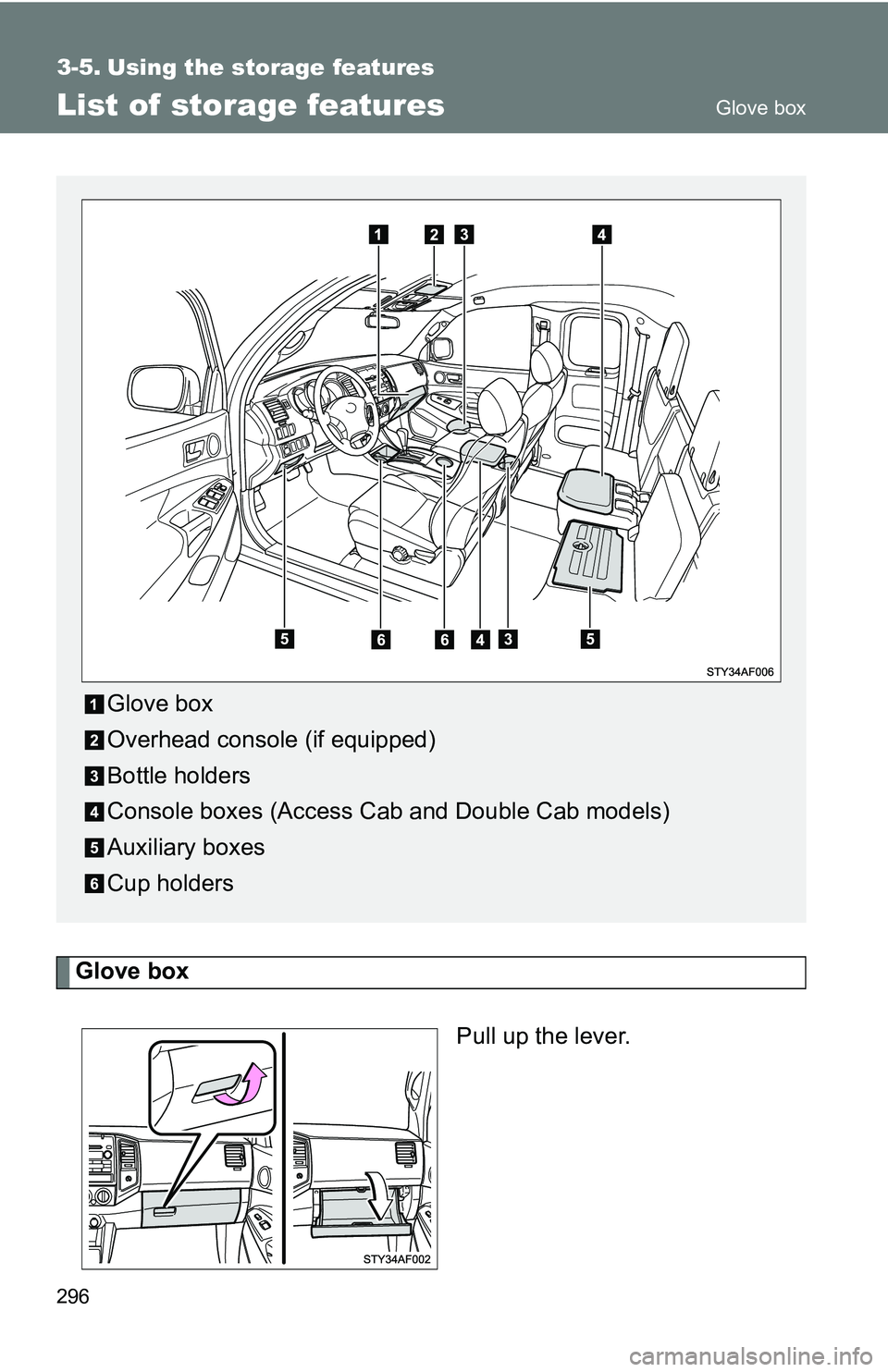
Glove boxPull up the lever.
Glove box
Overhead console (if equipped)
Bottle holders
Console boxes (Access Cab and Double Cab models)
Auxiliary boxes
Cup holders
Glove box
Page 297 of 520
297
3-5. Using the
storage features
3
Interior and exterior features
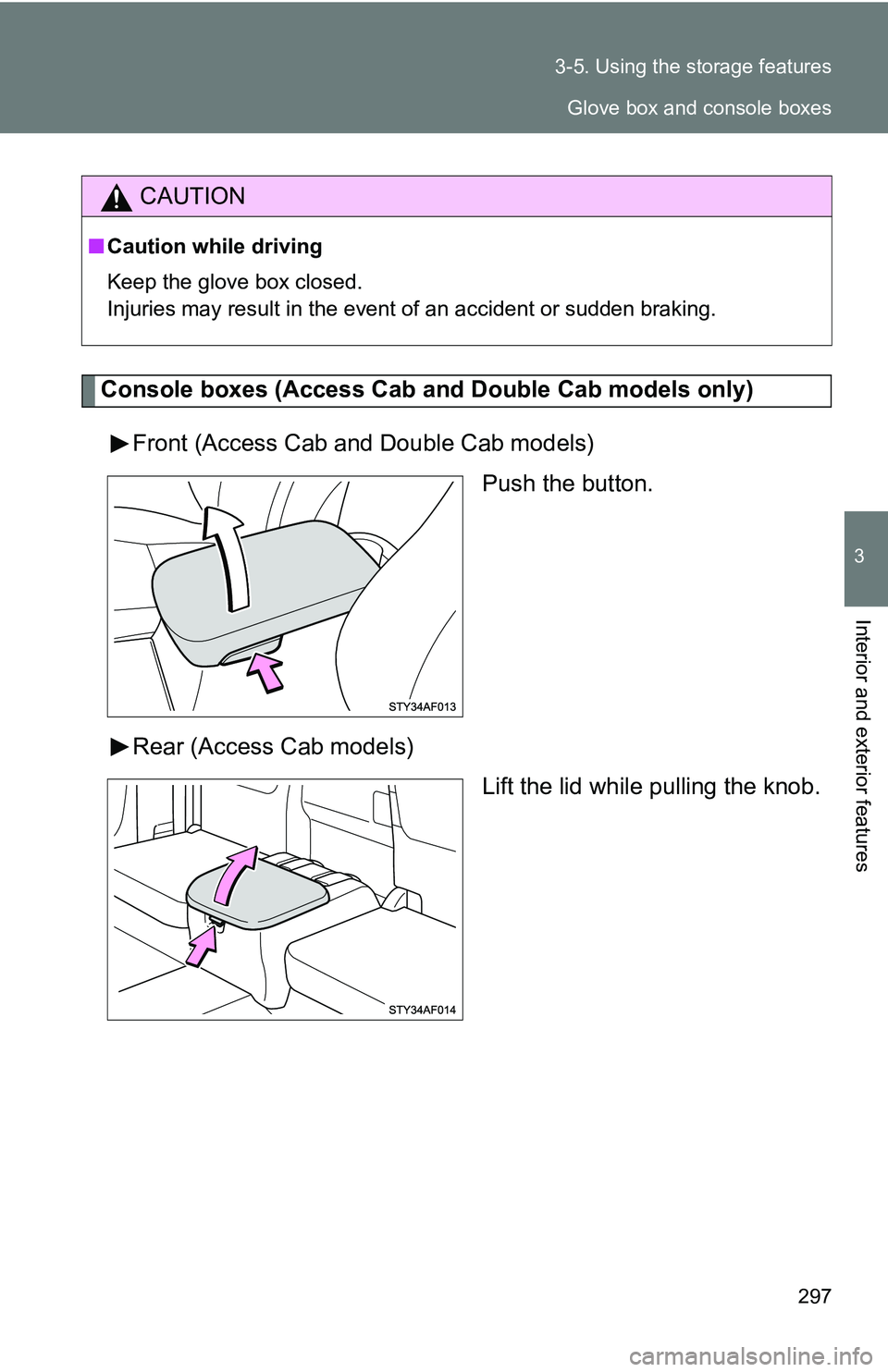
Console boxes (Access Cab a nd Double Cab models only)
Front (Access Cab and Double Cab models) Push the button.
Rear (Access Cab models) Lift the lid while pulling the knob.
CAUTION
■Caution while driving
Keep the glove box closed.
Injuries may result in the event of an accident or sudden braking.
Glove box and console boxes
Page 388 of 520
388
4-3. Do-it-yourself maintenance
Air conditioning filter
The air conditioning filter must be changed regularly to maintain air
conditioning efficiency.
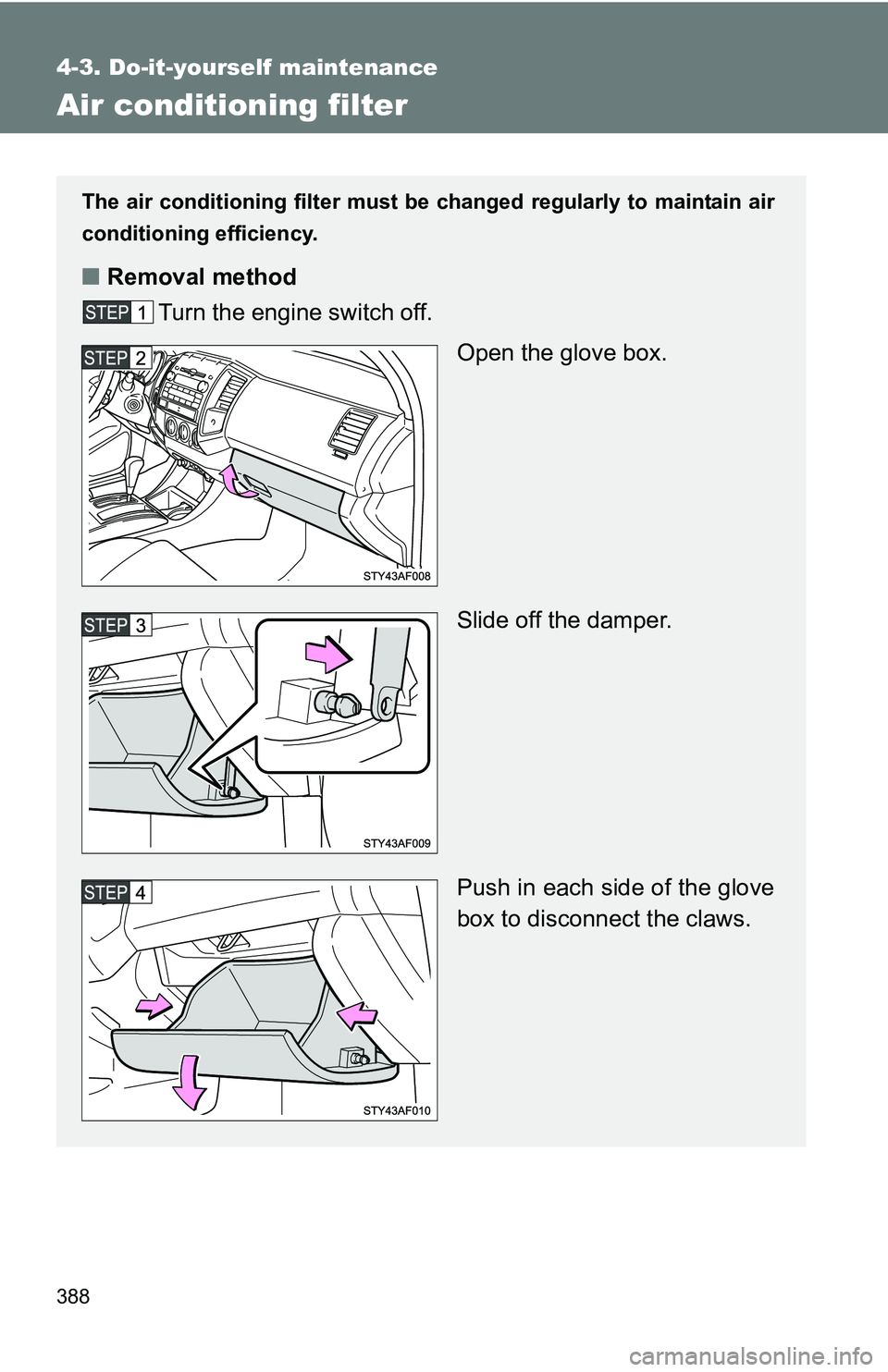
■ Removal method
Turn the engine switch off.
Open the glove box.
Slide off the damper.
Push in each side of the glove
box to disconnect the claws.