check engine TOYOTA TACOMA 2019 (in English) Owner's Manual
[x] Cancel search | Manufacturer: TOYOTA, Model Year: 2019, Model line: TACOMA, Model: TOYOTA TACOMA 2019Pages: 700, PDF Size: 12.83 MB
Page 195 of 700

1954-2. Driving procedures
4
Driving
WARNING
■When starting the engine
Always start the engine while sitting in the driver’s seat. Do not depress the
accelerator pedal while starting the engine under any circumstances.
Doing so may cause an accident resulting in death or serious in jury.
■ Caution while driving
Do not turn the engine switch to the “LOCK” position while driving. If, in an
emergency, you must turn the engine off while the vehicle is moving, turn
the engine switch only to the “ACC” position to stop the engine . An accident
may result if the engine is stopped while driving. ( P. 559)
NOTICE
■To prevent battery discharge
Do not leave the engine switch in the “ACC” or “ON” position fo r long peri-
ods of time without the engine running.
■ When starting the engine
● Do not crank the engine for more than 30 seconds at a time. This may
overheat the starter and wiring system.
● Do not race a cold engine.
● If the engine becomes difficult to start or stalls frequently, have your vehi-
cle checked by your Toyota dealer immediately.
Page 196 of 700
1964-2. Driving procedures
Engine (ignition) switch (vehicles with a
smart key system)
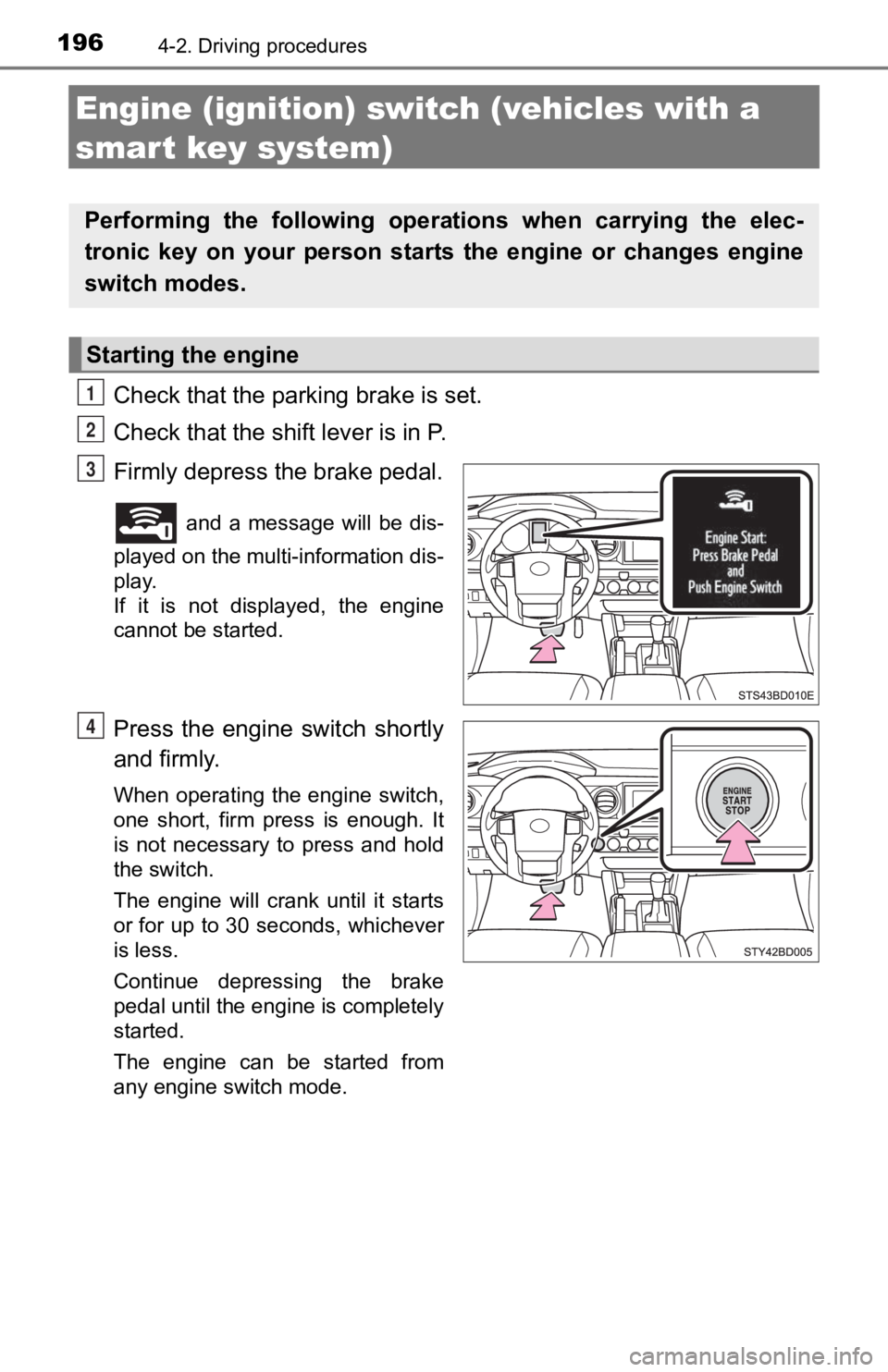
Check that the parking brake is set.
Check that the shift lever is in P.
Firmly depress the brake pedal.
and a message will be dis-
played on the multi-information dis-
play.
If it is not displayed, the engine
cannot be started.
Press the engine switch shortly
and firmly.
When operating the engine switch,
one short, firm press is enough. It
is not necessary to press and hold
the switch.
The engine will crank until it starts
or for up to 30 seconds, whichever
is less.
Continue depressing the brake
pedal until the engine is completely
started.
The engine can be started from
any engine switch mode.
Performing the following opera tions when carrying the elec-
tronic key on your person starts the engine or changes engine
switch modes.
Starting the engine
1
2
3
4
Page 198 of 700
1984-2. Driving procedures
If the engine is stopped with the shift lever in a position other than P,
the engine switch will not be turned off but instead be turned to
ACCESSORY mode. Perform the following procedure to turn the
switch off:
Check that the park ing brake is set.
Shift the shift lever to P.
Check that “Turn Power OFF” is displayed on the multi-informati on
display and then press the engine switch once.
Check that “Turn Power OFF” on the multi-information display is off.
■Auto power off function
If the vehicle is left in ACCESSORY mode for more than 20 minut es or IGNI-
TION ON mode (the engine is not running) for more than an hour with the
shift lever in P, the engine switch will automatically turn off. However, this
function cannot entirely prevent battery discharge. Do not leav e the vehicle
with the engine switch in ACCESSORY or IGNITION ON mode for lon g peri-
ods of time when the engine is not running.
■ Electronic key battery depletion
P. 108
■ Conditions affecting operation
P. 126
■ Note for the entry function
P. 127
■ If the engine does not start
●The engine immobilizer system may not have been deactivated. ( P. 69)
Contact your Toyota dealer.
● Check that the shift lever is securely set in P. The engine may not start if the
shift lever is displaced out of P. “Shift to P Position” will b e displayed on the
multi-information display.
■ Steering lock
After turning the engine switch off and opening and closing the doors, the
steering wheel will be locked due to the steering lock function . Operating the
engine switch again automatically cancels the steering lock.
When stopping the engine with the shift lever in a position other
than P
1
2
3
4
Page 199 of 700
1994-2. Driving procedures
4
Driving
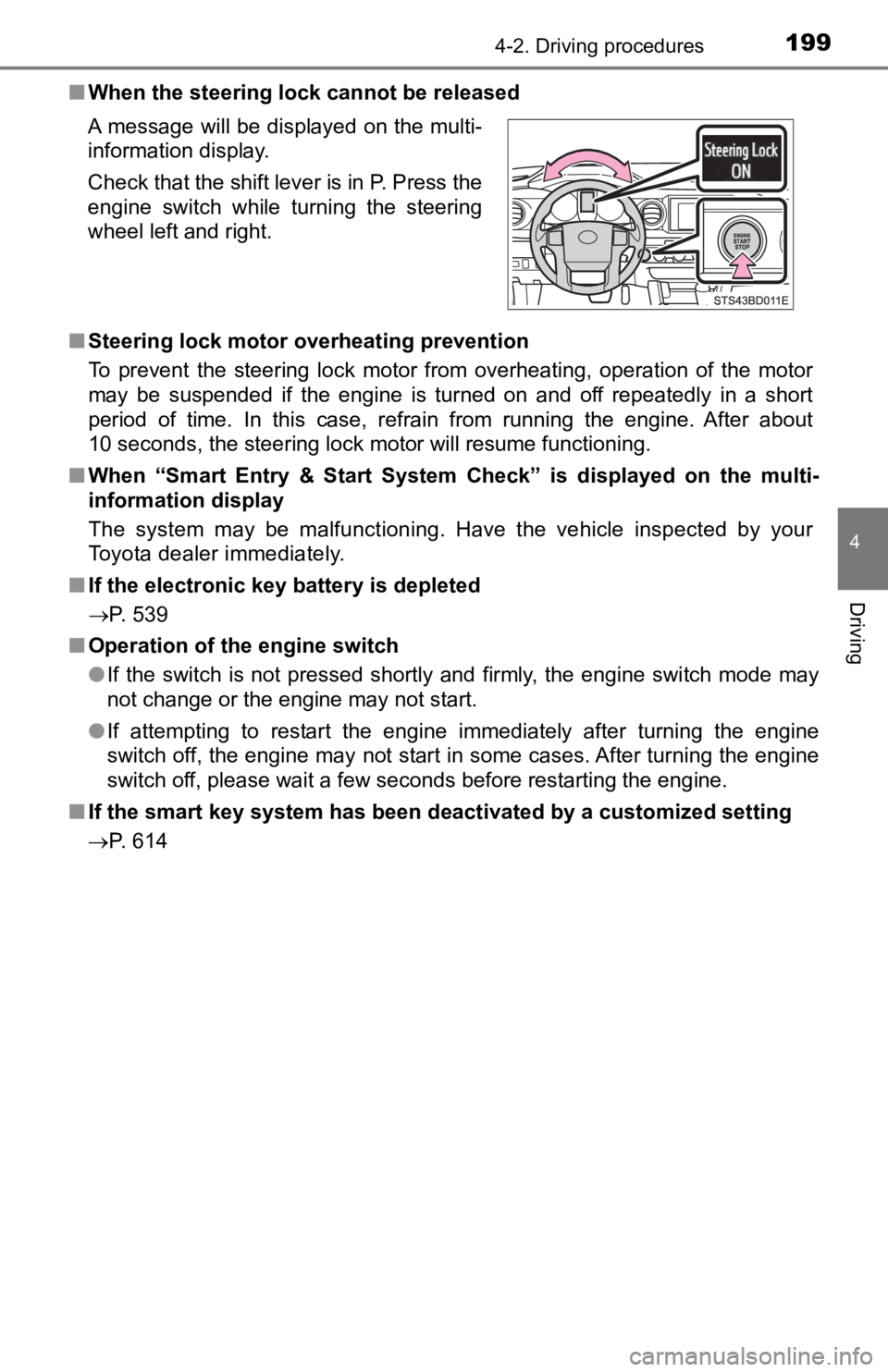
■When the steering lock cannot be released
■ Steering lock motor overheating prevention
To prevent the steering lock motor from overheating, operation of the motor
may be suspended if the engine is turned on and off repeatedly in a short
period of time. In this case, refrain from running the engine. After about
10 seconds, the steering lock motor will resume functioning.
■ When “Smart Entry & Start System Check” is displayed on the multi-
information display
The system may be malfunctioning. Have the vehicle inspected by your
Toyota dealer immediately.
■ If the electronic key battery is depleted
P. 539
■ Operation of the engine switch
●If the switch is not pressed shortly and firmly, the engine swi tch mode may
not change or the engine may not start.
● If attempting to restart the engine immediately after turning t he engine
switch off, the engine may not start in some cases. After turni ng the engine
switch off, please wait a few seconds before restarting the eng ine.
■ If the smart key system has been d eactivated by a customized setting
P. 614 A message will be displayed on the multi-
information display.
Check that the shift lever is in P. Press the
engine switch while turning the steering
wheel left and right.
Page 200 of 700

2004-2. Driving procedures
WARNING
■When starting the engine
Always start the engine while sitting in the driver’s seat. Do not depress the
accelerator pedal while starting the engine under any circumstances.
Doing so may cause an accident resulting in death or serious in jury.
■ Caution while driving
If engine failure occurs while the vehicle is moving, do not lock or open the
doors until the vehicle reaches a safe and complete stop. Otherwise, the
steering lock function will activate and this may lead to an ac cident, result-
ing in death or serious injury.
■ Stopping the engine in an emergency
If you want to stop the engine in an emergency while driving th e vehicle,
press and hold the engine switch for more than 2 seconds, or press it briefly
3 times or more in succession. ( P. 559)
However, do not touch the engine switch while driving except in an emer-
gency. Turning the engine off while driving will not cause loss of steering or
braking control, however, power assist to the steering will be lost. This will
make it more difficult to steer smoothly, so you should pull ov er and stop the
vehicle as soon as it is safe to do so.
NOTICE
■ To prevent battery discharge
● Do not leave the engine switch in ACCESSORY or IGNITION ON mode
for long periods of time without the engine running.
● If “ACCESSORY” or “IGNITION ON” is displayed on the multi-information
display while the engine is not running, the engine switch is not off. Exit the
vehicle after turning the engine switch off.
● Do not stop the engine when the shift lever is in a position ot her than P. If
the engine is stopped in another shift lever position, the engine switch will
not be turned off but instead be turned to ACCESSORY mode. If t he vehi-
cle is left in ACCESSORY mode, battery discharge may occur.
■ When starting the engine
● Do not race a cold engine.
● If the engine becomes difficult to start or stalls frequently, have your vehi-
cle checked by your Toyota dealer immediately.
■ Symptoms indicating a malfunction with the engine switch
If the engine switch seems to be operating somewhat differently than usual,
such as the switch sticking slightly, there may be a malfunction. Contact
your Toyota dealer immediately.
Page 205 of 700
2054-2. Driving procedures
4
Driving
■Shift lock system
The shift lock system is a system to prevent accidental operation of the shift
lever in starting.
The shift lever can be shifted from P only when the engine switch is in the
“ON” position (vehicles without a smart key system) or IGNITION ON mode
(vehicles with a smart key system) and the brake pedal is being depressed.
■ If the shift lever cannot be shift from P
First, check whether the brake pedal is being depressed.
If the shift lever cannot be shifted with your foot on the brak e pedal, there may
be a problem with the shift lock system. Have the vehicle inspected by your
Toyota dealer immediately.
The following steps may be used as an emergency measure to ensu re that
the shift lever can be shifted.
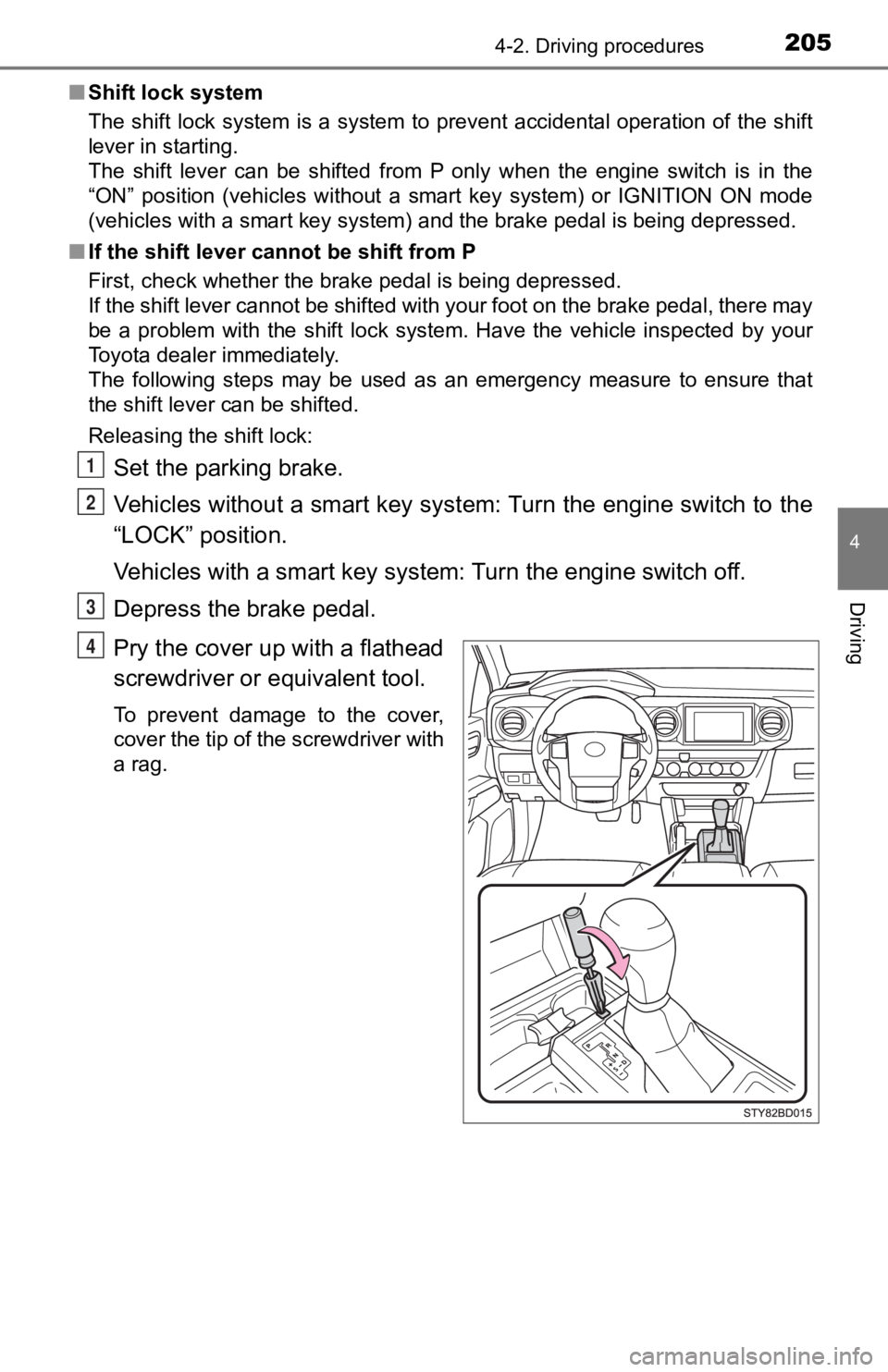
Releasing the shift lock:
Set the parking brake.
Vehicles without a smart key sys tem: Turn the engine switch to the
“LOCK” position.
Vehicles with a smart key syst em: Turn the engine switch off.
Depress the brake pedal.
Pry the cover up with a flathead
screwdriver or equivalent tool.
To prevent damage to the cover,
cover the tip of the screwdriver with
a rag.
1
2
3
4
Page 209 of 700
2094-2. Driving procedures
4
Driving
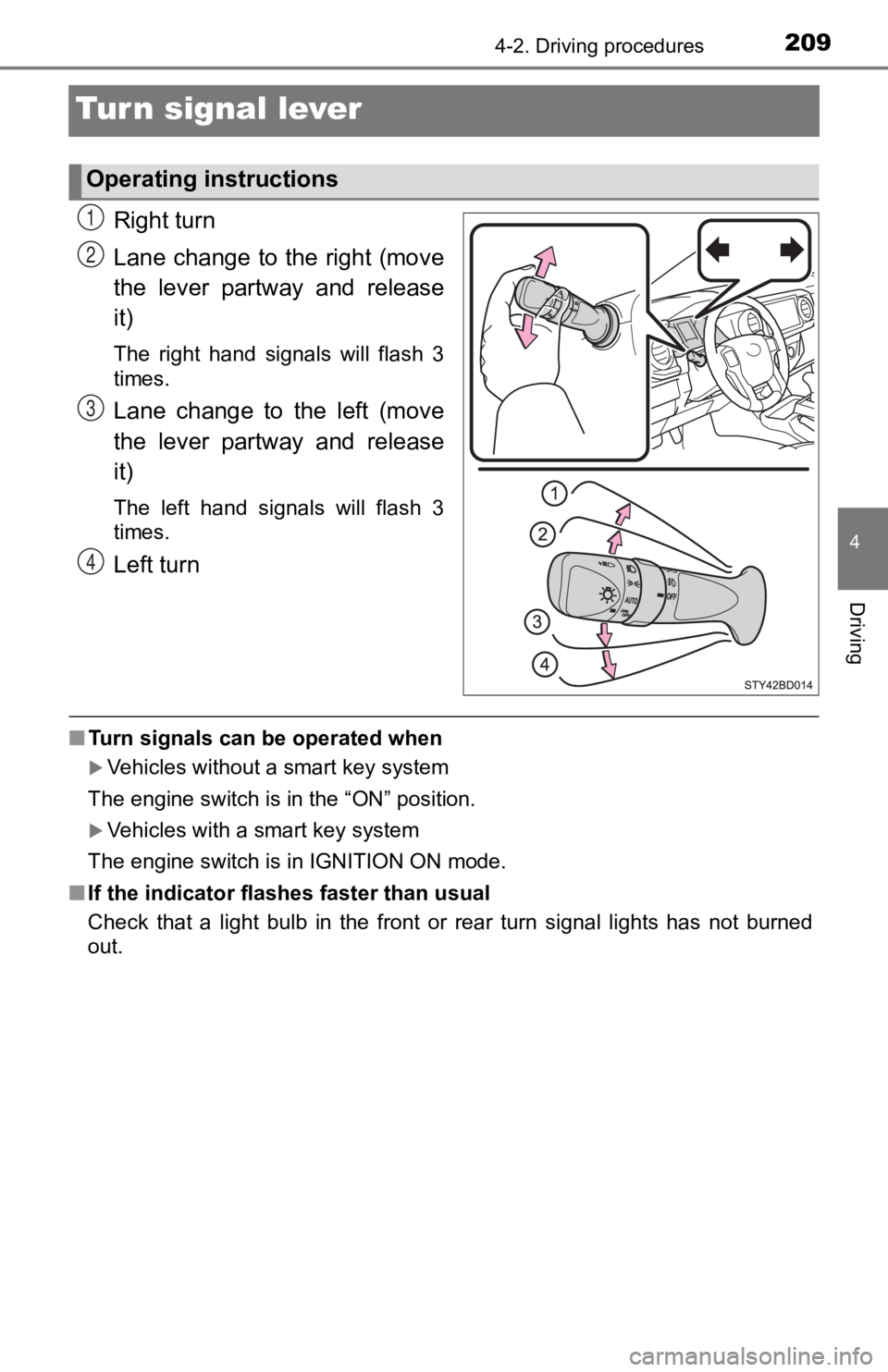
Turn signal lever
Right turn
Lane change to the right (move
the lever partway and release
it)
The right hand signals will flash 3
times.
Lane change to the left (move
the lever partway and release
it)
The left hand signals will flash 3
times.
Left turn
■Turn signals can be operated when
Vehicles without a smart key system
The engine switch is in the “ON” position.
Vehicles with a smart key system
The engine switch is in IGNITION ON mode.
■ If the indicator flashes faster than usual
Check that a light bulb in the front or rear turn signal lights has not burned
out.
Operating instructions
1
2
3
4
Page 223 of 700
2234-3. Operating the lights and wipers
4
Driving
■The windshield wipers and washer can be operated when
Vehicles without a smart key system
The engine switch is in the “ON” position.
Vehicles with a smart key system
The engine switch is in IGNITION ON mode.
■ If no windshield washer fluid sprays
Check that the washer nozzles are not blocked if there is washe r fluid in the
windshield washer fluid reservoir.
WARNING
■ Caution regarding the use of washer fluid
When it is cold, do not use the washer fluid until the windshie ld becomes
warm. The fluid may freeze on the windshield and cause low visi bility. This
may lead to an accident, resulting in death or serious injury.
NOTICE
■ When the windshield is dry
Do not use the wipers, as they may damage the windshield.
■ When the washer fluid tank is empty
Do not operate the switch continually as the washer fluid pump may over-
heat.
■ When a nozzle becomes blocked
In this case, contact your Toyota dealer.
Do not try to clear it with a pin or other object. The nozzle will be damaged.
Page 278 of 700

2784-5. Using the driving support systems
■The intuitive parking assist can be operated when
Vehicles without a smart key system
The engine switch is in the “ON” position and the shift lever is in R.
Vehicles with a smart key system
The engine switch is in IGNITION ON mode and the shift lever is in R.
■ If a message is displayed on the multi-information display
P. 581
■ Customization
Settings (e.g. buzzer volume) can be changed.
(Customizable features P. 654)
■ Certification (Canada only)
This ISM device complies with Canadian ICES-001.
WARNING
■ When using the intuitive parking assist
Observe the following precautions.
Failure to do so may result in the vehicle being unable to be driven safely
and possibly cause an accident.
● Do not use the sensor at speeds in excess of 6 mph (10 km/h).
● The sensors’ detection areas and reaction times are limited. Wh en revers-
ing, check the areas surrounding the vehicle (especially the si des of the
vehicle) for safety, and drive slowly, using the brake to contr ol the vehicle’s
speed.
● Do not install accessories within the sensors’ detection areas.
Page 307 of 700

3074-5. Using the driving support systems
4
Driving
■After unlocking the rear differential
Vehicles without a smart key system
To check that the indicator goes off, turn the engine switch to the “ON” posi-
tion, but do not start the engine.
Vehicles with a smart key system
To check that the indicator goes off, turn the engine switch to IGNITION ON
mode, but do not start the engine.
WARNING
■ To avoid an accident
● Do not use the rear differential lock system except when wheel spinning
occurs in a ditch or on a slippery or ragged surface. Large ste ering effort
and careful cornering control will be required.
● Do not lock the rear differential until the wheels have stopped spinning.
Otherwise, the vehicle may move in an unexpected direction when the dif-
ferential lock is engaged, resulting in an accident. This may also lead to
possible damage to differential lock component parts.
● Do not drive over 5 mph (8 km/h) when the differential is locke d.
● Do not keep driving with the rear differential lock switch on.