garage door opener TOYOTA TACOMA 2019 Owners Manual (in English)
[x] Cancel search | Manufacturer: TOYOTA, Model Year: 2019, Model line: TACOMA, Model: TOYOTA TACOMA 2019Pages: 700, PDF Size: 12.83 MB
Page 5 of 700
5
1
9 8
7 5 4
3
2
10
6
6-1. Using the air conditioning system
Manual air conditioning system............................. 426
Automatic air conditioning system............................. 432
Seat heaters ...................... 439
6-2. Using the interior lights Interior lights list ................ 441• Interior light ................... 442
• Front personal lights ..... 442
• Cargo lamp main switch ............................ 443
6-3. Using the storage features List of storage features...... 444• Glove box...................... 445
• Front console box ......... 446
• Overhead console ......... 446
• Cup holders .................. 447
• Bottle holders ................ 448
• Storage box .................. 449
Luggage compartment features ........................... 452
6-4. Other interior features Other interior features ....... 462• Sun visors ..................... 462
• Vanity mirrors................ 462
• Clock ............................. 463
• Power outlet (12 V DC) ...................... 464
• Power outlet
(120 V AC) .................... 465
• USB charging ports....... 470
• Wireless charger ........... 472
• Assist grips ................... 478
Garage door opener .......... 479
Compass ........................... 486 7-1. Maintenance and care
Cleaning and protecting the vehicle exterior .......... 492
Cleaning and protecting the vehicle interior ........... 496
7-2. Maintenance Maintenance requirements ................... 499
General maintenance ........ 501
Emission inspection and maintenance (I/M)
programs ......................... 504
7-3. Do-it-yourself maintenance Do-it-yourself service precautions ...................... 505
Hood .................................. 507
Engine compartment ......... 509
Tires................................... 521
Tire inflation pressure ........ 530
Wheels............................... 533
Air conditioning filter .......... 536
Wireless remote control/ electronic key battery ...... 539
Checking and replacing fuses ................................ 542
Light bulbs ......................... 545
8-1. Essential information Emergency flashers ........... 558
If your vehicle has to be stopped in
an emergency.................. 559
6Interior features7Maintenance and care
8When trouble arises
Page 22 of 700
22Pictorial index
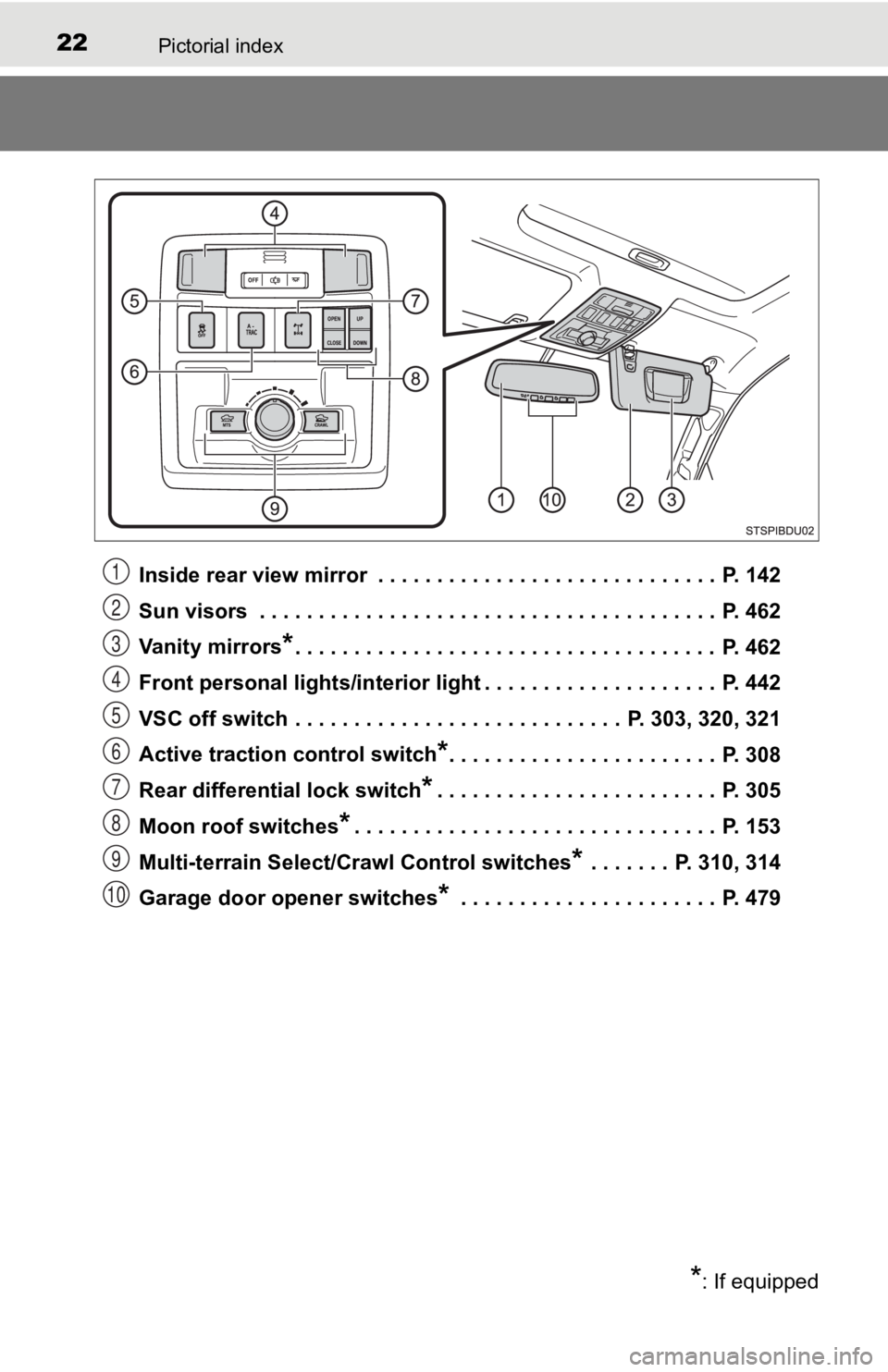
Inside rear view mirror . . . . . . . . . . . . . . . . . . . . . . . . . . . . . P. 142
Sun visors . . . . . . . . . . . . . . . . . . . . . . . . . . . . . . . . . . . . . . . P. 462
Vanity mirrors
*. . . . . . . . . . . . . . . . . . . . . . . . . . . . . . . . . . . . P. 462
Front personal lights/interior light . . . . . . . . . . . . . . . . . . . . P. 442
VSC off switch . . . . . . . . . . . . . . . . . . . . . . . . . . . . P. 303, 320, 321
Active traction control switch
*. . . . . . . . . . . . . . . . . . . . . . . P. 308
Rear differential lock switch
*. . . . . . . . . . . . . . . . . . . . . . . . P. 305
Moon roof switches
*. . . . . . . . . . . . . . . . . . . . . . . . . . . . . . . P. 153
Multi-terrain Select/Crawl Control switches
* . . . . . . . P. 310, 314
Garage door opener switches
* . . . . . . . . . . . . . . . . . . . . . . P. 479
*: If equipped
1
2
3
4
5
6
7
8
9
10
Page 425 of 700

425
6Interior features
6-1. Using the air conditioningsystem
Manual air conditioning system............................. 426
Automatic air conditioning system............................. 432
Seat heaters ...................... 439
6-2. Using the interior lights Interior lights list ................ 441• Interior light ................... 442
• Front personal lights ..... 442
• Cargo lamp mainswitch ............................ 443 6-3. Using the storage features
List of storage features ..... 444• Glove box...................... 445
• Front console box ......... 446
• Overhead console......... 446
• Cup holders .................. 447
• Bottle holders ................ 448
• Storage boxes............... 449
Luggage compartment features ........................... 452
6-4. Other interior features Other interior features ....... 462• Sun visors ..................... 462
• Vanity mirrors................ 462
• Clock ............................. 463
• Pow er outlet
(12 V DC) ...................... 464
• Power outlet
(120 V AC) .................... 465
• USB charging ports....... 470
• Wireless charger ........... 472
• Assist grips ................... 478
Garage door opener.......... 479
Compass ........................... 486
Page 479 of 700
4796-4. Other interior features
6
Interior features
Garage door opener
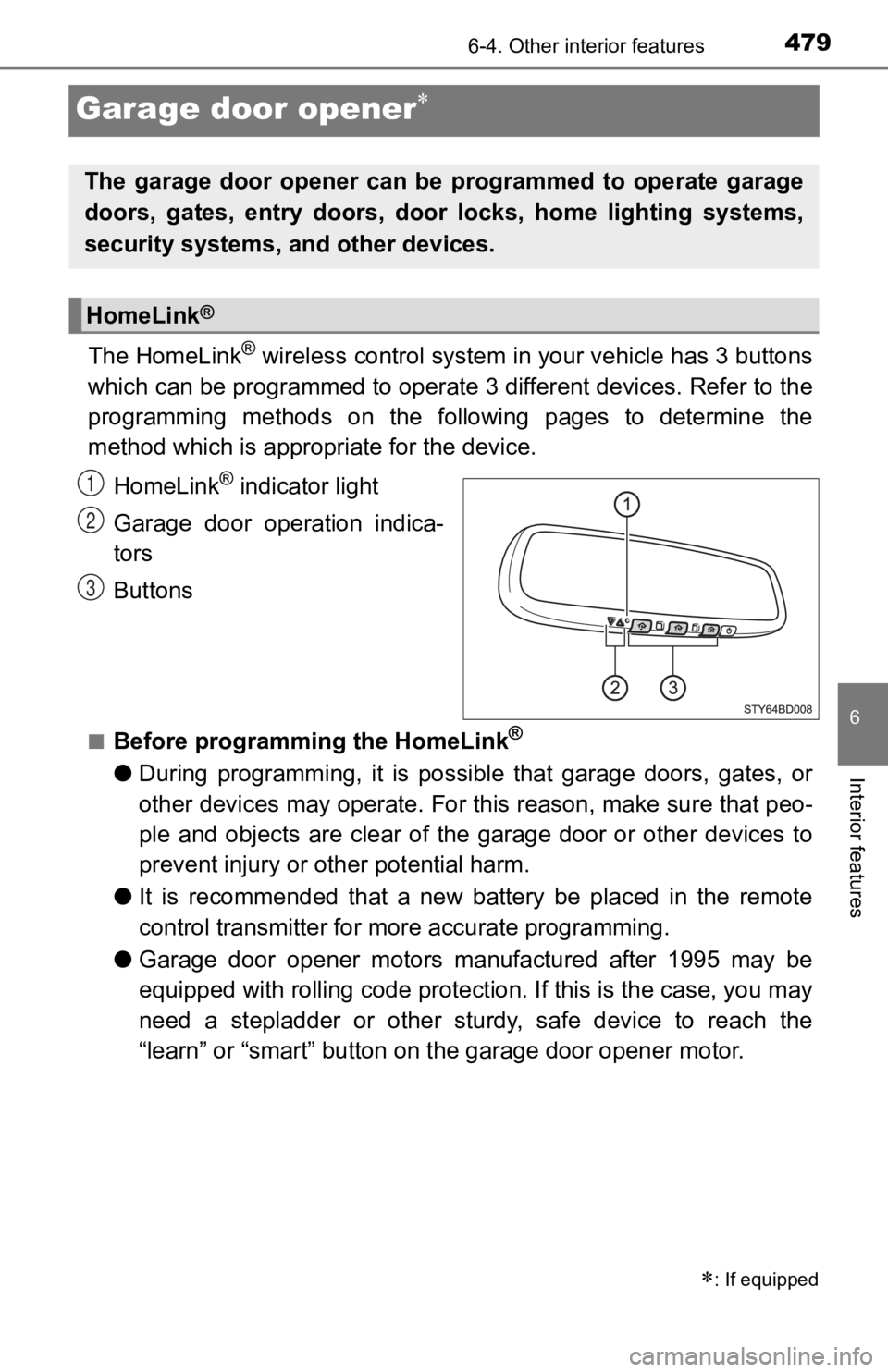
The HomeLink® wireless control system in your vehicle has 3 buttons
which can be programmed to operate 3 different devices. Refer to the
programming methods on the following pages to determine the
method which is approp riate for the device.
HomeLink
® indicator light
Garage door operation indica-
tors
Buttons
■Before programming the HomeLink®
● During programming, it is possible that garage doors, gates, or
other devices may operate. For this reason, make sure that peo-
ple and objects are clear of the garage door or other devices t o
prevent injury or other potential harm.
● It is recommended that a new battery be placed in the remote
control transmitter for mo re accurate programming.
● Garage door opener motors manufactured after 1995 may be
equipped with rolling code pro tection. If this is the case, you may
need a stepladder or other sturdy, safe device to reach the
“learn” or “smart” button on the garage door opener motor.
: If equipped
The garage door opener can be programmed to operate garage
doors, gates, entry doors, door locks, home lighting systems,
security systems, and other devices.
HomeLink®
1
2
3
Page 481 of 700
4816-4. Other interior features
6
Interior features
Test the HomeLink® operation by pressing the newly pro-
grammed button and observi ng the indicator light:
● Indicator light illuminates: Progr amming of a fixed code device
has completed. The garage door or other device should oper-
ate when a HomeLink
® button is pressed and released.
● Indicator light flashes rapidly: The garage door opener motor
or other device is equipped with a rolling code. To complete
programming, firmly press and hold the HomeLink
® button for
2 seconds then release it.
● If the garage door or other device does not operate, proceed
to “Programming a rolling code system”.
Repeat the steps above to program another device for any of the
remaining HomeLink
® buttons.
■Programming a rolling code system
2 or more people may be necessary to complete rolling code pro-
gramming.
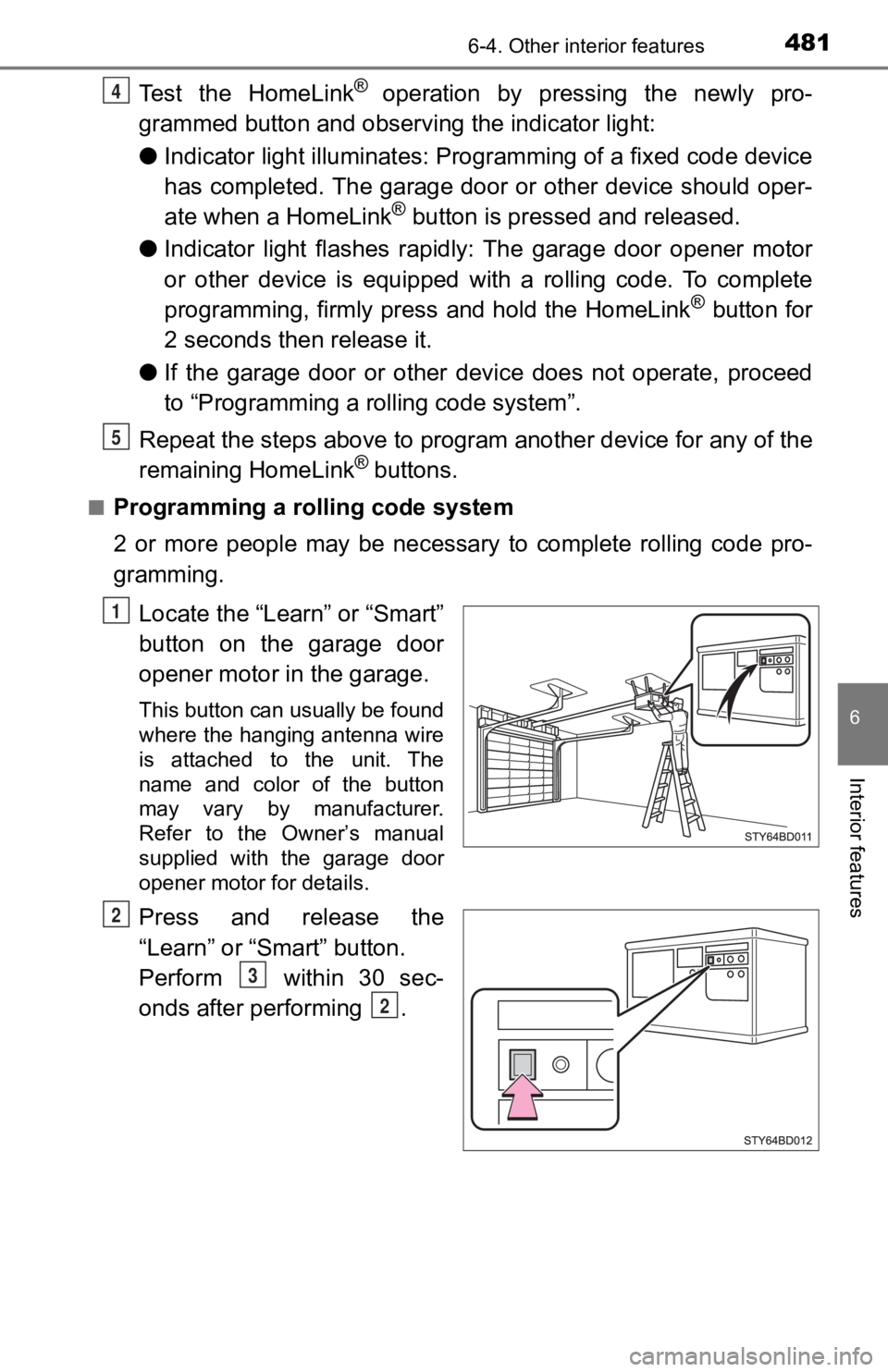
Locate the “Learn” or “Smart”
button on the garage door
opener motor in the garage.
This button can usually be found
where the hanging antenna wire
is attached to the unit. The
name and color of the button
may vary by manufacturer.
Refer to the Owner’s manual
supplied with the garage door
opener motor for details.
Press and release the
“Learn” or “Smart” button.
Perform within 30 sec-
onds after performing .
4
5
1
2
3
2
Page 482 of 700
4826-4. Other interior features
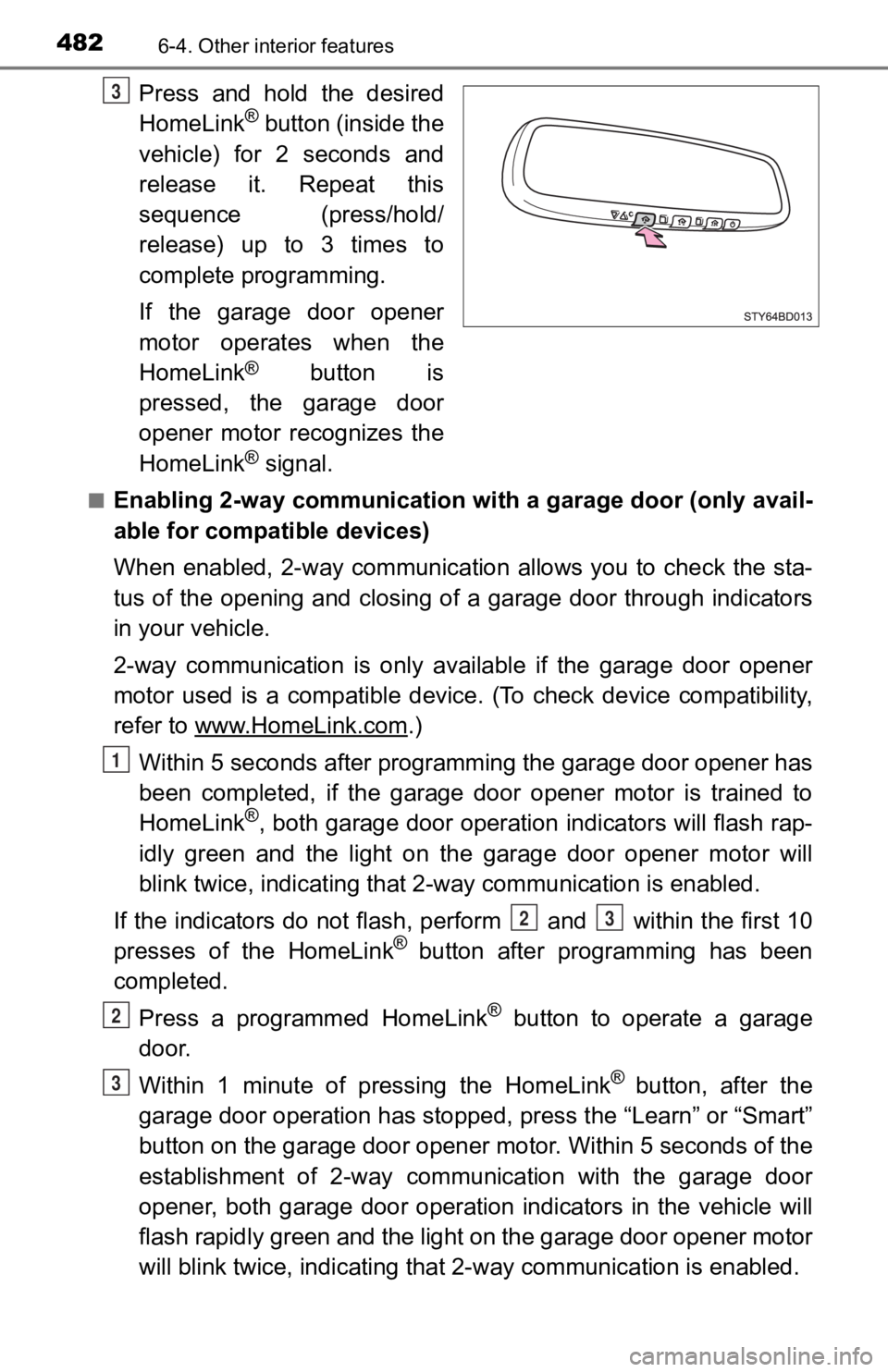
Press and hold the desired
HomeLink® button (inside the
vehicle) for 2 seconds and
release it. Repeat this
sequence (press/hold/
release) up to 3 times to
complete programming.
If the garage door opener
motor operates when the
HomeLink
® button is
pressed, the garage door
opener motor recognizes the
HomeLink
® signal.
■Enabling 2-way communication with a garage door (only avail-
able for compatible devices)
When enabled, 2-way communication allows you to check the sta-
tus of the opening and closing of a garage door through indicat ors
in your vehicle.
2-way communication is only available if the garage door opener
motor used is a compatible device. (To check device compatibility,
refer to www.HomeLink.com
.)
Within 5 seconds after programming the garage door opener has
been completed, if the garage door opener motor is trained to
HomeLink
®, both garage door operation indicators will flash rap-
idly green and the light on the garage door opener motor will
blink twice, indicating that 2 -way communication is enabled.
If the indicators do not flash, perform and within the first 10
presses of the HomeLink
® button after programming has been
completed.
Press a programmed HomeLink
® button to operate a garage
door.
Within 1 minute of pressing the HomeLink
® button, after the
garage door operation has stopped, press the “Learn” or “Smart”
button on the garage door opener motor. Within 5 seconds of the
establishment of 2-way commu nication with the garage door
opener, both garage door operation indicators in the vehicle wi ll
flash rapidly green and the light on the garage door opener mot or
will blink twice, indicating that 2- way communication is enabled.
3
1
23
2
3
Page 483 of 700
4836-4. Other interior features
6
Interior features
■Reprogramming a single HomeLink® button
When the following procedure is performed, buttons which alread y
have devices registered to them can be overwritten:
With one hand, press and hold the desired HomeLink
® button.
When the HomeLink
® indicator starts flas hing orange, release
the HomeLink® button and perform “Programming the Home-
Link®” (it takes 20 seconds for the HomeLink® indicator to
start flashing).
Press the appropriate HomeLink
® button. The HomeLink® indicator
light should turn on.
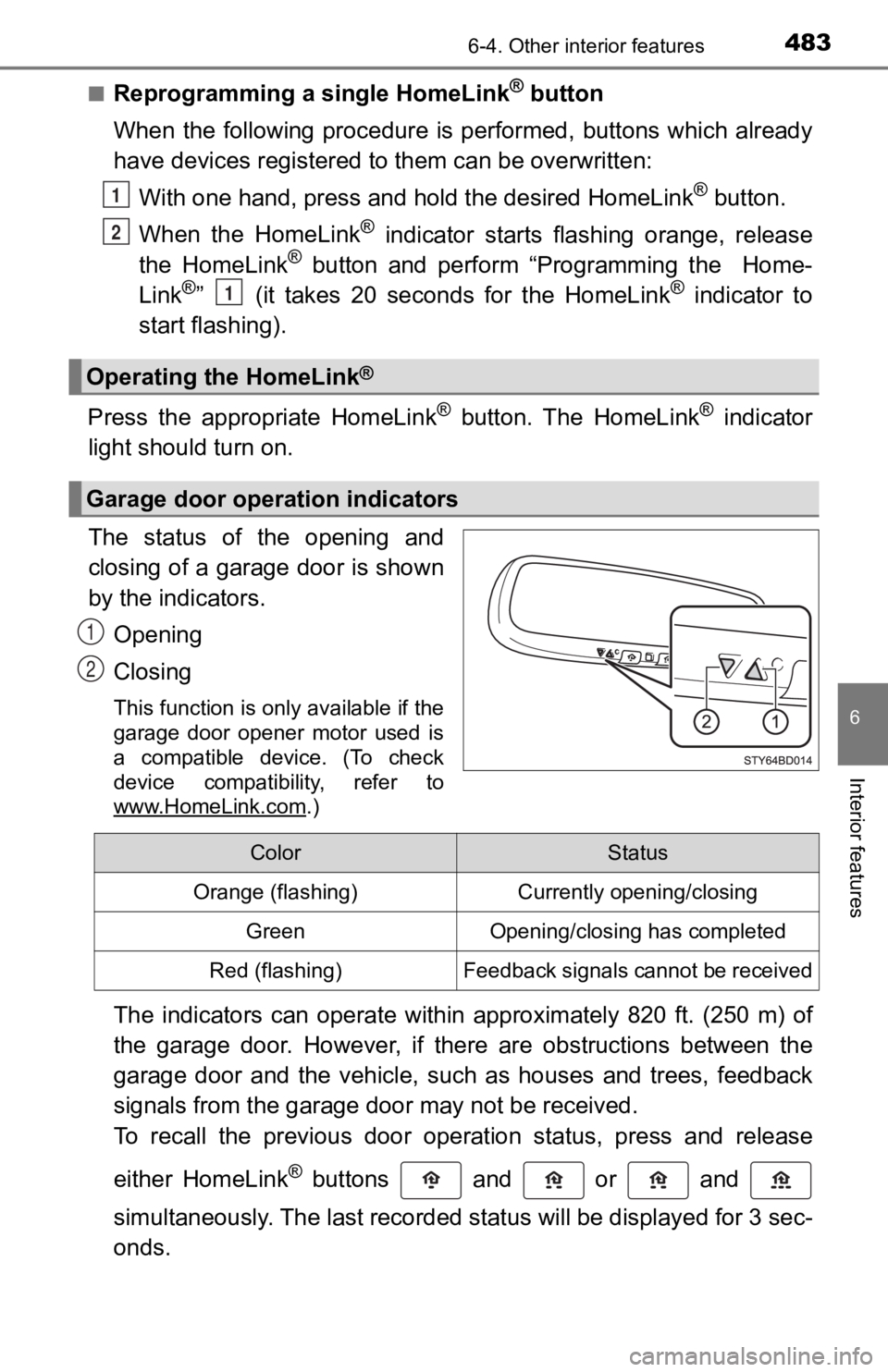
The status of the opening and
closing of a garage door is shown
by the indicators.
Opening
Closing
This function is only available if the
garage door opener motor used is
a compatible device. (To check
device compatibility, refer to
www.HomeLink.com
.)
The indicators can operate within approximately 820 ft. (250 m) of
the garage door. However, if there are obstructions between the
garage door and the vehicle, such as houses and trees, feedback
signals from the garage door may not be received.
To recall the previous door operation status, press and release
either HomeLink
® buttons and or and
simultaneously. The last recorded status will be displayed for 3 sec-
onds.
Operating the HomeLink®
Garage door operation indicators
1
2
1
1
2
ColorStatus
Orange (flashing)Currently opening/closing
GreenOpening/closing has completed
Red (flashing)Feedback signals cannot be received
Page 485 of 700
4856-4. Other interior features
6
Interior features
■Certification for the garage door opener
For vehicles sold in the U.S.A.
FCC ID: NZLAECHL5
NOTE:
This device complies with part 15 of the FCC Rules. Operation is subject to
the following two conditions: (1) This device may not cause har mful interfer-
ence, and (2) this device must accept any interference received, including
interference that may cause undesired operation.
FCC WARNING:
Changes or modifications not expressly approved by the party re sponsible for
compliance could void the user’s authority to operate the equip ment.
For vehicles sold in Canada
NOTE:
This device complies with Industry Canada licence-exempt RSS standard(s).
Operation is subject to the following two conditions: (1) this device may not
cause interference, and (2) this device must accept any interfe rence, includ-
ing interference that may cause undesired operation of the device.
REMARQUE:
Le présent appareil est conforme aux CNR d’Industrie Canada applicables
aux appareils radio exempts de licence. L’exploitation est autorisée aux deux
conditions suivantes: (1) l’appareil ne doit pas produire de brouillage, et (2)
l’utilisateur de l’appareil doit accepter tout brouillage radioélectrique subi,
même si le brouillage est susceptible d’en compromettre le fonctionnement.
■ When support is necessary
Visit on the web at www.homelink.com/toyota
or call 1-800-355-3515.
■ About HomeLink
®
HomeLink and the HomeLink house icon are registered trademarks of Gen-
tex Corporation.
WARNING
■ When programming a garage door or other remote control device
The garage door or other device may operate, so ensure people a nd
objects are out of danger to prevent potential harm.
■ Conforming to federal safety standards
Do not use the HomeLink
® compatible transceiver with any garage door
opener or device that lacks safety stop and reverse features as required by
federal safety standards.
This includes any garage door that cannot detect an interfering object. A
door or device without these features increases the risk of dea th or serious
injury.
■ When operating or programming HomeLink
®
Never allow a child to operate or play with the HomeLink® buttons.
Page 690 of 700
690Alphabetical index
Engine switch (ignition switch)............. 193, 196
Engine switch light
(ignition switch light) ............ 441
Event data recorder (EDR) ........ 10
Flat tire...................................... 597
Floor mats .................................. 24
Fluid Automatic transmission......... 635
Brake .................................... 636
Power steering ...................... 636
Washer ................................. 520
Fog lights ................................. 220 Replacing light bulbs............. 551
Switch ................................... 220
Wattage ................................ 639
Four-wheel drive system ........ 299
Front passenger occupant
classification system .............. 45
Front personal lights ............... 442
Front seats ............................... 131
Adjustment ............................ 131
Cleaning................................ 496
Correct driving posture ........... 26
Head restraints ..................... 136
Seat heaters ......................... 439
Front side marker lights Light switch ........................... 211
Replacing light bulbs............. 549
Wattage ................................ 639
Front turn signal lights Replacing light bulbs............. 550
Turn signal lever ................... 209
Wattage ................................ 639 Fuel ........................................... 630
Capacity................................ 630
Fuel gauge.............................. 90
Fuel pump shut off system ... 567
Information............................ 640
Refueling .............................. 224
Type...................................... 630
Warning light......................... 569
Warning message................. 579
Fuel consumption
Average fuel consumption ................. 95, 101
Current fuel
consumption ................. 95, 101
Fuel filler door ......................... 226
Fuel pump shut off system..... 567
Fuses ........................................ 542
Garage door opener ................ 479
Gas station information .......... 700
Gauges ....................................... 90
Glove box ................................. 445
Grocery bag hooks.................. 460
F
G
Page 696 of 700

696Alphabetical index
Side marker lights ................... 211Light switch ........................... 211
Replacing light bulbs..... 549, 553
Wattage ................................ 639
Side mirrors ............................. 145 Adjusting and folding ............ 145
BSM (Blind spot monitor) ...... 291
Side turn signal lights ............. 209 Replacing light bulbs............. 555
Turn signal lever ................... 209
Smart key system .................... 123 Antenna location ................... 123
Entry functions ...................... 112
Starting the engine................ 196
Warning message ................. 591
Snow tires ................................ 327
Spare tire .................................. 597
Inflation pressure .................. 637
Replacing .............................. 597
Storage location .................... 598
Spark plug ................................ 633
Specifications .......................... 626
Speech command system
*.... 420
Speedometer .............................. 90
Steering Column lock release ..... 194, 199
Warning message ................. 594
Steering wheel
Adjustment .................... 140, 140
Audio remote control switches
*........................... 340
Meter control switches ............ 95 Steering wheel audio
switches
*............................... 340
Stop lights
Replacing light bulbs ............ 553
Wattage ................................ 639
Storage box.............................. 449
Storage feature ........................ 444
Stuck If the vehicle becomes stuck ................................... 622
Sun visors ................................ 462
Switches Active traction control
switch ................................. 308
Audio remote control switches
*........................... 340
Automatic High Beam ........... 215
BSM (Blind spot monitor) main switch ........................ 291
Cargo lamp main switch ....... 443
“CLUTCH START CANCEL” switch ................ 318
Crawl Control switch ............. 314
Cruise control switch ............ 271
Door lock switches................ 113
Dynamic radar cruise control switch ..................... 257
Emergency flashers switch ... 558
Engine switch ............... 193, 196
Fog light switch ..................... 220
Front-wheel drive control
switch ................................. 299
Garage door opener switches ............................. 479