change time TOYOTA TACOMA 2020 Accessories, Audio & Navigation (in English)
[x] Cancel search | Manufacturer: TOYOTA, Model Year: 2020, Model line: TACOMA, Model: TOYOTA TACOMA 2020Pages: 314, PDF Size: 8.85 MB
Page 227 of 314
2297-3. Multi-terrain Monitor
7
Peripheral monitoring system
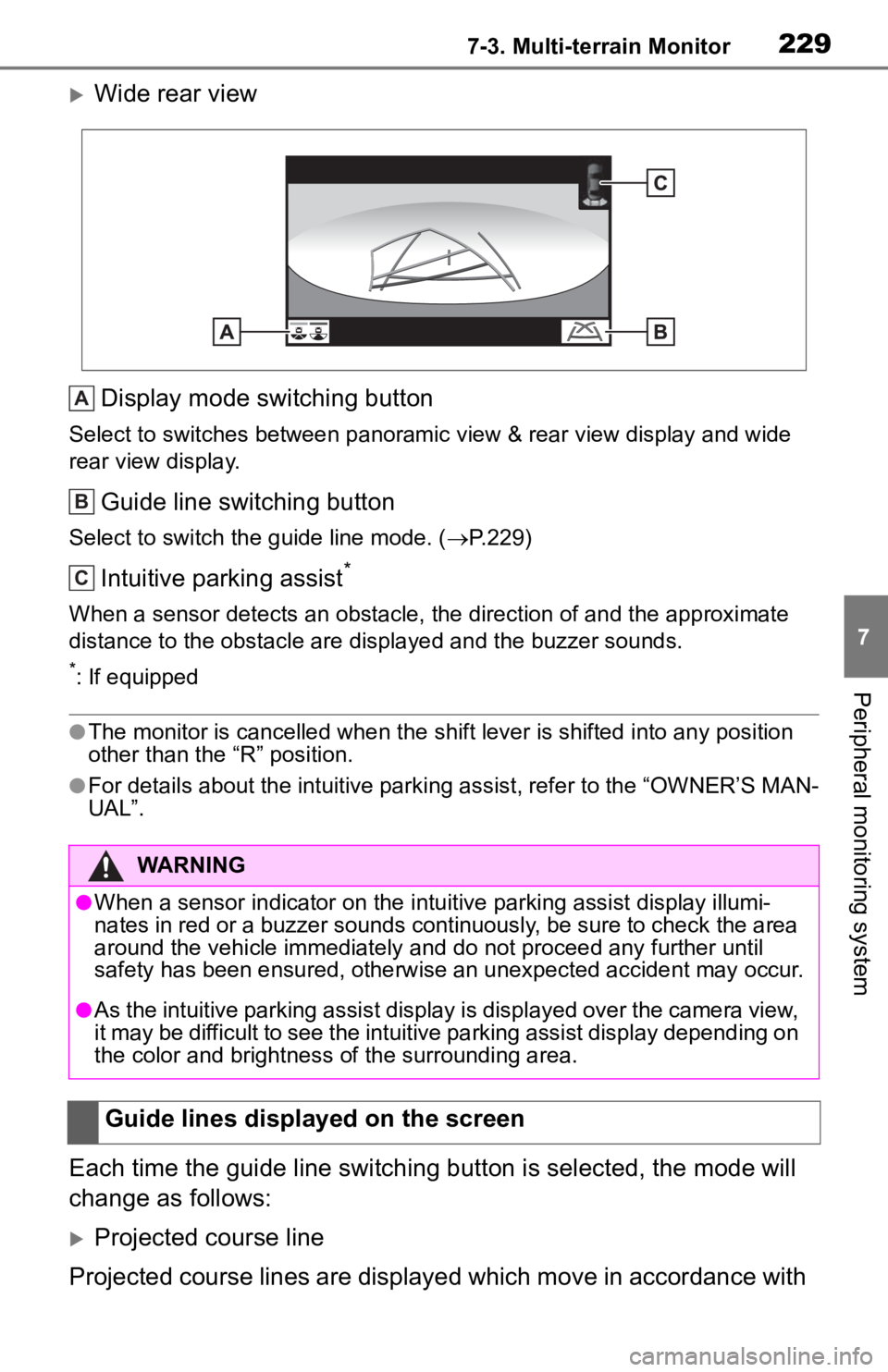
Wide rear viewDisplay mode switching button
Select to switches between panoramic view & rear view display and wide
rear view display.
Guide line switching button
Select to switch t he guide line mode. ( P.229)
Intuitive parking assist*
When a sensor detects an obstacle, the direction of and the app roximate
distance to the obsta cle are displayed and the buzzer sounds.
*: If equipped
●The monitor is cancelled when the shift lever is shifted into any position
other than the “R” position.
●For details about the intuitive parking assist, refer to the “O WNER’S MAN-
UAL”.
Each time the guide line switching button is selected, the mode will
change as follows:
Projected course line
Projected course lines are displayed which move in accordance w ith
WARNING
●When a sensor indicator on the intuitive parking assist display illumi-
nates in red or a buzzer sounds continuously, be sure to check the area
around the vehicle immediately a nd do not proceed any further until
safety has been ensured, otherwise an unexpected accident may o ccur.
●As the intuitive parking assist display is displayed over the c amera view,
it may be difficult to see the intuitive parking assist display depending on
the color and brightness of the surrounding area.
Guide lines displayed on the screen
A
B
C
Page 271 of 314
2738-2. Setup
8
Phone
do so in a quiet area.
“Play”: Select to play the voice tag.
4Select “OK” when voice tag
registration is complete.
■Editing a voice tag
1 Select “Edit”.
2 Select the desired contact to
edit.
3 Follow the steps in “Register-
ing a voice tag” from step 3 .
( P.272)
■Deleting the voice tag
1 Select “Delete”.
2 Select the desired contact
and select “Delete”.
3 Select “Yes” when the confir-
mation screen appears.
●Multiple data can be selected and
deleted at the same time.
●Voice tags are deleted when the
set language of the system is
changed. ( P. 6 0 )
1 Display the phone settings
screen. ( P.265)
2 Select “Messaging”. 3
Select the desired item to be
set.
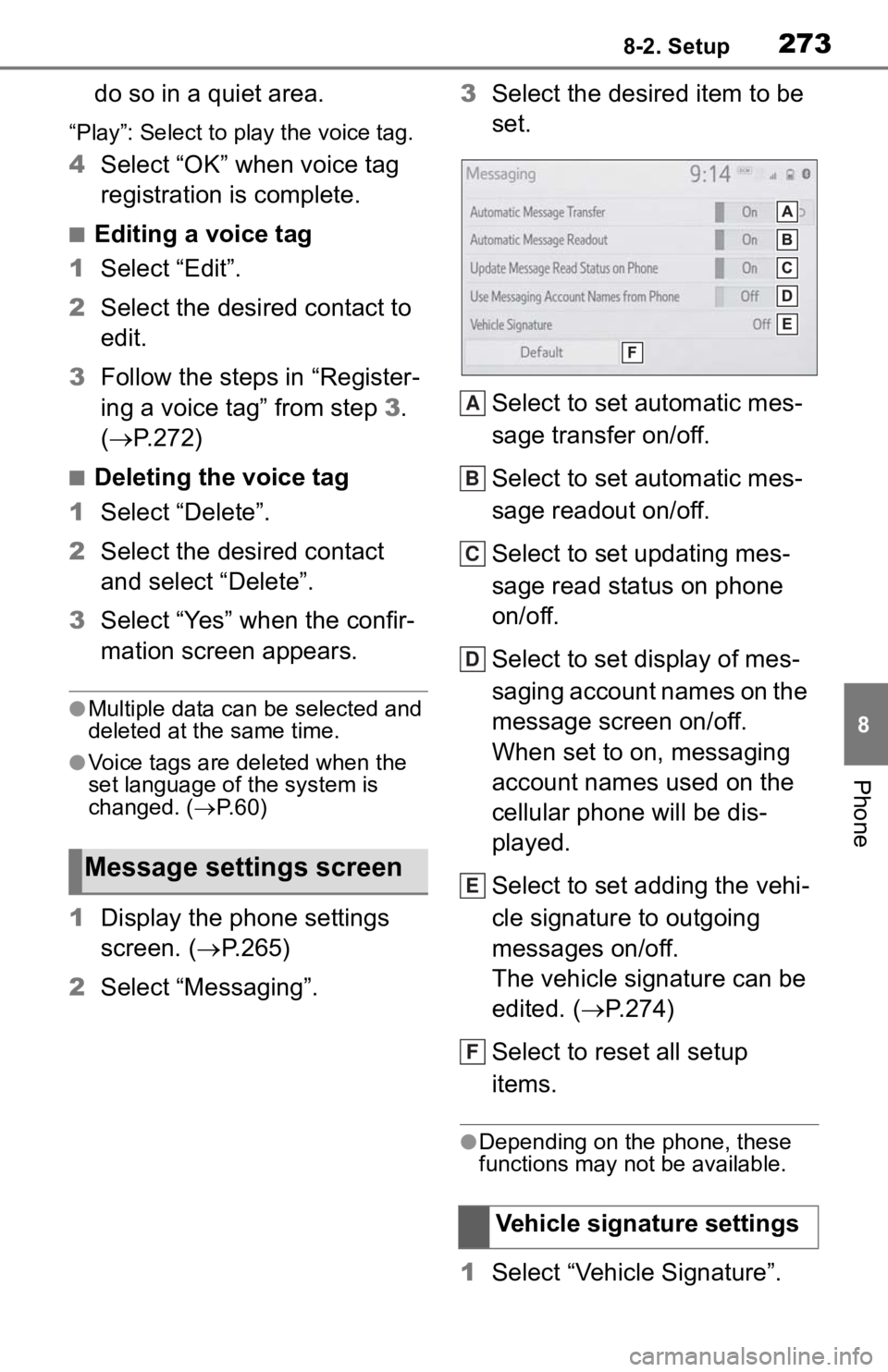
Select to set automatic mes-
sage transfer on/off.
Select to set automatic mes-
sage readout on/off.
Select to set updating mes-
sage read status on phone
on/off.
Select to set display of mes-
saging account names on the
message screen on/off.
When set to on, messaging
account names used on the
cellular phone will be dis-
played.
Select to set adding the vehi-
cle signature to outgoing
messages on/off.
The vehicle signature can be
edited. ( P.274)
Select to reset all setup
items.
●Depending on the phone, these
functions may not be available.
1 Select “Vehicle Signature”.
Message settings screen
Vehicle signature settings
A
B
C
D
E
F
Page 276 of 314
2788-3. What to do if...
■In other situations
The Bluetooth
® connection sta-
tus is displayed at the top of the
screen each time the engine
switch is in ACC or ON.
Even though all conceivable
measures have been taken, the
symptom status does not
change.
●For details, refer to the owner’s
manual that came with the cellular
phone.
Likely causeSolution
Connection con-
firmation display
on this system is
set to on.
To turn off the
display, set con-
nection confir-
mation display
on this system to
off. ( P. 4 6 )
Likely causeSolution
The cellular
phone is not
close enough to
this system.Bring the cellu-
lar phone closer
to this system.
Radio interfer-
ence has
occurred.
Turn off Wi-Fi®
devices or other
devices that may
emit radio
waves.
The cellular
phone is the
most likely cause
of the symptom.
Turn the cellular
phone off,
remove and rein-
stall the battery
pack, and then
restart the cellu-
lar phone.
Enable the cellu-
lar phone’s Blue-
tooth
®
connection.
Disable the Wi-
Fi
® connection of
the cellular
phone.
Stop the cellular
phone’s security
software and
close all applica-
tions.
Before using an
application
installed on the
cellular phone,
carefully check
its source and
how its opera-
tion might affect
this system.
Likely causeSolution