warning TOYOTA TACOMA 2020 Accessories, Audio & Navigation (in English)
[x] Cancel search | Manufacturer: TOYOTA, Model Year: 2020, Model line: TACOMA, Model: TOYOTA TACOMA 2020Pages: 314, PDF Size: 8.85 MB
Page 238 of 314
2407-3. Multi-terrain Monitor
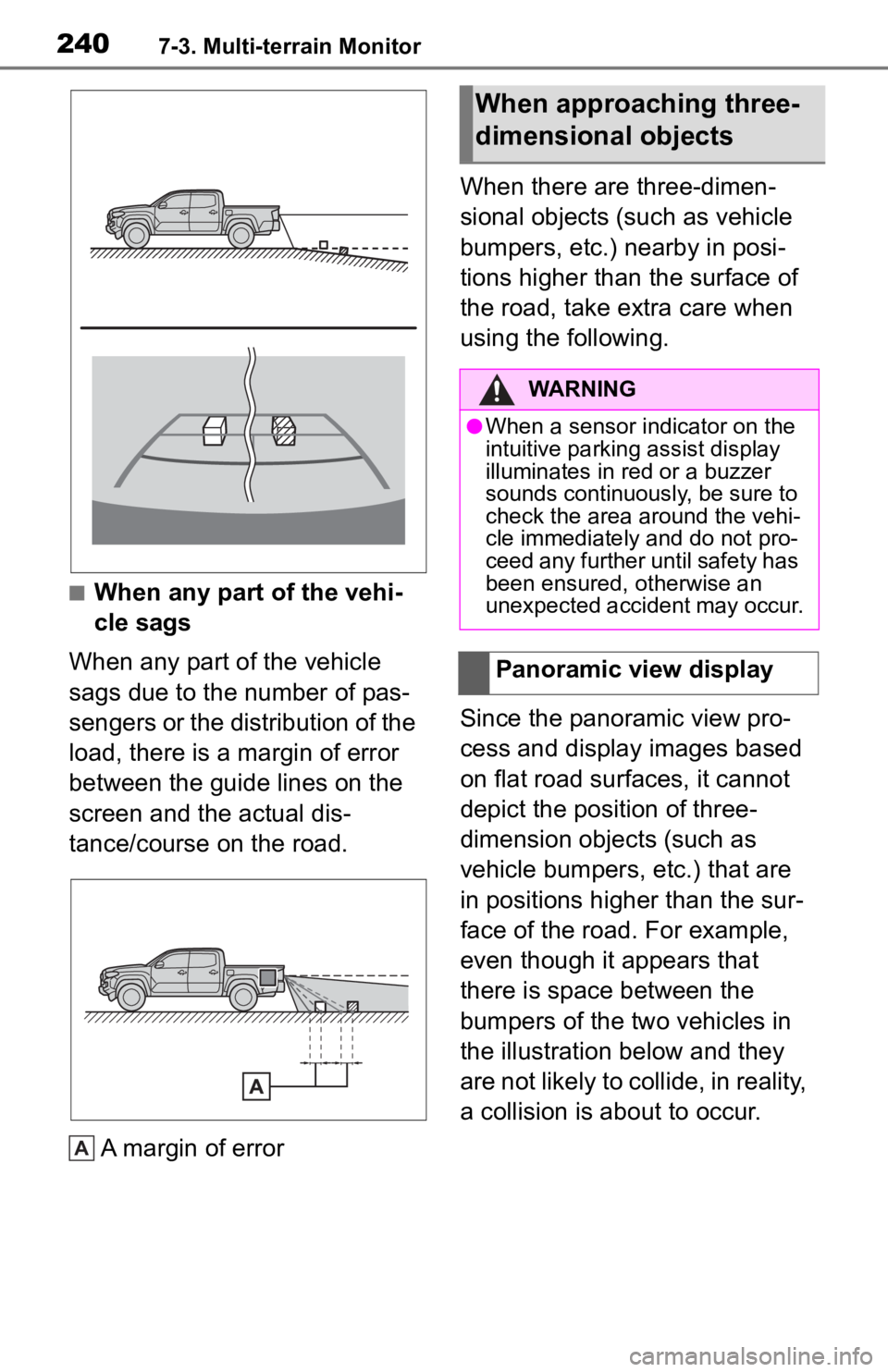
■When any part of the vehi-
cle sags
When any part of the vehicle
sags due to the number of pas-
sengers or the distribution of the
load, there is a margin of error
between the guide lines on the
screen and the actual dis-
tance/course on the road.
A margin of error When there are three-dimen-
sional objects (such as vehicle
bumpers, etc.) nearby in posi-
tions higher than the surface of
the road, take extra care when
using the following.
Since the panoramic view pro-
cess and display images based
on flat road surfaces, it cannot
depict the position of three-
dimension objects (such as
vehicle bumpers, etc.) that are
in positions higher than the sur-
face of the road. For example,
even though it appears that
there is space between the
bumpers of the two vehicles in
the illustration below and they
are not likely to collide, in reality,
a collision is about to occur.
A
When approaching three-
dimensional objects
WARNING
●When a sensor indicator on the
intuitive parking assist display
illuminates in red or a buzzer
sounds continuously, be sure to
check the area around the vehi-
cle immediately and do not pro-
ceed any further until safety has
been ensured, otherwise an
unexpected accident may occur.
Panoramic view display
Page 247 of 314
2498-1. Phone operation (Hands-free system for cellular phones)
8
Phone
●This system is not guaranteed to
operate with all Bluetooth®
devices.
●If your cellular phone does not
support Bluetooth®, this system
cannot function.
●In the following conditions, the
system may not function:
• The cellular phone is turned off.
• The current position is outside the communication area.
• The cellular phone is not con- nected.
• The cellular phone has a low bat-
tery.
●Depending on the type of Blue-
tooth® phone, some function is
not available.
●When using the hands-free sys-
tem or Bluetooth® audio and Wi-
Fi® hotspot functions at the same
time, the following problems may
occur:
• The Bluetooth
® connection may
be cut.
• Noise may be heard on the Blue-
tooth
® audio playback.
• A noise may be heard during
phone calls.
●Bluetooth® uses the 2.4 GHz fre-
quency band. If both a Wi-Fi® con-
nection and Bluetooth®
connection are being used simul-
taneously, each connection may
be affected.
●If a Bluetooth® device is attempt-
ing to connect to the vehicle while
another device is connected as a
Bluetooth
® audio device or con-
nected using the hands-free sys-
tem or Wi-Fi
® hotspot function, the
communication speed may
decrease or malfunctions may
occur, such as image distortion or
audio skipping. If a Bluetooth
®
device is connected to the system,
the interference it may cause will
be reduced. When carrying a
device with its Bluetooth
® connec-
tion enabled, make sure to regis-
ter it to the system and connect it
or disable its Bluetooth
® function.
●When a device is connected via
Bluetooth®, the Bluetooth® icon
on the status bar will be displayed
in blue. ( P. 1 6 )
Some basics
The hands-free system
enables calls to be made
and received without having
to take your hands off the
steering wheel.
This system supports Blue-
tooth
®. Bluetooth® is a wire-
less data system that
enables cellular phones to
be used without being con-
nected by a cable or placed
in a cradle.
The operating procedure of
the phone is explained here.
When an Apple CarPlay
connection is established,
phone functions will be per-
formed by Apple CarPlay
instead of the hands-free
system.
WARNING
●While driving, do not operate a
cellular phone.
Page 248 of 314
2508-1. Phone operation (Hands-free system for cellular phones)
To use the hands-free system
for cellular phones, it is neces-
sary to register a cellular phone
with the system. (P.36)
■Connecting a Bluetooth®
device
Registering an additional
device
1 Display the phone top
screen. ( P.248)
2 Select “Select Device”.
3 Select “Add Device”.
When another Bluetooth
®
device is connected, a confir-
mation screen will be dis-
played. To disconnect the
Bluetooth
® device, select
“Yes”.
4 Follow the steps in “Register-
ing a Bluetooth
® phone for
the first time” from step 5.
( P.36)
Selecting a registered device
1 Display the phone top
screen. ( P.248)
2 Select “Select Device”.
3 Select the desired device to
be connected.
4 Check that a confirmation
screen is displayed when the
connection is complete.
If an error message is dis-
played, follow the guidance
on the screen to try again.
■Bluetooth® phone condition
display
The condition of the Bluetooth
®
phone appears on the upper
right side of the screen. ( P.16)
WARNING
●Your audio unit is fitted with
Bluetooth® antennas. People
with implantable cardiac pace-
makers, cardiac resynchroniza-
tion therapy-pacemakers or
implantable cardioverter defibril-
lators should maintain a reason-
able distance between
themselves and the Bluetooth
®
antennas. The radio waves may
affect the operation of such
devices.
●Before using Bluetooth®
devices, users of any electrical
medical device other than
implantable cardiac pacemak-
ers, cardiac resynchronization
therapy-pacemakers or implant-
able cardioverter defibrillators
should consult the manufacturer
of the device for information
about its operation under the
influence of radio waves. Radio
waves could have unexpected
effects on the operation of such
medical devices.
NOTICE
●Do not leave your cellular phone
in the vehicle. The temperature
inside may rise to a level that
could damage the phone.
Registering/Connecting a
Bluetooth® phone
Page 286 of 314
2889-1. Connected services overview
Service Connect uses DCM to
collect and transmit vehicle data
that allows Toyota to provide:
Vehicle Health Report (VHR)
(Safety Recalls, Service Cam-
paigns, Current Vehicle
Alerts, Required Mainte-
nance, and Vehicle Condition
Status)
Maintenance Notifications
Vehicle Alert Notifications
■Availability of function
Service Connect is available
in the contiguous United
States, Washington D.C.,
Alaska, Hawaii, the United
States Virgin Islands, Puerto
Rico and Canada.
●Availability of fun ctions of the Ser-
vice Connect is dependent on net-
work reception level.
WARNING
●Operating Remote Connect
incorrectly may lead to unfore-
seen accidents or malfunctions.
Check the vehicle condition and
assume full res ponsibility before
using.
Service Connect