change wheel TOYOTA TACOMA 2020 Accessories, Audio & Navigation (in English)
[x] Cancel search | Manufacturer: TOYOTA, Model Year: 2020, Model line: TACOMA, Model: TOYOTA TACOMA 2020Pages: 314, PDF Size: 8.85 MB
Page 142 of 314
1444-4. Audio/visual remote controls
4-4.Audio/visual remote controls
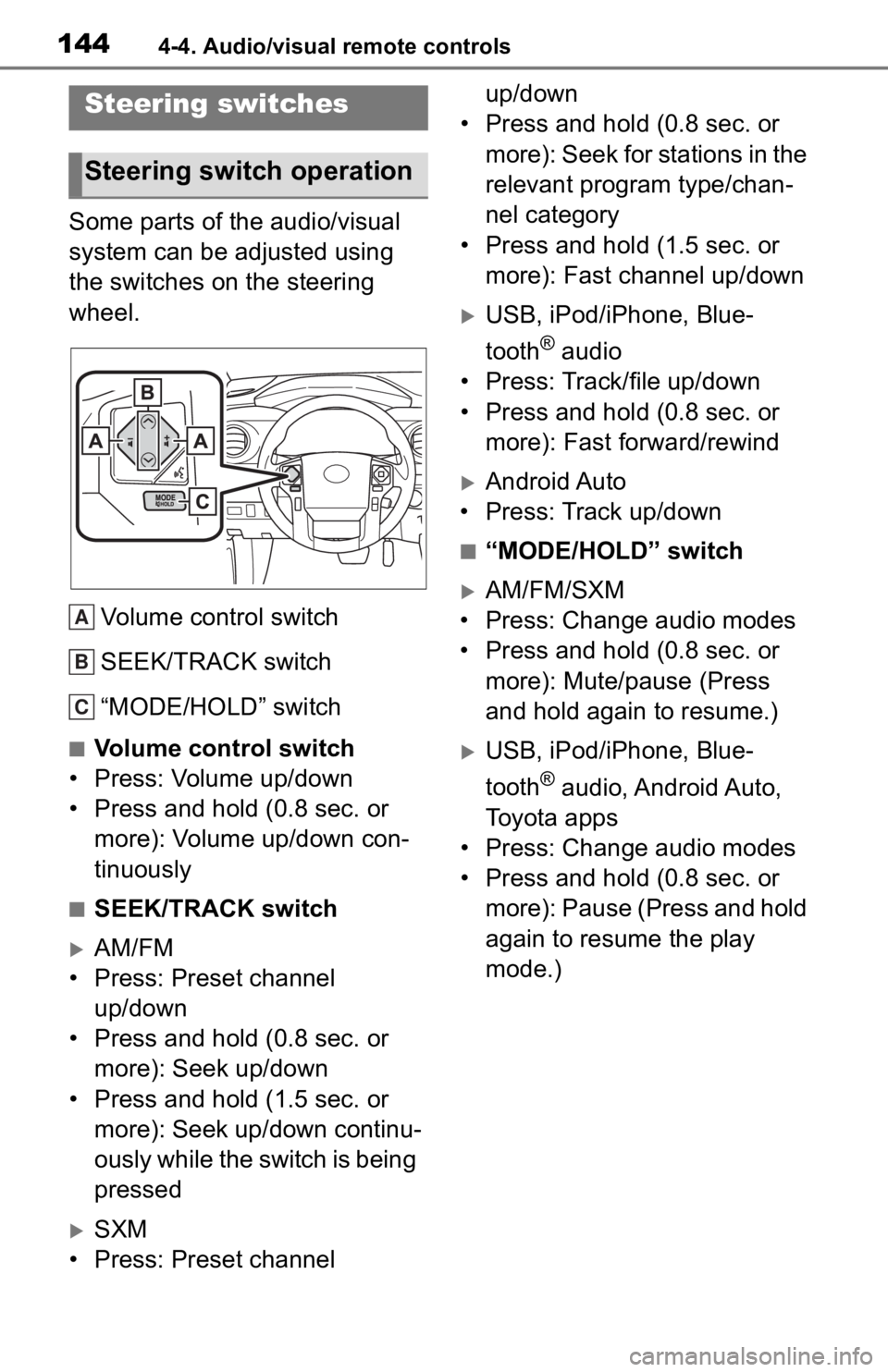
Some parts of the audio/visual
system can be adjusted using
the switches on the steering
wheel.Volume control switch
SEEK/TRACK switch
“MODE/HOLD” switch
■Volume control switch
• Press: Volume up/down
• Press and hold (0.8 sec. or more): Volume up/down con-
tinuously
■SEEK/TRACK switch
AM/FM
• Press: Preset channel up/down
• Press and hold (0.8 sec. or more): Seek up/down
• Press and hold (1.5 sec. or more): Seek up/down continu-
ously while the switch is being
pressed
SXM
• Press: Preset channel up/down
• Press and hold (0.8 sec. or
more): Seek for stations in the
relevant program type/chan-
nel category
• Press and hold (1.5 sec. or more): Fast channel up/down
USB, iPod/iPhone, Blue-
tooth
® audio
• Press: Track/file up/down
• Press and hold (0.8 sec. or more): Fast forward/rewind
Android Auto
• Press: Track up/down
■“MODE/HOLD” switch
AM/FM/SXM
• Press: Change audio modes
• Press and hold (0.8 sec. or more): Mute/pause (Press
and hold again to resume.)
USB, iPod/iPhone, Blue-
tooth
® audio, Android Auto,
Toyota apps
• Press: Change audio modes
• Press and hold (0.8 sec. or more): Pause (Press and hold
again to resume the play
mode.)
Steering switches
Steering switch operation
A
B
C
Page 184 of 314
1867-2. Panoramic view monitor
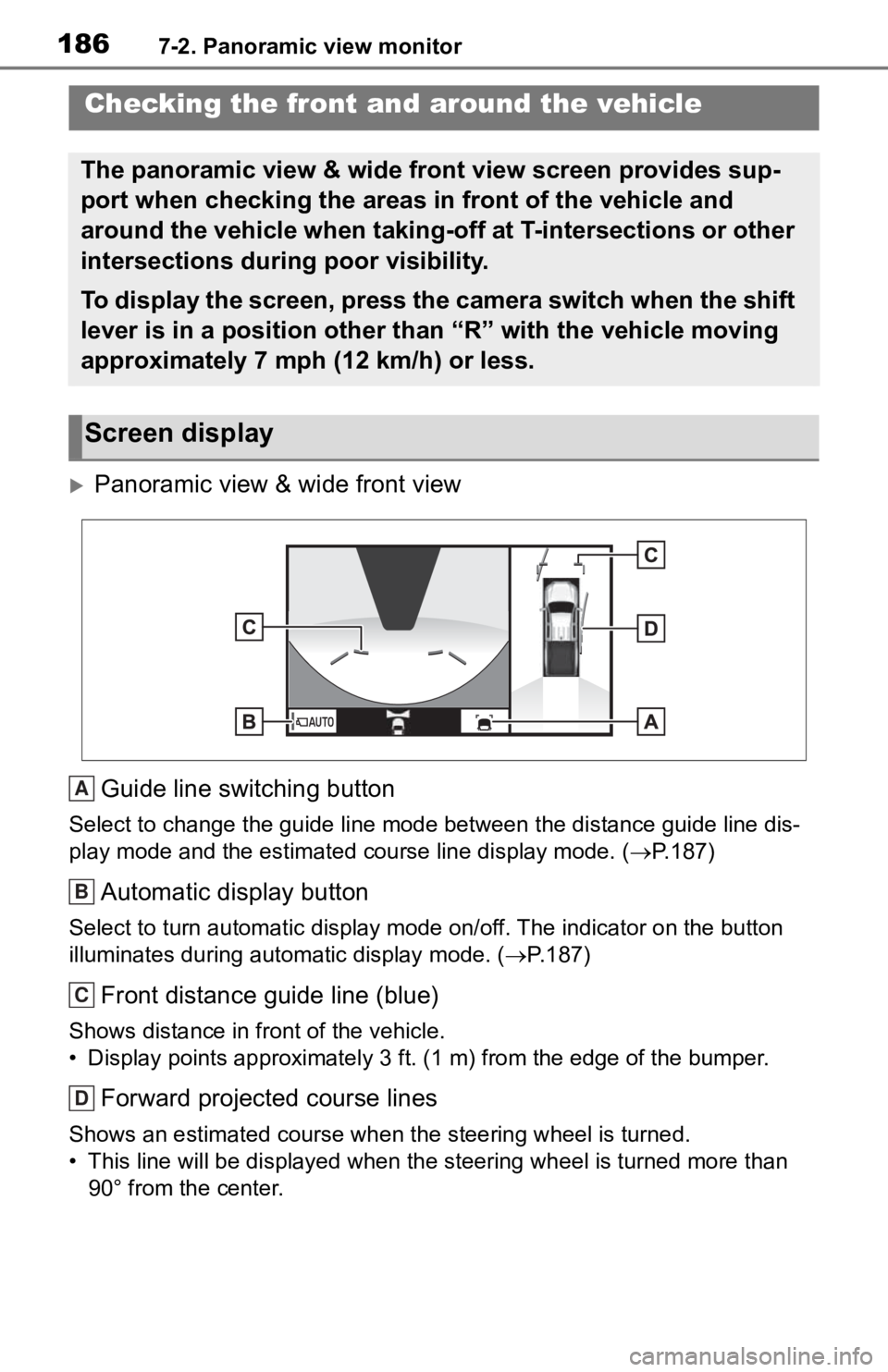
Panoramic view & wide front view
Guide line switching button
Select to change the guide line mode between the distance guide line dis-
play mode and the estimated course line display mode. (P.187)
Automatic display button
Select to turn automatic display mode on/off. The indicator on the button
illuminates during autom atic display mode. (P.187)
Front distance guide line (blue)
Shows distance in front of the vehicle.
• Display points approximately 3 ft. (1 m) from the edge of the bumper.
Forward projected course lines
Shows an estimated course when the steering wheel is turned.
• This line will be displayed when the steering wh eel is turned more than
90° from the center.
Checking the front and around the vehicle
The panoramic view & wide front view screen provides sup-
port when checking the areas in front of the vehicle and
around the vehicle when taking-off at T-intersections or other
intersections during poor visibility.
To display the screen, press the camera switch when the shift
lever is in a position other than “R” with the vehicle moving
approximately 7 mph (12 km/h) or less.
Screen display
A
B
C
D
Page 190 of 314
1927-2. Panoramic view monitor
Intuitive parking assist*
When a sensor detects an obstacle, the direction of and the app roximate
distance to the obsta cle are displayed and the buzzer sounds.
*: If equipped
●The monitor is cancelled when the shift lever is shifted into any position
other than the “R” position.
●For details about the intuitive parking assist, refer to the “O WNER’S MAN-
UAL”.
Each time the guide line switching button is selected, the mode will
change as follows:
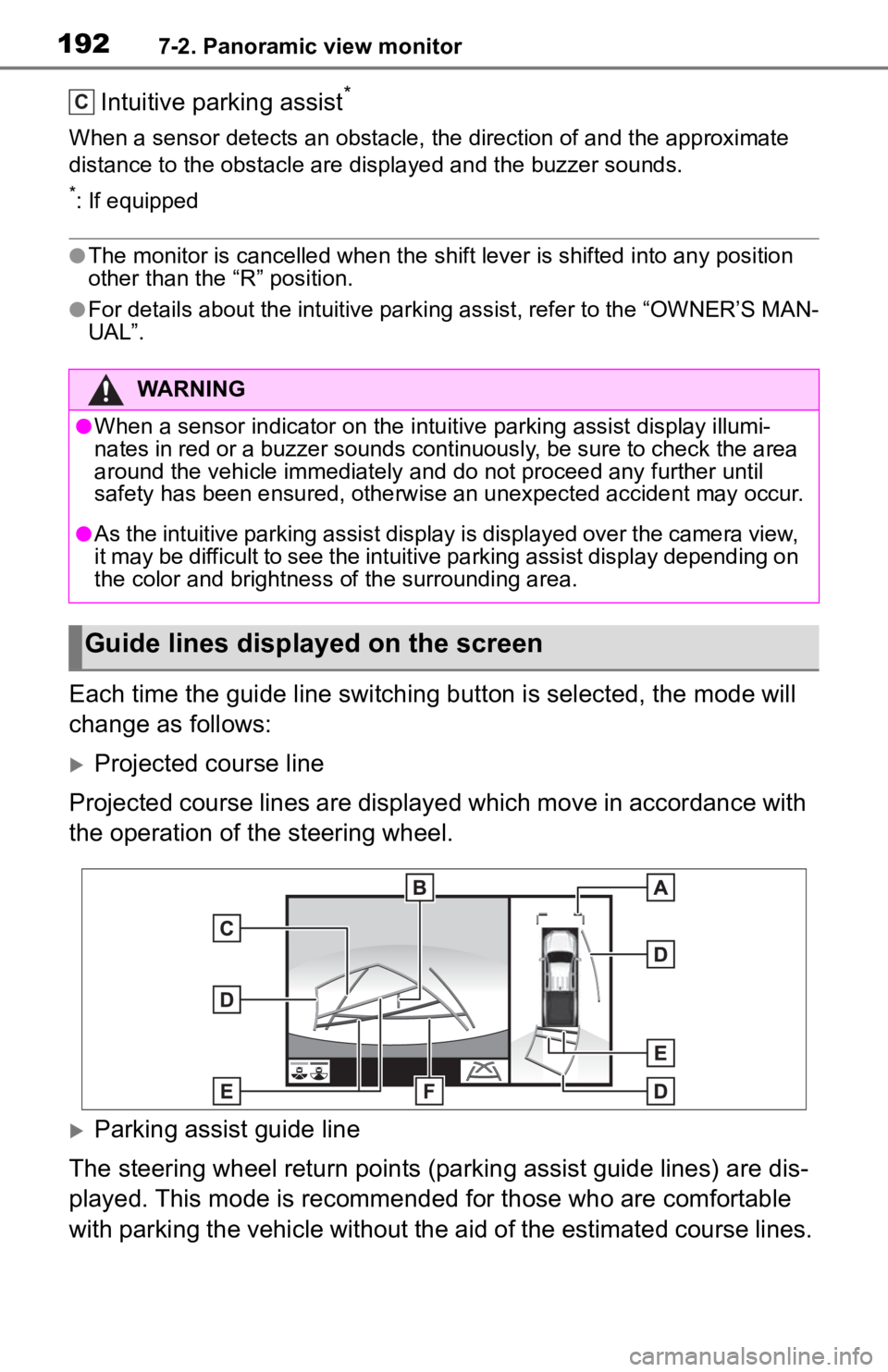
Projected course line
Projected course lines are displayed which move in accordance w ith
the operation of the steering wheel.
Parking assist guide line
The steering wheel return points (parking assist guide lines) are dis-
played. This mode is recommended for those who are comfortable
with parking the vehicle without the aid of the estimated cours e lines.
WARNING
●When a sensor indicator on the intuitive parking assist display illumi-
nates in red or a buzzer sounds continuously, be sure to check the area
around the vehicle immediately a nd do not proceed any further until
safety has been ensured, otherwise an unexpected accident may o ccur.
●As the intuitive parking assist display is displayed over the c amera view,
it may be difficult to see the intuitive parking assist display depending on
the color and brightness of the surrounding area.
Guide lines displayed on the screen
C
Page 192 of 314
1947-2. Panoramic view monitor
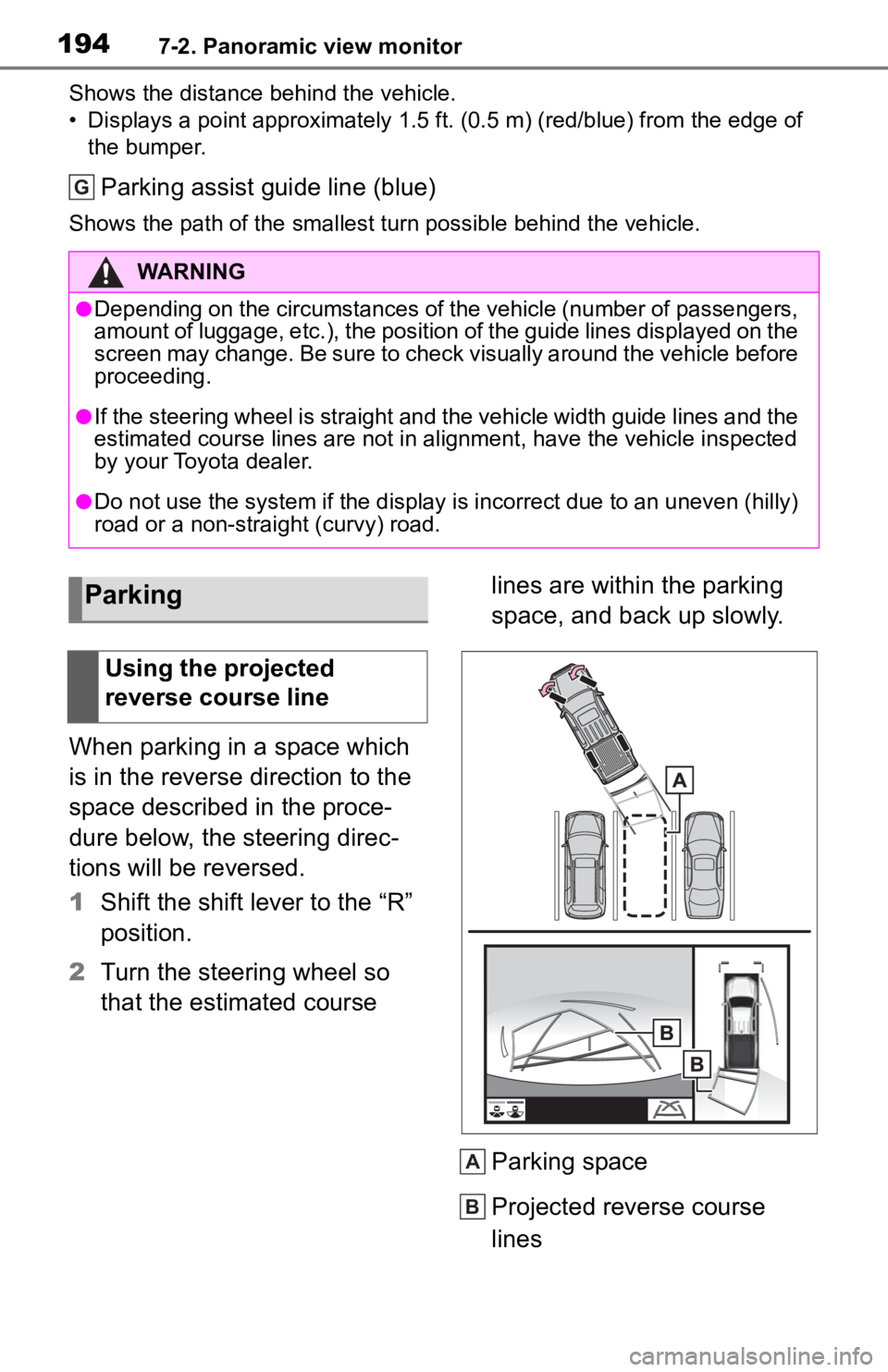
Shows the distance behind the vehicle.
• Displays a point approximately 1.5 ft. (0.5 m) (red/blue) from the edge of
the bumper.
Parking assist guide line (blue)
Shows the path of the smallest turn possible behind the vehicle .
When parking in a space which
is in the reverse direction to the
space described in the proce-
dure below, the steering direc-
tions will be reversed.
1Shift the shift lever to the “R”
position.
2 Turn the steering wheel so
that the estimated course lines are within the parking
space, and back up slowly.
Parking space
Projected reverse course
lines
WARNING
●Depending on the circumstances of the vehicle (number of passen
gers,
amount of luggage, etc.), the position of the guide lines displ ayed on the
screen may change. Be sure to check visually around the vehicle before
proceeding.
●If the steering wheel is straight and the vehicle width guide l ines and the
estimated course lines are not in alignment, have the vehicle i nspected
by your Toyota dealer.
●Do not use the system if the display is incorrect due to an une ven (hilly)
road or a non-straight (curvy) road.
G
Parking
Using the projected
reverse course line
A
B
Page 223 of 314
2257-3. Multi-terrain Monitor
7
Peripheral monitoring system
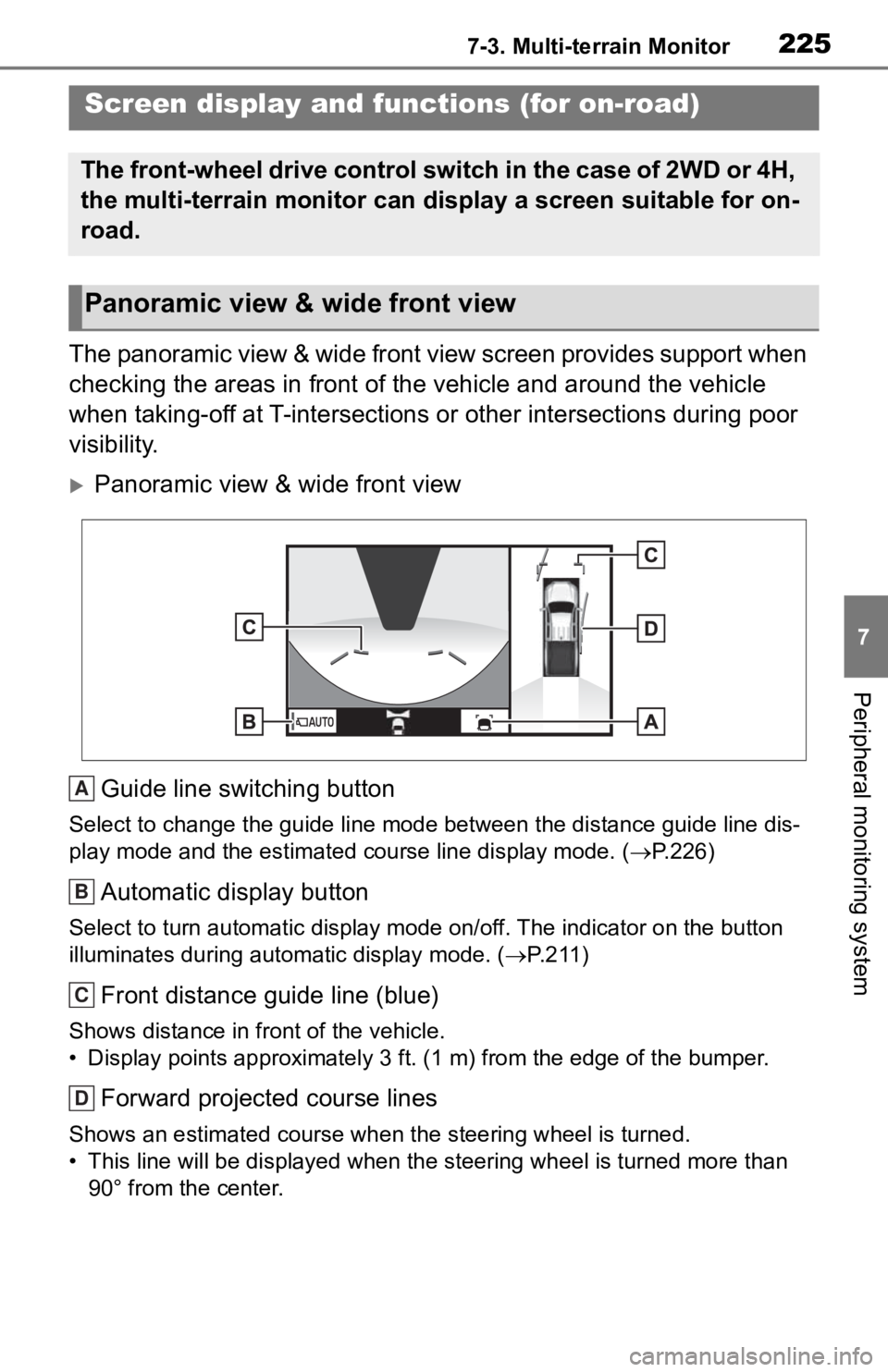
The panoramic view & wide front view screen provides support when
checking the areas in front of the vehicle and around the vehic le
when taking-off at T-intersections or other intersections during poor
visibility.
Panoramic view & wide front view
Guide line switching button
Select to change the guide line mode between the distance guide line dis-
play mode and the estimated course line display mode. (P.226)
Automatic display button
Select to turn automatic display mode on/off. The indicator on the button
illuminates during autom atic display mode. (P.211)
Front distance guide line (blue)
Shows distance in front of the vehicle.
• Display points approximately 3 ft. (1 m) from the edge of the bumper.
Forward projected course lines
Shows an estimated course when the steering wheel is turned.
• This line will be displayed when the steering wh eel is turned more than
90° from the center.
Screen display and functions (for on-road)
The front-wheel drive control switch in the case of 2WD or 4H,
the multi-terrain monitor can display a screen suitable for on-
road.
Panoramic view & wide front view
A
B
C
D
Page 229 of 314
2317-3. Multi-terrain Monitor
7
Peripheral monitoring system
Vehicle center line (blue)
The line indicates the estimated vehicle center on the ground.
Rear vehicle width extension guide lines
Displays a guide path when the vehicle is being backed straight up.
Projected reverse course line (yellow)
Shows an estimated course when the steering wheel is turned.
Rear distance guide line
Shows the distance behind the vehicle when the steering wheel is turned.
• The guide lines move in conjunc tion with the estimated course lines.
• The guide lines display points approximately 1. 5 ft. (0.5 m) (red) and
approximately 3 ft. (1 m) (yello w) from the center of the edge of the
bumper.
Rear distance guide line (blue)
Shows the distance behind the vehicle.
• Displays a point approximately 1.5 ft. (0.5 m) (red/blue) from the edge of
the bumper.
Parking assist guide line (blue)
Shows the path of the smallest turn possible behind the vehicle .
When parking in a space which
is in the reverse direction to the
space described in the proce-dure below, the steering direc-
tions will be reversed.
1
Shift the shift lever to the “R”
position.
2 Turn the steering wheel so
that the estimated course
WARNING
●Depending on the circumstances of the vehicle (number of passen gers,
amount of luggage, etc.), the position of the guide lines displ ayed on the
screen may change. Be sure to check visually around the vehicle before
proceeding.
●If the steering wheel is straight and the vehicle width guide l ines and the
estimated course lines are not in alignment, have the vehicle i nspected
by your Toyota dealer.
●Do not use the system if the display is incorrect due to an une ven (hilly)
road or a non-straight (curvy) road.
B
C
D
E
F
G
Parking
Using the projected reverse
course line