steering wheel TOYOTA TACOMA 2020 Accessories, Audio & Navigation (in English)
[x] Cancel search | Manufacturer: TOYOTA, Model Year: 2020, Model line: TACOMA, Model: TOYOTA TACOMA 2020Pages: 314, PDF Size: 8.85 MB
Page 35 of 314
352-1. Basic information before operation
2
Basic function
Linking multi-infor ma-
tion display and the
system
The following functions of
the system are linked with
the multi-information dis-
play in the instrument clus-
ter:
Audio
Phone
*
etc.
These functions can be
operated using the multi-
information display control
switches on the steering
wheel. For details, refer to
“OWNER’S MANUAL”.
*: When an Apple CarPlay con-
nection is established, this
function will be unavailable.
Page 118 of 314
1204-1. Basic operation
4-1.Basic operation
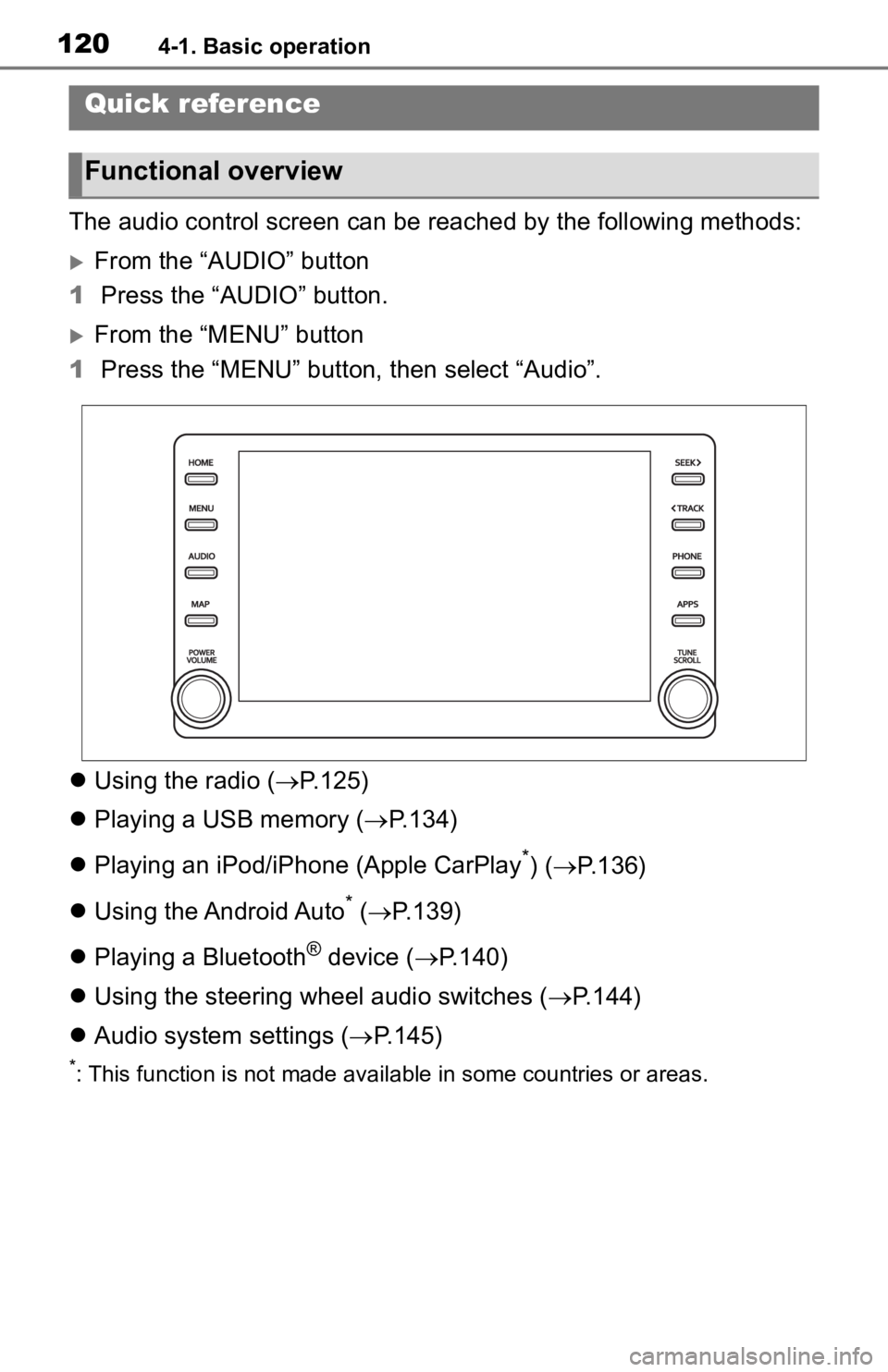
The audio control screen can be reached by the following methods:
From the “AUDIO” button
1 Press the “AUDIO” button.
From the “MENU” button
1 Press the “MENU” button, then select “Audio”.
Using the radio ( P.125)
Playing a USB memory ( P.134)
Playing an iPod/iPhone (Apple CarPlay
*) ( P.136)
Using the Android Auto
* ( P.139)
Playing a Bluetooth
® device ( P.140)
Using the steering wheel audio switches ( P.144)
Audio system settings ( P.145)
*: This function is not made availa ble in some countries or areas.
Quick reference
Functional overview
Page 131 of 314
1334-2. Radio operation
4
Audio/visual system
*: This function is not made avail-able in some countries or areas.
1 Display the audio source
selection screen. ( P.121)
2 Select the desired application
screen button.
The internet radio application
screen is displayed.
Perform operations accord-
ing to the displayed applica-
tion screen.
For the instrument panel
operation method: P.121
If a compatible phone is
already registered, it will be
connected automatically.
●Other applications can be acti-
vated while listening to internet
radio.
●Some parts of applications can be
adjusted using the switches on the
steering wheel.
●For additional info rmation, refer to
https://www.toyota.com/audio-
multimedia or call
1-800-331-4331 in the United
States,
https://www.toyota.ca/connected
or call
1-888-869-6828 in Canada, and
http://www.toyotapr.com/audio-
multimedia or call
1-877-855-8377 in Puerto Rico.
Internet radio*
One of Toyota apps features
is the ability to listen to
internet radio. In order to
use this service, a compati-
ble phone and the system
needs to be set up. For
details: P.289
Listening to internet radio
Page 142 of 314
1444-4. Audio/visual remote controls
4-4.Audio/visual remote controls
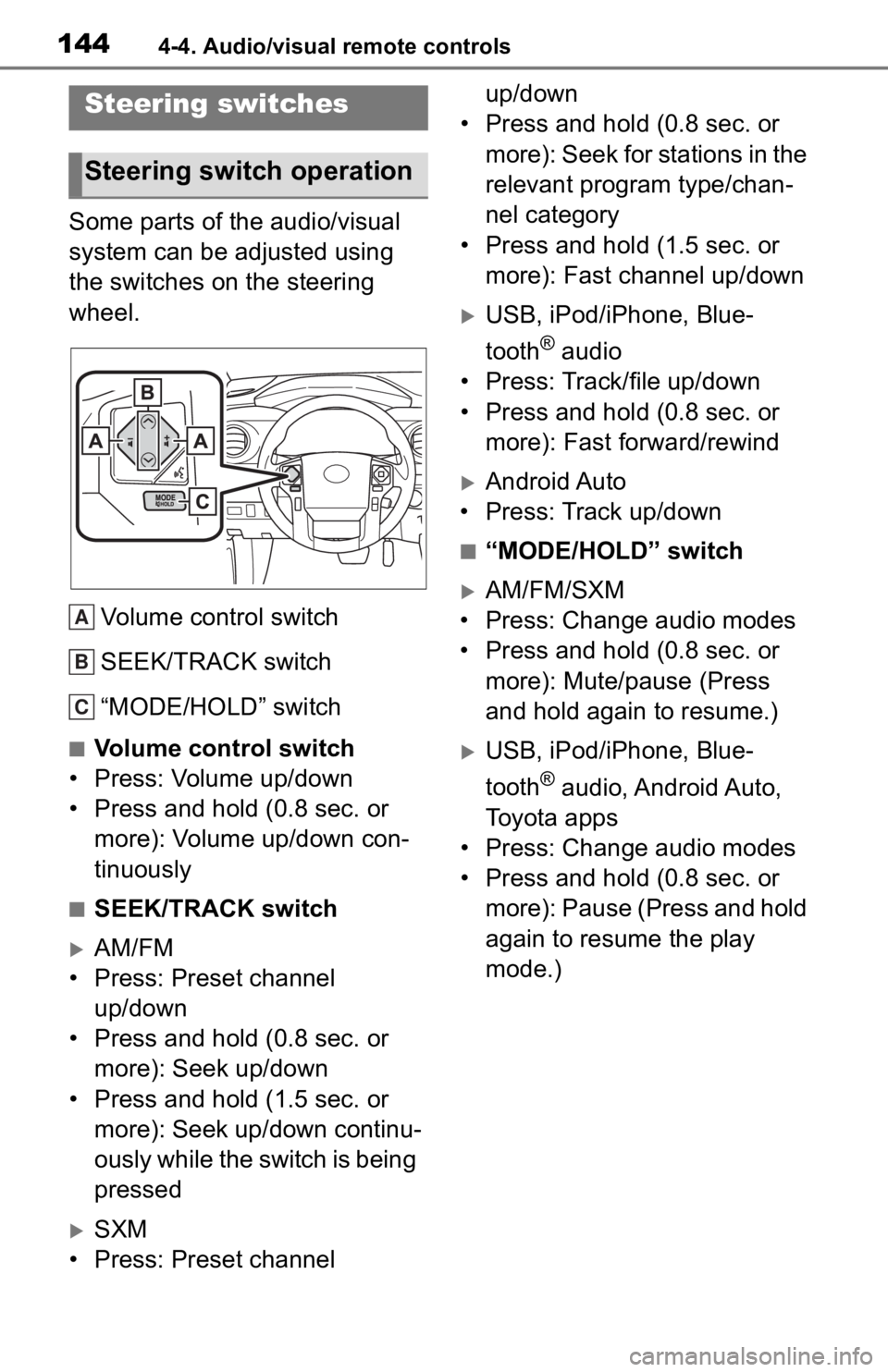
Some parts of the audio/visual
system can be adjusted using
the switches on the steering
wheel.Volume control switch
SEEK/TRACK switch
“MODE/HOLD” switch
■Volume control switch
• Press: Volume up/down
• Press and hold (0.8 sec. or more): Volume up/down con-
tinuously
■SEEK/TRACK switch
AM/FM
• Press: Preset channel up/down
• Press and hold (0.8 sec. or more): Seek up/down
• Press and hold (1.5 sec. or more): Seek up/down continu-
ously while the switch is being
pressed
SXM
• Press: Preset channel up/down
• Press and hold (0.8 sec. or
more): Seek for stations in the
relevant program type/chan-
nel category
• Press and hold (1.5 sec. or more): Fast channel up/down
USB, iPod/iPhone, Blue-
tooth
® audio
• Press: Track/file up/down
• Press and hold (0.8 sec. or more): Fast forward/rewind
Android Auto
• Press: Track up/down
■“MODE/HOLD” switch
AM/FM/SXM
• Press: Change audio modes
• Press and hold (0.8 sec. or more): Mute/pause (Press
and hold again to resume.)
USB, iPod/iPhone, Blue-
tooth
® audio, Android Auto,
Toyota apps
• Press: Change audio modes
• Press and hold (0.8 sec. or more): Pause (Press and hold
again to resume the play
mode.)
Steering switches
Steering switch operation
A
B
C
Page 165 of 314
1675-2. Mobile Assistant operation
5
Voice command system
5-2.Mobile Assistant operation
*: For countries or areas where
Apple CarPlay/Android Auto is
not available
Mobile Assist supports the Siri
Eyes Free Mode and Google
App. The available features and
functions may vary based on the
iOS/Android version installed on
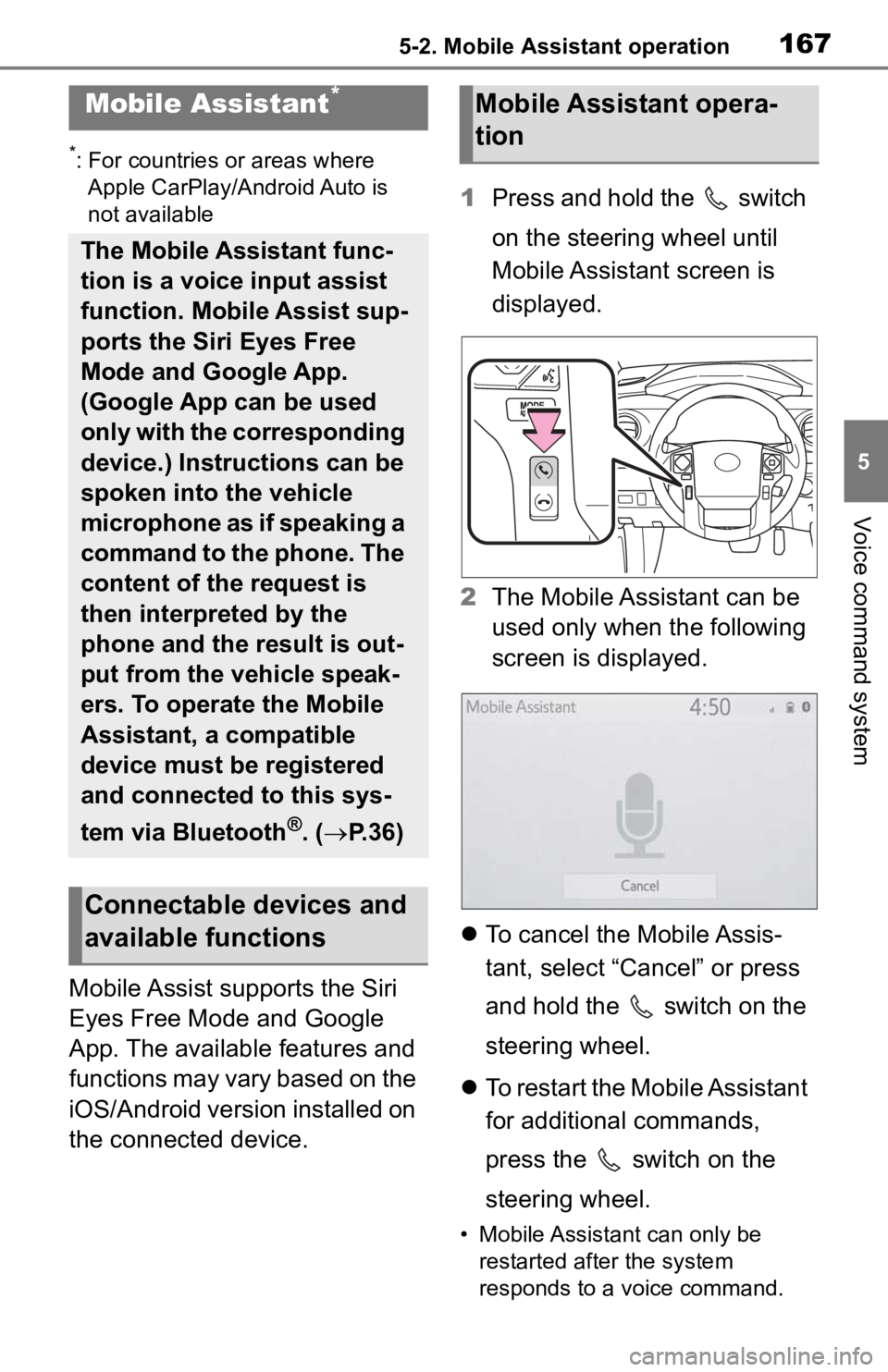
the connected device. 1
Press and hold the switch
on the steering wheel until
Mobile Assistant screen is
displayed.
2 The Mobile Assistant can be
used only when the following
screen is displayed.
To cancel the Mobile Assis-
tant, select “Cancel” or press
and hold the switch on the
steering wheel.
To restart the Mobile Assistant
for additional commands,
press the switch on the
steering wheel.
• Mobile Assistant can only be
restarted after the system
responds to a voice command.
Mobile Assistant*
The Mobile Assistant func-
tion is a voice input assist
function. Mobile Assist sup-
ports the Siri Eyes Free
Mode and Google App.
(Google App can be used
only with the corresponding
device.) Instructions can be
spoken into the vehicle
microphone as if speaking a
command to the phone. The
content of the request is
then interpreted by the
phone and the result is out-
put from the vehicle speak-
ers. To operate the Mobile
Assistant, a compatible
device must be registered
and connected to this sys-
tem via Bluetooth
®. ( P.36)
Connectable devices and
available functions
Mobile Assistant opera-
tion
Page 166 of 314

1685-2. Mobile Assistant operation
• After some phone and music commands, the Mobile Assistant
feature will automatically end to
complete the re quested action.
The volume of the Mobile
Assistant can be adjusted
using the “POWER VOLUME”
knob or steering wheel vol-
ume control switches. The
Mobile Assistant and phone
call volumes are synchro-
nized.
●While a phone call is active, the
Mobile Assistant cannot be used.
●If using the navig ation feature of
the cellular phone, ensure the
active audio source is Bluetooth
®
audio or iPod in order to hear turn
by turn direction prompts.
●Wait for the listening beeps before
using the Mobile Assistant.
●The Mobile Assistant may not rec-
ognize commands in the following
situations:
• Spoken too quickly.
• Spoken at a low or high volume.
• The roof or windows are open.
• Passengers are talking while the
Mobile Assistant is being used.
• The fan speed of the air condition-
ing system is set at high.
• The air conditioning vents are turned toward the microphone.
Page 172 of 314
1747-1. Rear view monitor system
7-1.Rear view monitor system
*: If equipped
●The screen illustrations used in
this text are intended as exam-
ples, and may differ from the
image that is actually displayed on
the screen.
The rear view monitor system is
a supplemental device intended
to assist the driver when back-
ing up. When backing up, be
sure to visually check all around
the vehicle both directly and
using the mirrors before pro-
ceeding. If you do not, you may
hit another vehicle, and could
possibly cause an accident.
Pay attention to the following
precautions when using the rear
view monitor system.
Rear view monitor sys-
tem
*
The rear view monitor sys-
tem assists the driver by
displaying an image of the
view behind the vehicle with
fixed guide lines on the
screen while backing up, for
example while parking.
Driving precautions
WARNING
●Never depend on the rear view
monitor system entirely when
backing up. The image and the
position of the guide lines dis-
played on the screen may differ
from the actual state.
Use caution, just as you would
when backing up any vehicle.
●Be sure to back up slowly,
depressing the brake pedal to
control vehicle speed.
●The instructions given are only
guide lines. When and how
much to turn the steering wheel
will vary according to traffic con-
ditions, road surface condi-
tions, vehicle condition, etc.
when parking. It is necessary to
be fully aware o f this before
using the rear view monitor sys-
tem.
●When parking, be sure to check
that the parking space will
accommodate your vehicle
before maneuvering into it.
●Do not use the rear view moni-
tor system in t he following
cases:
• On icy or slick road surfaces, or in snow
• When using tire chains or emer- gency tires
• When the tailgate is not closed completely
• On roads that are not flat or straight, such as curves or
slopes
Page 184 of 314
1867-2. Panoramic view monitor
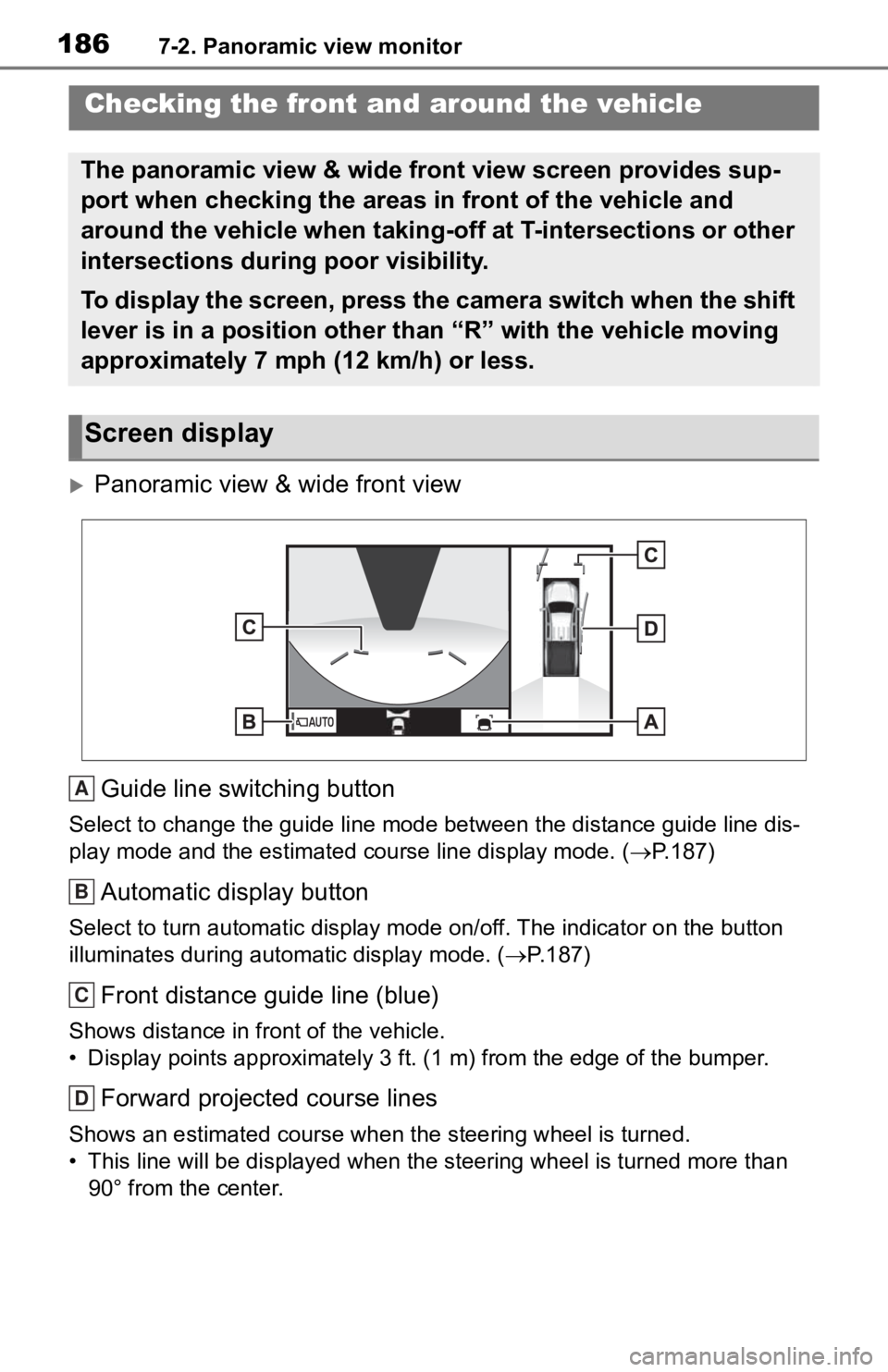
Panoramic view & wide front view
Guide line switching button
Select to change the guide line mode between the distance guide line dis-
play mode and the estimated course line display mode. (P.187)
Automatic display button
Select to turn automatic display mode on/off. The indicator on the button
illuminates during autom atic display mode. (P.187)
Front distance guide line (blue)
Shows distance in front of the vehicle.
• Display points approximately 3 ft. (1 m) from the edge of the bumper.
Forward projected course lines
Shows an estimated course when the steering wheel is turned.
• This line will be displayed when the steering wh eel is turned more than
90° from the center.
Checking the front and around the vehicle
The panoramic view & wide front view screen provides sup-
port when checking the areas in front of the vehicle and
around the vehicle when taking-off at T-intersections or other
intersections during poor visibility.
To display the screen, press the camera switch when the shift
lever is in a position other than “R” with the vehicle moving
approximately 7 mph (12 km/h) or less.
Screen display
A
B
C
D
Page 190 of 314
1927-2. Panoramic view monitor
Intuitive parking assist*
When a sensor detects an obstacle, the direction of and the app roximate
distance to the obsta cle are displayed and the buzzer sounds.
*: If equipped
●The monitor is cancelled when the shift lever is shifted into any position
other than the “R” position.
●For details about the intuitive parking assist, refer to the “O WNER’S MAN-
UAL”.
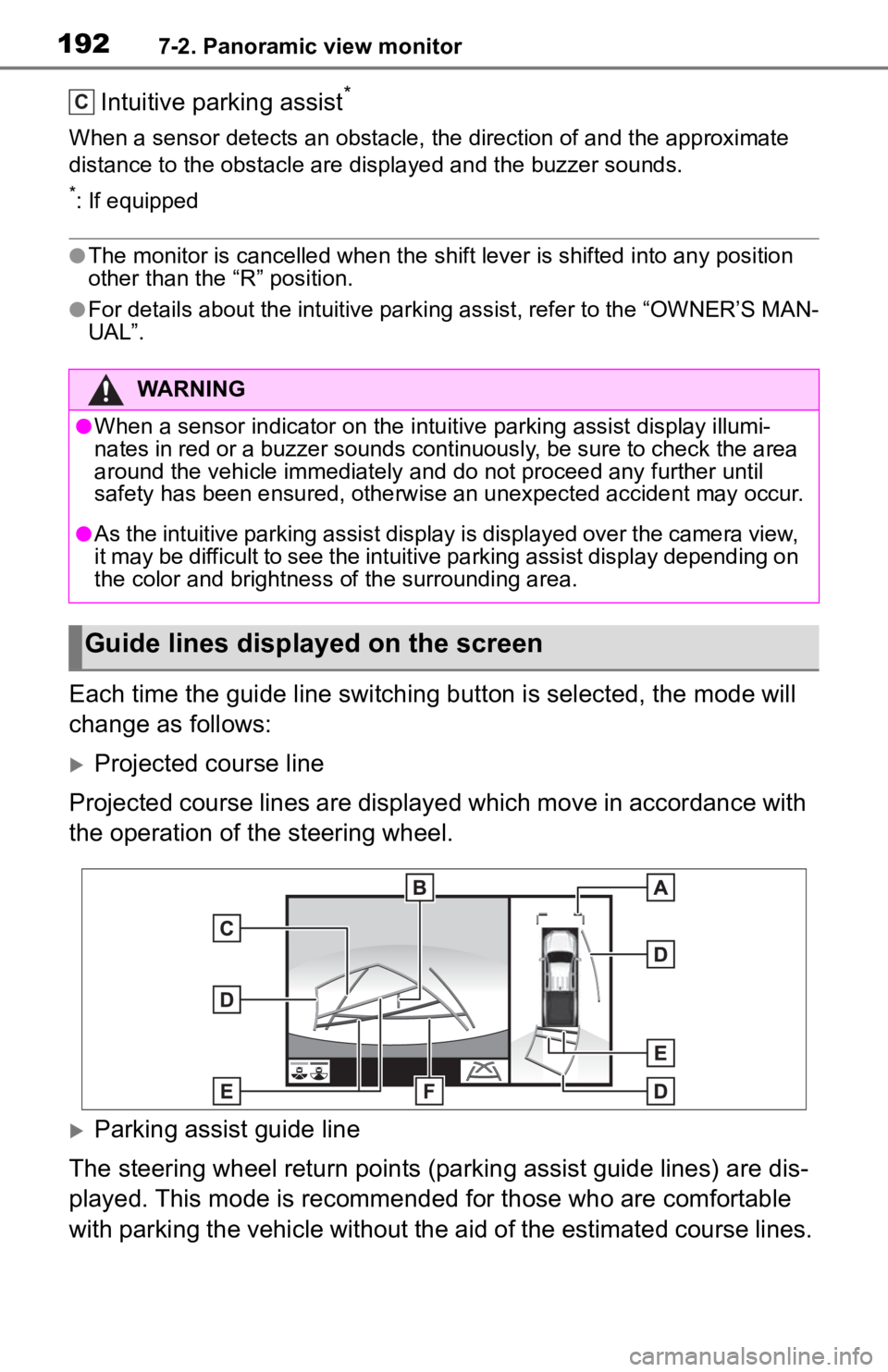
Each time the guide line switching button is selected, the mode will
change as follows:
Projected course line
Projected course lines are displayed which move in accordance w ith
the operation of the steering wheel.
Parking assist guide line
The steering wheel return points (parking assist guide lines) are dis-
played. This mode is recommended for those who are comfortable
with parking the vehicle without the aid of the estimated cours e lines.
WARNING
●When a sensor indicator on the intuitive parking assist display illumi-
nates in red or a buzzer sounds continuously, be sure to check the area
around the vehicle immediately a nd do not proceed any further until
safety has been ensured, otherwise an unexpected accident may o ccur.
●As the intuitive parking assist display is displayed over the c amera view,
it may be difficult to see the intuitive parking assist display depending on
the color and brightness of the surrounding area.
Guide lines displayed on the screen
C
Page 191 of 314
1937-2. Panoramic view monitor
7
Peripheral monitoring system
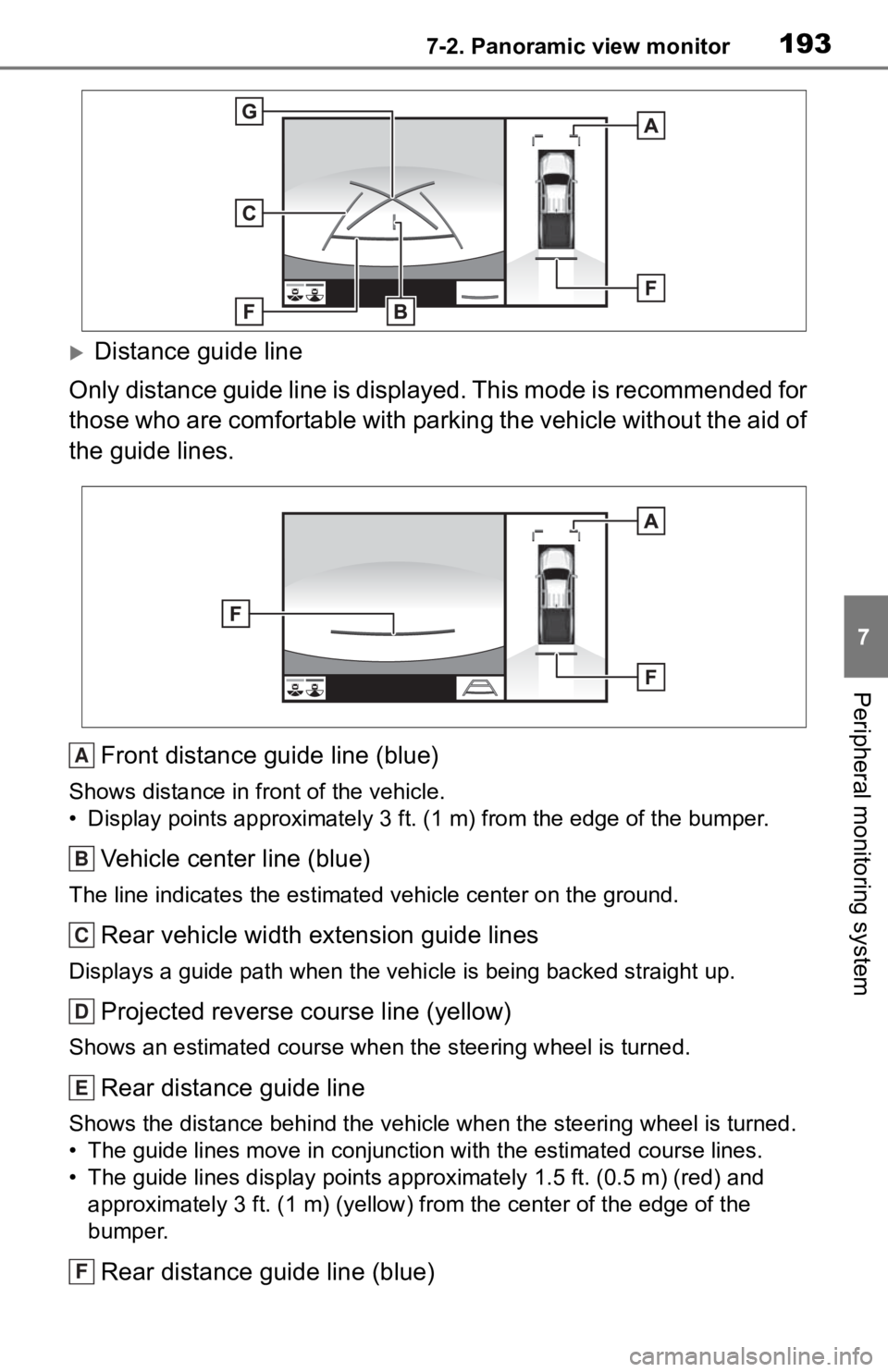
Distance guide line
Only distance guide line is dis played. This mode is recommended for
those who are comfortable with parking the vehicle without the aid of
the guide lines.
Front distance guide line (blue)
Shows distance in front of the vehicle.
• Display points approximately 3 ft. (1 m) from the edge of the bumper.
Vehicle center line (blue)
The line indicates the estimated vehicle center on the ground.
Rear vehicle width extension guide lines
Displays a guide path when the vehicle is being backed straight up.
Projected reverse course line (yellow)
Shows an estimated course when the steering wheel is turned.
Rear distance guide line
Shows the distance behind the vehicle when the steering wheel i s turned.
• The guide lines move in conjunc tion with the estimated course lines.
• The guide lines display points approximately 1.5 ft. (0.5 m) (red) and
approximately 3 ft. (1 m) (yello w) from the center of the edge of the
bumper.
Rear distance guide line (blue)
A
B
C
D
E
F