phone TOYOTA tC 2009 Accessories, Audio & Navigation (in English)
[x] Cancel search | Manufacturer: TOYOTA, Model Year: 2009, Model line: tC, Model: TOYOTA tC 2009Pages: 200, PDF Size: 16.95 MB
Page 27 of 200
21BASIC FUNCTIONS
SCION V398
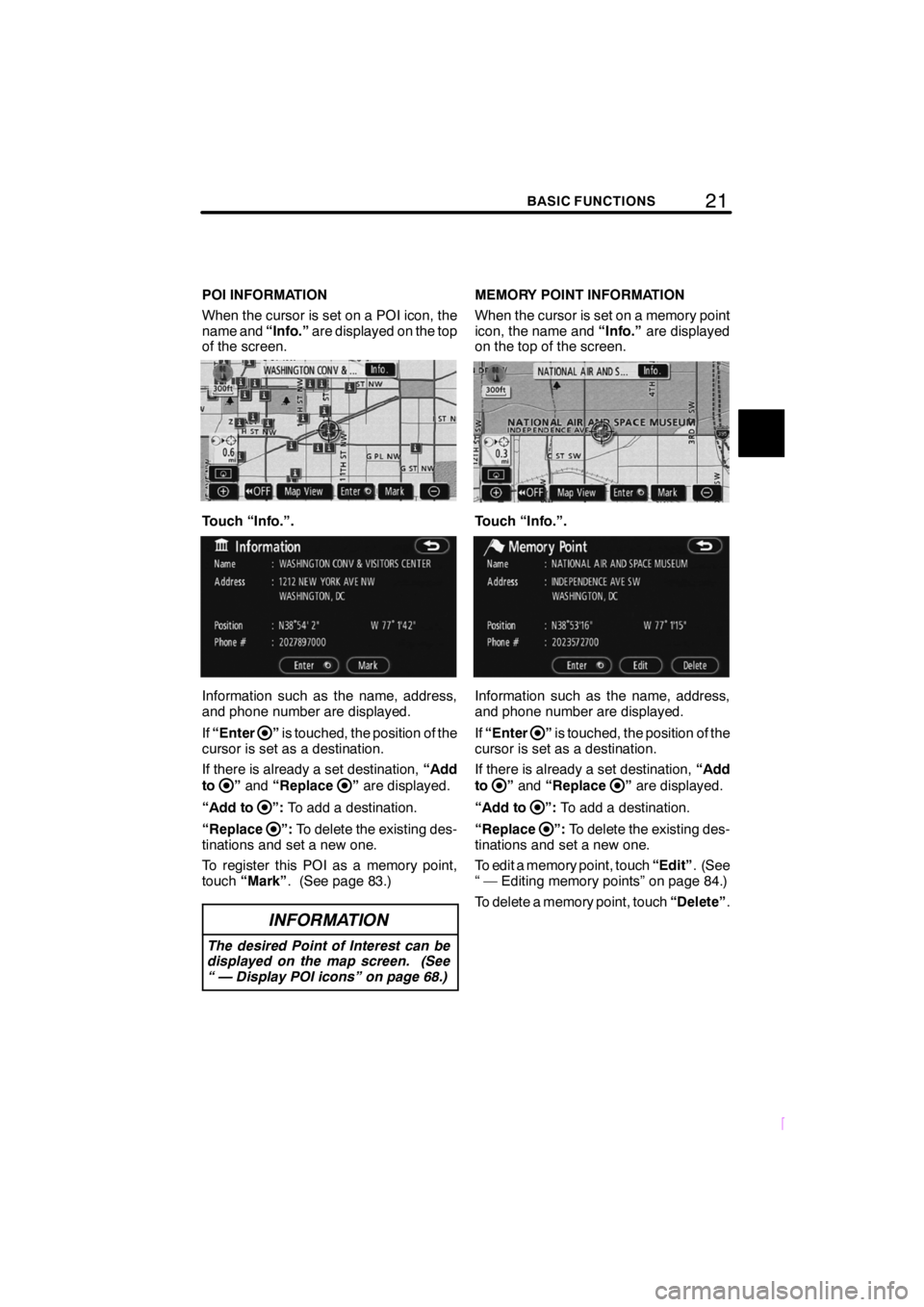
POI INFORMATION
When the cursor is set on a POI icon, the
name and“Info.”are displayed on the top
of the screen.
Touch “Info.”.
Information such as the name, address,
and phone number are displayed.
If “Enter
”is touched, the position of the
cursor is set as a destination.
If there is already a set destination, “Add
to
” and “Replace”are displayed.
“Add to
”: To add a destination.
“Replace
”: To delete the existing des-
tinations and set a new one.
To register this POI as a memory point,
touch “Mark” . (See page 83.)
INFORMATION
The desired Point of Interest can be
displayed on the map screen. (See
“ — Display POI icons” on page 68.)
MEMORY POINT INFORMATION
When the cursor is set on a memory point
icon, the name and “Info.”are displayed
on the top of the screen.
Touch “Info.”.
Information such as the name, address,
and phone number are displayed.
If “Enter
”is touched, the position of the
cursor is set as a destination.
If there is already a set destination, “Add
to
” and “Replace”are displayed.
“Add to
”: To add a destination.
“Replace
”: To delete the existing des-
tinations and set a new one.
To edit a memory point, touch “Edit”. (See
“ — Editing memory points” on page 84.)
To delete a memory point, touch “Delete”.
Page 28 of 200
22BASIC FUNCTIONS
SCION V398
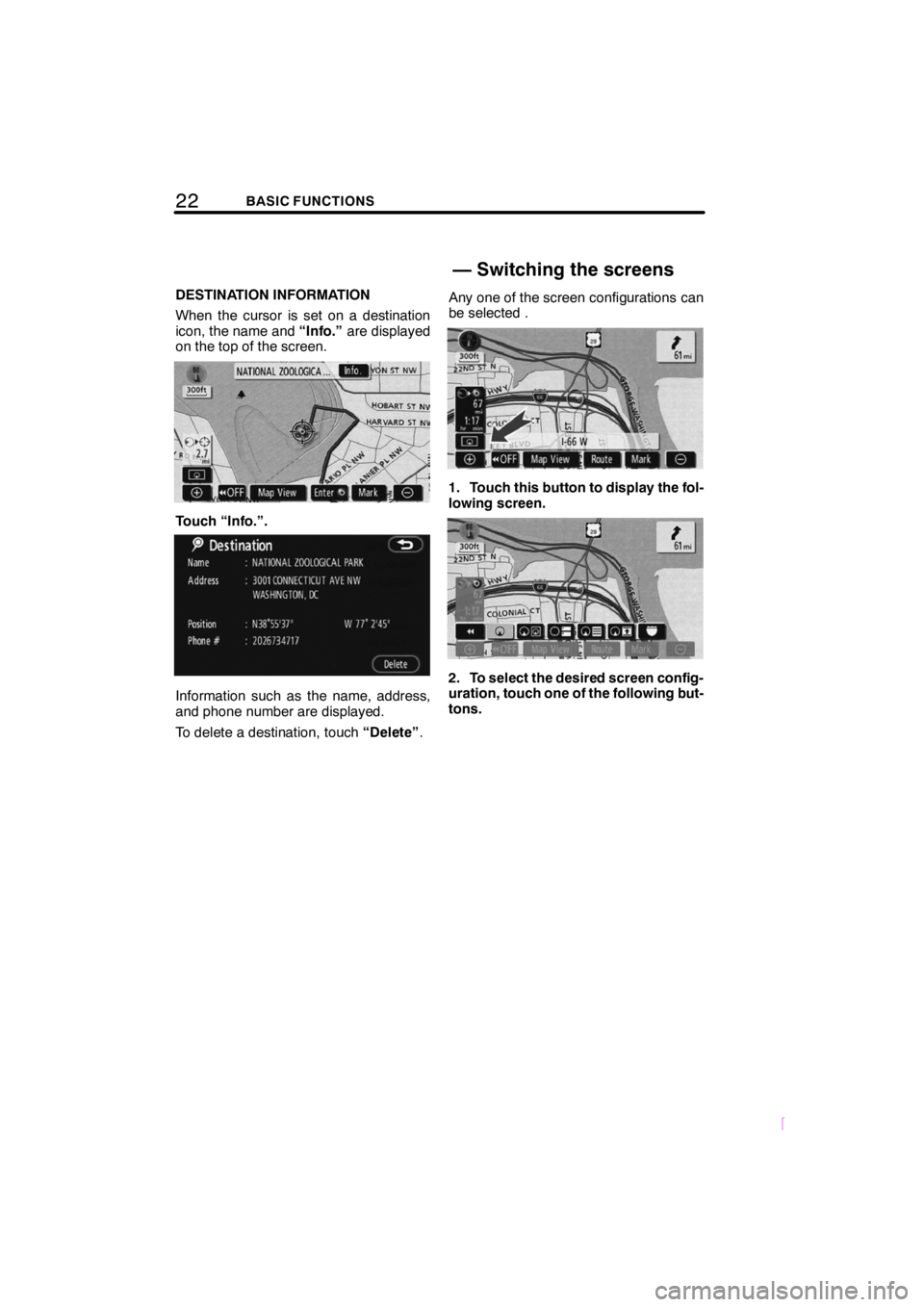
DESTINATION INFORMATION
When the cursor is set on a destination
icon, the name and“Info.”are displayed
on the top of the screen.
Touch “Info.”.
Information such as the name, address,
and phone number are displayed.
To delete a destination, touch “Delete”.Any one of the screen configurations can
be selected .
1. Touch this button to display the fol-
lowing screen.
2. To select the desired screen config-
uration, touch one of the following but-
tons.
— Switching the screens
Page 35 of 200

SECTIONIII
29DESTINATION SEARCH
SCION V398
DESTINATION SEARCH
DQuick reference (“Destination” screen) 30 .....................
D Destination search 31
....................................
Selecting the search area 32 ..............................
Destination search by Home 34 ...........................
Destination search by Quick access 34 .....................
Destination search by “Address” 35 ........................
Destination search by “POI Name” 39 ......................
Destination search by “POI Category” 42 ...................
Destination search by “Emergency” 45 .....................
Destination search by “Memory” 46 ........................
Destination search by “Previous” 46 ........................
Destination search by “Map” 47 ...........................
Destination search by “Intersection” 47 .....................
Destination search by “Freeway Ent./Exit” 48 ................
Destination search by “Coordinates” 49 .....................
Destination search by “Phone #” 50 ........................
D Starting route guidance 50 ..................................
Page 37 of 200
31DESTINATION SEARCH
SCION V398
8“Intersection”
The names of two intersecting streets can
be entered. This is helpful if only the gen-
eral vicinity, not the specific address, is
known. (Intersections for which there is no
information in the database cannot be
searched for.) 47 ....................
9“Freeway Ent./Exit”
The name of a freeway (interstate) en-
trance or exit can be entered. 48 ......
10“?”
Function help for the “Destination” screen
can be viewed on this screen. 17 ......
11“Change”
To change the selected search area, touch
this button. 32 ......................
12Quick access touch− screen but-
tons
One of 5 preset destinations can be se-
lected by touching the screen directly. To
use this function, it is necessary to set the
“Quick Access” for each memory point.
(To register a “Quick Access”, see “ —
Editing memory points” on page 84.) 34
.................................
13Home touch− screen button
A personal home address can be selected
without entering the address each time. To
use this function, it is necessary to set
“Home” for the memory point. (To register
“Home”, see “ — Registering home” on
page 89.) 34
........................
14“Phone #”
A destination can be entered by the tele-
phone number. 50 ...................
15“Coordinates”
A destination can be set by using latitude
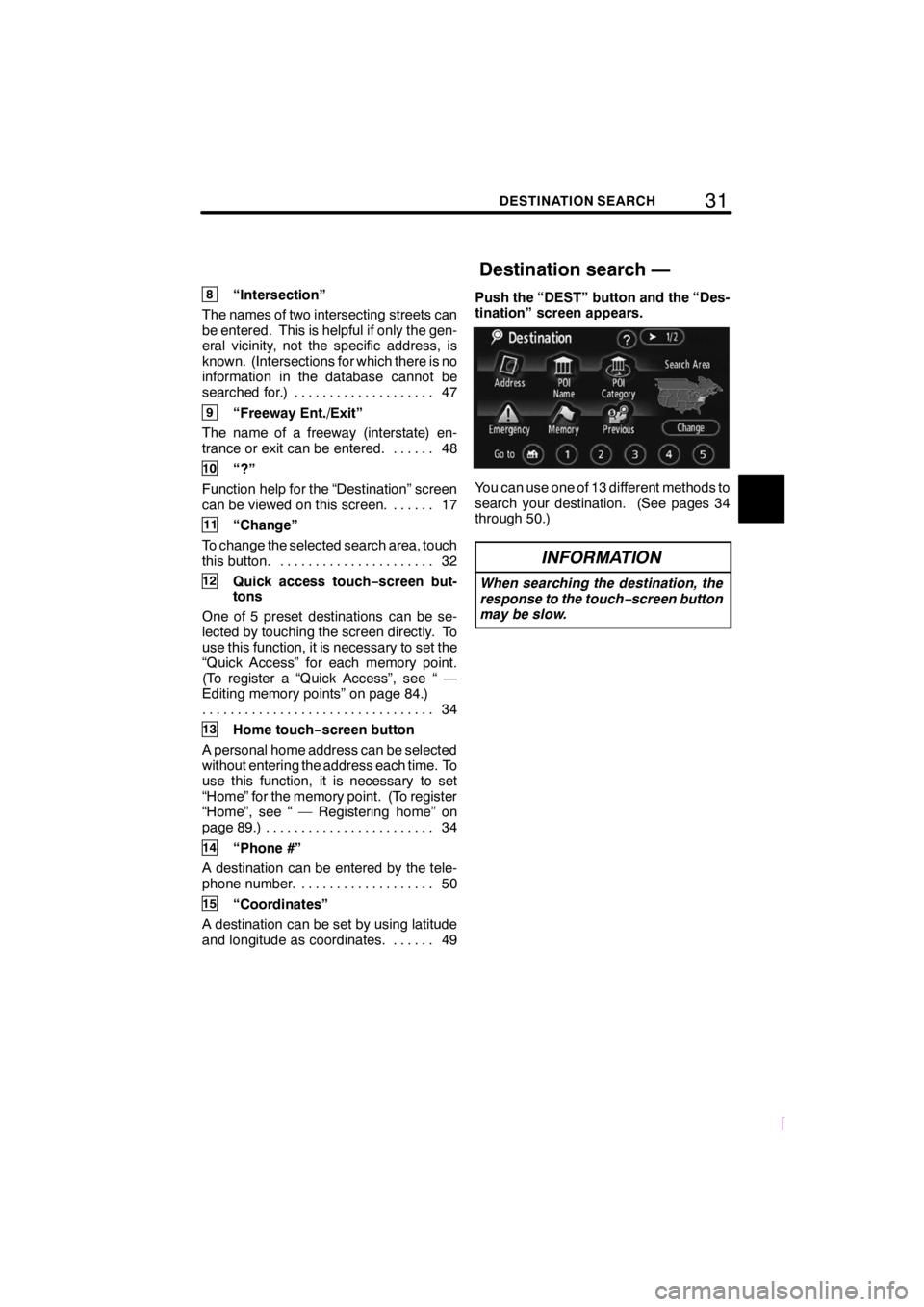
and longitude as coordinates. 49 ......Push the “DEST” button and the “Des-
tination” screen appears.
You can use one of 13 different methods to
search your destination. (See pages 34
through 50.)
INFORMATION
When searching the destination, the
response to the touch−
screen button
may be slow.
Destination search —
Page 56 of 200
50DESTINATION SEARCH
SCION V398
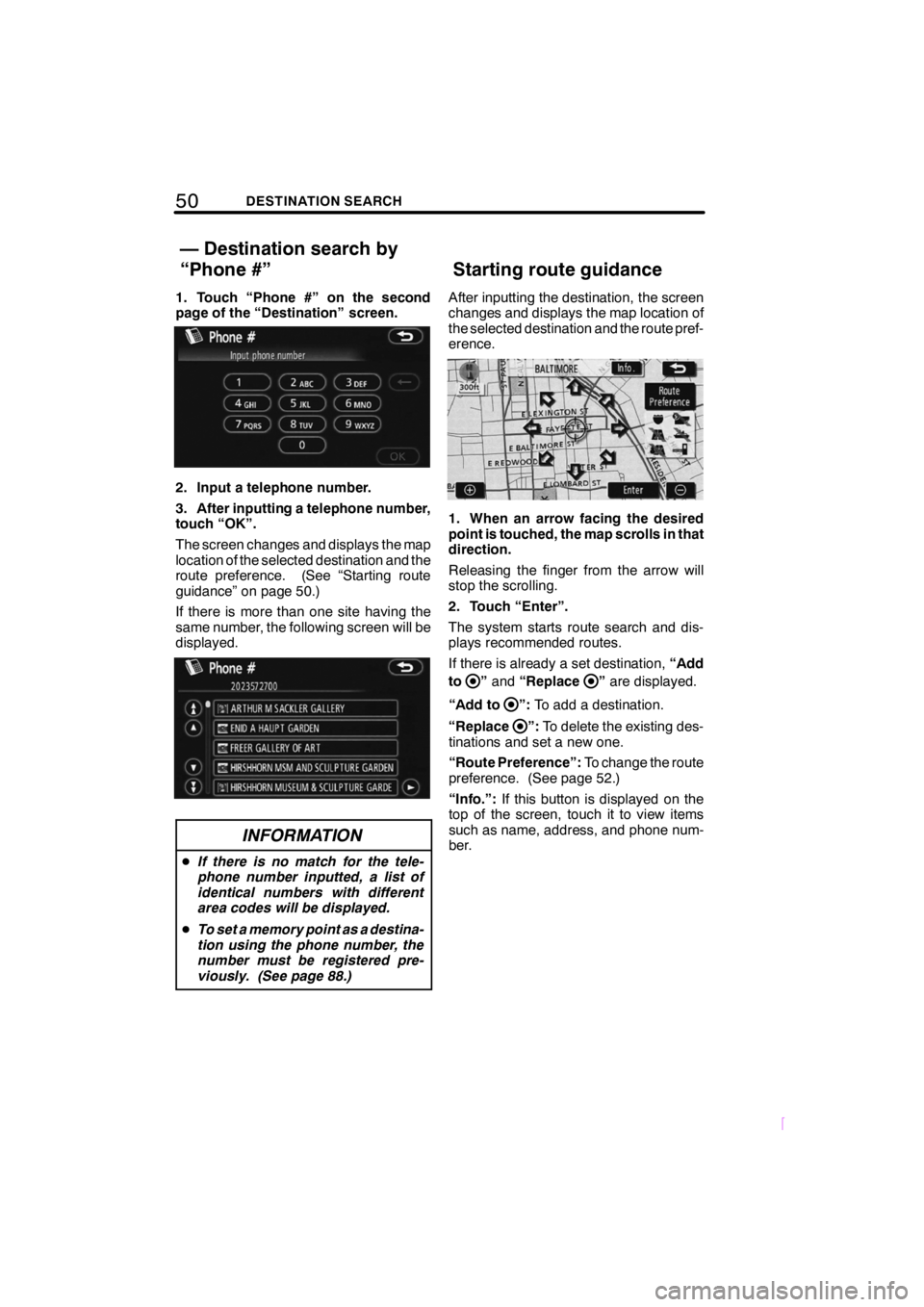
1. Touch “Phone #” on the second
page of the “Destination” screen.
2. Input a telephone number.
3. After inputting a telephone number,
touch “OK”.
The screen changes and displays the map
location of the selected destination and the
route preference. (See “Starting route
guidance” on page 50.)
If there is more than one site having the
same number, the following screen will be
displayed.
INFORMATION
DIf there is no match for the tele-
phone number inputted, a list of
identical numbers with different
area codes will be displayed.
D To set a memory point as a destina-
tion using the phone number, the
number must be registered pre-
viously. (See page 88.)
After inputting the destination, the screen
changes and displays the map location of
the selected destination and the route pref-
erence.
1. When an arrow facing the desired
point is touched, the map scrolls in that
direction.
Releasing the finger from the arrow will
stop the scrolling.
2. Touch “Enter”.
The system starts route search and dis-
plays recommended routes.
If there is already a set destination, “Add
to
” and “Replace”are displayed.
“Add to
”: To add a destination.
“Replace
”: To delete the existing des-
tinations and set a new one.
“Route Preference”: To change the route
preference. (See page 52.)
“Info.”: If this button is displayed on the
top of the screen, touch it to view items
such as name, address, and phone num-
ber.
— Destination search by
“Phone #” Starting route guidance
Page 90 of 200
84ADVANCED FUNCTIONS
SCION V398
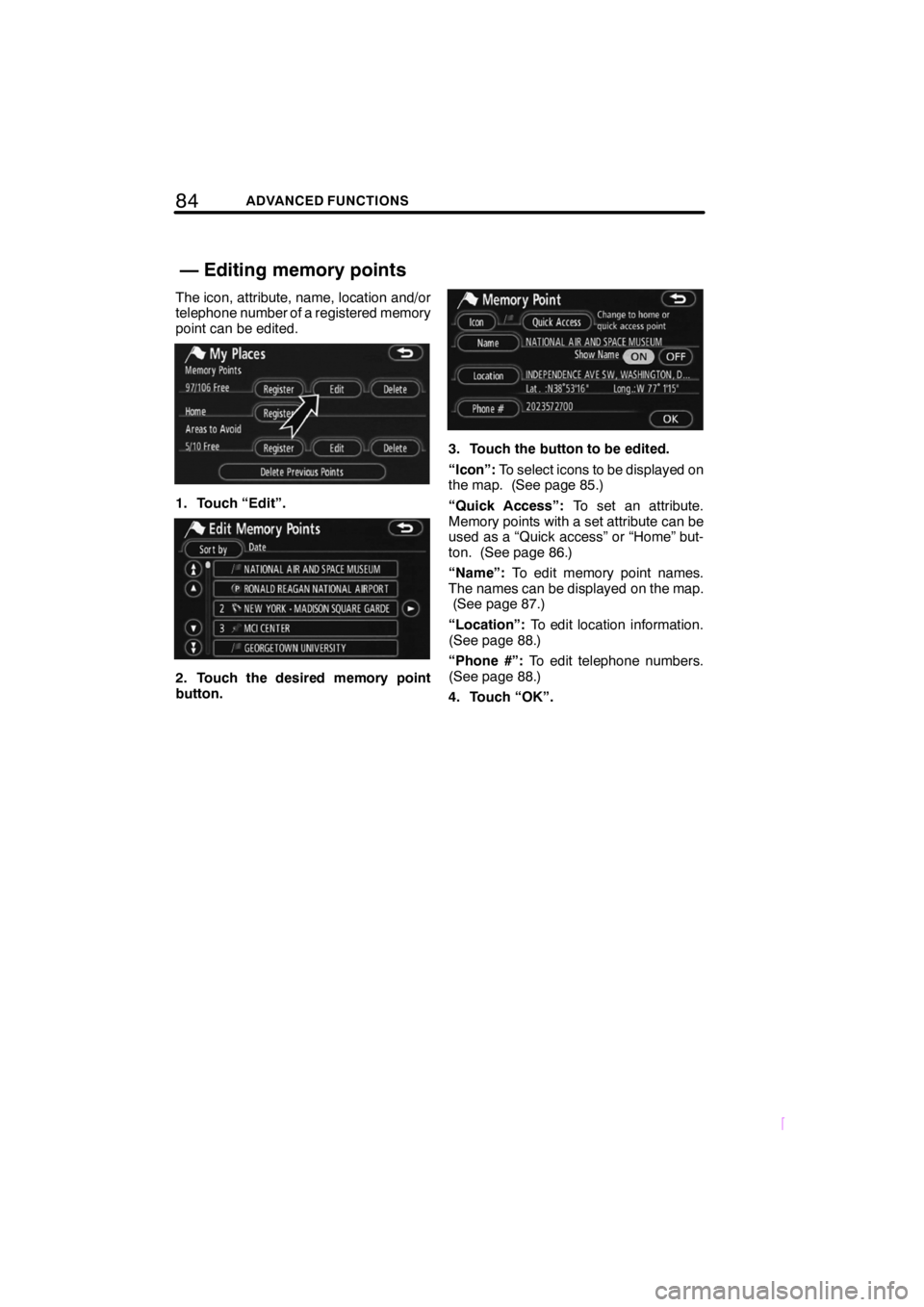
The icon, attribute, name, location and/or
telephone number of a registered memory
point can be edited.
1. Touch “Edit”.
2. Touch the desired memory point
button.
3. Touch the button to be edited.
“Icon”:To select icons to be displayed on
the map. (See page 85.)
“Quick Access”: To set an attribute.
Memory points with a set attribute can be
used as a “Quick access” or “Home” but-
ton. (See page 86.)
“Name”: To edit memory point names.
The names can be displayed on the map. (See page 87.)
“Location”: To edit location information.
(See page 88.)
“Phone #”: To edit telephone numbers.
(See page 88.)
4. Touch “OK”.
— Editing memory points
Page 94 of 200
88ADVANCED FUNCTIONS
SCION V398
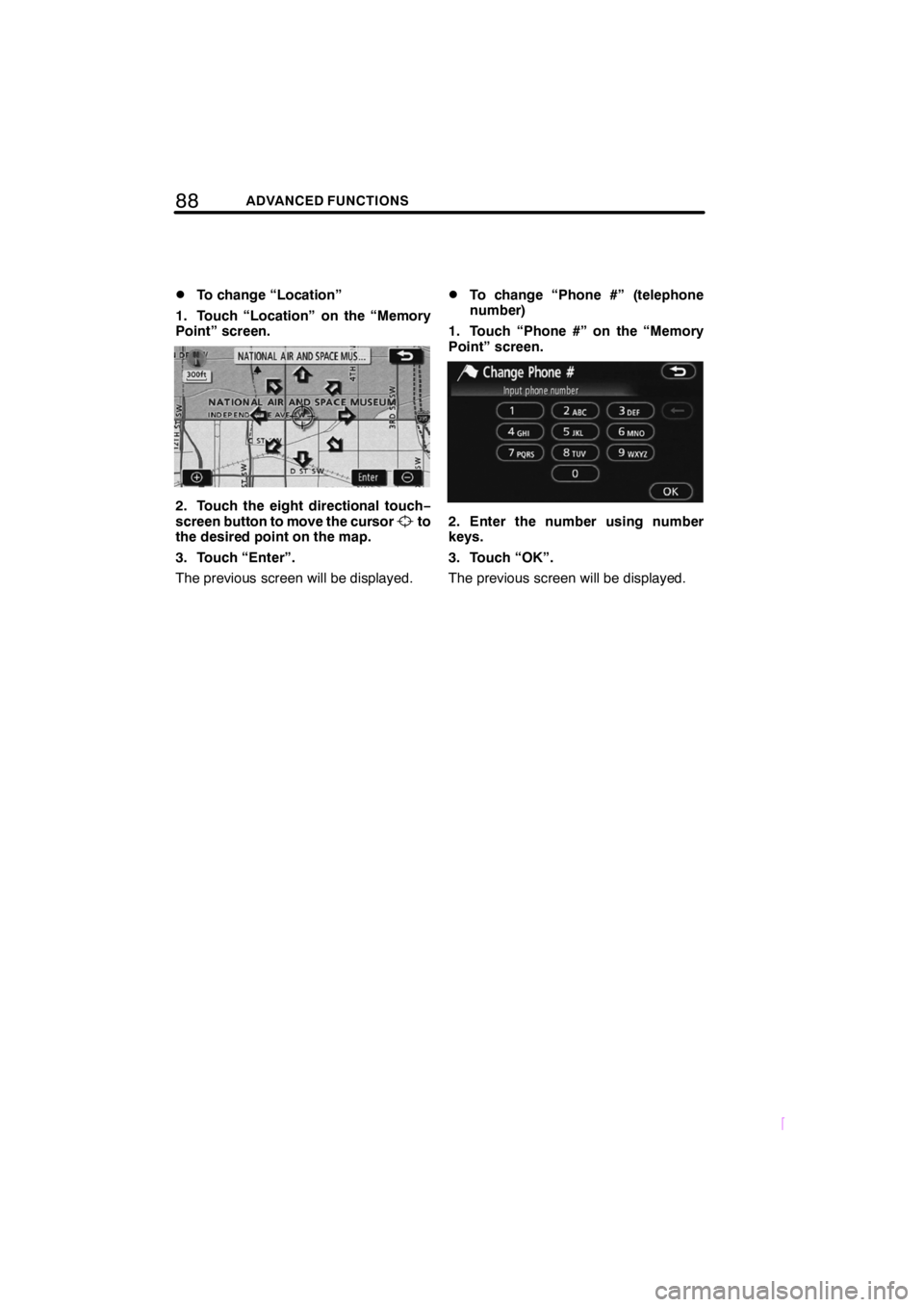
DTo change “Location”
1. Touch “Location” on the “Memory
Point” screen.
2. Touch the eight directional touch −
screen button to move the cursorto
the desired point on the map.
3. Touch “Enter”.
The previous screen will be displayed.
DTo change “Phone #” (telephone
number)
1. Touch “Phone #” on the “Memory
Point” screen.
2. Enter the number using number
keys.
3. Touch “OK”.
The previous screen will be displayed.
Page 115 of 200
109OTHER FUNCTIONS
SCION V398
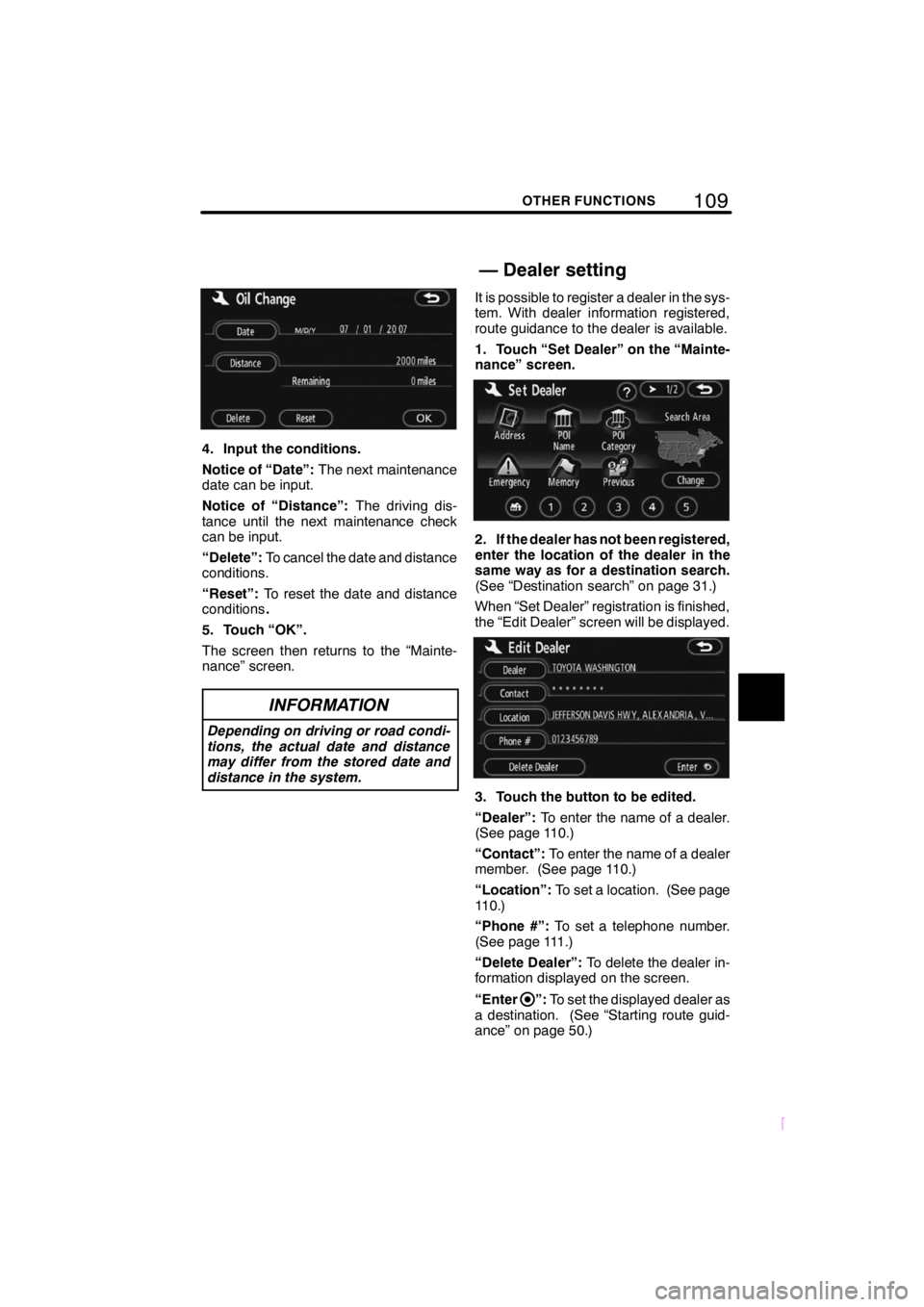
4. Input the conditions.
Notice of “Date”:The next maintenance
date can be input.
Notice of “Distance”: The driving dis-
tance until the next maintenance check
can be input.
“Delete”: To cancel the date and distance
conditions.
“Reset”: To reset the date and distance
conditions .
5. Touch “OK”.
The screen then returns to the “Mainte-
nance” screen.
INFORMATION
Depending on driving or road condi-
tions, the actual date and distance
may differ from the stored date and
distance in the system.
It is possible to register a dealer in the sys-
tem. With dealer information registered,
route guidance to the dealer is available.
1. Touch “Set Dealer” on the “Mainte-
nance” screen.
2. If the dealer has not been registered,
enter the location of the dealer in the
same way as for a destination search.
(See “Destination search” on page 31.)
When “Set Dealer” registration is finished,
the “Edit Dealer” screen will be displayed.
3. Touch the button to be edited.
“Dealer”: To enter the name of a dealer.
(See page 110.)
“Contact”: To enter the name of a dealer
member. (See page 110.)
“Location”: To set a location. (See page
110.)
“Phone #”: To set a telephone number.
(See page 111.)
“Delete Dealer”: To delete the dealer in-
formation displayed on the screen.
“Enter
”: To set the displayed dealer as
a destination. (See “Starting route guid-
ance” on page 50.)
— Dealer setting
Page 117 of 200
111OTHER FUNCTIONS
SCION V398
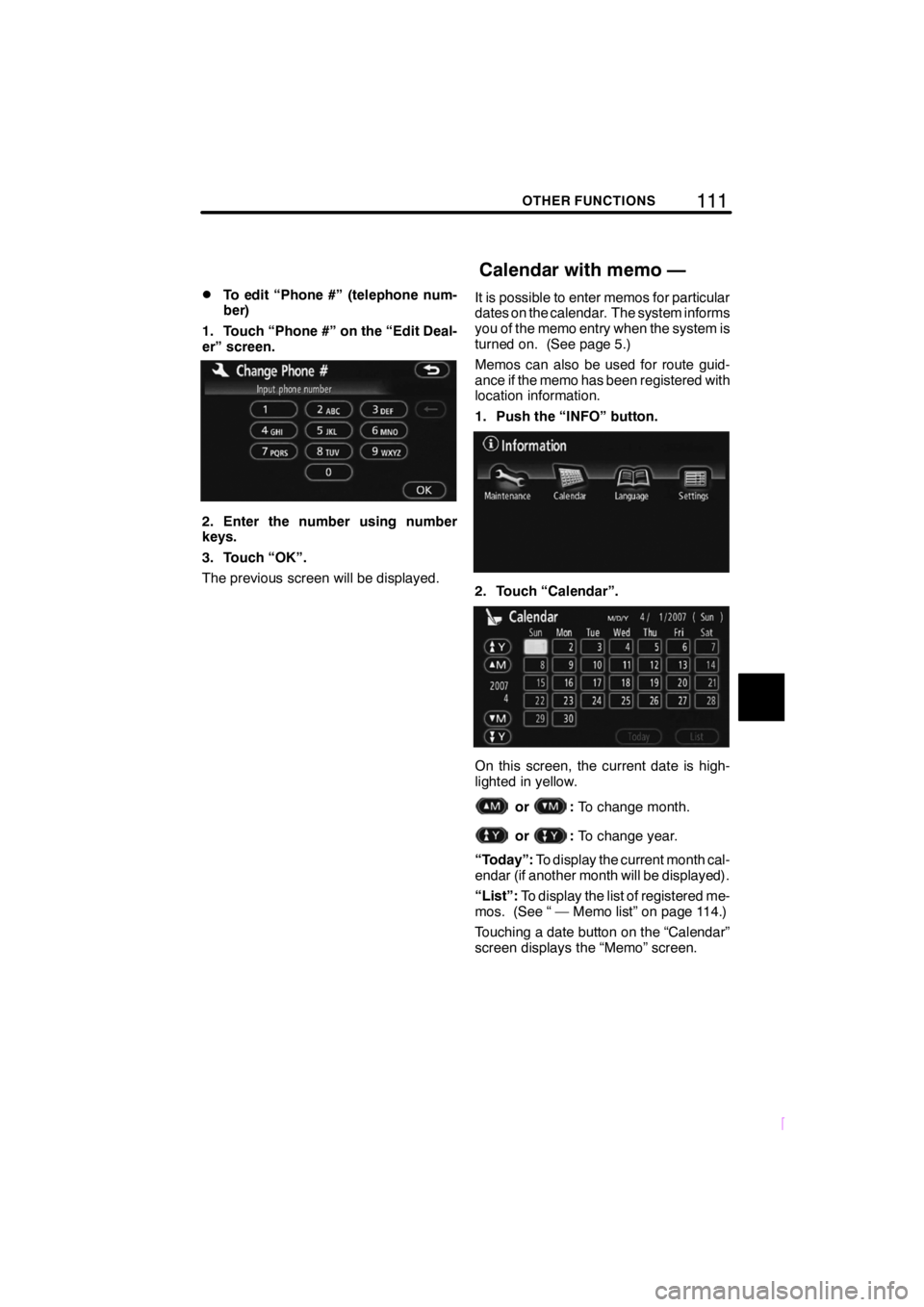
DTo edit “Phone #” (telephone num-
ber)
1. Touch “Phone #” on the “Edit Deal-
er” screen.
2. Enter the number using number
keys.
3. Touch “OK”.
The previous screen will be displayed. It is possible to enter memos for particular
dates on the calendar. The system informs
you of the memo entry when the system is
turned on. (See page 5.)
Memos can also be used for route guid-
ance if the memo has been registered with
location information.
1. Push the “INFO” button.
2. Touch “Calendar”.
On this screen, the current date is high-
lighted in yellow.
or:
To change month.
or:To change year.
“Today”: To display the current month cal-
endar (if another month will be displayed).
“List”: To display the list of registered me-
mos. (See “ — Memo list” on page 114.)
Touching a date button on the “Calendar”
screen displays the “Memo” screen.
Calendar with memo —
Page 145 of 200

139
SCION V398
AUDIO/VIDEO SYSTEM
DIf the satellite radio tuner malfunctions
When problems occur with the XM tuner, a message will appear on the display. Referring
to the table below to identify the problem, take the suggested corrective action.
ANTENNA
The XM antenna is not connected. Check whether the XM antenna
cable is attached securely.
ANTENNAA short circuit occurs in the antenna or the surrounding antenna cable.
See a SCION certified dealer for assistance.
UPDATING
You have not subscribed to the XM satellite radio. The radio is being
updated with the latest encryption code. Contact the XM satellite radio
for subscription information. When a contact is canceled, you can
choose the “CH000” and all free −to− air channels.
UPDATINGThe premium channel you selected is not authorized. Wait for about 2
seconds until the radio returns to the previous channel or “CH001”. If
it does not change automatically, select another channel. If you want
to listen to the premium channel, contact the XM satellite radio.
NO
SIGNALThe XM signal is too weak at the current location. Wait until your vehicle
reaches a location with a stronger signal.
LOADINGThe unit is acquiring audio or program information. Wait until the unit
has received the information.
OFF AIRThe channel you selected is not broadcasting any programming. Select
another channel.
−−−−−There is no song/program title or artist name/feature associated with the
channel at that time. No action needed.
−−−
The channel you selected is no longer available. Wait for about 2 sec-
onds until the radio returns to the previous channel or “CH001”. If it does
not change automatically, select another channel.
The XM Listener Care Center is also available on the phone, please call (800) 852 −9696
during the following hours:
Monday — Saturday: 7 a.m. — 1 a.m. Sunday: 12 p.m. — 12 a.m. (EST)