steering TOYOTA VENZA 2013 (in English) Service Manual
[x] Cancel search | Manufacturer: TOYOTA, Model Year: 2013, Model line: VENZA, Model: TOYOTA VENZA 2013Pages: 556, PDF Size: 10.4 MB
Page 165 of 556
165
2-1. Driving procedures
2
When driving
VENZA_OM_OM73010U_(U)
CAUTION
●
Do not adjust the position of the steering wheel, the seat, or the inside or
outside rear view mirrors while driving.
Doing so may result in a loss of vehicle control that can cause accidents
that may result in death or serious injury.
● Always check that all passengers’ arms, heads or other parts of their bod-
ies are not outside the vehicle, as this may result in death or serious injury.
● Do not drive in excess of the speed limit. Even if the legal speed limit per-
mits it, do not drive over 85 mph (140 km/h) unless your vehicle has high-
speed capability tires. Driving over 85 mph (140 km/h) may result in tire
failure, loss of control and possible injury. Be sure to consult a tire dealer
to determine whether the tires on your vehicle are high-speed capability
tires or not before driving at such speeds.
■ When driving on slippery road surfaces
● Sudden braking, acceleration and steering may cause tire slippage and
reduce your ability to control the vehicle, resulting in an accident.
● Sudden acceleration, engine braking due to shift changing, or changes in
engine speed could cause the vehicle to skid, resulting in an accident.
● After driving through a puddle, lightly depress the brake pedal to make
sure that the brakes are functioning properly. Wet brake pads may prevent
the brakes from functioning properly. If the brakes on only one side are wet
and not functioning properly, steering control may be affected, resulting in
an accident.
■ When shifting the shift lever
Be careful not to shift the shift lever with the accelerator pedal depressed.
This may lead to unexpected rapid acceleration of the vehicle that may
cause an accident and result in death or serious injury.
Page 169 of 556
169
2-1. Driving procedures
2
When driving
VENZA_OM_OM73010U_(U)
NOTICE
■
While driving the vehicle
● Do not depress the accelerator and brake pedals at the same time during
driving, as this may restrain driving torque.
● Do not use the accelerator pedal or depress accelerator and brake pedals
together to hold the vehicle on a hill.
■ When parking the vehicle
Always put the shift lever in “P”. Failure to do so may cause the vehicle to
move or the vehicle may accelerate suddenly if the accelerator pedal is acci-
dentally depressed.
■ Avoiding damage to vehicle parts
● Do not turn the steering wheel fully in either direction and hold it there for
an extended period of time.
Doing so may damage the power steering motor.
● When driving over bumps in the road, drive as slowly as possible to avoid
damaging the wheels, underside of the vehicle, etc.
■ If you hear a squealing or scrapin g noise (brake pad wear limit indica-
tors)
Have your Toyota dealer check and replace the brake pads as soon as pos-
sible.
The rotor damage can result if the pads are not replaced when needed.
It is dangerous to drive the vehicle when the wear limits of the brake pads
and/or that of the brake discs are exceeded.
Page 170 of 556

170 2-1. Driving procedures
VENZA_OM_OM73010U_(U)
NOTICE
■If you get a flat tire while driving
A flat or damaged tire may cause the following situations. Hold the steering
wheel firmly and gradually press the brake pedal to slow down the vehicle.
● It may be difficult to control your vehicle.
● The vehicle will make abnormal sounds.
● The vehicle will behave abnormally.
Replace a flat tire with a new one. ( P. 447)
■ When encountering flooded roads
Do not drive on a road that has flooded after heavy rain etc. Doing so may
cause the following serious damage to the vehicle.
● Engine stalling
● Short in electrical components
● Engine damage caused by water immersion
In the event that you drive on a flooded road and the vehicle is flooded, be
sure to have your Toyota dealer check the following.
● Brake function
● Changes in quantity and quality of oil and fluid used for the engine, tran-
saxle, transfer (AWD models), differential (AWD models), etc.
● Lubricant condition for the propeller shaft (AWD models), bearings and
suspension joints (where possible) and the function of all joints, bearings,
etc.
Page 173 of 556
173
2-1. Driving procedures
2
When driving
VENZA_OM_OM73010U_(U)
■
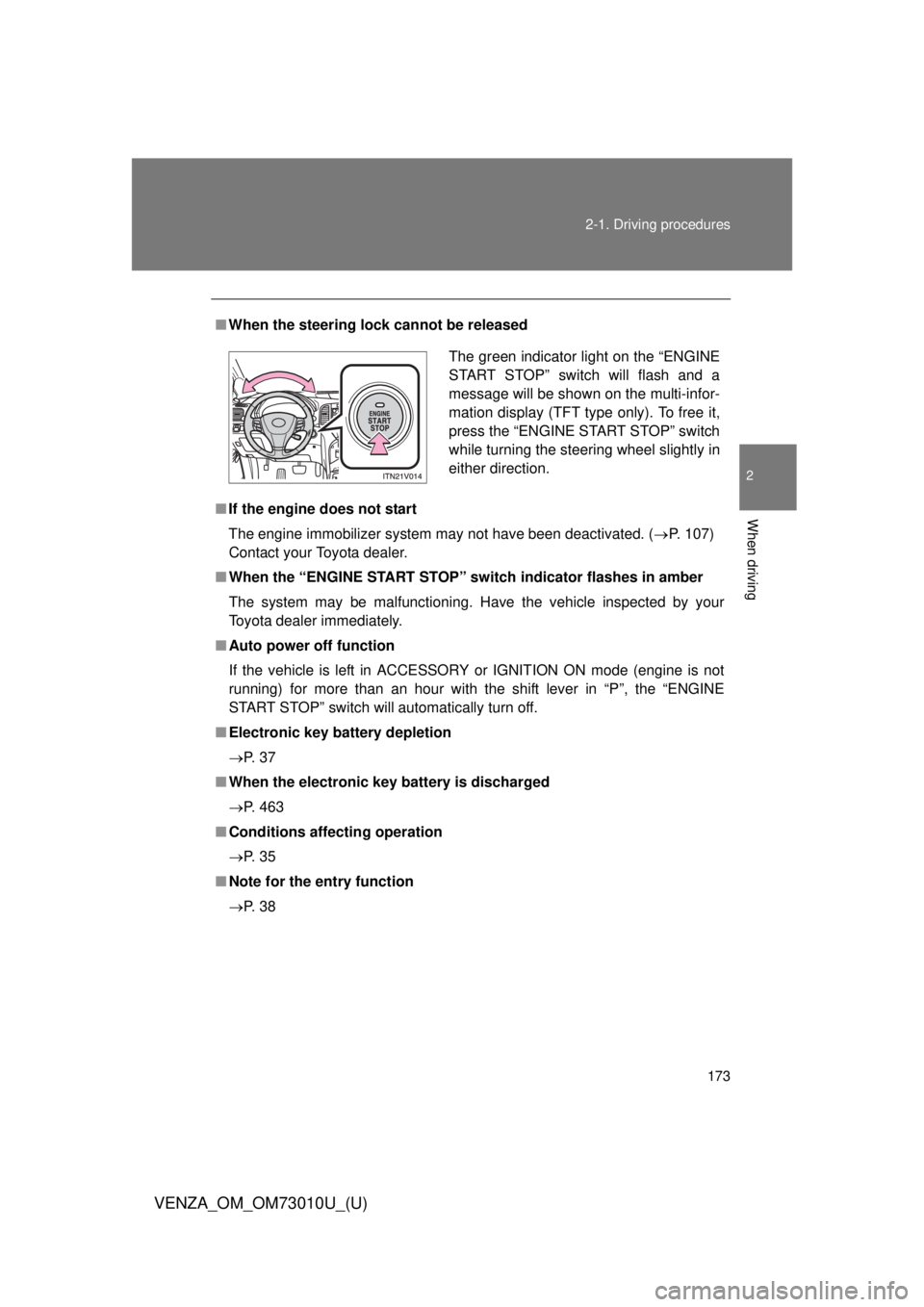
When the steering lock cannot be released
■ If the engine does not start
The engine immobilizer system may not have been deactivated. ( P. 107)
Contact your Toyota dealer.
■ When the “ENGINE START STOP” switch indicator flashes in amber
The system may be malfunctioning. Have the vehicle inspected by your
Toyota dealer immediately.
■ Auto power off function
If the vehicle is left in ACCESSORY or IGNITION ON mode (engine is not
running) for more than an hour with the shift lever in “P”, the “ENGINE
START STOP” switch will automatically turn off.
■ Electronic key battery depletion
P. 3 7
■ When the electronic key battery is discharged
P. 463
■ Conditions aff ecting operation
P. 3 5
■ Note for the entry function
P. 3 8
The green indicator light on the “ENGINE
START STOP” switch will flash and a
message will be shown on the multi-infor-
mation display (TFT type only). To free it,
press the “ENGINE START STOP” switch
while turning the steering wheel slightly in
either direction.
Page 174 of 556

174 2-1. Driving procedures
VENZA_OM_OM73010U_(U)
CAUTION
■When starting the engine
Always start the engine while sitting in the driver’s seat. Do not depress the
accelerator pedal while starting the engine under any circumstances.
Doing so may cause an accident resulting in death or serious injury.
■ Stopping the engine in an emergency
If you want to stop the engine in an emergency while driving the vehicle,
press and hold the “ENGINE START STOP” switch for more than 2 seconds,
or press it briefly 3 times or more in succession. ( P. 476)
However, do not touch the “ENGINE START STOP” switch while driving
except in an emergency. Turning the engine off while driving will not cause
loss of steering or braking control, but the power assist to these systems will
be lost. This will make it more difficult to steer and brake, so you should pull
over and stop the vehicle as soon as it is safe to do so.
NOTICE
■ To prevent battery discharge
Do not leave the “ENGINE START STOP” switch in ACCESSORY or IGNI-
TION ON mode for long periods without the engine running.
■ When starting the engine
● Do not race a cold engine.
● If the engine becomes difficult to start or stalls frequently, have your vehi-
cle checked by your Toyota dealer immediately.
Page 175 of 556
175
2-1. Driving procedures
2
When driving
VENZA_OM_OM73010U_(U)
Engine (ignition) switch (vehicles without smar t key system)
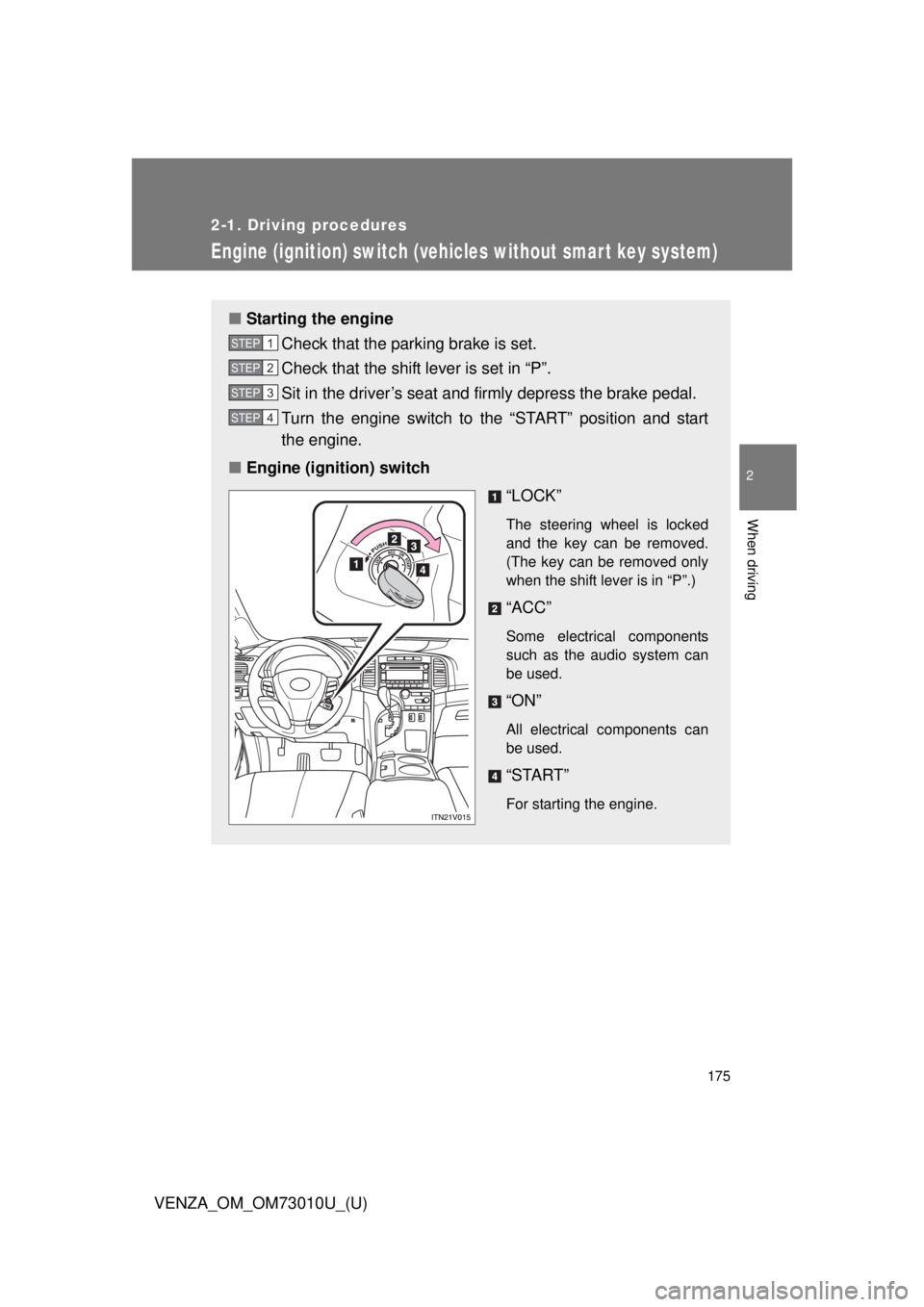
■Starting the engine
Check that the parking brake is set.
Check that the shift lever is set in “P”.
Sit in the driver’s seat and firmly depress the brake pedal.
Turn the engine switch to the “START” position and start
the engine.
■ Engine (ignition) switch
“LOCK”
The steering wheel is locked
and the key can be removed.
(The key can be removed only
when the shift lever is in “P”.)
“ACC”
Some electrical components
such as the audio system can
be used.
“ON”
All electrical components can
be used.
“START”
For starting the engine.
STEP1
STEP2
STEP3
STEP4
Page 176 of 556
176 2-1. Driving procedures
VENZA_OM_OM73010U_(U)
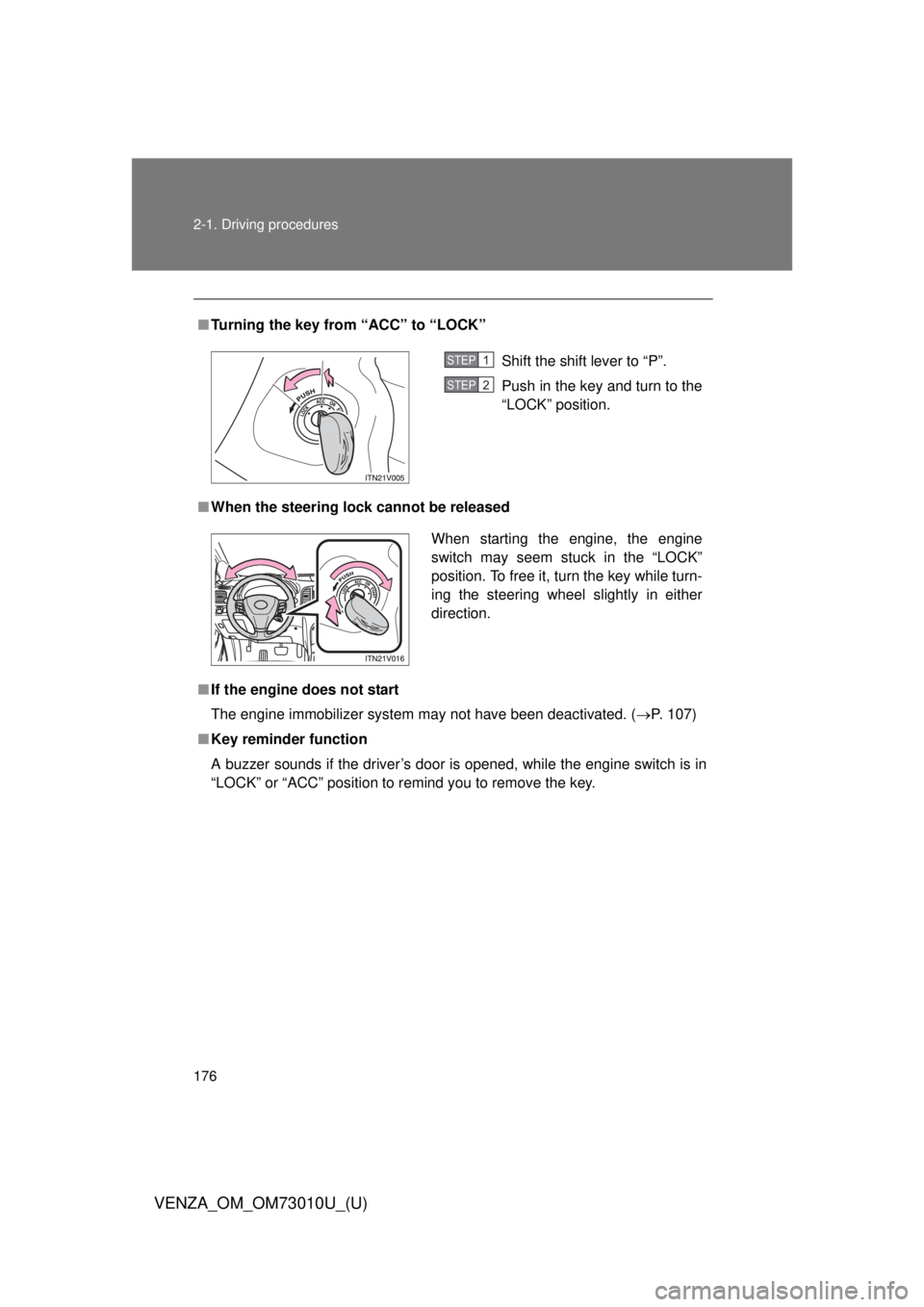
■Turning the key from “ACC” to “LOCK”
■ When the steering lock cannot be released
■ If the engine does not start
The engine immobilizer system may not have been deactivated. ( P. 107)
■ Key reminder function
A buzzer sounds if the driver’s door is opened, while the engine switch is in
“LOCK” or “ACC” position to remind you to remove the key.
Shift the shift lever to “P”.
Push in the key and turn to the
“LOCK” position.STEP1
STEP2
When starting the engine, the engine
switch may seem stuck in the “LOCK”
position. To free it, turn the key while turn-
ing the steering wheel slightly in either
direction.
Page 185 of 556
185
2-1. Driving procedures
2
When driving
VENZA_OM_OM73010U_(U)
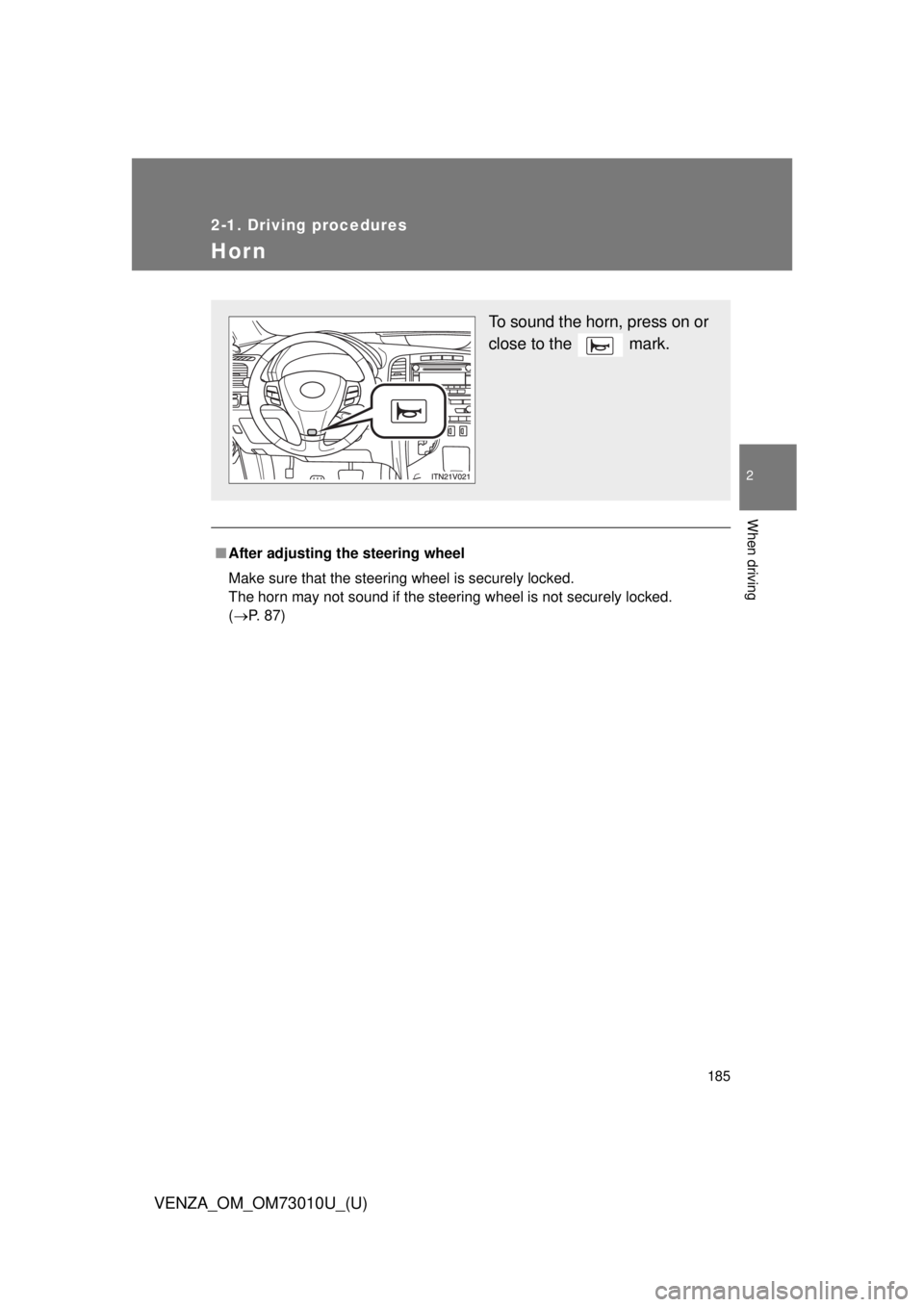
Hor n
■After adjusting the steering wheel
Make sure that the steering wheel is securely locked.
The horn may not sound if the steering wheel is not securely locked.
(P. 87)
To sound the horn, press on or
close to the mark.
Page 231 of 556
231
2-4. Using other driving systems
2
When driving
VENZA_OM_OM73010U_(U)
Driving assist systems
To help enhance driving safety and performance, the following sys-
tems operate automatically in res ponse to various driving situations.
Be aware, however, that these systems are supplementary and
should not be relied upon too h eavily when operating the vehicle.
■ABS (Anti-lock Brake System)
Helps to prevent wheel lock w hen the brakes are applied sud-
denly, or if the brakes are applied while driving on a slippery
road surface.
■ Brake assist
Generates an increased level of braking force after the brake
pedal is depressed, when the system detects a panic stop situa-
tion.
■ VSC (Vehicle Stability Control)
Helps the driver to control skidding when swerving suddenly or
turning on slippery road surfaces
■ TRAC (Traction Control)
Maintains drive power and prevent the front wheels (2WD mod-
els) or four wheels (AWD models) from spinning when starting
the vehicle or accelerating on slippery roads.
■ EPS (Electric Power Steering)
Employs an electric motor to re duce the amount of effort needed
to turn the steering wheel.
■ Enhanced VSC (Enhanced Vehicle Stability Control)
Provides cooperative control of the ABS, TRAC, VSC and EPS.
Helps to maintain directional stability when swerving on slippery
road surfaces by cont rolling steering performance.
■ Hill-start assist control
P. 237
Page 234 of 556

234 2-4. Using other driving systems
VENZA_OM_OM73010U_(U)
■When the “TRAC OFF” indicator light comes on even if the VSC OFF
switch has not been pressed
TRAC and hill-start assist control cannot be operated. Contact your Toyota
dealer.
■ Automatic reactivation of TRAC and VSC
After turning the TRAC and VSC systems off, the systems will be automati-
cally reactivated in the following situations:
● When the “ENGINE START STOP” switch is turned off (vehicles with
smart key system)
● When the engine switch is turned to the “LOCK” position (vehicles with-
out smart key system)
● If only the TRAC system is turned off, the TRAC will turn on when vehicle
speed increases
If both the TRAC and VSC systems are turned off, automatic reactivation
will not occur when vehicle speed increases.
■ Sounds and vibrations caused by the ABS, brake assist, TRAC and
VSC
● A sound may be heard from the engine compartment when the engine is
started or just after the vehicle begins to move. This sound does not indi-
cate that a malfunction has occurred in any of these systems.
● Any of the following conditions may occur when the above systems are
operating. None of these indicates that a malfunction has occurred.
• Vibrations may be felt through the vehicle body and steering.
• A motor sound may be heard after the vehicle comes to a stop.
• The brake pedal may pulsate slightly after the ABS is activated.
• The brake pedal may move down slightly after the ABS is activated.