belt TOYOTA VENZA 2014 Owners Manual (in English)
[x] Cancel search | Manufacturer: TOYOTA, Model Year: 2014, Model line: VENZA, Model: TOYOTA VENZA 2014Pages: 17, PDF Size: 7.66 MB
Page 2 of 17
OVERVIEW
FEATURES/OPERATIONS
SAFETY AND EMERGENCY FEATURES
1
This Quick Reference Guide is a summary of basic vehicle
operations. It contains brief descriptions of fundamental operations
so you can locate and use the vehicle’s main equipment quickly
and easily.
The Quick Reference Guide is not intended as a substitute for the
Owner’s Manual located in your vehicle’s glove box. We strongly
encourage you to review the Owner’s Manual and supplementary
manuals so you will have a better understanding of your vehicle’s
capabilities and limitations.
Your dealership and the entire staff of Toyota Motor Sales, U.S.A.,
Inc. wish you many years of satisfied driving in your new Venza.
A word about safe vehicle operations
This Quick Reference Guide is not a full description of Venza
operations. Every Venza owner should review the Owner’s Manual
that accompanies this vehicle.
Pay special attention to the boxed information highlighted in
color throughout the Owner’s Manual. Each box contains safe
operating instructions to help you avoid injury or equipment
malfunction.
All information in this Quick Reference Guide is current at the
time of printing. Toyota reserves the right to make changes at
any time without notice.
2014
Venza
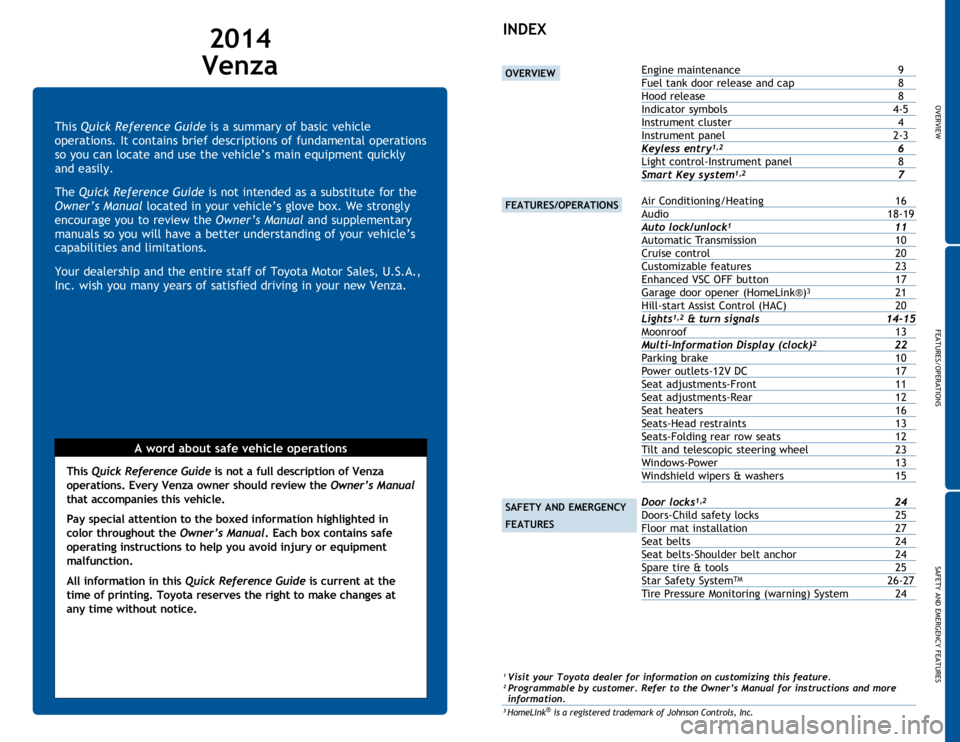
INDEX
1 Visit your Toyota dealer for information on customizing this feature.2 Programmable by customer. Refer to the Owner’s Manual for instructions and more
information.
3 HomeLink® is a registered trademark of Johnson Controls, Inc.
OVERVIEW
FEATURES/OPERATIONS
SAFETY AND EMERGENCY
FEATURES
Engine maintenance 9
Fuel tank door release and cap 8
Hood release 8
Indicator symbols 4-5
Instrument cluster 4
Instrument panel 2-3
Keyless entry
1,2 6
Light control-Instrument panel 8
Smart Key system
1,2 7
Air Conditioning/Heating 16
Audio 18-19
Auto lock/unlock
1 11
Automatic Transmission 10
Cruise control 20
Customizable features 23
Enhanced VSC OFF button 17
Garage door opener (HomeLink®)
3 21
Hill-start Assist Control (HAC) 20
Lights
1,2 & turn signals 14-15
Moonroof 13
Multi-Information Display (clock)
2 22
Parking brake 10
Power outlets-12V DC 17
Seat adjustments-Front 11
Seat adjustments-Rear 12
Seat heaters 16
Seats-Head restraints 13
Seats-Folding rear row seats 12
Tilt and telescopic steering wheel 23
Windows-Power 13
Windshield wipers & washers 15
Door locks
1,2 24
Doors-Child safety locks 25
Floor mat installation 27
Seat belts 24
Seat belts-Shoulder belt anchor 24
Spare tire & tools 25
Star Safety System
TM 26-27
Tire Pressure Monitoring (warning) System 24
Page 4 of 17
OVERVIEW
FEATURES/OPERATIONS
SAFETY AND EMERGENCY FEATURES
45
OVERVIEW
Indicator symbols
Instrument cluster
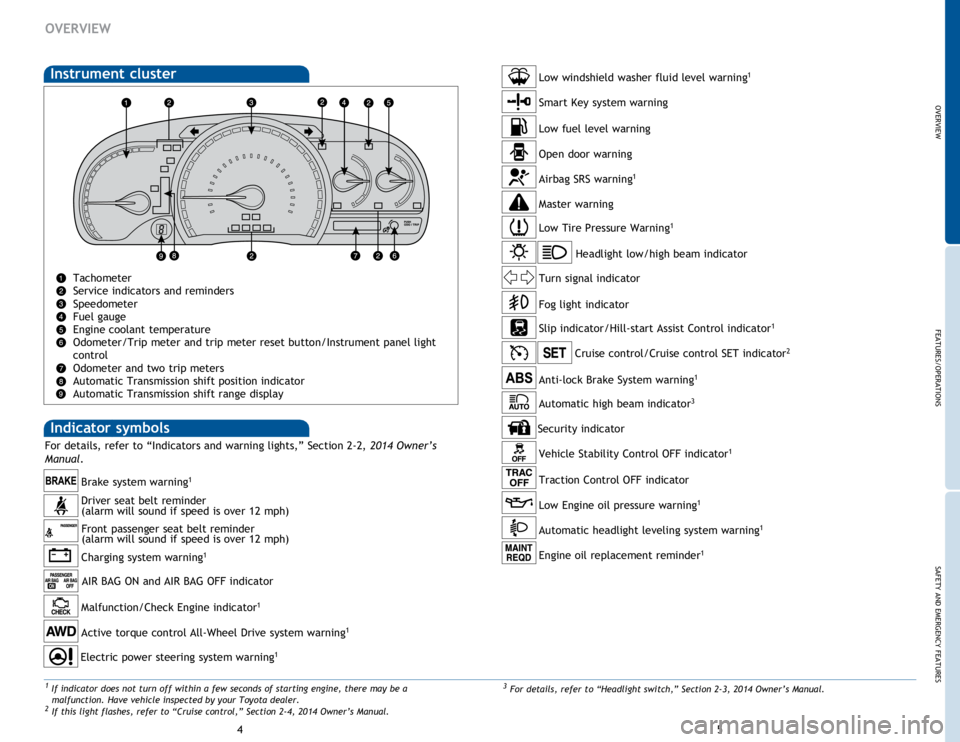
Tachometer
Service indicators and reminders
Speedometer
Fuel gauge
Engine coolant temperature
Odometer/Trip meter and trip meter reset button/Instrument panel light
control
Odometer and two trip meters
Automatic Transmission shift position indicator
Automatic Transmission shift range display
Charging system warning1
Brake system warning1
AIR BAG ON and AIR BAG OFF indicator
Anti-lock Brake System warning1
Headlight low/high beam indicator
Turn signal indicator
Slip indicator/Hill-start Assist Control indicator
1
Cruise control/Cruise control SET indicator2
Low Tire Pressure Warning1
Smart Key system warning
Open door warning
Airbag SRS warning1
Master warning
Low windshield washer fluid level warning1
Driver seat belt reminder
(alarm will sound if speed is over 12 mph) Front passenger seat belt reminder
(alarm will sound if speed is over 12 mph)
Malfunction/Check Engine indicator1
Active torque control All-Wheel Drive system warning1
Low fuel level warning
Electric power steering system warning1
Fog light indicator
For details, refer to “Indicators and warning lights,” Section 2-2, 2014 Owner’s
Manual .
3
For details, refer to “Headlight switch,” Section 2-3, 2014 Owner’s Manual.1 If indicator does not turn off within a few seconds of starting engine, there may be a
malfunction. Have vehicle inspected by your Toyota dealer.
2 If this light flashes, refer to “Cruise control,” Section 2-4, 2014 Owner’s Manual.
Vehicle Stability Control OFF indicator1
Low Engine oil pressure warning1
Automatic headlight leveling system warning1
Engine oil replacement reminder1
Security indicator
Traction Control OFF indicator
Automatic high beam indicator3
Page 8 of 17
OVERVIEW
FEATURES/OPERATIONS
SAFETY AND EMERGENCY FEATURES
1213
FEATURES/OPERATIONS
Seats-Head restraints
Front and rear (excluding center) seatsRear center
Lock release buttonLock release button
Height
(1)
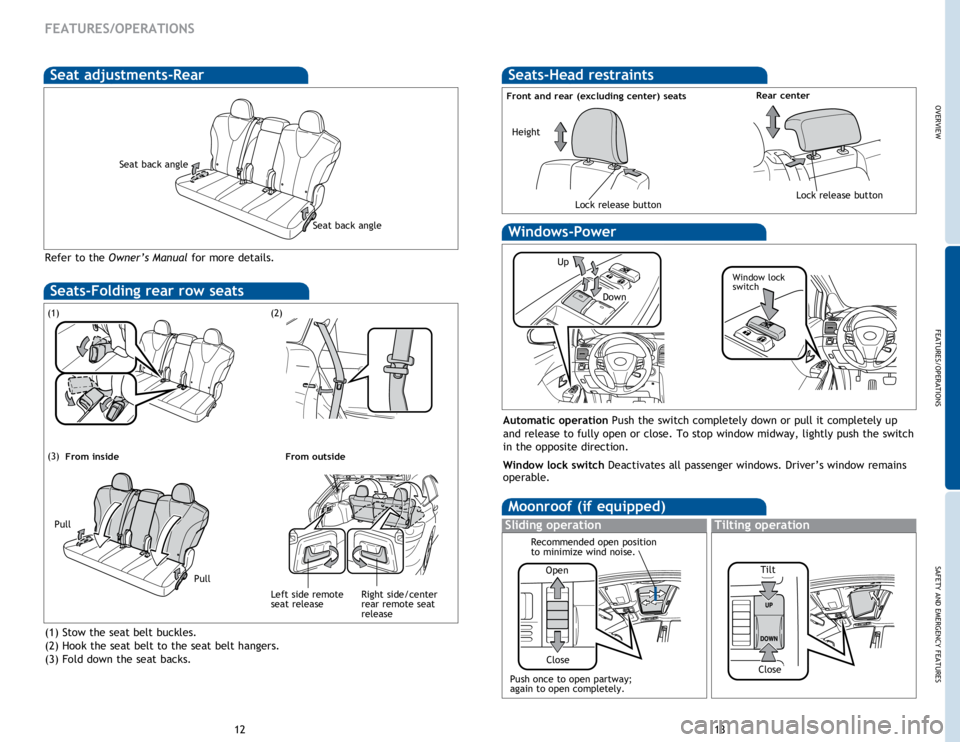
Stow the seat belt buckles.
(2) Hook the seat belt to the seat belt hangers.
(3) Fold down the seat backs.
(1)
(3)
(2)
Seats-Folding rear row seats
Pull
Pull
From inside
From outside
Right side/center
rear remote seat
release
Left side remote
seat release
Moonroof (if equipped)
Sliding operationTilting operation
Open
Close
Recommended open position
to minimize wind noise.
Windows-Power
Up
Down
Window lock
switch
Automatic operation
Push the switch completely down or pull it completely up
and release to fully open or close. To stop window midway, lightly push the switch
in the opposite direction.
Window lock switch Deactivates all passenger windows. Driver’s window remains
operable.
Push once to open partway;
again to open completely. TiltClose
Seat adjustments-Rear
Refer to the
Owner’s Manual for more details.
Seat back angle
Seat back angle
Page 14 of 17
OVERVIEW
FEATURES/OPERATIONS
SAFETY AND EMERGENCY FEATURES
25
24
SAFETY AND EMERGENCY FEATURES
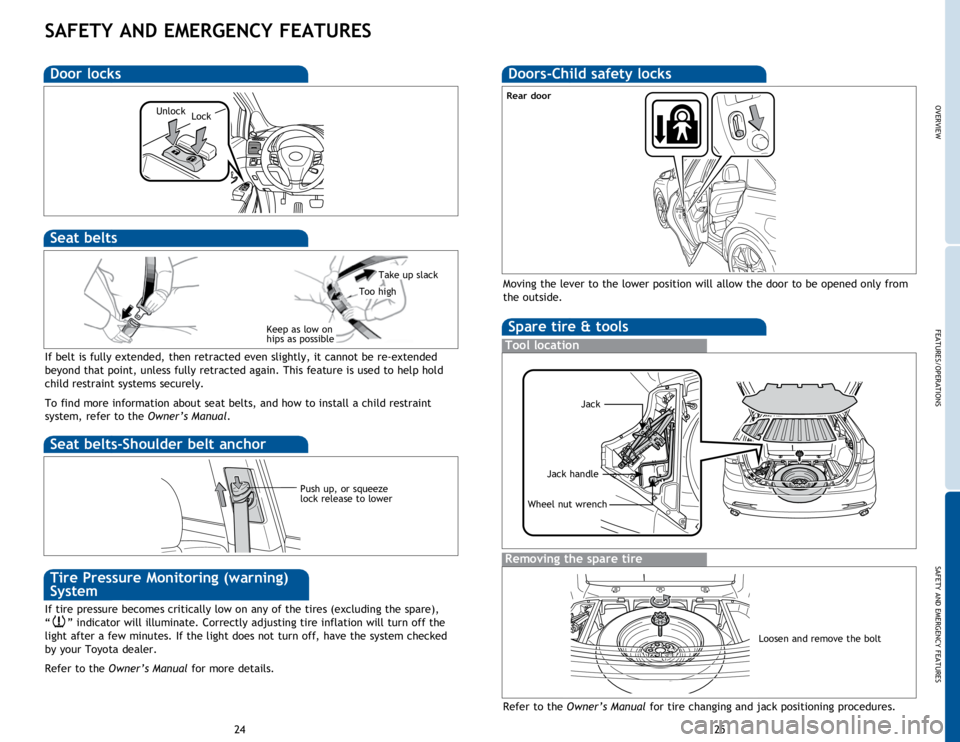
If belt is fully extended, then retracted even slightly, it cannot be re-extended
beyond that point, unless fully retracted again. This feature is used to help hold
child restraint systems securely.
To find more information about seat belts, and how to install a child restraint
system, refer to the Owner’s Manual.
Keep as low on
hips as possible
Take up slack
Too high
Seat belts
Push up, or squeeze
lock release to lower
Seat belts-Shoulder belt anchor
Spare tire & tools
Tool location
Removing the spare tire
Refer to the Owner’s Manual for tire changing and jack positioning procedures.
Wheel nut wrench
Moving the lever to the lower position will allow the door to be opened only from
the outside.
Rear door
Jack
Jack handle
Doors-Child safety locks
Loosen and remove the bolt
If tire pressure becomes critically low on any of the tires (excluding the spare),
“
” indicator will illuminate. Correctly adjusting tire inflation will turn off the
light after a few minutes. If the light does not turn off, have the system checked
by your Toyota dealer.
Refer to the Owner’s Manual for more details.
Tire Pressure Monitoring (warning)
System
Door locks
Lock
Unlock