AUX TOYOTA VERSO S 2011 Owners Manual
[x] Cancel search | Manufacturer: TOYOTA, Model Year: 2011, Model line: VERSO S, Model: TOYOTA VERSO S 2011Pages: 664, PDF Size: 160.56 MB
Page 21 of 664
21Pictorial index
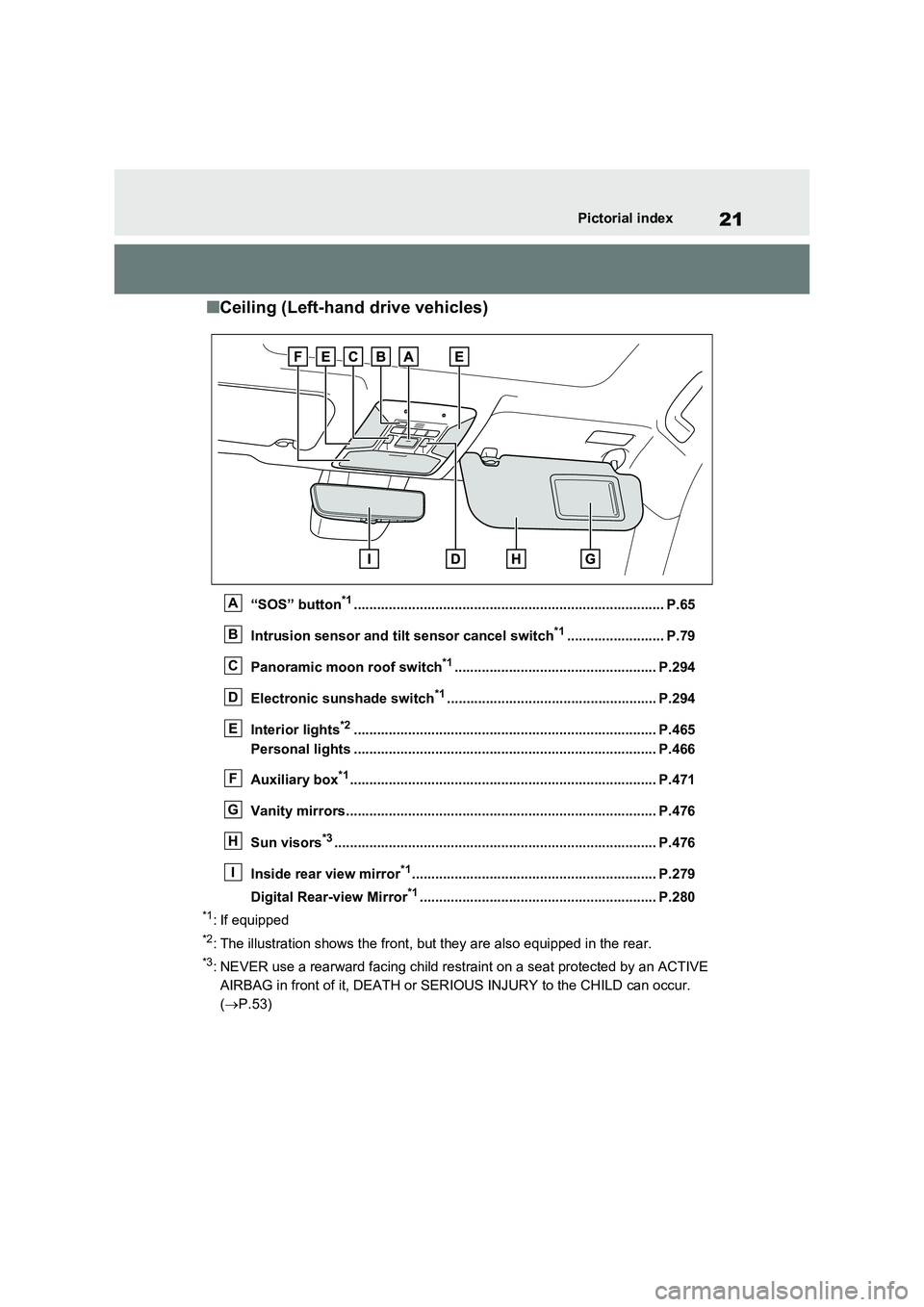
■Ceiling (Left-hand drive vehicles)
“SOS” button*1................................................................................ P.65
Intrusion sensor and tilt sensor cancel switch*1......................... P.79
Panoramic moon roof switch*1.................................................... P.294
Electronic sunshade switch*1...................................................... P.294
Interior lights*2.............................................................................. P.465
Personal lights .............................................................................. P.466
Auxiliary box*1............................................................................... P.471
Vanity mirrors................................................................................ P.476
Sun visors*3................................................................................... P.476
Inside rear view mirror*1............................................................... P.279
Digital Rear-view Mirror*1............................................................. P.280
*1: If equipped
*2: The illustration shows the front, but they are also equipped in the rear.
*3: NEVER use a rearward facing child restraint on a seat protected by an ACTIVE
AIRBAG in front of it, DEATH or SERIOUS INJURY to the CHILD can occur.
( P.53)
A
B
C
D
E
F
G
H
I
Page 29 of 664
29Pictorial index
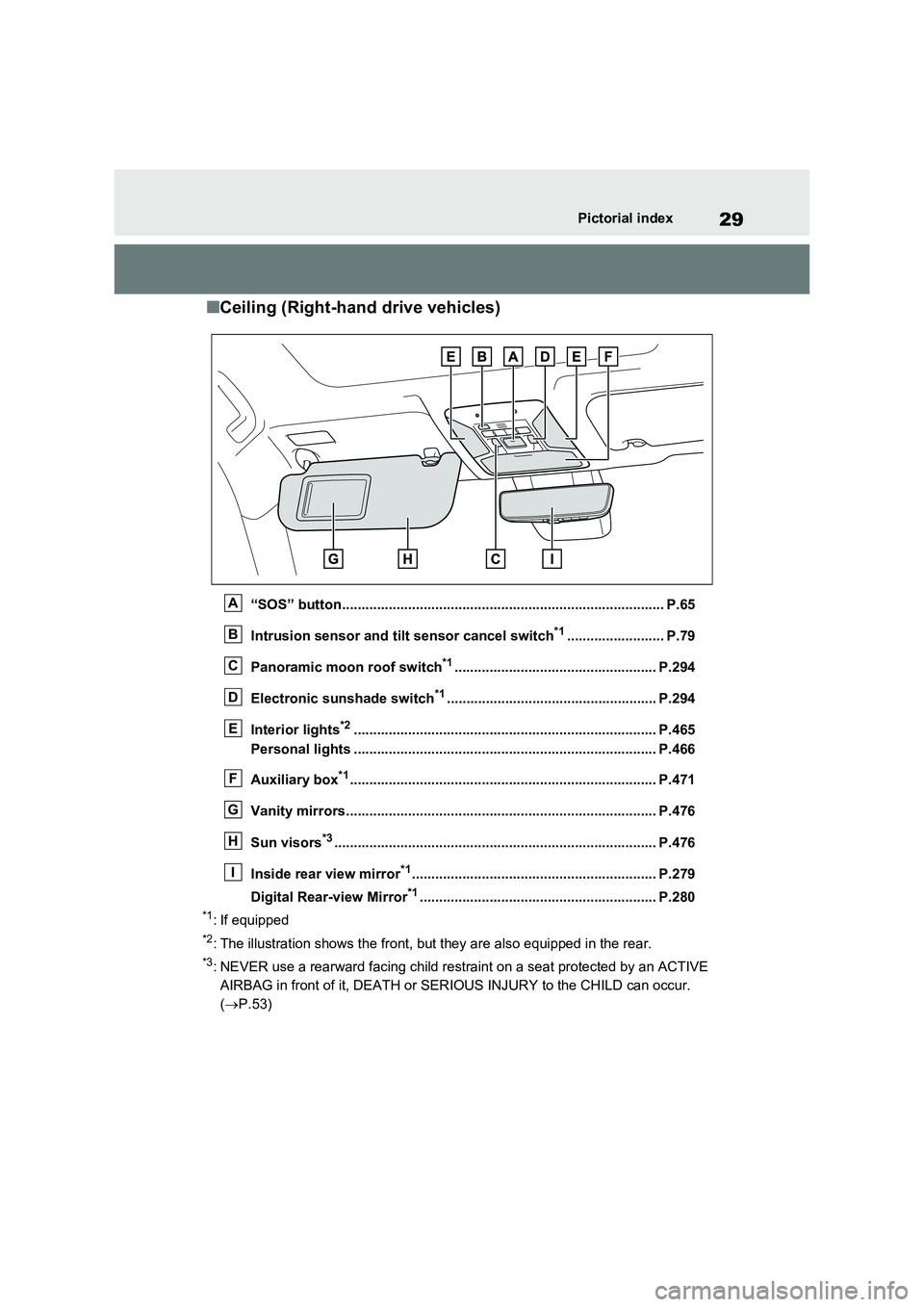
■Ceiling (Right-hand drive vehicles)
“SOS” button................................................................................... P.65
Intrusion sensor and tilt sensor cancel switch*1......................... P.79
Panoramic moon roof switch*1.................................................... P.294
Electronic sunshade switch*1...................................................... P.294
Interior lights*2.............................................................................. P.465
Personal lights .............................................................................. P.466
Auxiliary box*1............................................................................... P.471
Vanity mirrors................................................................................ P.476
Sun visors*3................................................................................... P.476
Inside rear view mirror*1............................................................... P.279
Digital Rear-view Mirror*1............................................................. P.280
*1: If equipped
*2: The illustration shows the front, but they are also equipped in the rear.
*3: NEVER use a rearward facing child restraint on a seat protected by an ACTIVE
AIRBAG in front of it, DEATH or SERIOUS INJURY to the CHILD can occur.
( P.53)
A
B
C
D
E
F
G
H
I
Page 165 of 664
165
2 2-2. Charging
Plug-in hybrid system
■If “Charging Stopped High Energy Use See Owner’s Manual” is
shown
■If “Charging System Malfunction See Owner’s Manual” is shown
■If “The Traction Battery Temp is low System put priority on
charging to preserve battery condition” is shown (Greenland only)
Likely causeCorrection procedure
Power is being consumed by electrical
components of vehicle
Check the following items, and then carry
out charging again.
If the headlights and audio are turned
on, turn them off.
Turn the power switch off.
If charging cannot be carried out, even
after performing the above, the auxiliary
battery may not be sufficiently charged.
Operate the hybrid system for approxi-
mately 15 minutes or more to charge the
auxiliary battery.
Likely causeCorrection procedure
Malfunction occurred in charging system
Have the vehicle inspected by any autho-
rized Toyota retailer or Toyota authorized
repairer, or any reliable repairer.
Likely causeCorrection procedure
The Hybrid battery (traction battery)
warming control was operated (P.129)
When the hybrid battery (traction battery)
warming control operates, the charging
schedule is not used and charging is per-
formed.
This is a control to protect the hybrid bat-
tery (traction battery), and not a malfunc-
tion.
Page 468 of 664
4686-3. Using the storage features
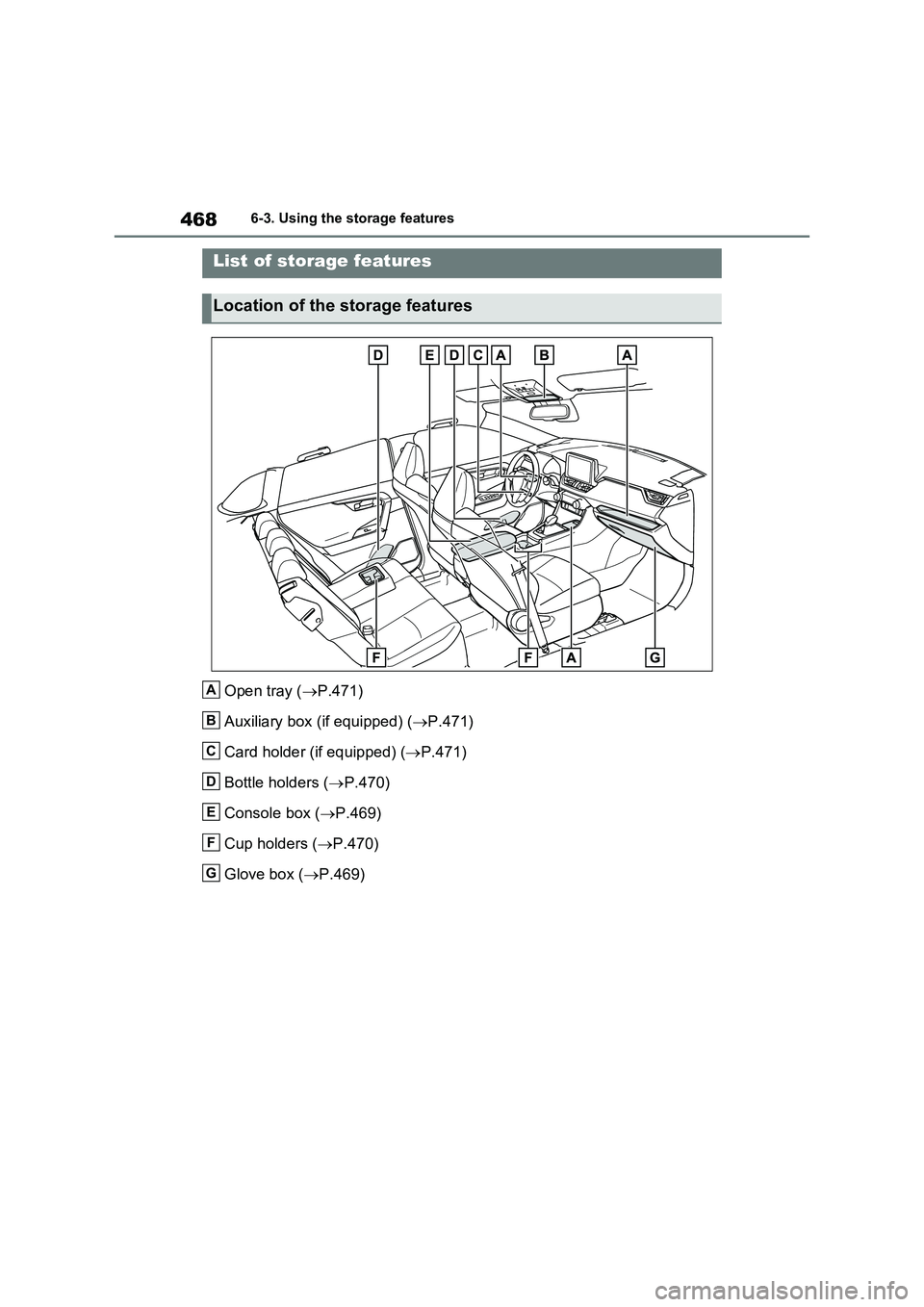
6-3.Using the s torage feature s
Open tray (P.471)
Auxiliary box (if equipped) (P.471)
Card holder (if equipped) (P.471)
Bottle holders (P.470)
Console box (P.469)
Cup holders (P.470)
Glove box (P.469)
List of storage features
Location of the storage features
A
B
C
D
E
F
G
Page 471 of 664
471
6
6-3. Using the storage features
Interior features
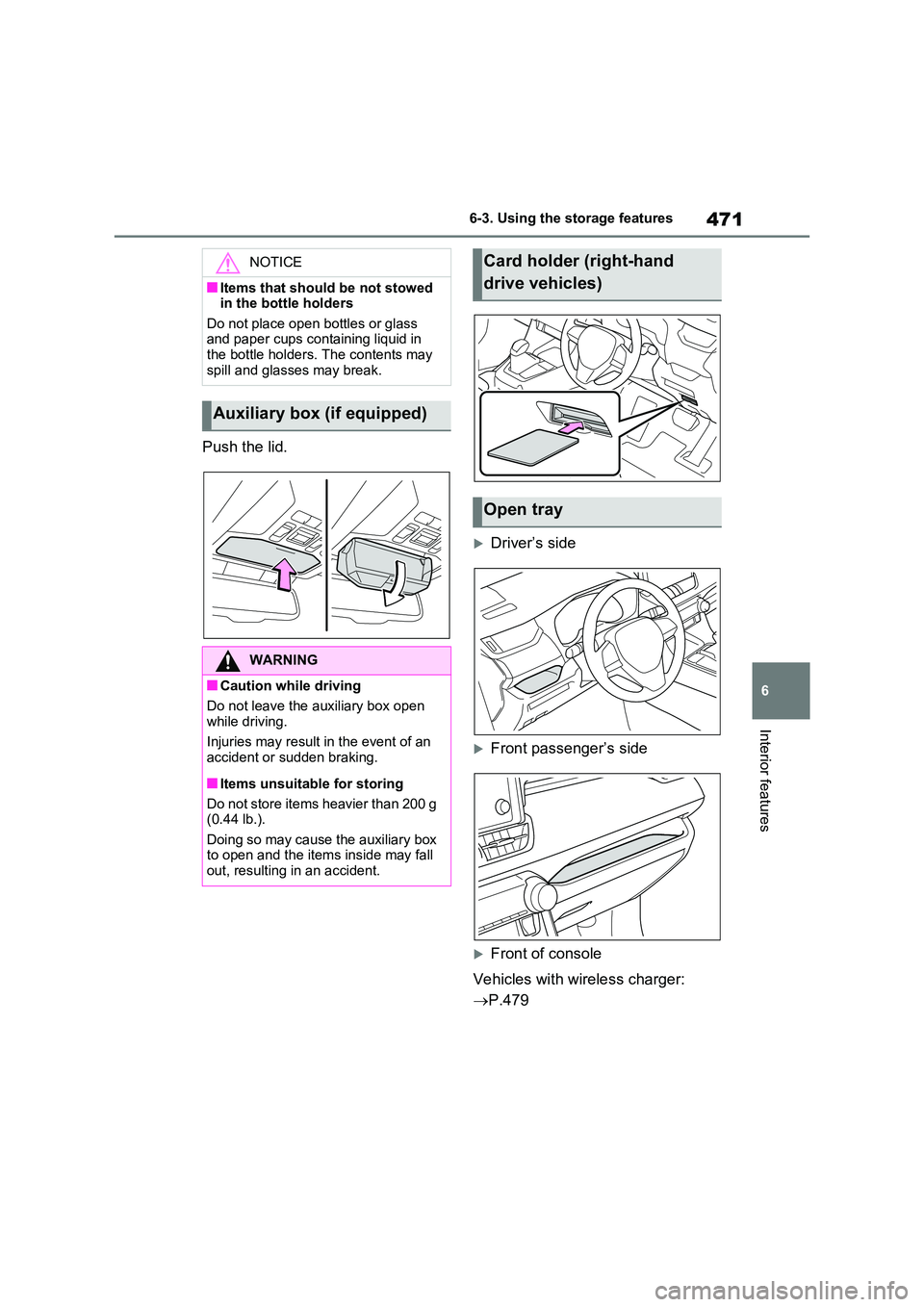
Push the lid.
Driver’s side
Front passenger’s side
Front of console
Vehicles with wireless charger:
P.479
NOTICE
■Items that should be not stowed in the bottle holders
Do not place open bottles or glass and paper cups containing liquid in the bottle holders. The contents may
spill and glasses may break.
Auxiliary box (if equipped)
WARNING
■Caution while driving
Do not leave the auxiliary box open while driving.
Injuries may result in the event of an accident or sudden braking.
■Items unsuitable for storing
Do not store items heavier than 200 g (0.44 lb.).
Doing so may cause the auxiliary box to open and the items inside may fall out, resulting in an accident.
Card holder (right-hand
drive vehicles)
Open tray
Page 498 of 664
4987-3. Do-it-yourself maintenance
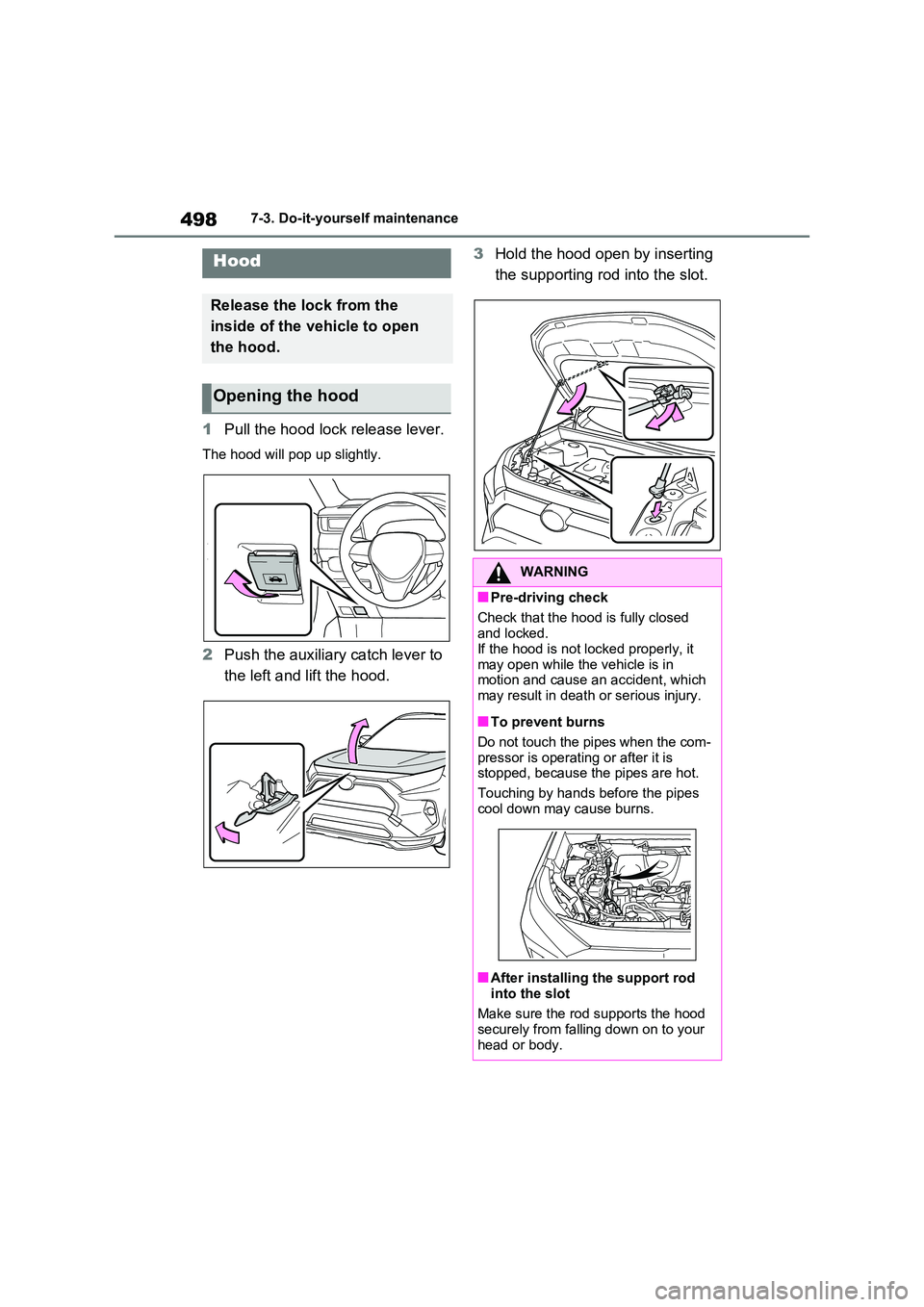
1Pull the hood lock release lever.
The hood will pop up slightly.
2Push the auxiliary catch lever to
the left and lift the hood.
3 Hold the hood open by inserting
the supporting rod into the slot.Hood
Release the lock from the
inside of the vehicle to open
the hood.
Opening the hood
WARNING
■Pre-driving check
Check that the hood is fully closed
and locked. If the hood is not locked properly, it
may open while the vehicle is in motion and cause an accident, which may result in death or serious injury.
■To prevent burns
Do not touch the pipes when the com-
pressor is operating or after it is stopped, because the pipes are hot.
Touching by hands before the pipes
cool down may cause burns.
■After installing the support rod
into the slot
Make sure the rod supports the hood securely from falling down on to your
head or body.
Page 512 of 664
5127-3. Do-it-yourself maintenance
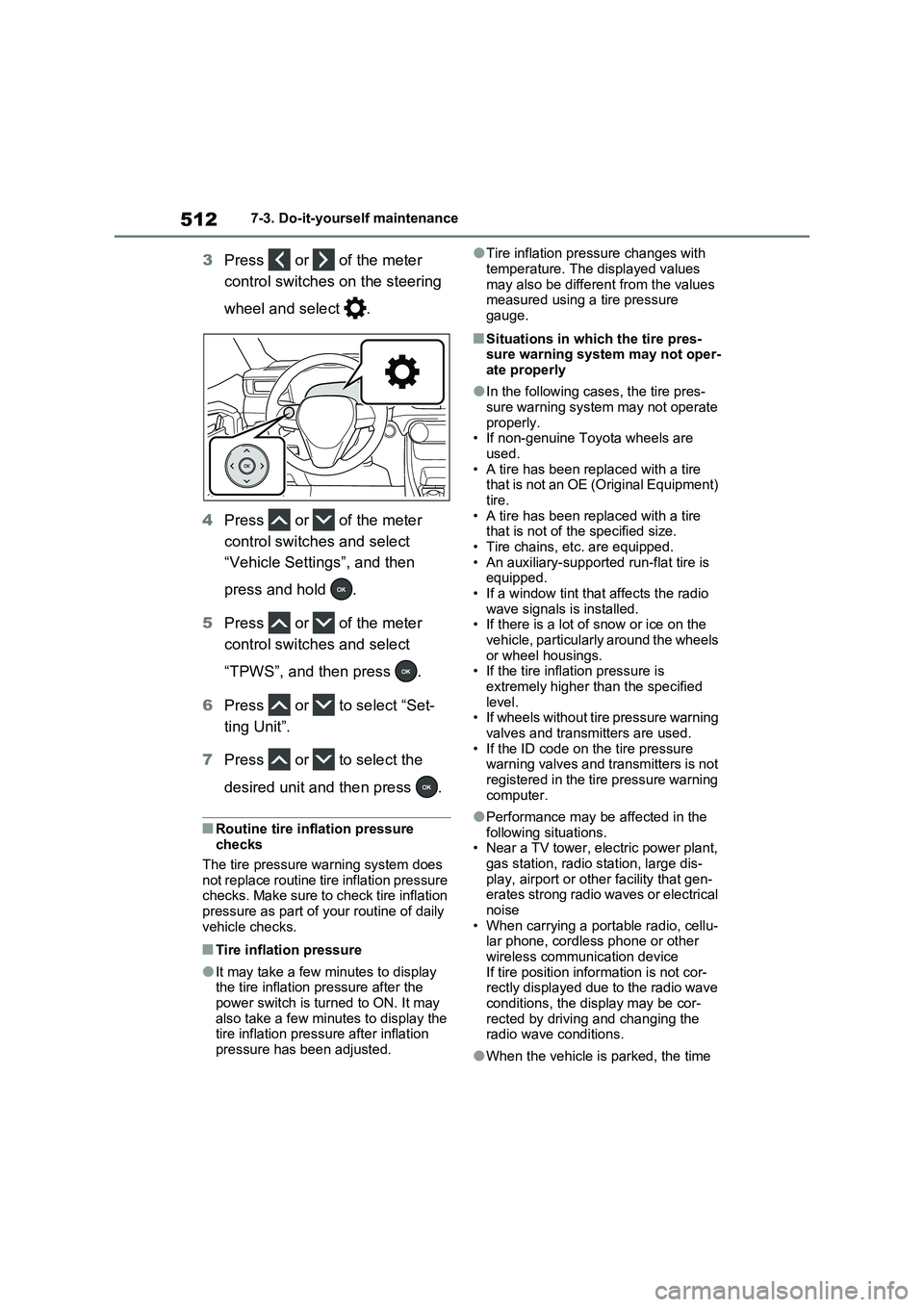
3Press or of the meter
control switches on the steering
wheel and select .
4Press or of the meter
control switches and select
“Vehicle Settings”, and then
press and hold .
5Press or of the meter
control switches and select
“TPWS”, and then press .
6Press or to select “Set-
ting Unit”.
7Press or to select the
desired unit and then press .
■Routine tire inflation pressure
checks
The tire pressure warning system does
not replace routine tire inflation pressure
checks. Make sure to check tire inflation
pressure as part of your routine of daily
vehicle checks.
■Tire inflation pressure
●It may take a few minutes to display
the tire inflation pressure after the
power switch is turned to ON. It may
also take a few minutes to display the
tire inflation pressure after inflation
pressure has been adjusted.
●Tire inflation pressure changes with
temperature. The displayed values
may also be different from the values
measured using a tire pressure
gauge.
■Situations in which the tire pres-
sure warning system may not oper-
ate properly
●In the following cases, the tire pres-
sure warning system may not operate
properly.
• If non-genuine Toyota wheels are
used.
• A tire has been replaced with a tire
that is not an OE (Original Equipment)
tire.
• A tire has been replaced with a tire
that is not of the specified size.
• Tire chains, etc. are equipped.
• An auxiliary-supported run-flat tire is
equipped.
• If a window tint that affects the radio
wave signals is installed.
• If there is a lot of snow or ice on the
vehicle, particularly around the wheels
or wheel housings.
• If the tire inflation pressure is
extremely higher than the specified
level.
• If wheels without tire pressure warning
valves and transmitters are used.
• If the ID code on the tire pressure
warning valves and transmitters is not
registered in the tire pressure warning
computer.
●Performance may be affected in the
following situations.
• Near a TV tower, electric power plant,
gas station, radio station, large dis-
play, airport or other facility that gen-
erates strong radio waves or electrical
noise
• When carrying a portable radio, cellu-
lar phone, cordless phone or other
wireless communication device
If tire position information is not cor-
rectly displayed due to the radio wave
conditions, the display may be cor-
rected by driving and changing the
radio wave conditions.
●When the vehicle is parked, the time
Page 650 of 664
650Alphabetical Index
Blower customization ................. 454
Front seat concentrated airflow
mode (S-FLOW) ...................... 457
Humidity sensor ......................... 459
Remote Air Conditioning System460
Automatic headlight leveling system
..................................................... 333
Automatic High Beam (AHB) ....... 334
Automatic light control system ... 332
Auxiliary box ................................. 471
Average fuel consumption .......... 198
Average fuel economy ................. 181
Average vehicle speed ......... 185, 198
B
Back door ...................................... 210
Hands Free Power Back Door ... 215
Power back door ........................ 213
Wireless remote control ............. 213
Back-up lights
Replacing light bulbs .................. 548
Wattage...................................... 625
Battery (12-volt battery) ............... 506
If the 12-volt battery is discharged
................................................. 606
Preparing and checking before win-
ter ............................................ 445
Replacing ................................... 609
Warning light .............................. 569
Battery (traction battery)................ 94
Charging .................................... 135
Location ....................................... 94
Specification............................... 621
Blind Spot Monitor (BSM) ............ 393
Blind Spot Monitor function ........ 408
Rear Crossing Traffic Alert function
................................................. 411
Bottle holders ............................... 470
Brake
Brake Hold ................................. 329
Parking brake ............................. 326Regenerative braking ................... 90
Warning light .............................. 568
Brake assist...................................438
Brake Hold ..................................... 329
Brake Override System ................ 301
Break-in tips .................................. 301
BSM (Blind Spot Monitor) ............393
Blind Spot Monitor function ........ 408
Rear Crossing Traffic Alert function
................................................. 411
C
Card holder.................................... 471
Care
Aluminum wheels .......................488
Exterior ....................................... 488
Front camera .............................. 345
Interior ........................................491
Radar sensor.............................. 345
Seat belts ...................................491
Water-repellent coating .............. 489
Cargo hooks .................................. 472
Chains ............................................ 447
Charging
“My Room Mode” .......................153
AC charging cable ...................... 108
Charging equipment ................... 105
Charging indicator ...................... 106
Charging messages ................... 160
Charging procedure ................... 135
Charging schedule function........ 144
Charging time may increase ...... 128
High voltage components............. 94
How to charge ............................ 135
Information related to charging dis-
play .......................................... 131
Opening and closing the charging
port lid ...................................... 106
Power sources precautions ........ 125
Power sources that can be used 124
Safety functions.......................... 132
Page 656 of 664
656Alphabetical Index
properly.................................... 604
If you lose your keys .................. 603
Key number plate ....................... 202
Keyless entry ..................... 203, 223
Mechanical key .......................... 204
Power switch .............................. 317
Replacing the battery ................. 543
Warning buzzer .......................... 224
Wireless remote control key....... 203
Knee airbags ................................... 39
L
Lane Tracing Assist (LTA) ........... 362
Operation ................................... 362
Warning messages .................... 371
Language (multi-information dis-
play) ..................................... 188, 631
Lever
Auxiliary catch lever ................... 498
Hood lock release lever ............. 498
Shift lever ................................... 321
Tilt and telescopic steering lock
release lever ............................ 278
Turn signal lever ........................ 325
Wiper lever ......................... 338, 340
License plate lights
Light switch ................................ 332
Replacing light bulbs .................. 548
Light bulbs
Replacing ................................... 548
Wattage...................................... 625
Lights
Automatic High Beam system .... 334
Emergency flasher switch .......... 560
Extended Headlight Lighting system
................................................. 333
Fog light switch .......................... 337
Front interior lights ..................... 465
Headlight switch ......................... 332
Illuminated entry system ............ 466
Interior lights .............................. 465Luggage compartment light........ 212
Personal lights............................ 466
Rear interior light ........................ 466
Replacing light bulbs ..................548
Turn signal lever......................... 325
Vanity lights ................................ 476
Wattage ...................................... 625
Lock steering column................... 318
LTA (Lane Tracing Assist) ........... 362
Operation ...................................362
Warning messages .................... 371
Luggage compartment light 212, 216
Wattage ...................................... 625
Luggage cover .............................. 473
M
Maintenance
Do-it-yourself maintenance ........ 496
Maintenance data.......................618
Maintenance requirements......... 494
Malfunction indicator lamp .......... 570
Menu icons .................................... 180
Meter
“ODO TRIP” switch .................... 178
Clock .......................................... 179
Head-up display ......................... 191
Indicators.................................... 168
Meter control switches ............... 180
Meters ........................................174
Multi-information display ............179
Settings .............................. 186, 631
Units ........................................... 188
Warning lights .................... 568, 578
Warning messages .................... 189
Meter control switches ................. 180
Mirrors
Digital Rear-view Mirror.............. 280
Inside rear view mirror................ 279
Outside rear view mirror defoggers
................................................. 454
Outside rear view mirrors ........... 289
Page 664 of 664
664
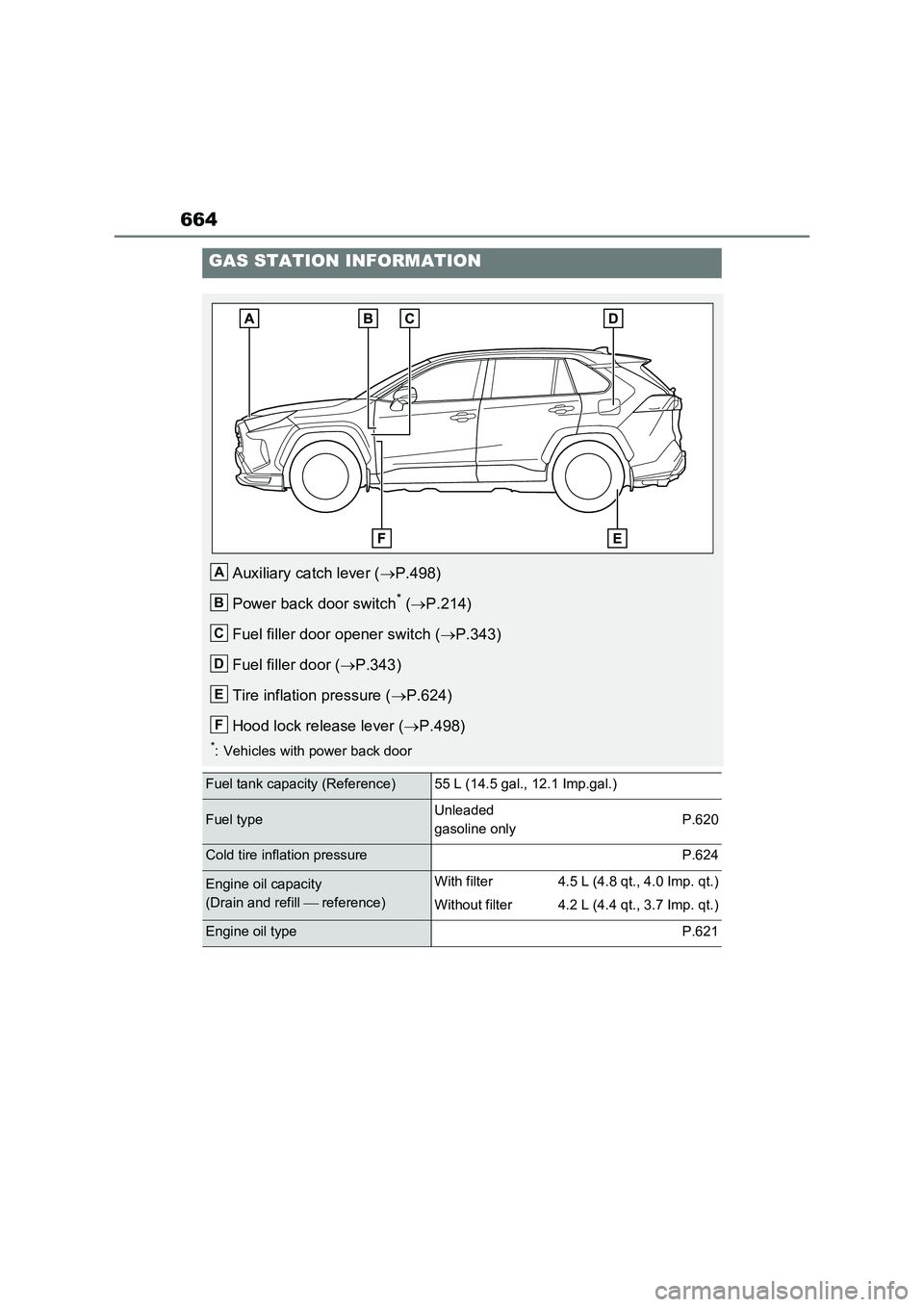
GAS STATION INFORMATION
Auxiliary catch lever (P.498)
Power back door switch
* (P.214)
Fuel filler door opener switch (P.343)
Fuel filler door (P.343)
Tire inflation pressure (P.624)
Hood lock release lever (P.498)
*: Vehicles with power back door
Fuel tank capacity (Reference)55 L (14.5 gal., 12.1 Imp.gal.)
Fuel typeUnleaded
gasoline onlyP.620
Cold tire inflation pressureP.624
Engine oil capacity
(Drain and refill reference)With filter
Without filter4.5 L (4.8 qt., 4.0 Imp. qt.)
4.2 L (4.4 qt., 3.7 Imp. qt.)
Engine oil typeP.621
A
B
C
D
E
F