navigation system TOYOTA YARIS CROSS 2021 Owner's Manual
[x] Cancel search | Manufacturer: TOYOTA, Model Year: 2021, Model line: YARIS CROSS, Model: TOYOTA YARIS CROSS 2021Pages: 650, PDF Size: 132.86 MB
Page 268 of 650
266
YARIS CROSS Owner's Manual_Europe_M52K60_en
4-5. Using the driving support systems
repairer.
*: If equipped
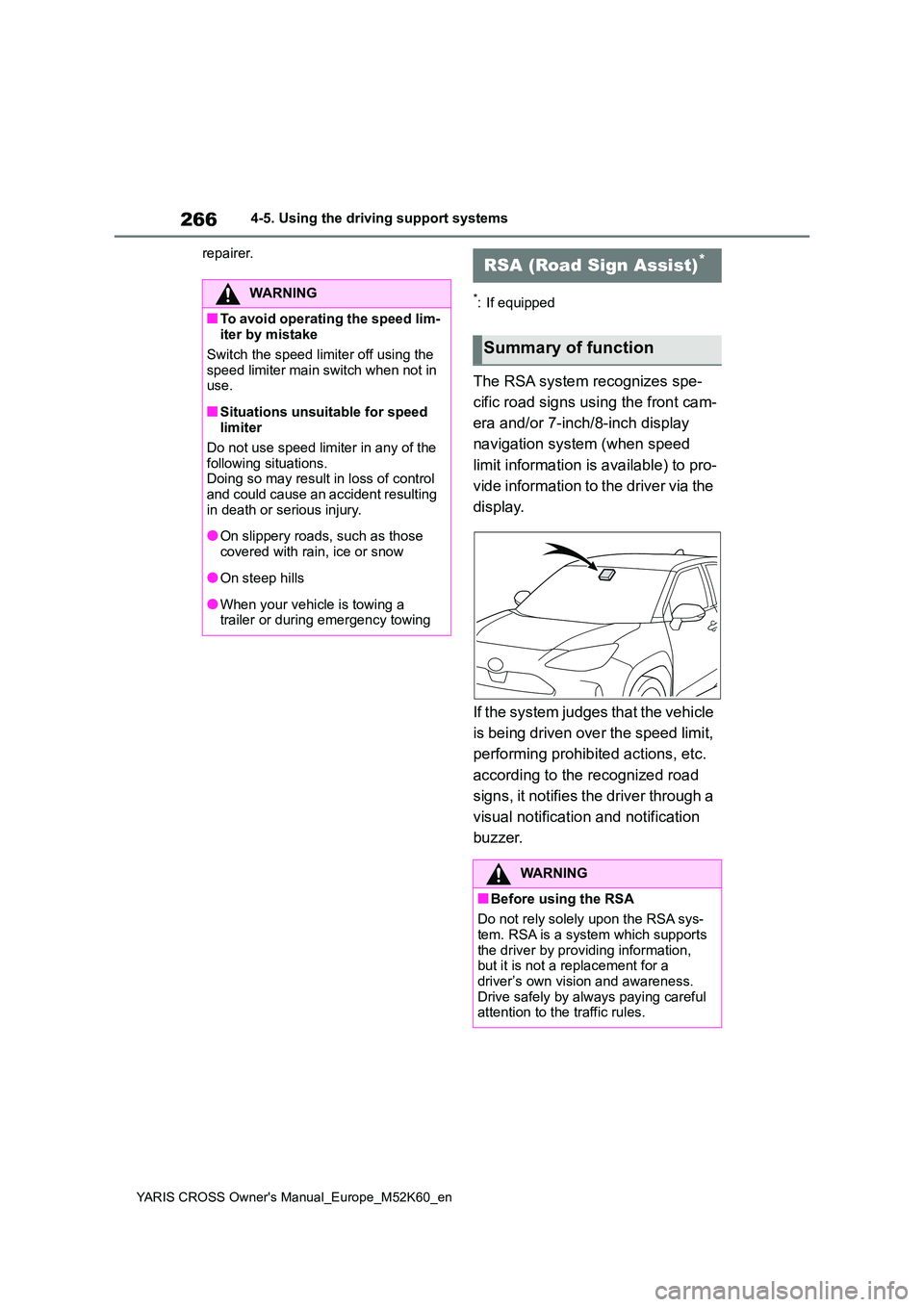
The RSA system recognizes spe-
cific road signs using the front cam-
era and/or 7-inch/8-inch display
navigation system (when speed
limit information is available) to pro-
vide information to the driver via the
display.
If the system judges that the vehicle
is being driven over the speed limit,
performing prohibited actions, etc.
according to the recognized road
signs, it notifies the driver through a
visual notification and notification
buzzer.
WARNING
■To avoid operating the speed lim- iter by mistake
Switch the speed limiter off using the
speed limiter main switch when not in use.
■Situations unsuitable for speed limiter
Do not use speed limiter in any of the
following situations. Doing so may result in loss of control and could cause an accident resulting
in death or serious injury.
●On slippery roads, such as those
covered with rain, ice or snow
●On steep hills
●When your vehicle is towing a trailer or during emergency towing
RSA (Road Sign Assist)*
Summary of function
WARNING
■Before using the RSA
Do not rely solely upon the RSA sys- tem. RSA is a system which supports
the driver by providing information, but it is not a replacement for a driver’s own vision and awareness.
Drive safely by always paying careful attention to the traffic rules.
Page 269 of 650
267
4
YARIS CROSS Owner's Manual_Europe_M52K60_en
4-5. Using the driving support systems
Driving
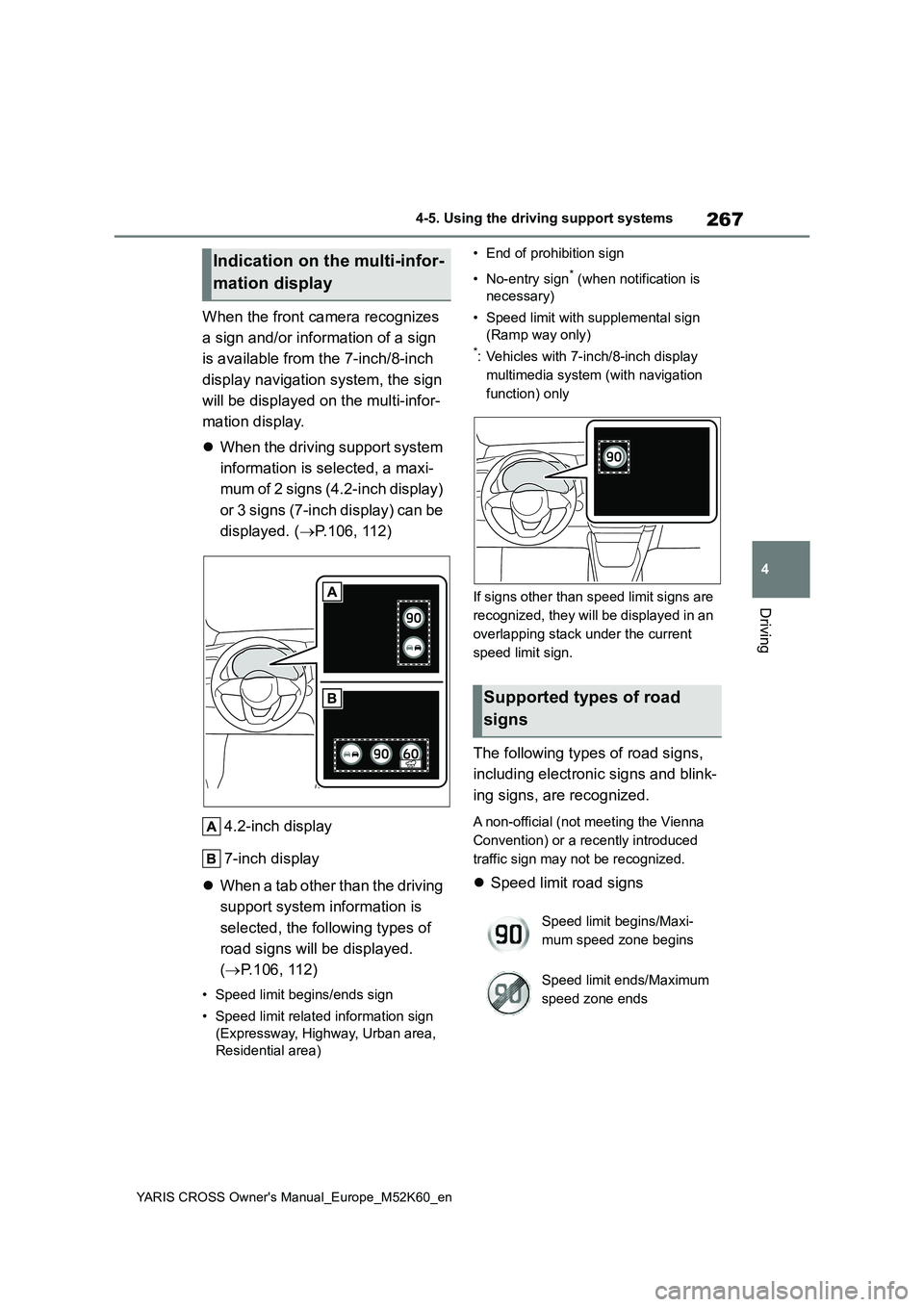
When the front camera recognizes
a sign and/or information of a sign
is available from the 7-inch/8-inch
display navigation system, the sign
will be displayed on the multi-infor-
mation display.
When the driving support system
information is selected, a maxi-
mum of 2 signs (4.2-inch display)
or 3 signs (7-inch display) can be
displayed. ( P.106, 112)
4.2-inch display
7-inch display
When a tab other than the driving
support system information is
selected, the following types of
road signs will be displayed.
( P.106, 112)
• Speed limit begins/ends sign
• Speed limit related information sign
(Expressway, Highway, Urban area,
Residential area)
• End of prohibition sign
• No-entry sign* (when notification is
necessary)
• Speed limit with supplemental sign
(Ramp way only)
*: Vehicles with 7-inch/8-inch display
multimedia system (with navigation
function) only
If signs other than speed limit signs are
recognized, they will be displayed in an
overlapping stack under the current
speed limit sign.
The following types of road signs,
including electronic signs and blink-
ing signs, are recognized.
A non-official (not meeting the Vienna
Convention) or a recently introduced
traffic sign may not be recognized.
Speed limit road signs
Indication on the multi-infor-
mation display
Supported types of road
signs
Speed limit begins/Maxi-
mum speed zone begins
Speed limit ends/Maximum
speed zone ends
Page 270 of 650
268
YARIS CROSS Owner's Manual_Europe_M52K60_en
4-5. Using the driving support systems
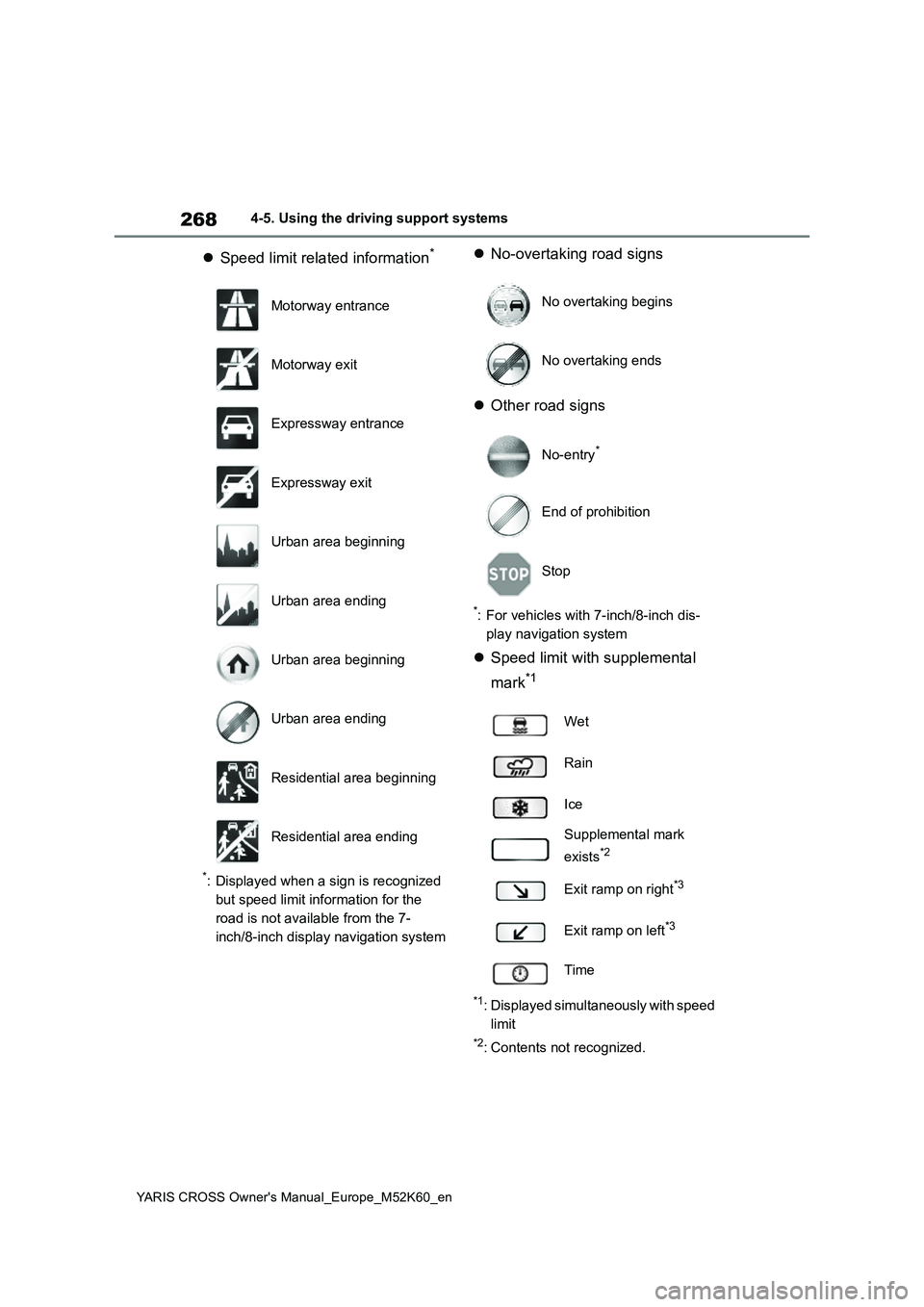
Speed limit related information*
*: Displayed when a sign is recognized
but speed limit information for the
road is not available from the 7-
inch/8-inch display navigation system
No-overtaking road signs
Other road signs
*: For vehicles with 7-inch/8-inch dis-
play navigation system
Speed limit with supplemental
mark*1
*1: Displayed simultaneously with speed
limit
*2: Contents not recognized.
Motorway entrance
Motorway exit
Expressway entrance
Expressway exit
Urban area beginning
Urban area ending
Urban area beginning
Urban area ending
Residential area beginning
Residential area ending
No overtaking begins
No overtaking ends
No-entry*
End of prohibition
Stop
Wet
Rain
Ice
Supplemental mark
exists*2
Exit ramp on right*3
Exit ramp on left*3
Time
Page 271 of 650
269
4
YARIS CROSS Owner's Manual_Europe_M52K60_en
4-5. Using the driving support systems
Driving
*3: If the turn signal indicator is not
operated when changing lanes, the
mark does not display.
In the following situations, the RSA
system will notify the driver.
When the vehicle speed exceeds
the speed notification threshold
of the speed limit sign displayed,
the sign display will be empha-
sized and a buzzer will sound.
When the RSA system recog-
nizes a no-entry sign and detects
that the vehicle has entered a
no-entry area based on the map
information of the navigation sys-
tem, the no-entry sign flashes
and a buzzer will sound. (For
vehicles with 7-inch/8-inch dis-
play navigation system)
If it is detected that your vehicle
is overtaking when a no overtak-
ing sign is displayed on the multi-
information display, the dis-
played sign will flash and a
buzzer will sound.
Depending on the situation, traffic
environment (traffic direction,
speed unit) may be detected incor-
rectly and a notification function
may not operate properly.
■Setting procedure
1 Press / (4.2-inch display) or
/ (7-inch display) of the
meter control switches and select
.
2 Press / (4.2-inch display) or
/ (7-inch display) of the
meter control switches and select
, then press .
■Automatic turn-off of RSA sign dis- play
One or more signs automatically turn off
in the following situations.
●No sign has been recognized for a
certain distance.
●The road changes due to a left or right
turn, etc.
■Conditions in which the function may not operate or detect correctly
In the following situations, RSA does not
operate normally and may not recognize signs, display the incorrect sign, etc. However, this does not indicate a mal-
function.
●The front camera is misaligned due to
a strong impact being applied to the sensor, etc.
●Dirt, snow, stickers, etc., are on the windshield near the front camera.
●In inclement weather such as heavy rain, fog, snow or sand storms.
●Light from an oncoming vehicle, the sun, etc., enters the front camera.
●The sign is dirty, faded, tilted or bent.
●The contrast of electronic sign is low.
●All or part of the sign is hidden by the leaves of a tree, a pole, etc.
●The sign is only visible to the front camera for a short amount of time.
●The driving scene (turning, lane change, etc.) is judged incorrectly.
●If a sign not appropriate for the cur-rently traveled lane, but the sign exists
directly after a freeway branches, or in an adjacent lane just before merging.
Notification function
Page 272 of 650
270
YARIS CROSS Owner's Manual_Europe_M52K60_en
4-5. Using the driving support systems
●S t ic ke r s a r e a t t ac he d t o t h e r e ar o f t he
preceding vehicle.
●A sign resembling a system compati-
ble sign is recognized.
●Side road speed signs may be
detected and displayed (if positioned in sight of the front camera) while the vehicle is traveling on the main road.
●Roundabout exit road speed signs may be detected and displayed (if
positioned in sight of the front camera) while traveling on a roundabout.
●The front of the vehicle is raised or lowered due to the carried load.
●The surrounding brightness is not suf-ficient or changes suddenly.
●When a sign intended for trucks, etc., is recognized.
●The vehicle is driven in a country with a different direction of traffic.
●The 7-inch/8-inch display navigation system map data is outdated.
●The 7-inch/8-inch display navigation system is not operating.
●The speed information displayed on the meter and on the 7-inch/8-inch display navigation system may be dif-
ferent due to the 7-inch/8-inch display navigation system using map data.
■Speed limit sign display
If the power switch was last turned off
while a speed limit sign was displayed on the multi-information display, the same sign displays again when the
power switch is turned to ON.
■If “RSA Malfunction Visit Your Dealer” is shown
The system may be malfunctioning.
Have the vehicle inspected by any authorized Toyota retailer or Toyota authorized repairer, or any reliable
repairer.
■Customization
Some functions can be customized. (Customizable features: P.498)
*: If equipped
BSM (Blind Spot Moni-
tor)*
The Blind Spot Monitor is a
system that uses rear side
radar sensors installed on the
inner side of the rear bumper
on the left and right side to
assist the driver in confirming
safety when changing lanes.
WARNING
■Cautions regarding the use of
the system
The driver is solely responsible for safe driving. Always drive safely, tak-
ing care to observe your surround- ings.
The Blind Spot Monitor is a supple-
mentary function which alerts the driver that a vehicle is in a blind spot of the outside rear view mirrors or is
approaching rapidly from behind into a blind spot. Do not overly rely on the
Blind Spot Monitor. As the function cannot judge if it is safe to change lanes, over reliance could lead to an
accident resulting in death or serious injury.
As the system may not function cor-
rectly under certain conditions, the driver’s own visual confirmation of safety is necessary.
Page 278 of 650
276
YARIS CROSS Owner's Manual_Europe_M52K60_en
4-5. Using the driving support systems
panoramic view monitor)
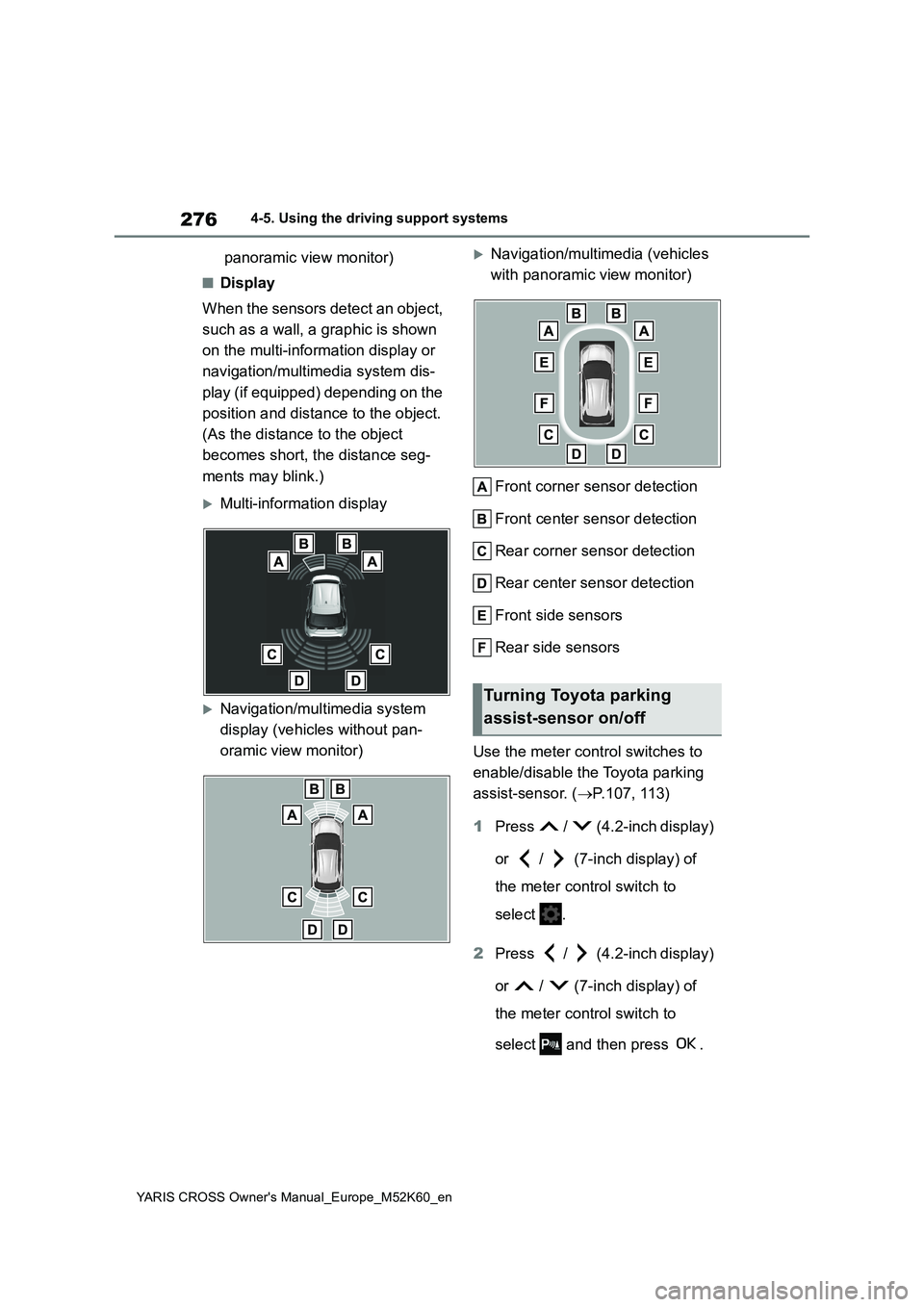
■Display
When the sensors detect an object,
such as a wall, a graphic is shown
on the multi-information display or
navigation/multimedia system dis-
play (if equipped) depending on the
position and distance to the object.
(As the distance to the object
becomes short, the distance seg-
ments may blink.)
Multi-information display
Navigation/multimedia system
display (vehicles without pan-
oramic view monitor)
Navigation/multimedia (vehicles
with panoramic view monitor)
Front corner sensor detection
Front center sensor detection
Rear corner sensor detection
Rear center sensor detection
Front side sensors
Rear side sensors
Use the meter control switches to
enable/disable the Toyota parking
assist-sensor. ( P.107, 113)
1 Press / (4.2-inch display)
or / (7-inch display) of
the meter control switch to
select .
2 Press / (4.2-inch display)
or / (7-inch display) of
the meter control switch to
select and then press .
Turning Toyota parking
assist-sensor on/off
Page 288 of 650
286
YARIS CROSS Owner's Manual_Europe_M52K60_en
4-5. Using the driving support systems
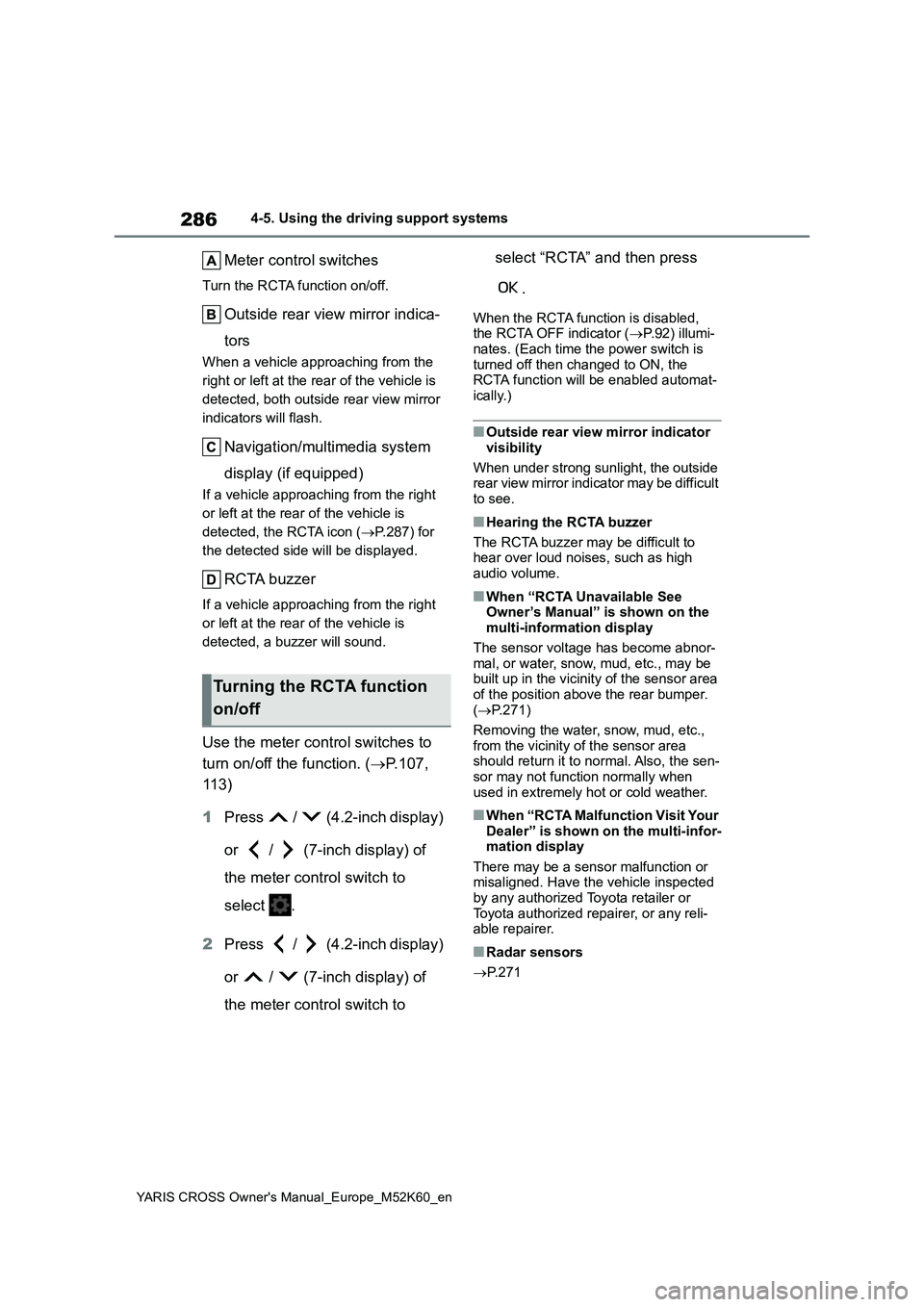
Meter control switches
Turn the RCTA function on/off.
Outside rear view mirror indica-
tors
When a vehicle approaching from the
right or left at the rear of the vehicle is
detected, both outside rear view mirror
indicators will flash.
Navigation/multimedia system
display (if equipped)
If a vehicle approaching from the right
or left at the rear of the vehicle is
detected, the RCTA icon ( P.287) for
the detected side will be displayed.
RCTA buzzer
If a vehicle approaching from the right
or left at the rear of the vehicle is
detected, a buzzer will sound.
Use the meter control switches to
turn on/off the function. ( P.107,
11 3 )
1 Press / (4.2-inch display)
or / (7-inch display) of
the meter control switch to
select .
2 Press / (4.2-inch display)
or / (7-inch display) of
the meter control switch to
select “RCTA” and then press
.
When the RCTA function is disabled, the RCTA OFF indicator ( P.92) illumi- nates. (Each time the power switch is
turned off then changed to ON, the RCTA function will be enabled automat-ically.)
■Outside rear view mirror indicator
visibility
When under strong sunlight, the outside rear view mirror indicator may be difficult
to see.
■Hearing the RCTA buzzer
The RCTA buzzer may be difficult to hear over loud noises, such as high
audio volume.
■When “RCTA Unavailable See Owner’s Manual” is shown on the multi-information display
The sensor voltage has become abnor- mal, or water, snow, mud, etc., may be built up in the vicinity of the sensor area
of the position above the rear bumper. ( P.271)
Removing the water, snow, mud, etc.,
from the vicinity of the sensor area should return it to normal. Also, the sen-sor may not function normally when
used in extremely hot or cold weather.
■When “RCTA Malfunction Visit Your Dealer” is shown on the multi-infor-mation display
There may be a sensor malfunction or misaligned. Have the vehicle inspected by any authorized Toyota retailer or
Toyota authorized repairer, or any reli- able repairer.
■Radar sensors
P. 2 7 1
Turning the RCTA function
on/off
Page 289 of 650
287
4
YARIS CROSS Owner's Manual_Europe_M52K60_en
4-5. Using the driving support systems
Driving
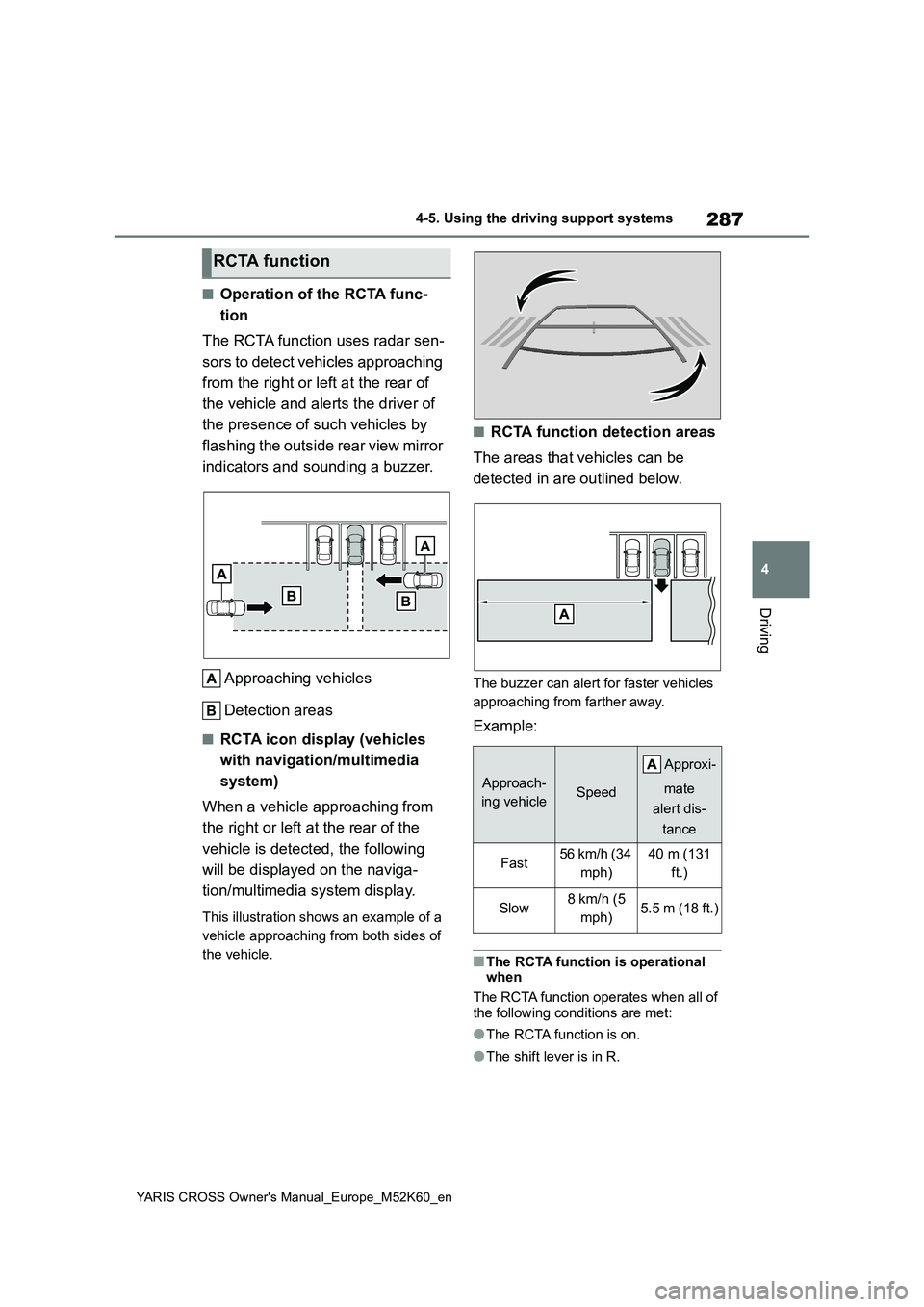
■Operation of the RCTA func-
tion
The RCTA function uses radar sen-
sors to detect vehicles approaching
from the right or left at the rear of
the vehicle and alerts the driver of
the presence of such vehicles by
flashing the outside rear view mirror
indicators and sounding a buzzer.
Approaching vehicles
Detection areas
■RCTA icon display (vehicles
with navigation/multimedia
system)
When a vehicle approaching from
the right or left at the rear of the
vehicle is detected, the following
will be displayed on the naviga-
tion/multimedia system display.
This illustration shows an example of a
vehicle approaching from both sides of
the vehicle.
■RCTA function detection areas
The areas that vehicles can be
detected in are outlined below.
The buzzer can alert for faster vehicles
approaching from farther away.
Example:
■The RCTA function is operational when
The RCTA function operates when all of
the following conditions are met:
●The RCTA function is on.
●The shift lever is in R.
RCTA function
Approach-
ing vehicleSpeed
A pp r ox i -
mate
alert dis-
tance
Fast56 km/h (34
mph)
40 m (131
ft.)
Slow8 km/h (5
mph)5.5 m (18 ft.)
Page 303 of 650
301
4
YARIS CROSS Owner's Manual_Europe_M52K60_en
4-5. Using the driving support systems
Driving
*: If equipped
■Function description
The Advanced Park assists in
backing into or parallel parking in a
spot selected on the multimedia
display, or departing from a parking
space, by delivering operation guid-
ance through displays and buzzer
operation, as well as operating the
steering wheel, accelerator pedal,
and brake pedal. (Shift lever opera-
tions are done by the driver)
Additionally, the panoramic view
monitor can display the area in
front, behind, and from above the
vehicle, helping confirm the condi-
tion of the area around the vehicle.
For details on the panoramic view
monitor refer to the “Navigation and
multimedia system Owner’s man-
ual”.
Depending on the condition of the
road surface or the vehicle, the dis-
tance between the vehicle and a
parking space, etc., it may not be
possible to assist in parking in the
target space.
Toyota Teammate
Advanced Park*
Advanced Park
WARNING
■When using the Advanced Park
●Do not overly rely on the Advanced
Park. As with a normal vehicle, take care to observe your surroundings while the vehicle is moving.
●Always pay attention to the vehi-cle’s surroundings while operating.
●The Advanced Park supports the driver when parking and leaving a
parking space. While checking the safety of the area around the vehi-cle, make sure to depress the brake
pedal as necessary to slow or stop the vehicle.
●As low objects (curb stones, park-ing blocks, etc.) may not be detected, make sure to check the
safety of the area around your vehi- cle and depress the brake pedal to stop the vehicle if it may collide with
an object.
●While the Advanced Park is operat-
ing, if it is likely that your vehicle will collide with a nearby vehicle, park-ing block, object, or person,
depress the brake pedal to stop the vehicle and press the advance park main switch to disable.
●Never use only the multimedia dis-play to view the area behind the
vehicle. The image displayed may differ than the actual situation. Using only the screen when back-
ing up may lead to an accident, such as a collision with another vehicle. When backing up, make
sure to look directly or use the mir- rors to check the safety of the area around your vehicle, especially
behind the vehicle.
●As the steering wheel will turn while
this Advanced Park is operating, pay attention to the following.
Page 328 of 650
326
YARIS CROSS Owner's Manual_Europe_M52K60_en
4-5. Using the driving support systems
“Peripheral monitoring system” in
the “Navigation and multimedia
system Owner’s manual”.
Displayable range of the screens
Cameras
Differences between displayed
images and the actual road
Differences between displayed
images and the actual objects
■Situations in which white park-
ing space box may not be rec-
ognized properly
In situations such as the following,
parking space box on the road sur-
face may not be detected:
When the parking space does
not use white lines (parking
space boundaries are marked
with rope, blocks, etc.)
When the parking space box are
faded or dirty, making them
unclear
When the road surface is bright,
such as concrete, and the con-
trast between it and the white
parking space box is small
When the parking space box are
any color other than yellow or
white
When the area surrounding the
parking space is dark, such as at
night, in an underground parking
lot, parking garage, etc.
When it is raining or has rained
and the road surface is wet and
reflective or there are puddles
When the sun is shining directly
into a camera, such as in the
early morning or evening
When the parking space is cov-
ered with snow or de-icing agent
When there marks from repairs
or other marks on the road sur-
face, or there is a traffic bollard,
or other object on the road sur-
face
When the color or brightness of
the road surface is uneven
When a camera has been
splashed by hot or cold water
and the lens has fogged up
When the appearance of the
parking space is affected by the
shadow of the vehicle or trees
When a camera lens is dirty or
covered with water droplets
In situations such as the following,
the target parking space may not
be recognized correctly:
When there marks from repairs
or other marks on the road sur-
face, or there is a parking block,
traffic bollard, or other object on
the road surface
When it is raining or has rained
and the road surface is wet and
reflective or there are puddles
When the color or brightness of
the road surface is uneven
When the parking space is on a
slope
When the appearance of the