brake TOYOTA YARIS SEDAN 2011 Owner's Manual
[x] Cancel search | Manufacturer: TOYOTA, Model Year: 2011, Model line: YARIS SEDAN, Model: TOYOTA YARIS SEDAN 2011Pages: 406, PDF Size: 9.23 MB
Page 129 of 406
116
2-1. Driving procedures
Automatic transmission∗
∗: If equipped
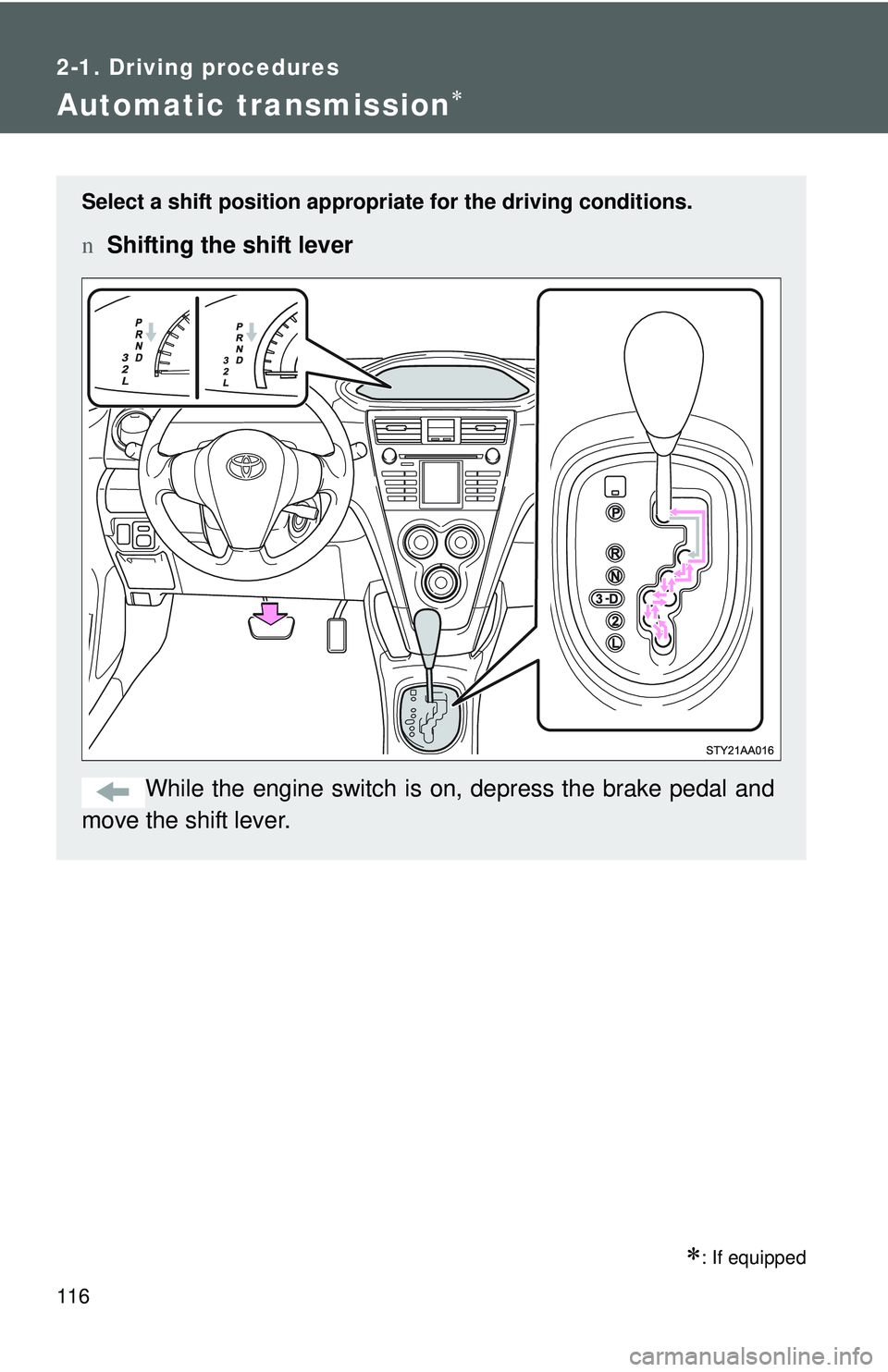
Select a shift position appropriate for the driving conditions.
nShifting the shift lever
While the engine switch is on, depress the brake pedal and
move the shift lever.
Page 130 of 406
117
2-1. Driving procedures
2
When driving
n
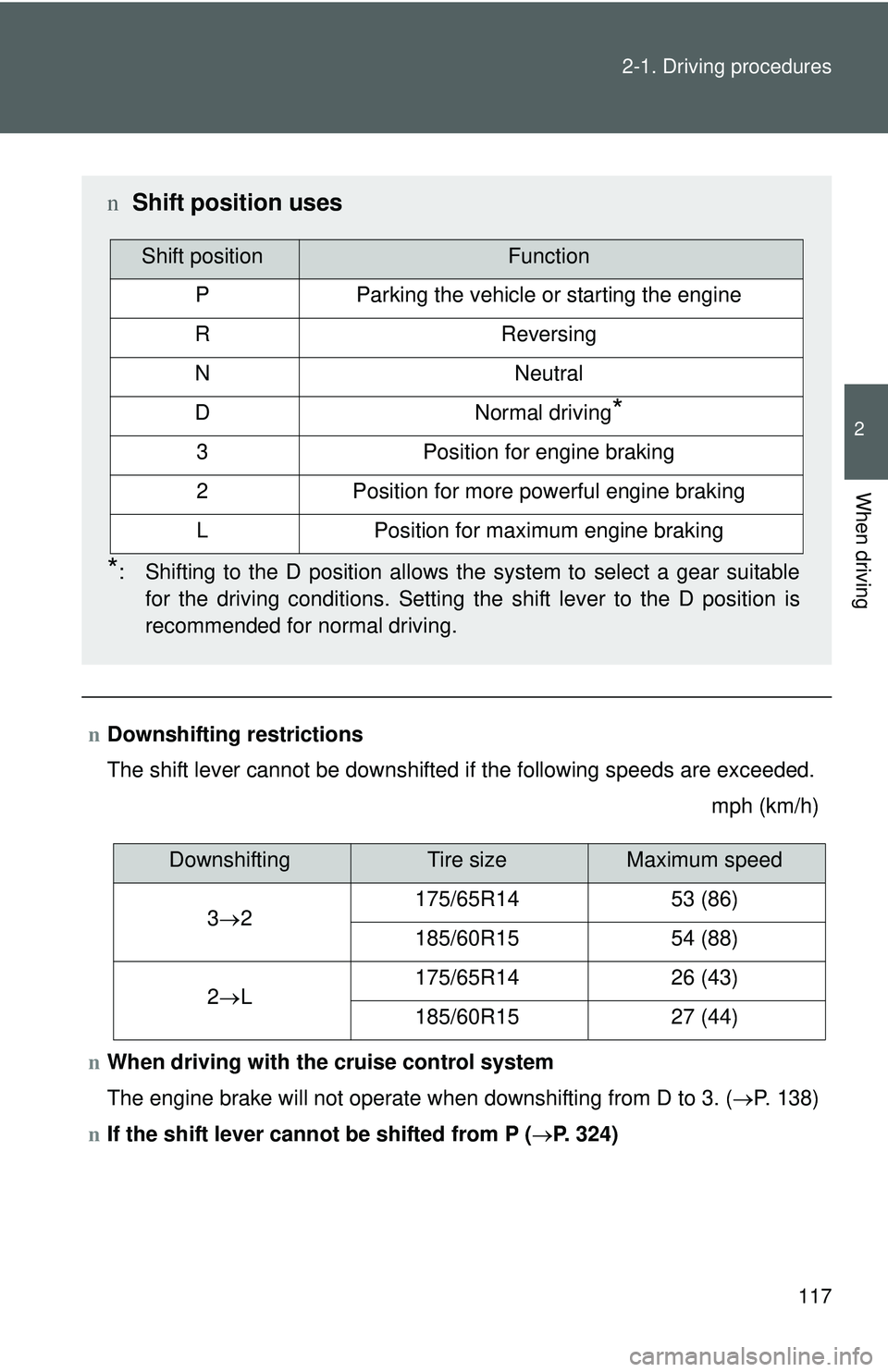
Downshifting restrictions
The shift lever cannot be downshifted if the following speeds are exceeded.
mph (km/h)
n When driving with the cruise control system
The engine brake will not operate when downshifting from D to 3. ( →P. 138)
n If the shift lever cannot be shifted from P (→P. 324)
n Shift position uses
*: Shifting to the D position allows the system to select a gear suitable
for the driving conditions. Setting the shift lever to the D position is
recommended for normal driving.
Shift positionFunction
PParking the vehicle or starting the engine
RReversing
NNeutral
DNormal driving*
3Position for engine braking
2Position for more powerful engine braking
LPosition for maximum engine braking
DownshiftingTire sizeMaximum speed
3 → 2 175/65R14
53 (86)
185/60R15 54 (88)
2 → L 175/65R14
26 (43)
185/60R15 27 (44)
Page 133 of 406
120
2-1. Driving procedures
Parking brake
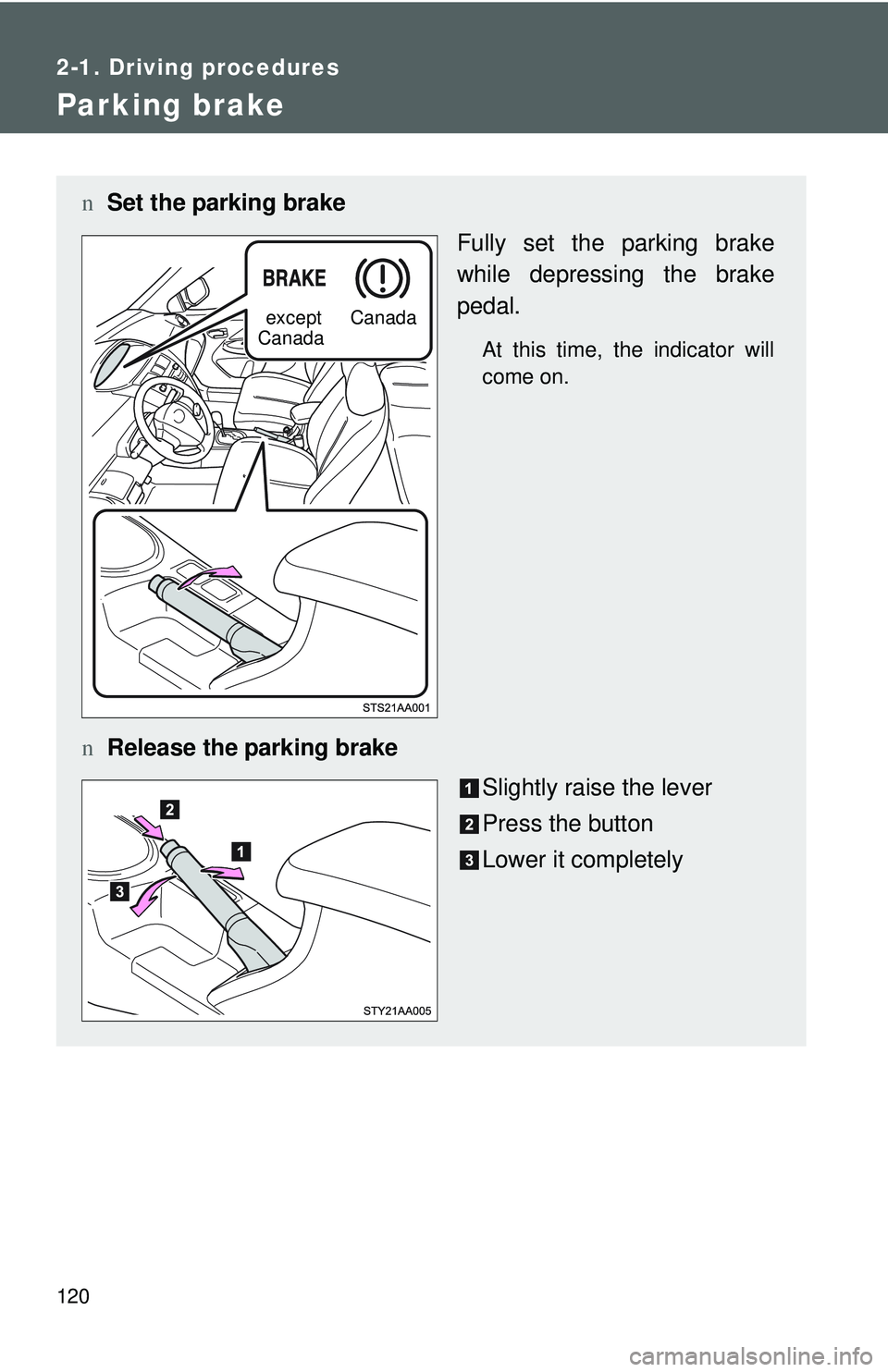
nSet the parking brake
Fully set the parking brake
while depressing the brake
pedal.
At this time, the indicator will
come on.
nRelease the parking brake
Slightly raise the lever
Press the button
Lower it completely
except
Canada Canada
Page 134 of 406
121
2-1. Driving procedures
2
When driving
n
Parking brake engaged warning buzzer
The buzzer sounds to indicate that parking brake is still engaged (with the
vehicle having reached a speed of 3 mph [5 km/h]).
n Usage in winter time
See “Winter driving tips” for parking brake usage in winter time. (→ P. 150)
NOTICE
nBefore driving
Fully release the parking brake.
Driving the vehicle with the parking brake set will lead to brake components
overheating, which may affect braking performance and increase brake
wear.
Page 146 of 406
133
2-3. Operating the lights and wipers
2
When driving
n
Daytime running light system (if equipped)
lTo make your vehicle more visible to other drivers, the headlights turn on
automatically (at a reduced intensity) whenever the engine is started and
the parking brake is released. Daytime running lights are not designed for
use at night.
l Compared to turning on the headlights, the daytime running light system
offers greater durability and consumes less electricity, so it can help
improve fuel economy.
n Light reminder buzzer
A buzzer sounds when the key is removed and the driver’s door is opened
while the lights are turned on.
NOTICE
nTo prevent battery discharge
Do not leave the lights on longer than necessary when the engine is not run-
ning.
Page 152 of 406
139
2-4. Using other
driving systems
2
When driving
nCruise control can be set when
lThe shift lever is in D or 3 (vehicles with an automatic transmission).
l Vehicle speed is above approximately 25 mph (40 km/h).
n Accelerating
The vehicle can be accelerated normally. After acceleration, the set speed
resumes.
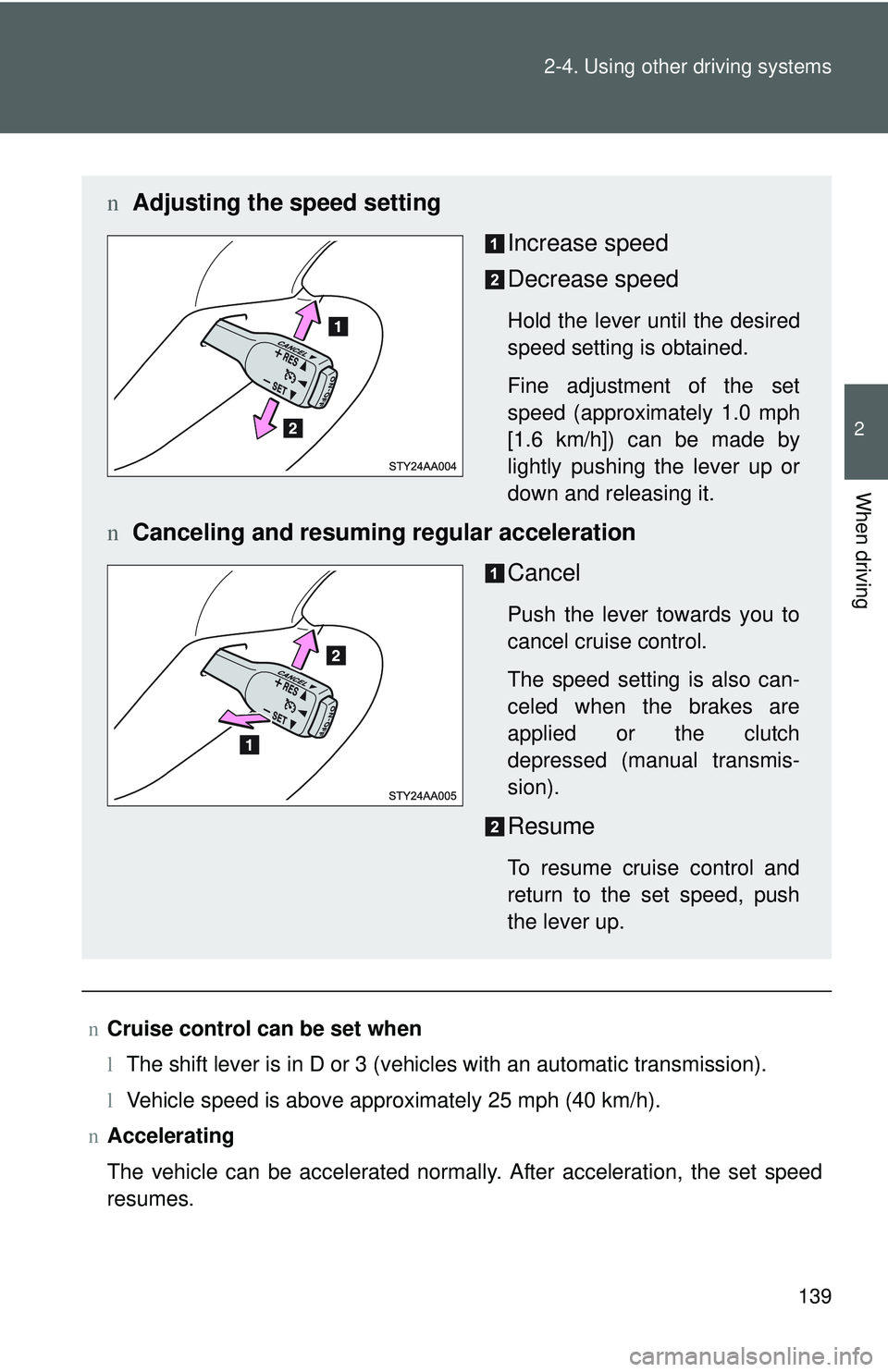
n Adjusting the speed setting
Increase speed
Decrease speed
Hold the lever until the desired
speed setting is obtained.
Fine adjustment of the set
speed (approximately 1.0 mph
[1.6 km/h]) can be made by
lightly pushing the lever up or
down and releasing it.
nCanceling and resuming regular acceleration
Cancel
Push the lever towards you to
cancel cruise control.
The speed setting is also can-
celed when the brakes are
applied or the clutch
depressed (manual transmis-
sion).
Resume
To resume cruise control and
return to the set speed, push
the lever up.
Page 154 of 406
141
2-4. Using other driving systems
2
When driving
Driving assist systems
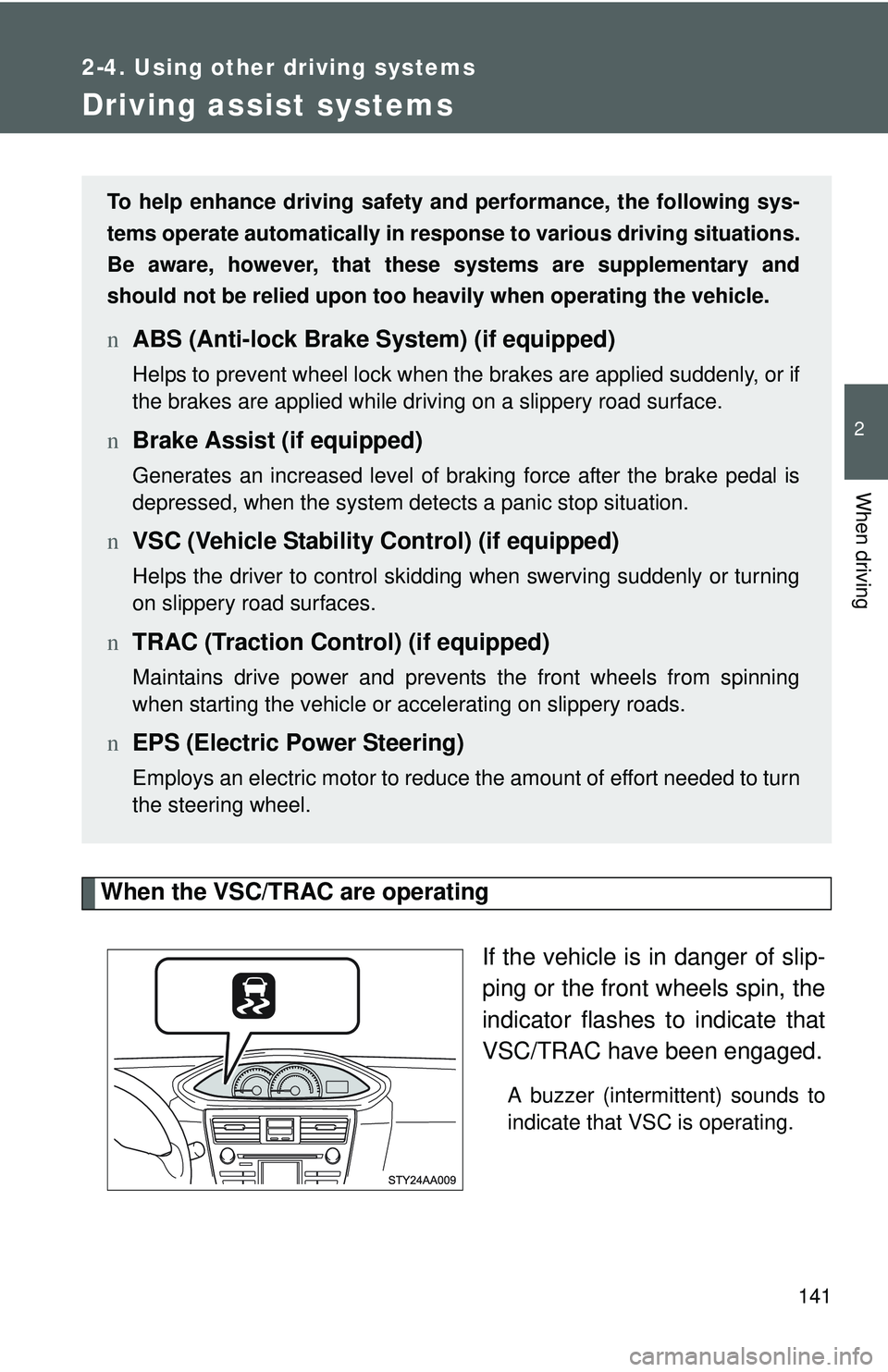
When the VSC/TRAC are operatingIf the vehicle is in danger of slip-
ping or the front wheels spin, the
indicator flashes to indicate that
VSC/TRAC have been engaged.
A buzzer (intermittent) sounds to
indicate that VSC is operating.
To help enhance driving safety and performance, the following sys-
tems operate automatically in res ponse to various driving situations.
Be aware, however, that these systems are supplementary and
should not be relied upon too heavi ly when operating the vehicle.
nABS (Anti-lock Brake System) (if equipped)
Helps to prevent wheel lock when the brakes are applied suddenly, or if
the brakes are applied while driving on a slippery road surface.
nBrake Assist (if equipped)
Generates an increased level of braking force after the brake pedal is
depressed, when the system detects a panic stop situation.
nVSC (Vehicle Stability Control) (if equipped)
Helps the driver to control skidding when swerving suddenly or turning
on slippery road surfaces.
nTRAC (Traction Control) (if equipped)
Maintains drive power and prevents the front wheels from spinning
when starting the vehicle or accelerating on slippery roads.
nEPS (Electric Power Steering)
Employs an electric motor to reduce the amount of effort needed to turn
the steering wheel.
Page 156 of 406
143
2-4. Using other
driving systems
2
When driving
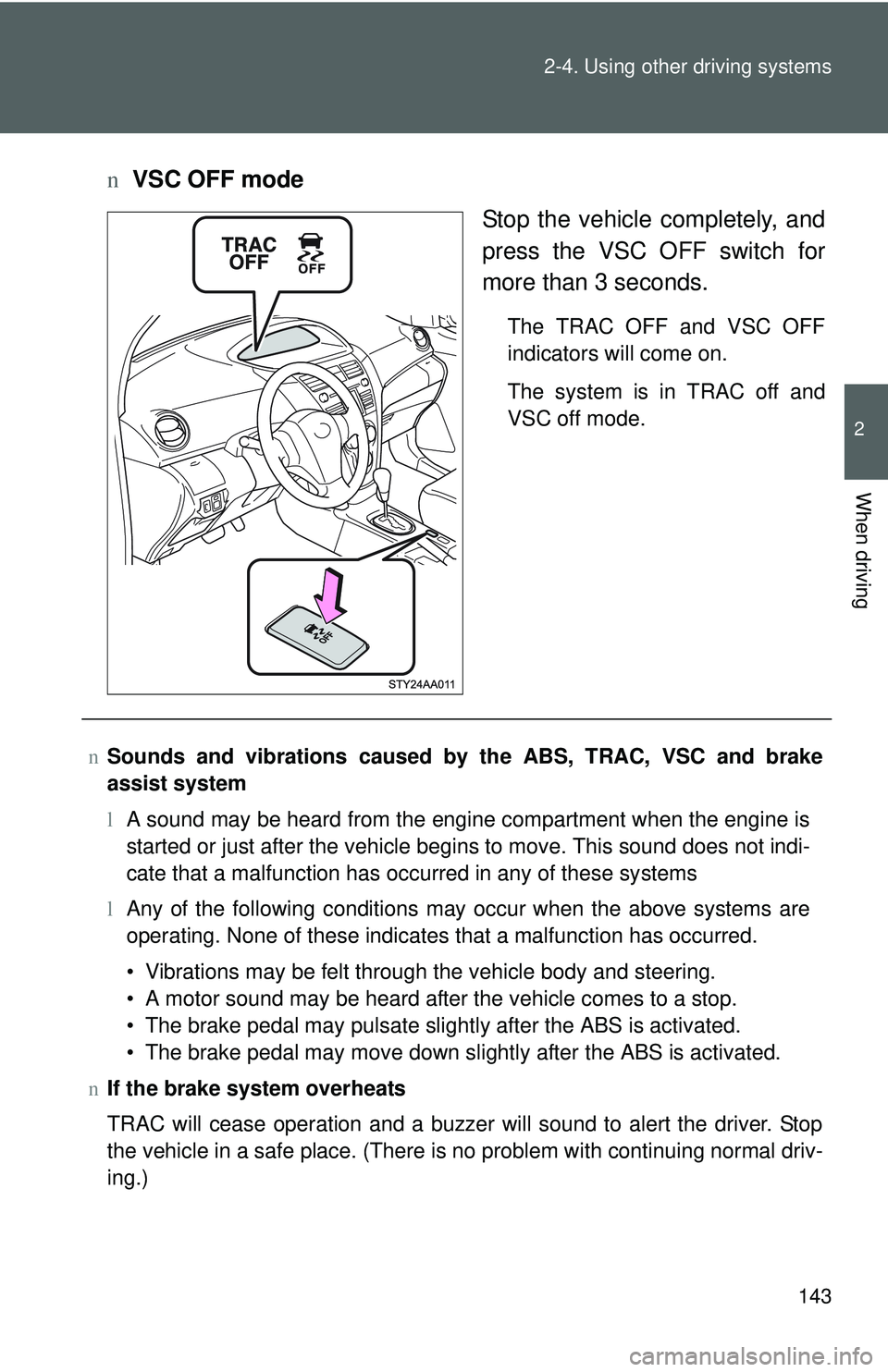
nVSC OFF mode
Stop the vehicle completely, and
press the VSC OFF switch for
more than 3 seconds.
The TRAC OFF and VSC OFF
indicators will come on.
The system is in TRAC off and
VSC off mode.
nSounds and vibrations caused by the ABS, TRAC, VSC and brake
assist system
lA sound may be heard from the engine compartment when the engine is
started or just after the vehicle begins to move. This sound does not indi-
cate that a malfunction has occurred in any of these systems
l Any of the following conditions may occur when the above systems are
operating. None of these indicates that a malfunction has occurred.
• Vibrations may be felt through the vehicle body and steering.
• A motor sound may be heard after the vehicle comes to a stop.
• The brake pedal may pulsate slightly after the ABS is activated.
• The brake pedal may move down slightly after the ABS is activated.
n If the brake system overheats
TRAC will cease operation and a buzzer will sound to alert the driver. Stop
the vehicle in a safe place. (There is no problem with continuing normal driv-
ing.)
Page 161 of 406
148 2-5. Driving information
CAUTION
nThings that must not be carried in the trunk
The following things may cause a fire if loaded in the trunk.
lReceptacles containing gasoline
lAerosol cans
nStorage precautions
Observe the following precautions.
Failing to do so may result in death or serious injury.
lDo not place cargo or luggage in or on the following locations as the
item may get under the clutch, brake or accelerator pedal and prevent
the pedals from being depressed properly, block the driver’s vision, or
hit the driver or passengers, causing an accident.
• Driver’s feet
• Front passenger or rear seats (when stacking items)
• Package tray
• Instrument panel
• Dashboard
• Auxiliary box or tray that has no lid
lSecure all items in the occupant compartment, as they may shift and
injure someone during emergency braking, sudden swerving or an
accident.
lNever allow anyone to ride in the enlarged trunk. It is not designed for
passengers. They should ride in their seats with their seat belts prop-
erly fastened. Otherwise, they are much more likely to suffer death or
serious bodily injury, in the event of sudden braking, sudden swerving
or an accident.
nCapacity and distribution
lDo not exceed the maximum axle weight rating or the total vehicle
weight rating.
lEven if the total load of occupant’s weight and the cargo load is less
than the total load capacity, do not apply the load unevenly. Improper
loading may cause deterioration of steering or braking control which
may cause death or serious injury.
Page 163 of 406
150
2-5. Driving information
Winter driving tips
Carry out the necessary preparations and inspections before driving
the vehicle in winter. Always drive the vehicle in a manner appropri-
ate to the prevailing weather conditions.
n Pre-winter preparations
lUse fluids that are appropriate to the prevailing outside tem-
peratures.
• Engine oil
• Engine coolant
• Washer fluid
l Have a service technician inspect the level and specific grav-
ity of battery electrolyte.
l Have the vehicle fitted with four snow tires or purchase a set
of tire chains for the front tires.
Ensure that all tires are the same size and brand, and that chains
match the size of the tires.
nBefore driving the vehicle
Perform the following according to the driving conditions.
lDo not try to forcibly open a window, scrape an outside rear
view mirror surface or move a wiper or outside rear view mir-
ror that is frozen. Pour warm water over the frozen area to
melt the ice. Wipe away the water immediately to prevent it
from freezing.
l To ensure proper operation of th e climate control system fan,
remove any snow that has accumulated on the air inlet vents
in front of the windshield.
l Remove any ice that has accumu lated on the vehicle chassis.
l Periodically check for and remove any excess ice or snow
that may have accumulated in the wheel well or on the
brakes.