Settings VAUXHALL CORSA 2014.5 Infotainment system
[x] Cancel search | Manufacturer: VAUXHALL, Model Year: 2014.5, Model line: CORSA, Model: VAUXHALL CORSA 2014.5Pages: 177, PDF Size: 2.97 MB
Page 43 of 177

Navigation43
In the 2D map view, you can toggle
between the "north orientation",
and the "driving direction
orientation" mode, see Map
orientation below.
In the 3D map view, only the
"driving direction orientation" mode
is available.
■ Map orientation : toggles the 2D
map view between the "north
orientation" ( north-up) mode and
the "driving direction orientation"
( head -up) mode.
In the head-up mode, the map
rotates depending on the driving
direction of the vehicle.
■ Auto Zoom : if set to On, the map
scale will be adjusted (zoom in/out) automatically by the navigationsystem to ensure reliable route
guidance.■ Show POIs In Map : if set to On,
points of interest, e.g. fuel stations,
parking areas, or restaurants, are
indicated by corresponding
symbols on the map.
■ Map Data Information : displays the
name and version of the map data
stored on the inserted SD card.
Setting up the navigation
system
To open the NAVIGATION SETUP
menu: press the SETUP button, and
then select the Navigation menu item.The following settings/options are
available:
■ Map Setup : displays the MAP
SETUP menu, see "Setting up the
map display" above.
■ Voice Guidance : if set to On, voice
commands (e.g. remaining
distance to next turning, turning
direction) are announced during
route guidance.
■ Voice Vol. : if voice guidance is
activated (see above), change this
setting to adjust the volume of voice commands. After each change an
audible feedback is given.
■ Position Information : displays the
address/GPS coordinates of the current position.
To store the displayed address/
GPS coordinates in the address
book: select the Save screen
button.
Page 44 of 177
44Navigation
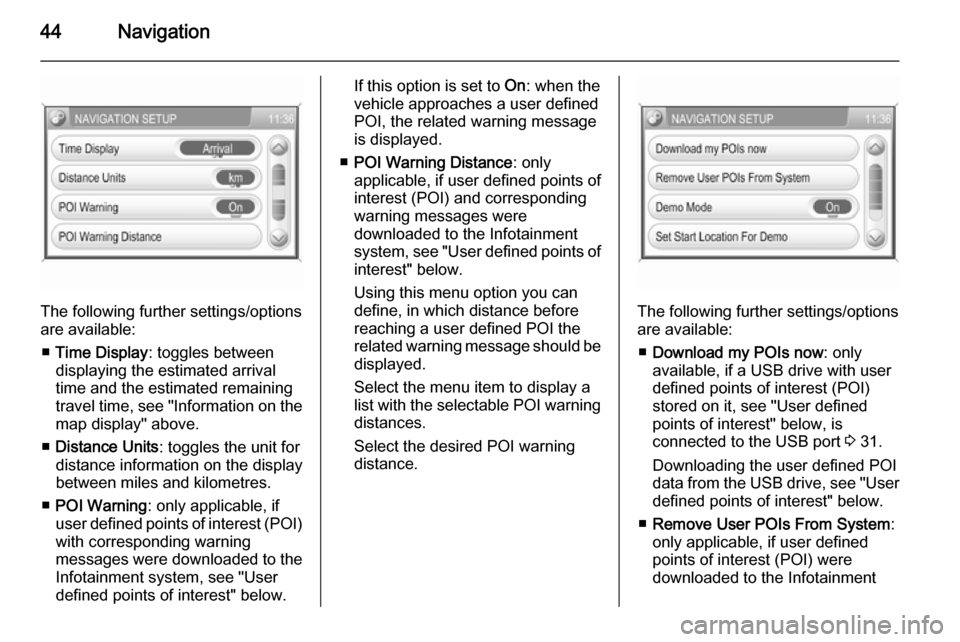
The following further settings/options
are available:
■ Time Display : toggles between
displaying the estimated arrival
time and the estimated remaining
travel time, see "Information on the
map display" above.
■ Distance Units : toggles the unit for
distance information on the display
between miles and kilometres.
■ POI Warning : only applicable, if
user defined points of interest (POI) with corresponding warning
messages were downloaded to the
Infotainment system, see "User
defined points of interest" below.
If this option is set to On: when the
vehicle approaches a user defined POI, the related warning message
is displayed.
■ POI Warning Distance : only
applicable, if user defined points of
interest (POI) and corresponding
warning messages were
downloaded to the Infotainment
system, see "User defined points of interest" below.
Using this menu option you can
define, in which distance before
reaching a user defined POI the
related warning message should be
displayed.
Select the menu item to display a list with the selectable POI warning distances.
Select the desired POI warning
distance.
The following further settings/options
are available:
■ Download my POIs now : only
available, if a USB drive with user defined points of interest (POI)
stored on it, see "User defined
points of interest" below, is
connected to the USB port 3 31.
Downloading the user defined POI data from the USB drive, see "User
defined points of interest" below.
■ Remove User POIs From System :
only applicable, if user defined
points of interest (POI) were
downloaded to the Infotainment
Page 46 of 177

46Navigation
Notice
Functionality of the Dynamic
navigation settings when route
guidance is active, see "Settings for route calculation and guidance" in
chapter "Guidance" 3 65.
User defined points of interest
In addition to the predefined points of interest (POI) stored on the map SD
card, you can create user defined
POIs that meet your special personal
needs. After creation, such user
defined POIs can be downloaded to
the Infotainment system.
You can create two different types of
user defined POIs:
(1) Destination POIs : POIs that you
can use as destinations for route
guidance.
For each POI you need to define the GPS coordinates (longitude and
latitude values) of the POI's location
and a descriptive name.
After downloading the POI data to the Infotainment system, you will find the
POI name (e.g. "Michaels house") in
the menu for user defined POIs3 48. You can select the regarding
menu item as destination for route
guidance.
(2) POI warnings : POIs that you want
to be warned of ( e.g. very sharp turns
on a road), before reaching the
corresponding location.
For each POI you need to define the
GPS coordinates (longitude and
latitude values) of the POI's location
and a descriptive warning message.
After downloading the POI data to the Infotainment system, and in case
route guidance is active:
When the vehicle approaches the
POI location defined by the GPS
coordinates, the corresponding
warning message (e.g. "Very sharp turn") will be displayed.
Using the menu option POI Warning
Distance in the NAVIGATION
SETUP menu, see above, you can
define, in which distance before
reaching a user defined POI the
related warning message should be
displayed.Creating user defined POIs
For each POI type you need to create
a separate text file, e.g. by using a
simple text editor software.Destination POIs
1. Create a text file with an arbitrary name and the file extension .asc,
e.g. "TomsDestinationPOIs.asc".
2. The POI data need to be entered into the text file in the following
format:
Longitude coordinate, Latitude
coordinate, "Name of POI [ any
comment ]"
Page 66 of 177

66Navigation
Controlling route guidance via
the NAVIGATION menu Press the NAV button to open the
NAVIGATION menu.
The NAVIGATION menu provides
three options that you can use for controlling route guidance:
■ Options : opens the ROUTE
OPTIONS menu that provides
several settings for route
calculation/recalculation and route
guidance, see "Settings for route
calculation and guidance" below.
■ Route : opens the ROUTE LIST
menu that shows all streets on the
current route, see "Displaying the
route list" below.
■ Cancel Route : cancels the currently
active route guidance.
If an additional waypoint
(intermediate destination) is
currently set for route guidance, a
message prompts you to decide:
if route guidance to both the
waypoint and the final destination should be cancelled, or,
if route guidance only to the
waypoint should be cancelled.
If you cancel route guidance only to a waypoint: the navigation system
automatically recalculates the route to guide you to the final destination.
Settings for route calculation and
guidance
Before starting route guidance, but also when route guidance is already
active, you can set several criteria for route calculation/recalculation and
route guidance.Press the NAV button, and then
select the Options menu item to open
the ROUTE OPTIONS menu.
The following menu options are
available:
■ Dynamic navigation : select, if the
navigation system should take
TMC (traffic) messages into
account for route calculation/
recalculation, see chapter
"Dynamic guidance" 3 70.
Available settings:
Off : no TMC messages are taken
into account for route calculation.
Page 85 of 177
Phone85
Downloading the phone book
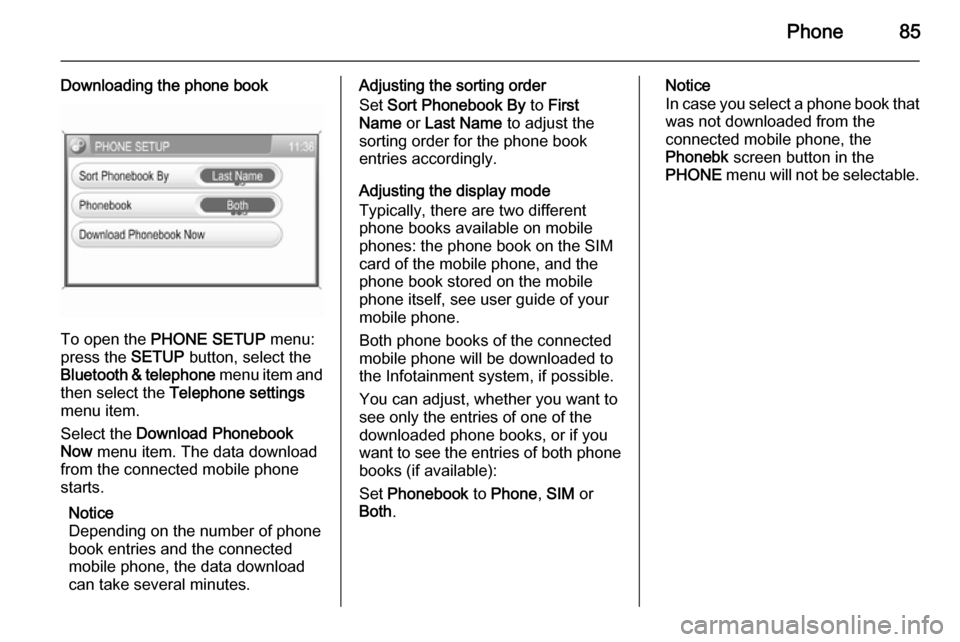
To open the PHONE SETUP menu:
press the SETUP button, select the
Bluetooth & telephone menu item and
then select the Telephone settings
menu item.
Select the Download Phonebook
Now menu item. The data download
from the connected mobile phone
starts.
Notice
Depending on the number of phone
book entries and the connected
mobile phone, the data download
can take several minutes.
Adjusting the sorting order
Set Sort Phonebook By to First
Name or Last Name to adjust the
sorting order for the phone book entries accordingly.
Adjusting the display mode
Typically, there are two different
phone books available on mobile
phones: the phone book on the SIM
card of the mobile phone, and the
phone book stored on the mobile
phone itself, see user guide of your
mobile phone.
Both phone books of the connected
mobile phone will be downloaded to
the Infotainment system, if possible.
You can adjust, whether you want to
see only the entries of one of the
downloaded phone books, or if you
want to see the entries of both phone
books (if available):
Set Phonebook to Phone , SIM or
Both .Notice
In case you select a phone book that
was not downloaded from the
connected mobile phone, the
Phonebk screen button in the
PHONE menu will not be selectable.
Page 86 of 177

86IndexAActivating the CD player ...............26
Activating the radio .......................20
Adding waypoints .........................65
Address book................................ 48
Address entry ............................... 48
AUX input socket ........................................ 30
usage ........................................ 30
B
Bluetooth ...................................... 75
Bluetooth connection ....................76
C CD player activating ................................... 26
important information ................25
usage ........................................ 26
Connecting a Bluetooth device .....76
Control elements overview .............9
D Destination input ..........................48
Dynamic guidance ........................70
E Emergency call ............................. 78G
General information ...................
................ 6, 25, 30, 31, 34, 36, 75
Guidance ..................................... 65
H Home address .............................. 48
I
Infotainment system control elements .......................... 9
instrument panel.......................... 9
setting volume ........................... 11
speed compensated volume .....11
steering wheel audio controls .....9
switching on .............................. 11
tone settings .............................. 11
usage ........................................ 11
volume settings ......................... 11
M Map display .................................. 37
Maps ............................................ 71
Map SD card handling..................................... 71
replace ...................................... 71
Multifunction knob......................... 11
Page 90 of 177

90IntroductionIntroductionGeneral information.....................90
Theft-deterrent feature .................91
Overview ...................................... 92
Operation ..................................... 94
Tone settings ............................. 101
Volume settings .........................102General information
The Infotainment system provides
you with state-of-the-art in-car
infotainment.
The radio has nine automatic station
memories for each waveband: FM,
AM and DAB (if available).
The integrated audio player will
entertain you with audio CDs and
MP3 CDs.
Furthermore, you can connect
external data storage devices, e.g.
iPod, MP3 player or USB stick, or a
portable CD player to the
Infotainment system as further audio
sources.
The on-board computer can be
accessed from the Infotainment
System. For details please consult
the Owner's Manual for your car.
The digital sound processor provides
you with several preset equalizer
modes for sound optimisation.
Optionally, the Infotainment system
can be operated using controls on the steering wheel.In addition the Infotainment systemcan be equipped with a Mobile phone portal.
The well-thought-out design of the
control elements and the clear
displays enable you to control the
system easily and intuitively.
Notice
This manual describes all options
and features available for the
various Infotainment systems.
Certain descriptions, including those for display and menu functions, may
not apply to your vehicle due to
model variant, country
specifications, special equipment or
accessories.
Important information on
operation and traffic safety9 Warning
The Infotainment system has to be
used so that the vehicle can be
driven safely at all times. If in doubt
Page 93 of 177

Introduction93
1e knob ................................. 94
Briefly press: switch on/off
Infotainment system ..............94
Turn: adjust volume ..............94
2 TUNER ................................ 104
Switch between FM and AM 104
If DAB receiver is
connected: Switch
between analogue and
digital reception ...................104
3 MEDIA ................................. 117
Switch between audio
sources (except radio) ........117
4 MAIN ..................................... 94
Main menu ............................ 94
5 Multifunction knob .................94
Turn: select function .............. 94
Press: confirm function .........94
6 INFO ..................................... 94
Information page ...................947SOUND ............................... 101
Sound function
programme selection ..........101
8 BC......................................... 92
On-board computer ...............92
9 1...9 ..................................... 104
Radio: number buttons,
station buttons ....................104
10 Audio/MP3 CD slot .............. 117
11 SETTINGS ............................ 94
Context-depending
settings .................................. 94
12 Rocker switch ...................... 117
Radio: mn automatic
station search, dc manual
station search (not DAB) .....104
CD, USB, iPod: mn
track selection/fast
forward/fast rewind, dc
album selection (not iPod),
c repeat track, d scan CD/
USB (not iPod) ....................11713TP....................................... 109
Traffic programme ............... 109
14 j Eject CD .......................... 117
Page 95 of 177

Introduction95
■ If the automatic switch-on isdisabled, the Infotainment system
can only be switched on with the
e switch and with the j button for
CD ejection and off with the e
button.
■ If the Infotainment system is switched off when the ignition is
switched off, regardless of the
current setting of the automatic
switch-on, it can only be switched
on via the e button and with the
j button for CD ejection.
■ The automatic start is always enabled after the Infotainmentsystem has been disconnected
from the operating voltage and re-
connected.
Enable/Disable Ignition Logic
In the main menu press SETTINGS
button.
The system Settings menu is
displayed.
Enable/disable Ignition logic tick box.
Enabled: on the right side of the
display the message appears "Turn
on/off Radio via Ignition logic".Disabled: on the right side of the
display the message appears "Turn
on Radio via ON/OFF button only".
Automatic switch-off
The Infotainment system switches
itself off automatically after one hour
if you switch it on with the ignition off.
Setting the volume Turn the e knob.
■ The Infotainment system plays at the volume last set, provided the
volume was below the maximum
switch-on volume 3 102.
■ Traffic announcements and external audio sources are inserted
at a preset minimum volume
3 102.
■ If the respective source is enabled,
the volume of the traffic
announcements, the external audio
sources and the radio and CD can
be adjusted separately.Speed dependent volume control
(SDVC)
When SDVC is activated 3 102, the
volume is adapted automatically to make up for the road and wind noise
when driving.
External source An external source, e.g. a mobile
phone or a navigation system, can be
connected to the Infotainment
system.
In this case External In appears in the
display.
We recommend having appliances
installed by a Vauxhall Authorised
Repairer.
AUX input
An external audio source, e.g. a
portable CD player, can be connected via the AUX input of your vehicle.
Stereo sound from this source is
played back via the loudspeakers of
the Infotainment system.
Location of AUX input connector
3 121.
Page 96 of 177
96Introduction
For the best possible audio quality,
the external audio source should be
set to maximum volume. On units with line-out, the output signal is available
at a fixed audio level and cannot be
changed.
To avoid overriding the AUX input, the effective output voltage of the
external audio source must be lower
than 1.5 V.
Menu concept
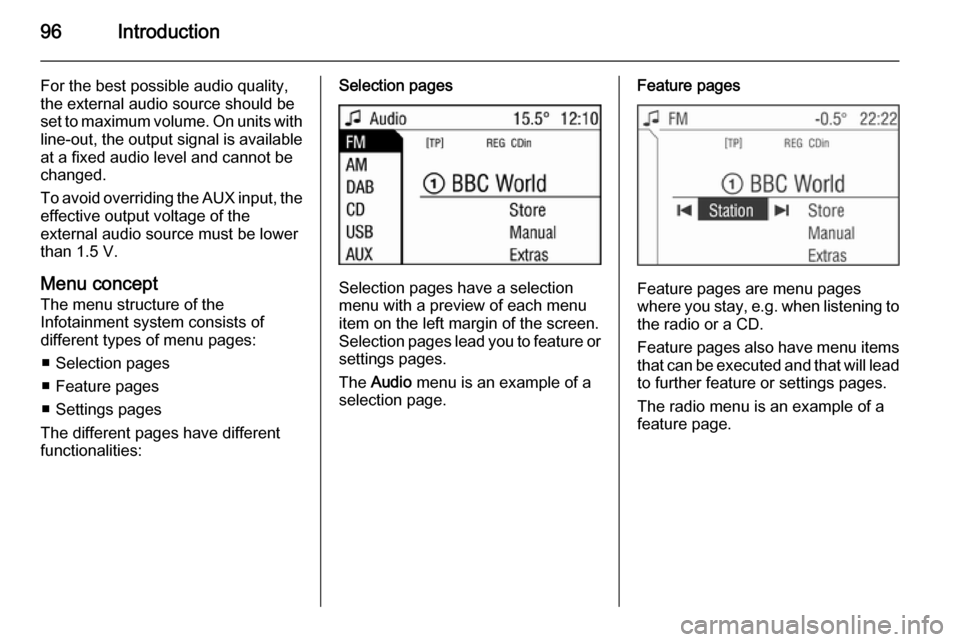
The menu structure of the Infotainment system consists of
different types of menu pages:
■ Selection pages
■ Feature pages
■ Settings pages
The different pages have different
functionalities:Selection pages
Selection pages have a selection
menu with a preview of each menu
item on the left margin of the screen. Selection pages lead you to feature or settings pages.
The Audio menu is an example of a
selection page.
Feature pages
Feature pages are menu pages
where you stay, e.g. when listening to
the radio or a CD.
Feature pages also have menu items that can be executed and that will leadto further feature or settings pages.
The radio menu is an example of a
feature page.