ignition VAUXHALL CROSSLAND X 2019.75 Owner's Guide
[x] Cancel search | Manufacturer: VAUXHALL, Model Year: 2019.75, Model line: CROSSLAND X, Model: VAUXHALL CROSSLAND X 2019.75Pages: 247, PDF Size: 7.77 MB
Page 76 of 247
74Instruments and controlsClockDate and time are shown in the
Info Display 3 90.
Setting date and time, see
Infotainment manual.
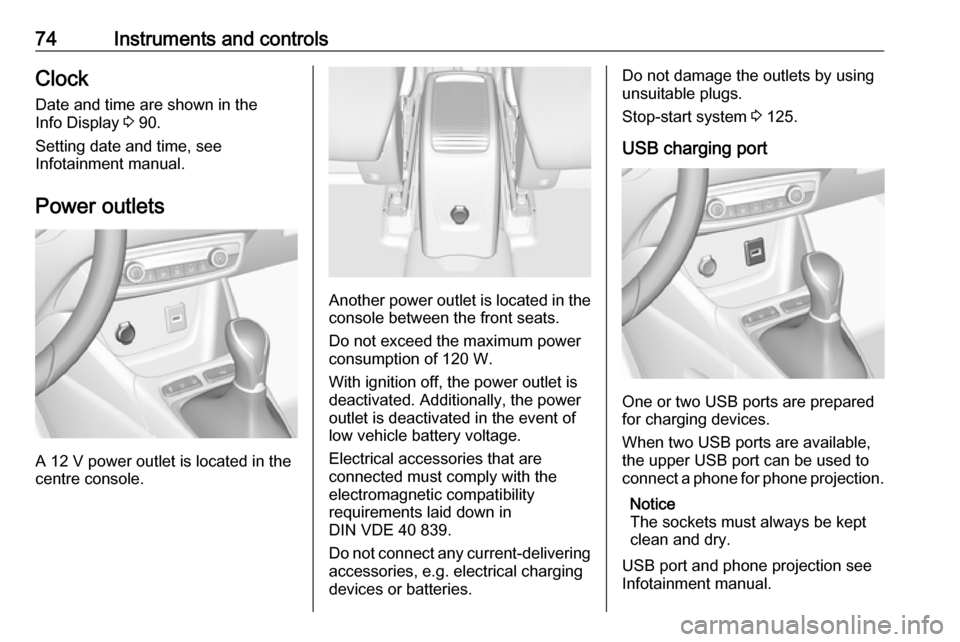
Power outlets
A 12 V power outlet is located in the
centre console.
Another power outlet is located in the
console between the front seats.
Do not exceed the maximum power
consumption of 120 W.
With ignition off, the power outlet is deactivated. Additionally, the poweroutlet is deactivated in the event of
low vehicle battery voltage.
Electrical accessories that are
connected must comply with the
electromagnetic compatibility
requirements laid down in
DIN VDE 40 839.
Do not connect any current-delivering
accessories, e.g. electrical charging
devices or batteries.
Do not damage the outlets by using
unsuitable plugs.
Stop-start system 3 125.
USB charging port
One or two USB ports are prepared
for charging devices.
When two USB ports are available,
the upper USB port can be used to
connect a phone for phone projection.
Notice
The sockets must always be kept
clean and dry.
USB port and phone projection see
Infotainment manual.
Page 81 of 247
Instruments and controls79Caution
If the needle is in the red warning
zone, the maximum permitted
engine speed is exceeded. Engine at risk.
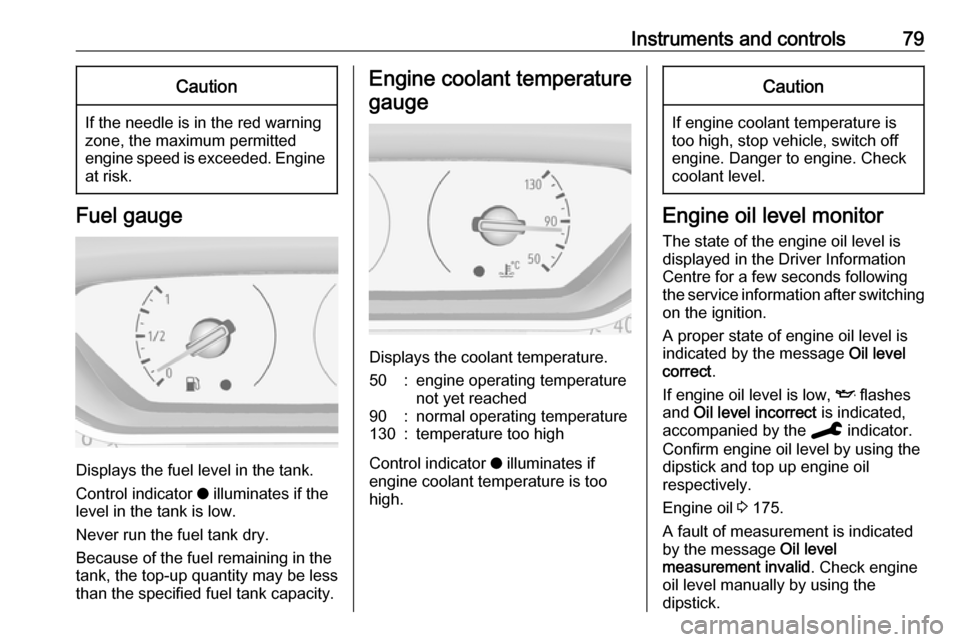
Fuel gauge
Displays the fuel level in the tank.
Control indicator o illuminates if the
level in the tank is low.
Never run the fuel tank dry.
Because of the fuel remaining in the
tank, the top-up quantity may be less
than the specified fuel tank capacity.
Engine coolant temperature
gauge
Displays the coolant temperature.
50:engine operating temperature
not yet reached90:normal operating temperature130:temperature too high
Control indicator o illuminates if
engine coolant temperature is too
high.
Caution
If engine coolant temperature is
too high, stop vehicle, switch off
engine. Danger to engine. Check
coolant level.
Engine oil level monitor
The state of the engine oil level is
displayed in the Driver Information
Centre for a few seconds following
the service information after switching
on the ignition.
A proper state of engine oil level is
indicated by the message Oil level
correct .
If engine oil level is low, I flashes
and Oil level incorrect is indicated,
accompanied by the C indicator.
Confirm engine oil level by using the
dipstick and top up engine oil
respectively.
Engine oil 3 175.
A fault of measurement is indicated
by the message Oil level
measurement invalid . Check engine
oil level manually by using the
dipstick.
Page 82 of 247
80Instruments and controlsService displayThe service system informs when to
change the engine oil and filter or a
vehicle service is required. Based on
driving conditions, the interval at
which an engine oil and filter change
is required can vary considerably.
Service information 3 213.
A required service due is displayed in the Driver Information Centre for7 seconds after switching on the
ignition.
If no service is required for the next
1800 miles or more no service
information appears in the display.
If service is required within the next
1800 miles, the remaining distance or
time duration is indicated for several
seconds. Simultaneously C lights
up permanently as reminder.
If service is required in less than
600 miles, C flashes and then
lights up permanently. Remaining
distance or time duration is indicated for several seconds.
Overdued service is indicated by a
message in the Driver Information
Centre which indicates the overdueddistance. C flashes and then lights
up permanently until service is
executed.
Reset of service interval
After each service, the service
indicator must be reset to ensure
proper functionality. It is
recommended to seek the assistance of a workshop.
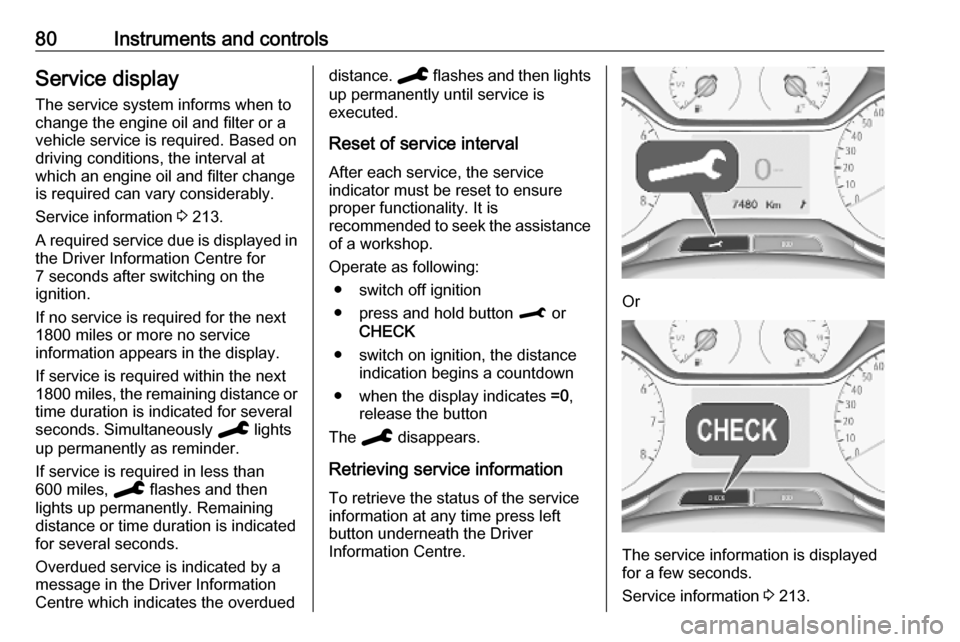
Operate as following: ● switch off ignition
● press and hold button M or
CHECK
● switch on ignition, the distance indication begins a countdown
● when the display indicates =0,
release the button
The C disappears.
Retrieving service information To retrieve the status of the service
information at any time press left
button underneath the Driver
Information Centre.
Or
The service information is displayed
for a few seconds.
Service information 3 213.
Page 83 of 247
Instruments and controls81Control indicatorsThe control indicators described are
not present in all vehicles. The
description applies to all instrument
versions.
Depending on the equipment, the
position of the control indicators may vary. When the ignition is switched
on, most control indicators will
illuminate briefly as a functionality test.
The control indicator colours mean:red:danger, important reminderyellow:warning, information, faultgreen:confirmation of activationblue:confirmation of activationwhite:confirmation of activation
Instrument cluster overview 3 76.
Turn lights
O illuminates or flashes green.
Illuminates briefly The parking lights are switched on.
Flashes
A turn light or the hazard warning flashers are activated.
Rapid flashing: failure of a turn light or associated fuse.
This includes turn lights connected to the socket of the towing equipment.
Bulb replacement 3 180.
Fuses 3 188.
Turn lights 3 103.
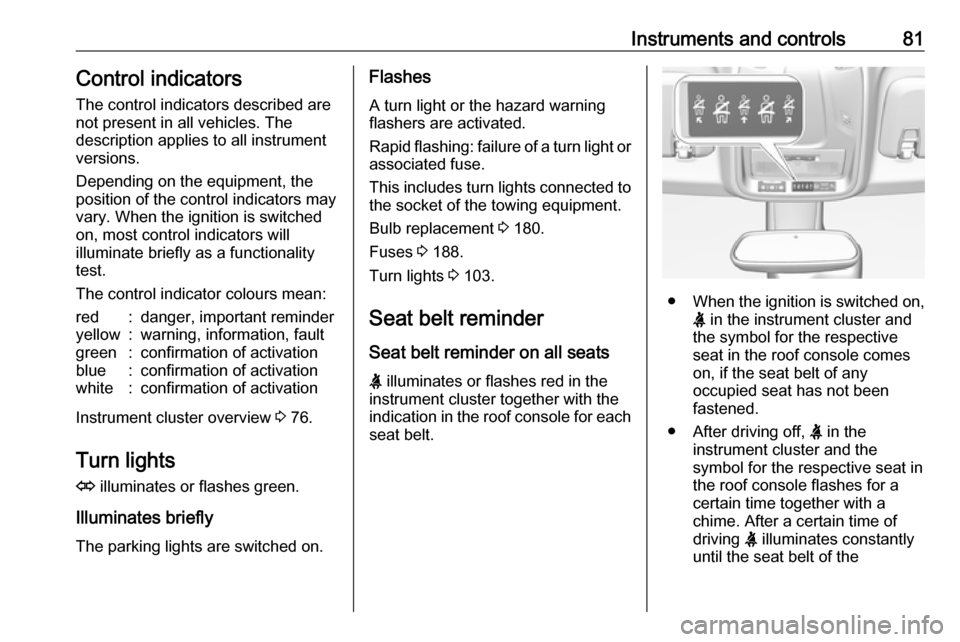
Seat belt reminder
Seat belt reminder on all seats
X illuminates or flashes red in the
instrument cluster together with the
indication in the roof console for each
seat belt.
● When the ignition is switched on,
X in the instrument cluster and
the symbol for the respective
seat in the roof console comes
on, if the seat belt of any
occupied seat has not been
fastened.
● After driving off, X in the
instrument cluster and the
symbol for the respective seat in
the roof console flashes for a
certain time together with a
chime. After a certain time of
driving X illuminates constantly
until the seat belt of the
Page 84 of 247
82Instruments and controlsrespective seat has been
fastened or if any passenger has
unfastened the seat belt.
Seat belts 3 46.
Airbag and belt tensioners
v illuminates red.
When the ignition is switched on, the control indicator illuminates for
approx. 4 seconds. If it does not
illuminate, does not go out after
4 seconds or illuminates whilst
driving, there is a fault in the airbag
system. Seek the assistance of a
workshop. The airbags and belt
pretensioners may fail to trigger in the event of an accident.
Deployment of the belt pretensioners
or airbags is indicated by continuous
illumination of v.9 Warning
Have the cause of the fault
remedied immediately by a
workshop.
Belt pretensioners 3 46.
Airbag system 3 49.
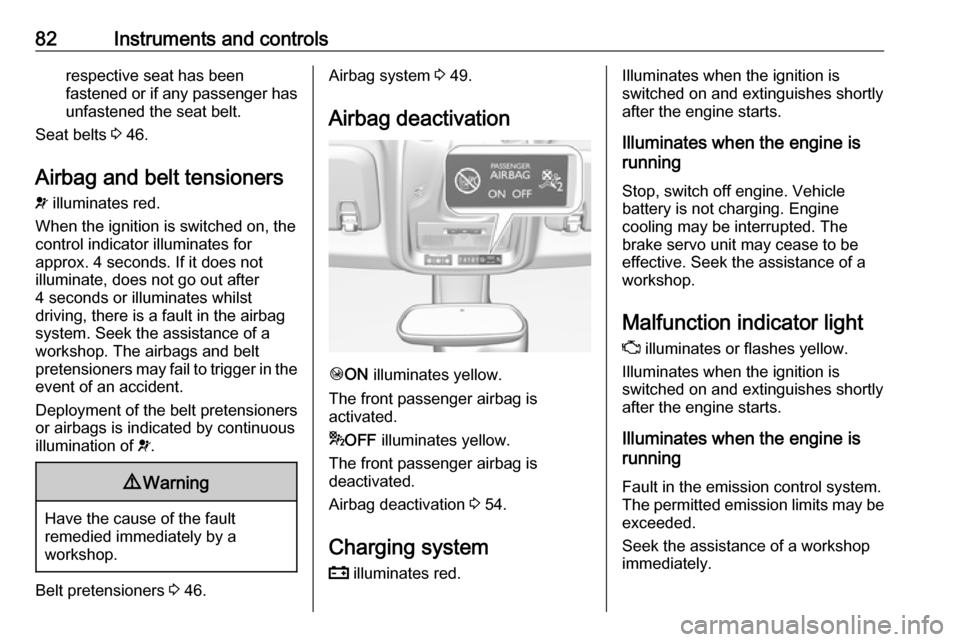
Airbag deactivation
Ó ON illuminates yellow.
The front passenger airbag is
activated.
* OFF illuminates yellow.
The front passenger airbag is
deactivated.
Airbag deactivation 3 54.
Charging system
p illuminates red.
Illuminates when the ignition is
switched on and extinguishes shortly
after the engine starts.
Illuminates when the engine is
running
Stop, switch off engine. Vehicle
battery is not charging. Engine
cooling may be interrupted. The
brake servo unit may cease to be
effective. Seek the assistance of a
workshop.
Malfunction indicator light
Z illuminates or flashes yellow.
Illuminates when the ignition is
switched on and extinguishes shortly
after the engine starts.
Illuminates when the engine is
running
Fault in the emission control system.The permitted emission limits may be
exceeded.
Seek the assistance of a workshop
immediately.
Page 85 of 247

Instruments and controls83Flashes when the engine is
running
The engine management system has
a fault that could lead to catalytic
converter damage. Ease up on the
accelerator until the flashing stops.
Seek the assistance of a workshop
immediately.
Service vehicle soon C illuminates yellow.
Illuminates briefly when the ignition is
switched on.
May illuminate together with other
control indicators and a
corresponding message in the Driver
Information Centre.
Seek the assistance of a workshop
immediately.
Stop engine
Y illuminates red.
Illuminates briefly when the ignition is switched on.Illuminates together with other control
indicators, accompanied by a warning chime and a corresponding message
in the Driver Information Centre.
Stop engine immediately and seek
the assistance of a workshop.
System check J illuminates yellow or red.
Illuminates yellow A minor engine fault has been
detected.
Illuminates red A major engine fault has been
detected.
Stop engine as soon as possible and seek the assistance of a workshop.
Brake and clutch systemR illuminates red.
The brake and clutch fluid level is too
low, when parking brake is not
applied 3 177.9 Warning
Stop. Do not continue your
journey. Consult a workshop.
Illuminates when the manual parking
brake is applied and ignition is
switched on 3 136.
Brake fluid 3 177.
Parking brake m illuminates red.
Illuminates when the parking brake is
applied and ignition is switched on
3 136.
Antilock brake system
(ABS)
u illuminates yellow.
Illuminates for a few seconds after the ignition is switched on. The system is
ready for operation when the control
indicator extinguishes.
If the control indicator does not go out after a few seconds, or if it illuminates while driving, there is a fault in the
Page 87 of 247

Instruments and controls85Check coolant level immediately
3 176.
If there is sufficient coolant, consult a
workshop.
Preheating
! illuminates yellow.
Preheating of diesel engine is
activated. Only activates when
outside temperature is low. Start the
engine when control indicator
extinguishes.
Starting the engine 3 123.
Exhaust filter
% or C illuminates yellow.
The exhaust filter requires cleaning.
Continue driving until the control
indicator extinguishes.
Illuminates temporarily
Start of saturation of the exhaust filter.
Start cleaning process as soon as
possible by driving at a vehicle speed of at least 40 mph.Illuminates constantly
Indication of a low additive level. Seek
the assistance of a workshop.
Exhaust filter 3 128.
AdBlue Y flashes or illuminates yellow.
Illuminates yellow
The remaining driving range is
between 370 miles and 1500 miles.
Flashes yellow The remaining driving range is
between 0 and 370 miles.
AdBlue level is low. Refill AdBlue
soon to avoid prevention of the
engine start.
AdBlue 3 129.
Deflation detection system w illuminates or flashes yellow.Illuminates
Tyre pressure loss in one or more
wheels. Stop immediately and check
tyre pressure.
Flashes
Fault in system. Consult a workshop.
Deflation detection system 3 195.
Engine oil pressure I illuminates red.
Illuminates when the ignition is
switched on and extinguishes shortly after the engine starts.
Illuminates when the engine is
runningCaution
Engine lubrication may be
interrupted. This may result in
damage to the engine and / or
locking of the drive wheels.
Page 88 of 247

86Instruments and controls1. Select neutral gear.
2. Move out of the flow of traffic as quickly as possible without
impeding other vehicles.
3. Switch off ignition.9 Warning
When the engine is off,
considerably more force is needed
to brake and steer.
During an Autostop, the brake
servo unit will still be operational.
Do not remove key until vehicle is stationary, otherwise the steeringwheel lock could engage
unexpectedly.
Keep engine turned off and let the
vehicle be towed to a workshop
3 175.
Low fuel o illuminates yellow.
Level in fuel tank is too low.
Refuelling 3 166.
Bleeding the diesel fuel system
3 179.
Autostop D illuminates or flashes green.
Illuminates green
Engine is in an Autostop.
Flashes green
Autostop is temporarily unavailable,
or Autostop mode is invoked
automatically.
Stop-start system 3 125.
Exterior light 8 illuminates green.
The exterior lights are on 3 99.
Low beam
9 illuminates green.
Illuminated when low beam is on.
High beam
C illuminates blue.Illuminated when high beam is on or
during headlight flash 3 100.
High beam assist
f illuminates green.
The high beam assist is activated
3 100.
Front fog lights
> illuminates green.
The front fog lights are on 3 103.
Rear fog light
ø illuminates yellow.
The rear fog light is on 3 104.
Rain sensor
< illuminates green.
Illuminated when automatic wiping
with rain sensor is activated.
Windscreen wiper and washer 3 71.
Page 92 of 247

90Instruments and controlsThe values of trip 1 page can be reset
by pressing SET/CLR for a few
seconds.
Trip 2 page:
Average speed
Display of average speed. The
measurement can be reset at any
time.
Average fuel consumption
Display of average consumption. The measurement can be reset at any
time and starts with a default value.
Distance travelled
Displays the current distance for trip
2 since a certain reset.
The values of trip 2 page can be reset
by pressing SET/CLR for a few
seconds.
Digital speed page
Digital display of the instantaneous
speed.
Stop and Start time counter
A time counter calculates the time
spent in STOP mode during a
journey. It resets to zero every time
the ignition is switched on.Compass page
Displays the geographic direction of
driving.
Blank page
No trip/fuel information is displayed.
AdBlue Press M or CHECK repeatedly until
the AdBlue menu is shown.
AdBlue range
Indicates an estimate of the AdBlue
level. A message indicates whether
the level is sufficient or low.
3 129.
Info Display The Info Display is located in the
instrument panel near the instrument
cluster.
Depending on the vehicle
configuration the vehicle has a
● Graphic Info Display
or
● 7'' Colour Info Display with
touchscreen functionalityor
● 8'' Colour Info Display with
touchscreen functionality
The Info Display can indicate: ● time 3 74
● outside temperature 3 73
● date 3 74
● Infotainment system, see description in the Infotainment
manual
● indication of rear view camera 3 160
● indication of panoramic view system 3 158
● indication of parking assist instructions 3 149
● navigation, see description in the
Infotainment manual
● vehicle and system messages 3 93
● settings for vehicle personalisation 3 94
Page 100 of 247

98Instruments and controlsNotice
Establishing an emergency call may
not be possible in areas without
sufficient network availability or due
to hardware damage during an
accident.
Automatic crash notification
In case of an accident with airbag
deployment, an automatic
emergency call is established and an automatic crash notification will be
transmitted to the next public safety
answering point.
Emergency assistance
In case of an emergency you can also
manually place an emergency call by pressing the red SOS button for more
than two seconds. The LED flashes to confirm that a connection to the
nearest PSAP is being established.
The LED illuminates steadily as long
as the call is active.
Pressing the SOS button immediately
a second time will terminate the call.
The LED switches off.Status LED
Illuminates green and red and
extinguishes after a short time, when
the ignition is switched on: the system works properly.
Illuminates red: fault in the system.
Contact a workshop.
Flashes red: backup battery needs
replacement.
Breakdown call function
Pressing . for more than two
seconds connects you to a roadside
assistance service provider.
For information about coverage and
scope of services of the roadside
assistance, please refer to the
Service and warranty booklet.