audio VAUXHALL GRANDLAND X 2018.5 Infotainment system
[x] Cancel search | Manufacturer: VAUXHALL, Model Year: 2018.5, Model line: GRANDLAND X, Model: VAUXHALL GRANDLAND X 2018.5Pages: 127, PDF Size: 2.35 MB
Page 77 of 127

External devices77Caution
Avoid disconnecting the device
during playback. This may
damage the device or the
Infotainment system.
USB Auto Launch
By default, the USB audio menu is displayed automatically as soon as a
USB device is connected.
If desired, this function can be
deactivated.
Press ; and then select Settings to
open the settings menu.
Select Radio, scroll to USB Auto
Launch and touch the screen button
next to the function.
To reactivate the function, touch the
screen button again.
Bluetooth Devices which support the Bluetooth
music profiles A2DP and AVRCP can
be connected wirelessly to the
Infotainment system. The
Infotainment system can play music
files contained in these devices.
Connecting a device
For a detailed description on how to
establish a Bluetooth connection
3 85.
File formats and folders
The maximum capacity of a device
supported by the Infotainment system amounts to 2500 music files,
2500 picture files, 250 movie files,
2500 folders and 10 stages of folder
structure. Only devices formatted in
the FAT16 / FAT32 file system are
supported.
If there are images included in the audio metadata, these images are
displayed on the screen.
Notice
Some files may not be played
properly. This may be due to a
different recording format or the
condition of the file.
Files from online shops to which
Digital Rights Management (DRM)
has been applied cannot be played.
The Infotainment system can play the following audio, picture and movie
files stored on external devices.Audio files
The playable audio file formats are
MP3 (MPEG-1 Layer 3, MPEG-2
Layer 3), WMA, AAC, AAC+, ALAC
OGG WAF (PCM), AIFF, 3GPP
(audio only), Audio Books and LPCM.
iPod ®
and iPhone ®
devices play
ALAC, AIFF, Audio Books and LPCM.
When playing a file with ID3 tag
information, the Infotainment system
can display information, e.g. on the
track title and artist.
Picture files
The displayable picture file formats
are JPG, JPEG, BMP, PNG and GIF.
JPG files must be 64 to 5000 pixels in
width and 64 to 5000 pixels in height.
BMP, PNG and GIF files must be 64
to 1024 pixels in width and 64 to
1024 pixels in height.
The pictures should not exceed a file
size of 1MB.
Movie files
The playable movie file formats are
AVI and MP4.
Page 78 of 127
78External devicesThe maximum resolution is 1280 x
720 pixels. The frame rate must be
less than 30 fps.
The usable codec is H.264/MPEG-4
AVC.
The playable audio formats are MP3,
AC3, AAC and WMA.
The displayable subtitle format is
SMI.
Playing audio Activating the music function
If the device is not yet connected to
the Infotainment system, connect the
device 3 76.
Usually, the respective audio main
menu is displayed automatically.
If playback is not started
automatically, e.g. if USB Auto
Launch is deactivated 3 76, take the
following steps:
Press ; and then select Audio to
open the audio main menu last
selected.Select Source in the interaction
selector bar and then select the
desired audio source to open the
respective audio main menu.
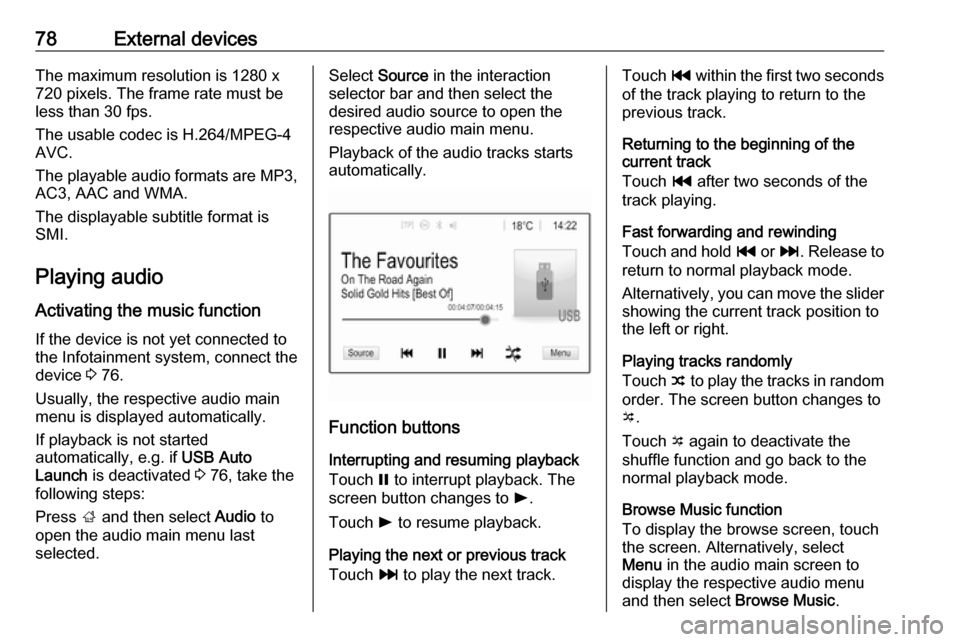
Playback of the audio tracks starts automatically.
Function buttons
Interrupting and resuming playback
Touch = to interrupt playback. The
screen button changes to l.
Touch l to resume playback.
Playing the next or previous track
Touch v to play the next track.
Touch t within the first two seconds
of the track playing to return to the
previous track.
Returning to the beginning of the
current track
Touch t after two seconds of the
track playing.
Fast forwarding and rewinding
Touch and hold t or v. Release to
return to normal playback mode.
Alternatively, you can move the slider
showing the current track position to
the left or right.
Playing tracks randomly
Touch n to play the tracks in random
order. The screen button changes to
o .
Touch o again to deactivate the
shuffle function and go back to the
normal playback mode.
Browse Music function
To display the browse screen, touch
the screen. Alternatively, select
Menu in the audio main screen to
display the respective audio menu
and then select Browse Music.
Page 90 of 127
90PhoneContacts settings
The contacts list can be sorted by last name or first name.
Press ; and then select Settings to
display the respective menu.
Select Bluetooth and then Sort
Order . Activate the desired option.
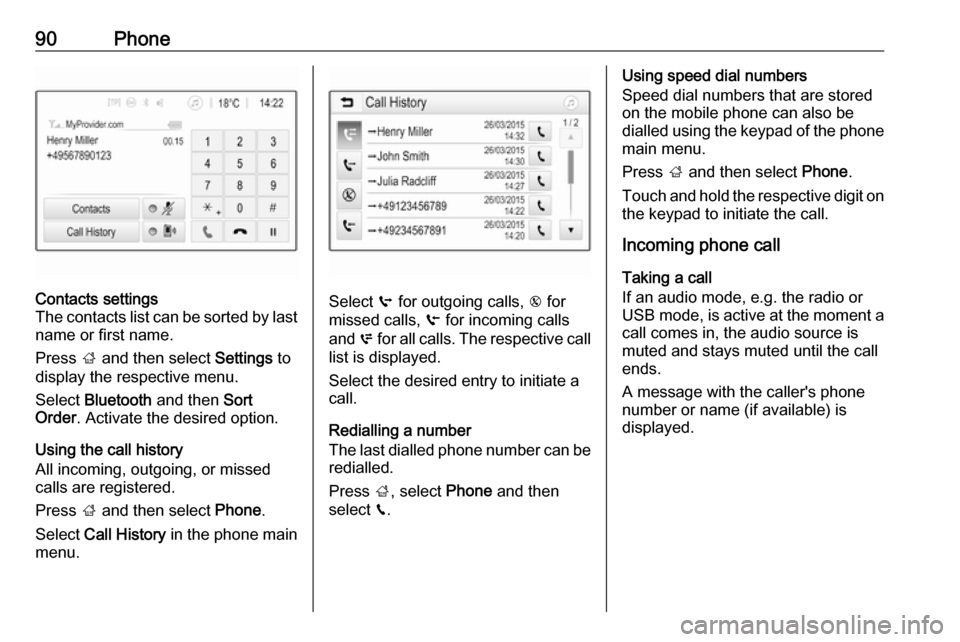
Using the call history
All incoming, outgoing, or missed calls are registered.
Press ; and then select Phone.
Select Call History in the phone main
menu.
Select q for outgoing calls, r for
missed calls, s for incoming calls
and p for all calls. The respective call
list is displayed.
Select the desired entry to initiate a
call.
Redialling a number
The last dialled phone number can be
redialled.
Press ;, select Phone and then
select v.
Using speed dial numbers
Speed dial numbers that are stored
on the mobile phone can also be
dialled using the keypad of the phone
main menu.
Press ; and then select Phone.
Touch and hold the respective digit on the keypad to initiate the call.
Incoming phone call
Taking a call
If an audio mode, e.g. the radio or
USB mode, is active at the moment a
call comes in, the audio source is
muted and stays muted until the call
ends.
A message with the caller's phone
number or name (if available) is
displayed.
Page 94 of 127

94IndexAActivating Bluetooth music ...........78
Activating phone ........................... 88
Activating radio ............................. 70
Activating USB audio ....................78
Activating USB movie ...................80
Activating USB picture ..................79
Audio files ..................................... 76
Auto volume.................................. 67
B Basic operation ............................. 64
Bluetooth Bluetooth connection ................85
Bluetooth music menu ..............78
Connecting device ....................76
General information................... 76
Pairing ....................................... 85
Phone ........................................ 88
Bluetooth connection ....................85
C Call Functions during a call ..............88
Incoming call ............................. 88
Initiating a phone call ................88
Ring tone ................................... 88
Call history .................................... 88Control elements
Infotainment system ..................58
Steering wheel .......................... 58
Control elements overview ...........58
D
DAB .............................................. 74
Digital audio broadcasting ............74
Displaying pictures .......................79
Display settings ......................79, 80
E Emergency call ............................. 87
F Favourite lists ............................... 72
Retrieving stations..................... 72
Storing stations ......................... 72
File formats Audio files.................................. 76
Movie files ................................. 76
Picture files................................ 76
G
General information ..........76, 83, 84
Bluetooth ................................... 76
DAB ........................................... 74
Infotainment system ..................56
Phone ........................................ 84
Smartphone applications ..........76
USB ........................................... 76
Page 95 of 127

95HHome menu .................................. 64
I Infotainment control panel ............58
Intellitext ....................................... 74
M
Maximum startup volume .............67
Menu operation............................. 64
Mobile phones and CB radio equipment ................................ 92
Movie files..................................... 76
Mute.............................................. 61
O
Operation ...................................... 88
External devices ........................76
Menu ......................................... 64
Phone ........................................ 88
Radio ......................................... 70
P Pairing .......................................... 85
Phone Bluetooth ................................... 84
Bluetooth connection ................85
Call history ................................ 88
Emergency calls ........................87
Entering a number ....................88
Functions during a call ..............88General information................... 84
Incoming call ............................. 88
Phone book ............................... 88
Phone main menu .....................88
Selecting the ring tone ..............88
Speed dial number ....................88
Phone book .................................. 88
Phone projection .......................... 81
Picture files ................................... 76
Playing audio ................................ 78
Playing movies ............................. 80
R Radio Activating................................... 70Configuring DAB .......................74
Configuring RDS .......................72
DAB announcements ................74
Digital audio broadcasting
(DAB) ........................................ 74
Favourite lists ............................ 72
Intellitext .................................... 74
Radio data system (RDS) .........72
Regional .................................... 72
Regionalisation ......................... 72
Retrieving stations..................... 72
Selecting the waveband ............70
Station search ........................... 70
Station tuning ............................ 70Storing stations......................... 72
Usage ........................................ 70
Radio data system .......................72
RDS .............................................. 72
Regional ....................................... 72
Regionalisation ............................. 72
Retrieving stations ........................72
Ring tone Changing the ring tone ..............88
Ring tone volume ......................67
S Smartphone .................................. 76
Phone projection .......................81
Speech recognition .......................83
Speed dial numbers .....................88
Station search............................... 70
Steering wheel audio controls ......58
Storing stations ............................. 72
Switching the Infotainment system on .................................. 61
System settings ............................ 67
T
Theft-deterrent feature ................. 57
Tone settings ................................ 66
Touch beep volume ......................67
TP volume .................................... 67
Page 96 of 127

96UUsage ............................... 61, 70, 83
Bluetooth ................................... 76
Menu ......................................... 64
Phone ........................................ 88
Radio ......................................... 70
USB ........................................... 76
USB Connecting device ....................76
General information................... 76
USB audio menu .......................78
USB movie menu ......................80
USB picture menu .....................79
Using smartphone applications ....81
V Voice recognition ..........................83
Volume Auto volume .............................. 67
Maximum startup volume ..........67
Mute function............................. 61
Ring tone volume ......................67
Setting the volume ....................61
Speed compensated volume ....67
Touch beep volume ..................67
TP volume ................................. 67
Volume limitation at high
temperatures ............................. 61
Volume settings ............................ 67W
Waveband selection .....................70
Page 98 of 127

98IntroductionIntroductionGeneral information.....................98
Theft-deterrent feature .................99
Control elements overview ........100
Usage ........................................ 103General information
The Infotainment system provides
you with state-of-the-art in-car
infotainment.
Using the FM, AM or DAB radio
functions, you can play a great
number of different radio stations. If desired, you can register stations on
radio preset buttons.
You can connect external data
storage devices to the Infotainment
system as further audio sources,
either via a cable or via Bluetooth ®
.
In addition, the Infotainment system is equipped with a Phone function that
allows comfortable and safe use of
your mobile phone in the vehicle.
The Infotainment system can be
operated using the control panel or
the controls on the steering wheel.
Notice
This manual describes all options
and features available for the
various Infotainment systems.
Certain descriptions, including those
for display and menu functions, may
not apply to your vehicle due tomodel variant, country
specifications, special equipment or
accessories.
Important information on
operation and traffic safety9 Warning
Drive safely at all times when
using the Infotainment system.
If in doubt, stop the vehicle before operating the Infotainment
system.
Radio reception
Radio reception may be disrupted by static, noise, distortion or loss of
reception due to:
● changes in distance from the transmitter
● multi-path reception due to reflection
● shadowing
Page 101 of 127

Introduction1011X
If switched off: short press:
switch power on ..................103
If switched on: short press: mute system; long press:
switch power off ..................103
Turn: adjust volume ............103
2 Preset buttons
Short press: select
favourites ............................ 109
Long press: save radio
stations as favourites ..........109
3 AUDIO
Short press: open menu
for tone and volume
settings ................................ 106
4 Î
Short press: toggle
through the different
display modes .....................103
Long press: turn display off (while the sound remains
active) ................................. 1035Q / P
Radio: short press:
manual station search .........109
Media: short press: select
next or previous folder,
genre, artist or playlist;
long press: scroll in a list .....113
N / O
Radio: short press:
automatic station search
for the previous or next
station; long press: seek
up or down .......................... 109
Media: short press: select
previous or next track; long press: fast forward or
rewind ................................. 113
6 OK
Short press: confirm a
setting or open a submenu . 105
7 MENU
Short press: display home
page .................................... 1058 BAND
Short press: toggle
between the wavebands .....109
9 Display
10 TA
Short press: activate or
deactivate traffic
announcements ..................110
Long press: open the TA
settings ................................ 111
11 LIST
Radio: short press: displaystations list; long press:
update stations list ..............109
Media: short press: display folders list; long press:
display the track listing
options ................................ 113
12 BACK
Menu: one level back ..........105
Input: delete last character
or entire entry ......................121
Page 102 of 127
102Introduction13 SRCq
Short press: toggle
between the audio sources . 109
Long press: open phone
menu if phone connected ...121Steering wheel controls
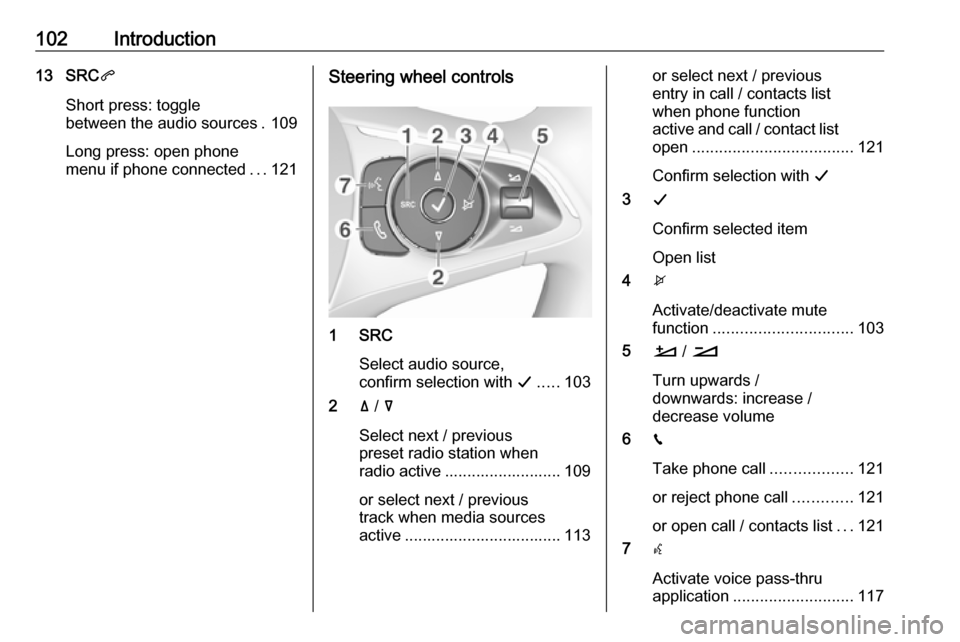
1 SRC
Select audio source,
confirm selection with G..... 103
2 ä / å
Select next / previous
preset radio station when
radio active .......................... 109
or select next / previous
track when media sources
active ................................... 113
or select next / previous
entry in call / contacts list
when phone function
active and call / contact list
open .................................... 121
Confirm selection with G
3 G
Confirm selected item
Open list
4 x
Activate/deactivate mute
function ............................... 103
5 À / Á
Turn upwards /
downwards: increase /
decrease volume
6 v
Take phone call ..................121
or reject phone call .............121
or open call / contacts list ...121
7 w
Activate voice pass-thru
application ........................... 117
Page 103 of 127

Introduction103Usage
Control elements
The Infotainment system is operated
via function buttons, navigation
buttons and menus that are shown on the display.
Inputs are made optionally via: ● the control panel on the Infotainment system 3 100
● controls on the steering wheel 3 100
Switching the Infotainment
system on or off
Press X briefly. After switching on,
the last selected Infotainment source
becomes active.
Notice
Some functions of the Infotainment
system are only available if ignition
is switched on or engine is running.
Press X again to turn the system off.
Automatic switch-off
If the Infotainment system is switched
on by pressing X while the ignition is
switched off, it switches off again
automatically after a certain time.
Setting the volume Turn m. The current setting is shown
on the display.
When the Infotainment system is
switched on, the last selected volume
is set.
Speed compensated volume
When the automatic volume function
is activated 3 106, the volume is
adapted automatically to make up for the road and wind noises as you
drive.
Mute function
Press x on the steering wheel to
mute the audio sources.
To cancel the mute function, press
x again.
Changing the display mode There are three different display
modes available:
● full screen display
● splitted display with time and date information shown on the
left side of the screen
● black display
Repeatedly press Î to toggle
between full screen display mode and splitted display mode.
Press and hold Î to turn the display
off while the sound remains active. Press Î again to reactivate the
display.