radio VAUXHALL MOKKA 2014.5 User Guide
[x] Cancel search | Manufacturer: VAUXHALL, Model Year: 2014.5, Model line: MOKKA, Model: VAUXHALL MOKKA 2014.5Pages: 219, PDF Size: 6 MB
Page 102 of 219

100Instruments and controls
Radio settings
See Infotainment system manual for
further information.
Bluetooth settings
See Infotainment system manual for
further information.
Vehicle settings ■ Climate and air quality
Auto fan speed : Modifies the fan
regulation. Changed setting will be active after switching the ignition off
and on again.
Climate control mode : Activates or
deactivates cooling.
Auto demist : Supports windscreen
dehumidification by automatically
selecting the necessary settings
and auto air conditioning mode.
Auto rear demist : Automatic
activation of rear heated window.
■ Comfort settings
Chime volume : Changes the
volume of warning chimes.Personalization by driver : Activates
or deactivates the personalisation
function.
Rear auto wipe in reverse :
Activates or deactivates automatic
switching on of the rear window
wiper when reverse gear is
engaged.
■ Exterior ambient lighting
Exterior lighting by unlocking :
Activates or deactivates the entry
lighting.
Duration upon exit of vehicle :
Activates or deactivates and
changes the duration of exit
lighting.
■ Power door locks
Auto door lock : Activates or
deactivates the automatic door
unlocking function after switching
off ignition. Activates or deactivates the automatic door locking function after driving off.
Stop door lock if door open :
Activates or deactivates the
automatic door locking function
while a door is open.Delayed door lock : Activates or
deactivates the delayed door
locking function.
■ Remote locking, unlocking, starting
Remote unlock feedback :
Activates or deactivates the hazard warning flasher feedback whilst
unlocking.
Remote door unlock : Changes the
configuration to unlock only the
driver's door or the whole vehicle
whilst unlocking.
■ Restore factory settings :
Resets all settings to the default
settings.
Settings in the Colour-Info-
Display CD 600/Navi 650/Navi 950
Press the CONFIG button on the
Infotainment system faceplate to
enter the Configuration menu.
Turn the multifunction knob to scroll
upwards or downwards in the list.
Press the multifunction knob
(Navi 950 / Navi 650: press the outer
ring) to select a menu item.
Page 103 of 219
Instruments and controls101
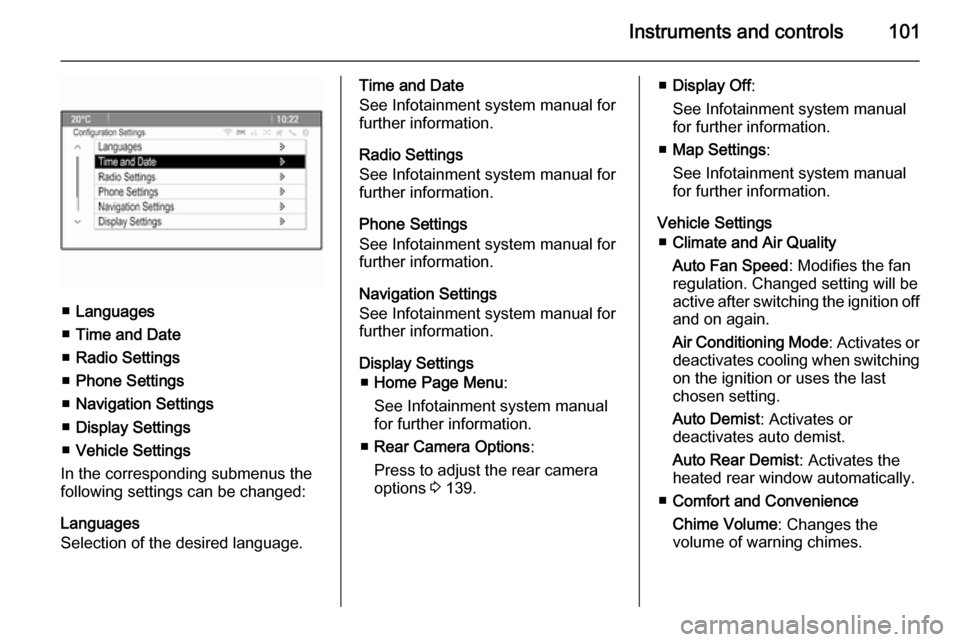
■Languages
■ Time and Date
■ Radio Settings
■ Phone Settings
■ Navigation Settings
■ Display Settings
■ Vehicle Settings
In the corresponding submenus the
following settings can be changed:
Languages
Selection of the desired language.
Time and Date
See Infotainment system manual for
further information.
Radio Settings
See Infotainment system manual for
further information.
Phone Settings
See Infotainment system manual for
further information.
Navigation Settings
See Infotainment system manual for
further information.
Display Settings ■ Home Page Menu :
See Infotainment system manual
for further information.
■ Rear Camera Options :
Press to adjust the rear camera
options 3 139.■ Display Off :
See Infotainment system manual for further information.
■ Map Settings :
See Infotainment system manual
for further information.
Vehicle Settings ■ Climate and Air Quality
Auto Fan Speed : Modifies the fan
regulation. Changed setting will be
active after switching the ignition off
and on again.
Air Conditioning Mode : Activates or
deactivates cooling when switching
on the ignition or uses the last
chosen setting.
Auto Demist : Activates or
deactivates auto demist.
Auto Rear Demist : Activates the
heated rear window automatically.
■ Comfort and Convenience
Chime Volume : Changes the
volume of warning chimes.
Page 113 of 219

Lighting111Lighting featuresEntry lighting
Welcome lighting Following lights are switched on for a
short time by unlocking the vehicle
with the radio remote control:
■ low beam,
■ sidelights,
■ tail lights,
■ number plate lights,
■ instrument panel light,
■ interior lights.
This function works only in the dark
and facilitates locating the vehicle.
Activation or deactivation of this
function can be changed in the menu Settings in the Info-Display. Vehicle
personalisation 3 99.
The following lights will additionally
switch on when driver's door is
opened:
■ some switches,
■ some interior lights.Exit lighting
Low beam, sidelights and tail lights
illuminate the surrounding area for an adjustable time after leaving the
vehicle.
Switching on
Activation, deactivation and duration
of lighting of this function can be
changed in the Vehicle Settings.
Vehicle personalisation 3 99.
1. Switch off ignition.
2. Remove ignition key.
3. Open driver's door.
4. Pull turn signal lever.
5. Close driver's door.
If the driver's door is not closed the
lights switch off after a few seconds.
The lighting is switched off
immediately if the turn signal lever is pulled while the driver's door is open.
Battery discharge
protection To prevent discharge of the batterywhen the ignition is switched off,
some interior lights are switched off
automatically after some time.
Page 177 of 219

Vehicle care175Tyre pressure
Check the pressure of cold tyres at
least every 14 days and before any
long journey. Do not forget the spare
wheel. This also applies to vehicles
with tyre pressure monitoring system.
Unscrew the valve cap.
Tyre pressure 3 207 and on the label
on the driver's door frame.
The tyre pressure data refers to cold
tyres. It applies to summer and winter tyres.
Always inflate the spare tyre to the
pressure specified for full load.
The ECO tyre pressure serves to
achieve the smallest amount of fuel
consumption possible.
Incorrect tyre pressures will impair
safety, vehicle handling, comfort and
fuel economy and will increase tyre
wear.
Tyre pressures differ depending on
various options. For the correct tyre
pressure value, follow the procedure
below:
1. Identify the engine identifier code.
Engine data 3 202.
2. Identify the respective tyre.
The tyre pressure tables show all
possible tyre combinations 3 207.
For the tyres approved for your
vehicle, refer to the EEC Certificate of Conformity provided with your vehicle
or other national registration
documents.
The driver is responsible for correct
adjustment of tyre pressure.9 Warning
If the pressure is too low, this can
result in considerable tyre warm-
up and internal damage, leading to tread separation and even to tyre
blow-out at high speeds.
Tyre pressure monitoring
system
The Tyre Pressure Monitoring
System (TPMS) uses radio and
sensor technology to check tyre
pressure levels.
All wheels must be equipped with
pressure sensors and the tyres must
have the prescribed pressure.
Notice
In countries where the tyre pressure
monitoring system is legally
required, the use of wheels without
pressure sensors will invalidate the
vehicle type approval.
Page 179 of 219

Vehicle care177
■ The TPMS sensor matchingprocess was not done or not
completed successfully after
rotating the tyres. The malfunction
light and the warning message or
code should go off after
successfully completing the sensor matching process. See "TPMS
Sensor Matching Process" later in
this section.
■ One or more TPMS sensors are missing or damaged. The warning
message or code and the
malfunction light should go off
when the TPMS sensors are
installed and the sensor matching
process is performed successfully.
Consult your workshop for service.
■ Replacement tyres or wheels do not match the original equipment
tyres or wheels. Tyres and wheels other than those recommended
could prevent the TPMS from
functioning properly.
■ Operating electronic devices or being near facilities using radio
wave frequencies similar to theTPMS could cause the TPMS
sensors to malfunction.
If the TPMS is not functioning
properly, it cannot detect or signal
a low tyre condition. Consult your
workshop for service if the TPMS
malfunction light and a warning
message or code come on and stay on.
TPMS Sensor Matching
Process Each TPMS sensor has a unique
identification code. The identification
code must be matched to a new tyre/
wheel position after rotating the tyres
or replacing one or more of the TPMS
sensors. The TPMS sensor matching process should also be performed
after replacing a spare tyre with a
road tyre containing the TPMS
sensor.
The malfunction light and the warning
message or code should go off at the
next ignition cycle. The sensors are
matched to the tyre/wheel positions,
using a TPMS relearn tool, in the
following order: driver side front tyre,
passenger side front tyre, passengerside rear tyre, and driver side rear.
Consult your workshop for service or
to purchase a relearn tool. There are
two minutes to match the first tyre/
wheel position, and five minutes
overall to match all four tyre/wheel positions. If it takes longer, the
matching process stops and must be
restarted.
The TPMS sensor matching process
is:
1. Apply the parking brake.2. Turn the ignition on.
3. Use the MENU button on the turn
signal lever to select the Vehicle
Information Menu in the Driver
Information Centre (DIC).
4. Use the thumbwheel to scroll to the tyre pressure menu.
5. Press the SET/CLR button to
begin the sensor matching
process. A message requesting
acceptance of the process should
display.
Page 211 of 219

Customer information209Customer informationCustomer information................209
Vehicle data recording and pri‐
vacy ........................................... 209Customer information
Declaration of conformity
This vehicle has systems that
transmit and/or receive radio waves
subject to Directive 1999/5/EC.
These systems are in compliance
with the essential requirements and
other relevant provisions of
Directive 1999/5/EC. Copies of the
original Declarations of Conformity
can be obtained on our website.Vehicle data recording
and privacy
Event data recorders
Data storage modules in the
vehicle
A large number of electronic
components of your vehicle contain
data storage modules temporarily or
permanently storing technical data
about the condition of the vehicle,
events and errors. In general, this
technical information documents the
condition of parts, modules, systems
or the environment:
■ Operating conditions of system components (e.g. filling levels)
■ Status messages of the vehicle and
its single components (e.g. number of wheel revolutions / rotational
speed, deceleration, lateral
acceleration)
■ Dysfunctions and defects in important system components
Page 212 of 219

210Customer information
■ Vehicle reactions in particulardriving situations (e.g. inflation of
an airbag, activation of the stability
regulation system)
■ Environmental conditions (e.g. temperature)
These data are exclusively technical
and help identifying and correcting
errors as well as optimizing vehicle
functions.
Motion profiles indicating travelled
routes cannot be created with these
data.
If services are used (e.g. repair
works, service processes, warranty
cases, quality assurance),
employees of the service network
(manufacturer included) are able to
read out this technical information
from the event and error data storage
modules applying special diagnostic
devices. If required, you will receive
further information at these
workshops. After an error has been
corrected, the data are deleted from
the error storage module or they are
constantly overwritten.When using the vehicle, situations
may occur in which these technical
data related to other information
(accident report, damages on the
vehicle, witness statements etc.) may be associated with a specific person -
possibly, with the assistance of an
expert.
Additional functions contractually
agreed upon with the client (e.g.
vehicle location in emergency cases)
allow the transmission of particular vehicle data from the vehicle.Radio Frequency
Identification (RFID) RFID technology is used in somevehicles for functions such as tyre
pressure monitoring and ignition
system security. It is also used in
connection with conveniences such
as radio remote controls for door
locking/unlocking and starting, and in-
vehicle transmitters for garage door
openers. RFID technology in
Vauxhall vehicles does not use or
record personal information or link with any other Vauxhall system
containing personal information.
Page 217 of 219

215
RRadio Frequency Identification (RFID) ..................................... 210
Radio remote control ...................20
Reading lights ............................ 110
Rear carrier system ......................57
Rear floor storage cover ..............68
Rear fog light ....................... 89, 109
Rear view camera ...................... 139
Rear window wiper/washer .......... 75
Recommended fluids and lubricants ........................ 195, 199
Refuelling ................................... 148
Reversing lights .........................109
Ride control systems ..................131
Roof .............................................. 31
Roof load ...................................... 70
Roof rack ..................................... 70
S Seat adjustment ....................... 6, 35
Seat belt ........................................ 8
Seat belt reminder .......................84
Seat belts ..................................... 38
Seat position ................................ 34
Selector lever ............................. 125
Service ....................................... 117
Service display ............................ 81
Service information ....................194Service vehicle soon .................... 85
Side airbag system ......................45
Side turn signal lights ................167
Spare wheel ............................... 185
Speed limiter............................... 134
Speedometer ............................... 79
Starting and operating ................119
Starting off ................................... 16
Starting the engine ....................119
Steering ...................................... 118
Steering wheel adjustment ......9, 72
Steering wheel controls ...............72
Stop-start system........................ 120
Storage compartments .................54
Sunglasses storage .....................56
Sunroof ........................................ 31
Sunvisor lights ........................... 110
Sun visors .................................... 31
Symbols ......................................... 4
T
Tachometer ................................. 79
Tail lights ................................... 165
Three-point seat belt .................... 39
Tools .......................................... 173
Top-tether fastening eyes ............53
Tow bar....................................... 152
Towing ................................ 152, 189
Towing another vehicle .............190Towing hitch installation
dimensions ............................. 208
Towing the vehicle .....................189
Traction Control system ............. 131
Traction Control system off........... 87
Traffic sign assistant ...................141
Trailer towing ............................. 152
Transmission ............................... 16
Transmission display .................125
Tread depth ............................... 178
Trip computer .............................. 96
Trip odometer .............................. 79
Turn and lane-change signals ...108
Turn signal ................................... 84
Tyre chains ................................ 179
Tyre designations ......................174
Tyre pressure ............................ 175
Tyre pressure monitoring system ............................... 87, 175
Tyre pressures ........................... 207
Tyre repair kit ............................. 180
Tyres .......................................... 174
U Ultrasonic parking assist ...... 86, 138
Underseat storage .......................56
Upholstery .................................. 193
Upshift .......................................... 86
Using this manual ..........................3