buttons VOLKSWAGEN JETTA 2010 Owners Manual
[x] Cancel search | Manufacturer: VOLKSWAGEN, Model Year: 2010, Model line: JETTA, Model: VOLKSWAGEN JETTA 2010Pages: 477, PDF Size: 77.6 MB
Page 187 of 477
Booklet 2.1 Safety first
Additional Information
What types of Child Restraint System anchors are availabl e and how
are they related to child safety?
For years , C hild Restrai nt Sys te m s (C RS) have
b ee n in sta lled us ing the safety belts already
pr ese nt in every ve hicle.
S in ce September
1999, CHS man ufac turers
h ave been providing tet her s traps tha t attach the
top of the C RS to the vehicl e's s tructure on mo st
of th eir forwa rd-fac ing syste m s in order to
co mp ly with U.S. Federal re gulation s for
ens perfo rmance in crash . Ve hicle manu fac tur ers
were req uir ed to p hase -in tether a nchorag es fo r
a tta chm ent of the tet her
in th eir U. S. ve hi
cl es beg innin g September 1999.
The combination of the teth er an cho rages and
the lower anch orages is no w generally ca lled the
LATCH syste m for " Lower Anch or and Tethe r
for Childr en".
(T he t erm
rega rdin g lower anc ho ra ges
had bee n use d by Volkswagen a nd other manu
facture rs in the past, but LATC H is now the stan
dard nam e for the ne w child res traint anchorag e
sys te m .)
64 Child safety
Some C HS manufa ctur ers have been providin g
t e th er straps on certa in mod els o f their CHSs, ei
th er as sta ndard equi pment or as a retrofit, for
seve ral years. Chec k w ith the manufacturer of
th e CRS for te th er stra p availab ility.
Tu provide a simpl er and mor e prac ticable
to attac h th e ens on the ve hicle U.S. Fed
eral reg ulations req uired the pha se- in of lowe r
anchorages in vehicles and d evices on new CRSs
to attach to t he ve hicle a nch orages.
CRS man ufa ctur ers w ill prob ably offer
kin ds
of lower an ch orages o n their c hild seats
T hey co uld come w ith:
• hook-on or p ush -on con nec tor s attach ed to
adj ustable strap s or
• rigid l atches o n bars
exte nd out the ba ck
o f the and a re release d with re lease buttons
at the bo ttom of the
In addition to the LATCH lowe r anchorag es,
both of these child r estrain t systems use teth er
he lp kee p th e C HS firm ly in
Page 207 of 477
Booklet 3.1 Controls and Equipment
Applies to vehicl es, with multi-fun cti on s teeri ng wheel
Overview of the control buttons on the multi
function steering wheel
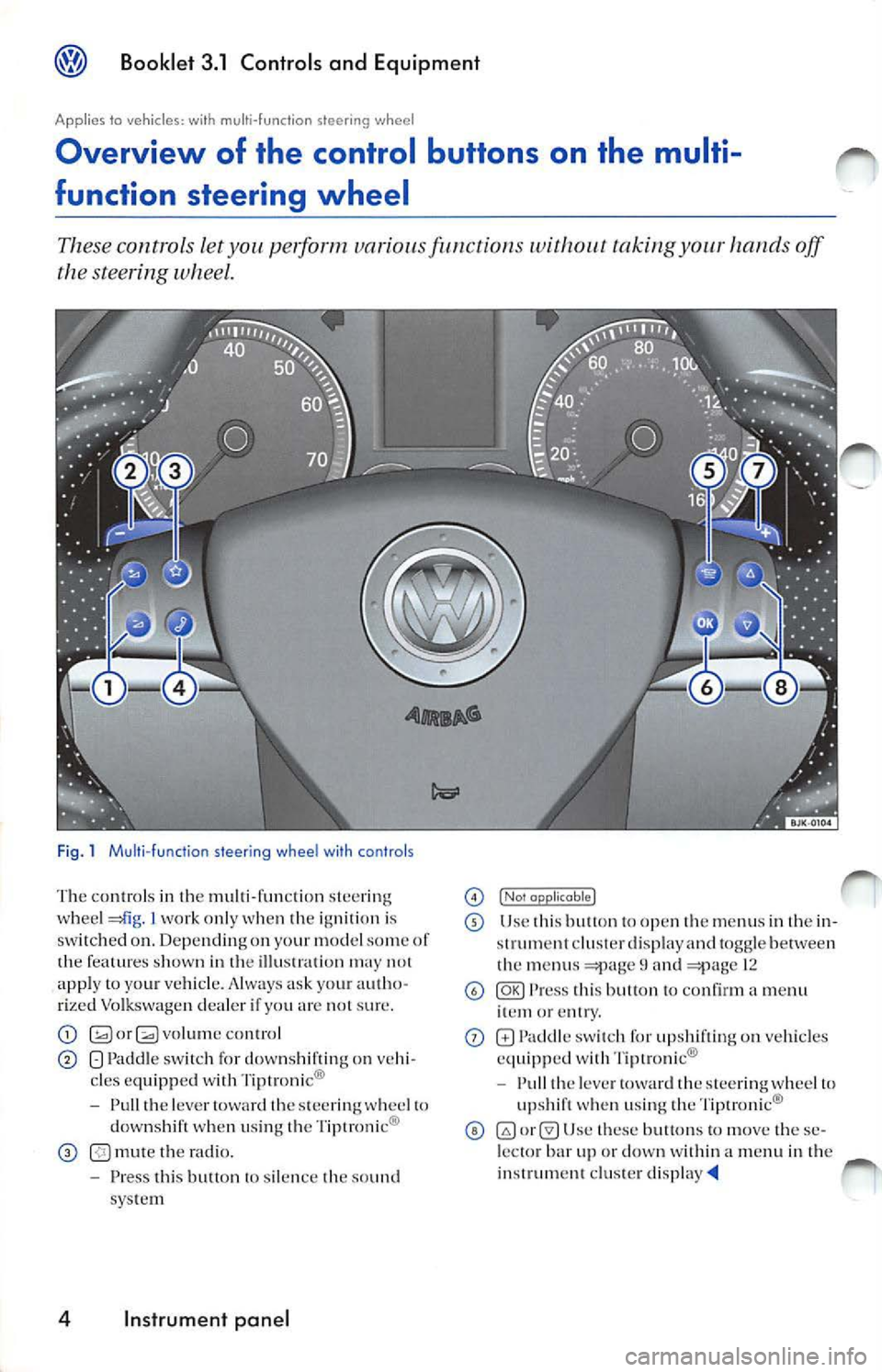
These controls let you pe,form variou s fu 11ctions without tak ing off
the steering wheel.
Fig . 1 Mu lti-fu nct io n steer ing whee l wi th co ntrols
T he con tro ls in th e multi -fun ction ste erin g
whee l I work only when ignition is
sw itch ed on . Depend ing on yo ur model some of
features shown in the may 1101 app ly to your vehicle. A lways ask you r auth o
rized Volkswag en dea ler if yo u not sur e.
G;;l orQ volume con tro l
Pad dle sw itch for downshiftin g on vehi
cles equipped with Tip tronic®
- Pull th e lever towa rd
s tee ring whee l to
down shift when u sin g Tiptronic ®
mute th e rad io .
- Pre ss thi s butt on to silenc e
sound
sys te m
4 Instrument panel
I Nol J
Use thi s to open m enu s in th e in
st rum ent cluster disp lay and togg le betwe en
menu s and 12
Press co nfirm a menu or
on vehicles
e quipp ed wi th Tipl ronic®
- Pull
leve r stee ring wh eel to
up shi ft w hen u sing the Tiptroni c®
U se these bu11on s to m ove these
l ec tor bar up or dow n within menu in the
i nst rum ent clu ste r
Page 208 of 477
Booklet 3.1 Control s and Equipment
Instrument cluster
Instrument overview
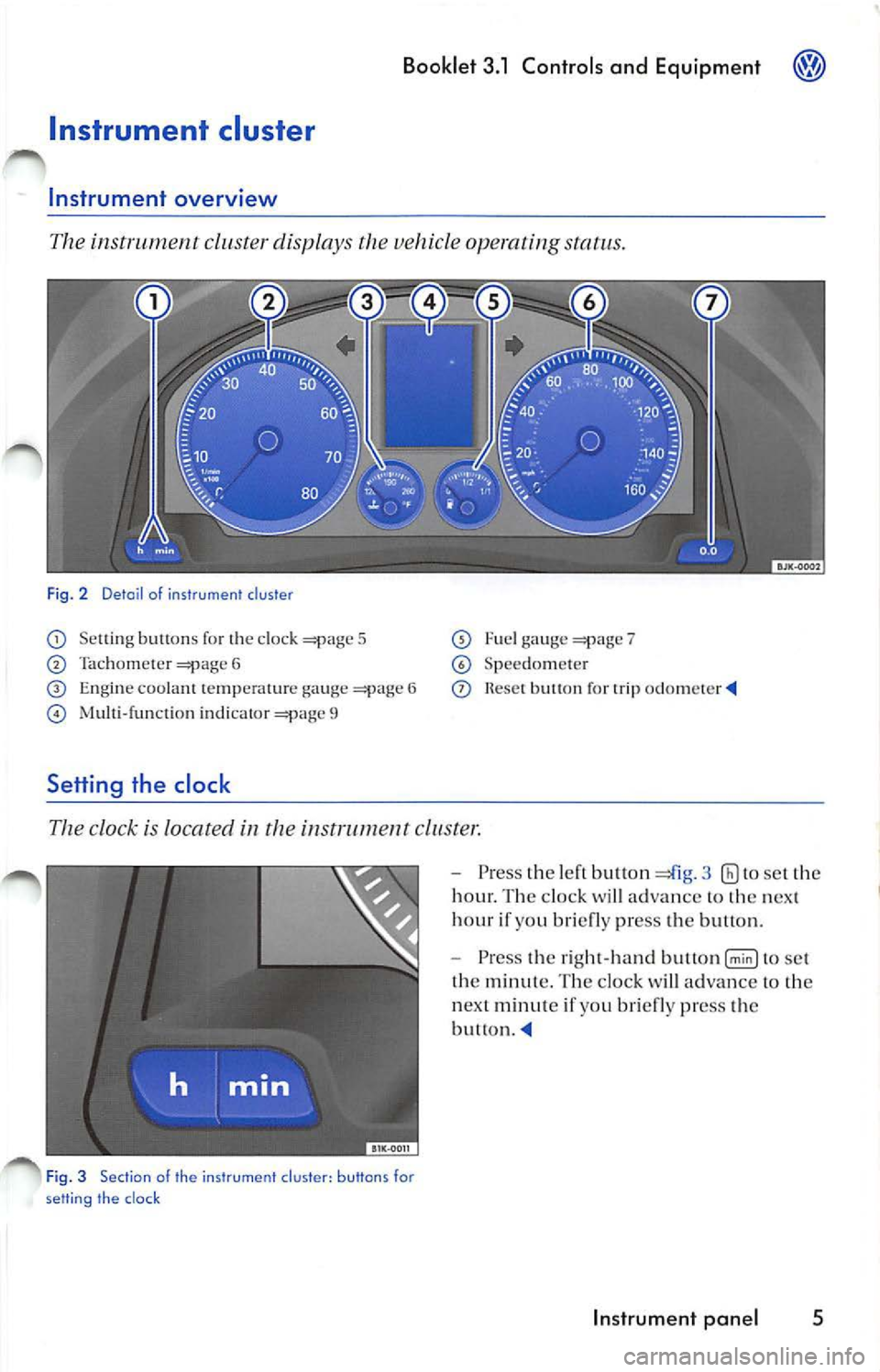
The instrument cluster displays the vehicle operating status.
Fig. 2 Detai l of instrumen t cluster
Se ttin g buttons fo r the clock 5
Ta cho me ter 6
E n gi ne coolant te mp erature ga uge 6
indi cator 9
Setting the clock
Fu el ga uge 7
Sp ee dom ete r
button for trip odome te r
The clock is located in the instrument cl uste r.
Fig . 3 Sec tion of the instr um ent cl uster : button s for
se tting the clock
Pre ss the le ft button 3 to set the
hour. Th e clock will ad vance to the nex t
hour if you briefly press the bullon.
Pre ss the right-h and to se t
th e minute . Th e cloc k will ad vance
10 th e
n ex t minut e if yo u br ie fl y press th e
button.
In strum ent pan el 5
Page 235 of 477
Booklet 3.1 Controls and Equipment
Remote control key
Locking and unlocking the vehicle
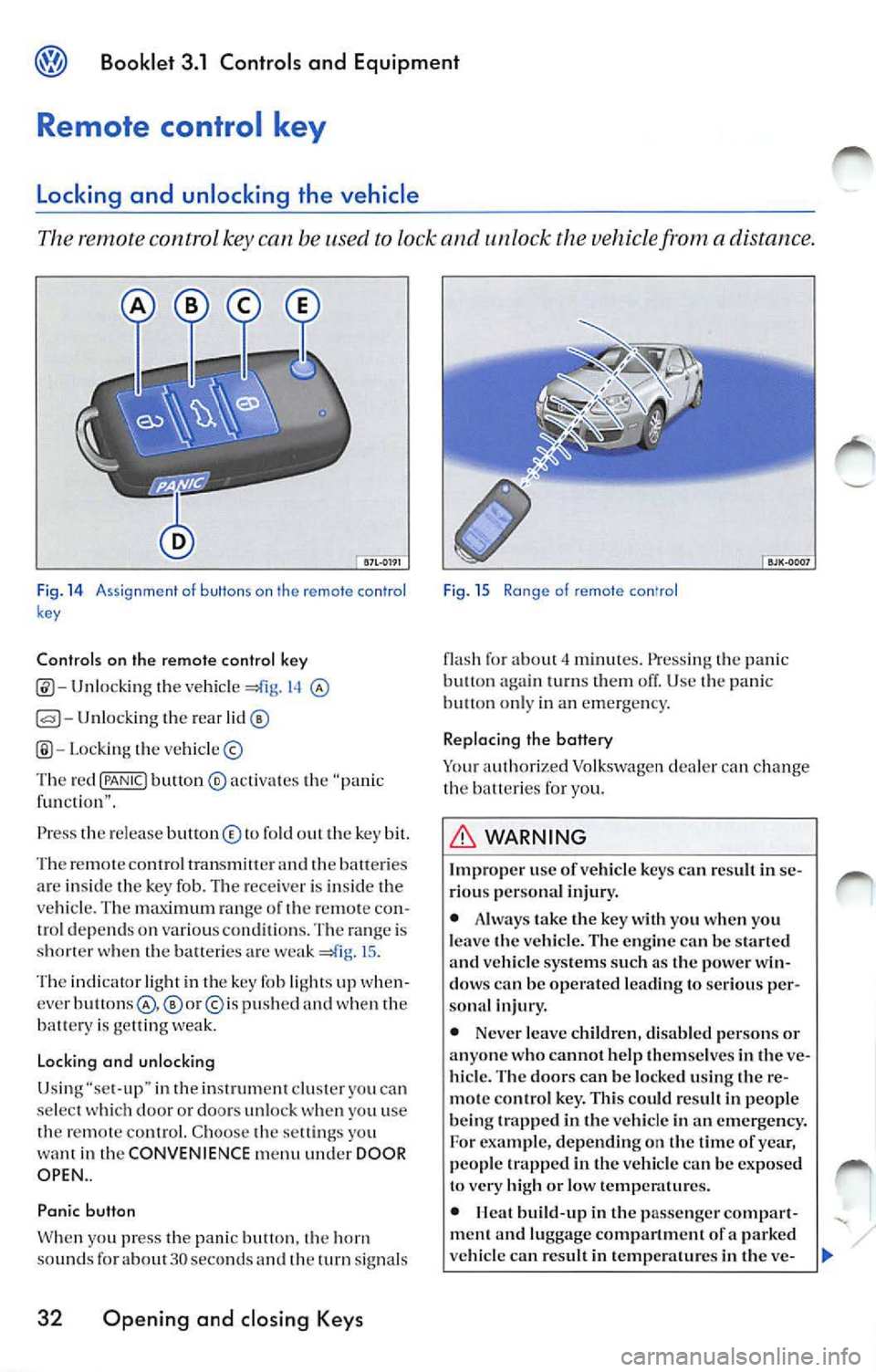
The remote control key can be used to lock and unlock the vehicle from a distance.
Fig. 14 A ssi gnme nt o f buttons on th e remote con tro l
k ey
Controls on the remote control key
Unlocking the vehicl e 14
Unlocking the rear
Lo cki ng the vehicle ©
Th e red
{PANIC! button ® activa tes the "pa nic
f un cti on" .
Press th e re le ase button © to fold out the key bit.
Th e re m ote contro l tran smitter and
batte ri es
ar e insid e th e key fob. The rece iver is in side the
ve hicle . T he maximum ran ge of th e remo te con
trol dep end s on various conditions. The range is
s h o rter when the balteric s are weak
15 .
The indicator light in th e key fob li ght s up when
cver
p u sh ed and when the
batt ery is ge llin g we ak.
Lo cking and unlocking
Usi ng "se t-up" in the inst rument clu ster you ca n
se lect doo r or doors un loc k you u se
th e remot e control. C hoo se th e sett ings yo u
want in the CONVENIENCE menu under DOOR
OPEN ..
Panic button
W hen yo u press t he panic butt on. horn
sou nds fo r about 30 seco nds an d th e turn signal s
32 Opening and closing Keys
Fig . 15 Ra nge of remote con'ro l
flash fo r about minut es. Press ing the pani c
butt on turn s them off. Use panic on ly in an emerge ncy.
Replacing the battery
Yo ur auth orized Volkswagen dealer can ch ange
the b atteri es for you.
WARNING
Improp er use of vehicl e key s ca n resu lt in se
ri ous per sona l injury.
• Alwa ys take the key with you when you
l e ave the vehicle. The en gine
be start ed vehicle systems such a s the power win
dow s can be operated le ading to seriou s per
sona l injur y.
• Never leave childr en, disab le d pe rsons or
anyone who cannot help them se lves in
ve
hicl e. The door s can be locked using the re
m ote con tro l ke y. This could r esult in peop le
b eing trapp ed in the vehicle in an emergency.
For exam ple, depending on the tim e of yea r,
people trapped in the vehicle can be exposed
to very high or low temp eratures.
•
build -up in the passenge r compar t
ment a nd luggage compartment of a parked
ve hicle can re sult in temp erature s in the ve-
Page 242 of 477
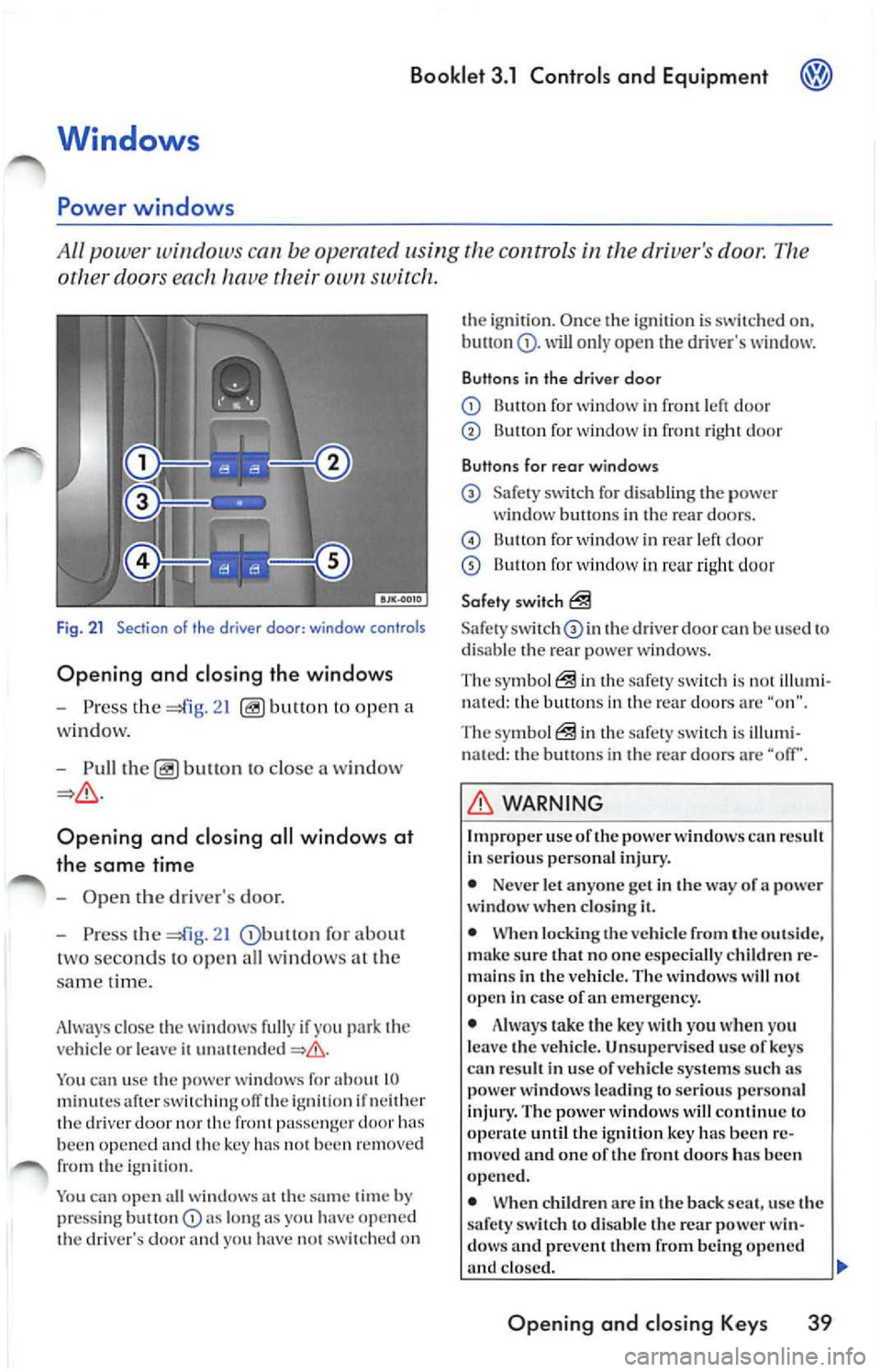
Booklet 3.1 Controls and Equipment
other doors ea ch hav e own switch .
Fig . 21 Section of th e driver door: window controls
Opening and closing the windows
-Press the ope n a
w indow.
- Pull
to close a win dow
Opening and closing all wind ows at
the same time
-Ope n the driver's door.
- Press the
21 for abou t
t wo se conds to op en all wi ndows at the
s am e tim e.
A lwa ys close the w indows fully if yo u
vehicl e or le a ve ii
You ca n u se the power window s for about 10 minut es aft er ofT the ig niti on if n eith er
th e dri ver nor front pa ssenge r doo r been opened and the key has 1101 been re m ove d
from the igniti on.
You can open a ll wi ndow s at the
time by
pr ess ing but ton lo ng as you have o pe n ed
th e dri ver's door yo u ha ve 1101 switched on th
e ignirio n. Once th e ig niti on i s sw itch ed on,
will o nly open dri ver's w indow.
Buttons in the driver door
Button for window in front le ft d oo r
Button for wind ow in front right doo r
Buttons for rear windows
Safe ty sw itch for d isa bling the power
window b uttons in th e re ar door s.
B utt on for wind ow in rear le ft d oor
13u11on for window in rea r ri ght doo r
Safety switch
Safety th e driver doo r can be use d to
di sa ble th e rear p ower w in dows.
The symb ol
in the safe ty sw itch i s illum i
n ate d : the button s in th e rear doo rs a re "o n".
The symbol
in the safety s witch is illumi
n ated: the button s in th e rea r d oo rs are "off'.
WARNING
Imp roper use oft he power windows can result
In se ri ous perso nal inju ry.
• Neve r let anyo ne get in the way of a power
windo w wh en clos ing it.
• When locking the veh icle from the out sid e,
make sure that no on e especia lly c hildren re
m ain s in the vehicl e. T he w indo ws w ill not
open in case of an eme rge ncy .
• Always take the key with you when yo u
l e av e the vehicle . Un supervised u se of ke ys
ca n re sult in u se of ve hicle systems su ch as
pow er windows leading to serious perso nal
injury. The power wind ows will continu e lo
until the i gnition key has been re
mo ved and one of the fron t door s ha s be en
opened.
• When children arc in the back seat, use the
s afet y sw itch
di sa ble the rear power win
dow s and preve nt th em from being opened
clo sed. II>
Opening and closing Key s 39
Page 244 of 477
Booklet 3.1 Controls and Equipment
Pinch protection
The wind ows have a pinch protection feature. This helps re du ce the risk of inju
ries when the windows are closing.
• lfa w indow is obst ructe d w hen closing, the
w ind ow will sto p and open (go down) aga in
If this happe ns, see why the window could
n ot clo se befo re att emp ting to close aga in. If
yo u tr y to close the wind ow again wit hi n 10 sec
o nd s, th e w ind ow's closing force is a utomati
ca lly incr ease d.
• If th e wi ndow is st ill obst ructed, the wi ndow
w ill stop at this po int.
• If th ere is no obvio us reason why the w indow
ca nn ot be closed, try to close it agai n wit hin 5
seconds. T he pin ch protection is now off. The
window clo ses with maximum force.
If you wa it lo n ge r th an the lO or 5 seco nds de
sc ribed above, the w in dow will open f ully whe n
you ope rate o ne of the buttons. One-touch
closi ng is on aga in.
Th e one- tou ch functio n and pinch prot ection do
not wurk if ther e is a m alf un ction in th e power
windows. Contact yo ur authoriz ed Vo lkswage n
deal er co have the m alfunc tion corrected.
Convenience opening and closing
You can ope n or clo se the windo ws from
outside the vehicl e.
Convenience closing
-Hold th e key in th e close pos ition in th e
l oc k of the driver's door, until all windo ws
a re clo sed.
- Turn th e key the other way to interrupt
th e fun ction.
Convenience opening
-Hold th e key in the ope n position in the
l oc k of the driver' s door, until the windows
are ope n.
WARNING
Improper use of the pow er windows can result
in serious personal injury .
• Never let anyone ge t in th e way of a power
window when closing it.
• Always make sure that no one i s in th e w ay
while overriding the pinch protection to close
a w indo w!
• When locking the vehicle from the out side ,
make sur e that no one especially c hildr en re
mains in the vehicle. Th e windows will not
open in case of an emergency.
• Always take the key with you wh en you
leav e the vehicle. Unsupervised use of keys
can result in use of vehicle s ystem s such as
power windows leading to serious personal
inju ry.
• The power windows will continue to op
crntc until the igniti on ke y has bee n re mo ved
and one of the front door s ha s bee n opened.
• When children are in the b ack sea t, use the
safety switch to disable the rear power win
dows and prevent them from b eing opened
and closed.
<4
-Turn the key the oth er way to interrupt
t h e function.
Using set-up in the main menu , you can select if
yo u want the driver 's doo r w in dow. all w indows
o r n o window a t all to open whe n you unlock
your vehicle using the ma ste r key in th e driver's
doo r lock. C hoose the se ttings yo u want in the
CONVENIENCE menu.
WARNING
Improp er use of the power windows can result
in seriou s per sonal injury.
• Neve r let anyon e get in the way of a power
window when clo sing
Opening and closing Keys 41
Page 247 of 477
@ Booklet 3.1 Controls and Equipm ent
Appl ies to vehic les: wi th Homelink Universol Tronsmitter
Homelink ® Universal Transmitter
The Hom eLink ® will le arn the radio frequency codes of to three tran s
mitter s.
BJK-00 11
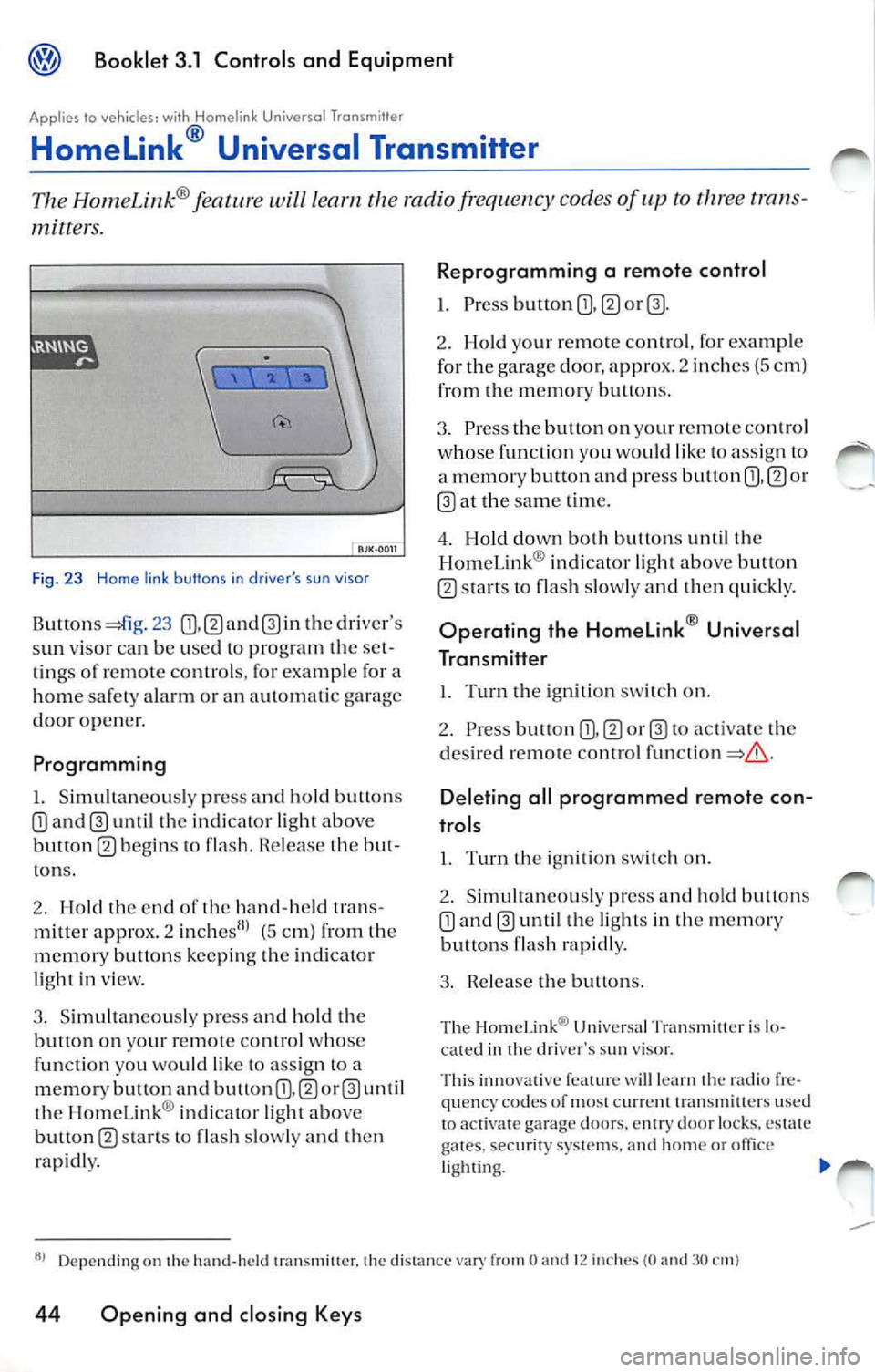
Fig. 23 H ome link buttons in driver 's su n visor
23 th e dr iver 's
s un viso r ca n b e use d to pr ogram th e se t
tin gs of remote co ntrols , for exa mple for a
home safet y ala rm or an automati c garage
door opener.
Programming
I. Simultaneou sly pre ss and hold button s
until the indi cator light above
button m b egins to fla sh. R ele ase the but
ton s.
2. Hold th e end of th e hand-h eld tran s
mitter appro x. 2
(5 cm) from th e
m emo, y butt ons keepi ng th e ind icato r
li gh t in view.
3 . Simult an eously press and hold the
button on your remote control whose
fun ction you wo uld like to ass ign to a
m emor y button and button
th e HomeLink ® indi cator light ab ove
button
s ta rts to flas h slow ly a nd t hen
rap idly.
Reprogramming a remote control
1. Pre ss button m
2. Ho ld your remot e control , fo r exa mple
fo r the garage door, appr ox. 2 inch es (5 c m)
from the m emor y button s.
3. Pre ss the button on yo ur r emot e contro l
w ho se function you would lik e to ass ig n to
a m emory button and press button
or
at the sam e tim e.
4 . Hold down both button s until the
Hom eLin k® indi cator ligh t abo ve but ton
s ta rts to flash slowly and then qui ckly.
Op erating the Homelink ® Universal
Transmitter
l. Turn the ign ition switch on.
2. Press button
to activa te th e
d es ired re mote control
Deleting all programmed remote con
trols
I. Turn th e ig niti on sw itch on.
2 . Sim ultan eo usly pr ess and h old butt ons
until the light s in the m emor y
bu ttons flash rapidly.
3 . Rel ease the butt ons.
Th e Hom eLin k® Uni vers a l Tr an sm ill er is lo
ca ted in th e dri ver's sun viso r.
Thi s inn ova tive fea ture
lea rn radio fr e
qu en cy co des of most c urr clll tran sm itte rs use d
to act iva te g ara ge doors. en try door locks, es tate
gates.
syste ms, and hom e or lighti ng.
Depending on the hand -hel d 1ransmi11cr. the distan ce O 12 in che s (0 3 0
44 Opening and closing Keys
Page 267 of 477
Booklet 3.1 Controls and Equipment
WARNING
• Never adjust the driver or front passenger
seat while the vehicle is in motion. While ad
ju stin g your seat, you could adjust your seat to
an incorrect sitting position. Adjust your seat
before driving
or when th e vehicle is not
moving.
• The elect rical front seat adju stment also
work s with the ignition off. Therefore, chil
dren sh ould never be lef t unattended in the
vehicle -ther e is a risk of injury!
• Exercise caut ion when adjustin g the seat
height or fonvard/backward position. Care
l ess use of the front seat adjustment co ntrols
can cause injuri es.
WARNING (continued)
• To reduce the risk of personal injury in an
accident, front seat passenge rs must never
ride in a moving vehicle w ith the seat back re
clined. Safet y belt s offer prote ction only when
th e seatback is upright and belt s are properl y
po sition ed on the bod y. The more Lheseatback
i s re clined, the greate r th e risk of personal in
ju ry from an out of position safety belt.
avoid damaging the e lec trical co mp onen ts of
th e front seat, do not knee l on the sea t or apply
dir ect pressure at a sing le po int to the seat
cu shi on a nd
Applies to vehicles: wilh electrically adjustable fronts seat and memory buttons
Memory for driver 's s eat
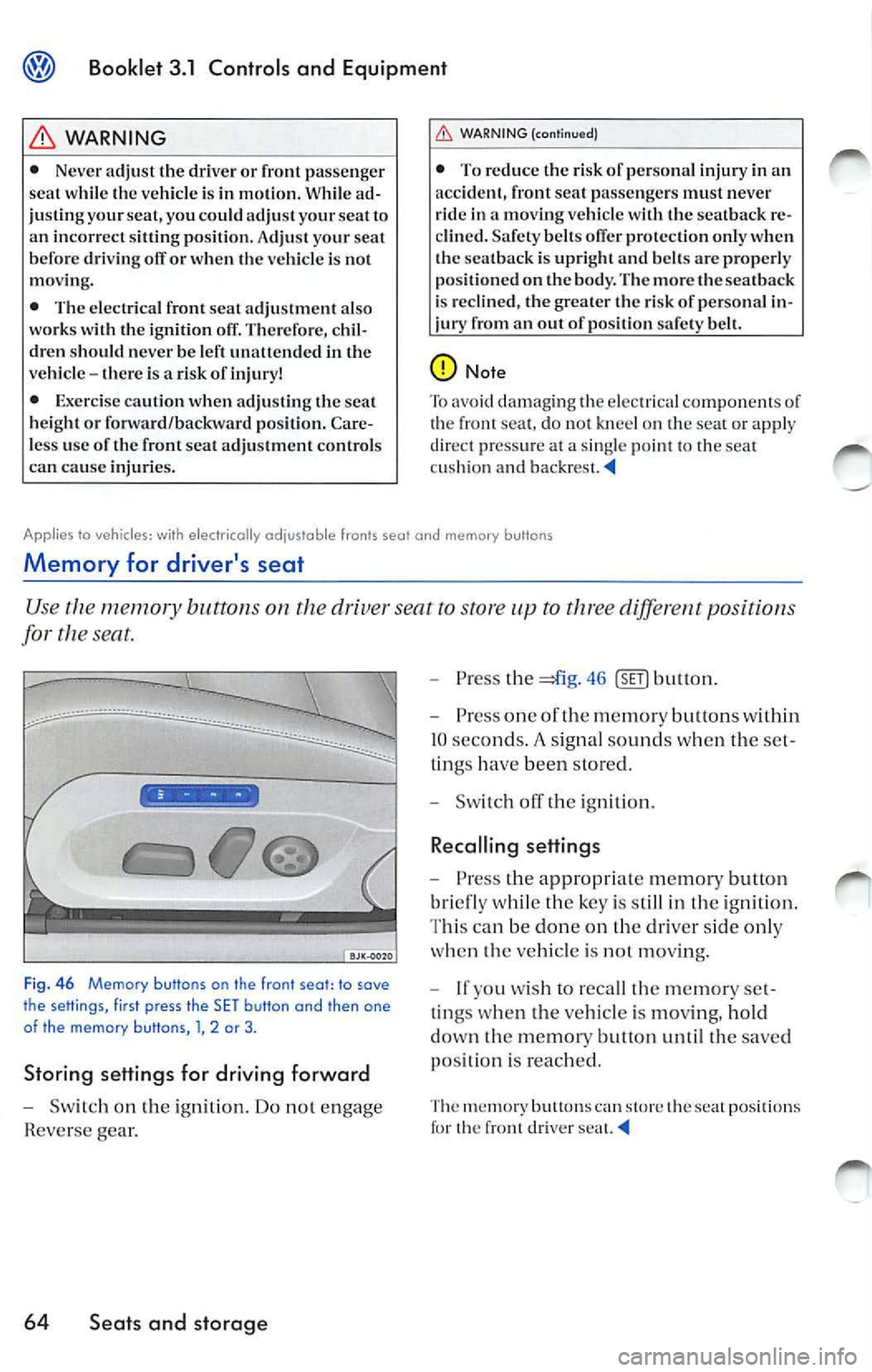
Use memory buttons on dri ver seat to sto re to three diffe rent positions
for
seat.
••••
F ig. 46 Memory buttons on the front seot: to sove
the setlings, first press the SET butlon and then one
of the memory butlons , l, 2 or 3 .
Storing settings for driving forward
-Sw itch on the igniti on. Do not en gage
Rever se gear.
64 Seats and storage
-Press the =*i g. 46
bri efly whil e the key is s till in the ignition .
T hi s ca n be don e on the driver side only
whe n th e ve hicle is
moving.
- lfyou w ish to reca ll the memor y set
t ings whe n the vehicle is moving, hold
dow n the memory button until the sa ve d
p osit ion is reac hed .
The m em ory butt ons ca n sto re th e sea t positions th e fron t d river
Page 438 of 477
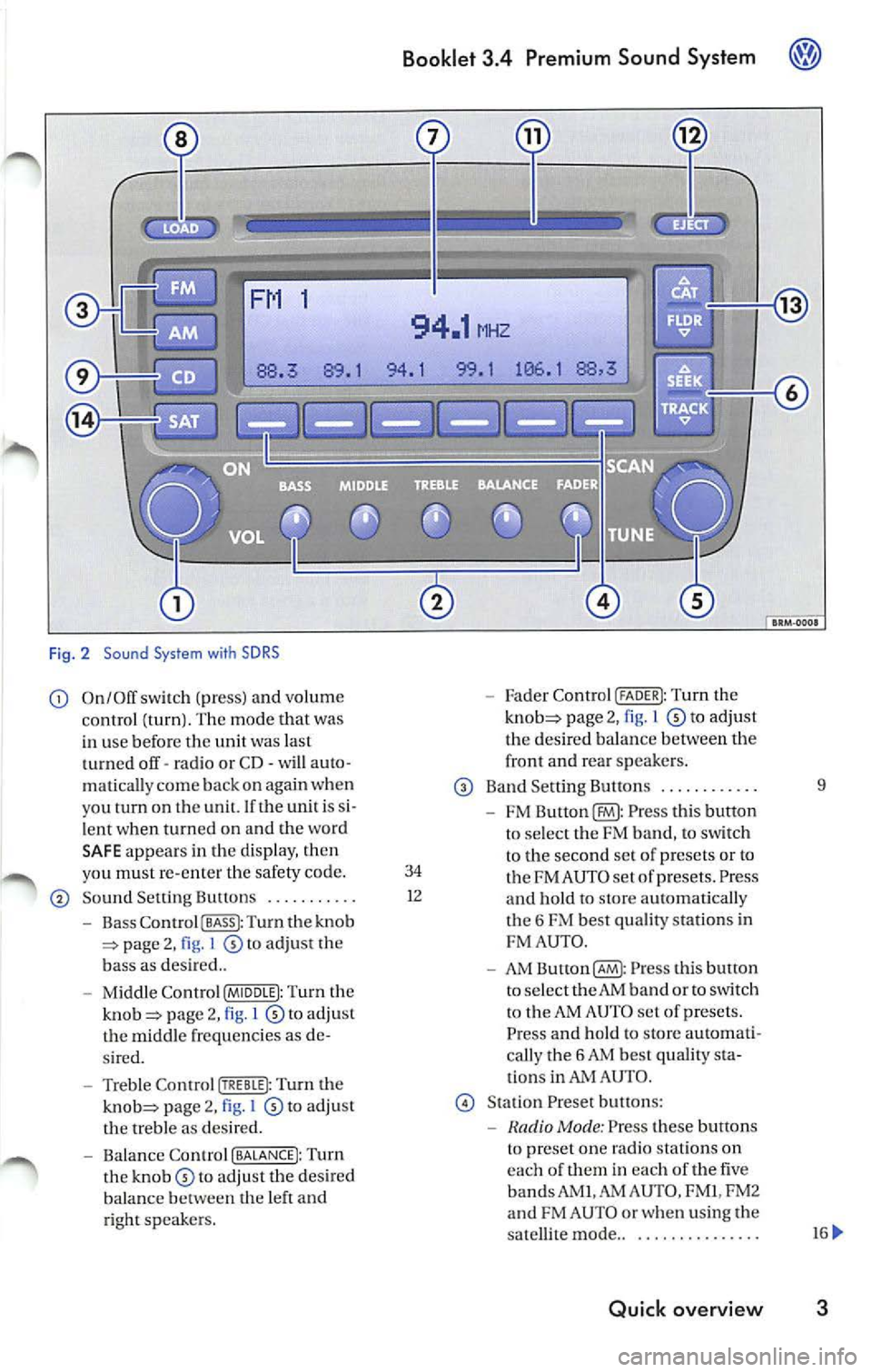
Fig . 2 Sound System with SDRS
On/Off switch (pr ess) and volume Fader Control (FADER I: Tu rn the
c ontrol (turn ). The mode that was page 2, 1 to adjust
in use befor e the unit was last th
e des ired balan ce betwee n the
t urned off· ra dio or CD· will auto · front and
rear sp eake rs .
matica lly c om e back on aga in when
Band Sett ing Button s .... ..... ... 9
you tu rn on th e un it. If th e unit i s
FM Press thi s butto n
l e nt when turn ed on and the wo rd
to se lec t the FM band, to sw itch
SA FE appear s in the d is pla y, th en
to the second set of p rese ts or to
yo u must re-en ter the safety code. 34 FM AU TO set of prese ts . Press So und Setting Bultons ........... 1
2
and hold to sLOre automati cal ly
Bass Co ntro l I BASS I: Turn the knob t
h e 6 FM best quality station s in page 2, I to adjust the FM
AUT O.
b ass as des ired ..
AM Button(§ : Pr ess this bulton
Mi ddle Contr ol (MIDDLE I: Turn the to
select the AM band or to switch page 2, l to adju st t
o the AM AUTO set of presets.
t h e m id dle frequ enci es as Press and hold to store automati-
s ir ed . call
y the 6 AM bes t quality
Treble Control Turn the ti
ons in AUTO .
page 2, I to adj ust Stat ion Preset butt ons:
th e treble as des ired.
Mode : Press these buttons
Balance Contro l (BALANCE!: Turn t
o pre set on e radio statio ns on
th e to adjust the desired eac
h of th em in eac h of the five
balance th e left and bands AM
I.AM AUTO , FM I, FM2
ri ght sp eake rs. and
FM AUTO or whe n using the
sa tellit e mode ..
............. ..
Quick overview 3
Page 439 of 477
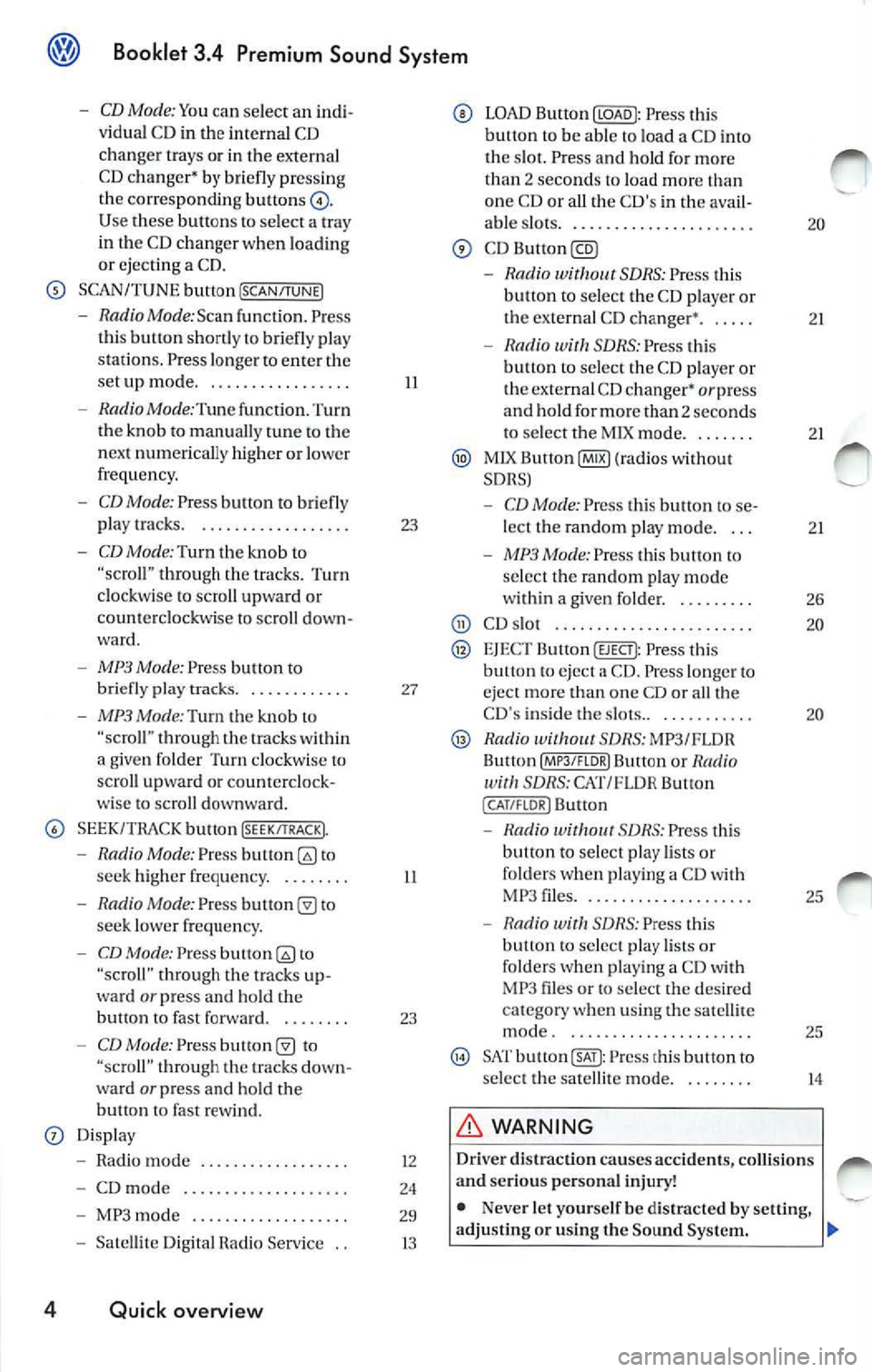
Booklet 3.4 Premium Sound System
-CD Mode: Yo u can select an indi
v idu al C D in the internal CD
chan ger trays or in the externa l
CD c hang er•
briefl y pre ssing
the corre spondin g button s
Use buttons to select a tray
in th e C D chan ger when loading
or ejecting a CD.
SCAN/TUNE button [SCAN/TUNEJ
- RadioMode:Scan func tion. Press
th is button shortly to briefly pla y
st ations . Pre ss longe r to ent er the
se tup mode ...... ... ... ..... .
- Radio Mode :Tune function. Turn
the knob to manually tune to the
n ex t numerically higher or lowe r
frequency.
- CD Mode: Press button to briefly
play tracks. . .... ...... ...... .
-CD Mode: Turn th e kno b to through the trac ks. Turn
clockwise to scro ll upward or
coun te rclockwise to sc roll down
ward .
-MP3 Mode: Press button to
briefly pla y tra cks. . .......... .
- MP3 Mode:Turn the knob "scro ll" thro ugh the within
a give n folder Turn clockw ise lo
scro ll upwa rd or counterclock
wise to scroll downward.
SEEK/TRACK bu tton !SEEK/TRACK).
-Radio Mode: Press to
seek high er freque ncy. . ...... .
- Radio Mode: Pres s to
seek lower frequ en cy.
- CD Mode: Press to
"scroll" through the tracks up
ward
or press and hold the
bullon fast forward. . ...... .
-CD Mode: Press "scroll" t hrough tracks down
wa rd or press and ho ld the
button fast rew ind.
Displ ay
- Radio mode ..... ..... ..... .. .
- CD mod e .. ....... .......... .
- MP3 mode .......... ........ .
- Satelli te Di git al Radio Service ..
4 Quick overview
II
23
27
II
23
12
24
29
13
LOAD Button Press this
button to be able load a CD i nto
tl1 e s lot. Press a nd hold fo r mo re
th an
2 sec ond s to load more one CD or all the C D's in th e ava il-
able s lots .. ......... ....... .... .
-Rad io SDRS : Press t his
button to select the CD playe r or
the externa l CD changer •. . ....
- Radio SDRS : Press this
b utt on to selec t th e CD playe r o r
the external CD changer•
or press
and hold for more than 2 seconds
to select tl1e M IX mode ...... . .
MlX Button@IB) (ra dios wi thout
SDRS)
- CD Mode: Pres s thi s butt on to se
lect the random p lay mode. . ..
- MP3 Mode: Press this button to
se lec t the random play mode
w ith in a given folder. . ...... . .
CD s lot .... ............... ... ..
EJEC T Button (EJECT): Press this eject a CD . Press lo nger eject more than one CD or all th e
CD 's inside the slots.. . .. ....... .
Radio SDRS: MP3/FLOR
Bu llon Butt on or Radio SDRS: CAT/FL OR Button
( CAT /FLOR I Button
-S DRS : Press thi s
button to select play lists or
folde rs w hen p lay ing a CD wit h
MP 3 files .... ..... ........... .
- Radio with SDRS: Press this
button to select play lists o r
fo lders w hen pl aying a CD with
MP3 files or to select the de sir ed
c at egory when using the satell ite
mode . ... ... ..... .......... .
SAT Press this button to
s elect the satellit e mode.
WARNING
20
21
2 1
2 1
26
20
20
25
25
14
Driv er di straction causes accidents , collision s
a nd serious personal injury!
• Nev er let yourse lf be distra cted by setting,
adjusting or using the Sound System .