fuel VOLKSWAGEN TRANSPORTER 2015 Owner´s Manual
[x] Cancel search | Manufacturer: VOLKSWAGEN, Model Year: 2015, Model line: TRANSPORTER, Model: VOLKSWAGEN TRANSPORTER 2015Pages: 486, PDF Size: 72.17 MB
Page 70 of 486

• The seat cushion is damp or wet.
• The interior or exterior temperature is above 2s•c (7rF).
Function
Switching on
Adjusting the heating output
Switching off
Action 49
Press the 0 or (9 button. The seat heating is switched on at the highest setting. All indicator lamps light up.
Press the 0 or (9 button repeat-edly until the required heat level is set.
Press the button 0 or (9 until the indicator lamps in the button go out 49.
A WARNING
Anyone experiencing reduced sensitivity to pain or temperature due to medication, para-lysis or chronic illness (e.g. diabetes) could sustain burns on the back, buttocks and legs when using the seat heating. These burns may take a long time to heal or may never heal fully. Please consult a doctor to deter-mine your own level of health.
Memory seats
Fig. 50 Memory buttons on the outside of the driv-er seat.
r"''l1 First read and observe the introductory L-JcJ.I information and safety warnings & on page 69.
The memory buttons can be used to store and re-call settings for the driver seat.
Before the JOurney
A WARNING (Continued)
• Anyone experiencing reduced sensitivity to pain or temperature should never use the seat heating.
A wARNING
Wet upholstery can cause a fault In the seat heating and Increase the risk of burns.
• Ensure that the seat cushion is dry before the seat heating is used.
• Do not sit on the seat when wearing damp or wet clothing.
• Do not set any damp or wet objects or items of clothing on the seat.
• Do not spill any liquids on the seat.
Q)
• To avoid damaging the heating elements, do not kneel on the seat or apply sharp pressure at a single point on the seat cushion and back-rest.
• Liquids, sharp objects and Insulating mate-rials (such as a protective cover or child seat) on the seat could damage the seat heating.
• If the system starts to emit a smell, switch the seat heating off Immediately and have lt checked by a qualified workshop.
r:O:-, The seat heating should be switched off as C!JtJ soon as it is no longer needed. Fuel is other-wise wasted.
Individual settings for the driver seat can be as-signed to each of the three memory buttons.
Storing the driver seat settings
• Apply the handbrake firmly.
• Put the gearbox into neutral.
• Adjust the driver seat.
• Press the @] button for longer than one second 50.
• Within approximately 10 seconds press the memory button you wish to use. A gong signal will sound to confirm that the settings have been saved. .,..
Page 107 of 486
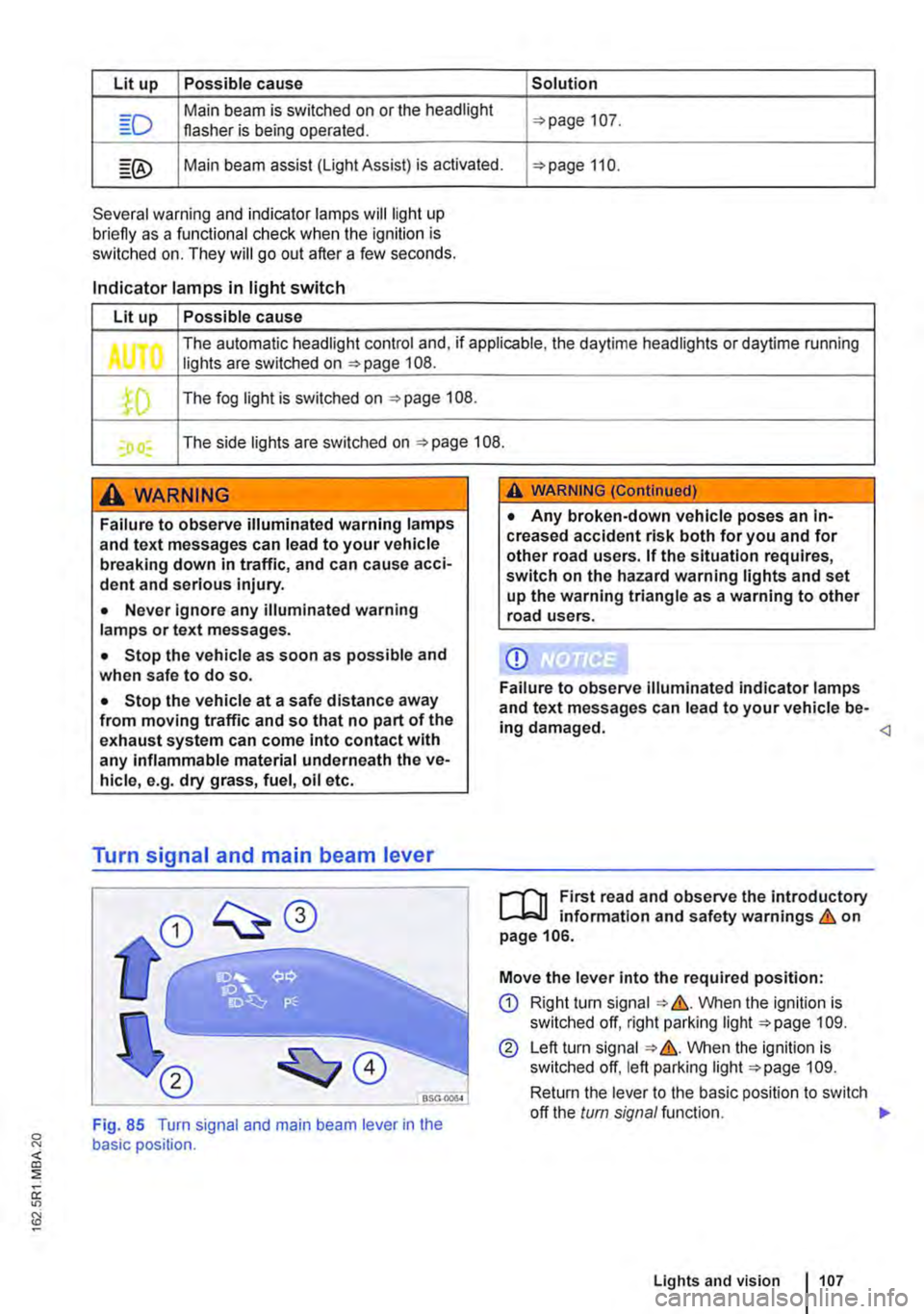
Lit up Possible cause Solution
Main beam is switched on or the headlight 107. flasher is being operated.
Main beam assist (light Assist) is activated. 110.
Several warning and indicator lamps will light up briefly as a funclional check when the ignition is switched on. They will go out after a few seconds.
Indicator lamps in light switch
Lit up Possible cause
The automatic headlight control and, if applicable, the daytime headlights or daytime running Jl lights are switched on 108 .
.fD The fog light is switched on 108.
I) I The side lights are switched on 108.
A WARNING
Failure to observe illuminated warning lamps and text messages can lead to your vehicle breaking down in traffic, and can cause acci-dent and serious injury.
• Never Ignore any illuminated warning lamps or text messages.
• Stop the vehicle as soon as possible and when safe to do so.
• Stop the vehicle at a safe distance away from moving traffic and so that no part of the exhaust system can come into contact with any inflammable material underneath the ve-hicle, e.g. dry grass, fuel, oil etc.
Turn signal and main beam lever
A WARNING (Continued)
• Any broken-down vehicle poses an In-creased accident risk both for you and for other road users. If the situation requires, switch on the hazard warning lights and set up the warning triangle as a warning to other road users.
CD
Failure to observe illuminated indicator lamps and text messages can lead to your vehicle be-ing damaged.
...--r'l1 First read and observe the introductory l.-Jo:JJ information and safety warnings & on page 106.
Move the lever into the required position:
CD Right tu m signal &. VVhen the ignition is switched off, right parking light 109.
@ Left turn signal &. VVhen the ignition is switched off, left parking light 109.
Return the lever to the basic position to switch
<]
Fig. 85 Turn signal and main beam lever in the basic position.
off the turn signal function. 1>
Lights and vision 1107
Page 124 of 486
• Do not fold electrically folding exterior mir-rors In or out manually as this can damage the electric motor.
r:lil:-. The exteriormirror heating should be switch-W ed off when 11 IS no longer needed. Fuel is otherwise wasted.
1241 Before the JOurney
m In the event of a fault, the electric exterior W mirrors can be adjusted by hand by pressing on the outer edge of the mirror.
m The vehicle aerials are located in the exterior W mirrors. If any metallic chrome plates, such as chrome mirror caps, are retrofitted to the exteri-or mirrors, you may experience problems with the radio, mobile telephone and navigation services or they may lose the ability to send and receive sig-nals completely.
Page 138 of 486
Additional information and warnings:
• Lights 106
• Transporting 125
• Driving with respect for the environment 278
• Wheels and tyres 367
• Accessories, modifications, repairs and renewal of parts 394
A wARNING
When transporting heavy or bulky objects in the roof carrier, the vehicle's handling will change due to a shift in the centre of gravity and an increased susceptibility to cross-winds.
• Always secure loads properly using suita-ble and undamaged securing straps.
• Cargo that is large, heavy, bulky, long or flat will have a negative effect on the vehicle aerodynamics, centre of gravity and overall handling.
Attaching the mounts and roof carrier
r-Y'n First read and observe the introductory L-J,:.JJ information and safety warnings &. on page 137.
Your vehicle has special roof rails on the right and left for fitting the mounts. Therefore, standard roof carriers cannot be used. Volkswagen Commercial Vehicles recommends using only mounts and roof carriers that have been approved by Volkswagen Commercial Vehicles.
The mounts are the basis of a complete roof carrier system. Special fixtures must then be added to transport luggage, bicycles, skis, surfboards or boats safely on the roof. All components of this system are available at a Volkswagen Commercial Vehicles dealership.
The roof carrier system must always be installed exactly according to instructions and should be kept with the vehicle wallet.
138 I Before the journey
A WARNING (Continued)
• Avoid abrupt and sudden driving and braking manoeuvres.
• Always adapt your speed and driving style to suit visibility, weather, road and traffic con-ditions.
CD
• Always remove the roof carrier before driv-ing through an automatic car wash.
• The height of the vehicle is changed by the installation of a carrier system and the load se-cured to it. Check and compare the height of the vehicle with clearance heights, e.g. for un-derpasses and garage doors.
• The roof carrier system and its load must not obstruct you from opening and closing the sliding/tilting roof and tallgate. The roof aerial must also remain unaffected.
• When opening the tallgate, take care not to let it hit the roof load.
Driving with a fitted roof carrier will increase W air resistance and thus increase fuel con-sumption.
Incorrectly attaching the mounts and roof carrier, and using them Inappropriately, can cause the whole system to fail off the roof. This can cause accidents and injuries.
• Always observe the manufacturer's in-structions.
• Only use mounts and roof carriers when they are undamaged and fitted correctly.
• Fit mounts and roof carriers correctly.
• Check the bolts and anchorage points be-fore starting your journey and adjust as nec-essary after driving a short distance. During a long trip, check ail bolts and fasteners at each stop.
• Special fixtures for items such as bicy-cles, skis, surfboards, etc. should always be properly Installed.
• Do not carry out any alterations or repairs to the mounts and roof carrier.
W Read and observe the instructions provided L!J for the fitted roof carrier system and carry them in the vehicle at all times.
Page 139 of 486
Loading the roof carrier
ill1 First read and observe the introductory L-l.:.l.l information and safety warnings & on page 137.
Loads can only be attached securely when the roof carrier system is fitted correctly &.
Maximum permissible roof load
The maximum permissible roof load for vehicles with a normal roof is 150 kg and for vehicles with a pop-up roof it is 50 kg. The roof load limit refers to the combined weight of the roof carrier and the load carried on the roof &.
Each mount can bear a maximum load of 50 kg if the weight of the load is evenly distributed over the entire length of the mount.
Ensure that you know the weight of the roof rack and the items to be transported on the roof, and weigh them if necessary. Never exceed the maxi-mum permissible roof load.
However, you will not be able to carry the maxi-mum roof load if you are using a roof carrier with a lower weight rating. In this instance, do not exceed the maximum weight limit for the roof carrier. This weight limit is listed in the fitting instructions.
Distributing the load
Distribute the load evenly and secure it correctly
Checking the fittings
After the mounts and roof carrier have been at-tached, check the bolted connections and fasten-ings once you have travelled a short distance and then at regular intervals.
Towing a trailer
o:n Introduction
This chapter contains information on the following subjects:
Technical requirements . . . . . . . . . . 141 Fitting the removable ball coupling 142
Removing the ball coupling . . . . . . . . . 144
Hitching and connecting the trailer . . . 144 Loading the trailer . . . . . . . . . .. . . 146 Towing a trailer . . . . . . . . . . . . . . . . . . . . . . . . 146
Trailer stabilisation . . . . . . . . . . . . . . . . . . . . . . 147
Retrofitting a towing bracket............... 149
A WARNING
Accidents and vehicle damage can occur if the maximum permitted roof load is excee-ded.
• Never exceed the quoted roof load, the maximum permissible axle loads, and the permissible gross vehicle weight for the vehi-cle.
• Do not exceed the weight rating of the roof carrier, even if the maximum roof load has not been reached.
• Secure heavy objects as far forwards as possible and distribute the load evenly.
A WARNING
Loose and Incorrectly secured loads can fall off the roof carrier and cause accidents and injuries.
• Always use suitable and undamaged se-curing straps.
• Secure loads properly.
The additional load will affect the durability, fuel consumption and performance of the vehicle and, in certain circumstances, could shorten the service intervals.
Driving with a trailer not only places an extra load on the vehicle, but also requires increased concen-tration on the part of the driver.
Transporting items 139
Page 184 of 486
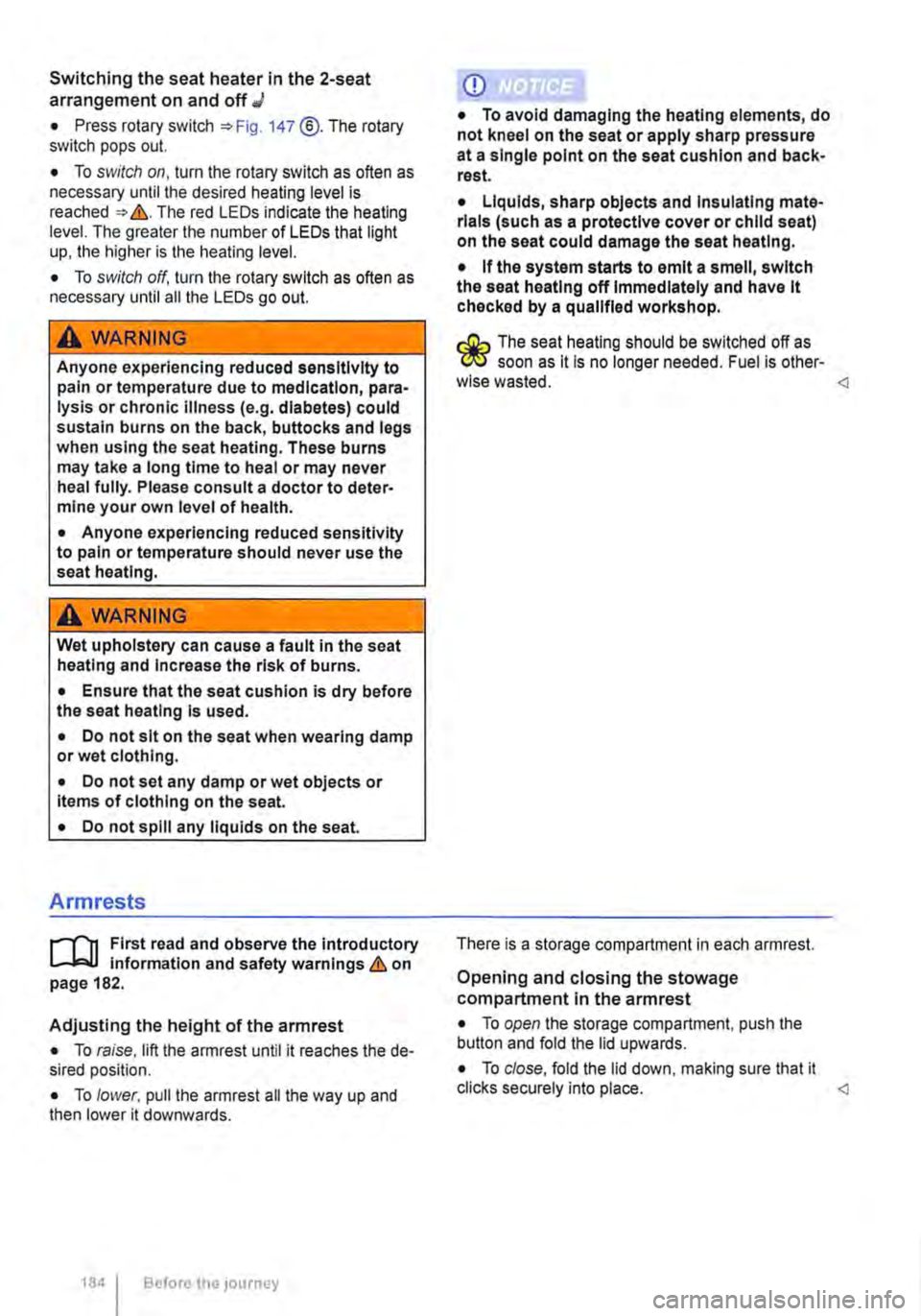
Switching the seat heater in the 2-seat arrangement on and off J
• Press rotary switch 147 @.The rotary switch pops out.
• To switch on, turn the rotary switch as often as necessary until the desired heating level is reached &. The red LEDs indicate the heating level. The greater the number of LEDs that light up, the higher is the heating level.
• To switch off, turn the rotary switch as often as necessary until all the LEDs go out.
A wARNING
Anyone experiencing reduced sensitivity to pain or temperature due to medication, para-lysis or chronic Illness (e.g. diabetes) could sustain burns on the back, buttocks and legs when using the seat heating. These burns may take a long time to heal or may never heal fully. Please consult a doctor to deter-mine your own level of health.
• Anyone experiencing reduced sensitivity to pain or temperature should never use the seat heating.
A WARNING
Wet upholstery can cause a fault in the seat heating and Increase the risk of burns.
• Ensure that the seat cushion is dry before the seat heating Is used.
• Do not sit on the seat when wearing damp or wet clothing.
• Do not set any damp or wet objects or Items of clothing on the seat.
• Do not spill any liquids on the seat.
Armrests
r--f"'n First read and observe the introductory L-J.:.l.l information and safety warnings & on page 182.
Adjusting the height of the armrest
• To raise, lift the armrest until it reaches the de-sired position.
• To lower. pull the armrest all the way up and then lower it downwards.
184 I Before tho journey
CD
• To avoid damaging the heating elements, do not kneel on the seat or apply sharp pressure at a single point on the seat cushion and back-rest.
• Liquids, sharp objects and Insulating mate-rials (such as a protective cover or child seat) on the seat could damage the seat heating.
• If the system starts to emit a smell, switch the seat heating off Immediately and have it checked by a qualified workshop.
r:Q:.. The seat heating should be switched off as 'r!1S soon as lt is no longer needed. Fuel is other-wise wasted. <1
There is a storage compartment in each armrest.
Opening and closing the stowage compartment in the armrest
• To open the storage compartment, push the button and fold the lid upwards.
• To close, fold the lid down, making sure that it clicks securely into place. <1
Page 206 of 486
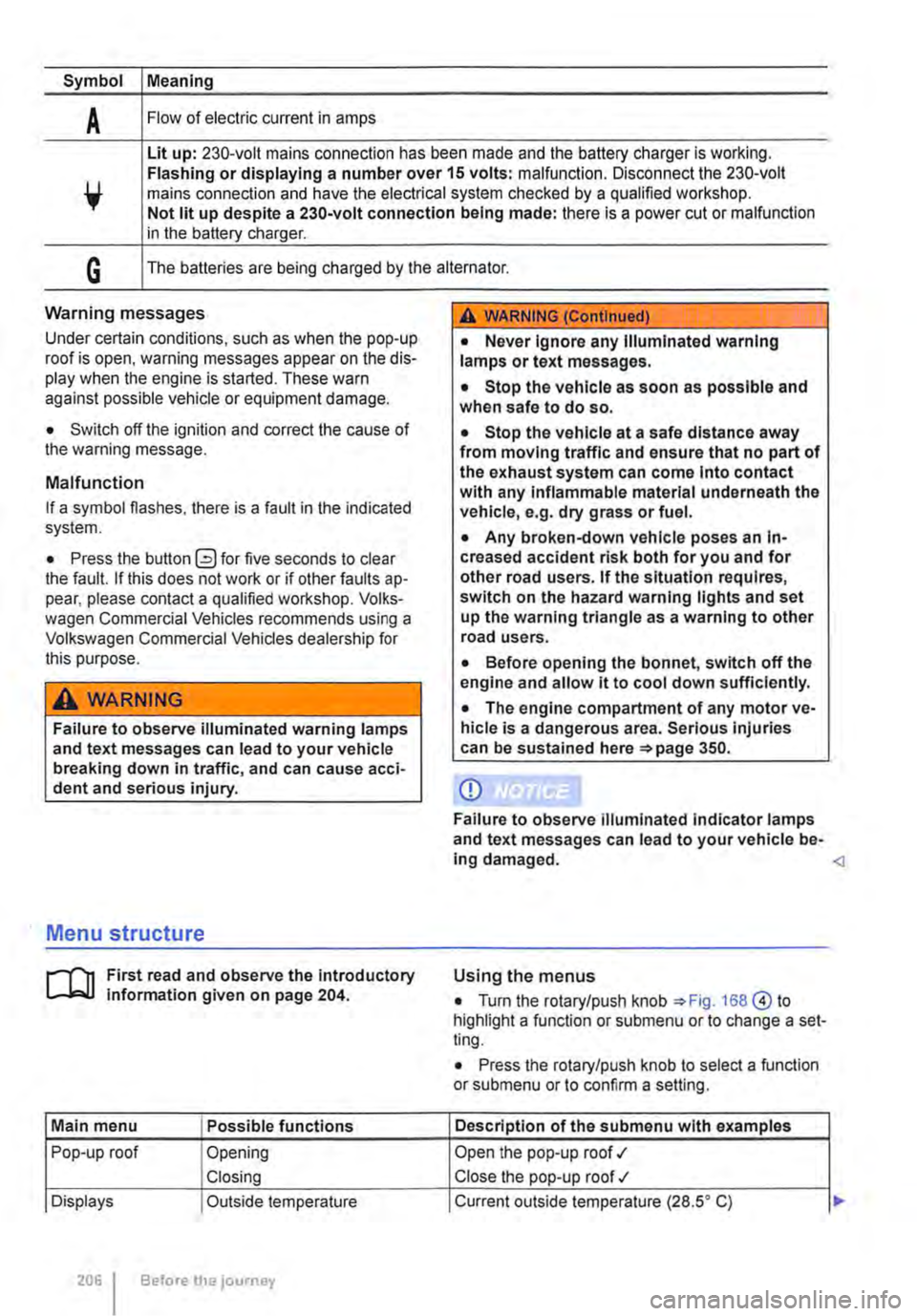
Symbol Meaning
A Flow of electric current in amps
Lit up: 230-volt mains connection has been made and the battery charger is working. Flashing or displaying a number over 15 volts: malfunction. Disconnect the 230-volt mains connection and have the electrical system checked by a qualified workshop. Not lit up despite a 230-volt connection being made: there is a power cut or malfunction in the battery charger.
G The batteries are being charged by the alternator.
Warning messages
Under certain conditions, such as when the pop-up roof is open, warning messages appear on the dis-play when the engine is started. These warn against possible vehicle or equipment damage.
• Switch off the ignition and correct the cause of the warning message.
Malfunction
If a symbol flashes, there is a fault in the indicated system.
• Press the button G?) for five seconds to clear the fault. If this does not work or if other faults ap-pear, please contact a qualified workshop. Volks-wagen Commercial Vehicles recommends using a Volkswagen Commercial Vehicles dealership for this purpose.
A WARNING
Failure to observe illuminated warning lamps and text messages can lead to your vehicle breaking down in traffic, and can cause acci-dent and serious injury.
A WARNING (Continued)
• Never Ignore any Illuminated warning lamps or text messages.
• Stop the vehicle as soon as possible and when safe to do so.
• Stop the vehicle at a safe distance away from moving traffic and ensure that no part of the exhaust system can come Into contact with any Inflammable material underneath the vehicle, e.g. dry grass or fuel.
• Any broken-down vehicle poses an In-creased accident risk both for you and for other road users. If the situation requires, switch on the hazard warning lights and set up the warning triangle as a warning to other road users.
• Before opening the bonnet, switch off the engine and allow it to cool down sufficiently.
• The engine compartment of any motor ve-hicle is a dangerous area. Serious injuries can be sustained here 350.
CD
Failure to observe illuminated indicator lamps and text messages can lead to your vehicle be-ing damaged.
J'"'""'('n First read and observe the introductory L-J,:.IJ information given on page 204.
Main menu Possible functions
Pop-up roof Opening
Closing
Displays Outside temperature
206 Before the journey
Using the menus
• Turn the rotary/push knob 168@ to highlight a function or submenu or to change a set-ting.
• Press the rotary/push knob to select a function or submenu or to confirm a setting.
Description of the submenu with examples
Open the pop-up roof .,1
Close the pop-up roof .,t
Current outside temperature (28.SO C) ...
Page 237 of 486
• Keep the knob pressed in for approx. 15 sec-onds to temporarily bridge the igniter safety device. If you let go of the knob too quickly, the gas flame goes out. If this occurs, re-light the burner as de-scribed above.
• Release the regulating knob and adjust the gas flame as required.
Turning off the gas flame
• Turn the appropriate knob@ fully clockwise to turn off the gas flame.
• Close the gas shut-off valve in the kitchen unit.
• Close the safety valve on the gas bottle.
• Remove all objects from the gas cooker and al-low the cooker to cool fully.
• Place the backrest of the left front seat in an upright position or turn the left front seat so that you can close the kitchen unit's cover plate.
• Lower the kitchen unit cover plate and latch it securely. <1
Water supply and disposal, California
n::n Introduction
This chapter contains information on the following subjects:
Fresh water system . . . . . . . . . . . . . . . . . . . . . . 238
Sterilising agent . . . . . . . . . . . . . . . . • . . . . . . . . 239
Cleaning the fresh water tank . . . . . . . . . . . . . 239 Waste water tank . . . . . . . . . . . . . . . . . . . . . . . . 240
Turning the water on and off . . . . . . . . . . . . . . 240
Cleaning the drain . . . . . . . . . . . . . . . . . . . . . . . 241
Additional information:
• Central control panel 204
• Rectifying faults on the camping equipment 254
• Fuses for the camping equipment 249
• Winter conditions 253
• Filling the tank 340
A WARNING
Improper use of the fresh water system can lead to poisoning and illness.
• The fresh water tank should only be filled with drinking water from the public water supply.
• Never fill the fresh water tank from springs or streams. Such water could be con-taminated or contain debris.
• Never use commercially available house-hold cleaners to clean the fresh water tank.
• Never leave water in the fresh water tank for long periods without replacing it with fresh water.
,A WARNING (Continued)
• Drain the fresh water system completely when it will not be used for a long time.
A WARNING
Both the fresh water tank and the waste water tank drain out underneath the vehicle. In very cold conditions this poses a danger from the formation of ice.
• Be especially careful when fresh or waste water are drained during freezing or very cold weather.
CD
In very cold weather the fresh and waste water systems should be emptied to prevent them from becoming damaged if the vehicle is not to be kept heated continuously or Is only to be used for short periods.
CD
Do not allow the water pump to run dry as this will damage the pump.
• Only switch on the water pump when there Is water in the fresh water tank.
m if you do not use the sink for a long period' it L.:!J should be kept dry and free of salt.
m Never confuse the fresh water tank filler neck L.:!J with the fuel tank filler neck. <1
Equipment, California 237
Page 251 of 486
Supplementary heater, California
o:JJ Introduction
This chapter contains information on the following subjects:
Programming the supplementary heater. . . . . 251
The supplementary heating system is supplied with fuel from the vehicle fuel tank and can be used when the vehicle is in motion or stationary.
Additional information:
• Central control panel 204
• Supplementary heaters 322
• Rectifying faults on the camping equipment 254
A WARNING
The fumes from the supplementary heating system contain carbon monoxide, which is an odourless and colourless poisonous gas. Carbon monoxide can cause people to lose consciousness. lt can also cause death.
A WARNING (Continued)
• Never start or run the supplementary heat-ing system in unventilated or closed rooms.
• Never programme the auxiliary heater so that it is switched on and run in unventilated or enclosed spaces.
A WARNING
Parts of the exhaust system of the supple-mentary heating system become very hot. This can cause fires.
• Park the vehicle so that no part of the ex-haust system can come into contact with any inflammable material underneath the vehicle, e.g. dry grass.
CD
Do not place any food, medicine or any other heat-sensitive items In front of the vents. Heat-sensitive food, medicine and other items could be either damaged or rendered useless.
,.....-('n First read and observe the introductory L-bl.l information and safety warnings & on page 251.
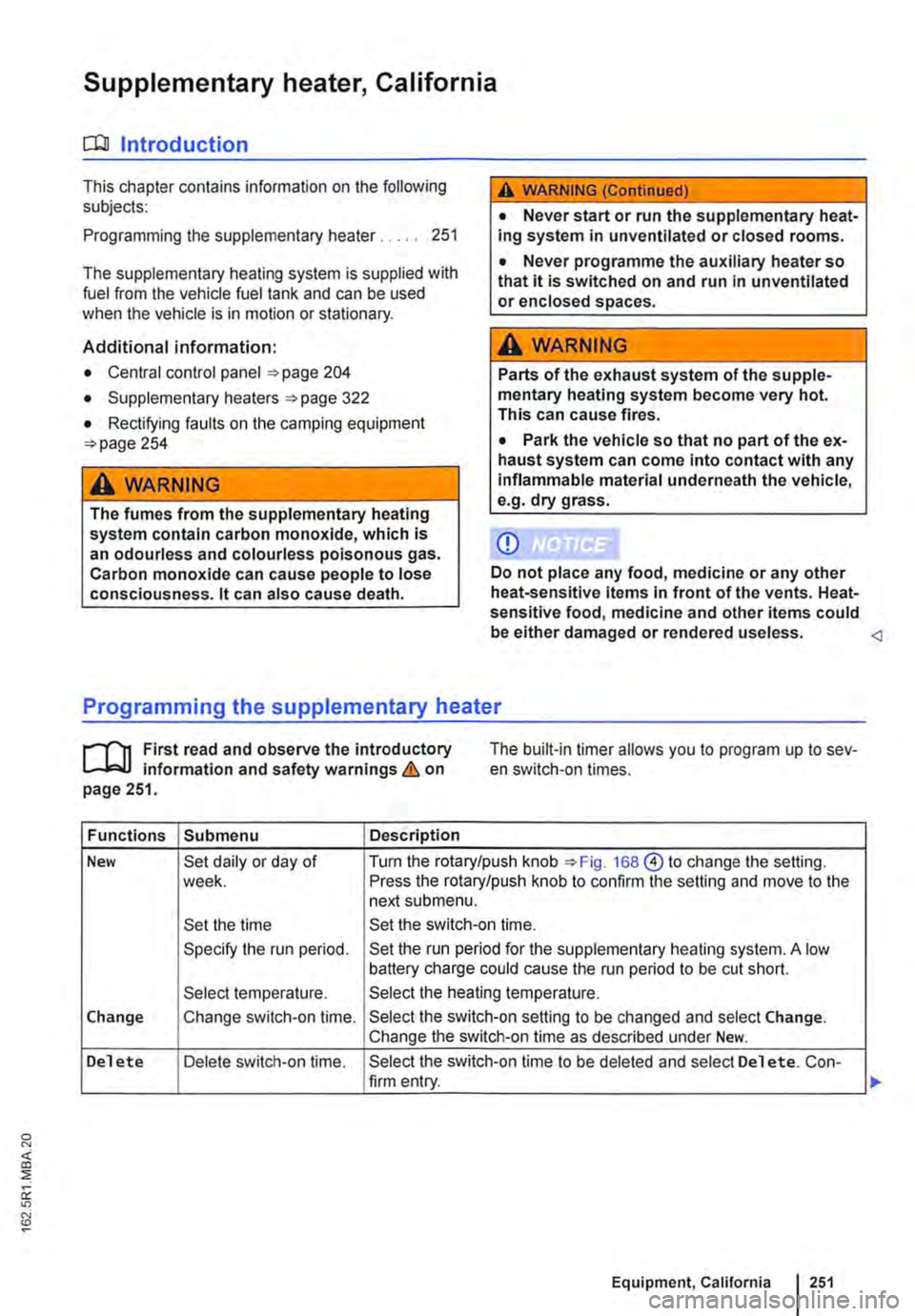
The built-in timer allows you to program up to sev-en switch-on times.
Functions Submenu Description
New Set daily or day of Turn the rotary/push knob 168@ to change the setting. week. Press the rotary/push knob to confirm the setting and move to the next submenu.
Set the time Set the switch-on time.
Specify the run period. Set the run period for the supplementary heating system. A low battery charge could cause the run period to be cut short.
Select temperature. Select the heating temperature.
Change Change switch-on time. Select the switch-on setting to be changed and select Change. Change the switch-on time as described under New.
Delete Delete switch-on time. Select the switch-on time to be deleted and select Delete. Con-firm entry.
Equipment, California I 251
Page 254 of 486
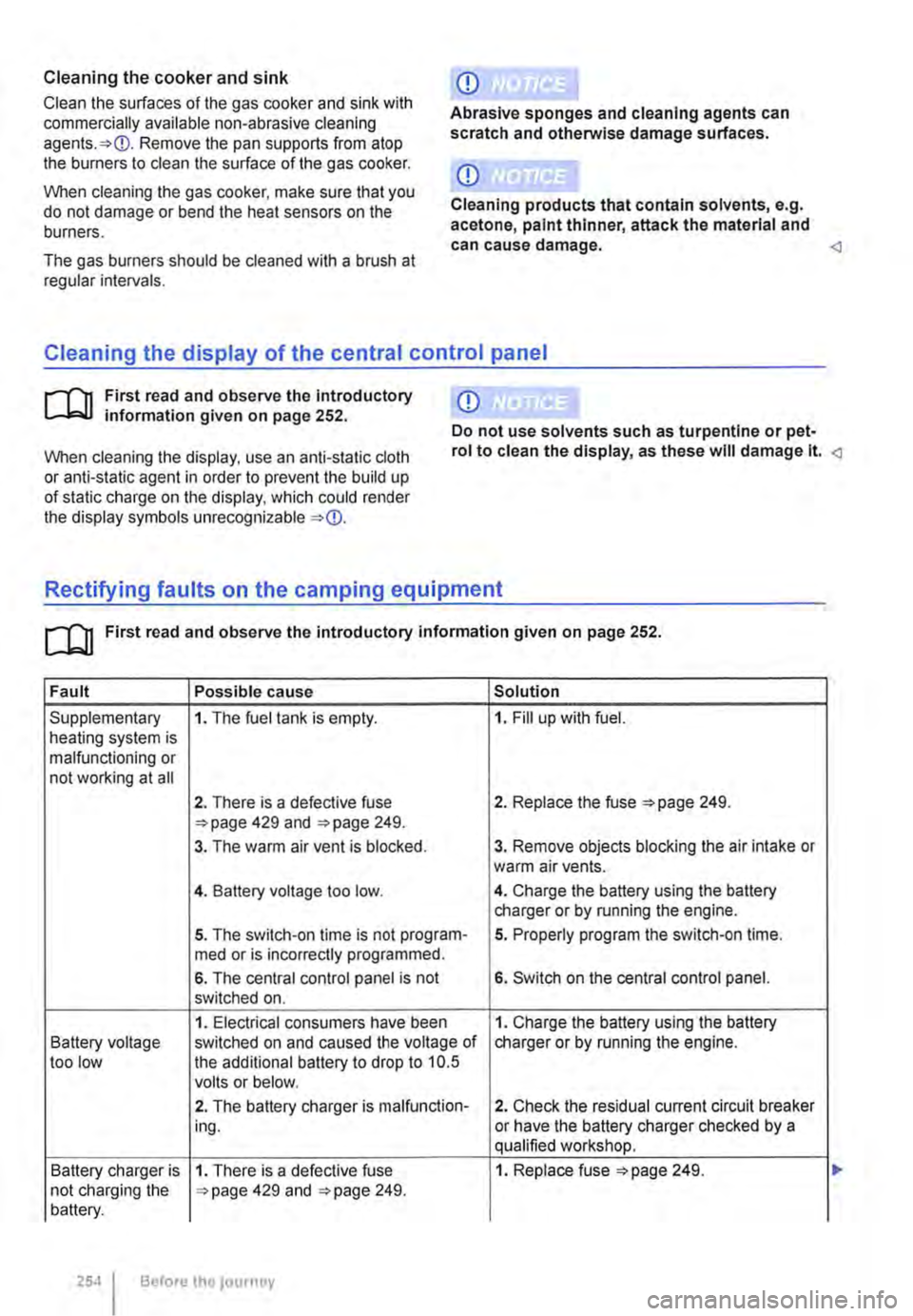
Cleaning the cooker and sink
Clean the surfaces of the gas cooker and sink with commercially available non-abrasive cleaning Remove the pan supports from atop the burners to clean the surface of the gas cooker.
When cleaning the gas cooker, make sure that you do not damage or bend the heat sensors on the burners.
The gas burners should be cleaned with a brush at regular intervals.
CD
Abrasive sponges and cleaning agents can scratch and otherwise damage surfaces.
CD
Cleaning products that contain solvents, e.g. acetone, paint thinner, attack the material and can cause damage. <1
Cleaning the display of the central control panel
CD r-l'n First read and observe the Introductory L-l.::JJ information given on page 252. Do not use solvents such as turpentine or pet-
When cleaning the display, use an anti-static cloth or anti-static agent in order to prevent the build up of static charge on the display, which could render the display symbols unrecognizable
rol to clean the display, as these will damage lt.
[]J First read and observe the introductory information given on page 252.
Fault Possible cause Solution
Supplementary 1. The fuel tank is empty. 1. Fill up with fuel. heating system is malfunctioning or not working at all
2. There is a defective fuse 2. Replace the fuse 249. 429 and 249.
3. The warm air vent is blocked. 3. Remove objects blocking the air intake or warm air vents.
4. Battery voltage too low. 4. Charge the battery using the battery charger or by running the engine.
5. The switch-on time is not program-5. Properly program the switch-on time. med or is incorrectly programmed.
6. The central control panel is not 6. Switch on the central control panel. switched on.
1. Electrical consumers have been 1. Charge the battery using the battery Battery voltage switched on and caused the voltage of charger or by running the engine. too low the additional battery to drop to 10.5 volts or below.
2. The battery charger is malfunction-2. Check the residual current circuit breaker ing. or have the battery charger checked by a qualified workshop.
Battery charger is 1. There is a defective fuse 1. Replace fuse =>page 249. not charging the 429 and 249. battery.
254 Before the journey