window VOLKSWAGEN TRANSPORTER 2018 User Guide
[x] Cancel search | Manufacturer: VOLKSWAGEN, Model Year: 2018, Model line: TRANSPORTER, Model: VOLKSWAGEN TRANSPORTER 2018Pages: 486, PDF Size: 69.28 MB
Page 39 of 486
Replacing the battery
• Fold out the key bit of the remote control key =>page 37.
• Pull up the cover on the rear side of the remote control key =>Fig. 20 in the direction of the arrow =>
• Insert the new battery as shown =>Fig. 21 and push it into the battery compartment against the di-rection of the arrow =>
Synchronising the remote control key
,--m First read and observe the introductory L-.lo:.ll information and safety warnings & on page 36.
The vehicle may no longer be able to be locked or unlocked with the remote control if you press the @ button repeatedly outside of the effective range of the remote control key. If this is the case. the re-mote control key has to be re-synchronised as fol-lows:
Central locking system
CQ Introduction
This chapter contains information on the following subjects:
Description of the central locking system . . . . 40
Locking and unlocking the vehicle from outside . . . . . . . . . . . . . . . . . . . . . . . . . . . . . . . . 40
Locking and unlocking the vehicle from inside
SAFELOCK mechanism ................. .
Anti-theft alarm ........................ .
Interior monitoring system and anti-tow alarm
42
42
43
44
The central locking system will only work correctly when all doors and the tailgate are properly closed. The vehicle cannot be locked with the remote con-trol key if the driver door is open.
CD
• The remote control key can be damaged if the battery is not changed properly.
• Unsuitable batteries can damage the remote control keys. Only replace discharged batteries with a new battery of the same voltage rating, size and specification.
• Ensure that the battery Is fitted the right way round.
r:lib Dispose of discharged batteries in accord-W ance with regulations governing the protec-tion of the environment.
r:lib The battery in the remote control key may W contain perchlorate. Please comply with any legal requirements and regulations when handling and disposing of these batteries.
• Press button @in the remote control key. Re-main standing close to the vehicle.
• Lock the vehicle with the key bit in the driver door lock.
• Switch on the ignition using the remote control key. The synchronisation process is complete.
Additional information and warnings:
• Exterior views =>page 5
• Vehicle key set =>page 36
• Doors => page 45
• Sliding doors =>page 46
• Tailgate =>page 49
• Wing doors =>page 52
• Electric windows =>page 55
• Sliding/tilting roof =>page 58
• Towing a trailer =>page 139
Opening and closing 39
Page 41 of 486
ro First read and observe the Introductory Information and safety warnings & on page 39.
Function Wlth remote control key With mechanical vehicle key
Unlocking the vehicle Press the@ button. Press Insert the vehicle key into the driver door and hold for convenience lock cylinder and turn it to the opening posi-opening. lion. Turn and hold for convenience opening. The tailgate or the wing doors are also opened if the key slot of the tailgate or wing doors is in vertical position. Only the driver door will be unlocked in vehicles without cen-trallocking.
Locking the vehicle Press the @ button. Press Insert the vehicle key into the driver door and hold for convenience lock cylinder and turn it to the closing posi-closing. lion. Turn and hold for convenience closing.
Unlocking the tailgate only Press the Insert the vehicle key into the lock cylinder of In some types of keys, the the tailgate, and turn the key slot anti-clock-button is located on the side wise as far as it will go. of the key.
Locking the tailgate only -Insert the vehicle key into the lock cylinder of the tailgate and turn the key slot clockwise to the horizontal position.
Unlocking the wing doors -Insert the vehicle key into the lock cylinder of only. the wing door, and turn the key slot anti-clockwise as far as it will go.
Unlocking the wing doors -Insert the vehicle key into the lock cylinder of only. the wing door and turn the key slot clockwise to the horizontal position.
Opening the electric sliding Unlocking the vehicle Press -door the@ or§] button.
Note: If the Volkswagen Commercial Vehicles dealer has programmed the single door unlocking function, all the doors and the tailgate will be un-locked only after you press the @ button twice or turn the mechanical vehicle key twice.
the doors or the tailgate within a few seconds auto-matically after unlocking the car. This function pre-vents the vehicle from remaining unlocked if the unlocking button is pressed by mistake.
The remote control key will lock and unlock the ve-hicle only when the battery has enough power and the remote control key is located within a few me-tres of the vehicle. All the turn signals will flash as confirmation when the vehicle is locked.
The vehicle cannot be locked using the remote control key if the driver door is still open. The vehi-cle will be locked again if you do not open one of
Convenience opening and closing
• See electric windows-functions 55.
• See: Sliding/tilting roof-functions =:>page 58.
Page 44 of 486
m Due to the current legislation on the Israel W market, the acoustic warning signals are de-activated there.
m The alarm will be triggered again if a person W gains access to the same or a different se-cured zone after the alarm has been switched off. For example, if the tailgate is opened after a door had been opened.
m The anti-theft alarm will not be activated if W the vehicle is locked from the Inside using the central locking button @.
m If you unlock the driver door mechanically us-L!J ing the vehicle key, only the driver door is un-locked, and not the whole vehicle. The SAFELOCK mechanism on all doors is not deactivated and the central locking button is not activated until you switch on the ignition (however the doors will not be unlocked).
m The anti-theft alarm will not function correctly W if the vehicle battery is weak or discharged.
m lt is not possible to include the trailer in the W anti-theft alarm system.
81f·01U
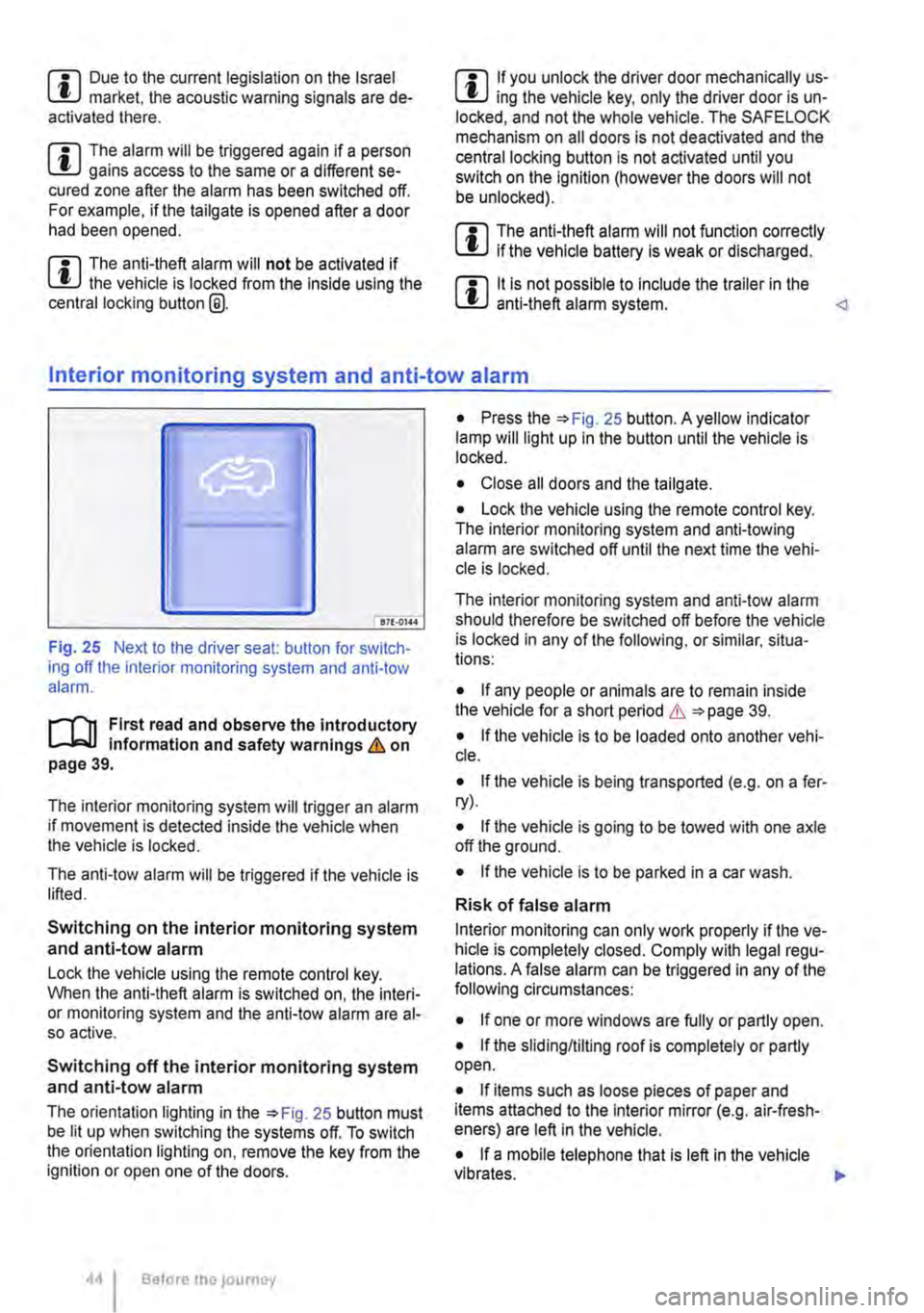
Fig. 25 Next to the driver seat: button for switch-ing off the interior monitoring system and anti-tow alarm.
r-f"n First read and observe the introductory information and safety warnings & on page 39.
The interior monitoring system will trigger an alarm if movement is detected inside the vehicle when the vehicle is locked.
The anti-tow alarm will be triggered if the vehicle is lifted.
Switching on the interior monitoring system and anti-tow alarm
Lock the vehicle using the remote control key. When the anti-theft alarm is switched on, the interi-or monitoring system and the anti-tow alarm are al-so active.
Switching off the interior monitoring system and anti-tow alarm
The orientation lighting in the =>Fig. 25 button must be lit up when switching the systems off. To switch the orientation lighting on, remove the key from the ignition or open one of the doors.
Before the journey
• Press the =>Fig. 25 button. A yellow indicator lamp will light up in the button until the vehicle is locked.
• Close all doors and the tailgate.
• Lock the vehicle using the remote control key. The interior monitoring system and anti-towing alarm are switched off until the next time the vehi-cle is locked.
The interior monitoring system and anti-tow alarm should therefore be switched off before the vehicle is locked in any of the following, or similar, situa-tions:
• If any people or animals are to remain inside the vehicle for a short period & =>page 39.
• If the vehicle is to be loaded onto another vehi-cle.
• If the vehicle is being transported (e.g. on a fer-ry).
• If the vehicle is going to be towed with one axle off the ground.
• If the vehicle is to be parked in a car wash.
Risk of false alarm
Interior monitoring can only work properly if the ve-hicle is completely closed. Comply with legal regu-lations. A false alarm can be triggered in any of the following circumstances:
• If one or more windows are fully or partly open.
• If the slidingflilting roof is completely or partly open.
• If items such as loose pieces of paper and items attached to the Interior mirror (e.g. air-fresh-eners) are left in the vehicle.
• If a mobile telephone that is left in the vehicle vibrates. 11>-
Page 49 of 486
Switching the child lock on and off
• Unlock the vehicle and open the appropriate sliding door.
• Use the vehicle key to bring the slot to the de-sired position.
Slot position =>Fig. 29 or =>Fig. 30:
® Child lock is switched off.
@ Child lock is switched on.
A WARNING
When the child lock is activated, the door cannot be opened from the Inside.
Tailgate
a:n Introduction
This chapter contains information on the following subjects:
Warning lamp . . . . . . . . . . . . . . . . . . . . . . 50
Opening and closing the tallgate from the outside . . . . . . . . . . . . . . . . . . . . . . . . . . . . 50
Unlocking and locking the tailgate from the inside . . . . . . . . . . . . . . . . . . . . . . . . . . . . . . . . . 51
Child proof lock in the tailgate . . . . . . . 52
Additional information and warnings:
• Exterior views 5
• Central locking system 39
• Transporting 125
• Manual opening and closing 413
A WARNING
Incorrect and unsupervised unlocking, open-ing or closing of the tail gate can cause acci-dents and serious injuries.
• Therefore the tailgate should only be opened or closed when you are sure there is no-one in its path.
• Never close the tailgate by pushing it down with your hand on the window. The rear window could shatter and cause Injuries.
• After closing the tailgate, check that it is closed and locked correctly so that it does not open while the vehicle is in motion. The closed tailgate must be flush with the sur-rounding body panels.
A WARNING (Continued)
• Never leave children or people requiring assistance alone In the vehicle when the doors are locked. This may mean that these people lock themselves In the vehicle. They could become trapped In the vehicle in an emergency and may not be able to get them-selves to safety. People locked In the vehicle may be subjected to very high or very low temperatures.
• Temperatures inside a locked vehicle may reach extremes of heat or cold, according to season. This can cause serious injuries and Illness or fatalities, especially to small chil-dren.
• Always keep the tailgate closed while the vehicle Is In motion so that no toxic exhaust fumes can enter the vehicle Interior.
• Never open the tailgate if a load is attach-ed to it, e.g. a rack or luggage carrier. lt may also not possible to open the tailgate if there are objects attached to it, e.g. bicycles. The additional load might cause the open tailgate to close by itself. Support the tail gate as nec-essary or remove the load from the surface.
• Close and lock the tailgate and all vehicle doors when the vehicle Is not In use. Make sure there Is no-one left In the vehicle.
• Never leave children playing unattended In or around the vehicle, especially when the tailgate is open. Children could climb Into the luggage compartment and shut the tailgate, thereby trapping themselves Inside. Tempera-tures Inside a locked vehicle may reach ex-tremes of heat or cold, according to season. This can cause serious Injuries and Illness or fatalities, especially to small children.
• Never leave children or people requiring assistance alone in the vehicle. They could use the vehicle key or central locking button to lock the vehicle and thereby trap them-selves Inside. .,.
Opening and closing
Page 52 of 486
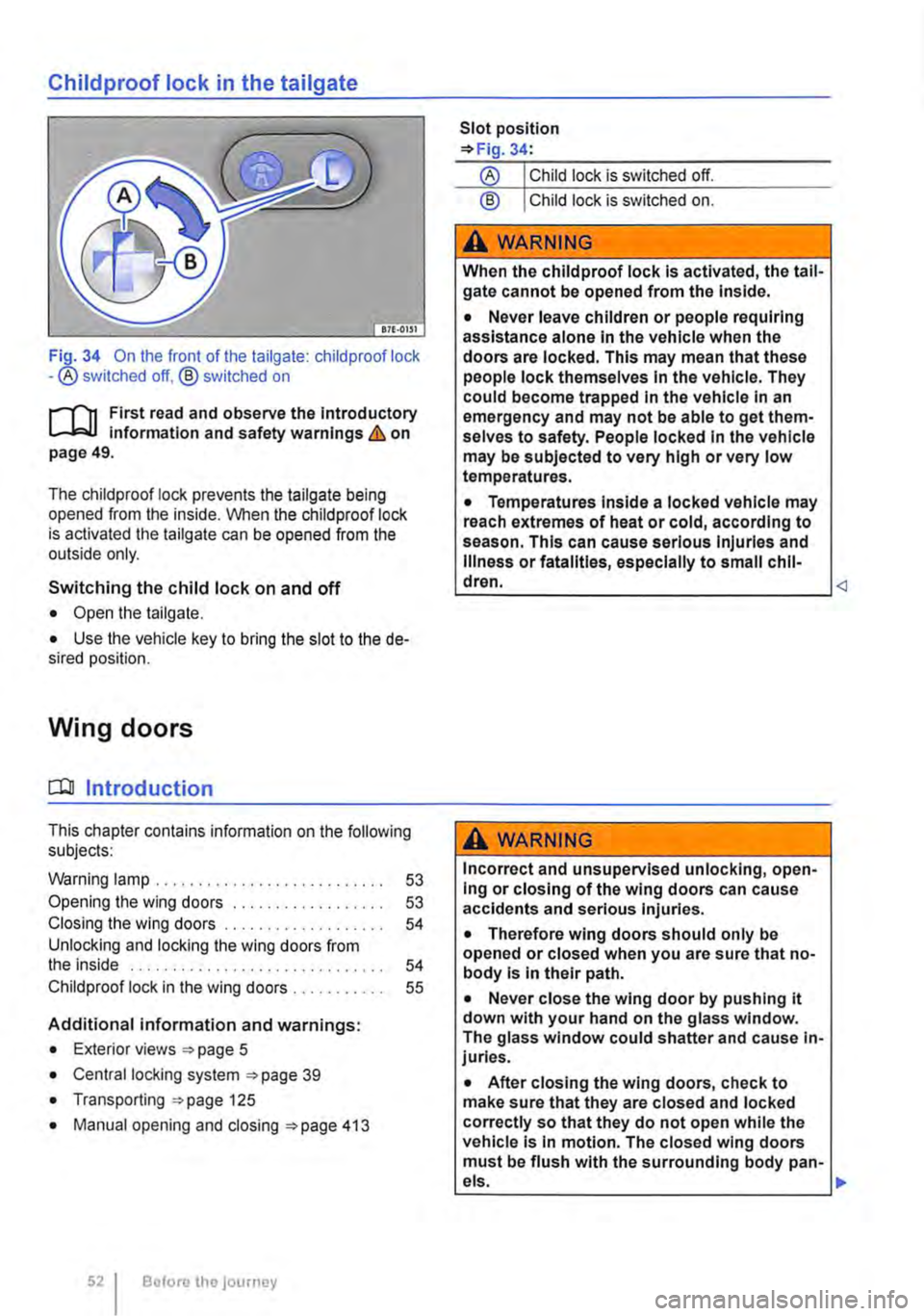
Childproof lock in the tailgate
Fi_Q-34 On the front of the tailgate: child proof lock -®switched off, @ switched on
rJ'n First read and observe the introductory l-J.:.U information and safety warnings & on page 49.
The childproof lock prevents the tailgate being opened from the inside. When the child proof lock is activated the tailgate can be opened from the outside only.
Switching the child lock on and off
• Open the tailgate.
• Use the vehicle key to bring the slot to the de-sired position.
Wing doors
CQJ Introduction
This chapter contains information on the following subjects:
Warning lamp . . . . . . . . . . 53
Opening the wing doors 53 Closing the wing doors 54 Unlocking and locking the wing doors from the inside . . . . . . . . . . . . . . . . . . . . . . . . . . . . . . 54 Child proof lock in the wing doors . 55
Additional information and warnings:
• Exterior views =>page 5
• Central locking system =>page 39
• Transporting =>page 125
• Manual opening and closing =>page 413
52 Before the journey
Slot position =>Fig. 34:
@ Child lock is switched on.
A WARNING
When the childproof lock Is activated, the tail-gate cannot be opened from the Inside.
• Never leave children or people requiring assistance alone In the vehicle when the doors are locked. This may mean that these people lock themselves In the vehicle. They could become trapped In the vehicle In an emergency and may not be able to get them-selves to safety. People locked In the vehicle may be subjected to very high or very low temperatures.
• Temperatures Inside a locked vehicle may reach extremes of heat or cold, according to season. This can cause serious Injuries and Illness or fatalities, especially to small chil-dren.
Incorrect and unsupervised unlocking, open-Ing or closing of the wing doors can cause accidents and serious Injuries.
• Therefore wing doors should only be opened or closed when you are sure that no-body Is In their path.
• Never close the wing door by pushing it down with your hand on the glass window. The glass window could shatter and cause in-juries.
• After closing the wing doors, check to make sure that they are closed and locked correctly so that they do not open while the vehicle Is In motion. The closed wing doors must be flush with the surrounding body pan-
•
Page 55 of 486
Opening the wing door from the inside
• Make sure that the child proof lock is not active and that the safety knob is in the upper position 35{!).
• Pull the lever® to unlock the wing doors.
• Push the left-hand wing door back to open it. <1
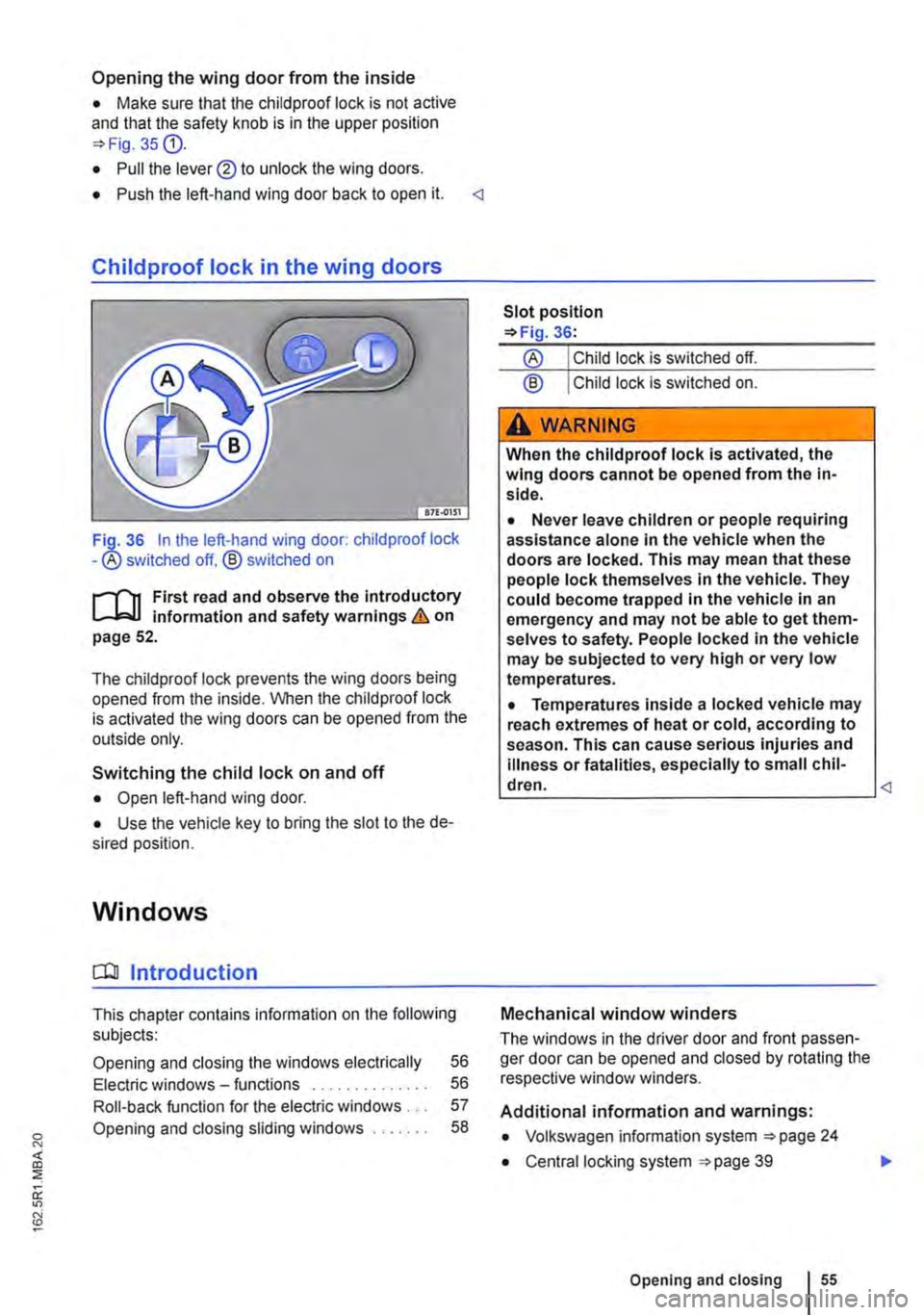
Childproof lock in the wing doors
36 In the left-hand wing door: child proof lock -® switched off. ® switched on
,......,.., First read and observe the introductory information and safety warnings & on page 52.
The chiidproof lock prevents the wing doors being opened from the inside. When the child proof lock is activated the wing doors can be opened from the outside only.
Switching the child lock on and off
• Open left-hand wing door.
• Use the vehicle key to bring the slot to the de-sired position.
Windows
a:n Introduction
This chapter contains information on the following subjects:
Opening and closing the windows electrically 56
Electric windows -functions . . . . . . . . . . . . . . 56
Roll-back function for the electric windows . . . 57
Opening and closing sliding windows . . . . . . . 58
® Child lock is switched on.
A WARNING
When the child proof lock is activated, the wing doors cannot be opened from the in-side.
• Never leave children or people requiring assistance alone in the vehicle when the doors are locked. This may mean that these people lock themselves in the vehicle. They could become trapped in the vehicle in an emergency and may not be able to get them-selves to safety. People locked in the vehicle may be subjected to very high or very low temperatures.
• Temperatures inside a locked vehicle may reach extremes of heat or cold, according to season. This can cause serious injuries and illness or fatalities, especially to small chil-dren. <1
Mechanical window winders
The windows in the driver door and front passen-ger door can be opened and closed by rotating the respective window winders.
Additional information and warnings:
• Volkswagen information system 24
• Central locking system 39
Opening and closing I 55
..
Page 56 of 486
A WARNING
Always take care when using the mechanical or electric windows otherwise you could cause serious accidents or injuries.
• Windows should only be opened or closed when you are sure that nobody is In their op-erating area.
• Never leave children or people requiring assistance alone in the vehicle when the ve-hicle is locked. Electric windows can no lon-ger be opened in an emergency.
A WARNING (Continued)
• Always take all vehicle keys with you ev-ery time you leave the vehicle. The electric windows can still be operated using the but-tons several minutes after the ignition has been switched off, provided the driver door and the front passenger door are not opened.
CD
During sudden rain showers, water can enter the vehicle interior via open windows and cause damage to the vehicle.
'----------------: BSG-0031
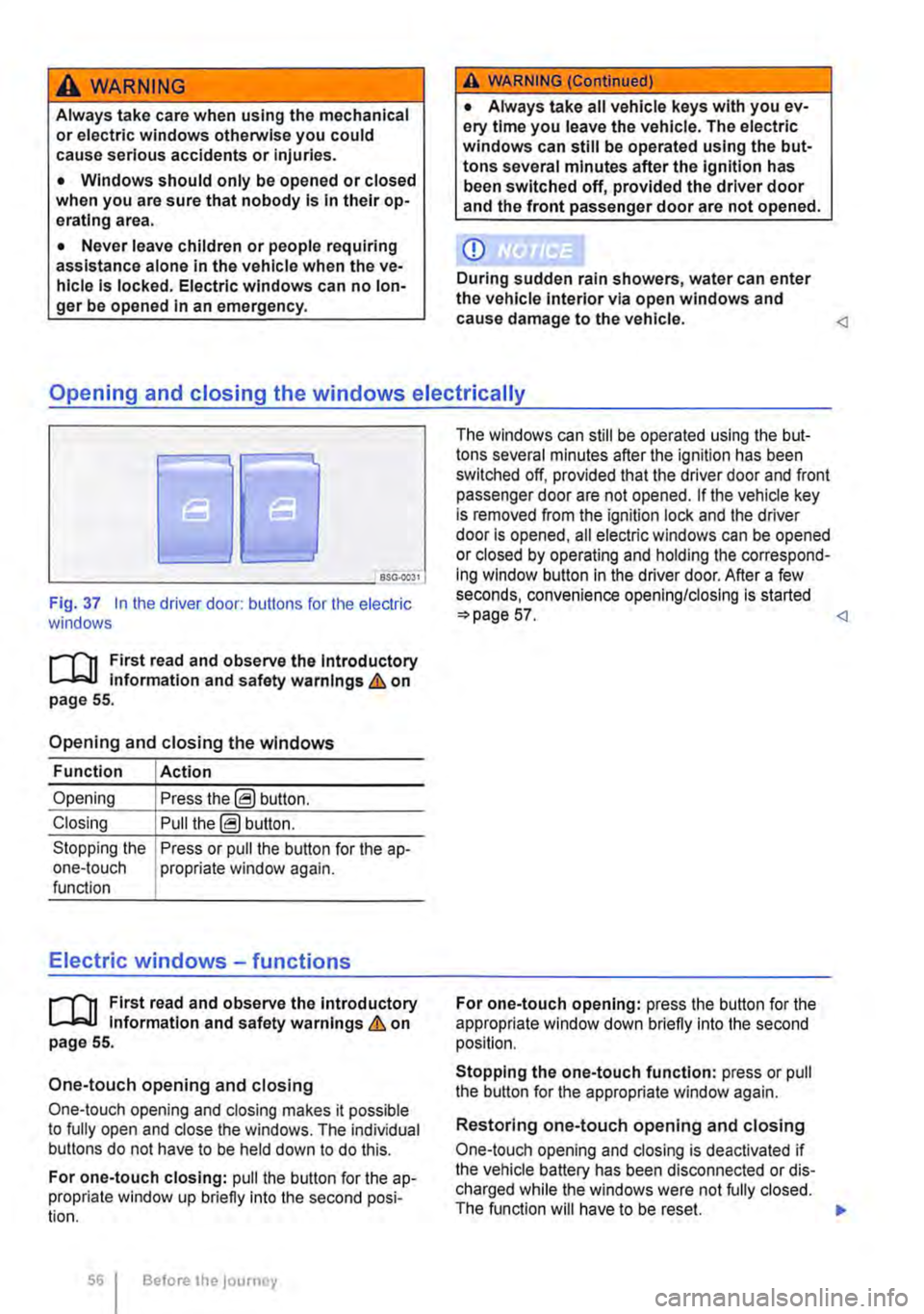
Fig. 37 In the driver door: butlons for the electric windows
r-111 First read and observe the Introductory L-J,::.JJ information and safety warnings & on page 55.
Opening and closing the windows
Function Action
Opening Press the@ button.
Closing Pull the@ button.
Stopping the Press or pull the button for the a p-one-touch propriate window again. function
Electric windows -functions
r-111 First read and observe the introductory L-J,::.JJ information and safety warnings & on page 55.
One-touch opening and closing
One-touch opening and closing makes it possible to fully open and close the windows. The individual buttons do not have to be held down to do this.
For one-touch closing: pull the butlon for the ap-propriate window up briefly into the second posi-tion.
56 Before the journey
The windows can still be operated using lhe but-tons several minutes after the ignition has been switched off, provided that the driver door and front passenger door are not opened. If the vehicle key is removed from the ignition lock and lhe driver door Is opened, all electric windows can be opened or closed by operating and holding lhe correspond-ing window button in the driver door. After a few seconds, convenience opening/closing is started 57.
Stopping the one-touch function: press or pull the button for the appropriate window again.
Restoring one-touch opening and closing
One-touch opening and closing is deactivated if the vehicle battery has been disconnected or dis-charged while the windows were not fully closed. The function will have to be reset.
Page 57 of 486
• Close all windows and doors.
• Pull up the button for the window and hold it in this position for at least one second.
• Let go of the button then pull it up again and hold it in this position. One-touch opening and closing is now ready for operation.
The one-touch function can be restored for individ-ual windows or for several windows at the same time.
Convenience opening and closing
There are three different ways of opening and clos-ing all electric windows simultaneously when the ignition is switched off:
• Press and hold the locking or unlocking button in the remote control key.
• To interrupt this function, let go of the locking or unlocking button.
• OR: hold the vehicle key in the driver door lock cylinder in either the locking or the unlocking posi-tion until all windows are either opened or closed.
• To interrupt this function, turn the vehicle key in the opposite direction.
• OR: after switching the ignition off and opening the driver and front passenger doors, push or pull the@ button in the required direction for at least two seconds.
During convenience closing, first the windows and then the sliding/tilting roof will be closed.
A WARNING
Careless or unsupervised use of the electric windows can cause serious Injuries.
• The electric windows should only be opened or closed when you are sure that no-body is in their operating area.
• Never leave children or people requiring assistance alone In the vehicle when the ve-hicle is locked. The windows can no longer be opened In an emergency.
• Always take all vehicle keys with you ev-ery time you leave the vehicle. The windows can still be operated using the buttons sever-al minutes after the Ignition has been switch-ed off, provided that the driver door and front passenger door are not opened.
m One-touch opening and closing and the roii-L!J back function will not work if there is a fault in the electric windows. Go to a qualified workshop.
l"""l'l1 First read and observe the Introductory l-J,a,IJ Information and safety warnings & on page 55.
The roll-back function for the electric windows can reduce the risk of Injuries when the windows are closing :) &. If the one-touch closing function for a window does not work because it is stiff or is being obstructed, the window will automatically open again.
• Check to see why the window has not closed.
• Try to close the window again.
• If the window is again prevented from closing within approximately 10 seconds of the first at-tempt because it is stiff or obstructed, the automat-ic closing function is switched off for approximately 10 seconds.
• If the window is still obstructed, the window stops at this point. To close the window without the roll-back function, press the button again within 1 0 seconds :) &.
Closing the window without the roll-back function
• Try to close the window again within approxi-mately 10 seconds by holding the button. The roll-back function will be deactivated for a small section of the path of the closing window.
• If the closing procedure takes longer than ap-proximately 10 seconds, the roll-back function will be reactivated. The window will then stop again if it is stiff or meets another obstacle.
• Please go to a qualified workshop if the window still cannot be closed.
A WARNING
Closing the electric windows without the roll-back function could lead to severe Injuries.
• Always take care when closing electric windows. 11>
Opening and closing
Page 58 of 486
A WARNING (Continued)
• Ensure that nobody obstructs the path of the electric windows, especially if the roll-back function is not active.
Opening and closing sliding windows
r-T'n First read and observe the introductory L-.lr::.U information and safety warnings & on page 55.
Opening the sliding window in the side panel
• Press the window handle and pull it towards the inside of the vehicle.
• Keep the window handle in this position and open the sliding window.
• Make sure that the sliding window is securely engaged in one of the available positions.
Closing the sliding window in the side panel
• Press the window handle and pull it towards the inside of the vehicle.
• Keep the window handle in this position and close the sliding window.
• Push the window frame below the window han-dle to the front to ensure that the sliding window locks properly.
Sliding/tilting roof
0::0 Introduction
This chapter contains information on the following subjects:
Opening and closing the sliding/tilting roof . . . 59
Sliding/tilting roof-functions . . . . . . . . . . . . 59 Roil-back function for the sliding/tilting roof 60
Additional information and warnings:
• Volkswagen information system 24
• Central locking system 39
• Manual pop-up roof, California 218
• Electric pop-up roof, California 221
• Manual opening and closing 413
58 Before the journey
A WARNING (Continued)
• The roll-back function does not prevent fingers or other body parts from being press-ed against the window frame and sustaining injury.
m The roll-back function is also activated if the W windows are closed using convenience clos-ing 57.
• Pull the window handle and open or close the sliding window.
A WARNING
In the event of a sudden braking manoeuvre or accident, a window not securely engaged could move forward and cause injuries.
• Always make sure that the sliding window is securely engaged in one of the 3 positions.
Improper or unsupervised use of the sliding/ tilting roof can cause serious Injuries.
• The sliding/tilting roof should therefore only be opened or closed when you are sure that nobody is In its operating area.
• Always take all vehicle keys with you ev-ery time you leave the vehicle. 11>
Page 59 of 486
A WARNING (Continued)
• Never leave children or people requiring assistance alone in the car, particularly if they have access to the vehicle key. Unsuper-vised use of the vehicle key can lock the ve-hicle, start the engine, switch on the ignition and operate the sliding/tilting roof.
• The sliding/tilting roof can be operated for a short period after the ignition has been switched off, provided that the driver door and front passenger door are not opened.
CD
• In order to avoid damage in winter, remove ice and snow from the roof of the vehicle be-fore opening or tilting the sliding/tilting roof.
m Leaves and other loose items must be re-L.!:J moved from the guide rails of the sliding/tilt-ing roof at regular inteNals, either by hand or using a vacuum cleaner.
m If there is a fault in the sliding/tilting roof, the L.!:J roil-back function will not work properly. Go to a qualified workshop.
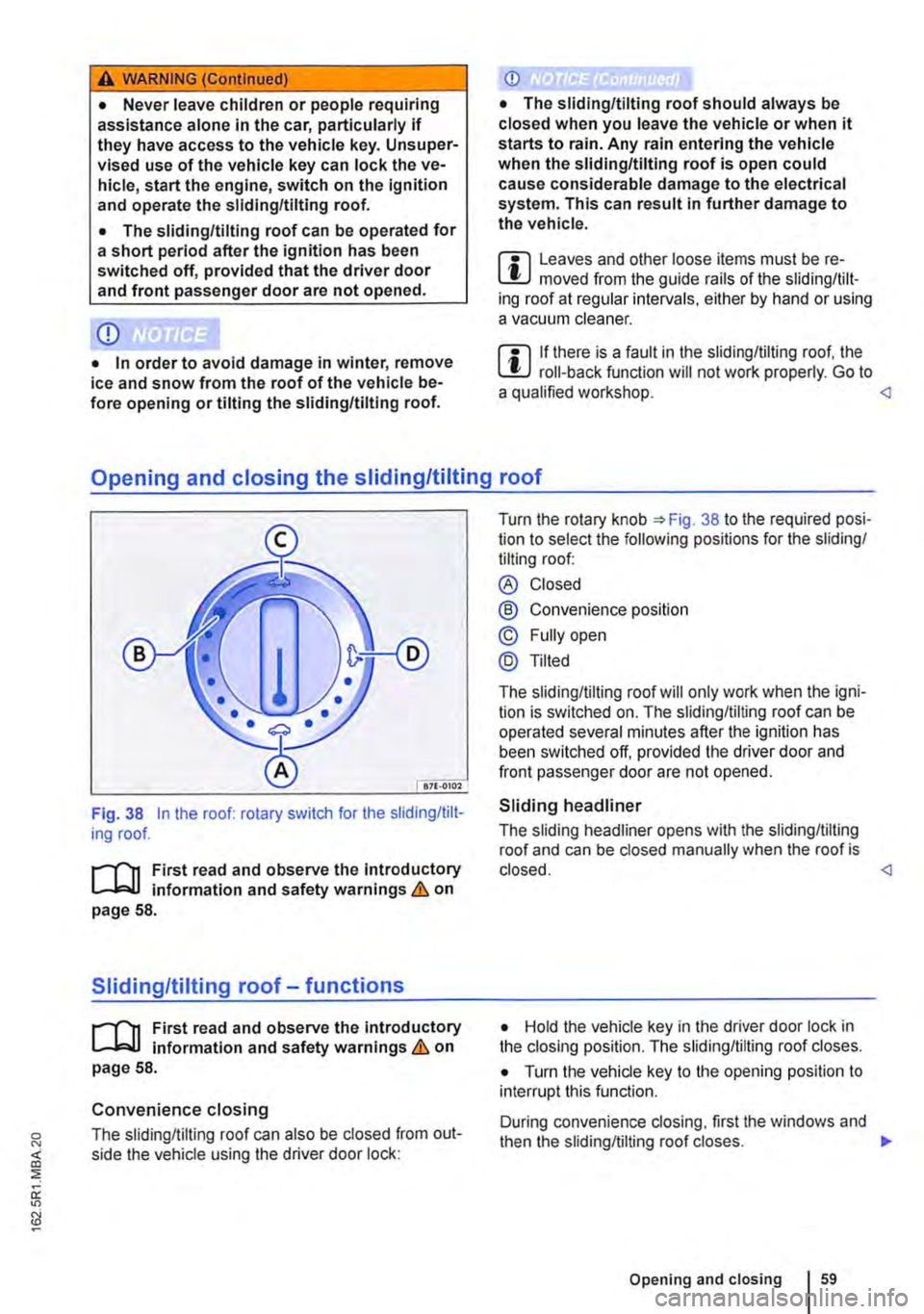
Fig. 38 In the roof: rotary switch for the sliding/tilt-ing roof.
r-T'n First read and observe the Introductory L-J,::.jJ information and safety warnings & on page 58.
Sliding/tilting roof-functions
r-T'n First read and obseNe the Introductory L-J,::.jJ information and safety warnings & on page 58.
Convenience closing
The sliding/tilting roof can also be closed from out-side the vehicle using the driver door lock:
Turn the rotary knob 38 to the required posi-tion to select the following positions for the sliding/ tilting roof:
® Closed
@ Convenience position
© Fully open
@Tilted
The sliding/tilting roof will only work when the igni-tion is switched on. The sliding/tilting roof can be operated several minutes after the ignition has been switched off, provided the driver door and front passenger door are not opened.
Sliding headliner
The sliding headliner opens with the sliding/tilting roof and can be closed manually when the roof is closed.
• Turn the vehicle key to the opening position to interrupt this function.
During convenience dosing, first the windows and then the sliding/tilting roof closes. .,..
Opening and closing 159