window VOLVO C70 CONVERTIBLE 2007 Owner´s Manual
[x] Cancel search | Manufacturer: VOLVO, Model Year: 2007, Model line: C70 CONVERTIBLE, Model: VOLVO C70 CONVERTIBLE 2007Pages: 276, PDF Size: 9.81 MB
Page 94 of 276

2007 Volvo C70
For information about how to make these settings, see the Personal setti\
ngs section on page 72.
81 03 Climate
Air vents
Air vents in the dashboard
A. Open
B. Closed
C. Horizontal air flow
D. Vertical air flow
Direct the outer air vents toward the side windows to defrost.
82 03 Climate
Electronic Climate Control (ECC)
file:///K|/delme/2007_C70/07c70_03.htm (3 of 10)12/22/2006 9:15:43 PM
Page 95 of 276
2007 Volvo C70
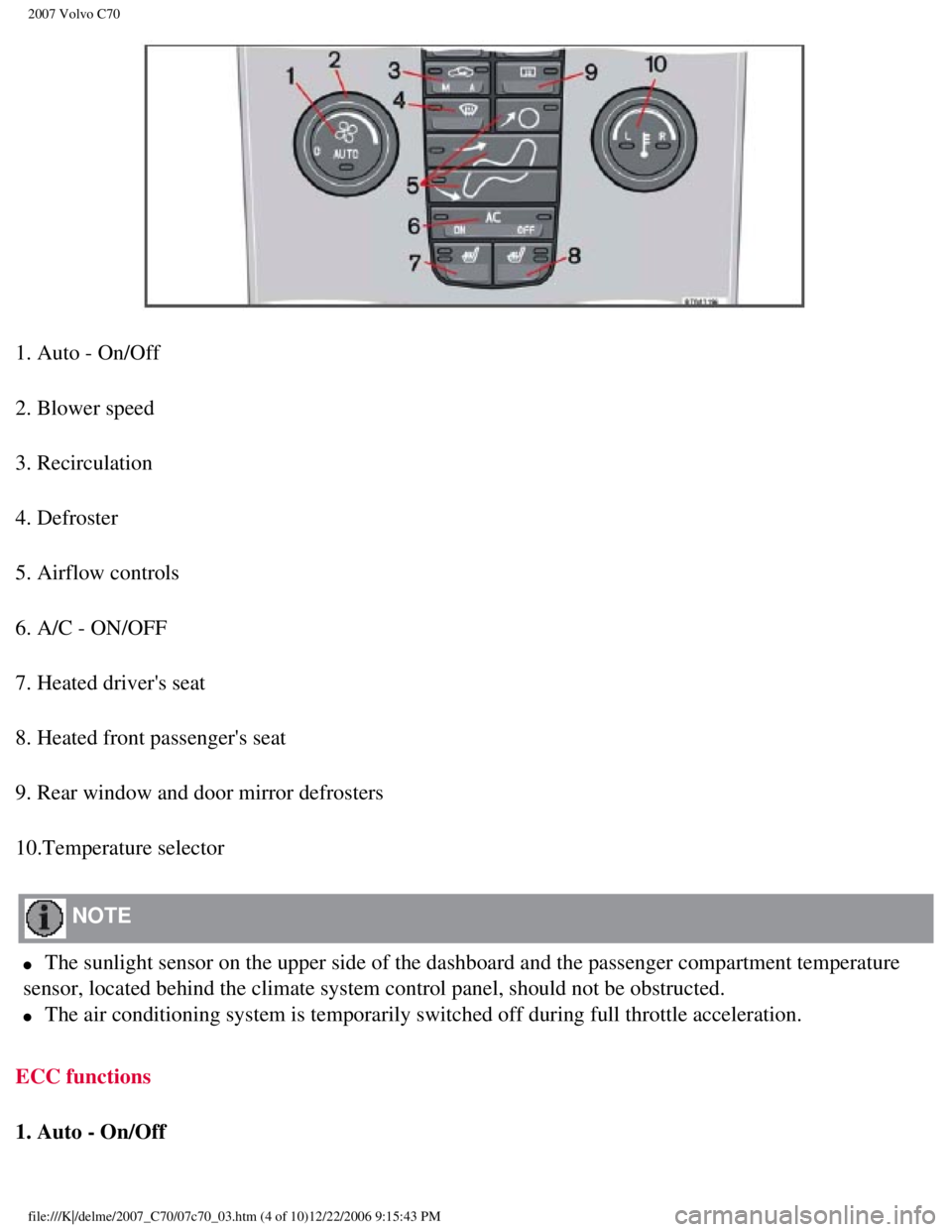
1. Auto - On/Off
2. Blower speed
3. Recirculation
4. Defroster
5. Airflow controls
6. A/C - ON/OFF
7. Heated driver's seat
8. Heated front passenger's seat
9. Rear window and door mirror defrosters
10.Temperature selector
NOTE
l The sunlight sensor on the upper side of the dashboard and the passenger\
compartment temperature
sensor, located behind the climate system control panel, should not be o\
bstructed.
l The air conditioning system is temporarily switched off during full thro\
ttle acceleration.
ECC functions
1. Auto - On/Off
file:///K|/delme/2007_C70/07c70_03.htm (4 of 10)12/22/2006 9:15:43 PM
Page 97 of 276

2007 Volvo C70
risk of condensation forming on the insides of the windows, especially i\
n winter.
Timer
The timer function minimizes the risk of fogging, or stale air when the \
recirculation function is selected.
See
page 73 for information on setting the recirculation timer.
NOTE
Recirculation is always disengaged if the defroster button is engaged to\
clear ice or condensation from
the side windows.
4. Defroster
Directs airflow to the windshield and side windows and increases blower \
speed.
When the defroster is activated:
l Air flows to the windows at high blower speed.
l The LED in the defroster button lights up when this function is activate\
d. The air conditioning system
is controlled to provide maximum air dehumidification.
l The air conditioning is automatically switched on (can be switched off \
by pressing button 5).
The air is not recirculated.
5. Airflow controls
Press one of the three buttons in the illustration to activate the selec\
ted airflow. A symbol
in the display above the climate control panel and a lit LED in the sele\
cted button indicate that the manual
function has been selected. With manually selected airflow both warm and\
cool air can be selected. See
also the table on
page 85.
6. Air conditioning On/Off
file:///K|/delme/2007_C70/07c70_03.htm (6 of 10)12/22/2006 9:15:43 PM
Page 98 of 276

2007 Volvo C70
ON: The air conditioning system is engaged when the ON light is lit and is\
controlled
automatically by the system to maintain the selected temperature.
OFF: The system is disengaged when the OFF lights up
When OFF is selected and the OFF LED is lit, the air conditioning system\
is deactivated.
84 03 Climate
Electronic Climate Control (ECC)
Other functions are still controlled automatically.
When Defroster (4) is selected, the air conditioning system is activat\
ed for maximum dehumidifying.
7 and 8. Heated front seats (option)
Maximum heating: Press the button once - both LEDs light up.
Reduced heating: Press the button a second time - one LED lights up.
Seat heating off: Press the button a third time - no LEDs are lit.
9. Rear window and door mirror defrosters
Press to defrost the rear window and door mirrors.
The rear window and door mirrors are defrosted simultaneously if the swi\
tch is pressed once. The
function is active if one LED is lit in the switch. The door mirrors are\
deactivated automatically after
file:///K|/delme/2007_C70/07c70_03.htm (7 of 10)12/22/2006 9:15:43 PM
Page 112 of 276

2007 Volvo C70
94 04 Interior
Power retractable hard top
Raising or lowering the power retractable hard top
1. Turn the ignition key to position II, or start the engine if the vehi\
cle is parked outdoors.
2. Press the brake pedal.
3. Press and hold down the left button (1) to raise the power retracta\
ble hard top or the right button (2) to
lower it. Hold down the respective button until the top is completely ra\
ised or lowered.
Release the button when an audible signal sounds. The message ROOF OPEN or ROOF CLOSED will be
displayed.
CAUTION
l Please heed any messages that may appear in the information display whil\
e the top is in operation.
l Any windows that are closed will be opened approximately 4 inches (10 c\
m) while the power
retractable hard top is in operation. The windows will be automatically \
re-closed when the top is
completely raised or lowered.
WARNING
file:///K|/delme/2007_C70/07c70_04.htm (11 of 27)12/22/2006 9:15:45 PM\
Page 115 of 276

2007 Volvo C70
Power retractable hard top
Temporary cover
The cover should only be used if the power retractable hard top is down \
and cannot be raised. It should be
placed over the car so that the shock-cord attaching points are on the u\
nderside.
To install the cover
1. Raise all windows.
2. Take out the cover (stowed in the compartment in the rear side of th\
e ski hatch in the center of the rear
seat backrest), remove it from the bag and unfold it.
file:///K|/delme/2007_C70/07c70_04.htm (14 of 27)12/22/2006 9:15:45 PM\
Page 131 of 276

2007 Volvo C70
NOTE
The remote control will not lock or unlock the glove
compartment.
Double locking
If the car is locked with the remote control while the power retractable hard top is down, the double locking feature activates after
approximately 30 seconds. This means that the doors cannot be unlocked o\
r opened from inside the car.
NOTE
The double locking function can be temporarily disabled. See
page 118 for
instructions.
2. Unlock - Press the Unlock button on the remote once to unlock the driver's doo\
r. The turn signals will flash twice to confirm
unlocking.
After a short pause, press the Unlock button a second time within 10 sec\
onds to unlock the other doors and the trunk.
A long press (at least two seconds) opens all side windows.
NOTE
l The turn signals flash to confirm that the vehicle has been correctly lo\
cked/unlocked with the remote control. When locking the
vehicle, the turn signals will flash a confirmation only if all the door\
s are securely closed and locked. Flashing confirmation for
locking and unlocking may be customized in the vehicle's Personal settin\
gs menu. See
page 72 for more information.
l The two-step unlocking function can be changed so that one press of the \
Unlock button unlocks all of the doors and the trunk.
See Personal settings on
page 72 for more information.
l Automatic relocking: If the doors are unlocked, the locks will automatically reengage (re-\
lock) and the alarm will rearm after 2
minutes unless a door or the trunk has been opened.
l Automatic locking: When the car starts to move, the doors and trunk can be locked automat\
ically. This feature can be turned on
or off, see Personal settings on
page 72 for more information.
l Airbag deployment will automatically attempt to unlock the doors.
3. Approach lighting - As you approach the car:
Press the yellow button on the remote control to light the interior ligh\
ting, position/parking lamps, and license
110 05 Locks and alarm
Remote control and key blade
plate lighting and the lights in the door mirrors. These lights will swi\
tch off automatically after 30, 60 or 90 seconds. See the
Personal settings on
page 72 for information about adjusting the time setting.
4. Unlock trunk- Press the button once to disarm the alarm system and unlock only the t\
runk. After closing, the trunk will not
automatically relock. Press Lock to relock it and rearm the alarm.
NOTE
This function will unlock, but not pop open, the
trunk.
file:///K|/delme/2007_C70/07c70_05.htm (3 of 13)12/22/2006 9:15:47 PM
Page 135 of 276

2007 Volvo C70
2. Turn the key blade 180° clockwise in the glove compartment lock to\
lock
113 05 Locks and alarm
Remote control and key blade
points C, D, E, and F and disconnect these points from the central locki\
ng system (a message appears in the information display).
3. Give the parking attendant or service personnel only the remote contr\
ol (with the key blade removed).
Deactivating the valet locking function
Turn the key blade 180° counterclockwise in the glove compartment loc\
k to deactivate valet locking.
See
page 115 for information on locking the glove compartment normally.
114 05 Locks and alarm
Locking and unlocking
Locking/unlocking the car from the inside
The switches near the door opening handles on the driver's and passenger\
's doors can be used to lock or unlock both doors and the
trunk, and to set the alarm.
Unlocking
l Press in the upper section in the lock button. A long press (at least t\
wo seconds) also opens all the side windows.
Locking
l Press in the lower section of the lock button.
file:///K|/delme/2007_C70/07c70_05.htm (7 of 13)12/22/2006 9:15:47 PM
Page 143 of 276

2007 Volvo C70
122 06 Starting and driving
General information
Economical driving conserves natural resources
Better driving economy may be obtained by thinking ahead, avoiding rapid\
starts and stops and adjusting
the speed of your vehicle to immediate traffic conditions.
Observe the following rules:
l Bring the engine to normal operating temperature as soon as possible by \
driving with a light foot on the
accelerator pedal for the first few minutes of operation. A cold engine \
uses more fuel and is subject to
increased wear.
l Whenever possible, avoid using the vehicle for driving short distances. \
This does not allow the engine
to reach normal operating temperature.
l Drive carefully and avoid rapid acceleration and hard braking.
l Use the transmission's Drive (D) position as often as possible and avo\
id using kickdown.
l Do not exceed posted speed limits.
l Avoid carrying unnecessary items (extra load) in the vehicle.
l Maintain correct tire pressure. Check tire pressure regularly (when tir\
es are cold).
l Remove snow tires when threat of snow or ice has ended.
l At highway driving speeds, fuel consumption will be lower with the air c\
onditioning on and the
windows closed than with the air conditioning off and the windows open. \
l Using the onboard trip computer's fuel consumption modes can help you le\
arn how to drive more
economically.
Other factors that decrease gas mileage are:
l Dirty air cleaner
l Dirty engine oil and clogged oil filter
l Dragging brakes
l Incorrect front end alignment
Some of the above mentioned items and others are checked at the standard\
maintenance intervals.
Avoid overheating the engine
Do not drive at engine speeds above 4,500 rpm if you tow a trailer in hi\
lly areas. This could cause the
engine oil to overheat.
file:///K|/delme/2007_C70/07c70_06.htm (2 of 18)12/22/2006 9:15:48 PM
Page 144 of 276

2007 Volvo C70
WARNING
Driving with the trunk open: Driving with the trunk open could lead to poisonous exhaust gases
entering the passenger compartment. If the trunk must be kept open for a\
ny reason, proceed as follows:
l Close the windows
l Set the ventilation system control to air flow to floor, windshield and \
side windows and the blower
control to its highest setting.
Weight distribution affects handling
At the specified curb weight your vehicle has a tendency to understeer, \
which means that the steering
wheel has to be turned more than might seem appropriate for the curvatur\
e of a bend. This ensures good
stability and reduces the risk of rear wheel skid. Remember that these p\
roperties can alter with the vehicle
load. The heavier the load in the cargo area, the less the tendency to u\
ndersteer.
Handling, roadholding
Vehicle load, tire design and inflation pressure all affect vehicle hand\
ling. Therefore,
123 06 Starting and driving
General information
check that the tires are inflated to the recommended pressure according \
to the vehicle load. See the "Tire
pressure" section. Loads should be distributed so that capacity weight o\
r maximum permissible axle loads
are not exceeded.
Driving through water
The vehicle can be driven through water up to a depth of approximately 9\
in. (25 cm), at a maximum
speed of 6 mph (10 km/h).
l Take particular care when driving through flowing water.
l Clean the electrical connections for trailer wiring after driving in mud\
or water
l When driving through water, maintain low speed and do not stop in the wa\
ter.
WARNING
After driving through water, press lightly on the brake pedal to ensure \
that the brakes are functioning
normally. Water or mud can make the brake linings slippery, resulting in\
delayed braking effect.
file:///K|/delme/2007_C70/07c70_06.htm (3 of 18)12/22/2006 9:15:48 PM