ESP VOLVO S60 2018 Owner´s Manual
[x] Cancel search | Manufacturer: VOLVO, Model Year: 2018, Model line: S60, Model: VOLVO S60 2018Pages: 396, PDF Size: 9.4 MB
Page 171 of 396
DRIVER SUPPORT
169
SymbolMessage Description
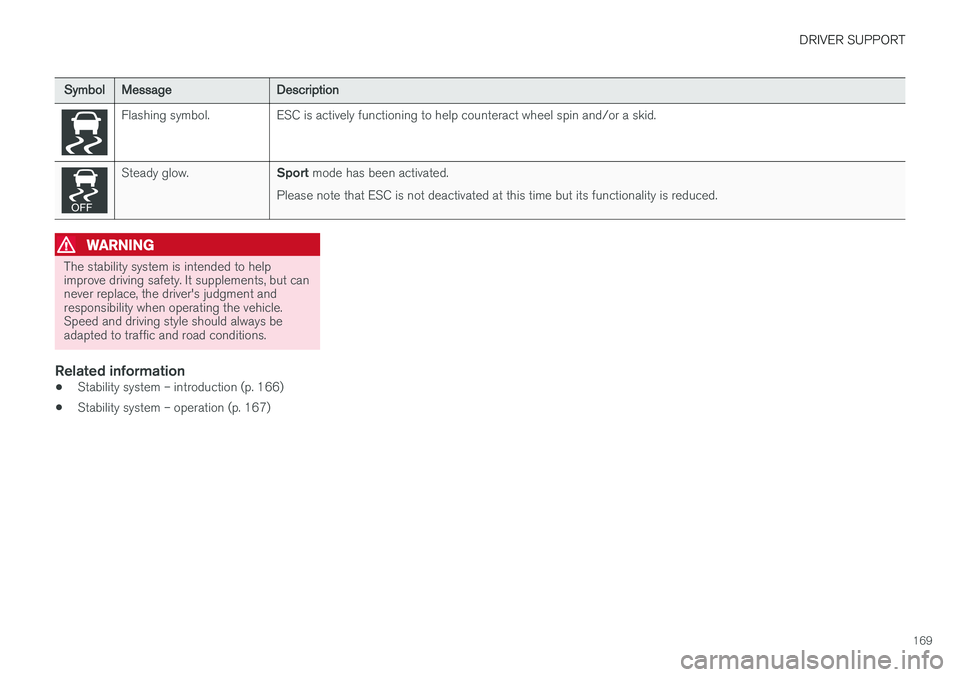
Flashing symbol. ESC is actively functioning to help counteract wheel spin and/or a skid.
Steady glow.
Sport mode has been activated.
Please note that ESC is not deactivated at this time but its functionality is reduced.
WARNING
The stability system is intended to help improve driving safety. It supplements, but cannever replace, the driver's judgment andresponsibility when operating the vehicle.Speed and driving style should always beadapted to traffic and road conditions.
Related information
• Stability system – introduction (p. 166)
• Stability system – operation (p. 167)
Page 172 of 396
DRIVER SUPPORT
* Option/accessory.
170
Adjustable steering force *
Steering force increases with the speed of the vehicle to give the driver enhanced sense ofcontrol and stability. At low speed the vehicle iseasy to steer in order to facilitate parking, etc.
Adjustable steering force *Steering force can be changed under MY CAR
Car settingsSteering wheel force.
Select Low, Medium or High. For a description
of the menu system, My Car – introduction (p. 71).
NOTE
This steering force level menu function can- not be accessed when the vehicle is inmotion.
NOTE
In certain situations, the power steering may become too warm and will have to be tempo-rarily cooled down. While this is happening,the power steering effect will be reducedslightly and somewhat more effort may berequired to turn the steering wheel. If this occurs, a message will be displayed in the instrument panel.
Road Sign Information (RSI) * –
introduction
RSI is a feature that helps the driver see road signs with the posted speed limit.
Introduction
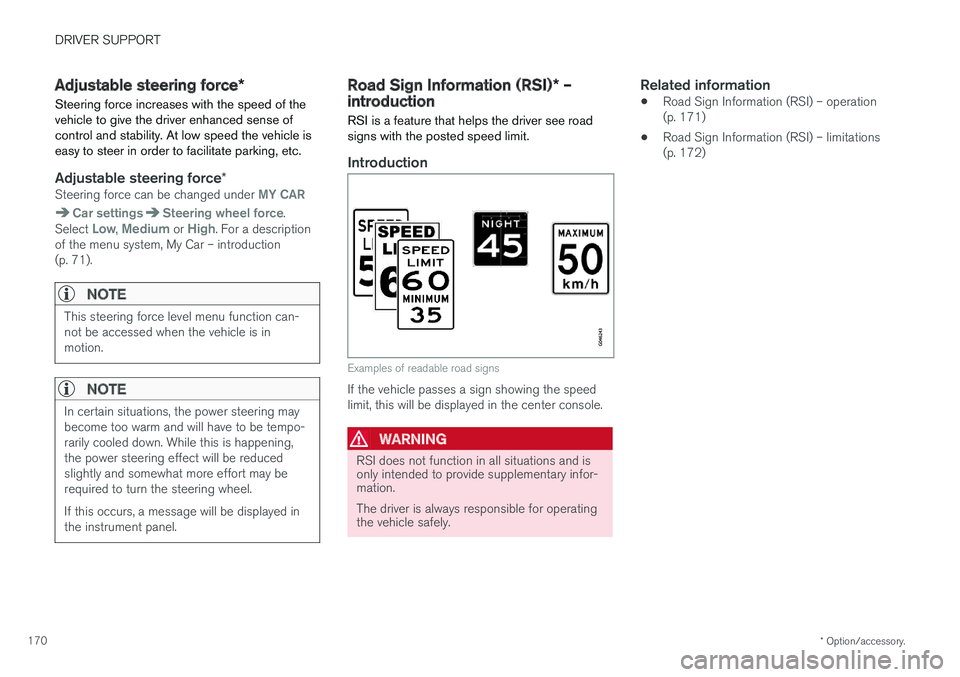
Examples of readable road signs
If the vehicle passes a sign showing the speed limit, this will be displayed in the center console.
WARNING
RSI does not function in all situations and is only intended to provide supplementary infor-mation. The driver is always responsible for operating the vehicle safely.
Related information
• Road Sign Information (RSI) – operation (p. 171)
• Road Sign Information (RSI) – limitations(p. 172)
Page 178 of 396
||
DRIVER SUPPORT
176
WARNING
•Adaptive Cruise Control cannot cover all driving situations and traffic, weather androad conditions. The "Function" sectionprovides information about limitations thatthe driver must be aware of before usingthis feature.
• This system is designed to be a supple-mentary driving aid. It is not, however,intended to replace the driver's attentionand judgement. The driver is responsiblefor maintaining a safe distance and speedand must intervene if Adaptive CruiseControl does not maintain a suitablespeed or suitable distance to the vehicleahead.
• Maintenance of ACC components mayonly be performed by a trained and quali-fied Volvo technician.
Operation
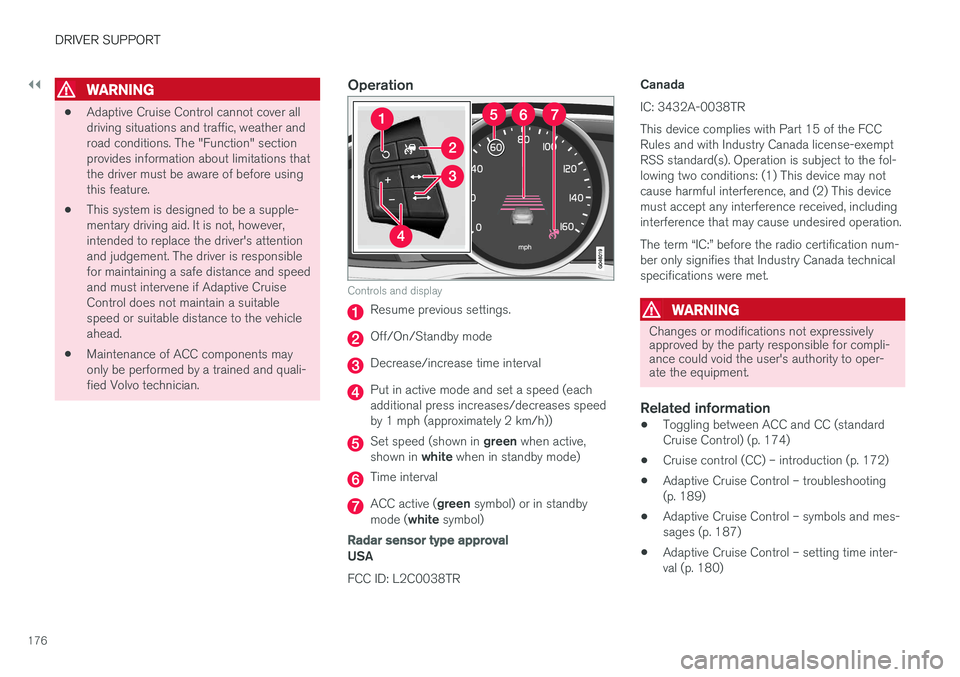
Controls and display
Resume previous settings.
Off/On/Standby mode
Decrease/increase time interval
Put in active mode and set a speed (each additional press increases/decreases speedby 1 mph (approximately 2 km/h))
Set speed (shown in
green when active,
shown in white when in standby mode)
Time interval
ACC active ( green symbol) or in standby
mode ( white symbol)
Radar sensor type approval
USA FCC ID: L2C0038TR CanadaIC: 3432A-0038TR This device complies with Part 15 of the FCC Rules and with Industry Canada license-exemptRSS standard(s). Operation is subject to the fol-lowing two conditions: (1) This device may notcause harmful interference, and (2) This devicemust accept any interference received, includinginterference that may cause undesired operation. The term “IC:” before the radio certification num- ber only signifies that Industry Canada technicalspecifications were met.
WARNING
Changes or modifications not expressively approved by the party responsible for compli-ance could void the user's authority to oper-ate the equipment.
Related information
•
Toggling between ACC and CC (standard Cruise Control) (p. 174)
• Cruise control (CC) – introduction (p. 172)
• Adaptive Cruise Control – troubleshooting(p. 189)
• Adaptive Cruise Control – symbols and mes-sages (p. 187)
• Adaptive Cruise Control – setting time inter-val (p. 180)
Page 179 of 396
DRIVER SUPPORT
}}
177
•
Adaptive Cruise Control – setting speed (p. 179)
• Radar sensor (p. 185)
• Adaptive Cruise Control (ACC) – QueueAssist (p. 183)
• Adaptive Cruise Control – passing anothervehicle (p. 182)
• Adaptive Cruise Control – limitations(p. 185)
• Adaptive Cruise Control – function (p. 177)
• Adaptive Cruise Control – engaging (p. 179)
• Adaptive Cruise Control – deactivating(p. 181)
Adaptive Cruise Control – function
Function
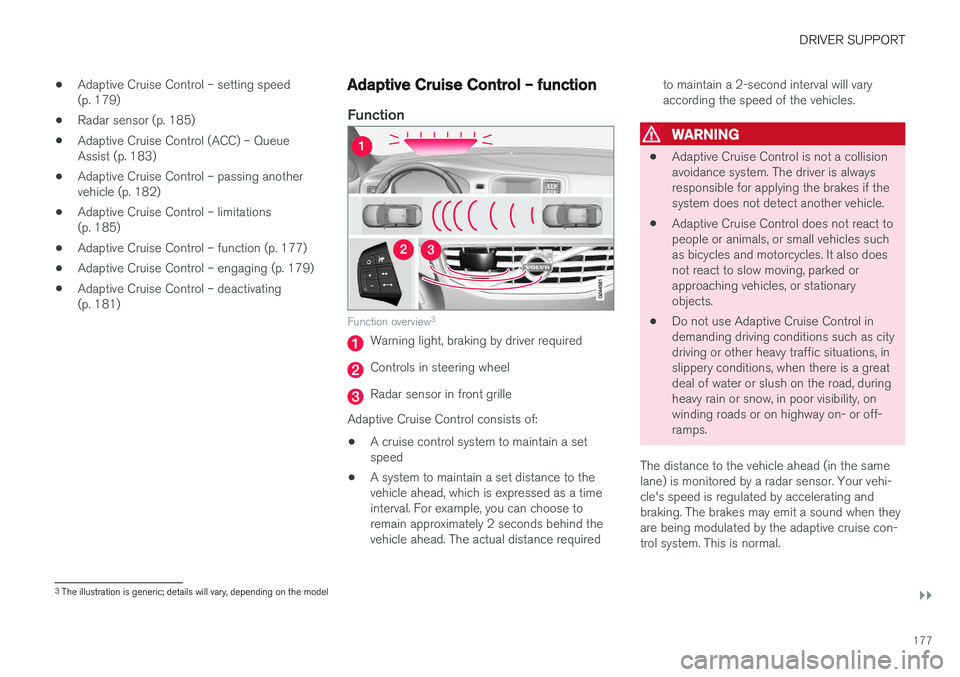
Function overview 3
Warning light, braking by driver required
Controls in steering wheel
Radar sensor in front grille
Adaptive Cruise Control consists of:
• A cruise control system to maintain a set speed
• A system to maintain a set distance to thevehicle ahead, which is expressed as a timeinterval. For example, you can choose toremain approximately 2 seconds behind thevehicle ahead. The actual distance required to maintain a 2-second interval will varyaccording the speed of the vehicles.
WARNING
•
Adaptive Cruise Control is not a collision avoidance system. The driver is alwaysresponsible for applying the brakes if thesystem does not detect another vehicle.
• Adaptive Cruise Control does not react topeople or animals, or small vehicles suchas bicycles and motorcycles. It also doesnot react to slow moving, parked orapproaching vehicles, or stationaryobjects.
• Do not use Adaptive Cruise Control indemanding driving conditions such as citydriving or other heavy traffic situations, inslippery conditions, when there is a greatdeal of water or slush on the road, duringheavy rain or snow, in poor visibility, onwinding roads or on highway on- or off-ramps.
The distance to the vehicle ahead (in the samelane) is monitored by a radar sensor. Your vehi-cle's speed is regulated by accelerating andbraking. The brakes may emit a sound when theyare being modulated by the adaptive cruise con-trol system. This is normal.
3 The illustration is generic; details will vary, depending on the model
Page 188 of 396
||
DRIVER SUPPORT
186
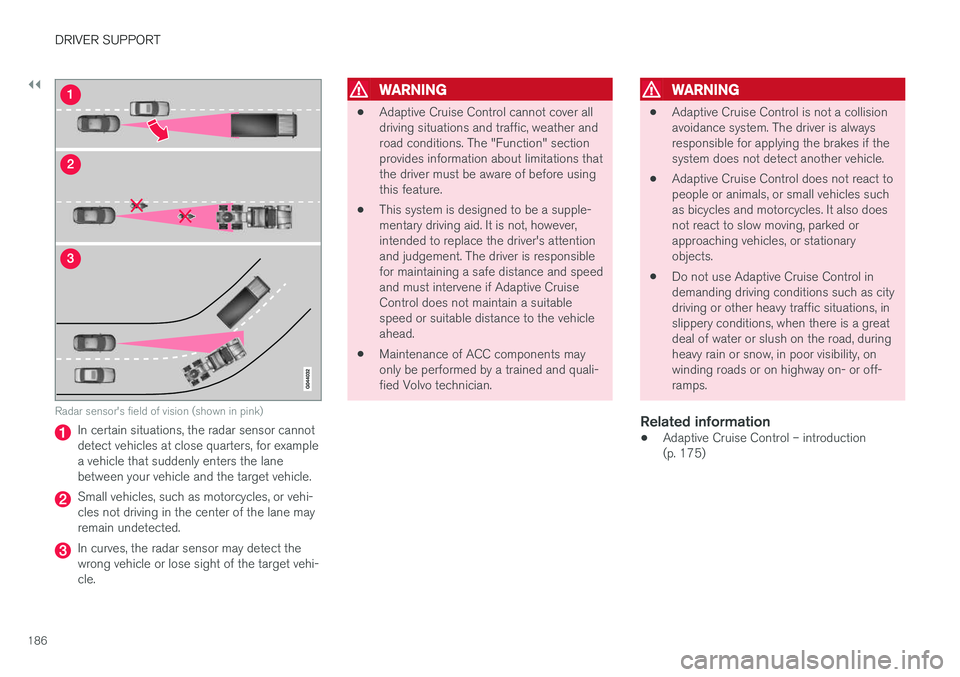
Radar sensor's field of vision (shown in pink)
In certain situations, the radar sensor cannot detect vehicles at close quarters, for examplea vehicle that suddenly enters the lanebetween your vehicle and the target vehicle.
Small vehicles, such as motorcycles, or vehi- cles not driving in the center of the lane mayremain undetected.
In curves, the radar sensor may detect the wrong vehicle or lose sight of the target vehi-cle.
WARNING
•Adaptive Cruise Control cannot cover all driving situations and traffic, weather androad conditions. The "Function" sectionprovides information about limitations thatthe driver must be aware of before usingthis feature.
• This system is designed to be a supple-mentary driving aid. It is not, however,intended to replace the driver's attentionand judgement. The driver is responsiblefor maintaining a safe distance and speedand must intervene if Adaptive CruiseControl does not maintain a suitablespeed or suitable distance to the vehicleahead.
• Maintenance of ACC components mayonly be performed by a trained and quali-fied Volvo technician.
WARNING
• Adaptive Cruise Control is not a collision avoidance system. The driver is alwaysresponsible for applying the brakes if thesystem does not detect another vehicle.
• Adaptive Cruise Control does not react topeople or animals, or small vehicles suchas bicycles and motorcycles. It also doesnot react to slow moving, parked orapproaching vehicles, or stationaryobjects.
• Do not use Adaptive Cruise Control indemanding driving conditions such as citydriving or other heavy traffic situations, inslippery conditions, when there is a greatdeal of water or slush on the road, duringheavy rain or snow, in poor visibility, onwinding roads or on highway on- or off-ramps.
Related information
• Adaptive Cruise Control – introduction(p. 175)
Page 192 of 396
DRIVER SUPPORT
190
Distance Alert – introduction
Distance Alert is part of Adaptive Cruise Control and is a function that provides information aboutthe time interval to the vehicle ahead.
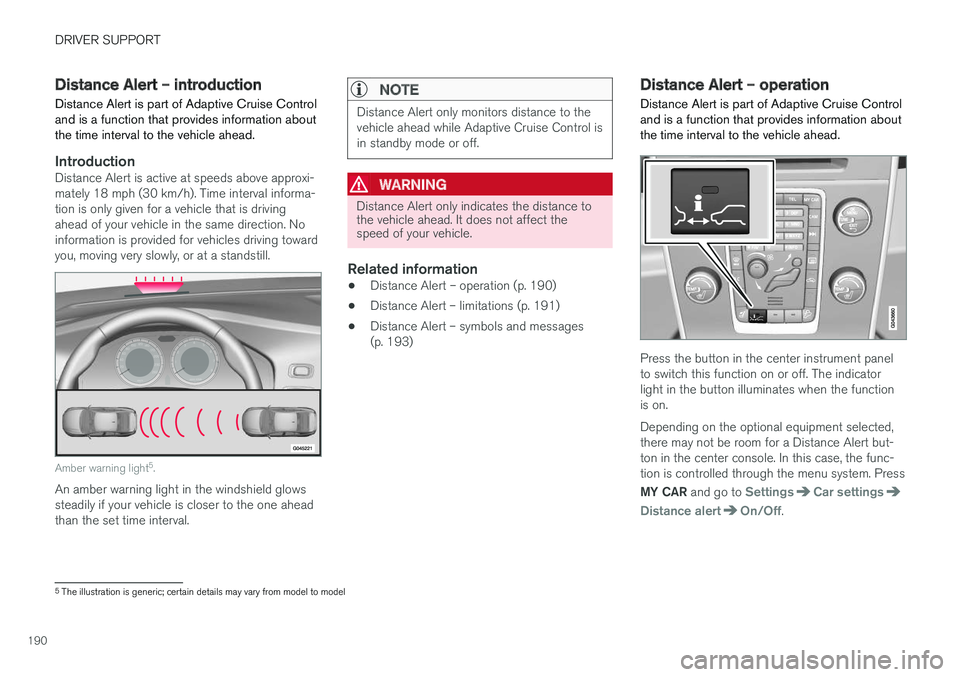
IntroductionDistance Alert is active at speeds above approxi- mately 18 mph (30 km/h). Time interval informa-tion is only given for a vehicle that is drivingahead of your vehicle in the same direction. Noinformation is provided for vehicles driving towardyou, moving very slowly, or at a standstill.
Amber warning light 5
.
An amber warning light in the windshield glows steadily if your vehicle is closer to the one aheadthan the set time interval.
NOTE
Distance Alert only monitors distance to the vehicle ahead while Adaptive Cruise Control isin standby mode or off.
WARNING
Distance Alert only indicates the distance to the vehicle ahead. It does not affect thespeed of your vehicle.
Related information
• Distance Alert – operation (p. 190)
• Distance Alert – limitations (p. 191)
• Distance Alert – symbols and messages (p. 193)
Distance Alert – operation
Distance Alert is part of Adaptive Cruise Control and is a function that provides information aboutthe time interval to the vehicle ahead.
Press the button in the center instrument panel to switch this function on or off. The indicatorlight in the button illuminates when the functionis on. Depending on the optional equipment selected, there may not be room for a Distance Alert but-ton in the center console. In this case, the func-tion is controlled through the menu system. Press MY CAR and go to
SettingsCar settings
Distance alertOn/Off.
5
The illustration is generic; certain details may vary from model to model
Page 203 of 396
DRIVER SUPPORT
}}
201
•
City Safety – operation (p. 196)
• City Safety – limitations (p. 196)
• City Safety – troubleshooting (p. 197)
• City Safety – symbols and messages (p. 199)
Collision warning – introduction Pedestrian and Cyclist Detection with Full Auto Brake is designed to assist the driver if there is arisk of a collision with a pedestrian, a cyclist, avehicle ahead that is at a standstill or one that ismoving in the same direction as your vehicle.
This system consists of the following three func- tions:
• Collision Warning
warns the driver of a
potential collision situation.
• Brake Support
helps the driver brake effi-
ciently in a critical situation.
• Auto-brake
brakes the vehicle automatically
if a collision with a pedestrian, a cyclist oranother vehicle cannot be avoided and thedriver does not apply the brakes in time orsteer around the person/vehicle. Auto-brakecan help prevent a collision or reduce thespeed at which a collision occurs.
Since Pedestrian and Cyclist Detection with FullAuto Brake is activated in circumstances wherethe driver should have begun braking muchsooner, the system will not be able to assist thedriver in all situations. This system is designed to activate as late as possible to help avoid unnecessary intervention. The system should not be used in such a way that the driver changes his/her way of operatingthe vehicle. If the driver relies entirely on the sys- tem, the chances of an accident eventually occur-ring increase considerably. The Pedestrian and Cyclist Detection with Full Auto Brake and City Safety
™ systems supple-
ment each other. See City Safety – introduction (p. 194) for detailed information about City Safety ™.
WARNING
No automatic system can be guaranteed to function 100% correctly in all situations. Forthat reason, never test the Auto-brake systemby driving toward a person or object. Thiscould result in serious injury or death.
Page 204 of 396
||
DRIVER SUPPORT
* Option/accessory.
202
WARNING
• Pedestrian and Cyclist Detection with Full Auto Brake does not work in all driving,traffic, weather and road conditions. Itdoes not react to vehicles not traveling inthe same direction as your vehicle.
• Pedestrian and Cyclist Detection with FullAuto Brake does not react to animals.
• Warnings are only provided when the riskof collision is high. The "Function" sectionprovides information about limitations thatthe driver must be aware of before usingCollision Warning.
• Pedestrian and Cyclist Detection with FullAuto Brake will not provide a warning orbrake the vehicle for pedestrians orcyclists at speeds above 50 mph(80 km/h).
WARNING
•
Pedestrian and Cyclist Detection with Full Auto Brake will not provide a warning orbrake the vehicle for pedestrians in dark-ness or in tunnels, even if there is streetlighting in the area.
• The auto-brake function can help preventa collision or reduce the speed at impactbut the driver should always apply thebrakes for the best possible brakingeffect, even if auto-brake is actively apply-ing the brakes.
• Never wait for a collision warning. Thissystem is designed to be a supplemen-tary driving aid. It is not, however,intended to replace the driver's attentionand judgement. The driver is responsiblefor maintaining a safe distance andspeed, even when the collision warningsystem is in use.
• Maintenance of the Pedestrian andCyclist Detection with Full Auto Brakesystem's components must only be per-formed by a trained and qualified Volvotechnician.
Related information
•
Collision warning
* – function (p. 203)
• Collision warning
* – operation (p. 204) •
Collision warning
* – Pedestrian detection
(p. 206)
• Collision warning
* – Cyclist detection
(p. 205)
• Collision warning
* – limitations (p. 207)
• The camera
Page 208 of 396
||
DRIVER SUPPORT
* Option/accessory.
206 •
The camera's function is deactivated and will not detect a cyclist in darkness or in tunnels,even if there is street lighting in the area.
• For optimal cyclist detection, City Safety
™
must be activated.
WARNING
Pedestrian and Cyclist Detection with Full Auto Brake is designed to be a supplemen-tary driving aid. It is not, however, intended toreplace the driver's attention and judgement.The driver is always responsible for operatingthe vehicle in a safe manner. The system cannot detect a bike/cyclist if:
• He/she is wearing loose-fitting clothing that may obscure body contours
• The bike is approaching your vehicle fromthe side
• The bike is not equipped with a rear-fac-ing red reflector
• The bike is carrying large objects
• Most of the cyclist's body or the bikeitself cannot be "seen" by the system'scamera
Related information
•Collision warning – introduction (p. 201)
• Collision warning
* – function (p. 203)
• Collision warning
* – operation (p. 204) •
Collision warning
* – Pedestrian detection
(p. 206)
• Collision warning
* – limitations (p. 207)
• Collision warning – troubleshooting (p. 210)
• Collision warning – symbols and messages(p. 212)
Collision warning
* – Pedestrian
detection
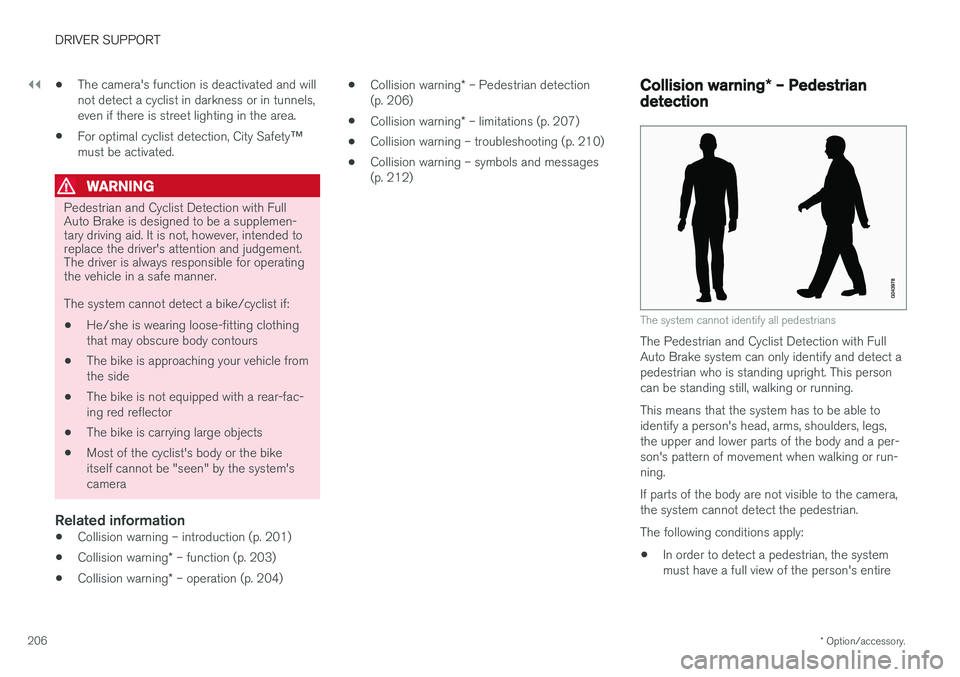
The system cannot identify all pedestrians
The Pedestrian and Cyclist Detection with Full Auto Brake system can only identify and detect apedestrian who is standing upright. This personcan be standing still, walking or running. This means that the system has to be able to identify a person's head, arms, shoulders, legs,the upper and lower parts of the body and a per-son's pattern of movement when walking or run-ning. If parts of the body are not visible to the camera, the system cannot detect the pedestrian. The following conditions apply:
• In order to detect a pedestrian, the system must have a full view of the person's entire
Page 209 of 396
DRIVER SUPPORT
}}
* Option/accessory.207
body and the person must be at least 32 in. (80 cm) tall.
• The system cannot detect a pedestrian carry-ing a large object.
• The camera's capacity to see a pedestrian atdawn or dusk is limited, much as it is for thehuman eye.
• The camera's function is deactivated and willnot detect a pedestrian in darkness or in tun-nels, even if there is street lighting in thearea.
WARNING
•Pedestrian and Cyclist Detection with Full Auto Brake is designed to be a supple-mentary driving aid. It is not, however,intended to replace the driver's attentionand judgement. The driver is alwaysresponsible for operating the vehicle in asafe manner.
• The system cannot detect all pedestriansin all situations, such as in darkness/atnight and cannot detect partially hiddenpedestrians, people who are less thanapprox. 32 in. (80 cm) tall, or peoplewearing clothing that obscures the con-tours of their bodies.
Related information
•Collision warning – introduction (p. 201)
• Collision warning
* – function (p. 203)
• Collision warning
* – operation (p. 204)
• Collision warning
* – Cyclist detection
(p. 205)
• Collision warning
* – limitations (p. 207)
• Collision warning – troubleshooting (p. 210)
• Collision warning – symbols and messages(p. 212)
Collision warning
* – limitations
Strong sunlight, reflections, extreme light con- trasts, the use of sunglasses, or if the driver is notlooking straight ahead may make the visual warn-ing signal in the windshield difficult to see. Forthis reason, always activate the audible warningsignal. Slippery driving conditions increase braking dis- tance, which can reduce the system's capacity toavoid a collision. In these conditions, the ABS andstability systems provide the best possible brak-ing effect while helping to maintain stability.
NOTE
The visual warning signal may be temporarily disengaged in the event of high passengercompartment temperature due to strong sun-light, etc. If this occurs, the audible warningsignal will be used, even if it has been deacti-vated in the menu system.