turn signal VOLVO S90 2018 Owner´s Manual
[x] Cancel search | Manufacturer: VOLVO, Model Year: 2018, Model line: S90, Model: VOLVO S90 2018Pages: 640, PDF Size: 11.37 MB
Page 357 of 640
DRIVER SUPPORT
355
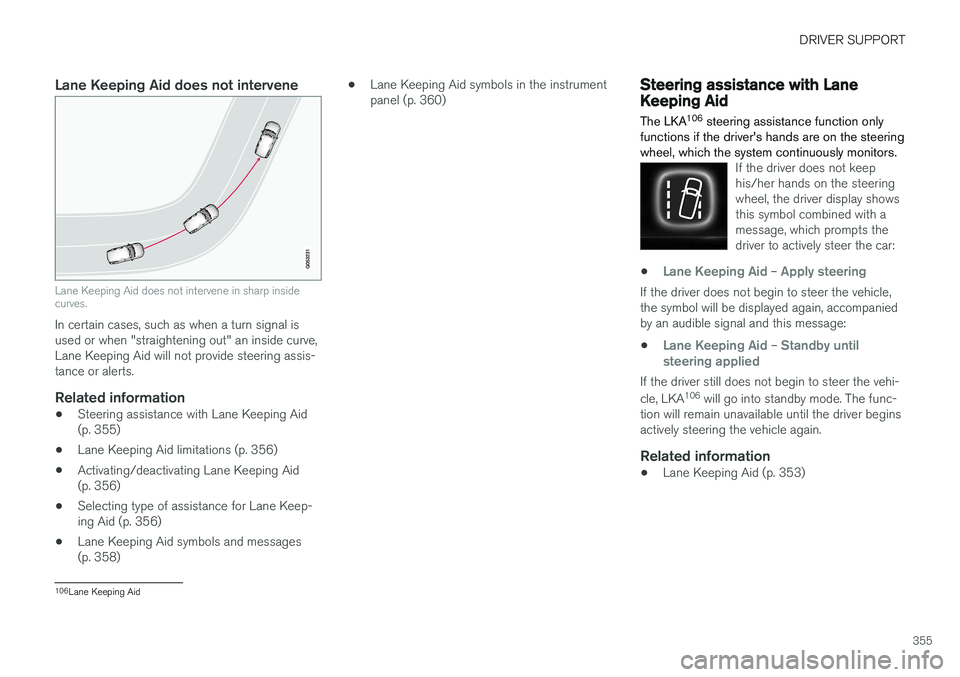
Lane Keeping Aid does not intervene
Lane Keeping Aid does not intervene in sharp inside curves.
In certain cases, such as when a turn signal is used or when "straightening out" an inside curve,Lane Keeping Aid will not provide steering assis-tance or alerts.
Related information
•Steering assistance with Lane Keeping Aid(p. 355)
• Lane Keeping Aid limitations (p. 356)
• Activating/deactivating Lane Keeping Aid(p. 356)
• Selecting type of assistance for Lane Keep-ing Aid (p. 356)
• Lane Keeping Aid symbols and messages(p. 358) •
Lane Keeping Aid symbols in the instrumentpanel (p. 360)
Steering assistance with LaneKeeping Aid The LKA 106
steering assistance function only
functions if the driver's hands are on the steering wheel, which the system continuously monitors.
If the driver does not keep his/her hands on the steeringwheel, the driver display showsthis symbol combined with amessage, which prompts thedriver to actively steer the car:
•Lane Keeping Aid – Apply steering
If the driver does not begin to steer the vehicle, the symbol will be displayed again, accompaniedby an audible signal and this message:
•
Lane Keeping Aid – Standby until
steering applied
If the driver still does not begin to steer the vehi- cle, LKA 106
will go into standby mode. The func-
tion will remain unavailable until the driver begins actively steering the vehicle again.
Related information
• Lane Keeping Aid (p. 353)
106
Lane Keeping Aid
Page 364 of 640
DRIVER SUPPORT
362
Run-Off Mitigation with steeringassistance
This sub-function is intended to help reduce the risk of the vehicle inadvertently running off theroad by actively steering the vehicle back ontothe road.
The function is active at speeds between 65-140 km/h (40-87 mph) on roads with clearlyvisible traffic lane markings/lines. The system uses a camera to monitor the edges of the road and the painted side marker lines. Ifthe vehicle is about to cross the edge of the road, the function will attempt to steer the vehicle back onto the road. If this is not sufficient to keep the vehicle on the road, the brakes will also be applied. However, the function will not provide either
steering assistance or braking if the turn signal is used. The function will also not be activated if it detects that the driver is actively operating thevehicle. After the system has automatically intervened, this text message will appear in the instrumentpanel:
•
Collision avoidance assistance –Automatic intervention
WARNING
• The "Steering assistance at risk of run- off" subfunction is supplementary driversupport intended to help improve drivingsafety – it cannot handle all situations inall traffic, weather and road conditions.
• The function cannot detect barriers, railsor similar obstacles at the side of theroad.
• "Steering assistance at risk of run-off" isnot a substitute for the driver's attentionand judgment. The driver is alwaysresponsible for ensuring the vehicle isdriven in a safe manner, at the appropri-ate speed, with an appropriate distance toother vehicles, and in accordance withcurrent traffic rules and regulations.
Related information
•
Steering assistance at risk of collision(p. 361)
Run-Off Mitigation with steeringassistance levels This function has two activation levels for inter- vention:
•Steering assistance only
• Steering assistance with braking
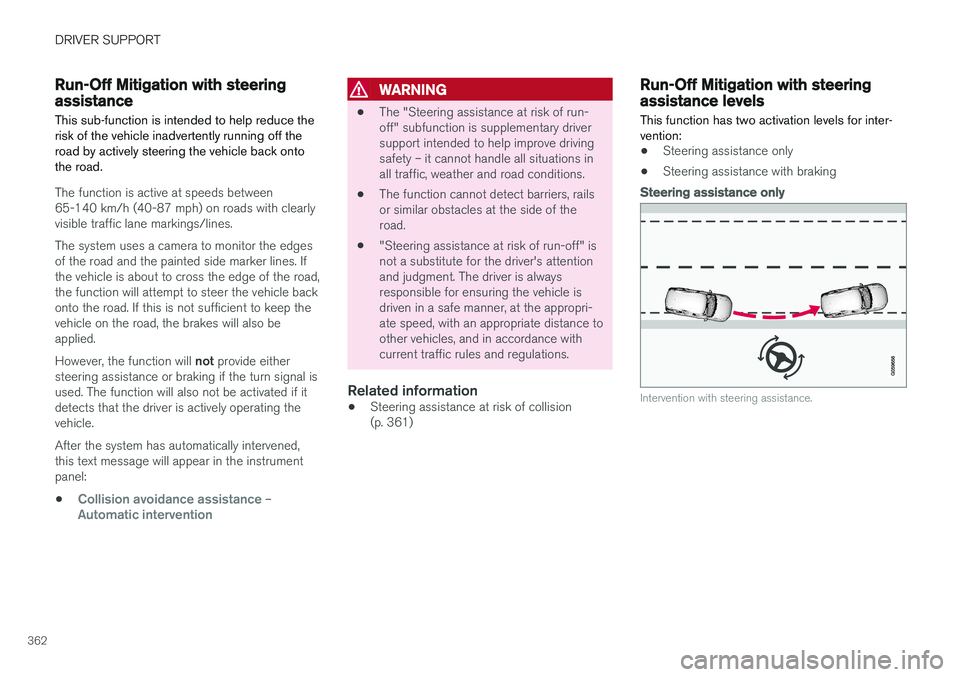
Steering assistance only
Intervention with steering assistance.
Page 366 of 640

||
DRIVER SUPPORT
364
NOTE
The function uses the vehicle's radar unit, which has some general limitations – see thesection "Radar unit limitations".
Related information
•Steering assistance at risk of collision (p. 361)
• Speed-dependent steering wheel resistance(p. 262)
Steering assistance during collisionrisks from oncoming traffic
This sub-function can help assist a distracted driver who has not noticed that the vehicle isveering into oncoming traffic.
The function provides assistance by swerving your vehi- cle back into your own lane.
Oncoming vehicles
Own vehicle
The function is active at speeds between 60-140 km/h (37-87 mph) on roads with clearlyvisible traffic lane markings/lines. If your vehicle is starting to veer from your own lane and a vehicle is approaching from the oppo- site direction, this function can help the driversteer the vehicle back into its own lane. However, the function will
not provide steering
assistance if the turn signal is used. The functionwill also not be activated if it detects that thedriver is actively operating the vehicle. After the system has automatically intervened, this text message will appear in the instrumentpanel:
•
Collision avoidance assistance –Automatic intervention
WARNING
• The "Steering assistance at risk of head- on collision" subfunction is supplemen-tary driver support intended to improvedriving safety – it cannot handle all situa-tions in all traffic, weather and road condi-tions.
• Pilot Assist is only activated if there is ahigh risk of collision – you must thereforenever wait for the function to intervene.
• The function is not a substitute for thedriver's attention and judgment. The driveris always responsible for ensuring thevehicle is driven in a safe manner, at theappropriate speed, with an appropriatedistance to other vehicles, and in accord-ance with current traffic rules and regula-tions.
Page 368 of 640

||
DRIVER SUPPORT
* Option/accessory.
366
NOTE
The function uses the vehicle's camera unit, which has some general limitations – see thesection "Camera unit limitations".
NOTE
The function uses the vehicle's radar unit, which has some general limitations – see thesection "Radar unit limitations".
Related information
• Steering assistance at risk of collision (p. 361)
• Speed-dependent steering wheel resistance(p. 262)
Steering assistance during collision
risks from behind
*
If you become distracted and do not notice your vehicle starting to veer out of the lane whileanother vehicle is approaching from behind or isin your vehicle's blind spot, this sub-function canhelp provide assistance.
The function provides assistance by steering your vehi- cle back into your own lane.
Another vehicle in blind spot zone
Own vehicle
If your vehicle is beginning to veer out of your lane while another vehicle is in your blind spot oranother vehicle is rapidly approaching in the next lane, this function can help the driver steer the vehicle back into its own lane. Even if the driver intentionally changes lanes using a turn signal without noticing another vehi- cle approaching, the function can provide assis-tance. The function is active at speeds between 60-140 km/h (37-87 mph) on roads with clearlyvisible traffic lane markings/lines. After the system has automatically intervened, this text message will appear in the instrumentpanel:
•
Collision avoidance assistance –Automatic intervention
WARNING
• The "Steering assistance at risk of rear- end collision" subfunction is supplemen-tary driver support intended to improvedriving safety – it cannot handle all situa-tions in all traffic, weather and road condi-tions.
• Pilot Assist is only activated if there is ahigh risk of collision – you must thereforenever wait for the function to intervene.
• The function is not a substitute for thedriver's attention and judgment. The driveris always responsible for ensuring thevehicle is driven in a safe manner, at theappropriate speed, with an appropriatedistance to other vehicles, and in accord-ance with current traffic rules and regula-tions.
Page 373 of 640

DRIVER SUPPORT
}}
371
Park Assist front, rear and sides
Park Assist has different parameters depending on which part of the vehicle is approaching anobstacle.
Back
Note: This illustration is general and details may vary depending on model.
The rear sensors will be activated if the vehicle begins rolling backward or if reverse gear isengaged. The distance monitored begins approx. 1.5 meters (5 feet) behind the vehicle. The rear sensors will be automatically deactivated if the vehicle is backing up with a trailer attached.
NOTE
When reversing with e.g. a trailer or bike car- rier on the trailer hitch – without Volvo originaltrailer cables – the Parking Assist system mayhave to be turned off manually to prevent thesensors from reacting to these.
Side sensors
Park Assist's side sensors are automatically acti- vated when the engine is started. They are activeat speeds below 10 km/h (6 mph). The distance monitored begins approx. 30 cm (1 ft) from the sides. The audible signal for obsta-cles along the sides of the vehicle is emittedfrom the side speakers.
Front camera
Note: This illustration is general and details may vary depending on model.
Park Assist's front sensors are automatically acti- vated when the engine is started. The front sen-sors are active at speeds below 10 km/h(6 mph). The distance monitored begins approx. 80 cm (2.5 ft) in front of the vehicle.
NOTE
The Parking Assist system is deactivated when the parking brake is applied or when P
is selected on vehicles with automatic trans- mission.
Page 388 of 640
||
DRIVER SUPPORT
386
NOTE
The distance between the vehicle and parking spots should be 0.5-1.5 meters (1.6-5.0 ft)when PAP is looking for parking.
ParkingPAP parks the vehicle using the following steps:
1. The system searches for and measurespotential parking spaces.
2. The vehicle is steered while it is backing into the parking space.
3. The vehicle is positioned in the parking space (the driver may be prompted to shift gears).
Searching for and measuring potential
parking spots
The function can be activated in the center display's Functionview. It can also be accessed from the camera views.
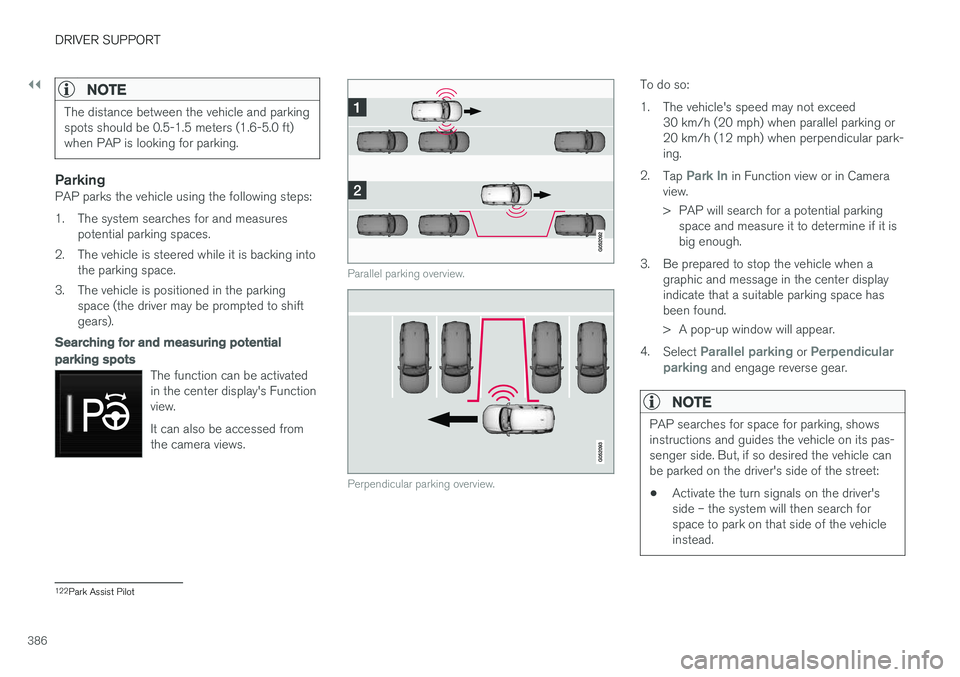
Parallel parking overview.
Perpendicular parking overview.
To do so:
1. The vehicle's speed may not exceed30 km/h (20 mph) when parallel parking or 20 km/h (12 mph) when perpendicular park-ing.
2. Tap
Park In in Function view or in Camera
view.
> PAP will search for a potential parking space and measure it to determine if it is big enough.
3. Be prepared to stop the vehicle when a graphic and message in the center displayindicate that a suitable parking space hasbeen found.
> A pop-up window will appear.
4. Select
Parallel parking or Perpendicular
parking and engage reverse gear.
NOTE
PAP searches for space for parking, shows instructions and guides the vehicle on its pas-senger side. But, if so desired the vehicle canbe parked on the driver's side of the street: • Activate the turn signals on the driver's side – the system will then search forspace to park on that side of the vehicleinstead.
122
Park Assist Pilot
Page 406 of 640
STARTING AND DRIVING
404
Parking on a hill
Always use the parking brake when parking on a hill.
WARNING
Always apply the parking brake when parking on an incline. Selecting a gear or putting the automatic transmission in P may not be suffi-
cient to keep the vehicle stationary in all sit- uations.
If the vehicle is pointing uphill: • Turn the front wheels so they are pointing away from
the curb.
If the vehicle is pointing downhill:
• Turn the front wheels so they are pointingtoward
the curb.
Heavy load uphill
Heavy loads, such as a trailer, could cause the vehicle to roll backward when the parking brakeis released automatically on steep uphill gradi-ents. To help avoid this, pull the control upwardwhile you are driving away. Release the controlwhen the vehicle gains traction.
Related information
•Activating and deactivating the parking brake(p. 402)
Parking brake malfunction
If you are unable to deactivate or activate the parking brake after several attempts, contact anauthorized Volvo workshop.
A audible warning signal will sound if the parking brake is applied while the vehicle is being driven. If the vehicle must be parked before the problem is rectified, turn the wheels as when parking on an incline and put the gear selector in P.
Low battery charge levelIf the battery charge level is too low, it will not be possible to apply or release the parking brake.Connect an auxiliary battery to the vehicle if thebattery is discharged.
Replacing brake padsDue to the design of the electric parking brake,the rear brake pads must be replaced by a work-shop. An authorized Volvo workshop is recom-mended.
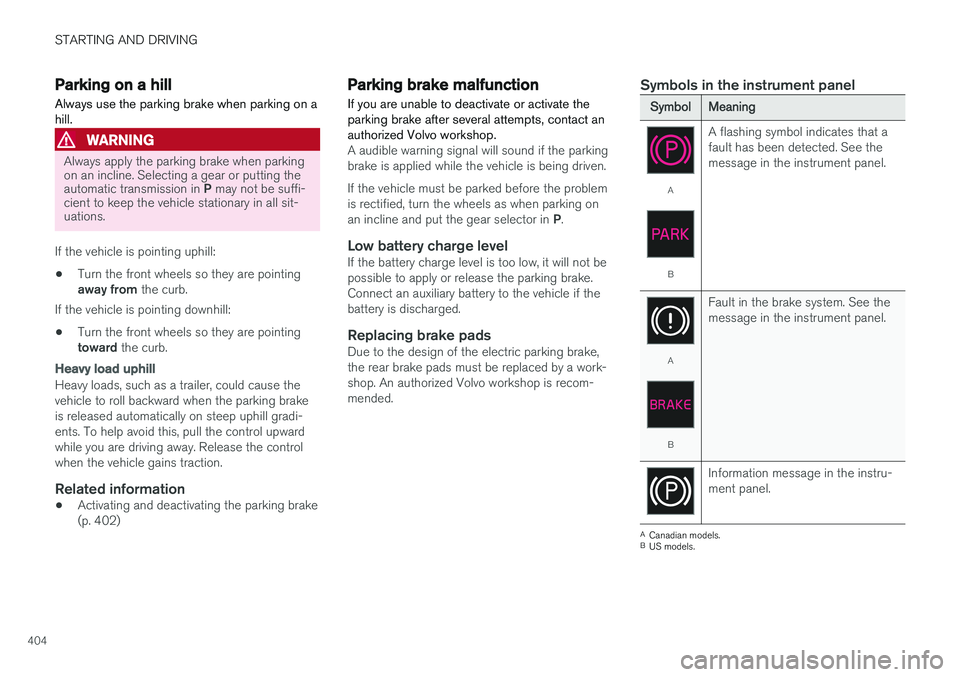
Symbols in the instrument panel
SymbolMeaning
A
B A flashing symbol indicates that a fault has been detected. See themessage in the instrument panel.
A
B
Fault in the brake system. See the message in the instrument panel.
Information message in the instru- ment panel.
A
Canadian models.
B US models.
Page 422 of 640
STARTING AND DRIVING
420
Conditions for the Start/Stopfunction Certain conditions must be met for Start/Stop to function.
If any condition is not met, this will be indicated in the instrument panel.
The engine does not auto-stopThe engine will not auto-stop if: •the vehicle has not reached a speed of ca 10 km/h (6 mph) after starting.
• after several auto-stops, the speed mustagain exceed approximately ca 10 km/h(6 mph) before the next auto-stop.
• the driver's seat belt is unbuckled.
• the start battery's charge is below the mini-mum level.
• the engine is not running at its normal oper-ating temperature.
• the ambient temperature is under approxi-mately -5 °C (23 °F) or over approximately30 °C (86 °F).
• windshield heating is activated.
• the climate system settings and the actualclimate in the passenger compartment differ.
• the vehicle is backing up.
• the start battery's temperature is above orbelow the permitted limits.
• the driver is turning the steering wheel hard. •
the road gradient is very steep.
• the hood is open.
• driving at high altitude and the engine hasnot reached its normal operating tempera-ture.
• ABS has been activated.
• hard braking (even if the ABS system hasnot been activated).
• many starts during a short period of timehave triggered the starter motor's overheat-ing protection.
• a trailer's electrical system is connected tothe vehicle's electrical system.
• the transmission is not running at its normaloperating temperature.
• The gear selector is in mode
M (±).
The engine does not auto-startThe engine will not auto-start after an auto-stopif: • the driver is not wearing a seat belt, the gear selector is in the
P position and the driver's
door is open. The engine must be started normally.
The engine auto-starts while the brake
pedal is depressed
In the following situations, the engine will auto-start even if the brake pedal is depressed: •
High levels of condensation on the inside ofthe windows.
• the climate system settings and the actualclimate in the passenger compartment differ.
• Electrical current consumption is temporarilyhigh or the start battery's charge is below theminimum level.
• The brake pedal is pumped repeatedly.
• The hood is open.
• The vehicle begins to roll or increases speedslightly if the engine auto-stopped before thevehicle was at a standstill.
• The driver's seat belt is unbuckled with the gear selector in the
D or N positions.
• The gear selector is moved from
D to R or M
( ± ).
• The driver's door is opened with the gearselector in
D. An audible signal and a text
message informs the driver that the ignition is on.
WARNING
Do not open the hood if the engine has auto- stopped. Turn off the engine by switching offthe ignition before lifting the hood.
Page 559 of 640
MAINTENANCE AND SERVICE
}}
557
Opening and closing the hood To open the hood, pull the lever in the passen- ger compartment and then turn the handle underthe hood.
Opening the hood
Pull the lever near the pedals to release the hood from its fully closed position.
Turn the handle under the front edge of the hood counterclockwise to release the catchand lift the hood.
Warning - hood not closedWhen the hood is released, a warningsymbol and graphic will be displayed inthe instrument panel and an audiblesignal will sound. If the vehicle begins
to roll, the audible signal will be repeated severaltimes.
NOTE
If the warning symbol is illuminated or an audible warning signal sounds even thoughthe hood is securely closed, consult a work-shop - an authorized Volvo workshop is rec-ommended.
Closing the hood1. Press down the hood until it begins to close under its own weight.
2. When the hood reaches the catch at the handle in the front edge of the vehicle, press down on the hood to close it completely.
WARNING
Risk of injury! When closing, make sure that the hood is completely unobstructed and thatno one can be injured.
WARNING
Make sure the hood locks securely after clos- ing. It must audibly lock on both sides.
Hood not completely closed. The illustration is generic - details may vary according to vehicle model.
Page 566 of 640
||
MAINTENANCE AND SERVICE
* Option/accessory.
564
CAUTION
Never touch the bulb glass with your bare fin- gers. Grease and oils from your fingers vapor-ize in the heat and will leave a deposit on thereflector, which may damage it.
NOTE
If the error message persists after the defec- tive bulb has been replaced, we recommend avisit to an authorized Volvo workshop.
NOTE
Exterior lighting such as headlights and tail- lights may develop temporary condensationon the inside of the lens. This is normal. Allexterior lighting is designed to resist this.Condensation is normally vented out of thelamp housing once the light has been lit forsome period of time.
NOTE
Bulbs for active curve lighting * contain traces
of mercury and should therefore always be submitted to a certified Volvo service techni-cian.
Related information
• Location of exterior lights (p. 565)
• Removing the plastic cover to replace bulbs (p. 564)
• Replacing the low beam headlight bulbs(p. 566)
• Replacing the high beam headlight bulbs(p. 567)
• Replacing daytime running lights/front park-ing light bulbs (p. 567)
• Replacing front turn signal bulbs (p. 568)
• Replacing the rear fog light bulb (p. 569)
• Bulb specifications (p. 572)
Removing the plastic cover toreplace bulbs
The headlight bulbs can be replaced without the assistance of a workshop, but before a bulb canbe replaced, the plastic cover over the headlightneeds to be removed.
–Release the pins in the plastic cover's four clips by pressing them down with a screw-driver or similar object and remove the cover-ing.
13 LED (Ligth Emitting Diode)
14 An authorized Volvo workshop is recommended.