ECO mode VOLVO V60 2012 Owner's Manual
[x] Cancel search | Manufacturer: VOLVO, Model Year: 2012, Model line: V60, Model: VOLVO V60 2012Pages: 400, PDF Size: 9.28 MB
Page 177 of 400
04 Comfort and driving pleasure
Adaptive cruise control*
04
* Option/accessory, for more information, see Introduction.175 General information on ACC
The adaptive cruise control (ACC – Adaptive
Cruise Control) helps the driver maintain a safe
distance from the vehicle ahead. The cruise
control provides a more relaxing driving expe-
rience on long journeys on motorways and long
straight main roads in smooth traffic flows.
The driver sets the desired speed and time
interval to the car in front. When the radar
detector detects a slower vehicle in front of the
car, the speed is automatically adapted to that.
When the road is clear again the car returns to
the selected speed.
If the adaptive cruise control is switched off or
set to the standby mode and the car comes too
close to a vehicle in front, then the driver is
warned by Distance Warning (see page 185)
about the short distance.WARNING
The driver must always be observant with
regard to the traffic conditions and intervene
when the adaptive cruise control is not
maintaining a suitable speed or suitable dis-
tance.
The adaptive cruise control cannot handle
all traffic, weather and road conditions.
Read the whole of this section for informa-
tion on the limitations of the adaptive cruise
control. The driver must be familiar with this
information before using the adaptive cruise
control.
The driver always bears responsibility for
maintaining the correct distance and speed,
even when the adaptive cruise control is
being used.
IMPORTANT
Maintenance of adaptive cruise control
components must only be performed at a
workshop - an authorised Volvo workshop
is recommended.
Automatic gearboxCars with automatic gearbox have enhanced
functionality with the adaptive cruise control's
Queue Assistant, see page 179.
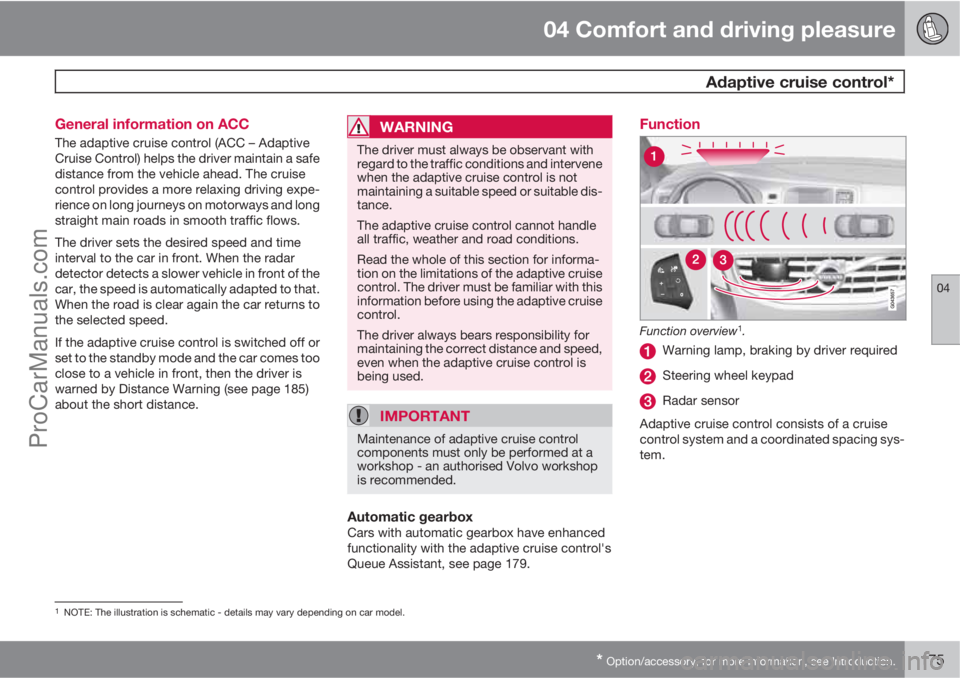
Function
Function overview1.
Warning lamp, braking by driver required
Steering wheel keypad
Radar sensor
Adaptive cruise control consists of a cruise
control system and a coordinated spacing sys-
tem.
1NOTE: The illustration is schematic - details may vary depending on car model.
ProCarManuals.com
Page 178 of 400
04 Comfort and driving pleasure
Adaptive cruise control*
04
176* Option/accessory, for more information, see Introduction.
WARNING
Adaptive cruise control is not a collision
avoidance system. The driver must inter-
vene if the system does not detect a vehicle
in front.
The adaptive cruise control does not brake
for humans or animals, and not for small
vehicles such as bicycles and motorcycles.
Nor for oncoming, slow or stationary vehi-
cles and objects.
Do not use the adaptive cruise control, for
example, in city traffic, in dense traffic, at
junctions, on slippery surfaces, with a lot of
water or slush on the road, in heavy rain/
snow, in poor visibility, on winding roads or
on slip roads.
The distance to the vehicle ahead is mainly
measured by a radar sensor. Cruise control
regulates the speed with acceleration and
braking. It is normal for the brakes to emit a low
sound when they are being used by cruise con-
trol.
WARNING
The brake pedal moves when the cruise
control brakes. Do not rest your foot under
the brake pedal as it could become trapped.
The adaptive cruise control aims to follow the
vehicle ahead in the same lane at a time interval
set by the driver. If the radar sensor cannot see
any vehicle in front then the car will instead
maintain the cruise control's set speed. This
also happens if the speed of the vehicle in front
exceeds the cruise control's set speed.
The cruise control aims to control the speed in
a smooth way. In situations that demand sud-
den braking the driver must brake himself/her-
self. This applies with large differences in
speed, or if the vehicle in front brakes heavily.
Due to limitations in the radar sensor, braking
may come unexpectedly or not at all, see
page 181.
The adaptive cruise control can be activated to
follow another vehicle at speeds from
30 km/h
2 up to 200 km/h. If the speed falls
below 30 km/h or if the engine speed becomes
too low, the cruise control is set in standby
mode at which automatic braking ceases - the
driver must then take over himself/herself to
maintain a safe distance to the vehicle ahead.
Warning lamp - braking by driver
required
Adaptive cruise control has a braking capacity
that is equivalent to more than 40% of the car's
braking capacity.If the car needs to be braked more heavily than
cruise control capacity and the driver does not
brake, then the cruise control uses the collision
warning system's warning lamp and warning
sound (see page 193) to alert the driver that
immediate intervention is required.
NOTE
The warning lamp may be difficult to notice
in strong sunlight or when sunglasses are
being worn.
WARNING
Cruise control only warns of vehicles
detected by the radar sensor. Consequently
there may be no warning or it may be sub-
ject to a delay. Do not wait for a warning but
brake when it is necessary.
Steep roads and/or heavy loadBear in mind that the adaptive cruise control is
primarily intended for use when driving on level
road surfaces. The cruise control may have dif-
ficultly in keeping the correct distance from the
vehicle ahead when driving on steep roads,
with a heavy load or with a trailer - in which
case, be extra attentive and ready to slow
down.
2Queue Assistant (in cars with automatic gearbox) can operate in the range of 0-200 km/h, see page 179.
ProCarManuals.com
Page 180 of 400
04 Comfort and driving pleasure
Adaptive cruise control*
04
178* Option/accessory, for more information, see Introduction.
Changing the speedIn active mode the speed is adjusted 5 km/h
with each press on
or . In active mode
the button
has the same function as but
results in a lower increase in speed. The last
press is stored in the memory.
NOTE
If any cruise control button is held
depressed for more than approx. 1 minute
then cruise control is disengaged. The
engine must be switched off in order to reset
cruise control.
In certain situations, cruise control cannot
be activated. Then the display shows
Cruise control Unavailable, see
page 183.
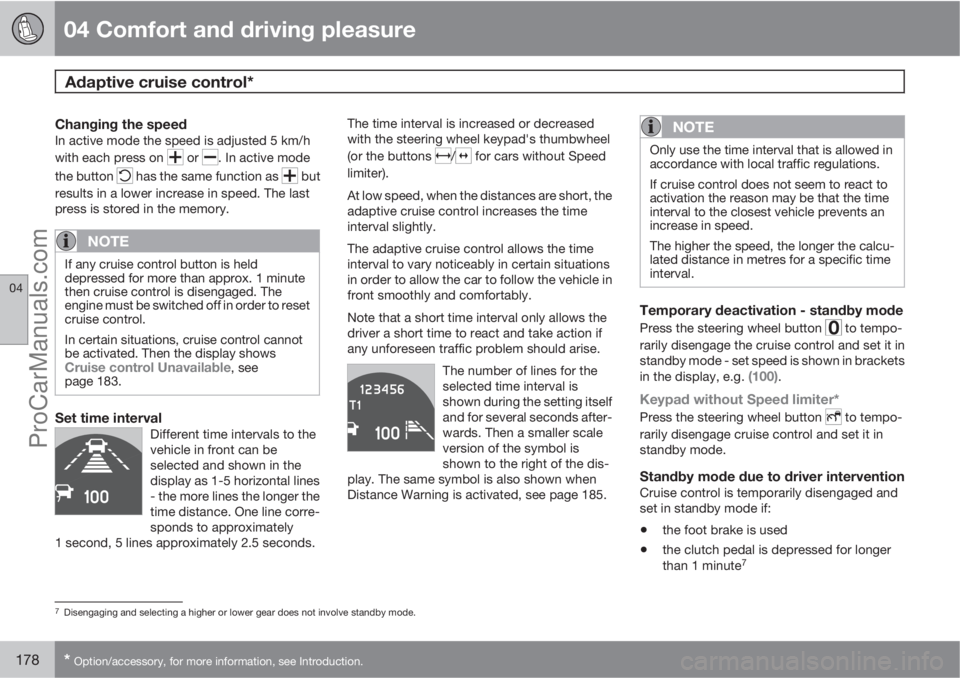
Set time intervalDifferent time intervals to the
vehicle in front can be
selected and shown in the
display as 1-5 horizontal lines
- the more lines the longer the
time distance. One line corre-
sponds to approximately
1 second, 5 lines approximately 2.5 seconds.
The time interval is increased or decreased
with the steering wheel keypad's thumbwheel
(or the buttons
/ for cars without Speed
limiter).
At low speed, when the distances are short, the
adaptive cruise control increases the time
interval slightly.
The adaptive cruise control allows the time
interval to vary noticeably in certain situations
in order to allow the car to follow the vehicle in
front smoothly and comfortably.
Note that a short time interval only allows the
driver a short time to react and take action if
any unforeseen traffic problem should arise.
The number of lines for the
selected time interval is
shown during the setting itself
and for several seconds after-
wards. Then a smaller scale
version of the symbol is
shown to the right of the dis-
play. The same symbol is also shown when
Distance Warning is activated, see page 185.
NOTE
Only use the time interval that is allowed in
accordance with local traffic regulations.
If cruise control does not seem to react to
activation the reason may be that the time
interval to the closest vehicle prevents an
increase in speed.
The higher the speed, the longer the calcu-
lated distance in metres for a specific time
interval.
Temporary deactivation - standby mode
Press the steering wheel button to tempo-
rarily disengage the cruise control and set it in
standby mode - set speed is shown in brackets
in the display, e.g.
(100).
Keypad without Speed limiter*
Press the steering wheel button to tempo-
rarily disengage cruise control and set it in
standby mode.
Standby mode due to driver interventionCruise control is temporarily disengaged and
set in standby mode if:
•the foot brake is used
•the clutch pedal is depressed for longer
than 1 minute7
7Disengaging and selecting a higher or lower gear does not involve standby mode.
ProCarManuals.com
Page 182 of 400
04 Comfort and driving pleasure
Adaptive cruise control*
04
180* Option/accessory, for more information, see Introduction.
NOTE
Activation of the cruise control below
30 km/h requires a vehicle in front within a
reasonable distance.
For shorter stops in connection with inching in
slow traffic or at traffic lights driving is auto-
matically resumed if the stops do not exceed
about 3 seconds - if it takes longer before the
car in front starts moving again then the cruise
control is set in standby mode. The driver must
then re-activate the cruise control in one of the
following ways:
•Press the steering wheel button .
or
•Press the accelerator pedal and accelerate
up to at least about 4 km/h (normal walking
pace).
The cruise control will then resume following
the vehicle in front.
NOTE
The cruise control can hold the car station-
ary for a maximum of 2 minutes - then the
parking brake is applied and the cruise con-
trol is disengaged.
•The driver has to release the parking
brake before the cruise control can be
reactivated.
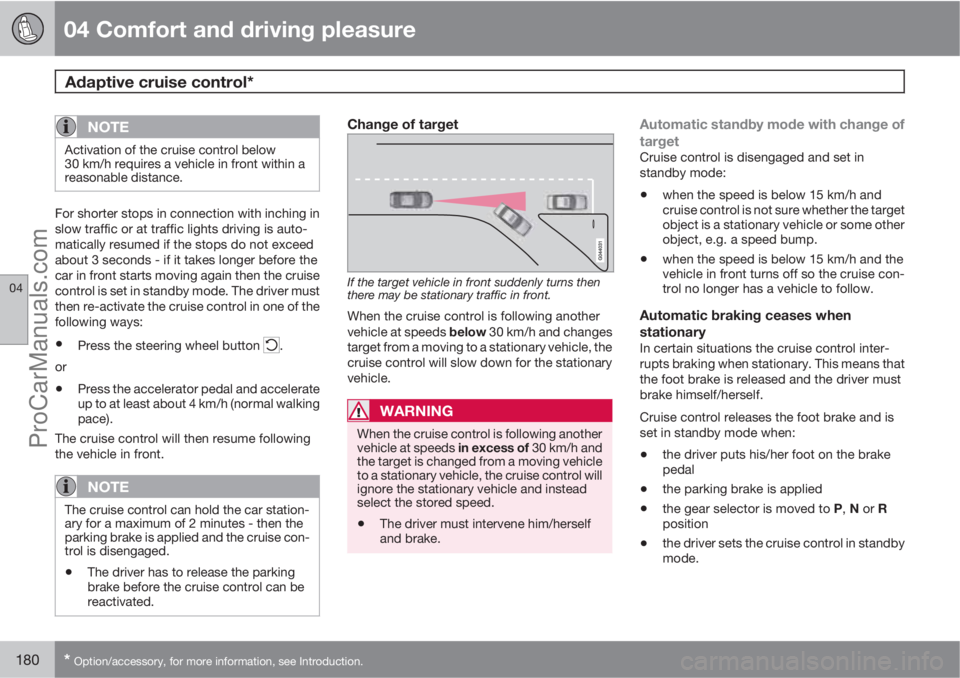
Change of target
If the target vehicle in front suddenly turns then
there may be stationary traffic in front.
When the cruise control is following another
vehicle at speeds below 30 km/h and changes
target from a moving to a stationary vehicle, the
cruise control will slow down for the stationary
vehicle.
WARNING
When the cruise control is following another
vehicle at speeds in excess of 30 km/h and
the target is changed from a moving vehicle
to a stationary vehicle, the cruise control will
ignore the stationary vehicle and instead
select the stored speed.
•The driver must intervene him/herself
and brake.
Automatic standby mode with change of
target
Cruise control is disengaged and set in
standby mode:
•when the speed is below 15 km/h and
cruise control is not sure whether the target
object is a stationary vehicle or some other
object, e.g. a speed bump.
•when the speed is below 15 km/h and the
vehicle in front turns off so the cruise con-
trol no longer has a vehicle to follow.
Automatic braking ceases when
stationary
In certain situations the cruise control inter-
rupts braking when stationary. This means that
the foot brake is released and the driver must
brake himself/herself.
Cruise control releases the foot brake and is
set in standby mode when:
•the driver puts his/her foot on the brake
pedal
•the parking brake is applied
•the gear selector is moved to P, N or R
position
•the driver sets the cruise control in standby
mode.
ProCarManuals.com
Page 183 of 400
04 Comfort and driving pleasure
Adaptive cruise control*
04
* Option/accessory, for more information, see Introduction.181
Automatic activation parking brakeIn some situations the cruise control applies
the parking brake in order to keep a stationary
car remaining stationary.
This takes place if:
•the driver opens the door or takes off his/
her seatbelt
•DSTC is changed from Normal to Sport
mode
•cruise control has held the car stationary
for more than 2 minutes
•the engine is switched off
•the brakes have overheated.
The radar sensor and its limitations
Apart from the adaptive cruise control, the
radar sensor is also used by the Collision
Warning with Auto Brake function (see
page 192) and the Distance Warning function
(see page 185). The function of the radar sen-
sor is to detect cars or larger vehicles in the
same direction, in the same lane.
Modification of the radar sensor could result in
it being illegal to use.
WARNING
The driver must always be observant with
regard to the traffic conditions and intervene
when the adaptive cruise control is not
maintaining a suitable speed or suitable dis-
tance.
The adaptive cruise control cannot handle
all traffic, weather and road conditions.
Read the whole of this section for informa-
tion on the limitations of the adaptive cruise
control. The driver must be familiar with this
information before using the adaptive cruise
control.
The driver always bears responsibility for
maintaining the correct distance and speed,
even when the adaptive cruise control is
being used.
WARNING
Accessories or other objects such as auxil-
iary lamps must not be installed in front of
the grille.
WARNING
Adaptive cruise control is not a collision
avoidance system. The driver must inter-
vene if the system does not detect a vehicle
in front.
The adaptive cruise control does not brake
for humans or animals, and not for small
vehicles such as bicycles and motorcycles.
Nor for oncoming, slow or stationary vehi-
cles and objects.
Do not use the adaptive cruise control, for
example, in city traffic, in dense traffic, at
junctions, on slippery surfaces, with a lot of
water or slush on the road, in heavy rain/
snow, in poor visibility, on winding roads or
on slip roads.
The capacity of the radar sensor to detect vehi-
cles in front is reduced significantly:
•if the radar sensor becomes blocked and
cannot detect other vehicles e.g. in heavy
rain or slush, or if other objects have col-
lected in front of the radar sensor.
NOTE
Keep the surface in front of the radar sensor
clean.
•if the speed of vehicles in front is signifi-
cantly different from your own speed.
ProCarManuals.com
Page 190 of 400
04 Comfort and driving pleasure
City Safety™
04
188* Option/accessory, for more information, see Introduction.
General
City Safety™ is a function for helping the driver
to avoid a collision when driving in queues,
amongst other things, when changes in the
traffic ahead, combined with a lapse in atten-
tion, could lead to an incident.
The function is active at speeds below
30 km/h and it helps the driver by automatically
braking the car in the event of imminent risk of
collision with vehicles in front, should the driver
not react in time by braking and/or steering
away.
City Safety™ is activated in situations where
the driver should have started braking earlier,
which is why it cannot help the driver in every
situation.
City Safety™ is designed to be activated as
late as possible in order to avoid unnecessary
intervention.
City Safety™ must not be used as an excuse
for the driver to change his/her driving style. If
the driver solely relies on City Safety™ to do
the braking, there will be a collision sooner or
later.
The driver or passengers normally only notice
City Safety™ if a situation arises where the car
is extremely close to being in a collision.If the car is also equipped with a Collision
Warning function with Auto Brake*, these two
systems complement each other. For more
information on Collision Warning function with
Auto Brake, see page 192.
IMPORTANT
Maintenance and replacement of City
Safety™ components must only be per-
formed by a workshop - an authorised Volvo
workshop is recommended.
WARNING
City Safety™ does not engage in all driving
situations or traffic, weather or road condi-
tions.
City Safety™ does not react to vehicles
driving in a different direction from the car,
to small vehicles, motorcycles and bicycles
or to humans and animals.
City Safety™ can prevent collision at a
speed difference of less than 15 km/h - at a
higher speed difference, it is only possible
to reduce collision speed. In order to obtain
full brake function, the driver must depress
the brake pedal.
Never wait for City Safety™ to engage. The
driver always bears responsibility for main-
taining the proper distance and speed.
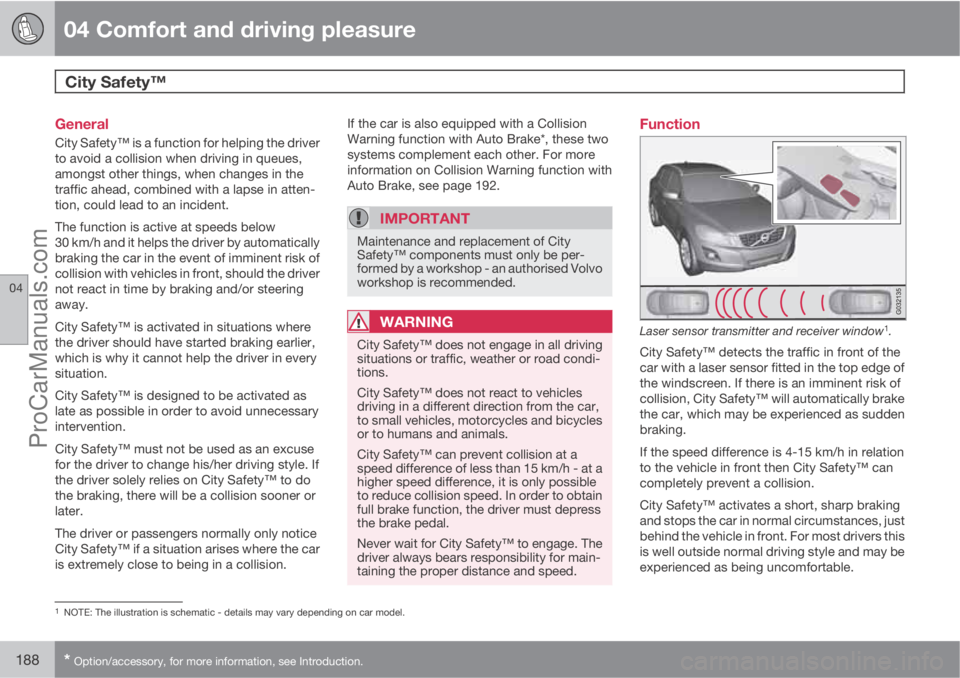
Function
Laser sensor transmitter and receiver window1.
City Safety™ detects the traffic in front of the
car with a laser sensor fitted in the top edge of
the windscreen. If there is an imminent risk of
collision, City Safety™ will automatically brake
the car, which may be experienced as sudden
braking.
If the speed difference is 4-15 km/h in relation
to the vehicle in front then City Safety™ can
completely prevent a collision.
City Safety™ activates a short, sharp braking
and stops the car in normal circumstances, just
behind the vehicle in front. For most drivers this
is well outside normal driving style and may be
experienced as being uncomfortable.
1NOTE: The illustration is schematic - details may vary depending on car model.
ProCarManuals.com
Page 201 of 400
04 Comfort and driving pleasure
Driver Alert System – DAC*
04
* Option/accessory, for more information, see Introduction.199 General information on Driver Alert
System
The Driver Alert System is intended to assist
drivers whose driving ability is deteriorating or
who are inadvertently leaving the lane they are
driving on.
The Driver Alert System consists of two differ-
ent functions, which can either be switched on
at the same time or individually:
•Driver Alert Control (DAC)
•Lane Departure Warning (LDW), see
page 202.
A switched-on function is set in standby mode
and is not activated automatically until speed
exceeds 65 km/h.
The function is deactivated again when speed
decreases to below 60 km/h.
Both functions use a camera which is depend-
ent on the lane having side markings painted
on each side.
WARNING
The Driver Alert System does not work in all
situations but is instead only intended to be
of supplementary assistance.
The driver always has ultimate responsibility
that the car is driven safely.
General information on Driver Alert
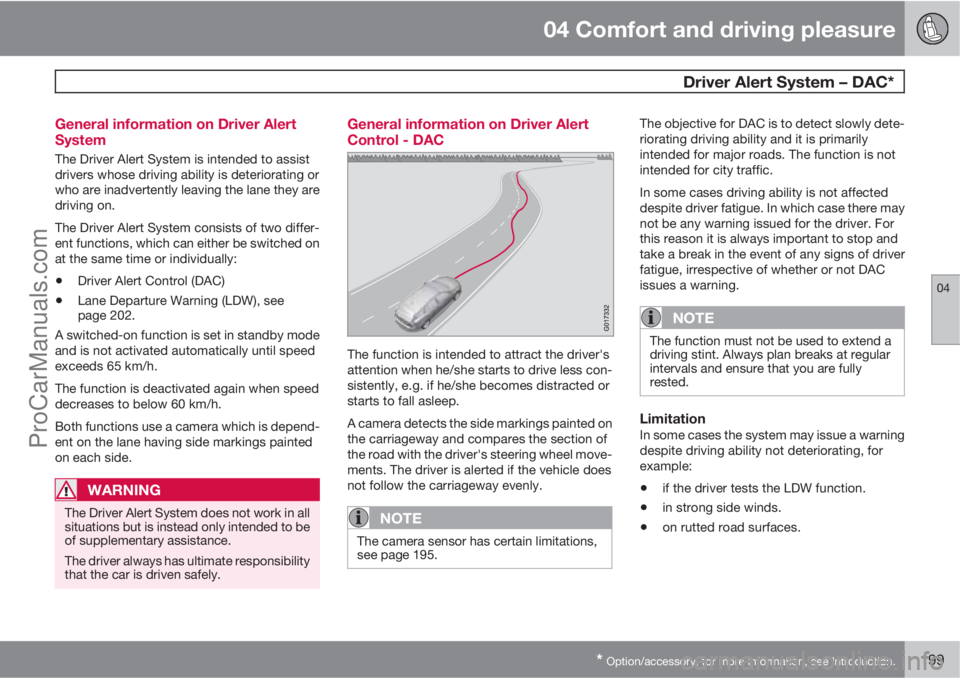
Control - DAC
The function is intended to attract the driver's
attention when he/she starts to drive less con-
sistently, e.g. if he/she becomes distracted or
starts to fall asleep.
A camera detects the side markings painted on
the carriageway and compares the section of
the road with the driver's steering wheel move-
ments. The driver is alerted if the vehicle does
not follow the carriageway evenly.
NOTE
The camera sensor has certain limitations,
see page 195.
The objective for DAC is to detect slowly dete-
riorating driving ability and it is primarily
intended for major roads. The function is not
intended for city traffic.
In some cases driving ability is not affected
despite driver fatigue. In which case there may
not be any warning issued for the driver. For
this reason it is always important to stop and
take a break in the event of any signs of driver
fatigue, irrespective of whether or not DAC
issues a warning.
NOTE
The function must not be used to extend a
driving stint. Always plan breaks at regular
intervals and ensure that you are fully
rested.
LimitationIn some cases the system may issue a warning
despite driving ability not deteriorating, for
example:
•if the driver tests the LDW function.
•in strong side winds.
•on rutted road surfaces.
ProCarManuals.com
Page 202 of 400
04 Comfort and driving pleasure
Driver Alert System – DAC*
04
200* Option/accessory, for more information, see Introduction.
Operation
Some settings are made from the centre con-
sole display screen and its menu system. For
information on how the menu system is used,
see page 144.
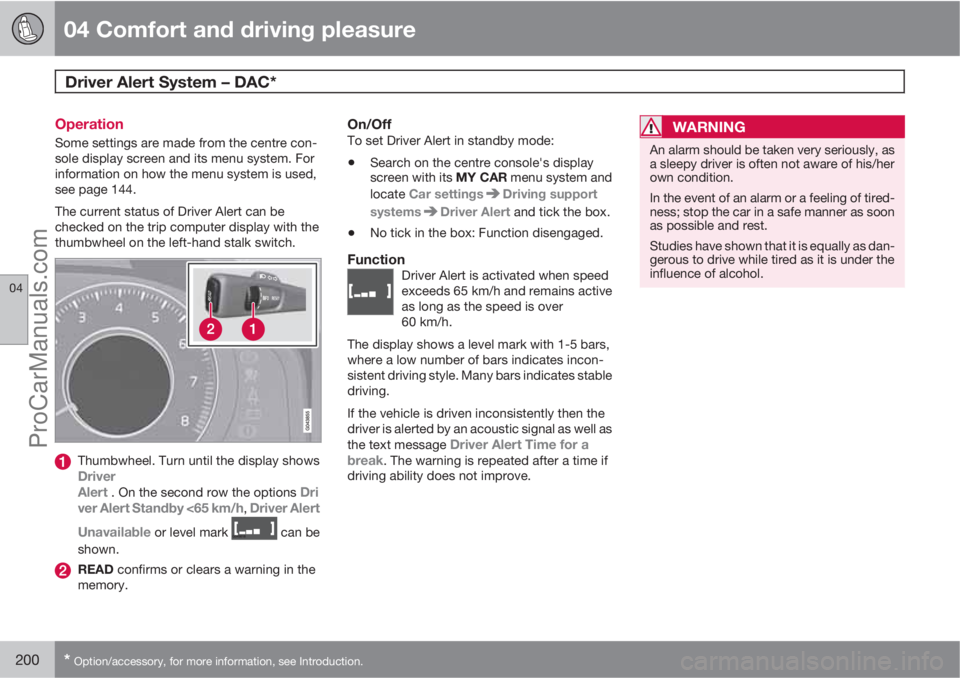
The current status of Driver Alert can be
checked on the trip computer display with the
thumbwheel on the left-hand stalk switch.
Thumbwheel. Turn until the display showsDriver
Alert . On the second row the options Dri
ver Alert Standby <65 km/h, Driver Alert
Unavailable
or level mark can be
shown.
READ confirms or clears a warning in the
memory.
On/OffTo set Driver Alert in standby mode:
•Search on the centre console's display
screen with its MY CAR menu system and
locate Car settings
Driving support
systems
Driver Alert and tick the box.
•No tick in the box: Function disengaged.
FunctionDriver Alert is activated when speed
exceeds 65 km/h and remains active
as long as the speed is over
60 km/h.
The display shows a level mark with 1-5 bars,
where a low number of bars indicates incon-
sistent driving style. Many bars indicates stable
driving.
If the vehicle is driven inconsistently then the
driver is alerted by an acoustic signal as well as
the text message
Driver Alert Time for a
break. The warning is repeated after a time if
driving ability does not improve.
WARNING
An alarm should be taken very seriously, as
a sleepy driver is often not aware of his/her
own condition.
In the event of an alarm or a feeling of tired-
ness; stop the car in a safe manner as soon
as possible and rest.
Studies have shown that it is equally as dan-
gerous to drive while tired as it is under the
influence of alcohol.
ProCarManuals.com
Page 203 of 400
04 Comfort and driving pleasure
Driver Alert System – DAC*
04
* Option/accessory, for more information, see Introduction.201 Symbols and messages in the display
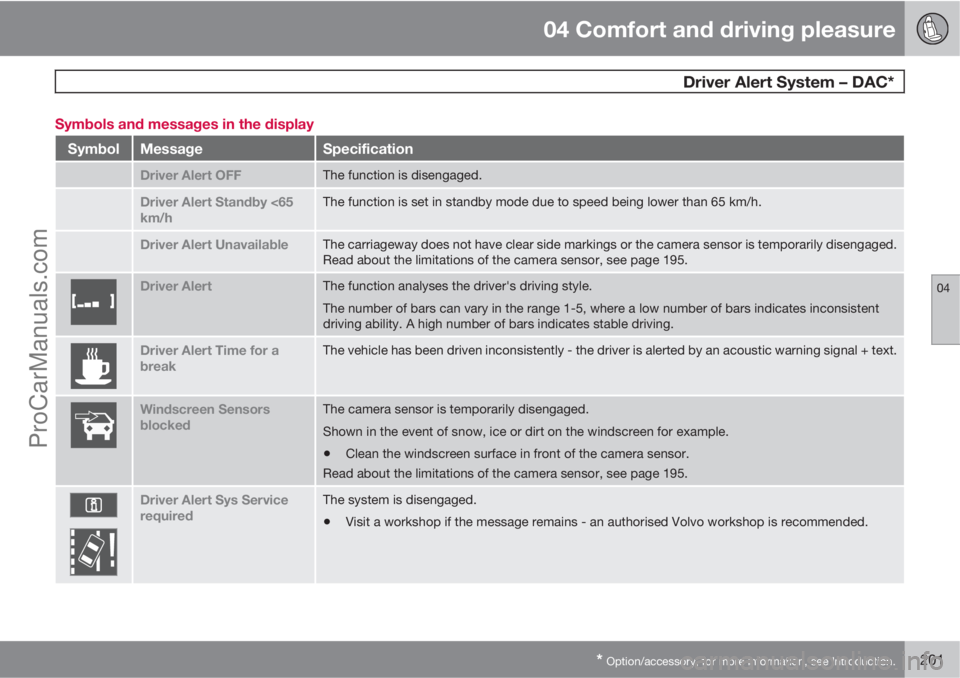
SymbolMessageSpecification
Driver Alert OFFThe function is disengaged.
Driver Alert Standby <65
km/hThe function is set in standby mode due to speed being lower than 65 km/h.
Driver Alert UnavailableThe carriageway does not have clear side markings or the camera sensor is temporarily disengaged.
Read about the limitations of the camera sensor, see page 195.
Driver AlertThe function analyses the driver's driving style.
The number of bars can vary in the range 1-5, where a low number of bars indicates inconsistent
driving ability. A high number of bars indicates stable driving.
Driver Alert Time for a
breakThe vehicle has been driven inconsistently - the driver is alerted by an acoustic warning signal + text.
Windscreen Sensors
blockedThe camera sensor is temporarily disengaged.
Shown in the event of snow, ice or dirt on the windscreen for example.
•Clean the windscreen surface in front of the camera sensor.
Read about the limitations of the camera sensor, see page 195.
Driver Alert Sys Service
requiredThe system is disengaged.
•Visit a workshop if the message remains - an authorised Volvo workshop is recommended.
ProCarManuals.com
Page 205 of 400
04 Comfort and driving pleasure
Driver Alert System - LDW*
04
* Option/accessory, for more information, see Introduction.203
NOTE
The driver is only warned once each time the
wheels cross a line. So there is no acoustic
alarm when there is a line between the car's
wheels.
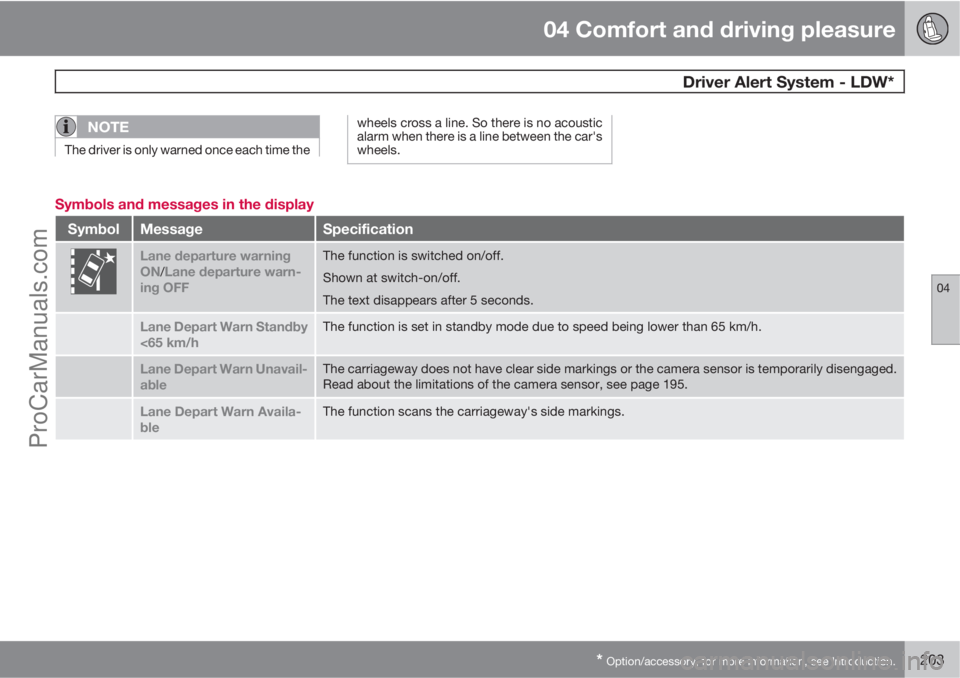
Symbols and messages in the display
SymbolMessageSpecification
Lane departure warning
ON/Lane departure warn-
ing OFF
The function is switched on/off.
Shown at switch-on/off.
The text disappears after 5 seconds.
Lane Depart Warn Standby
<65 km/hThe function is set in standby mode due to speed being lower than 65 km/h.
Lane Depart Warn Unavail-
ableThe carriageway does not have clear side markings or the camera sensor is temporarily disengaged.
Read about the limitations of the camera sensor, see page 195.
Lane Depart Warn Availa-
bleThe function scans the carriageway's side markings.
ProCarManuals.com