gearbox VOLVO V60 2014 User Guide
[x] Cancel search | Manufacturer: VOLVO, Model Year: 2014, Model line: V60, Model: VOLVO V60 2014Pages: 442, PDF Size: 13.85 MB
Page 189 of 442
07 Driver support
07
* Option/accessory, for more information, see Introduction.187
•
the clutch pedal is held depressed for a short time - however, a few seconds does not activate standby mode 5
• the gear selector is moved to neutral position (automatic gearbox)
• the driver maintains a speed higher thanthe set speed for longer than 1 minute.
The driver must then regulate the speed.
Related information
• Cruise control* (p. 185)
• Cruise control* - managing speed (p. 186)
• Cruise control* - resume set speed (p.187)
• Cruise control* - deactivate (p. 187)
Cruise control* - resume set speed
The cruise control (CC – Cruise Control) helps the driver to maintain an even speed. Aftertemporary deactivation and standby mode (p.186) it is possible to resume the set speed. To reactivate the cruise control from standby mode: •
Press the steering wheel button
.
> The combined instrument panel's mark- ing (5) and symbol (6) change colour from GREY to WHITE and the speed is thenset to the last speed stored.
NOTE
A marked speed increase may occur once the speed has been resumed by selecting
.
Related information
• Cruise control* (p. 185)
• Cruise control* - managing speed (p. 186)
• Cruise control* temporary deactivation and standby mode (p. 186)
• Cruise control* - deactivate (p. 187)
Cruise control* - deactivate
The cruise control (CC – Cruise Control) helps the driver to maintain an even speed. How itis deactivated is described here. The cruise control is deactivated with a steer- ing wheel button (1) or by switching off theengine - the set speed is deleted from the memory and cannot be resumed with the
button.
Related information
•
Cruise control* (p. 185)
• Cruise control* - managing speed (p. 186)
• Cruise control* temporary deactivation and standby mode (p. 186)
• Cruise control* - resume set speed (p.187)
5
Cars with 4-cyl 2.0L engine also allow gear changing.
ProCarManuals.co’
Page 190 of 442
07 Driver support
07
188* Option/accessory, for more information, see Introduction.
Adaptive cruise control - ACC*
The adaptive cruise control (ACC – Adaptive Cruise Control) helps the driver to maintain aneven speed and a safe distance from the vehi-cle ahead. The adaptive cruise control provides a more relaxing driving experience on long journeyson motorways and long straight main roads insmooth traffic flows. The driver sets the desired speed (p. 191) and time interval (p. 192) to the car in front.When the radar detector detects a slowervehicle in front of the car, the speed is auto-matically adapted to that. When the road isclear again the car returns to the selectedspeed. If the adaptive cruise control is switched off or set to standby mode (p. 193) and the carcomes too close to a vehicle in front, then thedriver is warned instead by the DistanceWarning (p. 202) function about the shortdistance.WARNING
The driver must always be observant with regard to the traffic conditions and inter-vene when the adaptive cruise control isnot maintaining a suitable speed or suita-ble distance. The adaptive cruise control cannot handle all traffic, weather and road conditions. Read all the sections about the adaptive cruise control in the owner's manual inorder to learn about its limitations, ofwhich the driver should be aware before itis used. The driver always bears responsibility for maintaining the correct distance andspeed, even when the adaptive cruise con-trol is being used.
IMPORTANT
Maintenance of adaptive cruise control components must only be performed at aworkshop - an authorised Volvo workshopis recommended.
Automatic gearboxCars with automatic gearbox have enhanced functionality with the adaptive cruise control'sQueue Assist (p. 195).
Related information
• Adaptive cruise control* - overview (p. 190)
• Adaptive cruise control* - function (p.189)
• Adaptive cruise control* - fault tracingand action (p. 199)
• Adaptive cruise control* - symbols andmessages (p. 200)
ProCarManuals.co’
Page 191 of 442
07 Driver support
07
}}
* Option/accessory, for more information, see Introduction.189
Adaptive cruise control* - function
The adaptive cruise control (ACC – Adaptive Cruise Control) helps the driver to maintain aneven speed and a safe distance from the vehi-cle ahead. It consists of a cruise control sys-tem and a coordinated spacing system.
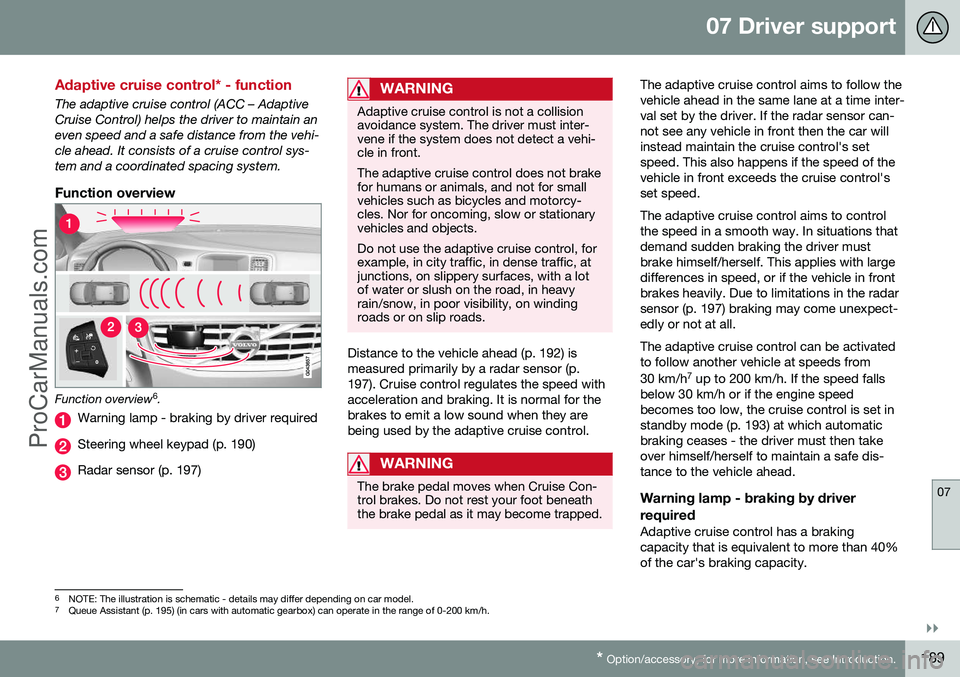
Function overview
Function overview 6
.
Warning lamp - braking by driver required
Steering wheel keypad (p. 190)
Radar sensor (p. 197)
WARNING
Adaptive cruise control is not a collision avoidance system. The driver must inter-vene if the system does not detect a vehi-cle in front. The adaptive cruise control does not brake for humans or animals, and not for smallvehicles such as bicycles and motorcy-cles. Nor for oncoming, slow or stationaryvehicles and objects. Do not use the adaptive cruise control, for example, in city traffic, in dense traffic, atjunctions, on slippery surfaces, with a lotof water or slush on the road, in heavyrain/snow, in poor visibility, on windingroads or on slip roads.
Distance to the vehicle ahead (p. 192) is measured primarily by a radar sensor (p.197). Cruise control regulates the speed withacceleration and braking. It is normal for thebrakes to emit a low sound when they arebeing used by the adaptive cruise control.
WARNING
The brake pedal moves when Cruise Con- trol brakes. Do not rest your foot beneaththe brake pedal as it may become trapped.
The adaptive cruise control aims to follow the vehicle ahead in the same lane at a time inter-val set by the driver. If the radar sensor can-not see any vehicle in front then the car willinstead maintain the cruise control's setspeed. This also happens if the speed of thevehicle in front exceeds the cruise control'sset speed. The adaptive cruise control aims to control the speed in a smooth way. In situations thatdemand sudden braking the driver mustbrake himself/herself. This applies with largedifferences in speed, or if the vehicle in frontbrakes heavily. Due to limitations in the radarsensor (p. 197) braking may come unexpect-edly or not at all. The adaptive cruise control can be activated to follow another vehicle at speeds from 30 km/h 7
up to 200 km/h. If the speed falls
below 30 km/h or if the engine speed becomes too low, the cruise control is set instandby mode (p. 193) at which automaticbraking ceases - the driver must then takeover himself/herself to maintain a safe dis-tance to the vehicle ahead.
Warning lamp - braking by driver required
Adaptive cruise control has a braking capacity that is equivalent to more than 40%of the car's braking capacity.
6 NOTE: The illustration is schematic - details may differ depending on car model.
7 Queue Assistant (p. 195) (in cars with automatic gearbox) can operate in the range of 0-200 km/h.
ProCarManuals.co’
Page 195 of 442
07 Driver support
07
* Option/accessory, for more information, see Introduction.193
The same symbol is also shown when Dis- tance Warning (p. 202) function is activated.
NOTE
Only use the time intervals permitted by local traffic regulations. If Cruise Control does not appear to react when activated, this may be because thetime distance to the car in front is prevent-ing an increase in speed. The higher the speed the longer the calcu- lated distance in metres for a given timeinterval.
Related information
•
Adaptive cruise control - ACC* (p. 188)
• Adaptive cruise control* - overview (p. 190)
• Adaptive cruise control* - function (p.189)
• Adaptive cruise control* - deactivate (p.194)
Adaptive cruise control* - temporary deactivation, and standby mode
The adaptive cruise control (ACC – Adaptive Cruise Control) helps the driver to maintain aneven speed and a safe distance from the vehi-cle ahead. The cruise control can be tempo-rarily deactivated and set in standby mode.
Temporary deactivation - standby mode
with Speed limiter
To temporarily disengage the adaptive cruisecontrol and set it in standby mode:
• Press the steering wheel button
This symbol and the stored speed's marking then change colour fromGREEN to WHITE.
Temporary deactivation - standby mode without Speed limiter
To temporarily disengage the adaptive cruise control and set it in standby mode:
• Press the steering wheel button
Standby mode due to driver interventionCruise control is temporarily disengaged and set in standby mode if:
• the foot brake is used
• the clutch pedal is depressed for longer than 1 minute 9 •
the gear selector is moved to
N position
(automatic gearbox)
• the driver maintains a speed higher than the set speed for longer than 1 minute.
The driver must then regulate the speed. A temporary increase in speed with the accel- erator pedal, e.g. during overtaking, does notaffect the cruise control setting - the carreturns to the last stored speed when theaccelerator pedal is released.
Automatic standby modeThe adaptive cruise control is dependent onother systems, e.g. DSTC (Stability and trac-tion control system) (p. 175). If any of thesesystems stop working then cruise control isautomatically deactivated. In the event of automatic deactivation a signal will sound and the message
Cruise control
Cancelled is shown in the combined instru-
ment panel. The driver must then intervene and adapt the speed and distance to thevehicle ahead. An automatic deactivation can be due to:
• the driver opens the door
• the driver takes off his seatbelt
• engine speed is too low/high
• speed has fallen below 30 km/h 10
9
Disengaging and selecting a higher or lower gear does not involve standby mode.
10 Does not apply to a car with Queue Assistant - it manages right down to stationary.
ProCarManuals.co’
Page 197 of 442
07 Driver support
07
}}
* Option/accessory, for more information, see Introduction.195
Adaptive Cruise Control* - Queue Assist
The adaptive cruise control (ACC – Adaptive Cruise Control) helps the driver to maintain aneven speed and a safe distance from the vehi-cle ahead. Queue Assist also provides theAdaptive Cruise Control with enhanced func-tionality at speeds below 30 km/h.. In cars with automatic gearbox the adaptive cruise control is supplemented with theQueue Assist function (also referred to as"Queue Assist"). Queue Assistant has the following functions:
• Extended speed range - also below 30 km/h and when stationary
• Change of target
• Automatic braking ceases when station-ary
• Automatic activation parking brake.
Note that the lowest programmable speed for the adaptive cruise control is 30 km/h - eventhough it is capable of following another vehi-cle down to a standstill, a lower speed can-
not be selected.
Extended speed range
NOTE
In order to activate the cruise control the driver's door must be closed and the drivermust be wearing the seatbelt.
With an automatic gearbox, the adaptive cruise control can follow another vehiclewithin the range 0-200 km/h.
NOTE
Activation of the cruise control below 30 km/h requires a vehicle in front within areasonable distance.
For shorter stops in connection with inching in slow traffic or at traffic lights driving isautomatically resumed if the stops do notexceed about 3 seconds - if it takes longerbefore the car in front starts moving againthen the Adaptive cruise control is set instandby mode with automatic braking. Thedriver must then reactivate it in one of the fol-lowing ways:
• Press the steering wheel button
.
or
• Depress the accelerator pedal.
> The cruise control will then resume fol- lowing the vehicle in front.
NOTE
Queue Assist can hold the car stationary for a maximum of 4 minutes - then theparking brake is applied and Cruise Con-trol is disengaged.
• The driver has to release the parking brake before the cruise control can bereactivated.
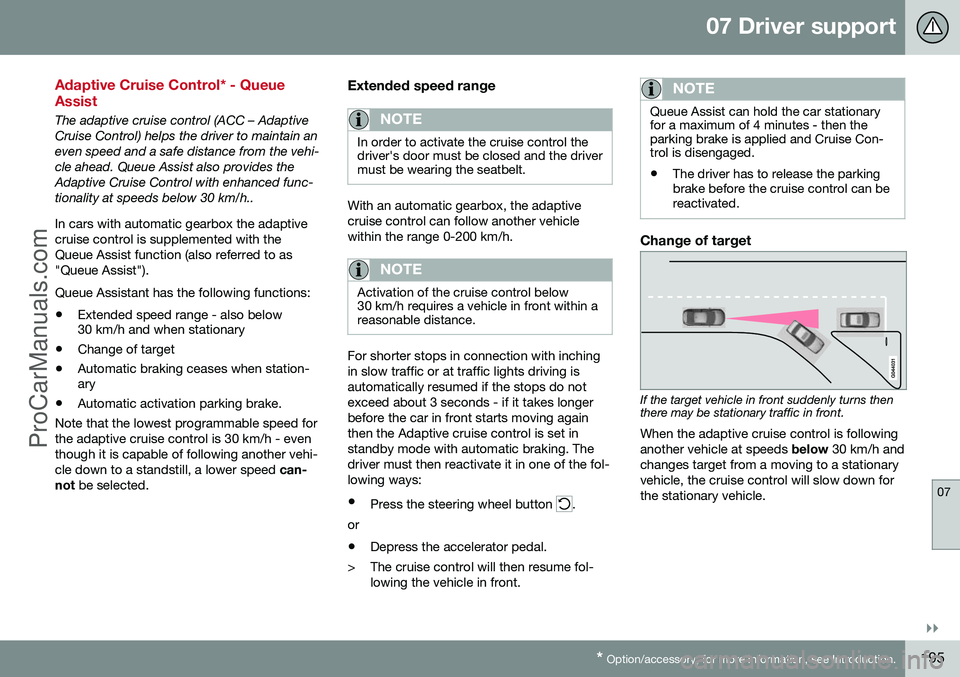
Change of target
If the target vehicle in front suddenly turns then there may be stationary traffic in front.
When the adaptive cruise control is following another vehicle at speeds below 30 km/h and
changes target from a moving to a stationaryvehicle, the cruise control will slow down forthe stationary vehicle.
ProCarManuals.co’
Page 209 of 442
07 Driver support
07
207
WARNING
The laser sensor also transmits laser light when City Safety™ is disabled manually.
Related information
•City Safety™ (p. 205)
• City Safety™ - limitations (p. 207)
• City Safety™ - function (p. 205)
• City Safety™ - laser sensor (p. 209)
• City Safety™ - symbols and messages (p. 211)
• MY CAR (p. 103)
City Safety™ - limitations
The sensor in City Safety™ is designed to detect cars and other large vehicles in front ofthe car irrespective of whether it is day ornight. However, the function has a number oflimitations. However, the sensor has limitations and has poorer functionality - or none at all - in e.g.heavy snowfall or rain, dense fog, duststorms or white-out situations. Mist, dirt, iceor snow on the windscreen may disrupt thefunction. Low-hanging objects, e.g. a flag/pennant for projecting load, or accessories such as auxili-ary lamps and bull bars that are higher thanthe bonnet limit the function. The laser beam from the sensor in City Safety™ measures how the light is reflected.The sensor cannot detect objects with lowreflection capacity. The rear sections of thevehicle generally reflect the light sufficientlythanks to the number plate and rear lightreflectors. On slippery road surfaces the braking dis- tance is extended, which may reduce thecapacity of City Safety™ to avoid a collision.In such situations the ABS and DSTC sys-tems will provide best possible braking forcewith maintained stability. When your own car is reversing, City Safety™ is temporarily deactivated. City Safety™ is not activated at low speeds -under 4 km/h, which is why the system doesnot intervene in situations where a vehicle infront is being approached very slowly, e.g.when parking. Driver commands are always prioritised, which is why City Safety™ does not intervenein situations where the driver is steering oraccelerating in a clear manner, even if a colli-sion is unavoidable. When City Safety™ has prevented a collision with a stationary object the car remains sta-tionary for a maximum of 1.5 seconds. If thecar is braked for a vehicle in front that is mov-ing, then speed is reduced to the same speedas that maintained by the vehicle in front. On a car with manual gearbox the engine stops when City Safety™ has stopped thecar, unless the driver manages to depress theclutch pedal beforehand.
NOTE
•
Keep the windscreen surface in front of the laser sensor free from ice, snowand dirt (see the illustration for sensorlocation (p. 205)).
• Do not affix or mount anything on thewindscreen in front of the laser sensor
• Remove ice and snow from the bonnet- snow and ice must not exceed aheight of 5 cm.
ProCarManuals.co’
Page 221 of 442
07 Driver support
07
}}
* Option/accessory, for more information, see Introduction.219
NOTE
The visual warning signal can be temporar- ily disengaged in the event of high passen-ger compartment temperature caused bystrong sunlight for example. If this occursthen the warning sound is activated even ifit is deactivated in the menu system.
• Warnings may not appear if the dis- tance to the vehicle in front is small orif steering wheel and pedal move-ments are large, e.g. a very active driv-ing style.
WARNING
Warnings and brake interventions could be implemented late or not at all if the trafficsituation or external influences mean thatthe radar or camera sensor cannot detecta pedestrian, a vehicle or a cyclist in frontcorrectly. The sensor system has a limited range for pedestrians and cyclists 19
- the system
can provide effective warnings and brake interventions for them at vehicle speeds upto 50 km/h. For stationary or slow-movingvehicles, warnings and brake interventionsare effective at vehicle speeds up to70 km/h. Warnings for stationary or slow-moving vehicles could be disengaged due to dark-ness or poor visibility. Warnings and brake interventions for pedestrians and cyclists are deactivated atvehicle speeds exceeding 80 km/h.
The collision warning system uses the same radar sensors as the Adaptive cruise control(p. 188). Read more about radar sensor limi-tations (p. 197). If warnings are perceived as being too fre- quent or disturbing then the warning distancecan be reduced (p. 217). This would lead tothe system warning at a later stage, whichreduces the total number of warnings. Collision Warning with Auto Brake is tempo-rarily deactivated with reverse gear engaged. Collision Warning with Auto Brake is not acti- vated at low speeds - under 4 km/h, which iswhy the system does not intervene in situa-tions where the car is approaching a vehiclein front very slowly, e.g. when parking. In situations where the driver demonstrates active, aware driving behaviour, a collisionwarning may be postponed slightly in order tokeep unnecessary warnings to a minimum. When Auto Brake has prevented a collision with a stationary object the car remains sta-tionary for a maximum of 1.5 seconds. If thecar is braked for a vehicle in front that is mov-ing, then speed is reduced to the same speedas that maintained by the vehicle in front. On a car with manual gearbox the engine stops when Auto Brake has stopped the car,unless the driver manages to depress theclutch pedal beforehand.
Related information
•
Collision warning system* (p. 212)
• Collision warning system* - function (p. 213)
• Collision warning system* - detection ofpedestrians (p. 216)
• Collision warning system* - cyclist detec-tion (p. 214)
19
For cyclists, the warning and full brake intervention may come very late or simultaneously.
ProCarManuals.co’
Page 244 of 442
||
07 Driver support
07
242* Option/accessory, for more information, see Introduction.
NOTE
When reversing with e.g. a trailer or bike carrier on the towbar - without Volvo genu-ine trailer wiring - parking assistance mayneed to be switched off manually in orderthat the sensors do not react to them.
Related information
• Park Assist* (p. 240)
• Park assist syst* - cleaning the sensors (p. 243)
• Park assist syst* - function (p. 240)
• Park assist syst* - forward (p. 242)
• Park assist syst* - fault indication (p. 243)
• Park assist camera (p. 244)
Park assist syst* - forward
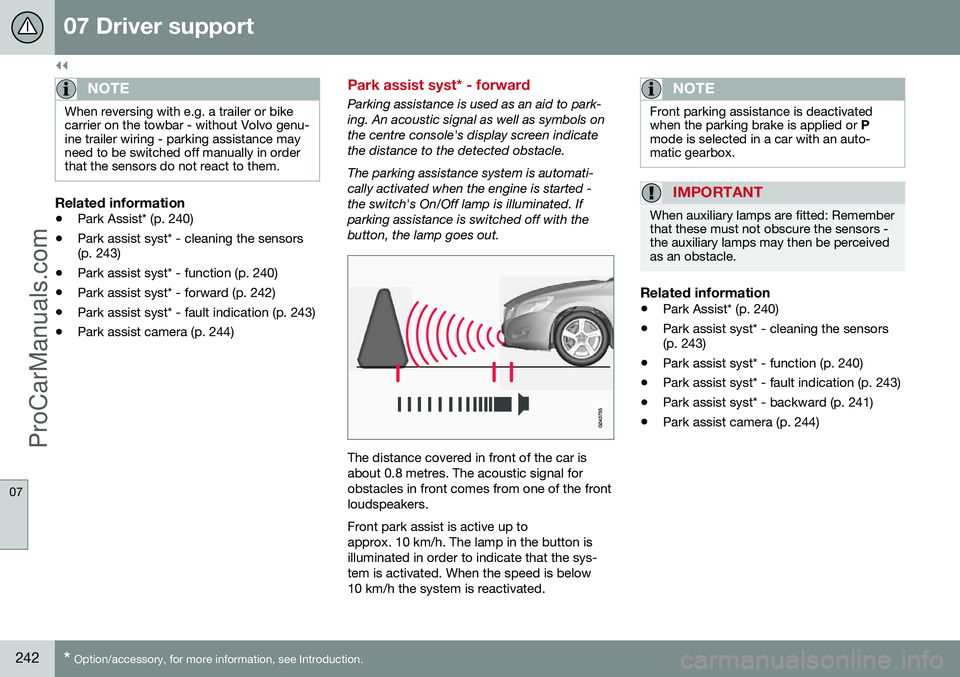
Parking assistance is used as an aid to park- ing. An acoustic signal as well as symbols onthe centre console's display screen indicatethe distance to the detected obstacle. The parking assistance system is automati- cally activated when the engine is started -the switch's On/Off lamp is illuminated. Ifparking assistance is switched off with thebutton, the lamp goes out.
The distance covered in front of the car is about 0.8 metres. The acoustic signal forobstacles in front comes from one of the frontloudspeakers. Front park assist is active up to approx. 10 km/h. The lamp in the button isilluminated in order to indicate that the sys-tem is activated. When the speed is below10 km/h the system is reactivated.
NOTE
Front parking assistance is deactivated when the parking brake is applied or
P
mode is selected in a car with an auto-matic gearbox.
IMPORTANT
When auxiliary lamps are fitted: Remember that these must not obscure the sensors -the auxiliary lamps may then be perceivedas an obstacle.
Related information
• Park Assist* (p. 240)
• Park assist syst* - cleaning the sensors (p. 243)
• Park assist syst* - function (p. 240)
• Park assist syst* - fault indication (p. 243)
• Park assist syst* - backward (p. 241)
• Park assist camera (p. 244)
ProCarManuals.co’
Page 258 of 442
||
07 Driver support
07
256
CTA is only active during reversing and is activated automatically when the gearbox'sreverse position is selected. •If CTA detects something approaching from the side, an acoustic warning signalsounds. The signal comes from either theleft or the right-hand speaker, dependingon the direction from which the object isapproaching.
• CTA also warns by illuminating the BLISlamps.
• An additional warning is provided in theform of an illuminated icon in the displayscreen's PAS graphics (p. 240).
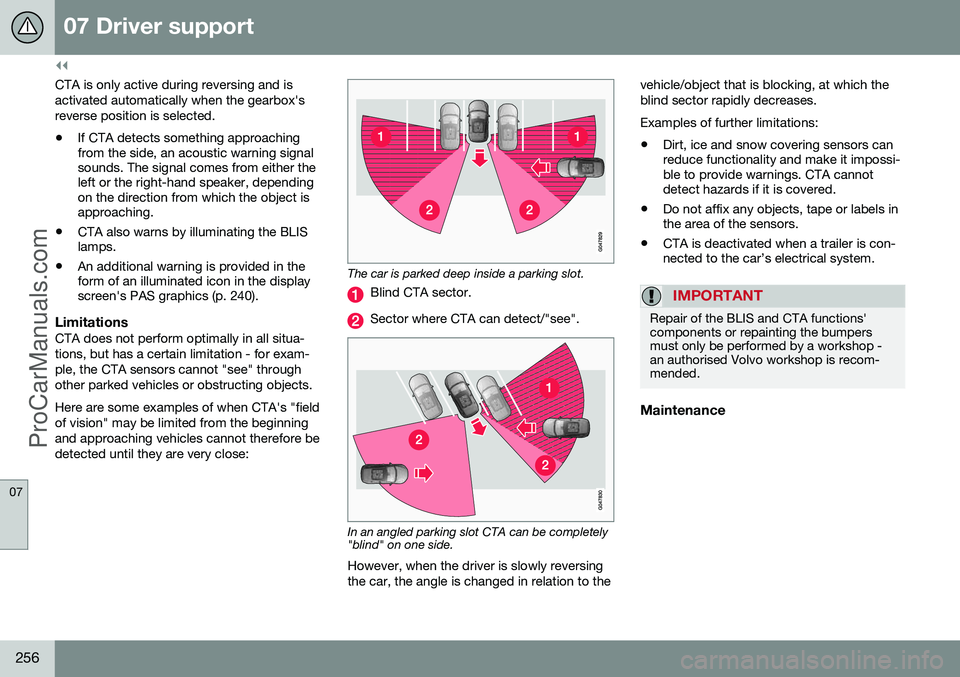
LimitationsCTA does not perform optimally in all situa- tions, but has a certain limitation - for exam-ple, the CTA sensors cannot "see" throughother parked vehicles or obstructing objects. Here are some examples of when CTA's "field of vision" may be limited from the beginningand approaching vehicles cannot therefore bedetected until they are very close:
The car is parked deep inside a parking slot.
Blind CTA sector.
Sector where CTA can detect/"see".
In an angled parking slot CTA can be completely "blind" on one side.
However, when the driver is slowly reversing the car, the angle is changed in relation to the vehicle/object that is blocking, at which theblind sector rapidly decreases. Examples of further limitations:
• Dirt, ice and snow covering sensors can reduce functionality and make it impossi-ble to provide warnings. CTA cannotdetect hazards if it is covered.
• Do not affix any objects, tape or labels inthe area of the sensors.
• CTA is deactivated when a trailer is con-nected to the car’s electrical system.
IMPORTANT
Repair of the BLIS and CTA functions' components or repainting the bumpersmust only be performed by a workshop -an authorised Volvo workshop is recom-mended.
Maintenance
ProCarManuals.com
Page 266 of 442
08 Starting and driving
08
264* Option/accessory, for more information, see Introduction.
Starting the engine
The engine is started and switched off using the remote control key and the START/STOP
ENGINE button.
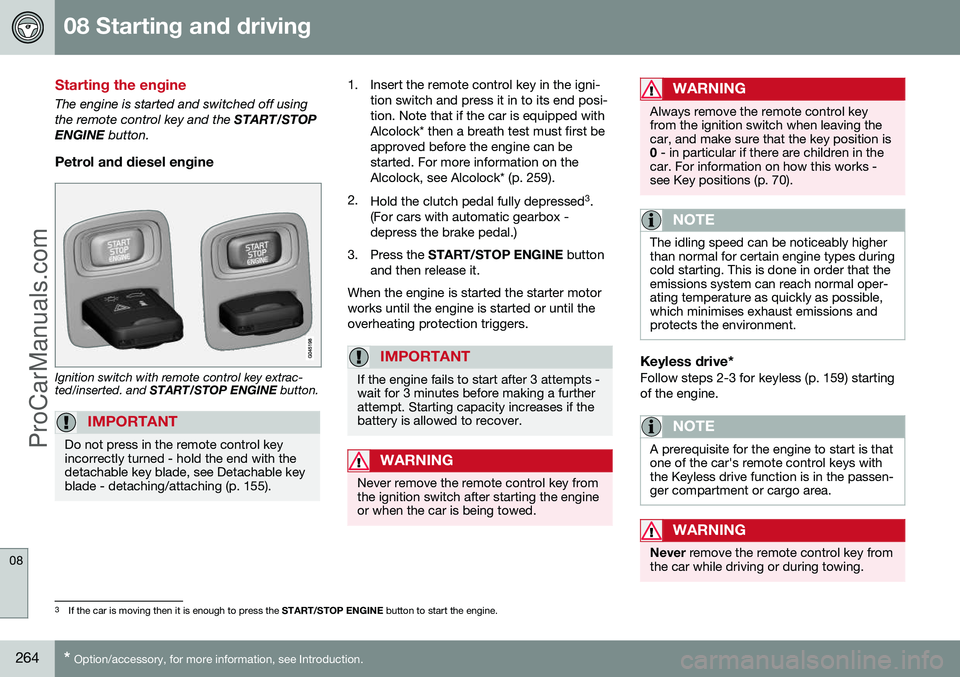
Petrol and diesel engine
Ignition switch with remote control key extrac- ted/inserted. and START/STOP ENGINE button.
IMPORTANT
Do not press in the remote control key incorrectly turned - hold the end with thedetachable key blade, see Detachable keyblade - detaching/attaching (p. 155).
1. Insert the remote control key in the igni-
tion switch and press it in to its end posi- tion. Note that if the car is equipped withAlcolock* then a breath test must first beapproved before the engine can bestarted. For more information on theAlcolock, see Alcolock* (p. 259).
2. Hold the clutch pedal fully depressed 3
.
(For cars with automatic gearbox -depress the brake pedal.)
3. Press the START/STOP ENGINE button
and then release it.
When the engine is started the starter motorworks until the engine is started or until theoverheating protection triggers.
IMPORTANT
If the engine fails to start after 3 attempts - wait for 3 minutes before making a furtherattempt. Starting capacity increases if thebattery is allowed to recover.
WARNING
Never remove the remote control key from the ignition switch after starting the engineor when the car is being towed.
WARNING
Always remove the remote control key from the ignition switch when leaving thecar, and make sure that the key position is0 - in particular if there are children in the
car. For information on how this works -see Key positions (p. 70).
NOTE
The idling speed can be noticeably higher than normal for certain engine types duringcold starting. This is done in order that theemissions system can reach normal oper-ating temperature as quickly as possible,which minimises exhaust emissions andprotects the environment.
Keyless drive*Follow steps 2-3 for keyless (p. 159) starting of the engine.
NOTE
A prerequisite for the engine to start is that one of the car's remote control keys withthe Keyless drive function is in the passen-ger compartment or cargo area.
WARNING
Never remove the remote control key from
the car while driving or during towing.
3 If the car is moving then it is enough to press the START/STOP ENGINE button to start the engine.
ProCarManuals.co’