steering VOLVO V60 2018 Owner´s Manual
[x] Cancel search | Manufacturer: VOLVO, Model Year: 2018, Model line: V60, Model: VOLVO V60 2018Pages: 406, PDF Size: 9.59 MB
Page 104 of 406
INSTRUMENTS AND CONTROLS
* Option/accessory.
102
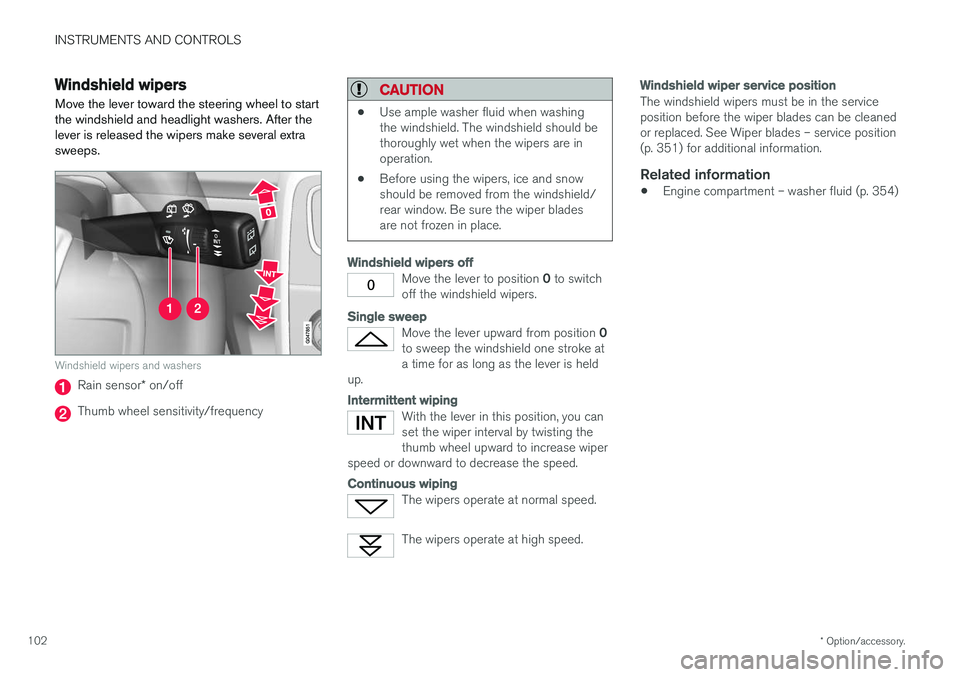
Windshield wipers Move the lever toward the steering wheel to start the windshield and headlight washers. After thelever is released the wipers make several extrasweeps.
Windshield wipers and washers
Rain sensor * on/off
Thumb wheel sensitivity/frequency
CAUTION
• Use ample washer fluid when washing the windshield. The windshield should bethoroughly wet when the wipers are inoperation.
• Before using the wipers, ice and snowshould be removed from the windshield/rear window. Be sure the wiper bladesare not frozen in place.
Windshield wipers off
Move the lever to position
0 to switch
off the windshield wipers.
Single sweep
Move the lever upward from position 0
to sweep the windshield one stroke at a time for as long as the lever is held
up.
Intermittent wiping
With the lever in this position, you can set the wiper interval by twisting thethumb wheel upward to increase wiper
speed or downward to decrease the speed.
Continuous wiping
The wipers operate at normal speed.
The wipers operate at high speed.
Windshield wiper service position
The windshield wipers must be in the service position before the wiper blades can be cleanedor replaced. See Wiper blades – service position(p. 351) for additional information.
Related information
• Engine compartment – washer fluid (p. 354)
Page 105 of 406
INSTRUMENTS AND CONTROLS
}}
* Option/accessory.103
Rain sensor*
The rain sensor automatically regulates wiper speed according to the amount of water on thewindshield.
The sensitivity of the rain sensor can be adjusted moving the thumb wheel up (the wipers willsweep the windshield more frequently) or down(the wipers will sweep the windshield less fre-quently).
NOTE
The wipers will make an extra sweep each time the thumb wheel is adjusted upward.
When the rain sensor is activated, the symbol
will illuminate in the instrument panel.
Activating and setting the sensitivity
When activating the rain sensor, the vehicle must be running or in ignition mode II and the wind-
shield wiper lever must be in position 0 or in the
single sweep position. Activate the rain sensor by pressing the button
. The windshield wipers will make one
sweep. Press the lever up for the wipers to make an extra sweep. The rain sensor returns to activemode when the stalk is released back to position 0 .
Deactivating
Deactivate the rain sensor by pressing the button
or press the lever down to another wiper
position. The rain sensor is automatically deactivated when the key is removed from the ignition slot or fiveminutes after the ignition has been switched off.
CAUTION
The rain sensor should be deactivated when washing the car in an automatic car wash, etc.If the rain sensor function is left on, the wip-ers will start inadvertently in the car wash andcould be damaged.
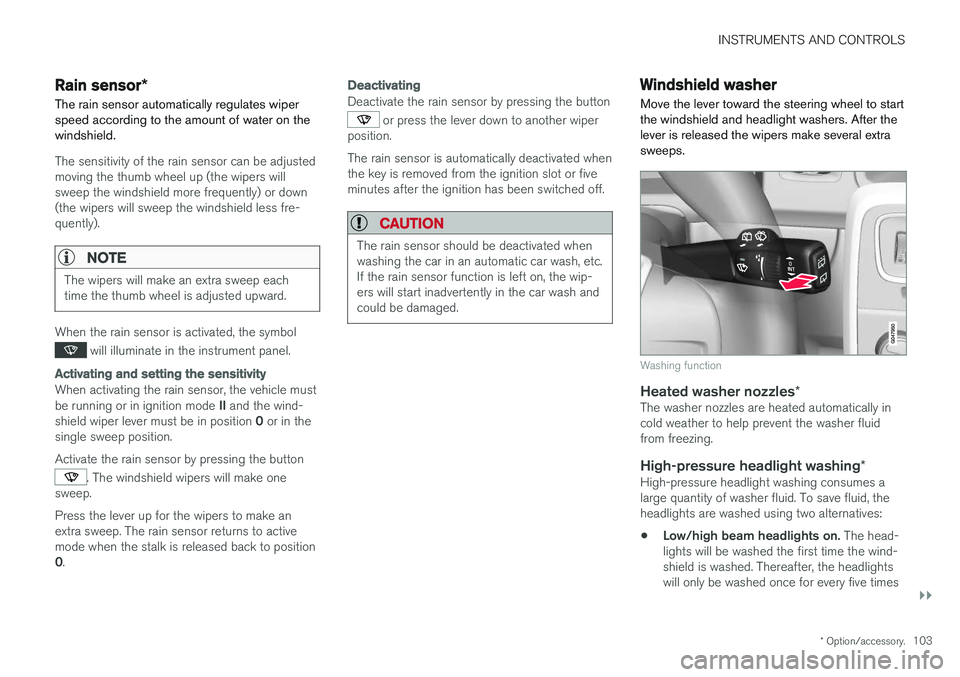
Windshield washer
Move the lever toward the steering wheel to start the windshield and headlight washers. After thelever is released the wipers make several extrasweeps.
Washing function
Heated washer nozzles *The washer nozzles are heated automatically in cold weather to help prevent the washer fluidfrom freezing.
High-pressure headlight washing *High-pressure headlight washing consumes alarge quantity of washer fluid. To save fluid, theheadlights are washed using two alternatives:
• Low/high beam headlights on.
The head-
lights will be washed the first time the wind-shield is washed. Thereafter, the headlightswill only be washed once for every five times
Page 118 of 406
||
INSTRUMENTS AND CONTROLS
* Option/accessory.
116
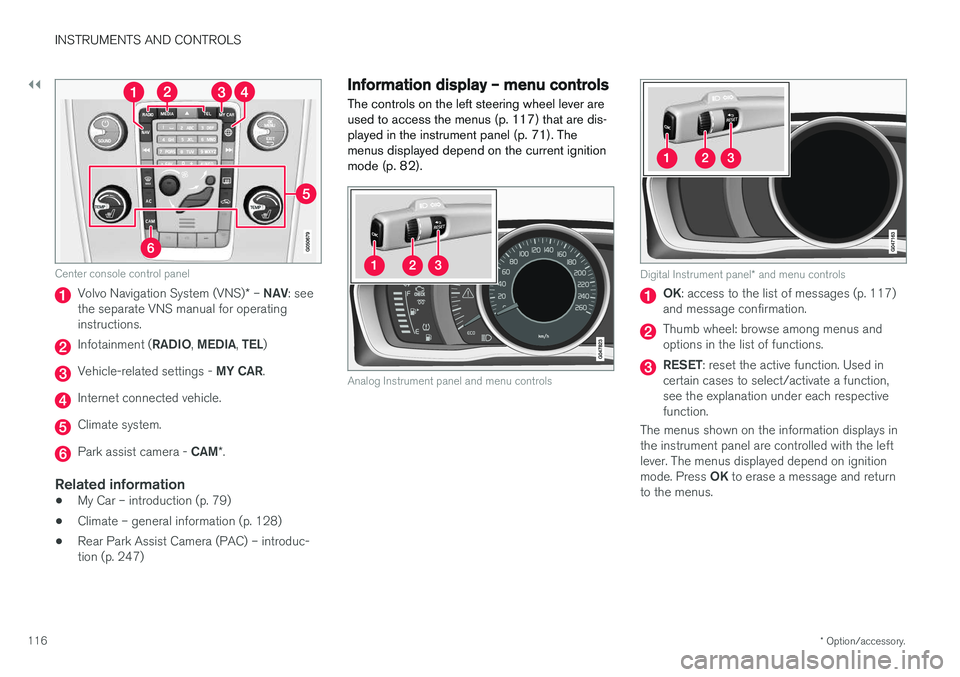
Center console control panel
Volvo Navigation System (VNS) * – NAV : see
the separate VNS manual for operating instructions.
Infotainment ( RADIO, MEDIA , TEL )
Vehicle-related settings - MY CAR.
Internet connected vehicle.
Climate system.
Park assist camera - CAM*.
Related information
• My Car – introduction (p. 79)
• Climate – general information (p. 128)
• Rear Park Assist Camera (PAC) – introduc- tion (p. 247)
Information display – menu controls
The controls on the left steering wheel lever are used to access the menus (p. 117) that are dis-
played in the instrument panel (p. 71). Themenus displayed depend on the current ignition
mode (p. 82).
Analog Instrument panel and menu controls
Digital Instrument panel * and menu controls
OK : access to the list of messages (p. 117)
and message confirmation.
Thumb wheel: browse among menus and options in the list of functions.
RESET : reset the active function. Used in
certain cases to select/activate a function, see the explanation under each respectivefunction.
The menus shown on the information displays inthe instrument panel are controlled with the leftlever. The menus displayed depend on ignition mode. Press OK to erase a message and return
to the menus.
Page 119 of 406
INSTRUMENTS AND CONTROLS
}}
* Option/accessory.117
Information display – menu overview
The menus displayed depend on the current ignition mode (p. 82).
The following menu alternatives may vary, depending on the equipment installed in the vehi-cle.
Analog instrument panelDigital speed Trip comp. opt.Service status
Messages (##) 20
Digital instrument panel
*Settings
Themes
Contrast mode /Color mode
Service status
Messages
Trip computer reset
Related information
• Information displays – introduction (p. 71)
• Information display – menu controls (p. 116)
• Information display – messages (p. 117)
Information display – messages
The controls on the left steering wheel lever are used to scroll among messages displayed in theinstrument panel and to confirm selections. When information, indicator or warning symbols illuminate, an explanatory message will be dis-played in the instrument panel.
When a warning (p. 77), information (p. 75) or indicator symbol (p. 75) comes on, a correspond-ing message appears in the information panel. Anerror message is stored in a memory list until thefault is rectified. Press OK to acknowledge and scroll among the
messages.
NOTE
If a warning message appears while you are using the trip computer, the message must be read and confirmed by pressing OK before
the previous activity can be resumed.
Message Description
Stop engineA
Stop and switch off the engine as soon as possible.Serious risk of damage. Con-tact an authorized Volvoworkshop.
Stop safelyA Stop and switch off the engine. Serious risk of dam-age. Contact an authorizedVolvo workshop.
Service urgentA Have the vehicle checked by an authorized Volvo work-shop immediately.
Service requiredA
Have the vehicle checked by an authorized Volvo work-shop as soon as possible.
See manualA
Read the owner's manual.
Book time for mainte-nanceTime to book service at an authorized Volvo retailer.
20Number of messages in parentheses
Page 158 of 406
||
LOCKS AND ALARM
* Option/accessory.
156
Unlock – Press the Unlock button on the
remote once to unlock the driver's door. After a short pause, press the Unlock button a second time within 10 seconds to unlock theother doors and the tailgate. This function can be changed so that all doors unlock at the same time by pressing My Car and
going to
SettingsCar settingsLock
settings
Change doors unlock setting. For
a description of the menu system, see My Car – introduction (p. 79).
Approach lighting – As you approach the
vehicle, press the button on the remote key to light the interior lighting, parking lights, license plate lighting and the lights in the door mirrors *.
These lights will switch off automatically after 30, 60 or 90 seconds. For a description of the menusystem, see My Car – introduction (p. 79).
Unlock tailgate – Press the button twice
within several seconds to disarm the alarm sys- tem (the alarm indicator light on the dashboardwill go out), and unlock only the tailgate.
NOTE
As an added safety precaution, the parking lights will come on automatically for a shortperiod when the tailgate has been opened.
After closing, the tailgate will not automatically relock. Press Lock to relock it and rearm thealarm. For information on opening the tailgate from the passenger compartment, see Locking/unlocking– tailgate (p. 168)
Panic alarm – This button can be used to
attract attention during emergency situations. To activate the panic alarm, press and hold this button for at least 3 seconds or press it twicewithin 3 seconds. The turn signals and horn willbe activated. The panic alarm will stop automati-cally after 2 minutes and 45 seconds. To deactivate, wait approximately 5 seconds and press the button again. The Panic alarm button will not unlock the vehi- cle.
Related information
• Locking/unlocking – from inside (p. 166)
• Locking/unlocking – from the outside(p. 165)
• Locking/unlocking confirmation (p. 154)
Remote key – range The remote key has a range of approximately 60 ft. (20 m) from the vehicle.
NOTE
Buildings or other obstacles may interfere with the function of the remote key. The vehi-cle can also be locked or unlocked with thekey blade, see Alarm-related functions(p. 172).
If the remote key is removed from the vehicle while the engine is running or if the ignition is in mode
I or II and all of the doors are closed, a
message will appear in the instrument panel dis- play and there will be an audible signal. When the remote key is returned to the vehicle, the message will be erased and the audible sig-nal will stop after one of the following has beendone:
• The remote key is inserted in the ignition slot
• The vehicle's speed exceeds 20 mph(30 km/h)
• The
OK button on the left steering wheel
lever is pressed
Related information
• Remote key – functions (p. 155)
Page 176 of 406
DRIVER SUPPORT
174
Stability system – introduction The Electronic Stability Control (ESC) system consists of a number of functions designed tohelp reduce wheel spin, counteract skidding andto generally help improve directional stability.
A pulsating sound will be audible when the system is actively operating and isnormal. Acceleration will also beslightly slower than normal.
WARNING
•The stability system (ESC) is intended to help improve driving safety but cannotdeal with all situations, or traffic, road andweather conditions. Speed and drivingstyle should always be adapted to thecurrent driving situation.
• ESC supplements, but can never replace,the driver's judgment and responsibilitywhen operating the vehicle. The driver isalways responsible for operating the vehi-cle in a safe manner in accordance withapplicable traffic regulations.
ESC consists of the following functions:
• Traction control
• Spin control
• Active Yaw Control
• Engine Drag Control •
Corner Traction Control
Traction Control (TC)
This function is designed to help reduce wheel spin at low speeds by transferring power from adrive wheel that begins to lose traction to thewheel on the opposite side of the vehicle (on thesame axle).
Spin Control (SC)
The SC function is designed to help prevent the drive wheels from spinning while the vehicle isaccelerating.
Active Yaw Control (AYC)
This function helps maintain directional stability, for example when cornering, by braking one ormore of the wheels if the vehicle shows a ten-dency to skid or slide laterally.
Corner Traction Control (CTC)
CTC compensates for understeering and helps provide additional stability when acceleratingthrough a curve by preventing the inside wheelfrom spinning. This is particularly useful whenaccelerating on a curving highway on-ramp. CTC is most effective if the stability system's Sport
mode is selected. See the section about
Sport mode.
Engine Drag Control (EDC)
EDC helps keep the engine running if the wheels show a tendency to lock, e.g., when shifting downin the Geartronic manual shifting mode or whileusing the engine's braking function on a slipperysurface. If the engine were to stop, power steer- ing would not function, making the vehicle moredifficult to steer.
Trailer Stability Assist (TSA)
The TSA helps stabilize a vehicle that is towing a trailer when the vehicle and trailer have begun tosway. See Trailer Stability Assist (TSA) (p. 294)for more information. This system is automatically deactivated if the driver selects
Sport mode.
Related information
•Stability system – operation (p. 175)
• Stability system – symbols and messages (p. 176)
• Trailer Stability Assist (TSA) (p. 294)
Page 177 of 406
DRIVER SUPPORT
175
Stability system – operation
Operation
Sport mode
The stability system is always activated and can- not be switched off.However, the driver can select Sport mode, which offers more
active driving characteristics. Sport mode can be selected in
the MY CAR menus, see My Car – introduction (p. 79).
In Sport mode, the engine management system
monitors movement of the accelerator pedal and steering wheel for sportier driving by allowingmore lateral movement of the rear wheels beforeESC is activated. Under certain circumstances, such as when driv- ing with snow chains, or driving in deep snow orloose sand, it may be advisable to temporarily use Sport mode for maximum tractive force.
If the driver releases pressure on the accelerator pedal, ETC will also activate to help stabilize thevehicle. To switch to Sport mode:
Sport mode remains active until the driver
switches it off in the menu or until the engine is switched off. ETC will return to normal modewhen the engine is restarted.
Related information
• Stability system – introduction (p. 174)
• Stability system – symbols and messages(p. 176)
Page 180 of 406
DRIVER SUPPORT
* Option/accessory.
178
Adjustable steering force *
Steering force increases with the speed of the vehicle to give the driver enhanced sense ofcontrol and stability. At low speed the vehicle iseasy to steer in order to facilitate parking, etc.
Adjustable steering force *Steering force can be changed under MY CAR
Car settingsSteering wheel force.
Select Low, Medium or High. For a description
of the menu system, My Car – introduction (p. 79).
NOTE
This steering force level menu function can- not be accessed when the vehicle is inmotion.
NOTE
In certain situations, the power steering may become too warm and will have to be tempo-rarily cooled down. While this is happening,the power steering effect will be reducedslightly and somewhat more effort may berequired to turn the steering wheel. If this occurs, a message will be displayed in the instrument panel.
Road Sign Information (RSI) * –
introduction
RSI is a feature that helps the driver see road signs with the posted speed limit.
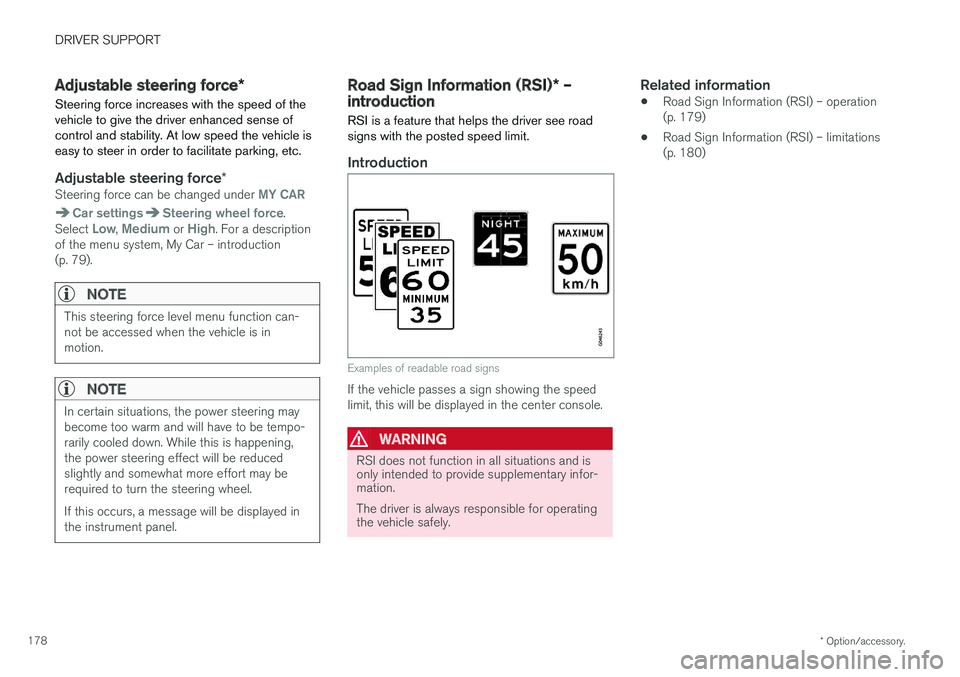
Introduction
Examples of readable road signs
If the vehicle passes a sign showing the speed limit, this will be displayed in the center console.
WARNING
RSI does not function in all situations and is only intended to provide supplementary infor-mation. The driver is always responsible for operating the vehicle safely.
Related information
• Road Sign Information (RSI) – operation (p. 179)
• Road Sign Information (RSI) – limitations(p. 180)
Page 183 of 406
DRIVER SUPPORT
}}
181
Related information
•Cruise control (CC) – engaging and setting speed (p. 181)
• Cruise control (CC) – deactivating (p. 183)
Cruise control (CC) – engaging and setting speed
Cruise control is designed to assist the driver by maintaining a set speed. It is primarily intendedfor use on long straight roads in steady traffic,such as on highways and other main roads.
Engaging the cruise control function
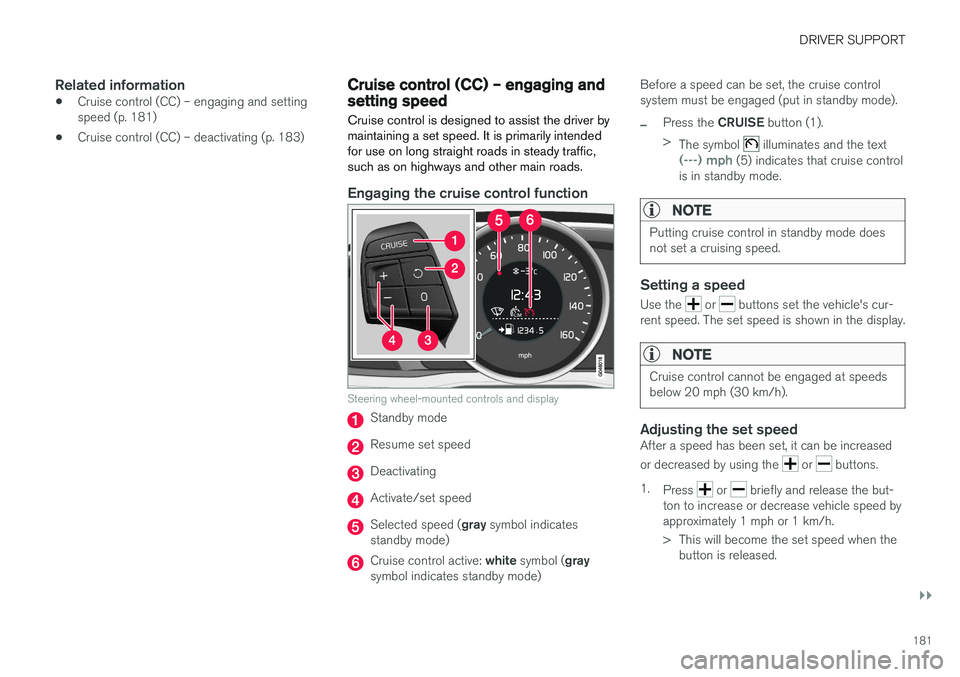
Steering wheel-mounted controls and display
Standby mode
Resume set speed
Deactivating
Activate/set speed
Selected speed ( gray symbol indicates
standby mode)
Cruise control active: white symbol ( gray
symbol indicates standby mode) Before a speed can be set, the cruise control system must be engaged (put in standby mode).
–Press the
CRUISE button (1).
> The symbol
illuminates and the text(---) mph (5) indicates that cruise control
is in standby mode.
NOTE
Putting cruise control in standby mode does not set a cruising speed.
Setting a speed
Use the or buttons set the vehicle's cur-
rent speed. The set speed is shown in the display.
NOTE
Cruise control cannot be engaged at speeds below 20 mph (30 km/h).
Adjusting the set speedAfter a speed has been set, it can be increased or decreased by using the
or buttons.
1. Press
or briefly and release the but-
ton to increase or decrease vehicle speed by approximately 1 mph or 1 km/h.
> This will become the set speed when the button is released.
Page 187 of 406
DRIVER SUPPORT
}}
185
•
Adaptive Cruise Control – setting speed (p. 187)
• Radar sensor (p. 193)
• Adaptive Cruise Control (ACC) – QueueAssist (p. 191)
• Adaptive Cruise Control – passing anothervehicle (p. 190)
• Adaptive Cruise Control – limitations(p. 193)
• Adaptive Cruise Control – function (p. 185)
• Adaptive Cruise Control – engaging (p. 187)
• Adaptive Cruise Control – deactivating(p. 189)
Adaptive Cruise Control – function
Function
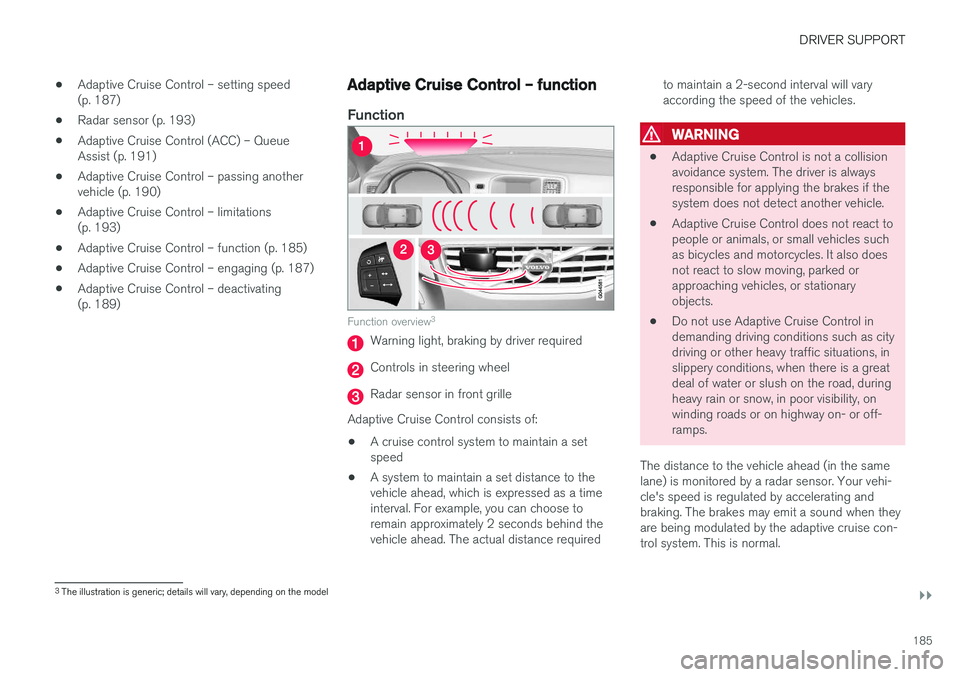
Function overview 3
Warning light, braking by driver required
Controls in steering wheel
Radar sensor in front grille
Adaptive Cruise Control consists of:
• A cruise control system to maintain a set speed
• A system to maintain a set distance to thevehicle ahead, which is expressed as a timeinterval. For example, you can choose toremain approximately 2 seconds behind thevehicle ahead. The actual distance required to maintain a 2-second interval will varyaccording the speed of the vehicles.
WARNING
•
Adaptive Cruise Control is not a collision avoidance system. The driver is alwaysresponsible for applying the brakes if thesystem does not detect another vehicle.
• Adaptive Cruise Control does not react topeople or animals, or small vehicles suchas bicycles and motorcycles. It also doesnot react to slow moving, parked orapproaching vehicles, or stationaryobjects.
• Do not use Adaptive Cruise Control indemanding driving conditions such as citydriving or other heavy traffic situations, inslippery conditions, when there is a greatdeal of water or slush on the road, duringheavy rain or snow, in poor visibility, onwinding roads or on highway on- or off-ramps.
The distance to the vehicle ahead (in the samelane) is monitored by a radar sensor. Your vehi-cle's speed is regulated by accelerating andbraking. The brakes may emit a sound when theyare being modulated by the adaptive cruise con-trol system. This is normal.
3 The illustration is generic; details will vary, depending on the model