trailer VOLVO V90 2017 User Guide
[x] Cancel search | Manufacturer: VOLVO, Model Year: 2017, Model line: V90, Model: VOLVO V90 2017Pages: 594, PDF Size: 15.07 MB
Page 365 of 594
DRIVER SUPPORT
}}
* Option/accessory.363
Park Assist*
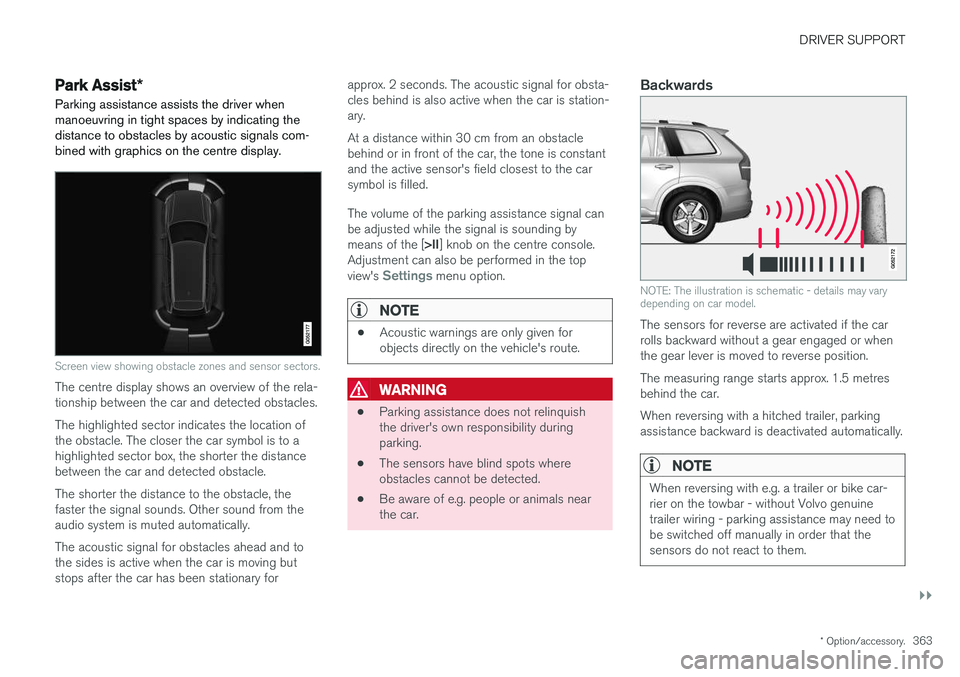
Parking assistance assists the driver when manoeuvring in tight spaces by indicating thedistance to obstacles by acoustic signals com-bined with graphics on the centre display.
Screen view showing obstacle zones and sensor sectors.
The centre display shows an overview of the rela- tionship between the car and detected obstacles. The highlighted sector indicates the location of the obstacle. The closer the car symbol is to ahighlighted sector box, the shorter the distancebetween the car and detected obstacle. The shorter the distance to the obstacle, the faster the signal sounds. Other sound from theaudio system is muted automatically. The acoustic signal for obstacles ahead and to the sides is active when the car is moving butstops after the car has been stationary for approx. 2 seconds. The acoustic signal for obsta-cles behind is also active when the car is station-ary. At a distance within 30 cm from an obstacle behind or in front of the car, the tone is constantand the active sensor's field closest to the carsymbol is filled. The volume of the parking assistance signal can be adjusted while the signal is sounding by means of the [
>II] knob on the centre console.
Adjustment can also be performed in the top view's
Settings menu option.
NOTE
• Acoustic warnings are only given for objects directly on the vehicle's route.
WARNING
•Parking assistance does not relinquish the driver's own responsibility duringparking.
• The sensors have blind spots whereobstacles cannot be detected.
• Be aware of e.g. people or animals nearthe car.
Backwards
NOTE: The illustration is schematic - details may vary depending on car model.
The sensors for reverse are activated if the car rolls backward without a gear engaged or whenthe gear lever is moved to reverse position. The measuring range starts approx. 1.5 metres behind the car. When reversing with a hitched trailer, parking assistance backward is deactivated automatically.
NOTE
When reversing with e.g. a trailer or bike car- rier on the towbar - without Volvo genuinetrailer wiring - parking assistance may need tobe switched off manually in order that thesensors do not react to them.
Page 372 of 594
DRIVER SUPPORT
* Option/accessory.
370
Park assist lines and fields for the Park Assist Camera *
The Park Assist Camera indicates the position of the car in relation to its surroundings by display-ing lines on the camera image.
Park assist lines
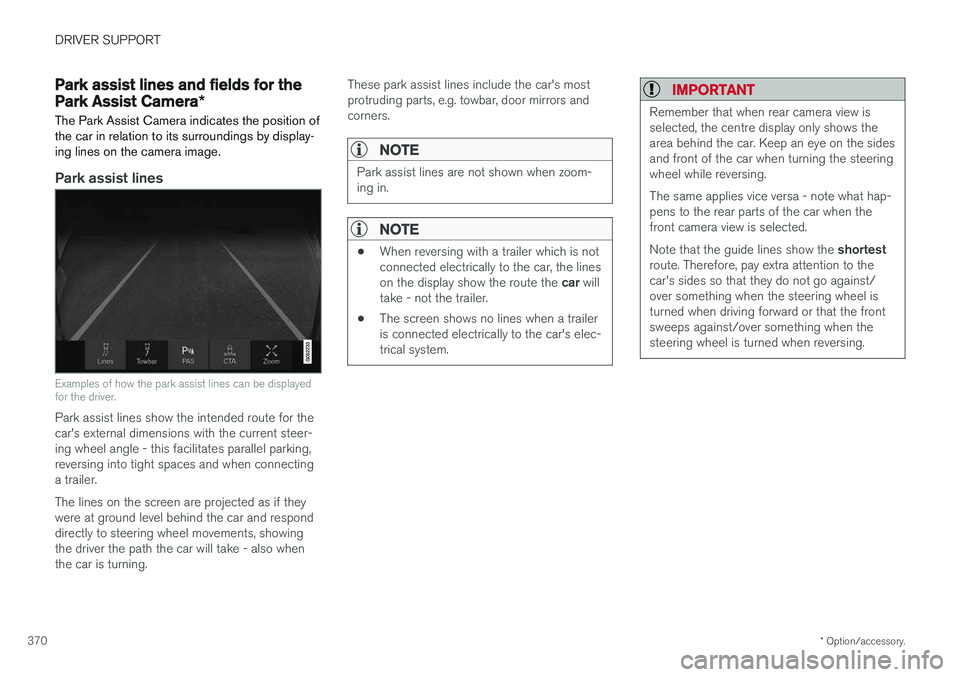
Examples of how the park assist lines can be displayed for the driver.
Park assist lines show the intended route for the car's external dimensions with the current steer-ing wheel angle - this facilitates parallel parking,reversing into tight spaces and when connectinga trailer. The lines on the screen are projected as if they were at ground level behind the car and responddirectly to steering wheel movements, showingthe driver the path the car will take - also whenthe car is turning. These park assist lines include the car's mostprotruding parts, e.g. towbar, door mirrors andcorners.
NOTE
Park assist lines are not shown when zoom- ing in.
NOTE
•
When reversing with a trailer which is not connected electrically to the car, the lines on the display show the route the
car will
take - not the trailer.
• The screen shows no lines when a trailer is connected electrically to the car's elec-trical system.
IMPORTANT
Remember that when rear camera view is selected, the centre display only shows thearea behind the car. Keep an eye on the sidesand front of the car when turning the steeringwheel while reversing. The same applies vice versa - note what hap- pens to the rear parts of the car when thefront camera view is selected. Note that the guide lines show the
shortest
route. Therefore, pay extra attention to the car's sides so that they do not go against/over something when the steering wheel isturned when driving forward or that the frontsweeps against/over something when thesteering wheel is turned when reversing.
Page 373 of 594
DRIVER SUPPORT
}}
* Option/accessory.371
Park assist lines in 360° view *
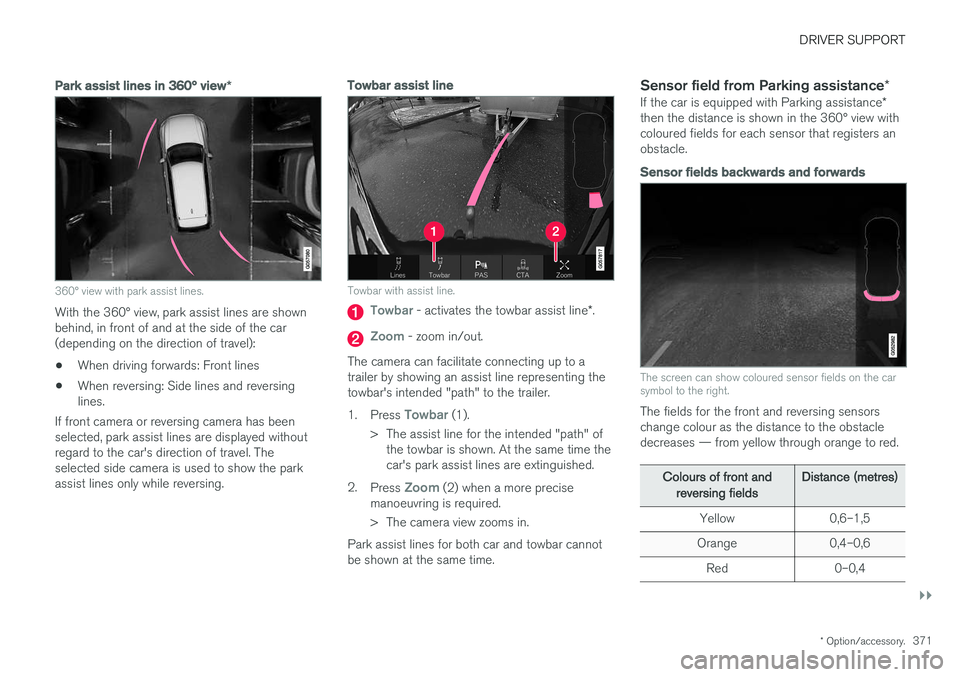
360° view with park assist lines.
With the 360° view, park assist lines are shown behind, in front of and at the side of the car(depending on the direction of travel):
• When driving forwards: Front lines
• When reversing: Side lines and reversinglines.
If front camera or reversing camera has beenselected, park assist lines are displayed withoutregard to the car's direction of travel. Theselected side camera is used to show the parkassist lines only while reversing.
Towbar assist line
Towbar with assist line.
Towbar - activates the towbar assist line *.
Zoom - zoom in/out.
The camera can facilitate connecting up to a trailer by showing an assist line representing thetowbar's intended "path" to the trailer. 1. Press
Towbar (1).
> The assist line for the intended "path" of the towbar is shown. At the same time the car's park assist lines are extinguished.
2. Press
Zoom (2) when a more precise
manoeuvring is required.
> The camera view zooms in.
Park assist lines for both car and towbar cannot be shown at the same time.
Sensor field from Parking assistance *
If the car is equipped with Parking assistance *
then the distance is shown in the 360° view withcoloured fields for each sensor that registers anobstacle.
Sensor fields backwards and forwards
The screen can show coloured sensor fields on the car symbol to the right.
The fields for the front and reversing sensors change colour as the distance to the obstacledecreases — from yellow through orange to red.
Colours of front and
reversing fields Distance (metres)
Yellow 0,6–1,5
Orange 0,4–0,6 Red 0–0,4
Page 378 of 594
DRIVER SUPPORT
* Option/accessory.
376
Parking with Active parking assistance *
The Active parking assistance (Park Assist Pilot - PAP) helps the driver park in three steps. Thefunction can also help the driver to leave a park-ing space.
NOTE
The PAP function measures the space and steers the car - the driver's task is to:
• keep a close watch around the car
• follow the instructions in the centre dis-play
• change gear (reverse/forward)
• control and maintain a safe speed
• brake and stop.
PAP can be activated if the following criteria are met once the engine has been started:
• No trailer is attached to the car.
• Speed must be lower than 30 km/h(20 mph).
NOTE
The distance between the car and parking spaces should be 0.5-1.5 metres while PAPis searching for a parking space.
ParkingThe PAP function parks the car using the follow- ing steps:
1. A parking space is identified and measured.
2. The car is reversed into the space.
3. The car is positioned into the space - the
system may then request that the driver changes gear.
Finding and measuring parking spaces
The function can be activated in the centre display's functionview. It can also be accessed from the camera views.
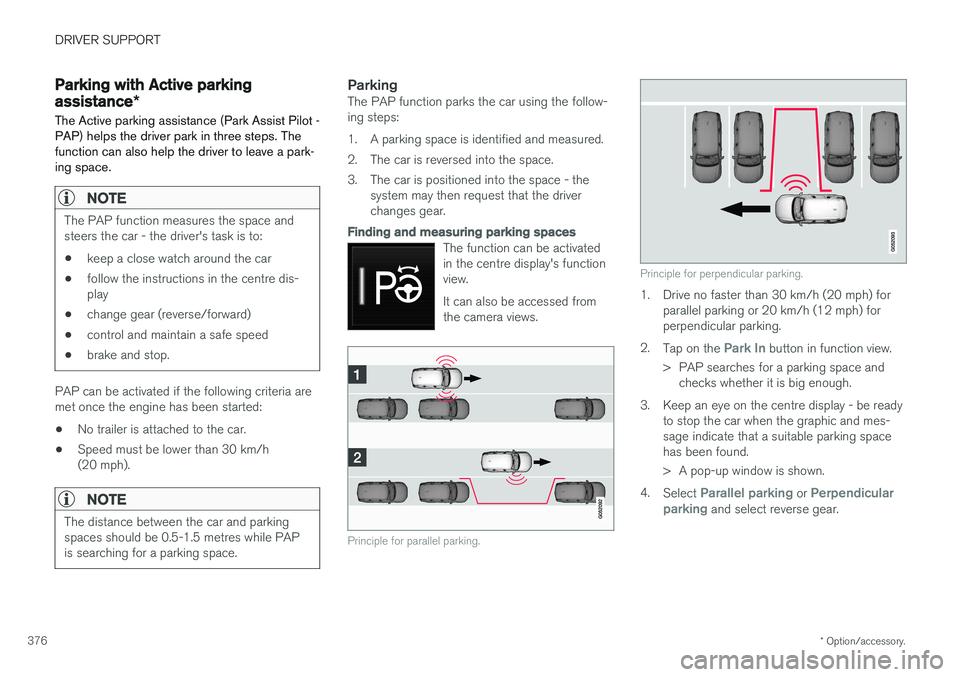
Principle for parallel parking.
Principle for perpendicular parking.
1. Drive no faster than 30 km/h (20 mph) forparallel parking or 20 km/h (12 mph) for perpendicular parking.
2. Tap on the
Park In button in function view.
> PAP searches for a parking space and checks whether it is big enough.
3. Keep an eye on the centre display - be ready to stop the car when the graphic and mes- sage indicate that a suitable parking spacehas been found.
> A pop-up window is shown.
4. Select
Parallel parking or Perpendicular
parking and select reverse gear.
Page 401 of 594
STARTING AND DRIVING
}}
399
•
The driver makes sweeping steering wheel movements.
• The road is very steep.
• The bonnet is opened.
• When driving at high altitudes when theengine has not reached operating tempera-ture.
• The ABS system has been activated.
• In the event of heavy braking (even withoutthe ABS system having been activated).
• Many starts during a short period of timehave activated the starter motor's thermalprotection.
• The exhaust system's particulate filter is full 4
.
• A trailer is connected electrically to the car
Page 413 of 594
STARTING AND DRIVING
}}
411
Releasing automatically
1. Put the seatbelt on.
2. Start the car.
3. With automatic gearbox:Select gear position D or R and depress the
accelerator pedal.With manual gearbox:Engage a suitable gear, release the clutch and depress the accelerator pedal.
> The parking brake releases and the sym- bol in the driver display extinguishes.
Parking on a hill
WARNING
Always use the parking brake when parking on an inclined surface. Engaging a gear or the automatic transmission's P position is not suf-
ficient to hold the car stationary in all situa- tions.
If the car is parked facing uphill: • Turn the wheels
away from the kerb.
If the car is parked facing downhill:
• Turn the wheels
towards the kerb.
Heavy load uphill
A heavy load, such as a trailer, can cause the car to roll backward when the parking brake isreleased automatically on a steep incline. Avoid this by pulling the control upwards while drivingthe car away. Release the control when theengine achieves traction.
Settings for parking brake
Automatic activation of the parking brake isselected via the centre display. Automatic activation when the car is switched off:1.
Press
Settings in the top view.
2. Press
My CarParking Brake and
Suspension and deselect/select the func-
tion Auto Activate Parking Brake.
Related information
• Parking brake (p. 409)
• In the event of a fault in the parking brake (p. 411)
• Automatic braking when stationary (p. 412)
In the event of a fault in the parking brake
Contact an authorised Volvo workshop if it is not possible to release or apply the parking brakeafter several attempts.
An acoustic warning signal sounds when driving with the parking brake applied. If the car has to be parked before a possible fault is rectified then the wheels must be turned as ifparking on a hill and the gear selector must be in position P, or engage first gear if the car has a
manual gearbox.
Low battery voltageIf the battery voltage is too low then the parking brake can neither be released nor applied. Con-nect a donor battery if the battery voltage is toolow.
Replacing the brake liningsThe rear brake linings must be replaced at aworkshop due to the design of the electrically-operated parking brake - an authorised Volvoworkshop is recommended.
Page 415 of 594
STARTING AND DRIVING
}}
413
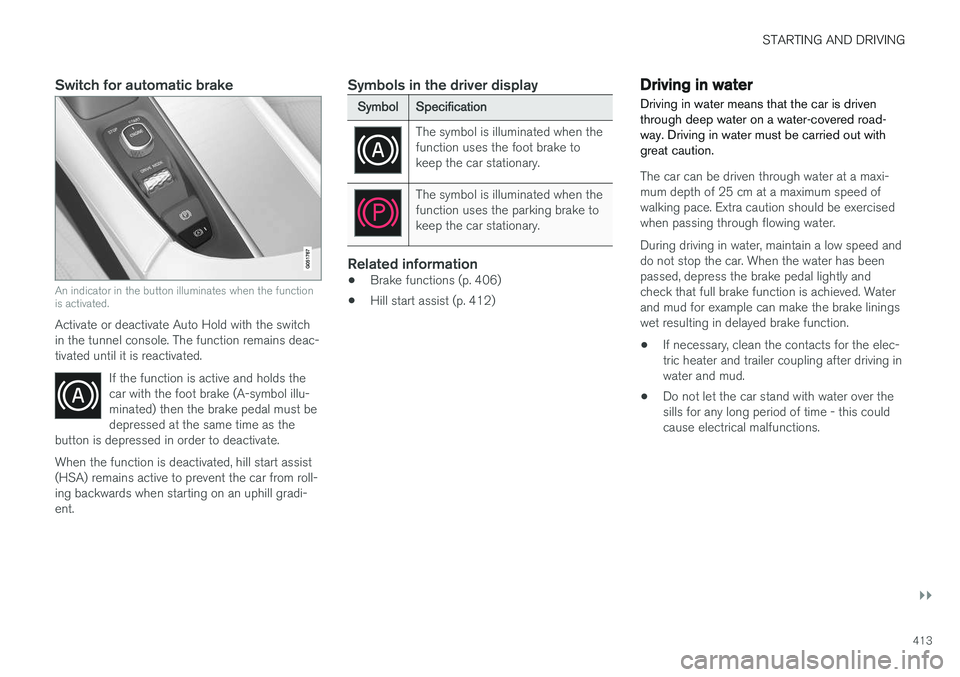
Switch for automatic brake
An indicator in the button illuminates when the function is activated.
Activate or deactivate Auto Hold with the switch in the tunnel console. The function remains deac-tivated until it is reactivated.If the function is active and holds thecar with the foot brake (A-symbol illu-minated) then the brake pedal must bedepressed at the same time as the
button is depressed in order to deactivate.
When the function is deactivated, hill start assist (HSA) remains active to prevent the car from roll-ing backwards when starting on an uphill gradi-ent.
Symbols in the driver display
Symbol Specification
The symbol is illuminated when the function uses the foot brake tokeep the car stationary.
The symbol is illuminated when the function uses the parking brake tokeep the car stationary.
Related information
•Brake functions (p. 406)
• Hill start assist (p. 412)
Driving in water Driving in water means that the car is driven through deep water on a water-covered road-way. Driving in water must be carried out withgreat caution.
The car can be driven through water at a maxi- mum depth of 25 cm at a maximum speed ofwalking pace. Extra caution should be exercisedwhen passing through flowing water. During driving in water, maintain a low speed and do not stop the car. When the water has beenpassed, depress the brake pedal lightly andcheck that full brake function is achieved. Waterand mud for example can make the brake liningswet resulting in delayed brake function.
• If necessary, clean the contacts for the elec-tric heater and trailer coupling after driving inwater and mud.
• Do not let the car stand with water over thesills for any long period of time - this couldcause electrical malfunctions.
Page 417 of 594
STARTING AND DRIVING
}}
* Option/accessory.415
Related information
•Driving with a trailer under special conditions (p. 428)
• Preparations for a long trip (p. 415)
Overloading the starter battery
The electrical functions in the car load the starter battery to varying degrees. Avoid using the igni-tion position II when the car is switched off.
Instead, use ignition position I - which uses less
power.
Also, be aware of different accessories that load the electrical system. Do not use functions whichuse a lot of power when the car is switched off.Examples of such functions are:
• ventilation fan
• headlamps
• windscreen wiper
• audio system (high volume).
If the starter battery voltage is low, the message
12 V Battery Low charge, will soon enter
power save mode is shown in the driver display.
The energy-saving function then shuts down cer- tain functions or reduces certain functions suchas the ventilation fan and/or audio system.
–In which case, charge the starter battery by starting the car and then running it for atleast 15 minutes - starter battery charging ismore effective during driving than runningthe engine at idling speed while stationary.
Related information
• Ignition positions (p. 385)
• Starter battery (p. 530)
Preparations for a long trip
Before a driving holiday or some other type of long journey, it is important to check the car'sfunctions and equipment particularly carefully.
Check that:
• the engine is working normally and that fuel consumption is normal
• there are no leaks (fuel, oil or other fluid)
• all bulbs are working
• the tyres have sufficient tread depth andpressure
• a warning triangle and high-visibility vest arelocated in the car - legally required in certaincountries
• the wiper blades are in good condition.
Related information
•
Fuel consumption and CO2 emissions(p. 572)
• Checking the tyre pressures (p. 484)
• Filling washer fluid (p. 529)
• Winter driving (p. 416)
• Economical driving (p. 422)
• Settings for car modem
* (p. 468)
• Loading (p. 227)
• Pilot Assist
* (p. 304)
• Speed limiter
* (p. 277)
Page 418 of 594
STARTING AND DRIVING
* Option/accessory.
416 •
Speed camera information
* (p. 350)
• Driving with a trailer (p. 426)
• Driving in water (p. 413)
• Alarm
* (p. 262)
• Level control
* and shock absorption (p. 405)
• Warning triangle (p. 500)
• Emergency puncture repair kit (p. 490)
• Spare wheel
* (p. 498)
Winter driving
For winter driving it is important to perform cer- tain checks of the car in order to ensure that itcan be driven safely.
Check the following in particular before the cold season:
• The engine coolant must contain 50% glycol.This mixture protects the engine againstfrost erosion down to approximately –35 °C.To avoid health risks, different types of glycolmust not be mixed.
• The fuel tank must be kept filled to preventcondensation.
• Engine oil viscosity is important. Oils withlower viscosity (thinner oils) facilitate startingin cold weather and also reduce fuel con-sumption while the engine is cold. Readmore about suitable oils in the section"Adverse driving conditions for engine oil".
IMPORTANT
Low viscosity oil must not be used for hard driving or in hot weather.
• The condition of the starter battery and charge level must be inspected. Coldweather places great demands on the starter battery and its capacity is reduced by thecold.
• Use washer fluid with antifreeze to avoid iceforming in the washer fluid reservoir.
Slippery driving conditionsTo achieve optimum roadholding Volvo recom-mends using winter tyres on all wheels if there isa risk of snow or ice.
NOTE
The use of winter tyres is a legal requirement in certain countries. Studded tyres are notpermitted in all countries.
Practise driving on slippery surfaces under con- trolled conditions to learn how the car reacts.
Related information
•Topping up coolant (p. 518)
• Adverse driving conditions for engine oil(p. 569)
• Starter battery (p. 530)
• Winter wheels (p. 499)
• Filling washer fluid (p. 529)
• Replacing a wiper blade (p. 528)
• Parking climate
* (p. 206)
• Activating/deactivating defrost of windowsand door mirrors (p. 194)
Page 421 of 594
STARTING AND DRIVING
419
IMPORTANT
Mixtures of various fuel types or use of fuels which are not recommended will invalidateVolvo's guarantees and any supplementaryservice agreements; this is applicable to allengines.
NOTE
Extreme weather conditions, driving with a trailer or driving at high altitudes in combina-tion with fuel grade are factors that couldaffect the car's performance.
Related information
•Petrol (p. 419)
• Diesel (p. 420)
• Opening/closing the fuel filler flap and refu- elling (p. 417)
• Economical driving (p. 422)
Petrol
Petrol is a type of engine fuel that is intended for cars with a petrol engine.
Only use petrol from well-known producers. Never use fuel of dubious quality. The petrol mustfulfil the EN 228 standard.
IMPORTANT
• Fuel that contains up to 10 percent by volume ethanol is permitted.
• EN 228 E10 petrol (max10 percent by volume ethanol) isapproved for use.
• Ethanol higher than E10 (max.10 percent by volume ethanol) is not per-mitted, e.g. E85 is not permitted.
Octane rating
•95 RON can be used for normal driving.
• 98 RON is recommended for optimum per- formance and minimum fuel consumption.
When driving in temperatures above +38 °C, fuelwith the highest possible octane rating is recom-mended for optimum performance and fuel econ-omy.
IMPORTANT
• Use only unleaded petrol to avoid damag- ing the catalytic converter.
• Fuel containing metallic additives mustnot be used.
• Do not use any additives which have notbeen recommended by Volvo.
Related information
•Handling of fuel (p. 418)
• Opening/closing the fuel filler flap and refu- elling (p. 417)