mirror controls VOLVO V90 CROSS COUNTRY 2021 User Guide
[x] Cancel search | Manufacturer: VOLVO, Model Year: 2021, Model line: V90 CROSS COUNTRY, Model: VOLVO V90 CROSS COUNTRY 2021Pages: 683, PDF Size: 14.19 MB
Page 210 of 683
CLIMATE CONTROL
* Option/accessory.
208
Perceived temperature
The climate control system regulates the cli- mate in the passenger compartment basedon perceived temperature, not actual tem-perature.
The selected passenger compartment tem- perature is based on the physical perception ofthe current ambient temperature, airflowspeed, humidity, sunlight in the passengercompartment, etc. The system has a sunlight sensor that detects which side of the vehicle the sunlight is shin-ing on and adjusts the temperature accord-ingly. This means that the temperature of theair coming out of the vents may be differentfor the left and right sides, even if the tem-perature setting is the same for both sides.
Related information
Climate (p. 206)
Climate control system voice commands 1
Voice commands can be used for the climate control system to e.g. change temperature, activate seat heating * or change blower
speed.
Tap and say one of the following com-
mands: "
Climate" - starts a command dialog for
climate controls and provides examples of commands that can be used.
"
Set temperature to X degrees" - sets
desired temperature.
"
Raise temperature"/"Lower
temperature" - raises/lowers the set tem-
perature.
"
Sync temperature" - synchronizes the
temperature for all climate zones in the vehicle with the temperature set for thedriver's side.
"
Air on feet"/"Air on body" - opens the
desired air vent.
"
Air on feet off"/"Air on body off" -
closes the desired air vent.
"
Set fan to max"/"Turn off fan" -
changes blower speed to Max/Off.
"
Raise fan speed"/"Lower fan speed" -
raises/lowers the set blower speed.
"
Turn on auto" - activates automatic cli-
mate control.
"
Air condition on"/"Air condition off" -
activates/deactivates air conditioning.
"
Recirculation on"/"Recirculation off" -
activates/deactivates air recirculation.
"
Turn on defroster "/"Turn off
defroster" - activates/deactivates win-
dow and door mirror defrosting.
"
Turn on max defroster"/"Turn off max
defroster" - activates/deactivates max
defroster.
"
Turn on rear defroster"/"Turn off rear
defroster" - Activates/deactivates heated
rear window and door mirrors.
"
Turn steering wheel heat on"/"Turn
steering wheel heat off" - activates/
deactivates heated steering wheel *.
"
Raise steering wheel heat"/"Lower
steering wheel heat" - raises/lowers the
level of steering wheel heating *.
"
Turn on seat heat"/"Turn off seat heat"
- activates/deactivates seat heating *.
"
Raise seat heat"/"Lower seat heat" -
raises/lowers the level of seat heating *.
1
Certain markets only.
Page 220 of 683
CLIMATE CONTROL
* Option/accessory.
218
Climate system controls
The climate system functions are controlled from physical buttons on the center console,the center display, and the climate panel on the rear side of the tunnel console *.
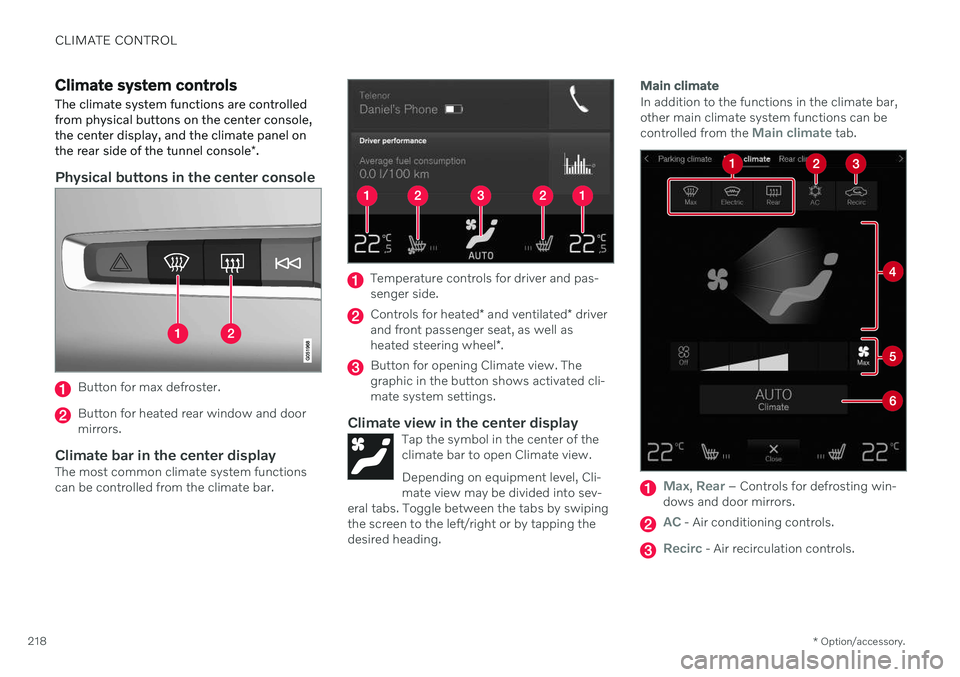
Physical buttons in the center console
Button for max defroster.
Button for heated rear window and door mirrors.
Climate bar in the center displayThe most common climate system functionscan be controlled from the climate bar.
Temperature controls for driver and pas- senger side.
Controls for heated * and ventilated * driver
and front passenger seat, as well as heated steering wheel *.
Button for opening Climate view. The graphic in the button shows activated cli-mate system settings.
Climate view in the center displayTap the symbol in the center of theclimate bar to open Climate view. Depending on equipment level, Cli- mate view may be divided into sev-
eral tabs. Toggle between the tabs by swipingthe screen to the left/right or by tapping thedesired heading.
Main climate
In addition to the functions in the climate bar, other main climate system functions can be controlled from the
Main climate tab.
Max, Rear – Controls for defrosting win-
dows and door mirrors.
AC - Air conditioning controls.
Recirc - Air recirculation controls.
Page 222 of 683
||
CLIMATE CONTROL
* Option/accessory.
220 only the controls for seat adjustment
* and the
unlock button will be displayed. After unlocking, blower speed and tempera- ture can also be changed from the climatepanel and all selected climate settings will bedisplayed. The screen locks automatically aftera period of inactivity.
Related information
Climate (p. 206)
Activating and deactivating power front seats
* (p. 220)
Activating and deactivating the heatedrear seats
* (p. 221)
Activating and deactivating front seat ven-tilation
* (p. 223)
Activating and deactivating the heatedsteering wheel
* (p. 223)
Activating auto climate control (p. 224)
Activating and deactivating recirculation (p. 225)
Activating and deactivating max defroster(p. 226)
Activating and deactivating the heatedrear window and door mirrors (p. 227)
Setting the blower speed for the frontseats (p. 228)
Setting the blower speed for the rear seats
* (p. 229)
Synchronize temperature (p. 232)
Activating and deactivating air condition- ing (p. 233)
Activating and deactivating power front seats
*
The seats can be heated for added comfort for the driver and passengers in cold weather.
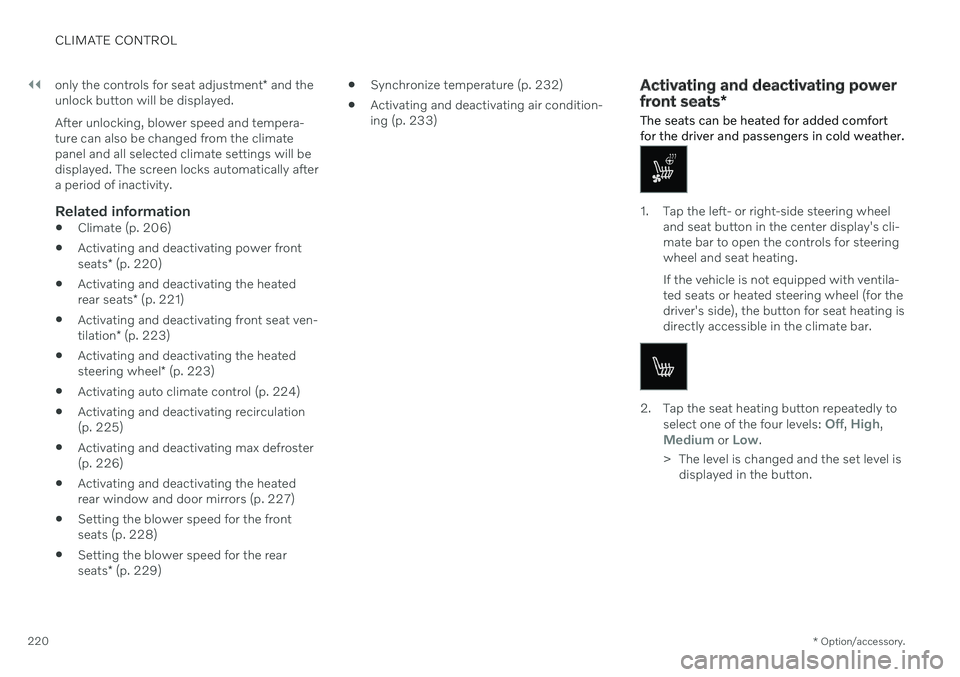
1. Tap the left- or right-side steering wheel and seat button in the center display's cli- mate bar to open the controls for steeringwheel and seat heating. If the vehicle is not equipped with ventila- ted seats or heated steering wheel (for thedriver's side), the button for seat heating isdirectly accessible in the climate bar.
2. Tap the seat heating button repeatedly to
select one of the four levels: Off, High,Medium or Low.
> The level is changed and the set level is displayed in the button.
Page 229 of 683
CLIMATE CONTROL
227
Activating and deactivating the heated rear window and doormirrors The heated rear window and door mirrors are used to quickly remove condensation and icefrom the glass.
Activating and deactivating the heated rear window and door mirrors fromthe center console
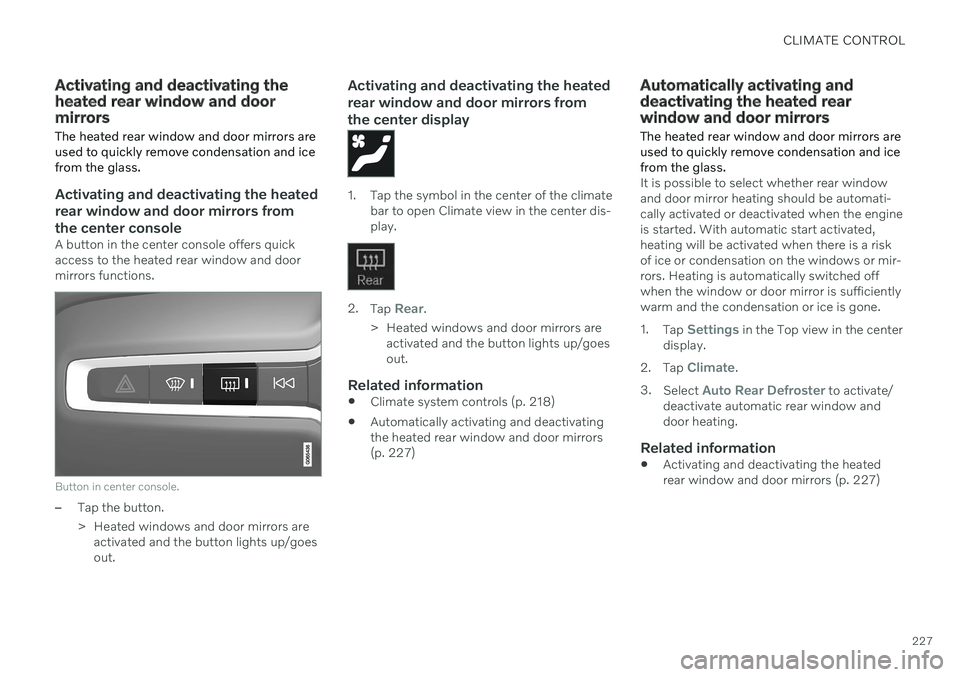
A button in the center console offers quick access to the heated rear window and doormirrors functions.
Button in center console.
–Tap the button.
> Heated windows and door mirrors areactivated and the button lights up/goes out.
Activating and deactivating the heated rear window and door mirrors fromthe center display
1. Tap the symbol in the center of the climate bar to open Climate view in the center dis- play.
2.Tap Rear.
> Heated windows and door mirrors are activated and the button lights up/goes out.
Related information
Climate system controls (p. 218)
Automatically activating and deactivatingthe heated rear window and door mirrors(p. 227)
Automatically activating and deactivating the heated rearwindow and door mirrors
The heated rear window and door mirrors are used to quickly remove condensation and icefrom the glass.
It is possible to select whether rear window and door mirror heating should be automati-cally activated or deactivated when the engineis started. With automatic start activated,heating will be activated when there is a riskof ice or condensation on the windows or mir-rors. Heating is automatically switched offwhen the window or door mirror is sufficientlywarm and the condensation or ice is gone. 1. Tap
Settings in the Top view in the center
display.
2. Tap
Climate.
3. Select
Auto Rear Defroster to activate/
deactivate automatic rear window and door heating.
Related information
Activating and deactivating the heatedrear window and door mirrors (p. 227)
Page 456 of 683
||
STARTING AND DRIVING
* Option/accessory.
454
WARNING
No person or object should be behind the tow truck when the vehicle is lifted ontothe bed of the truck.
CAUTION
The towing eyelet is only intended for tow- ing on roads, and must not be used to pull
vehicles from ditches or any similar pur-pose involving severe strain. Call a towtruck for professional assistance.
CAUTION
Note that the vehicle must always be towed with the wheels rolling forward.
Related information
Attaching and removing the towing eyelet (p. 451)
HomeLink ®
*25
HomeLink ®
26
is a programmable remote con-
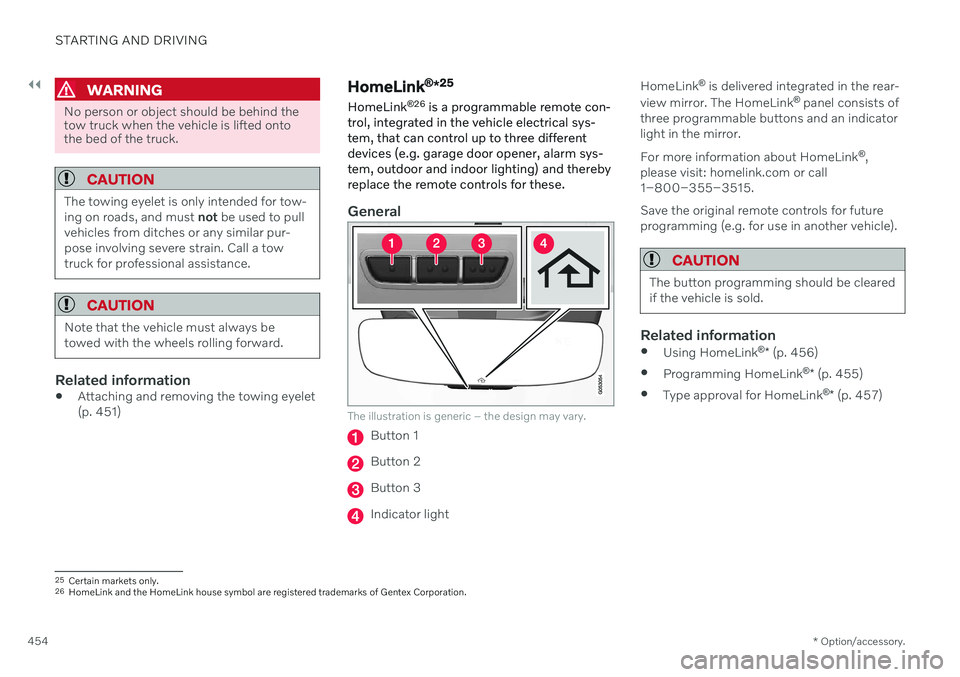
trol, integrated in the vehicle electrical sys- tem, that can control up to three differentdevices (e.g. garage door opener, alarm sys-tem, outdoor and indoor lighting) and therebyreplace the remote controls for these.
General
The illustration is generic – the design may vary.
Button 1
Button 2
Button 3
Indicator light HomeLink
®
is delivered integrated in the rear-
view mirror. The HomeLink ®
panel consists of
three programmable buttons and an indicator light in the mirror. For more information about HomeLink ®
,
please visit: homelink.com or call 1–800–355–3515. Save the original remote controls for future programming (e.g. for use in another vehicle).
CAUTION
The button programming should be cleared if the vehicle is sold.
Related information
Using HomeLink ®
* (p. 456)
Programming HomeLink ®
* (p. 455)
Type approval for HomeLink ®
* (p. 457)
25
Certain markets only.
26 HomeLink and the HomeLink house symbol are registered trademarks of Gentex Corporation.
Page 674 of 683
INDEX
672location and views 370
sensor field 374
Symbols and messages 377
trajectory lines 372
Park Assist Pilot 379 limitations 384
parallel parking 380
perpendicular parking 380
pulling out of a parking space 384
Symbols and messages 386
use 381
Park Assist System 364 parking on hills 408
Parking Assist 364 activating/deactivating 366
front, rear and sides 365
limitations 367
Symbols and messages 368
Parking brake 406 activating/deactivating 406
automatic activation 408
Low battery charge level 408
Parking climate 234 Symbols and messages 241
Passenger compartment filter 212
Passenger compartment interior 564 center console 565
electrical outlet 566
glove compartment 568
sun visor 569
Passenger compartment lighting 166 adjusting 168
auto switch 167
Passing assistance 318 activating 318
personal information (Customer Privacy
Policy) 35
Phone 499 changing to another 503
connect 500
connect automatically 502
connect manually 502
delete 503
disconnect 502
phone call 503, 506
text message 504
voice control 152
Phone charger 508
Pilot Assist 304 activating 308
auto-brake 323
controls 306
disengaged steering assistance 311
display 307
limitations 312
passing 318set time interval 322
standby mode 310
stored speed 321
switching target vehicles 320
Symbols and messages 314
turn off 309
WARNING 319
pinch protection 172 resetting 173
PIN code 517 Private locking 273
Polishing 635
Position lights 158
Power 657
Power folding door mirrors 177
Power panoramic roof 179
Power save mode 443
Power seats 191
Power windows 174 opening and closing 174
pinch protection 172
Precleaning 238 start/stop 238
Preconditioning 234 start/stop 234
timer 235
Pressure wash 638