sport mode VOLVO V90 CROSS COUNTRY 2021 User Guide
[x] Cancel search | Manufacturer: VOLVO, Model Year: 2021, Model line: V90 CROSS COUNTRY, Model: VOLVO V90 CROSS COUNTRY 2021Pages: 683, PDF Size: 14.19 MB
Page 476 of 683
||
AUDIO, MEDIA AND INTERNET
* Option/accessory.
474
NOTE
There may be a noticeable difference in sound quality when a change from ana-logue to digital or digital to analogueoccurs, such as:
Volume increase or decrease
Equalizer settings, i.e., Bass/ Mid-range/Treble cut or boost
Time alignment (Digital program mate-rial in extreme cases can be as muchas 8 seconds behind the analogue).This will noticeable as a "stuttering"effect.
The above items are dependant on thebroadcaster's equipment settings anddo not indicate a fault in the vehicle'sradio receiver or antenna systems .
Related information
HD Radio
™ (p. 471)
Activating and deactivating the HD Radio
™ (p. 472)
HD Radio
™ sub-channels (p. 473)
SiriusXM ®
Satellite radio *
The SiriusXM ®
Satellite system broadcasts
from of a number of high elevation satellites in geosynchronous orbit.
Listening to satellite radioThe digital signals from the satellites are line- of-sight, which means that physical obstruc-tions such as bridges, tunnels, etc, may tem-porarily interfere with signal reception. Avoid any obstructions, such as metallic objects transported on roof racks or in a skibox, or other antennas that may impede sig- nals from the SiriusXM ®
satellites.
Selecting SiriusXM ®
Satellite radio
mode
1. From the center display's Home view, swipe from right to left to come to App view.
2.Tap the SiriusXM ®
Satellite radio icon.
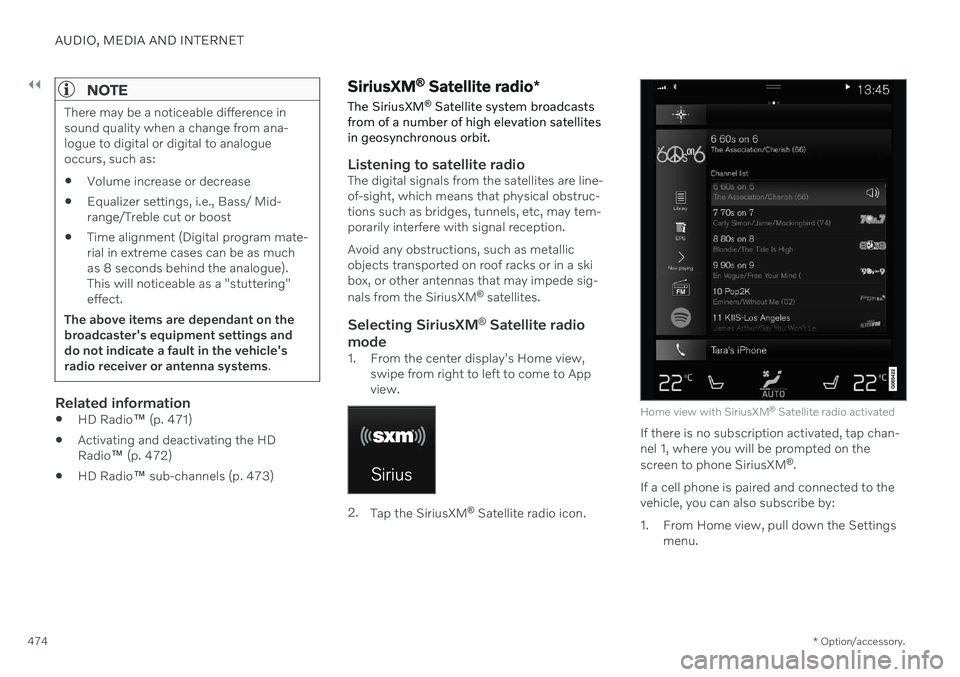
Home view with SiriusXM ®
Satellite radio activated
If there is no subscription activated, tap chan- nel 1, where you will be prompted on the screen to phone SiriusXM ®
.
If a cell phone is paired and connected to the vehicle, you can also subscribe by:
1. From Home view, pull down the Settings menu.
Page 482 of 683

||
AUDIO, MEDIA AND INTERNET
* Option/accessory.
480
Local 5Information from the closest weather station will be displayed and the following alternativesare available:
Map view
Today
5 days
Map view
Tap the map to display it in full-screen mode. Tap Back to return to the original map view.
Tap
Map options to display the following
alternatives.
Weather radar
Storm attributes
Surface features
Tropical storm tracks
Winds
Tap the relevant box to the right of the option to select/deselect it. Tap Done to confirm and
return to the previous screen or Cancel.
Today
Tap to see the current temperature, or the temperature in 3/6 hours. Tap
Back to return to the Local screen orClose to return to the SiriusXM Travel Link
home screen.
5 days
Tap to see weather information for the coming 5 days. Tap
Back to return to the Local screen orClose to return to the SiriusXM Travel Link
home screen.
Ski conditionTap to display a list of ski areas in the vicinity of the vehicle. Tap a name in the list for infor-mation such as if the ski area is open/closed,temperature, wind conditions, snow condi-tions, the number of lifts that are in operation,etc.
Weather locations
Ski location
Tap Map view to display a map and a weatherlegend. Tap
Map options to display the following
alternatives.
Weather radar
Storm attributes
Surface features
Tropical storm tracks
Winds
Tap the relevant box to the right of the option to select/deselect it. Tap Done to confirm and
return to the previous screen or Cancel.
AreasTap Areas to display a list of areas/locations in
states from the SiriusXM Travel Link database. Scroll to a state and tap to display:
Weather locations: tap arrow to the right
to display a list of towns. Scroll to desired town and tap for detailed weather infor-mation. You can choose Map view, today,5 days or Favorites (star)
Ski locations: tap arrow at right to dis-
play local ski areas. Tap an area for detailed info.
For information about storing a location, state,town, etc. as a favorite, see the heading"Favorites" in the article "SiriusXM TravelLink."
Related information
SiriusXM Travel Link ®
* (p. 478)
SiriusXM Travel Link ®
* - Fuel (p. 481)
SiriusXM Travel Link ®
* - Sports (p. 483)
SiriusXM Travel Link ®
* - Notifications
(p. 481)
5 This is the weather default unless another alternative has been selected.
Page 537 of 683
WHEELS AND TIRES
}}
535
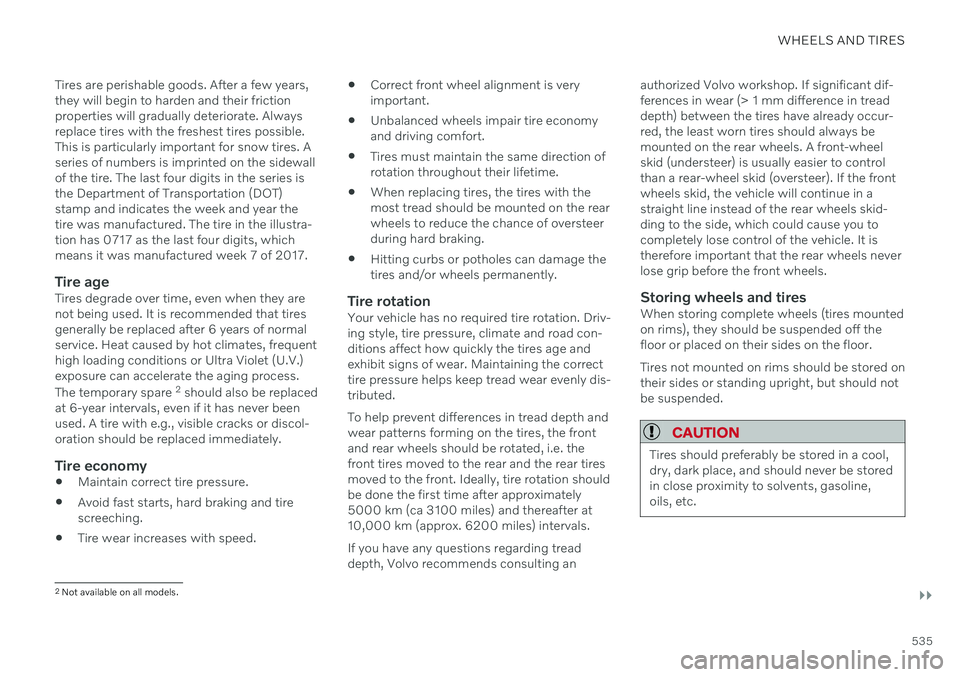
Tires are perishable goods. After a few years, they will begin to harden and their frictionproperties will gradually deteriorate. Alwaysreplace tires with the freshest tires possible.This is particularly important for snow tires. Aseries of numbers is imprinted on the sidewallof the tire. The last four digits in the series isthe Department of Transportation (DOT)stamp and indicates the week and year thetire was manufactured. The tire in the illustra-tion has 0717 as the last four digits, whichmeans it was manufactured week 7 of 2017.
Tire ageTires degrade over time, even when they arenot being used. It is recommended that tiresgenerally be replaced after 6 years of normalservice. Heat caused by hot climates, frequenthigh loading conditions or Ultra Violet (U.V.)exposure can accelerate the aging process. The temporary spare
2
should also be replaced
at 6-year intervals, even if it has never been used. A tire with e.g., visible cracks or discol-oration should be replaced immediately.
Tire economy
Maintain correct tire pressure.
Avoid fast starts, hard braking and tirescreeching.
Tire wear increases with speed.
Correct front wheel alignment is veryimportant.
Unbalanced wheels impair tire economyand driving comfort.
Tires must maintain the same direction ofrotation throughout their lifetime.
When replacing tires, the tires with themost tread should be mounted on the rearwheels to reduce the chance of oversteerduring hard braking.
Hitting curbs or potholes can damage thetires and/or wheels permanently.
Tire rotationYour vehicle has no required tire rotation. Driv-ing style, tire pressure, climate and road con-ditions affect how quickly the tires age andexhibit signs of wear. Maintaining the correcttire pressure helps keep tread wear evenly dis-tributed. To help prevent differences in tread depth and wear patterns forming on the tires, the frontand rear wheels should be rotated, i.e. thefront tires moved to the rear and the rear tiresmoved to the front. Ideally, tire rotation shouldbe done the first time after approximately5000 km (ca 3100 miles) and thereafter at10,000 km (approx. 6200 miles) intervals. If you have any questions regarding tread depth, Volvo recommends consulting an authorized Volvo workshop. If significant dif-ferences in wear (> 1 mm difference in treaddepth) between the tires have already occur-red, the least worn tires should always bemounted on the rear wheels. A front-wheelskid (understeer) is usually easier to controlthan a rear-wheel skid (oversteer). If the frontwheels skid, the vehicle will continue in astraight line instead of the rear wheels skid-ding to the side, which could cause you tocompletely lose control of the vehicle. It istherefore important that the rear wheels neverlose grip before the front wheels.
Storing wheels and tiresWhen storing complete wheels (tires mountedon rims), they should be suspended off thefloor or placed on their sides on the floor. Tires not mounted on rims should be stored on their sides or standing upright, but should notbe suspended.
CAUTION
Tires should preferably be stored in a cool, dry, dark place, and should never be storedin close proximity to solvents, gasoline,oils, etc.
2
Not available on all models.
Page 575 of 683
LOADING, STORAGE AND PASSENGER COMPARTMENT
}}
* Option/accessory.573
Rear seat ski hatch
The hatch in the rear seat backrest can be opened to transport long, narrow objectssuch as skis.
The illustration is generic - details may vary accord- ing to vehicle model.
1. In the cargo compartment, grasp the ski hatch handle and pull it down.
2. Fold down the armrest in the rear seat. If the private locking function is used, the ski hatch must be closed.
Related information
Loading recommendations (p. 570)
Private Locking (p. 272)
Load anchoring eyelets (p. 572)
Installing and removing the cargo compartment cover
*
The cover can be rolled out to conceal objects in the cargo compartment.
Installing the cargo compartment cover
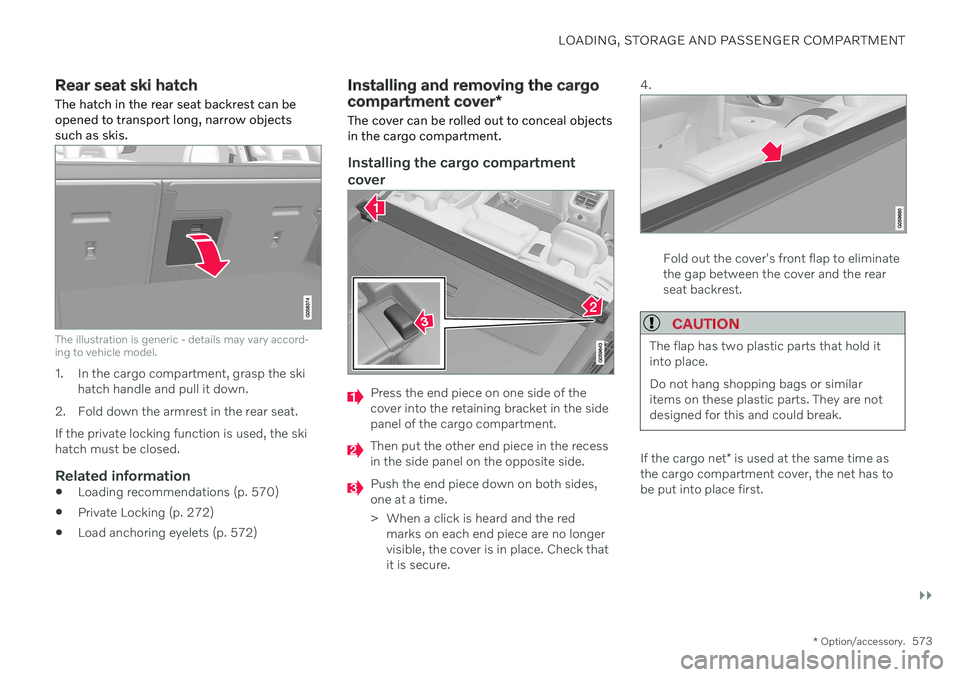
Press the end piece on one side of the cover into the retaining bracket in the sidepanel of the cargo compartment.
Then put the other end piece in the recess in the side panel on the opposite side.
Push the end piece down on both sides, one at a time.
> When a click is heard and the red marks on each end piece are no longer visible, the cover is in place. Check thatit is secure. 4.
Fold out the cover's front flap to eliminate the gap between the cover and the rearseat backrest.
CAUTION
The flap has two plastic parts that hold it into place. Do not hang shopping bags or similar items on these plastic parts. They are notdesigned for this and could break.
If the cargo net
* is used at the same time as
the cargo compartment cover, the net has to be put into place first.
Page 654 of 683
||
SPECIFICATIONS
652
Federal Motor Vehicle Safety Standards
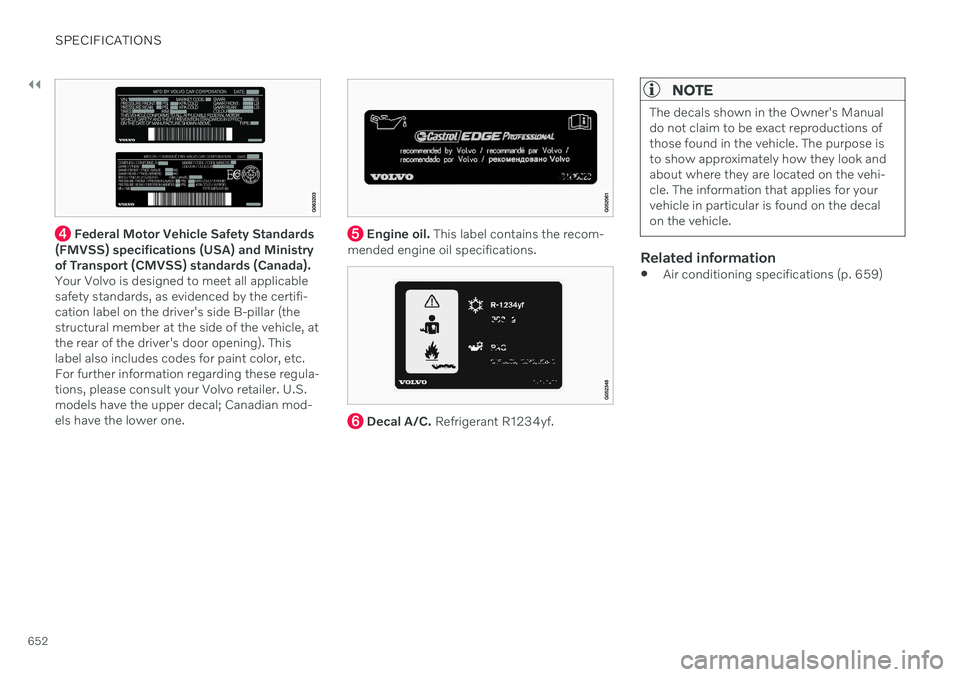
(FMVSS) specifications (USA) and Ministry of Transport (CMVSS) standards (Canada).Your Volvo is designed to meet all applicablesafety standards, as evidenced by the certifi-cation label on the driver's side B-pillar (thestructural member at the side of the vehicle, atthe rear of the driver's door opening). Thislabel also includes codes for paint color, etc.For further information regarding these regula-tions, please consult your Volvo retailer. U.S.models have the upper decal; Canadian mod-els have the lower one. Engine oil. This label contains the recom-
mended engine oil specifications.
Decal A/C. Refrigerant R1234yf.
NOTE
The decals shown in the Owner's Manual do not claim to be exact reproductions ofthose found in the vehicle. The purpose isto show approximately how they look andabout where they are located on the vehi-cle. The information that applies for yourvehicle in particular is found on the decalon the vehicle.
Related information
Air conditioning specifications (p. 659)
Page 669 of 683
INDEX
667
Door mirrors 176
compass 458
dimming 177
outer 176
power folding 177
resetting 177
store position 192, 193
Download Center 585 use 585
Driveline transmission 412
Drive mode 419 changing 421
ECO 422, 424
when using driver support 323
Driver Alert Control 356 activating/deactivating 357
limitations 358
rest stop guidance 357
Driver performance 96 settings 97
Driver profile 140 edit 141, 142, 143
select 141
Driver support system 278 Drive mode 323
Drivingcooling system 442
with a trailer 446
Driving economy 435
Driving through standing water 437driving with a trailer towball load 656
towing capacity 656
E
ECO climate 422
ECO mode 422
activate with function button 424
Economical driving 422, 435
Electrical outlet 566 use 567
Electrical system 600
Electric parking brake 406
Electronic immobilizer 260
emergency brake lights 165
Emission inspection readiness 582 Engine overheating 442
start 398
Start/Stopfunction 425
turn off 400
Engine braking 403, 433 Engine compartment coolant 598
engine oil 595
overview 594
Engine drag control 279
Engine oil 595 checking and filling 596
grade and volume 658
Engine shutdown 400
Engine specifications 657Engine temperature high 442
Environment 28Ethanol content max. 10% by volume 439
Exterior dimensions 653
F
Federal Clean Air Act 582
Ferry transport 429
Flooded road 437
Fluids, volumes 646, 659
Page 677 of 683
INDEX
675
Stability and traction control system 279
sport mode 280, 281
Symbols and messages 282
Stains 628, 630, 631, 632, 633, 634
Start/Stop deactivate 426
Driving 425
limitations 427
vehicle function 425
Start and lock system type designations 260
Start battery 444, 600 overload 443
Start engine 398 Starting the engine after a collision 65
Start the vehicle 398
Steel cargo grid 576
Steering assistance at risk of collision 345 Steering power level, see Steering wheel
resistance 278
Steering wheel 202, 203 heating 223, 224
keypad 202
paddle 202
steering wheel adjustment 203
Steering wheel keypad 202
Steering wheel paddles 415 Steering wheel resistance, speed-
dependent 278
Stone chips and scratches 641, 642, 643
Stop/start function 425
Storage compartments 564 center console 565
glove compartment 568
sun visor 569
Stored speed 321 Sunroof pinch protection 172
Sun shade panoramic roof 179, 182
pinch protection 172
rear door 176
Sun visor 569 mirror lighting 167
Support battery 602 Symbols dynamic 88
indicator symbols 99
warning symbols 99
Symbols and messages center display's status bar 128
parking climate 241
system updates 585T
Tailgate closing and locking using button 269
locking/unlocking 251, 264
open/close with foot movement 271
unlocking from inside 267
Technician certification 38 Temperature adjusting 230, 231, 232
perceived 208
Temporary Spare 552
Temporary tire sealing system 556 Terms and conditions services 35
users 520
Time interval to the vehicle ahead 322 Tires age 534
designations 538
direction of rotation 536
economy and wear 534
glossary of terms 537
inflation pressure table 661
pressure 661
recommended 534
removing and installing 548
rotation when changing 534
specifications 538, 661
Page 678 of 683
INDEX
676speed rating 538
storage 534
tread wear indicator 537
winter tires 554
Tire sealing system 556 Inflating tires 560
use 557
Tire tread 537
Tools 550Top tether anchors (child restraint sys-
tems) 75
Top view 136
Total airing function 246
Towing 450
Towing capacity and towball load 656
Towing eyelet 451TPMS - Tire Pressure Monitoring Sys-
tem 543
Traction control 279
Traffic information 470 Trailer driving with a trailer 446
Lamps 449
swaying 448
Trailer Stability Assist 280 trailer 448
Trailer stabilizer 280, 448
Transmission 412automatic 412, 413, 419
Transmission fluid grade 658
Travel Link 478 Fuel 481
Notifications 481
Sports 483
weather 479
Tread depth 537 winter tires 554
Tread wear indicator 537
Trip computer 93 display in instrument panel 95
Trip odometer 93
Trip odometer resetting 96
Trip statistics 96 settings 97
Troubleshooting Adaptive Cruise Control 300
City Safety 341
TSA - Trailer Stability Assist 448
Tunnel detection 159
Turn off engine 400
Turn signals 162Type approval HomeLink ® 457
radar system 388
U
Uniform Tire Quality Grading 540
Units 136Unlocking settings 250
with key blade 258
USB socket for connecting media 490
V
Vehicle care 634, 636, 637, 638,
639, 640
leather upholstery 632
Vehicle Event Data 33 Vehicle functions in the center display 126
Vehicle key bat. low 252 Vehicle modem connecting vehicle to Internet 516
settings 517