cruise control VOLVO V90 CROSS COUNTRY 2021 Service Manual
[x] Cancel search | Manufacturer: VOLVO, Model Year: 2021, Model line: V90 CROSS COUNTRY, Model: VOLVO V90 CROSS COUNTRY 2021Pages: 683, PDF Size: 14.19 MB
Page 425 of 683
STARTING AND DRIVING
}}
* Option/accessory.423
Limitations
Eco Coast is not available if
the engine and/or transmission are not at normal working temperatures
the gear selector is moved from
D to man-
ual shifting mode
the vehicle's speed is not within the65-140 km/h (40-87 mph) range
the gradient of the downgrade is morethan approximately 6%
the steering wheel paddles
* are being
used for manual shifting.
Deactivating and turning off Eco Coast
In certain situations, it may be advisable to deactivate or turn off Eco Coast so that enginebraking can be used. These situations mightinclude driving down steep hills or beforepassing another vehicle to help ensure thiscan be done as safely as possible. Deactivate Eco Coast by
pressing the accelerator or brake pedal
moving the gear selector to manual mode
using the steering wheel paddles
* to shift.
Turn off Eco Coast by
switching to another drive mode
*
deactivating
Eco drive mode in Function
view. It is possible to roll short distances even with- out Eco Coast in order to help conserve fuel.However, for the best fuel economy, EcoCoast should be activated and used to rolllonger distances.
Cruise control Eco CruiseWhen cruise control is activated in the Ecodrive mode, the vehicle's acceleration and deceleration will be slower than in other drivemodes to help further conserve fuel. Becauseof this, the vehicle's actual speed may beslightly above or below the set speed.
On a level road, the vehicle's actual speedmay differ from the set speed when cruisecontrol is active and the vehicle is coast-ing.
On a steep uphill gradient, the vehicle'sspeed is reduced until the transmissiondownshifts. Reduced acceleration is theninitiated in order to reach the set speed.
On a downhill gradient in which the vehi- cle is coasting, the vehicle's actual speed may be slightly above or below the setspeed. The function uses engine brakingto keep the set speed. If necessary, thenormal brakes are also applied.
ECO gauge in the instrument panel
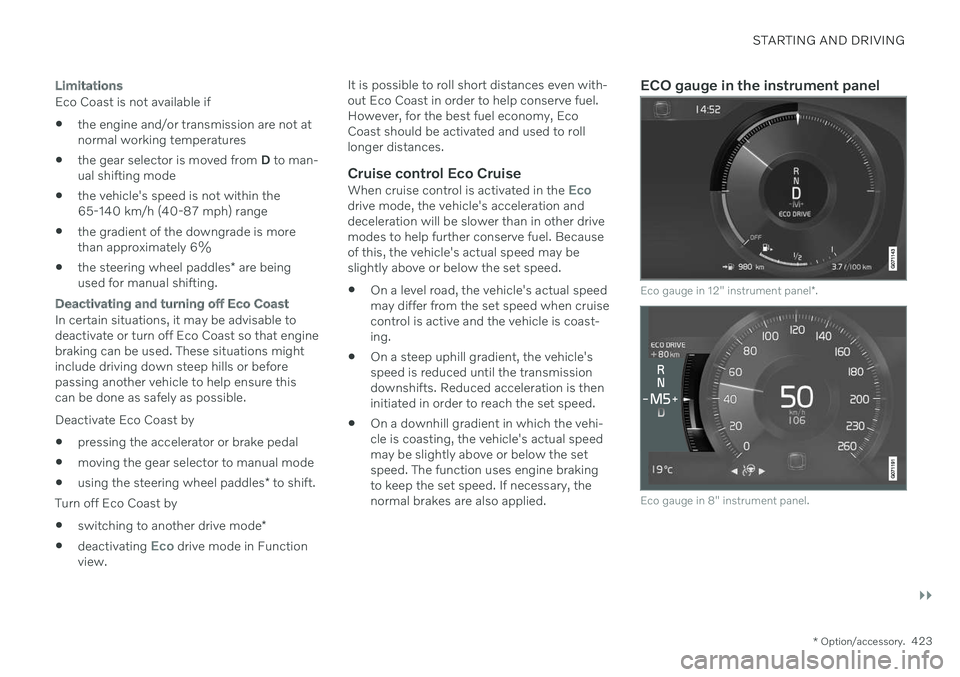
Eco gauge in 12" instrument panel
*.
Eco gauge in 8" instrument panel.
Page 427 of 683
STARTING AND DRIVING
}}
* Option/accessory.425
Start/Stop function Start/Stop is a function that temporarily switches off the engine when the vehicle hasstopped, e.g. at a traffic light or in heavy traf-fic, and then starts it again automaticallywhen needed.
The Start/Stop function reduces fuel con- sumption, which helps to reduce exhaustemissions. The system makes it possible to drive more economically and climate-smart by letting theengine auto-stop when appropriate.
Related information
Driving with the Start/Stop function(p. 425)
Conditions for the Start/Stop function(p. 427)
Drive modes
* (p. 419)
Driving with the Start/Stop function
Start/stop is a function that temporarily turns off the engine when the vehicle is stationaryand then automatically starts it when needed.
The Start/Stop function is available when the ignition is started and can be activated if cer-tain conditions are met. The instrument panel indicates when the func- tion is
Available
active
not available.
All of the vehicle's ordinary systems, such aslighting, radio, etc. function normally when theengine has been auto-stopped. Certain func-tions may be temporarily reduced howeversuch as the climate system's blower speed orextremely high audio system volume.
Auto-stopTo auto-stop the engine: Stop the vehicle by applying the brakes and keep the brake pedal depressed. Theengine will auto-stop.
In
Comfort or Eco drive mode, the engine
may auto-stop before the vehicle has com- pletely stopped. With Adaptive Cruise Control or Pilot Assistactivated, the engine will auto-stop aboutthree seconds after the vehicle has stopped.
Auto-startThe following conditions must be met for theengine to auto-start.
Release the brake pedal. The engine willauto-start and the vehicle can be driven.On an uphill gradient, Hill Start Assist (HSA 14
) will activate to help prevent the
vehicle from rolling backward.
When the Auto-hold function is activated, auto-start will be delayed until the acceler-ator is pressed.
When Adaptive Cruise Control or PilotAssist are activated, the engine will auto-start when the accelerator pedal is depressed or the
button on the left-
side steering wheel keypad is pressed.
Maintain pressure on the brake pedal and press the accelerator pedal. The enginewill auto-start.
On a downhill gradient: Release the brakepedal slightly so that the vehicle begins toroll. The engine will auto-start after a slightincrease in speed.
14
Hill Start Assist
Page 665 of 683
INDEX
663
1, 2, 3 ...
4WD 419
A
ABSanti-lock brakes 403
AC (Air conditioning) 233
Accessories and extra equipment 36 installation 37
Accessory installation warning 37
Active Bending Lights 162
Adapting driving characteristics 419
Adaptive Cruise Control 294 activating 297
auto-brake 323
change cruise control functionality 301
controls 296
deactivate 298
display 296
limitations 300
passing 318
set time interval 322
standby mode 299
stored speed 321
switching target vehicles 320
Symbols and messages 302
troubleshooting 300
WARNING 319
Adjusting the steering wheel 203
Advanced Air Cleaner 212
Airbag 55 activation/deactivation 59
driver's side 56
passenger side 56, 59
Air bag, see Airbag 55
Air conditioning 233 Air conditioning, fluid volume and grade 659
Air distribution 212 air vents 212, 214
changing 213
defrosting 226
recirculation 225
table showing options 215
Air quality 209, 211 Advanced Air Cleaner 212
allergy and asthma 210
passenger compartment filter 212
Air recirculation 225
Alarm 274 deactivating 275
Alarm about slippery road conditions 284
Alarm on hazard warning flashers 284Allergy and asthma-inducing sub-
stances 210
All Wheel Drive, AWD 419
All Wheel Drive (AWD) 419
All Wheel Drive (four-wheel drive) 419
Android Auto 496, 497, 498Antenna location 265
Apple CarPlay 492, 493, 495
Approach lighting 166
Apps 464
Assistance at risk of collision 345 activating/deactivating 346
at risk of run-off 346
during collision risks from behind 348 during collision risks from oncoming
traffic 347
limitations 349
Symbols and messages 350
Audio and media 462 Audio system HD digital radio 473 SiriusXM ®
Satellite radio 474, 475,
477
Auto-climate 224
Auto hold 409
INDEX
Page 666 of 683
INDEX
664Auto-hold brakes 409
activating/deactivating 410
after collision 411
driver support 278
Automatic car wash 637 Automatic engine stop auto-stop 425
Automatic high beam 161
Automatic locking 268
Automatic relocking 249, 263
Automatic transmission 412, 413 kickdown 418
oil 658
Trailer 446
B
Backrestfront seat, adjusting 190, 191, 194, 195 , 196, 197
rear seat, folding 200
Battery jump-start 444
Maintenance 600
recycling 604
starter battery 600
support 602
symbols on the battery 604
Blind Spot Information 352
BLIS 352 activating/deactivating 353
limitations 354
Symbols and messages 355
Blower adjusting 228, 229
air distribution 213
air vents 214
Bluetooth connect 489
connecting vehicle to Internet 515
phone 499
settings 507
Book service and repair 587
Booster cushions 74 Brake assist after collision 411
Brake fluid grade 659
Brake functions 403
Brakes 403 anti-lock brakes, ABS 403
auto-brake with Pilot Assist 323auto-braking with Adaptive Cruise
Control 323automatic when stationary 409
Brake Assist System, BAS 404
brake lights 165
brake system 403
emergency brake lights 165
Maintenance 405
on salted roads 405
on wet roads 405
parking brake 406
brake system fluid 659
C
Camera sensorsee Camera 390
Camera unit 390 limitations 390
maintenance and cleaning 393
Symbols and messages 395
Capacity weight 561, 655 Care Key restricted remote key 256
settings 257
Cargo compartment 569 attachment points 572
cargo net 577
Page 668 of 683
INDEX
666Collision warner
crossing traffic rear 360
see City Safety 331
Collision warning from the rear 351
with Adaptive Cruise Control 319
with Pilot Assist 319
Color code, paintwork 643
Color codes 643
Compass 458 calibration 458
Condensation in headlights 636, 637, 638, 639
Connected Safety 284 activating/deactivating 285
limitations 285
Connecting vehicle to Internet No connection or poor connection 519
via a mobile device (WiFi) 515
via cellular phone (Bluetooth) 515
via vehicle's modem 516
Connect phone 500
Contact information 26
Convertible seats 72
coolant 597 filling 598
Cooling systemoverheating 442
Cornering assistance 316 activating/deactivating 317
limitations 317
Cornering illumination 163
Corner Traction Control 279
Corrosion protection 641Covering cargo compartment 574
Crash, see Collision 44
Crash event data 33
Cross Traffic Alert 360 activating/deactivating 361
limitations 361
messages 363
Cruise control 291 activating 292
standby mode 294
stored speed 321
turn off 293
Curb weight 655
Customer Privacy Policy 35
CZIP (Clean Zone Interior Package) 210D
Data recording 33 transferring between vehicle and
workshop 584
Data sharing 520, 521
Daytime running lights 158Decals location 650
Defrosting 226Detecting obstacles City Safety 335
Diagnosis via the workshop's Wi-Fi 584
Dimensions 653
Dipstick, electronic 596
Direction of rotation 536
Disengaging the shiftlock 417 Display driver information 88
Display lighting 168
Distance Alert 358 activating/deactivating 359
limitations 359
Set time interval 322
DivX ®
488
Page 673 of 683
INDEX
671
Locks and remote keys 244 Low battery charge level
start battery 443
Low beams 159
Low-speed driving 432 activate with function button 433
M
Maintained climate comfort 239start/stop 239
Maintenance 582 corrosion protection 641
Max. axle weight 655
Max. roof load 655
Media player 483, 484, 485 compatible file formats 491
voice control 153
Messages and symbols Adaptive Cruise Control 302
Assistance at risk of collision 350
BLIS 355
camera and radar unit 395
City Safety 344
Cross Traffic Alert 363
Lane Keeping Aid 328
Park Assist Camera 377
Park Assist Pilot 386
Parking Assist 368
Pilot Assist 314
stability and traction control system 282
Messages in display 110, 144 handling 111, 144
saved 112, 145
Mileage 93 Misting condensation in headlights 634, 637
Mood lighting 168 adjusting 168
N
Netcargo compartment 577
O
Occupant safety 45
Occupant weight sensor 59
Octane rating 440
Oil, see also Engine oil 658
Oil filter 595
Oil level 596
On-board diagnostics 582
On-board Diagnostic socket 37
Option/accessory 21
Outside temperature gauge 98
Overheating 442, 446
Owner's information 16
OWNER'S MANUAL 21 environmental labeling 23
in cellular phone 20
in the center display 17, 18
P
Paddle at steering wheel 202 Paint
color code 643
paint damage and touch-up 641, 642 , 643
Panoramic roof 179 opening and closing 180
pinch protection 172
sun shade 182
ventilation position 181
Parallel parking 379
Park Assist Camera 369 activating 375
limitations 390
Page 678 of 683
INDEX
676speed rating 538
storage 534
tread wear indicator 537
winter tires 554
Tire sealing system 556 Inflating tires 560
use 557
Tire tread 537
Tools 550Top tether anchors (child restraint sys-
tems) 75
Top view 136
Total airing function 246
Towing 450
Towing capacity and towball load 656
Towing eyelet 451TPMS - Tire Pressure Monitoring Sys-
tem 543
Traction control 279
Traffic information 470 Trailer driving with a trailer 446
Lamps 449
swaying 448
Trailer Stability Assist 280 trailer 448
Trailer stabilizer 280, 448
Transmission 412automatic 412, 413, 419
Transmission fluid grade 658
Travel Link 478 Fuel 481
Notifications 481
Sports 483
weather 479
Tread depth 537 winter tires 554
Tread wear indicator 537
Trip computer 93 display in instrument panel 95
Trip odometer 93
Trip odometer resetting 96
Trip statistics 96 settings 97
Troubleshooting Adaptive Cruise Control 300
City Safety 341
TSA - Trailer Stability Assist 448
Tunnel detection 159
Turn off engine 400
Turn signals 162Type approval HomeLink ® 457
radar system 388
U
Uniform Tire Quality Grading 540
Units 136Unlocking settings 250
with key blade 258
USB socket for connecting media 490
V
Vehicle care 634, 636, 637, 638,
639, 640
leather upholstery 632
Vehicle Event Data 33 Vehicle functions in the center display 126
Vehicle key bat. low 252 Vehicle modem connecting vehicle to Internet 516
settings 517
Page 679 of 683
INDEX
677
Vehicle recovery 453
Vehicle status 586
inflation pressure 546
Vehicle upholstery 628, 630, 631, 632, 633, 634
Vehicle weight 655
Ventilation 212, 213, 214 Seats 223
Video 488, 490 settings 489
Voice control 149 climate 208
phone 152
radio and media 153
settings 154
use 150, 152, 153, 154
VOL mark 534
Volvo ID 26 create and register 27
W
Warning lights
Adaptive Cruise Control 319
Pilot Assist 319
stability and traction control system 279
Warning sound parking brake 408
warning symbols 99 Warning symbols safety 44
Warranties 582Washer headlights 186
rear window 187, 188
washer fluid, filling 646
Windshield 186
Washer fluid 183, 646
Washer nozzles, heated 183
Waxing 635Weights Curb weight 655
Wheel bolts 551Wheels cleaning 640
removing and installing 548
Snow chains 555
Wheels and tiresLoad index and speed symbol 538
Whiplash protection 48
Whiplash Protection System 48
WHIPS (Whiplash Protection System) 48Wi-Fi connecting vehicle to Internet 515
delete network 519sharing Internet connection, tether-
ing, hotspot 518
technology and security 520
Window sun shade 176
Windows and glass 172 Windshield projected image 146, 148
Windshield washing 186
Windshield wipers 183 rain sensor 184, 185
Winter driving 436 Snow chains 555
winter tires 554
Wiper blade 183 replacing 643, 644
service position 645
Wiper blade and washing fluid 183
WPC 508