length VOLVO V90 CROSS COUNTRY 2021 Owners Manual
[x] Cancel search | Manufacturer: VOLVO, Model Year: 2021, Model line: V90 CROSS COUNTRY, Model: VOLVO V90 CROSS COUNTRY 2021Pages: 683, PDF Size: 14.19 MB
Page 7 of 683
5
SEATS AND STEERING WHEEL
Manual front seats190
Power * front seats
191
Adjusting the power * front seats
191
Storing positions for seats, mir- rors and head-up display *192
Using stored positions for seats,mirrors and head-up display *193
Front seat massage * settings
194
Adjusting front seat massage set-tings * 195
Adjusting * front seat cushion length
196
Adjusting front seat side bolstersettings * 197
Adjusting front seat lumbar support *
197
Adjusting the passenger seat fromthe driver's seat * 199
Folding down the rear seat backrests 200
Adjusting the rear seat head restraints 201
Steering wheel controls and horn 202
Adjusting the steering wheel 203
CLIMATE CONTROL
Climate 206
Climate zones 206
Climate control sensors 207
Perceived temperature 208
Climate control system voice commands 208
Air quality 209
CleanZone *
210
Clean Zone Interior Package *
210
Interior Air Quality System *
211
Activating and deactivating the air quality sensor * 211
Passenger compartment air filter 212
Advanced Air Cleaner *
212
Air distribution 212
Adjusting air distribution 213
Opening, closing and directing air vents 214
Air distribution options 215
Climate system controls 218
Activating and deactivating power front seats * 220
Activating and deactivating theheated front seat * 221
Activating and deactivating theheated rear seats * 221
Activating and deactivating front seat ventilation
* 223
Activating and deactivating theheated steering wheel *223
Activating and deactivating auto-matic steering wheel heating *224
Activating auto climate control 224
Activating and deactivating recir- culation 225
Activating and deactivating therecirculation timer setting 225
Activating and deactivating maxdefroster 226
Activating and deactivating theheated rear window and door mirrors 227
Automatically activating and deac-tivating the heated rear windowand door mirrors 227
Setting the blower speed for thefront seats 228
Setting the blower speed for the rear seats * 229
Setting the temperature for the front seats 230
Setting the temperature for the rear seats * 231
Synchronize temperature 232
Activating and deactivating air conditioning 233
Page 81 of 683
SAFETY
}}
* Option/accessory.79
Integrated booster cushion *1
The integrated booster cushions in the rear seat's outboard seating positions help ensurethat children can sit comfortably and safely.
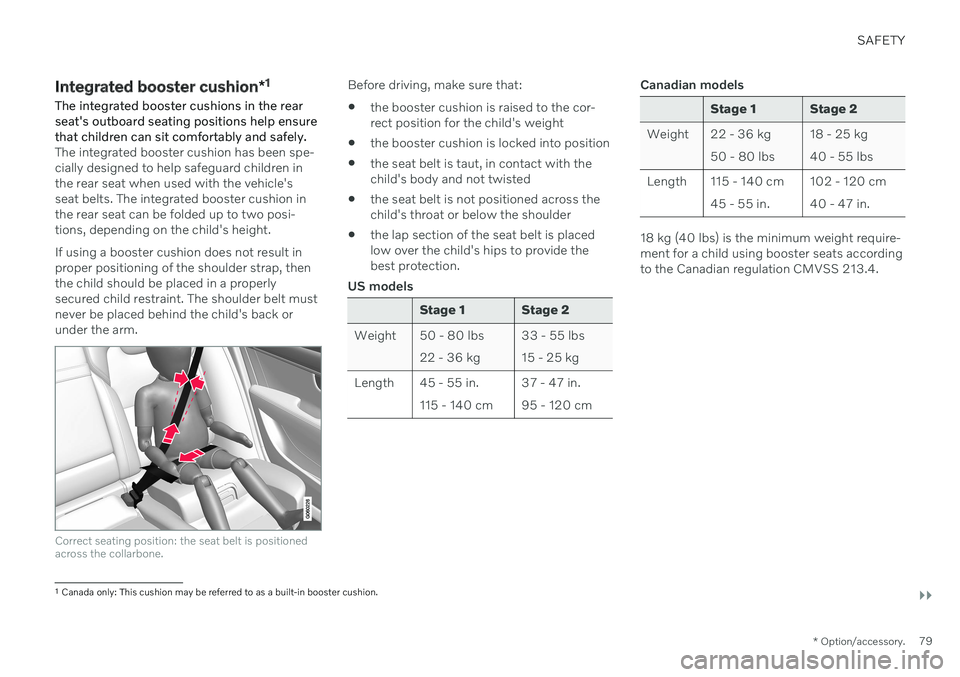
The integrated booster cushion has been spe- cially designed to help safeguard children inthe rear seat when used with the vehicle'sseat belts. The integrated booster cushion inthe rear seat can be folded up to two posi-tions, depending on the child's height. If using a booster cushion does not result in proper positioning of the shoulder strap, thenthe child should be placed in a properlysecured child restraint. The shoulder belt mustnever be placed behind the child's back orunder the arm.
Correct seating position: the seat belt is positioned across the collarbone.
Before driving, make sure that:
the booster cushion is raised to the cor- rect position for the child's weight
the booster cushion is locked into position
the seat belt is taut, in contact with thechild's body and not twisted
the seat belt is not positioned across thechild's throat or below the shoulder
the lap section of the seat belt is placedlow over the child's hips to provide thebest protection.
US models
Stage 1 Stage 2
Weight 50 - 80 lbs 22 - 36 kg 33 - 55 lbs 15 - 25 kg
Length 45 - 55 in. 115 - 140 cm 37 - 47 in.95 - 120 cm
Canadian models
Stage 1 Stage 2
Weight 22 - 36 kg 50 - 80 lbs 18 - 25 kg 40 - 55 lbs
Length 115 - 140 cm 45 - 55 in. 102 - 120 cm40 - 47 in.
18 kg (40 lbs) is the minimum weight require- ment for a child using booster seats accordingto the Canadian regulation CMVSS 213.4.
1
Canada only: This cushion may be referred to as a built-in booster cushion.
Page 168 of 683
LIGHTING
* Option/accessory.
166
Using home safe lighting
Some of the exterior lights remain on to illu- minate the area around the vehicle. This iscalled home safe lighting.
To activate home safe lighting:
1. Switch off the ignition.
2. Push the left-side steering wheel lever toward the dashboard and release.
3. Exit the vehicle and lock the doors. > A symbol in the instrument panel illumi-nates to indicate that the function is activated and exterior lighting switcheson: Parking lights, headlights, licenseplate lighting and outer door handle lighting *.
The length of time home safe lighting remains illuminated can be set in the center display.
Related information
Adjusting light functions via the centerdisplay (p. 157)
Welcome Light (p. 166)
Welcome Light
Approach lighting is activated when the vehi- cle is unlocked and can be used to providelight as you walk toward the vehicle.
The function is activated when the remote key is used for unlocking. The parking lights, ceil-ing lights, footwell lights and trunk/cargocompartment lights are activated in daylightconditions. In weak daylight or dark condi-tions, the license plate lighting and outer door handle lighting * will also be activated, with the
light directed toward the ground. If no door is opened, the lights will remain illu- minated for approx. 2 minutes. If a door isopened while the function is activated, the interior lighting and outer door handle lighting *
will remain on for a longer period of time. This function can be activated and deactivated in the center display.
Related information
Adjusting light functions via the centerdisplay (p. 157)
Using home safe lighting (p. 166)
Remote key (p. 246)
Interior Lighting
The passenger compartment is equipped with several different types of lighting, e.g.general lighting, adjustable ambient lightingand reading lights.
All lighting in the passenger compartment can be turned on and off manually within5 minutes after:
the engine has been switched off and theignition is in mode
0.
the vehicle is unlocked but has not beenstarted.
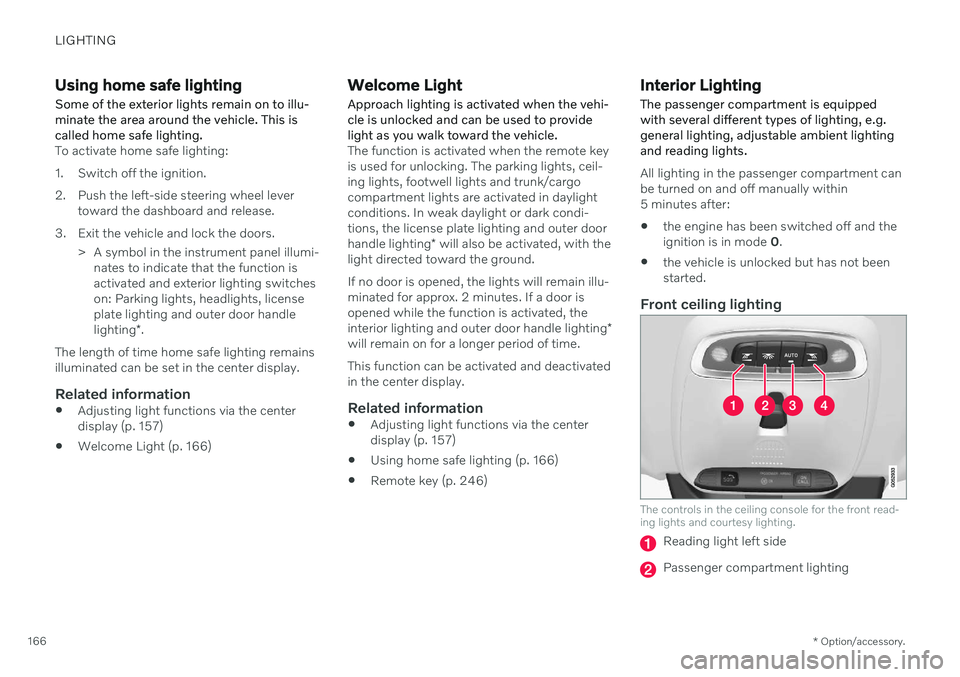
Front ceiling lighting
The controls in the ceiling console for the front read- ing lights and courtesy lighting.
Reading light left side
Passenger compartment lighting
Page 192 of 683

SEATS AND STEERING WHEEL
* Option/accessory.
190
Manual front seats
The front seats can be adjusted in a number of different ways to help enhance your seat-ing comfort.
Raise/lower the front edge of the seat cushion * by moving the control up/down. 1
Change the length of the seat cushion
* by
pulling up the lever and moving the cush- ion forward/backward.
Move the seat forward/backing by lifting the handle and moving the seat to a suita-ble distance from the steering wheel andpedals. Check to make sure the seat issecurely locked into place after its settinghas been changed.
Adjust lumbar support * by pressing the
button up/down/forward/rearward. 2
Raise/lower the seat by moving the con- trol up/down.
Change the backrest tilt by turning the knob on the backrest.
WARNING
Do not adjust the seat while driving. The seat should be adjusted so that thebrake pedal can be depressed fully. Inaddition, position the seat as far rear-ward as comfort and control allow.
Check that the seat is securely lockedinto position after adjusting.
Related information
Power
* front seats (p. 191)
Adjusting the power
* front seats (p. 191)
Storing positions for seats, mirrors and head-up display
* (p. 192)
Using stored positions for seats, mirrorsand head-up display
* (p. 193)
Adjusting front seat massage settings
*
(p. 195)
Adjusting
* front seat cushion length
(p. 196)
Front seat massage
* settings (p. 194)
Adjusting front seat side bolster settings
*
(p. 197)
Adjusting front seat lumbar support
*
(p. 197)
Adjusting the passenger seat from thedriver's seat
* (p. 199)
1
Only applies to the driver's seat.
2 Applies for four-way lumbar support *. Two-way lumbar support * is adjusted forward/rearward.
Page 193 of 683

SEATS AND STEERING WHEEL
}}
* Option/accessory.191
Power* front seats
The front seats can be adjusted in a number of different ways to help enhance your seat-ing comfort. The power seat can be movedforward/backward and up/down. The height and length * of the seat cushion and the tilt of
the backrest can be adjusted. Lumbar sup-port * can be adjusted up, down, forward and
backward. 3
The seats can be adjusted when the engine is running and for a certain period of time afterthe door has been unlocked without theengine running. They can also be adjusted fora short period after the engine is turned off.
CAUTION
The power seats have an overload protec- tor that is triggered if a seat is blocked byany object. If this occurs, remove theobject and attempt to adjust the seatagain.
Related information
Manual front seats (p. 190)
Adjusting the power
* front seats (p. 191)
Storing positions for seats, mirrors and head-up display
* (p. 192)
Using stored positions for seats, mirrorsand head-up display
* (p. 193)
Adjusting front seat massage settings
*
(p. 195)
Adjusting
* front seat cushion length
(p. 196)
Front seat massage
* settings (p. 194)
Adjusting front seat side bolster settings
*
(p. 197)
Adjusting front seat lumbar support
*
(p. 197)
Adjusting the passenger seat from thedriver's seat
* (p. 199)
Adjusting the power * front seats
Set the desired seating position using the controls on the front seat cushion. To set theconvenience functions, turn the multifunction control 4
upward/downward.
The illustration shows the controls in a vehicle with four-way lumbar support *. Vehicles with two-way
lumbar support * do not have the rotary multifunction
control.
In vehicles with four-way lumbar support *,
turn the multifunction control 4
up/down to
set the convenience functions. In vehicles with two-way lumbar support *, use the
round button to adjust the lumbar support forward/rearward.
Raise/lower the front edge of the seat cushion by moving the control up/down.
3 Applies for four-way lumbar support *. Two-way lumbar support * is adjusted forward/rearward.
Page 194 of 683

||
SEATS AND STEERING WHEEL
* Option/accessory.
192
Raise/lower the seat by moving the con- trol up/down.
Move the seat forward/rearward by mov- ing the control forward/rearward.
Change the backrest tilt by moving the control forward/backward.
Only one movement (forward/rearward/up/down) can be performed at a time. The front seat backrests cannot be folded down completely.
Related information
Manual front seats (p. 190)
Power
* front seats (p. 191)
Storing positions for seats, mirrors and head-up display
* (p. 192)
Using stored positions for seats, mirrorsand head-up display
* (p. 193)
Adjusting front seat massage settings
*
(p. 195)
Adjusting
* front seat cushion length
(p. 196)
Front seat massage
* settings (p. 194)
Adjusting front seat side bolster settings
*
(p. 197)
Adjusting front seat lumbar support
*
(p. 197)
Adjusting the passenger seat from thedriver's seat
* (p. 199)
Storing positions for seats, mirrors and head-up display *
Adjustment settings for the power * seat, door
mirrors and head-up display * can be stored in
the memory buttons.
Two different positions for the power * seat,
door mirrors and head-up display * can be
stored using the memory buttons. The buttons are located on the inside of either one or both *
front doors.
Button M for storing a setting.
Memory button.
Memory button.
4
Not available in vehicles with two-way lumbar support *.
Page 195 of 683
SEATS AND STEERING WHEEL
}}
* Option/accessory.193
Storing positions1. Adjust the seat, door mirrors and head-up
display to the desired position.
2. Press and hold the M button. The indica-
tor light in the button will illuminate.
3. Within three seconds, press and hold the 1
or 2 button.
> When the position has been stored in the memory button, an audio signal will sound and the indicator light in the M
button will go out.
If none of the memory buttons are pressedwithin three seconds, the M button will go out
and no position will be stored. The seats, door mirrors or head-up display must be readjusted before a new memoryposition can be set.
NOTE
For the stored positions to work, all driver profiles need to be in Protect Profilemode.
Related information
Manual front seats (p. 190)
Power
* front seats (p. 191)
Adjusting the power
* front seats (p. 191)
Using stored positions for seats, mirrors and head-up display
* (p. 193)
Adjusting front seat massage settings
*
(p. 195)
Adjusting
* front seat cushion length
(p. 196)
Front seat massage
* settings (p. 194)
Adjusting front seat side bolster settings
*
(p. 197)
Adjusting front seat lumbar support
*
(p. 197)
Adjusting the passenger seat from thedriver's seat
* (p. 199)
Adjusting the door mirrors (p. 177)
Head-up display settings
* (p. 148)
Protecting a driver profile (p. 142)
Using stored positions for seats, mirrors and head-up display
*
If the positions for the power * seat, door mir-
rors and head-up display * have been stored,
they can be activated using the memory but- tons.
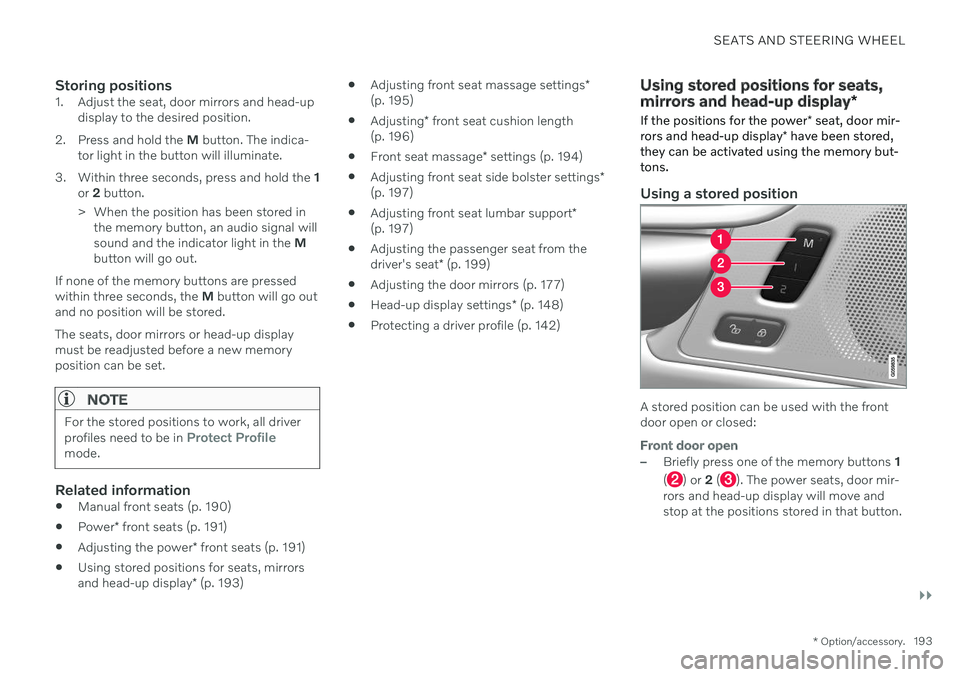
Using a stored position
A stored position can be used with the front door open or closed:
Front door open
–Briefly press one of the memory buttons 1
(
) or 2 (). The power seats, door mir-
rors and head-up display will move and stop at the positions stored in that button.
Page 196 of 683

||
SEATS AND STEERING WHEEL
* Option/accessory.
194
Front door closed
–Press and hold one of the memory buttons 1 (
) or 2 () until the seat, door mirrors
and head-up display stop in the positions stored in that memory button.
If the memory button is released, the seat,door mirrors and head-up display will stopmoving.
WARNING
This list point needs to be translated exactly to: "Because the driver's seatcan be adjusted with the ignition off,children should never be left unatten-ded in the vehicle.
Movement of the seat can be STOP-PED at any time by pressing any but-ton on the power seat control panel.
Do not adjust the seat while driving.
The seat should be adjusted so that thebrake pedal can be depressed fully. Inaddition, position the seat as far rear-ward as comfort and control allow.
The seat rails on the floor must not beobstructed in any way when the seat isin motion.
NOTE
For the stored positions to work, all driver profiles need to be in Protect Profilemode.
Related information
Manual front seats (p. 190)
Power
* front seats (p. 191)
Adjusting the power
* front seats (p. 191)
Storing positions for seats, mirrors and head-up display
* (p. 192)
Adjusting front seat massage settings
*
(p. 195)
Adjusting
* front seat cushion length
(p. 196)
Front seat massage
* settings (p. 194)
Adjusting front seat side bolster settings
*
(p. 197)
Adjusting front seat lumbar support
*
(p. 197)
Adjusting the passenger seat from thedriver's seat
* (p. 199)
Adjusting the door mirrors (p. 177)
Head-up display settings
* (p. 148)
Front seat massage * settings
The settings for the multifunctional seats can be adjusted using either the mutifunctioncontrol on the side of the seat or the centerdisplay. The adjustment settings are shown inthe center display.
Multifunction control, located on the side of the seat cushion.
Massage settingsThe following massage settings are available:
On/Off: Select On/Off to turn on/off the
massage function.
Programs 1-5: There are 5 preset mas-
sage programs. Select Swell, Tread,Advanced, Lumbar or Shoulder.
Intensity: Select Low, Normal or High.
Speed: Select Slow, Normal or Fast.
Page 197 of 683

SEATS AND STEERING WHEEL
* Option/accessory.195
Restarting the massage function
The massage function turns off automatically after 20 minutes. The function is reactivatedmanually.
–Tap Restart, which is displayed in the
center display, to restart the selected mas- sage program.
> The massage program will restart. If no selection is made, the message will be stored in Top view.
Related information
Manual front seats (p. 190)
Power
* front seats (p. 191)
Adjusting the power
* front seats (p. 191)
Storing positions for seats, mirrors and head-up display
* (p. 192)
Using stored positions for seats, mirrorsand head-up display
* (p. 193)
Adjusting front seat massage settings
*
(p. 195)
Adjusting
* front seat cushion length
(p. 196)
Adjusting front seat side bolster settings
*
(p. 197)
Adjusting front seat lumbar support
*
(p. 197)
Adjusting the passenger seat from thedriver's seat
* (p. 199)
Adjusting front seat massage settings *
The settings for the multifunctional seats can be adjusted using either the mutifunctioncontrol on the seat or the center display. Theadjustment settings are shown in the centerdisplay.
Adjusting front seat massage settingsThe front seat backrests have a massage func- tion. Air-filled cushions provide the massagingaction and a number of settings are available. The massage function can only be activated when the engine is running.
1. Activate the multifunction control by turn-
ing the control
upward/downward. The
seat settings view will appear in the center display. 2.
Select
Massage in the seat settings view.
3. Select massage settings by tapping the center display or by moving the cursor up/ down using the multifunction control's upper
/lower buttons. Change a set-
ting in the selected function by tapping the arrows on the center display or by using the multifunction control's front
/
rear
buttons.
Related information
Manual front seats (p. 190)
Power
* front seats (p. 191)
Adjusting the power
* front seats (p. 191)
Storing positions for seats, mirrors and head-up display
* (p. 192)
Using stored positions for seats, mirrorsand head-up display
* (p. 193)
Adjusting
* front seat cushion length
(p. 196)
Front seat massage
* settings (p. 194)
Adjusting front seat side bolster settings
*
(p. 197)
Adjusting front seat lumbar support
*
(p. 197)
Adjusting the passenger seat from thedriver's seat
* (p. 199)
Page 198 of 683

SEATS AND STEERING WHEEL
* Option/accessory.
196
Adjusting * front seat cushion
length Depending on the selected equipment level, the length of the seat cushion can either be adjusted using the multifunction control * on
the side of the seat cushion, or manually adjusted using the control on the front of theseat cushion.
Adjusting seat cushion length using the multifunction control
The multifunction control, located on the side of the seat cushion.
1. Activate the multifunction control by turn-
ing the control
upward/downward. The
seat settings view will appear in the center display. 2.
Select
Cushion extension in the seat set-
tings view.
Push in the front part of the four-way button
to extend the seat cushion.
Press the rear part of the four-way but- ton
to shorten the seat cushion.
Manually adjusting seat cushion length
Control for adjusting seat cushion.
1. Grasp the handle on the front of the
seat and pull upward.
2. Adjust the length of the seat cushion.
3. Release the handle and make sure the seat cushion locks into position.
Related information
Manual front seats (p. 190)
Power
* front seats (p. 191)
Adjusting the power
* front seats (p. 191)
Storing positions for seats, mirrors and head-up display
* (p. 192)
Using stored positions for seats, mirrorsand head-up display
* (p. 193)
Adjusting front seat massage settings
*
(p. 195)
Front seat massage
* settings (p. 194)
Adjusting front seat side bolster settings
*
(p. 197)
Adjusting front seat lumbar support
*
(p. 197)
Adjusting the passenger seat from thedriver's seat
* (p. 199)