ECO mode VOLVO XC60 2009 Owner´s Manual
[x] Cancel search | Manufacturer: VOLVO, Model Year: 2009, Model line: XC60, Model: VOLVO XC60 2009Pages: 297, PDF Size: 21.16 MB
Page 193 of 297
04 Comfort and driving pleasure
Park Assist Camera (PAC)*04
}}
* Option/accessory, for more information, see Introduction. 191
DeactivationMove the gear selector from
R to another posi-
tion. There is a slight delay in the PAC system,
which means that the view from behind the
vehicle will remain on the screen for approxi-
mately 15 seconds after the gear selector has
been moved from the R position or until the
vehicle reaches a forward speed of 6 mph
(10 km/h). The screen will then revert to the
mode that it was in before R was selected and
will, for example, display navigation system
information.
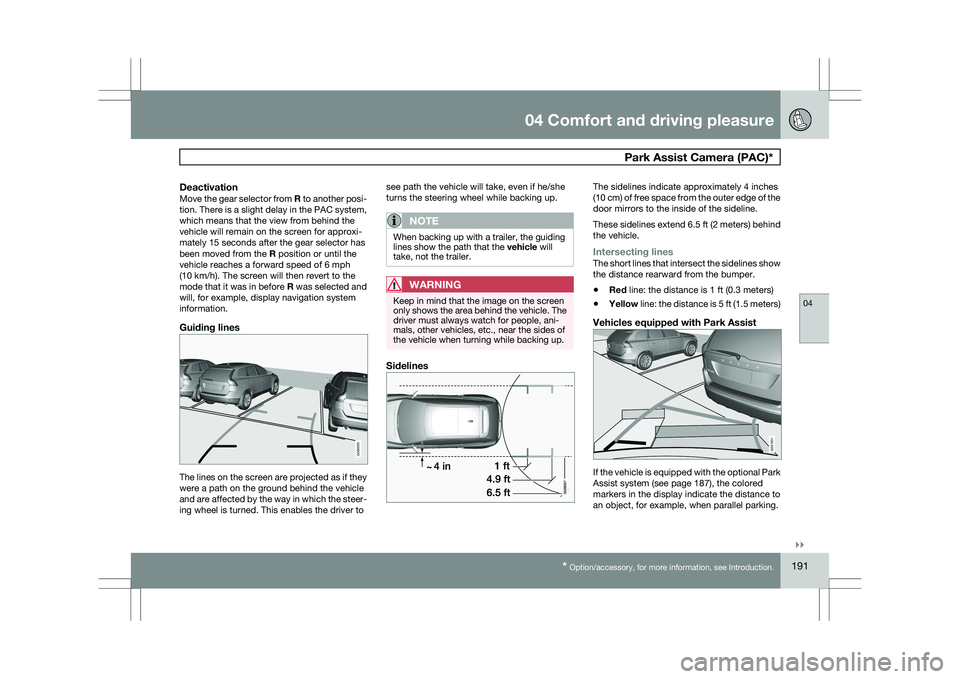
Guiding lines The lines on the screen are projected as if they
were a path on the ground behind the vehicle
and are affected by the way in which the steer-
ing wheel is turned. This enables the driver to see path the vehicle will take, even if he/she
turns the steering wheel while backing up.
NOTE When backing up with a trailer, the guiding
lines show the path that the vehicle will
take, not the trailer.
WARNING
Keep in mind that the image on the screen
only shows the area behind the vehicle. The
driver must always watch for people, ani-
mals, other vehicles, etc., near the sides of
the vehicle when turning while backing up.
Sidelines The sidelines indicate approximately 4 inches
(10 cm) of free space from the outer edge of the
door mirrors to the inside of the sideline.
These sidelines extend 6.5 ft (2 meters) behind
the vehicle.
Intersecting linesThe short lines that intersect the sidelines show
the distance rearward from the bumper.
\b
Red line: the distance is 1 ft (0.3 meters)
\b Yellow line: the distance is 5 ft (1.5 meters)
Vehicles equipped with Park Assist If the vehicle is equipped with the optional Park
Assist system (see page 187), the colored
markers in the display indicate the distance to
an object, for example, when parallel parking. G000000 G031931
Page 204 of 297
05 During your tripDriving recommendations 05
202 General information
Economical driving conserves natural
resources
Better driving economy may be obtained by
thinking ahead, avoiding rapid starts and stops
and adjusting the speed of your vehicle to
immediate traffic conditions.
Observe the following rules:
\b
Bring the engine to normal operating tem-
perature as soon as possible by driving
with a light foot on the accelerator pedal for
the first few minutes of operation. A cold
engine uses more fuel and is subject to
increased wear.
\b Whenever possible, avoid using the vehicle
for driving short distances. This does not
allow the engine to reach normal operating
temperature.
\b Drive carefully and avoid rapid acceleration
and hard braking.
\b Use the transmission\fs Drive (
D) position
as often as possible and avoid using kick-
down.
\b Do not exceed posted speed limits.
\b Avoid carrying unnecessary items (extra
load) in the vehicle.
\b Maintain correct tire pressure. Check tire
pressure regularly (when tires are cold). \b
Remove snow tires when threat of snow or
ice has ended.
\b Note that roof racks, ski racks, etc,
increase air resistance and also fuel con-
sumption.
\b At highway driving speeds, fuel consump-
tion will be lower with the air conditioning
on and the windows closed than with the
air conditioning off and the windows open.
\b Using the onboard trip computer\fs fuel
consumption modes can help you learn
how to drive more economically.
Other factors that decrease gas mileage
are:
\b Dirty air cleaner
\b Dirty engine oil and clogged oil filter
\b Dragging brakes
\b Incorrect front end alignment
Some of the above mentioned items and others
are checked at the standard maintenance
intervals.
WARNING Driving with the tailgate open: Driving with
the tailgate open could lead to poisonous
exhaust gases entering the passenger com-
partment. If the tailgate must be kept open
for any reason, proceed as follows:
\b
Close the windows
\b Set the ventilation system control to air
flow to floor, windshield and side win-
dows and the blower control to its high-
est setting.
Weight distribution affects handlingAt the specified curb weight your vehicle has a
tendency to understeer, which means that the
steering wheel has to be turned more than
might seem appropriate for the curvature of a
bend. This ensures good stability and reduces
the risk of rear wheel skid. Remember that
these properties can alter with the vehicle load.
The heavier the load in the cargo area, the less
the tendency to understeer.
Handling, roadholdingVehicle load, tire design and inflation pressure
all affect vehicle handling. Therefore, check
that the tires are inflated to the recommended
pressure according to the vehicle load. See the
"Tire pressure" section. Loads should be dis-
tributed so that capacity weight or maximum
permissible axle loads are not exceeded.
Page 205 of 297
05 During your trip
Driving recommendations05
}}
203
Driving through water
\b
The vehicle can be driven through water up
to a depth of approximately 10 in. (25 cm),
at a maximum speed of 6 mph (10 km/h).
\b Take particular care when driving through
flowing water.
\b Clean the electrical connections for trailer
wiring after driving in mud or water.
\b When driving through water, maintain low
speed and do not stop in the water.
WARNING After driving through water, press lightly on
the brake pedal to ensure that the brakes
are functioning normally. Water or mud can
make the brake linings slippery, resulting in
delayed braking effect.
CAUTION \b
Engine damage will occur if water is
drawn into the air cleaner.
\b If the vehicle is driven through water
deeper than 10 in (25 cm), water may
enter the differential and the transmis-
sion. This reduces the oil\fs lubricating
capacity and may shorten the service
life of these components.
\b Do not allow the vehicle to stand in
water up to the door sills longer than
absolutely necessary. This could result
in electrical malfunctions.
\b If the engine has been stopped while the
vehicle is in water, do not attempt to
restart it. Have the vehicle towed out of
the water.
Engine and cooling systemUnder special conditions, for example when
driving in hilly terrain, extreme heat or with
heavy loads, there is a risk that the engine and
cooling system will overheat. Proceed as fol-
lows to avoid overheating the engine.
\b
Maintain a low speed when driving with a
trailer up long, steep hills.
\b Do not turn the engine off immediately
when stopping after a hard drive.
WARNING The cooling fan may start or continue to
operate (for up to 6 minutes) after the engine
has been switched off.
\b
Remove any auxiliary lights from in front of
the grille when driving in hot weather con-
ditions.
\b Do not exceed engine speeds of 4500 rpm
if driving with a trailer in hilly terrain. The oil
temperature could become too high.
Conserving electrical currentKeep the following in mind to help minimize
battery drain:
\bWhen the engine is not running, avoid
using ignition mode
II. Many electrical sys-
tems (the audio system, the optional navi-
gation system, power windows, etc) will
function in ignition modes 0 and I. These
modes reduce drain on the battery.
\b Please keep in mind that using systems,
accessories, etc., that consume a great
deal of current when the engine is not run-
ning could result in the battery being com-
pletely drained.
\b The optional 12 volt socket in the cargo
area provides electrical current even with
the ignition switched off, which drains the
battery.
Page 219 of 297
05 During your trip
Towing a trailer05
}}
217
Introduction
Volvo recommends the use of Volvo trailer
hitches that are specially designed for the vehi-
cle.
NOTE
See page 282 for the maximum trailer and
tongue weights recommended by Volvo.
\b
Observe the legal requirements of the
state/province in which the vehicles are
\b All Volvo models are equipped with
energy-absorbing shock-mounted bump-
ers. Trailer hitch installation should not
interfere with the proper operation of this
bumper system.
Trailer towing does not normally present any
particular problems, but take into considera-
tion:
\b Increase tire pressure to recommended
full. See the tire inflation tables beginning
on page 258.
\b When your vehicle is new, avoid towing
heavy trailers during the first 620 miles
(1,000 km).
\b Maximum speed when towing a trailer:
50 mph (80 km/h).
\b Engine and transmission are subject to
increased loads. Therefore, engine coolant
temperature should be closely watched when driving in hot climates or hilly terrain.
Use a lower gear and turn off the air con-
ditioner if the temperature gauge needle
enters the red range.
\b If the automatic transmission begins to
overheat, a message will be displayed in
the text window.
\b Avoid overload and other abusive opera-
tion.
\b Hauling a trailer affects handling, durabil-
ity, and economy.
\b It is necessary to balance trailer brakes
with the towing vehicle brakes to provide a
safe stop (check and observe state/local
regulations).
\b Do not connect the trailer\fs brake system
directly to the vehicle\fs brake system.
\b More frequent vehicle maintenance is
required.
\b Remove the ball and drawbar assembly
when the hitch is not being used.
\b Volvo recommends the use of synthetic
engine oil when towing a trailer over long
distances or in mountainous areas.
WARNING \b
Bumper-attached trailer hitches must
not be used on Volvos, nor should
safety chains be attached to the
bumper.
\b Trailer hitches attaching to the vehicle
rear axle must not be used.
\b Never connect a trailer\fs hydraulic
brake system directly to the vehicle
brake system, nor a trailer\fs lighting
system directly to the vehicle lighting
system. Consult your nearest author-
ized Volvo retailer for correct installa-
tion.
\b When towing a trailer, the trailer\fs safety
wire must be correctly fastened to the
hole or hook provided in the trailer hitch
on the vehicle. The safety wire should
never be fastened to or wound around
the drawbar ball.
Page 223 of 297
05 During your trip
Emergency towing05
221
NOTEDuring towing, ignition mode
II should be
used so that the lighting can be switched on.
CAUTION Vehicles with AWD (All Wheel Drive) with the
front wheels off the ground should not be
towed at speeds above 50 mph (70 km/h) or
for distances longer than 30 miles (50 km).
CAUTION
\b
Please check with state and local
authorities before attempting this type
of towing, as vehicles being towed are
subject to regulations regarding maxi-
mum towing speed, length and type of
towing device, lighting, etc.
\b If the vehicle\fs battery is dead, do not
attempt to start the vehicle by pushing
or pulling it as this will damage the
three-way catalytic converter(s). The
engine must be jump started using an
auxiliary battery (see page 107).
\b If the vehicle is being towed on a flat bed
truck, the towing eyelets must not be
used to pull the vehicle up onto the flat
bed or to secure the vehicle on the flat
bed. Consult the tow truck operator.
Towing vehicles with front wheel drive/
All Wheel Drive
Volvo recommends the use of flat bed equip-
ment.
\b
If wheel lift equipment must be used,
please use extreme caution to help avoid
damage to the vehicle.
In this case, the
vehicle should be towed with the rear
wheels on the ground if at all possible.
\b If it is absolutely necessary to tow the vehi-
cle with the front wheels on the ground,
please refer to the towing information on
page 220.
CAUTION \b
Sling-type equipment applied at the
front will damage radiator and air con-
ditioning lines.
\b It is equally important not to use sling-
type equipment at the rear or apply lift-
ing equipment inside the rear wheels;
serious damage to the rear axle may
result.
\b If the vehicle is being towed on a flat bed
truck, the towing eyelets must not be
used to secure the vehicle on the flat
bed. Consult the tow truck operator.
Page 237 of 297
06 Maintenance and specifications
Replacing bulbs06
}}
235
8.
Reconnect the wiring connector to the bulb
holder.
9. Put the cover back into position and rein- stall the headlight housing.
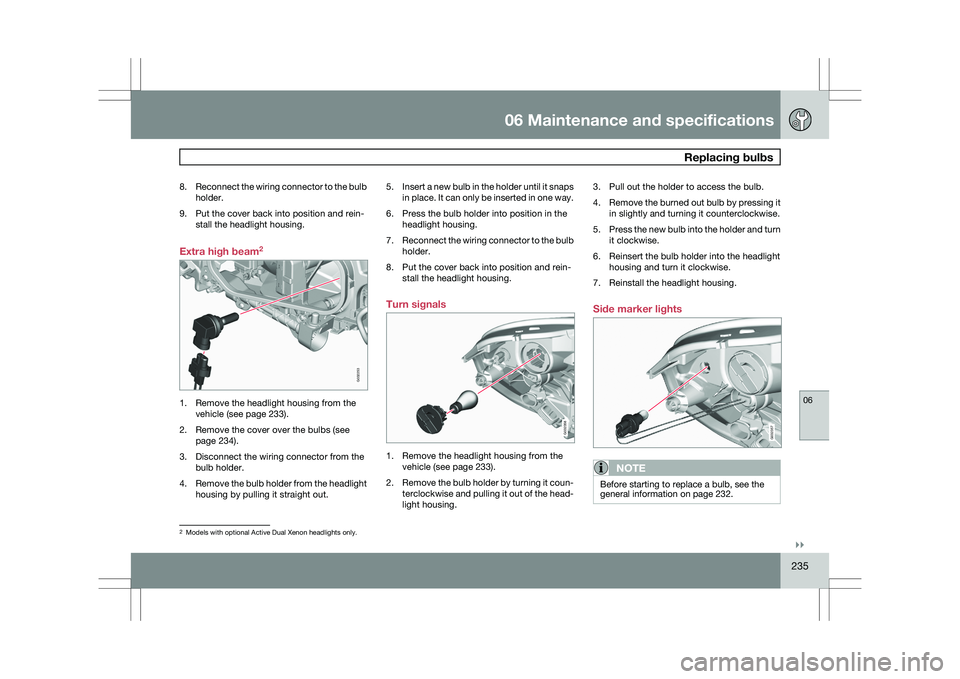
Extra high beam 21. Remove the headlight housing from the
vehicle (see page 233).
2. Remove the cover over the bulbs (see page 234).
3. Disconnect the wiring connector from the bulb holder.
4. Remove the bulb holder from the headlight
housing by pulling it straight out. 5.
Insert a new bulb in the holder until it snaps
in place. It can only be inserted in one way.
6. Press the bulb holder into position in the headlight housing.
7. Reconnect the wiring connector to the bulb
holder.
8. Put the cover back into position and rein- stall the headlight housing.
Turn signals 1. Remove the headlight housing from the
vehicle (see page 233).
2. Remove the bulb holder by turning it coun-
terclockwise and pulling it out of the head-
light housing. 3. Pull out the holder to access the bulb.
4.
Remove the burned out bulb by pressing it
in slightly and turning it counterclockwise.
5. Press the new bulb into the holder and turn
it clockwise.
6. Reinsert the bulb holder into the headlight housing and turn it clockwise.
7. Reinstall the headlight housing.
Side marker lights
NOTE Before starting to replace a bulb, see the
general information on page 232.
2
Models with optional Active Dual Xenon headlights only. G032253 G032358 G032357
Page 242 of 297
06 Maintenance and specificationsWiper blades and washer fluid 06
240 Wiper blades
The windshield wiper blades are different
lengths. The blade on the driver’s side is longer
than the one on the passenger side.
Service positionThe wiper blades must be in the service (verti-
cal) position for replacement or washing.
1.
Switch off the ignition (ignition mode 0, see
page 79) and keep the remote key in the
ignition slot 1
.
2. Move the right steering wheel lever up and
hold it for at least 1 second. The wipers will
then move to the vertical position on the
windshield. The wipers will return to the normal position
when the vehicle is started.
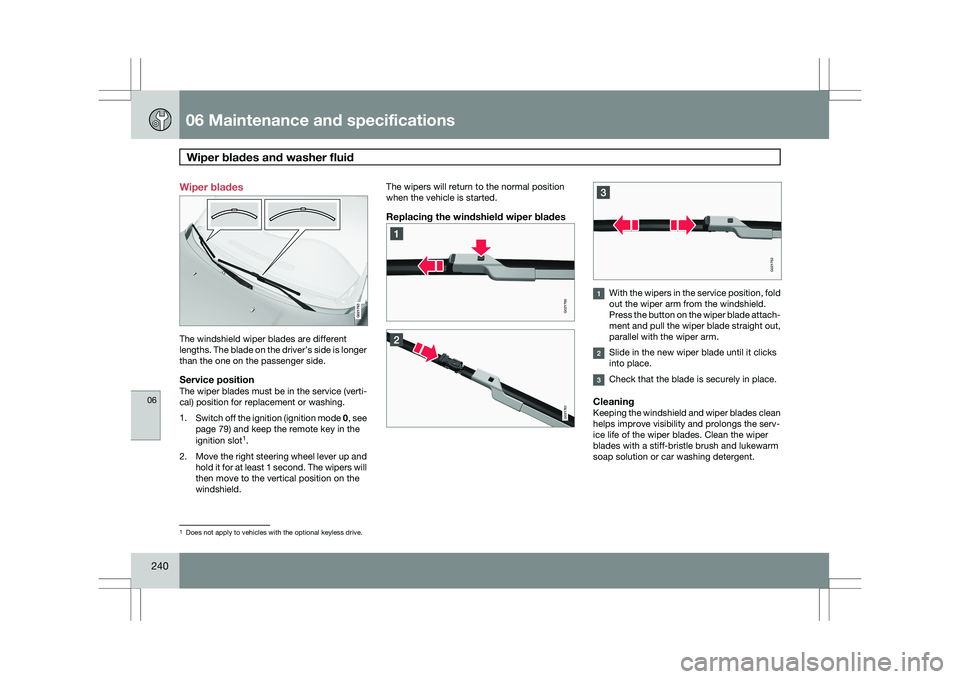
Replacing the windshield wiper blades
With the wipers in the service position, fold
out the wiper arm from the windshield.
Press the button on the wiper blade attach-
ment and pull the wiper blade straight out,
parallel with the wiper arm.
Slide in the new wiper blade until it clicks
into place.
Check that the blade is securely in place.
CleaningKeeping the windshield and wiper blades clean
helps improve visibility and prolongs the serv-
ice life of the wiper blades. Clean the wiper
blades with a stiff-bristle brush and lukewarm
soap solution or car washing detergent.
1
Does not apply to vehicles with the optional keyless drive. G021763 G021760 G021761 G021762
Page 255 of 297
06 Maintenance and specifications
Wheels and tires06
}}
253
Introduction
Your vehicle is equipped with tires according
to the vehicle\fs tire information placard on the
B-pillar (the structural member at the side of
the vehicle, at the rear of the driver\fs door
opening), or on the inside of the fuel filler door
on Canadian models.
CAUTION
Some Volvo models are equipped with an
Ultra High Performance tire and wheel com-
bination designed to provide maximum dry
pavement performance with consideration
for hydroplaning resistance. As such, they
may be more susceptible to road hazard
damage and, depending on driving condi-
tions, may achieve a tread life of less than
20,000 miles (30,000 km). Even if this vehi-
cle is equipped with Volvo’s advanced AWD
or DSTC system, these tires are not
designed for winter driving, and should be
replaced with winter tires when weather
conditions dictate.
The tires have good road holding characteris-
tics and offer good handling on dry and wet
surfaces. It should be noted however that the
tires have been developed to give these fea-
tures on snow/ice-free surfaces.
Certain models are equipped with "all-season"
tires, which provide a somewhat higher degree of road holding on slippery surfaces than tires
without the "all-season" rating. However, for
optimum road holding on icy or snow-covered
roads, we recommend suitable winter tires on
all four wheels.
When replacing tires, be sure that the new tires
are the same size designation, type (radial) and
preferably from the same manufacturer, on all
four wheels. Otherwise there is a risk of altering
the car\fs roadholding and handling characte-
ristics.
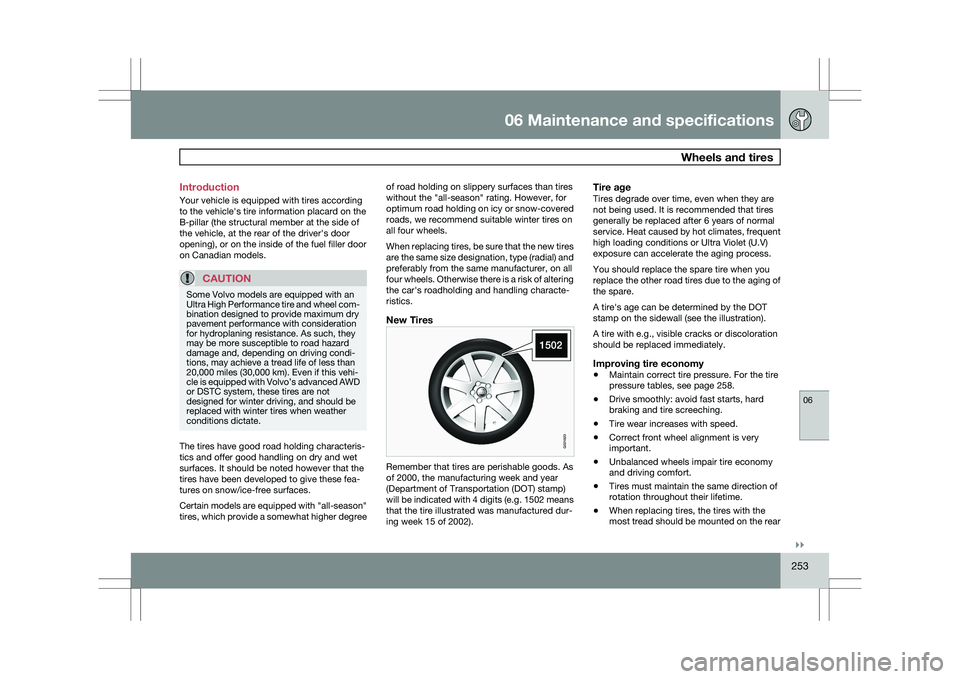
New Tires
Remember that tires are perishable goods. As
of 2000, the manufacturing week and year
(Department of Transportation (DOT) stamp)
will be indicated with 4 digits (e.g. 1502 means
that the tire illustrated was manufactured dur-
ing week 15 of 2002).
Tire ageTires degrade over time, even when they are
not being used. It is recommended that tires
generally be replaced after 6 years of normal
service. Heat caused by hot climates, frequent
high loading conditions or Ultra Violet (U.V)
exposure can accelerate the aging process.
You should replace the spare tire when you
replace the other road tires due to the aging of
the spare.
A tire\fs age can be determined by the DOT
stamp on the sidewall (see the illustration).
A tire with e.g., visible cracks or discoloration
should be replaced immediately.
Improving tire economy
\b
Maintain correct tire pressure. For the tire
pressure tables, see page 258.
\b Drive smoothly: avoid fast starts, hard
braking and tire screeching.
\b Tire wear increases with speed.
\b Correct front wheel alignment is very
important.
\b Unbalanced wheels impair tire economy
and driving comfort.
\b Tires must maintain the same direction of
rotation throughout their lifetime.
\b When replacing tires, the tires with the
most tread should be mounted on the rear G021823
Page 257 of 297
06 Maintenance and specifications
Wheels and tires06
}}
255
tread wear as even as possible and will help
you get maximum mileage from your tires.
Ideally, tire rotation should be done the first
time after approximately 3,000 miles
(5, 000 km) and thereafter at 6,000 mile
(10,000 km) intervals.
Tire rotation should only be performed if front/
rear tire wear is fairly even and tread height is
above 1/16" (1.6 mm).
NOTE
Tire rotation is not included in regularly
scheduled maintenance and is performed
only at customer request, at additional
charge.
Your Volvo retailer can also provide guidance
based on your particular driving circumstan-
ces.
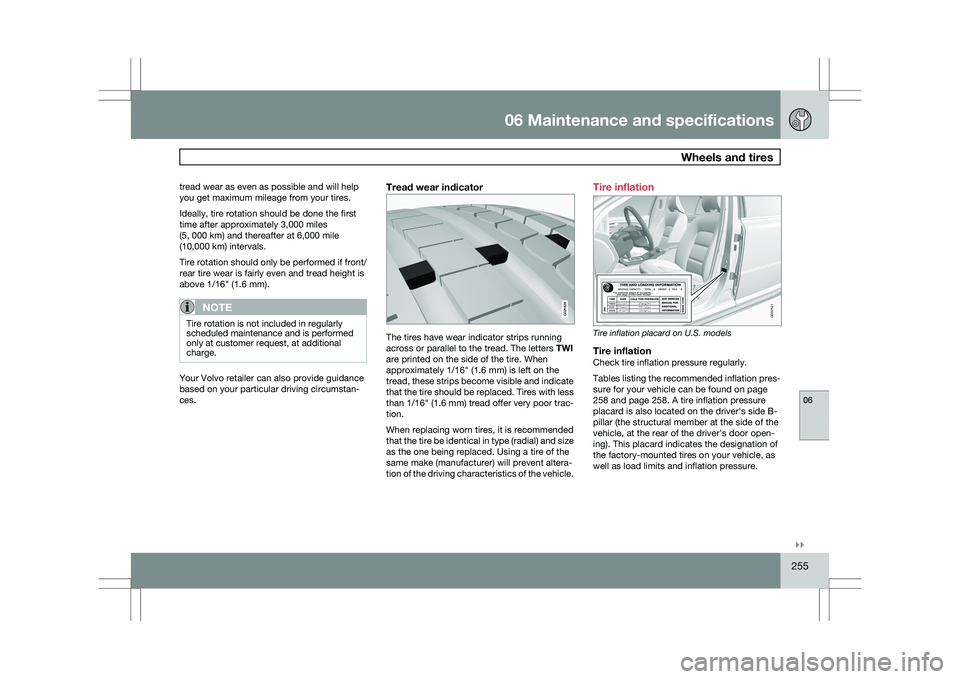
Tread wear indicator The tires have wear indicator strips running
across or parallel to the tread. The letters
TWI
are printed on the side of the tire. When
approximately 1/16" (1.6 mm) is left on the
tread, these strips become visible and indicate
that the tire should be replaced. Tires with less
than 1/16" (1.6 mm) tread offer very poor trac-
tion.
When replacing worn tires, it is recommended
that the tire be identical in type (radial) and size
as the one being replaced. Using a tire of the
same make (manufacturer) will prevent altera-
tion of the driving characteristics of the vehicle. Tire inflation
Tire inflation placard on U.S. models
Tire inflationCheck tire inflation pressure regularly.
Tables listing the recommended inflation pres-
sure for your vehicle can be found on page
258 and page 258. A tire inflation pressure
placard is also located on the driver\fs side B-
pillar (the structural member at the side of the
vehicle, at the rear of the driver\fs door open-
ing). This placard indicates the designation of
the factory-mounted tires on your vehicle, as
well as load limits and inflation pressure. G021829 G032521
Page 258 of 297
06 Maintenance and specificationsWheels and tires 06
256
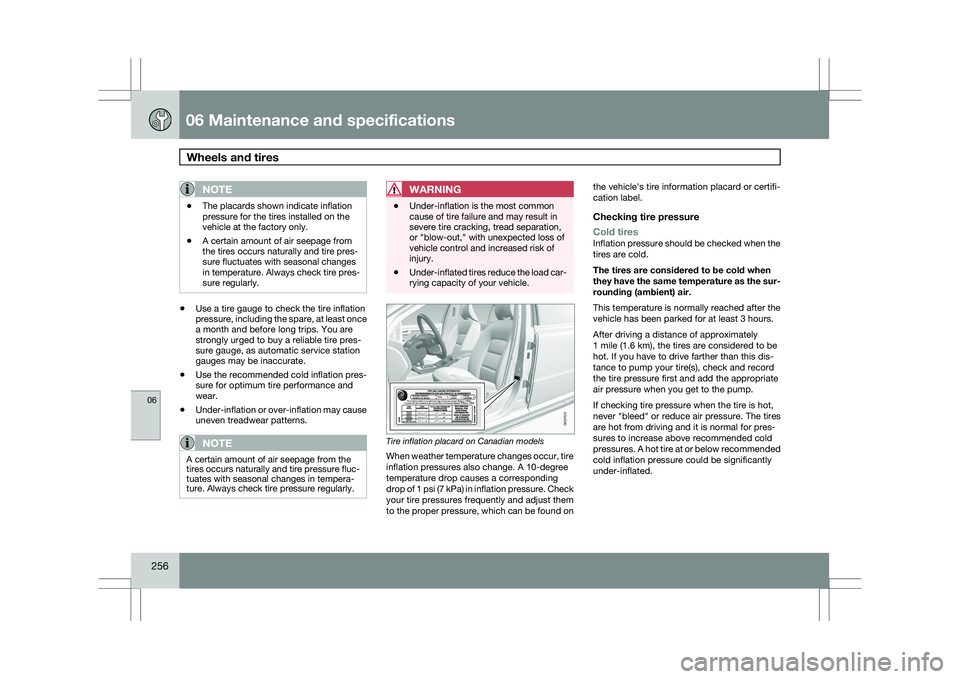
NOTE \b
The placards shown indicate inflation
pressure for the tires installed on the
vehicle at the factory only.
\b A certain amount of air seepage from
the tires occurs naturally and tire pres-
sure fluctuates with seasonal changes
in temperature. Always check tire pres-
sure regularly. \b
Use a tire gauge to check the tire inflation
pressure, including the spare, at least once
a month and before long trips. You are
strongly urged to buy a reliable tire pres-
sure gauge, as automatic service station
gauges may be inaccurate.
\b Use the recommended cold inflation pres-
sure for optimum tire performance and
wear.
\b Under-inflation or over-inflation may cause
uneven treadwear patterns.
NOTE A certain amount of air seepage from the
tires occurs naturally and tire pressure fluc-
tuates with seasonal changes in tempera-
ture. Always check tire pressure regularly.
WARNING \b
Under-inflation is the most common
cause of tire failure and may result in
severe tire cracking, tread separation,
or "blow-out," with unexpected loss of
vehicle control and increased risk of
injury.
\b Under-inflated tires reduce the load car-
rying capacity of your vehicle. Tire inflation placard on Canadian models
When weather temperature changes occur, tire
inflation pressures also change. A 10-degree
temperature drop causes a corresponding
drop of 1 psi (7 kPa) in inflation pressure. Check
your tire pressures frequently and adjust them
to the proper pressure, which can be found onthe vehicle\fs tire information placard or certifi-
cation label.
Checking tire pressure
Cold tires
Inflation pressure should be checked when the
tires are cold.
The tires are considered to be cold when
they have the same temperature as the sur-
rounding (ambient) air.
This temperature is normally reached after the
vehicle has been parked for at least 3 hours.
After driving a distance of approximately
1 mile (1.6 km), the tires are considered to be
hot. If you have to drive farther than this dis-
tance to pump your tire(s), check and record
the tire pressure first and add the appropriate
air pressure when you get to the pump.
If checking tire pressure when the tire is hot,
never "bleed" or reduce air pressure. The tires
are hot from driving and it is normal for pres-
sures to increase above recommended cold
pressures. A hot tire at or below recommended
cold inflation pressure could be significantly
under-inflated. G032522