Parking VOLVO XC60 2016 Owner´s Manual
[x] Cancel search | Manufacturer: VOLVO, Model Year: 2016, Model line: XC60, Model: VOLVO XC60 2016Pages: 398, PDF Size: 9.98 MB
Page 198 of 398
||
07 Driver support
07
196
SymbolMessageDescription
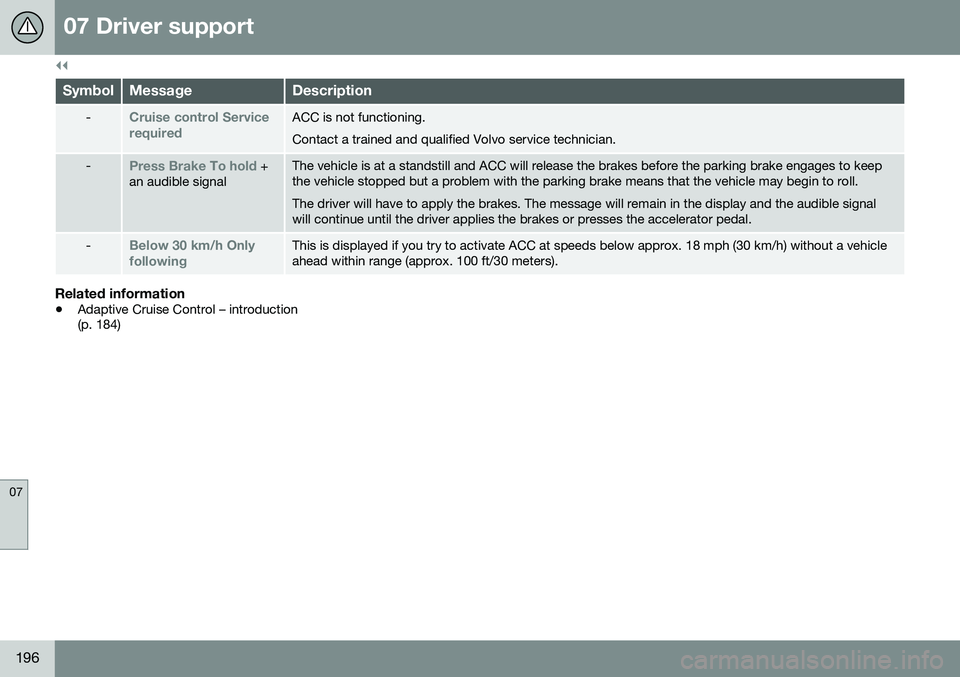
-Cruise control Service requiredACC is not functioning. Contact a trained and qualified Volvo service technician.
-Press Brake To hold +
an audible signalThe vehicle is at a standstill and ACC will release the brakes before the parking brake engages to keep the vehicle stopped but a problem with the parking brake means that the vehicle may begin to roll. The driver will have to apply the brakes. The message will remain in the display and the audible signal will continue until the driver applies the brakes or presses the accelerator pedal.
-Below 30 km/h Only followingThis is displayed if you try to activate ACC at speeds below approx. 18 mph (30 km/h) without a vehicle ahead within range (approx. 100 ft/30 meters).
Related information
• Adaptive Cruise Control – introduction (p. 184)
Page 204 of 398
07 Driver support
07
202
City Safety – introduction
City Safety™5
is a support system designed
to help the driver avoid low speed collisions when driving in slow-moving, stop-and-gotraffic. City Safety™ is not active if your vehicle’s speed is below approximately 2 mph(4 km/h). This means that City Safety™ willnot react if your vehicle approaches anothervehicle at very low speed, for example, whenparking. The function is active at speeds up to approximately 30 mph (50 km/h) and assiststhe driver by applying the brakes automati-cally, thereby avoiding or helping to reducethe effects of a collision. City Safety™ is designed to intervene as late as possible to help avoid unnecessary activa-tion. City Safety™ triggers brief, forceful braking if a low-speed collision is imminent. However,the system will not intervene in situationswhere the driver actively steers the vehicle orapplies the brakes, even if a collision cannotbe avoided. This is done in order to alwaysgive the driver’s actions highest priority. City Safety™ activates in situations where the driver has not applied the brakes in time, which means that the system cannot help thedriver in all situations. City Safety™ should not be used to alter the way in which the driver operates the vehicle.The driver should never rely solely on thissystem to safely stop the vehicle. Normally, the occupants of the vehicle will not be aware of City Safety™ except whenthe system intervenes when a low-speed col-lision is imminent. If the vehicle is also equipped with the optional Collision Warning with Full Auto-brake and Pedestrian Detection system, thetwo systems interact. For more informationabout the Collision Warning with Auto-brakesystem, see Collision warning – introduction(p. 209) .
WARNING
•
City Safety™ is a supplemental aid to the driver. It can never replace thedriver’s attention to traffic conditionsor his/her responsibility for operatingthe vehicle in a safe manner.
• City Safety™ does not function in alldriving situations or in all traffic,weather or road conditions.
WARNING
•
City Safety™ only reacts to vehicles traveling in the same direction as yourvehicle and does not react to smallvehicles or motorcycles or to people oranimals.
• City Safety™ is not activated whenyour vehicle is backing up.
• City Safety™ functions at speeds upto 30 mph (50 km/h). This system canhelp prevent a collision if the
differ-
ence in speed between your vehicle
and the vehicle ahead is less than9 mph (15 km/h). If the difference inspeed is greater, a collision cannot beavoided but the speed at which thecollision occurs can be reduced. Thedriver must apply the vehicle’s brakesfor full braking effect.
• City Safety™ will not intervene in apotential collision situation if the vehi-cle is being driven actively. The driveris always responsible for maintaining asafe distance to a vehicle or objectahead.
Related information
•
City Safety – function (p. 203)
• City Safety – operation (p. 204)
• City Safety – limitations (p. 204)
5
City Safety is a registered trademark of the Volvo Car Corporation
Page 218 of 398
||
07 Driver support
07
216* Option/accessory, for more information, see Introduction.
WARNING
• In certain situations, the system can- not provide warnings or warnings maybe delayed if traffic conditions or otherexternal factors make it impossible forthe radar sensor or camera to detect apedestrian, a cyclist or a vehicleahead.
• Warnings may not be provided if thedistance to the vehicle ahead is short,or if movements of the steering wheel/brake pedal are great, such as duringactive driving.
• The sensor system has a limited rangefor pedestrians/cyclists and provideswarnings and braking effect mosteffectively at speeds up to 30 mph(50 km/h). For stationary or slow-mov-ing vehicles, the system functions bestif your vehicle’s speed is belowapproximately 45 mph (70 km/h).
• Warnings for stationary or slow-mov-ing vehicles may not be provided indark conditions or in poor visibility.
The Pedestrian and Cyclist Detection with Full Auto Brake system uses the same radar sen-sors as Adaptive Cruise Control. For moreinformation on the radar sensor and its limita-tions, see Adaptive Cruise Control – limita-tions (p. 193).
NOTE
If warnings are given too frequently, the warning distance can be reduced (see Col-lision warning* – operation (p. 212)). Thiscauses the system to provide later warn-ings, which decreases the total number ofwarnings provided.
WARNING
•The system is not activated at speeds under approx. 2 mph (4 km/h). There-fore, it will not brake your vehicle if youapproach a vehicle ahead at very lowspeed, such as when parking.
• The driver's actions always have high-est priority and override the Pedestrianand Cyclist Detection with Full AutoBrake system. This means that thesystem will not intervene in situationswhere the driver is actively steering,braking or pressing the acceleratorpedal, even if a collision is imminent.
• When Auto-brake has prevented a col-lision with a stationary object, yourvehicle will remain at a standstill forapprox. 1.5 seconds. If your vehiclehas been braked for a moving vehicleahead, your vehicle's speed will bereduced to the same speed as thatvehicle's.
Related information
•
Collision warning – introduction (p. 209)
• Collision warning* – operation (p. 212)
• Collision warning* – function (p. 211)
• Collision warning* – Pedestrian detection (p. 214)
• Collision warning* – Cyclist detection(p. 213)
• The camera’s limitations (p. 217)
• Collision warning – symbols and mes-sages (p. 220)
• Collision warning – troubleshooting(p. 218)
Page 234 of 398
07 Driver support
07
232
Park assist – introduction
The park assist system is designed to assist you when driving into parking spaces,garages, etc. An audible signal and symbolsin the audio system’s display indicate the dis-tance to the object. The park assist system utilizes ultrasound sensors in the front bumper and rearbumper(s) to measure the distance to a vehi-cle or an object that may be close to the frontor rear of your vehicle.
NOTE
A trailer hitch whose wiring is integrated with the vehicle's electrical system will beincluded in the measurement of the availa-ble space behind the vehicle.
WARNING
Park Assist is an information system, NOT a safety system. This system is designedto be a supplementary aid when parkingthe vehicle. It is not, however, intended toreplace the driver's attention and judge-ment.
Related information
•Park assist – limitations (p. 235)
• Park assist – function (p. 232)
• Park assist – operation (p. 234)
• Park assist – troubleshooting (p. 236) •
Rear Park Assist Camera (PAC) – function (p. 237)
Park assist – function
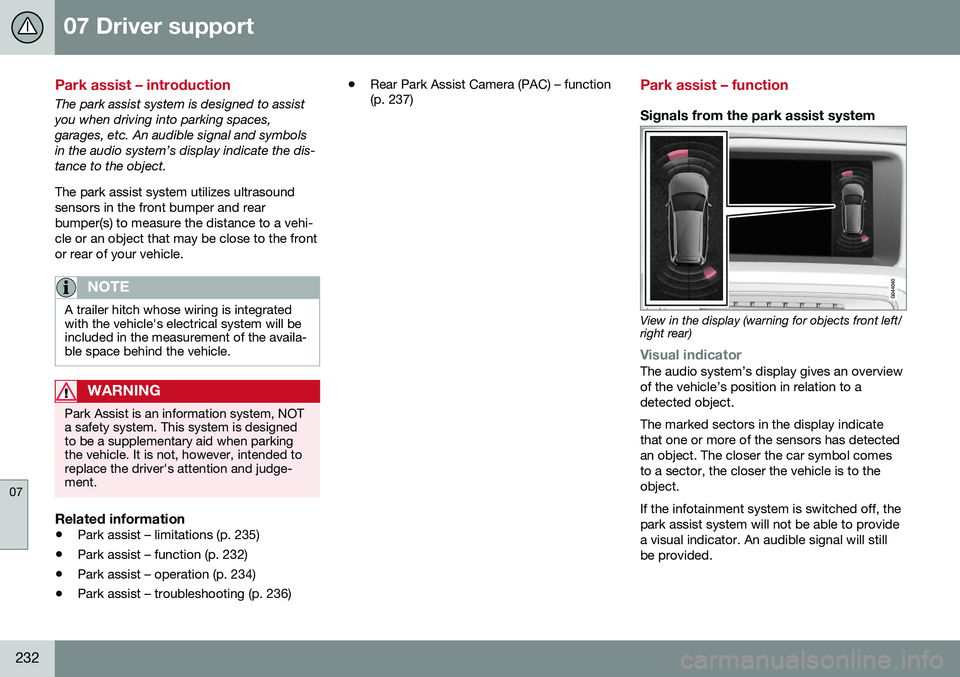
Signals from the park assist system
View in the display (warning for objects front left/ right rear)
Visual indicatorThe audio system’s display gives an overview of the vehicle’s position in relation to adetected object. The marked sectors in the display indicate that one or more of the sensors has detectedan object. The closer the car symbol comesto a sector, the closer the vehicle is to theobject. If the infotainment system is switched off, the park assist system will not be able to providea visual indicator. An audible signal will stillbe provided.
Page 236 of 398
||
07 Driver support
07
234* Option/accessory, for more information, see Introduction.
Front park assist
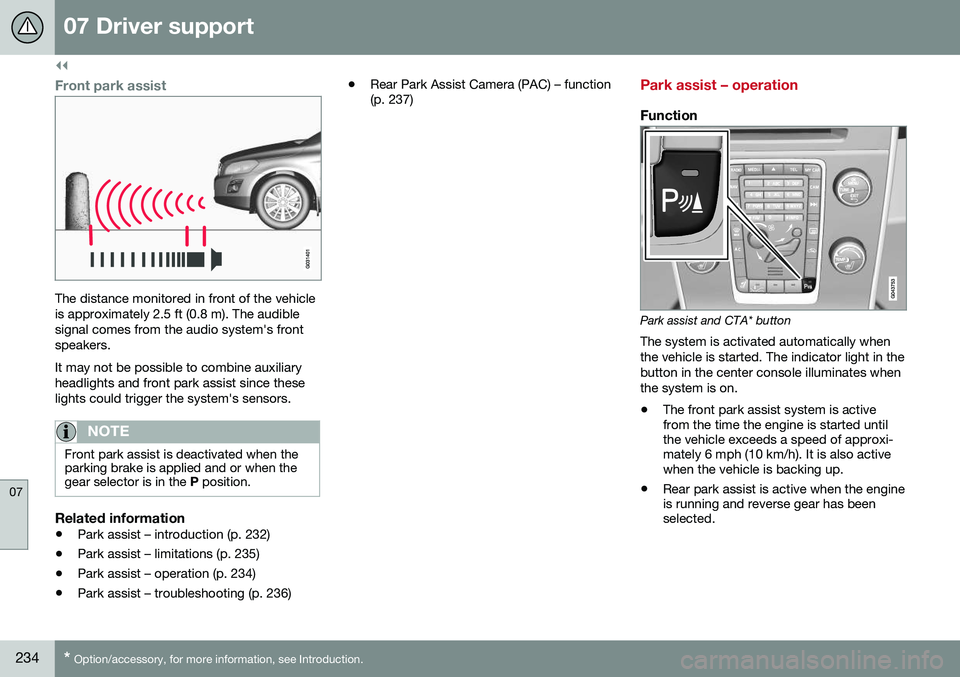
The distance monitored in front of the vehicle is approximately 2.5 ft (0.8 m). The audiblesignal comes from the audio system's frontspeakers. It may not be possible to combine auxiliary headlights and front park assist since theselights could trigger the system's sensors.
NOTE
Front park assist is deactivated when the parking brake is applied and or when thegear selector is in the P position.
Related information
• Park assist – introduction (p. 232)
• Park assist – limitations (p. 235)
• Park assist – operation (p. 234)
• Park assist – troubleshooting (p. 236) •
Rear Park Assist Camera (PAC) – function (p. 237)
Park assist – operation
Function
Park assist and CTA* button
The system is activated automatically when the vehicle is started. The indicator light in thebutton in the center console illuminates whenthe system is on.
• The front park assist system is active from the time the engine is started untilthe vehicle exceeds a speed of approxi-mately 6 mph (10 km/h). It is also activewhen the vehicle is backing up.
• Rear park assist is active when the engineis running and reverse gear has beenselected.
Page 237 of 398
07 Driver support
07
235
Activating/deactivatingThe system is activated automatically when the vehicle is started.
–Press the Park assist button on the center console to temporarily deactivate the sys-tem(s).
> The indicator light in the button will goout when the system has been deacti- vated.
Park assist will be automatically reactivatedthe next time the engine is started, or if thebutton is pressed (the indicator light in thebutton will illuminate).
NOTE
Park assist is disengaged automatically when the parking brake is applied.
Related information
• Park assist – introduction (p. 232)
• Park assist – limitations (p. 235)
• Park assist – function (p. 232)
• Park assist – troubleshooting (p. 236)
• Rear Park Assist Camera (PAC) – function (p. 237)
Park assist – limitations
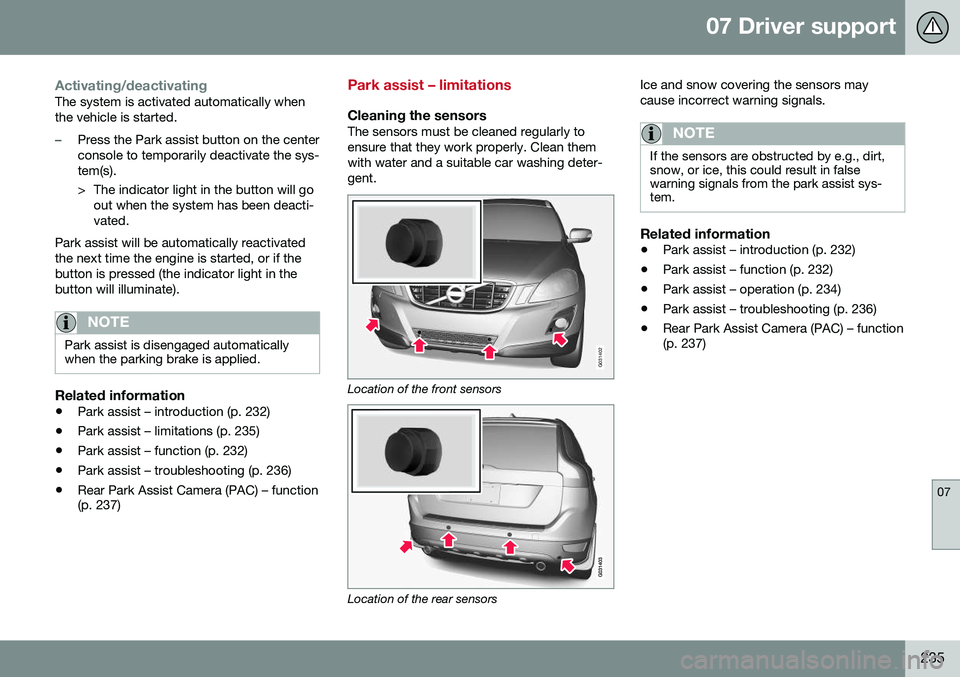
Cleaning the sensorsThe sensors must be cleaned regularly to ensure that they work properly. Clean themwith water and a suitable car washing deter-gent.
G031402
Location of the front sensors
Location of the rear sensors Ice and snow covering the sensors may cause incorrect warning signals.
NOTE
If the sensors are obstructed by e.g., dirt, snow, or ice, this could result in falsewarning signals from the park assist sys-tem.
Related information
•
Park assist – introduction (p. 232)
• Park assist – function (p. 232)
• Park assist – operation (p. 234)
• Park assist – troubleshooting (p. 236)
• Rear Park Assist Camera (PAC) – function (p. 237)
Page 238 of 398
07 Driver support
07
236
Park assist – troubleshooting
Faults in the systemIf the information symbol illuminates andPark assist syst Service required is shown
on the information display, this indicates that the system is not functioning properly andhas been disengaged. Consult a trained andqualified Volvo service technician.
CAUTION
In certain circumstances, the park assist system may give unexpected warning sig-nals that can be caused by external soundsources that use the same ultrasound fre-quencies as the system. This may includesuch things as the horns of other vehicles,wet tires on asphalt, pneumatic brakes,motorcycle exhaust pipes, etc. This doesnot indicate a fault in the system.
Related information
• Park assist – introduction (p. 232)
• Park assist – limitations (p. 235)
• Park assist – function (p. 232)
• Park assist – operation (p. 234)
• Rear Park Assist Camera (PAC) – function (p. 237)
Rear Park Assist Camera (PAC) – introduction
The Park Assist Camera is designed to pro- vide the driver with a view of the area behindthe vehicle when backing up.
IntroductionPAC uses the display in the center console toshow the area behind the car while you arebacking up. PAC also shows guiding lines in the on- screen image to indicate the direction that thevehicle will take as it moves rearward, whichhelps simplify parallel parking, backing into atight space or when attaching a trailer to thevehicle. The images of vehicles in this section are generic and may not depict your specificmodel.
NOTE
A trailer hitch whose wiring is integrated with the vehicle's electrical system will beincluded in the measurement of the availa-ble space behind the vehicle.
WARNING
• PAC is designed to be a supplemen- tary aid when parking the vehicle. It isnot, however, intended to replace thedriver’s attention and judgment.
• The camera has blind spots where itcannot detect objects or peoplebehind the vehicle.
• Pay particular attention to people oranimals that are close to the vehicle.
• Objects seen on the screen may becloser than they appear to be.
Related information
•
Rear Park Assist Camera (PAC) – opera- tion (p. 237)
• Rear Park Assist Camera (PAC) – limita-tions (p. 240)
Page 245 of 398
07 Driver support
07
}}
* Option/accessory, for more information, see Introduction.243
BLIS* – Cross Traffic Alert (CTA)
Cross Traffic Alert (CTA) is a supplementary BLIS 12
function intended to detect vehicles
crossing behind your vehicle while you are backing up.
Park assist/CTA button On vehicles equipped with the optional Park assist system (p. 232), Cross Traffic Alert(CTA) can be deactivated/reactivated bypressing the Park assist button on the centerconsole. The BLIS indicator lights on the frontdoors will flash when CTA is reactivated bypressing the button.
WARNING
• BLIS and CTA are information sys- tems, NOT warning or safety systemsand do not function in all situations.
• BLIS and CTA do not eliminate theneed for you to visually confirm theconditions around you, and the needfor you to turn your head and should-ers to make sure that you can safelychange lanes or back up.
• As the driver, you have full responsibil-ity for changing lanes/backing up in asafe manner.
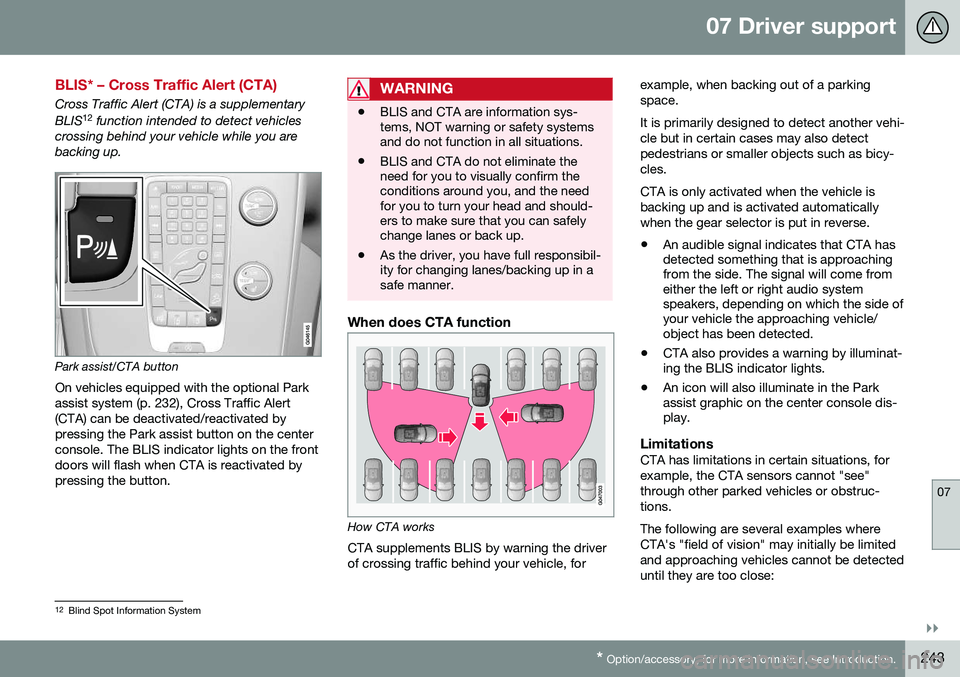
When does CTA function
How CTA works
CTA supplements BLIS by warning the driver of crossing traffic behind your vehicle, for example, when backing out of a parkingspace. It is primarily designed to detect another vehi- cle but in certain cases may also detectpedestrians or smaller objects such as bicy-cles. CTA is only activated when the vehicle is backing up and is activated automaticallywhen the gear selector is put in reverse.
• An audible signal indicates that CTA has detected something that is approachingfrom the side. The signal will come fromeither the left or right audio systemspeakers, depending on which the side ofyour vehicle the approaching vehicle/object has been detected.
• CTA also provides a warning by illuminat-ing the BLIS indicator lights.
• An icon will also illuminate in the Parkassist graphic on the center console dis-play.
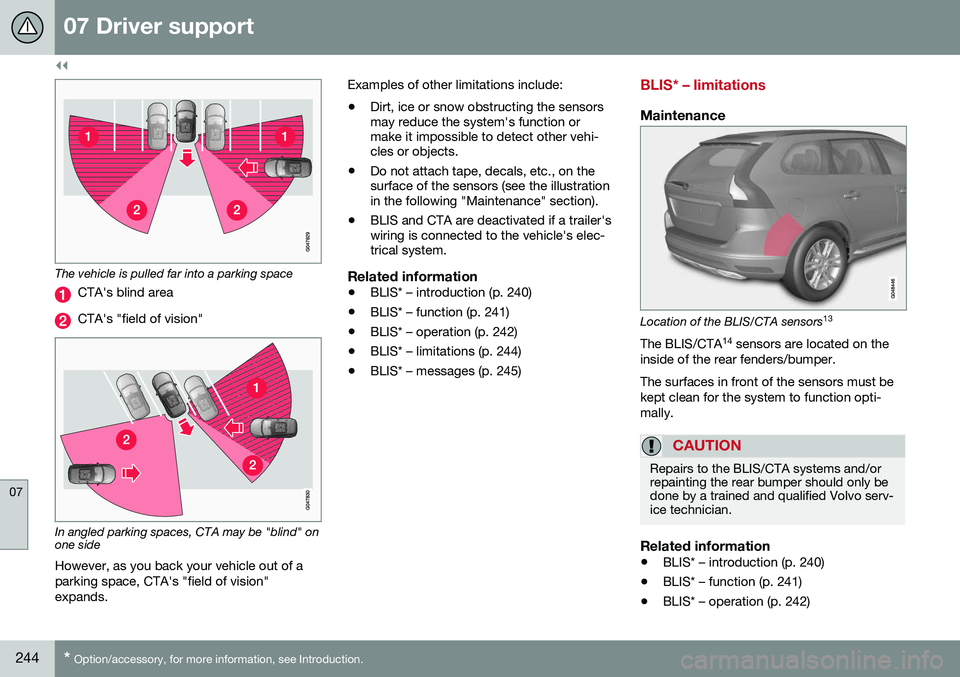
LimitationsCTA has limitations in certain situations, for example, the CTA sensors cannot "see"through other parked vehicles or obstruc-tions. The following are several examples where CTA's "field of vision" may initially be limitedand approaching vehicles cannot be detecteduntil they are too close:
12
Blind Spot Information System
Page 246 of 398
||
07 Driver support
07
244* Option/accessory, for more information, see Introduction.
The vehicle is pulled far into a parking space
CTA's blind area
CTA's "field of vision"
In angled parking spaces, CTA may be "blind" on one side
However, as you back your vehicle out of a parking space, CTA's "field of vision"expands. Examples of other limitations include:
• Dirt, ice or snow obstructing the sensors may reduce the system's function ormake it impossible to detect other vehi-cles or objects.
• Do not attach tape, decals, etc., on thesurface of the sensors (see the illustrationin the following "Maintenance" section).
• BLIS and CTA are deactivated if a trailer'swiring is connected to the vehicle's elec-trical system.
Related information
•BLIS* – introduction (p. 240)
• BLIS* – function (p. 241)
• BLIS* – operation (p. 242)
• BLIS* – limitations (p. 244)
• BLIS* – messages (p. 245)
BLIS* – limitations
Maintenance
Location of the BLIS/CTA sensors 13
The BLIS/CTA 14
sensors are located on the
inside of the rear fenders/bumper. The surfaces in front of the sensors must be kept clean for the system to function opti-mally.
CAUTION
Repairs to the BLIS/CTA systems and/or repainting the rear bumper should only bedone by a trained and qualified Volvo serv-ice technician.
Related information
• BLIS* – introduction (p. 240)
• BLIS* – function (p. 241)
• BLIS* – operation (p. 242)
Page 250 of 398
||
08 Starting and driving
08
248
WARNING
•Always remove the remote key from the ignition slot when leaving the vehi-cle and ensure that the ignition inmode
0 (see Ignition modes (p. 79) for
information about the ignition modes).
• On vehicles with the optional keylessdrive, never remove the remote keyfrom the vehicle while it is being drivenor towed.
• Always place the gear selector in Parkand apply the parking brake beforeleaving the vehicle. Never leave thevehicle unattended with the enginerunning.
• Always open garage doors fully beforestarting the engine inside a garage toensure adequate ventilation. Theexhaust gases contain carbon monox-ide, which is invisible and odorless butvery poisonous.
NOTE
•
After a cold start, idle speed may be noticeably higher than normal for ashort period. This is done to help bringcomponents in the emission controlsystem to their normal operating tem-perature as quickly as possible, whichenables them to control emissions andhelp reduce the vehicle's impact on the environment 3
.
CAUTION
• When starting in cold weather, the automatic transmission may shift up atslightly higher engine speeds than nor-mal until the automatic transmissionfluid reaches normal operating tem-perature.
• Do not race a cold engine immediatelyafter starting. Oil flow may not reachsome lubrication points fast enough toprevent engine damage.
• The engine should be idling when youmove the gear selector. Never acceler-ate until after you feel the transmissionengage. Accelerating immediately afterselecting a gear will cause harshengagement and premature transmis-sion wear.
• Selecting
P or N when idling at a
standstill for prolonged periods of timewill help prevent overheating of theautomatic transmission fluid.
Related information
• Switching off the engine (p. 249)
3
If the gear selector is in the D or R positions and the car is not moving, engine speed (rpm) will be lower and it will take longer for the engine to reach normal operating temperature.