seats VOLVO XC60 2018 Owner´s Manual
[x] Cancel search | Manufacturer: VOLVO, Model Year: 2018, Model line: XC60, Model: VOLVO XC60 2018Pages: 660, PDF Size: 11.77 MB
Page 195 of 660
SEATS AND STEERING WHEEL
}}
* Option/accessory.193
Folding down the backrests
Models with the electric backrest fold-down
function
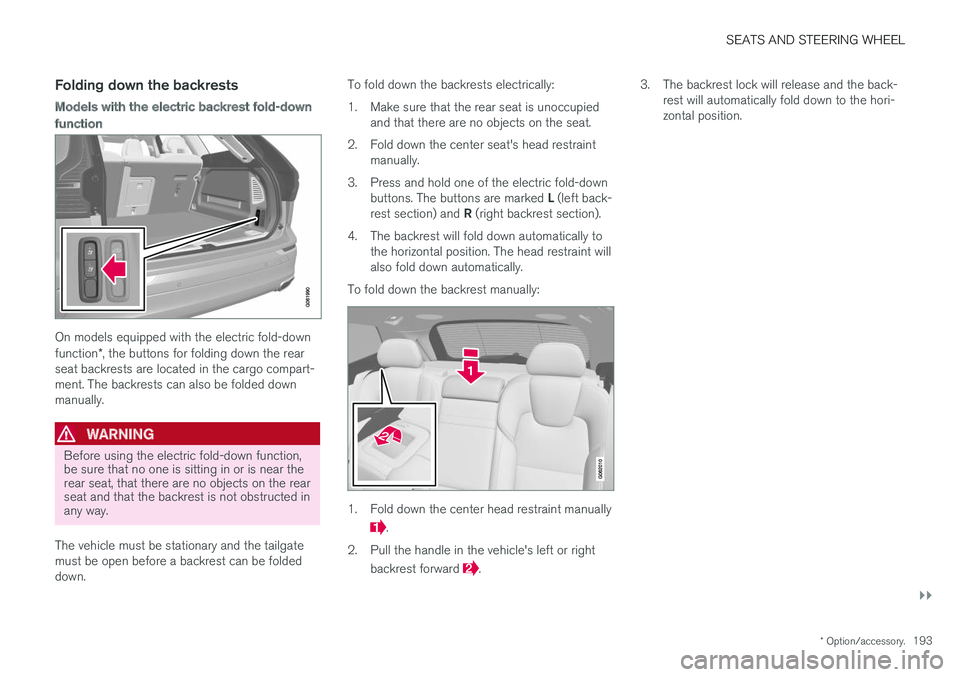
On models equipped with the electric fold-down function*, the buttons for folding down the rear
seat backrests are located in the cargo compart- ment. The backrests can also be folded downmanually.
WARNING
Before using the electric fold-down function, be sure that no one is sitting in or is near therear seat, that there are no objects on the rearseat and that the backrest is not obstructed inany way.
The vehicle must be stationary and the tailgate must be open before a backrest can be foldeddown. To fold down the backrests electrically:
1. Make sure that the rear seat is unoccupied
and that there are no objects on the seat.
2. Fold down the center seat's head restraint manually.
3. Press and hold one of the electric fold-down buttons. The buttons are marked L (left back-
rest section) and R (right backrest section).
4. The backrest will fold down automatically to the horizontal position. The head restraint will also fold down automatically.
To fold down the backrest manually:
1. Fold down the center head restraint manually
.
2. Pull the handle in the vehicle's left or right backrest forward
. 3. The backrest lock will release and the back-
rest will automatically fold down to the hori- zontal position.
Page 196 of 660
||
SEATS AND STEERING WHEEL
194
Models without the electric backrest fold-
down function
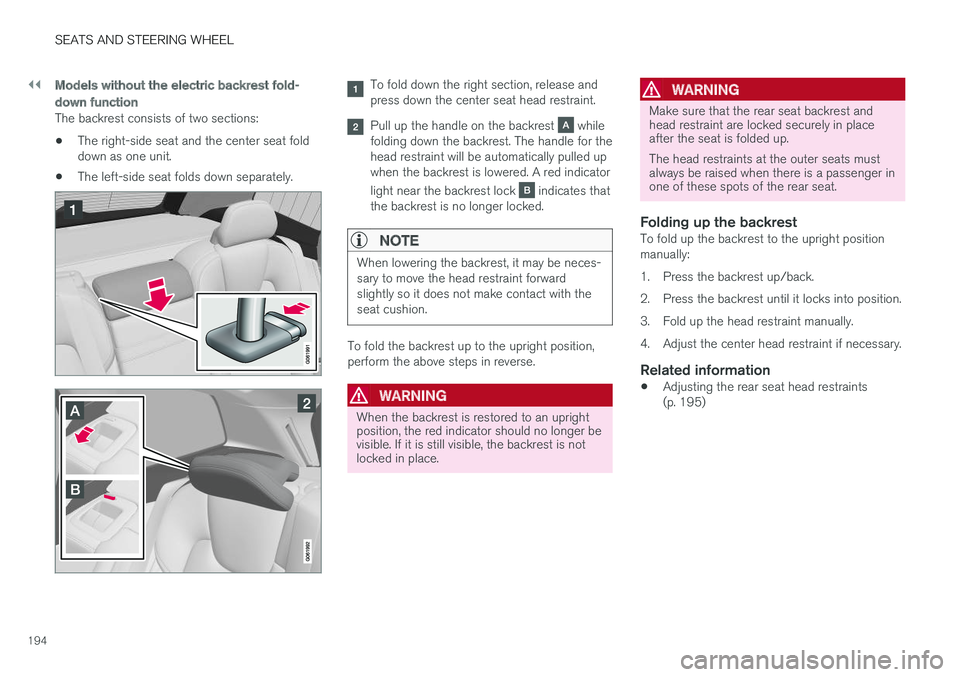
The backrest consists of two sections: •The right-side seat and the center seat fold down as one unit.
• The left-side seat folds down separately.
To fold down the right section, release and press down the center seat head restraint.
Pull up the handle on the backrest while
folding down the backrest. The handle for the head restraint will be automatically pulled upwhen the backrest is lowered. A red indicator light near the backrest lock
indicates that
the backrest is no longer locked.
NOTE
When lowering the backrest, it may be neces- sary to move the head restraint forwardslightly so it does not make contact with theseat cushion.
To fold the backrest up to the upright position, perform the above steps in reverse.
WARNING
When the backrest is restored to an upright position, the red indicator should no longer bevisible. If it is still visible, the backrest is notlocked in place.
WARNING
Make sure that the rear seat backrest and head restraint are locked securely in placeafter the seat is folded up. The head restraints at the outer seats must always be raised when there is a passenger inone of these spots of the rear seat.
Folding up the backrestTo fold up the backrest to the upright position manually:
1. Press the backrest up/back.
2. Press the backrest until it locks into position.
3. Fold up the head restraint manually.
4. Adjust the center head restraint if necessary.
Related information
• Adjusting the rear seat head restraints (p. 195)
Page 197 of 660
SEATS AND STEERING WHEEL
}}
* Option/accessory.195
Adjusting the rear seat headrestraints
Adjust the center head restraint in the rear seat to the seat occupant's height. Fold down theoutboard head restraints to improve rear visibil-ity.
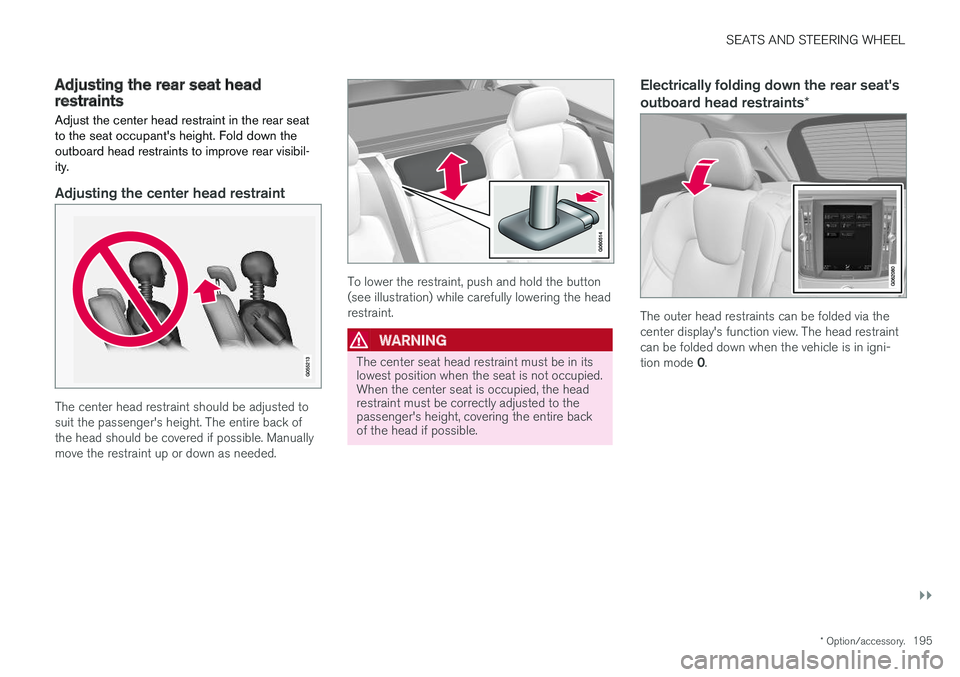
Adjusting the center head restraint
The center head restraint should be adjusted to suit the passenger's height. The entire back ofthe head should be covered if possible. Manuallymove the restraint up or down as needed.
To lower the restraint, push and hold the button (see illustration) while carefully lowering the headrestraint.
WARNING
The center seat head restraint must be in its lowest position when the seat is not occupied.When the center seat is occupied, the headrestraint must be correctly adjusted to thepassenger's height, covering the entire backof the head if possible.
Electrically folding down the rear seat's outboard head restraints *
The outer head restraints can be folded via the center display's function view. The head restraintcan be folded down when the vehicle is in igni- tion mode 0.
Page 198 of 660
||
SEATS AND STEERING WHEEL
* Option/accessory.
196 Tap the
Headrest Fold button
to activate/deactivate folding.
Manually push the head restraint until it clicks into position.
WARNING
Do not lower the head restraint if there are passengers in any of the rear seats.
WARNING
The head restraint must be locked in the upright position after it has been folded up.
Manually folding down the rear seat's outboard head restraints
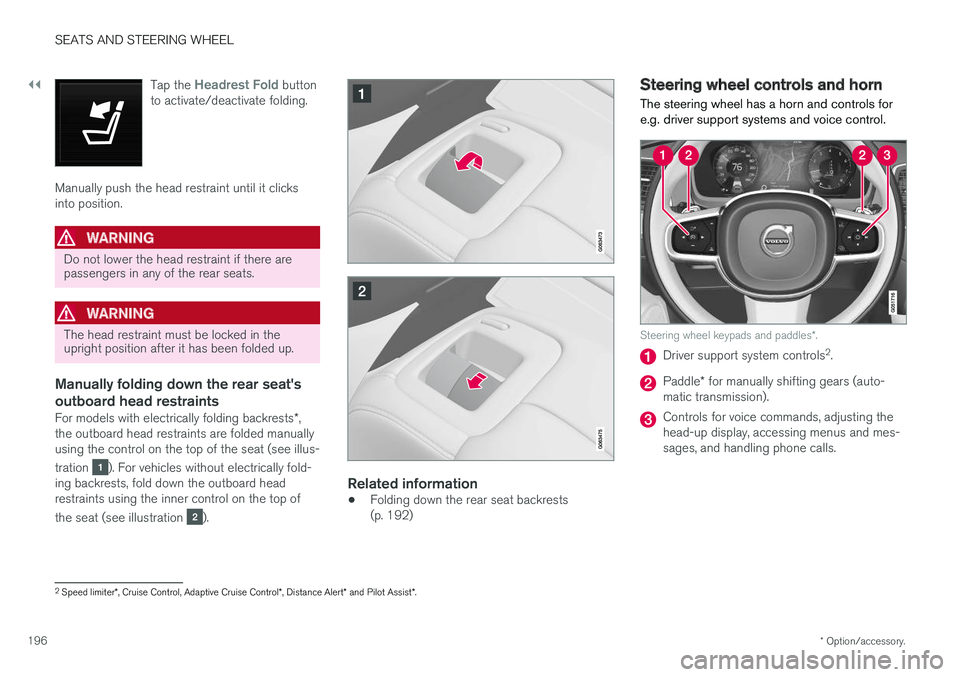
For models with electrically folding backrests *,
the outboard head restraints are folded manually using the control on the top of the seat (see illus- tration
). For vehicles without electrically fold-
ing backrests, fold down the outboard head restraints using the inner control on the top of the seat (see illustration
).
Related information
• Folding down the rear seat backrests (p. 192)
Steering wheel controls and horn The steering wheel has a horn and controls for e.g. driver support systems and voice control.
Steering wheel keypads and paddles
*.
Driver support system controls 2
.
Paddle * for manually shifting gears (auto-
matic transmission).
Controls for voice commands, adjusting the head-up display, accessing menus and mes-sages, and handling phone calls.
2 Speed limiter *, Cruise Control, Adaptive Cruise Control *, Distance Alert * and Pilot Assist *.
Page 199 of 660
SEATS AND STEERING WHEEL
197
Horn
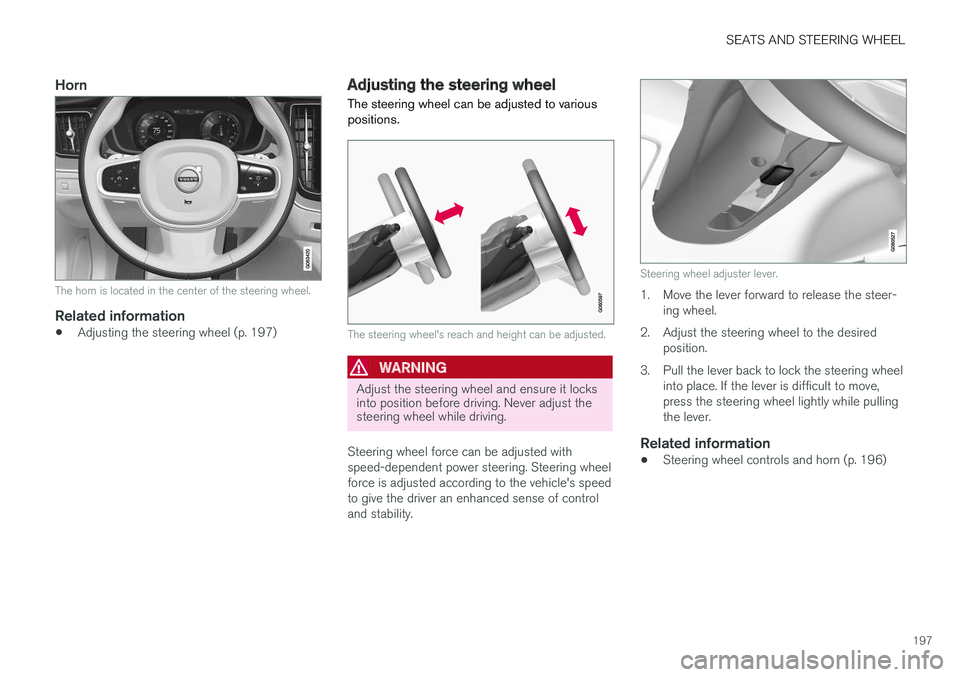
The horn is located in the center of the steering wheel.
Related information
•Adjusting the steering wheel (p. 197)
Adjusting the steering wheel
The steering wheel can be adjusted to various positions.
The steering wheel's reach and height can be adjusted.
WARNING
Adjust the steering wheel and ensure it locks into position before driving. Never adjust thesteering wheel while driving.
Steering wheel force can be adjusted with speed-dependent power steering. Steering wheelforce is adjusted according to the vehicle's speedto give the driver an enhanced sense of controland stability.
Steering wheel adjuster lever.
1. Move the lever forward to release the steer- ing wheel.
2. Adjust the steering wheel to the desired position.
3. Pull the lever back to lock the steering wheel into place. If the lever is difficult to move, press the steering wheel lightly while pullingthe lever.
Related information
• Steering wheel controls and horn (p. 196)
Page 202 of 660
CLIMATE CONTROL
* Option/accessory.
200
Climate
The vehicle is equipped with electronic climate control. The climate system cools, heats anddehumidifies the air in the passenger compart-ment.
All of the climate system functions are controlled from the center display and the buttons on thecenter console. Certain rear seat functions can also be controlled from the climate controls * on the rear of the tun-
nel console.
Related information
• Climate zones (p. 200)
• Climate control sensors (p. 201)
• Perceived temperature (p. 201)
• Climate control system voice commands (p. 202)
• Air quality (p. 203)
• Air distribution (p. 206)
• Climate system controls (p. 212)
Climate zones
The vehicle is divided into climate zones to make it possible to set different temperatures for dif-ferent parts of the passenger compartment.
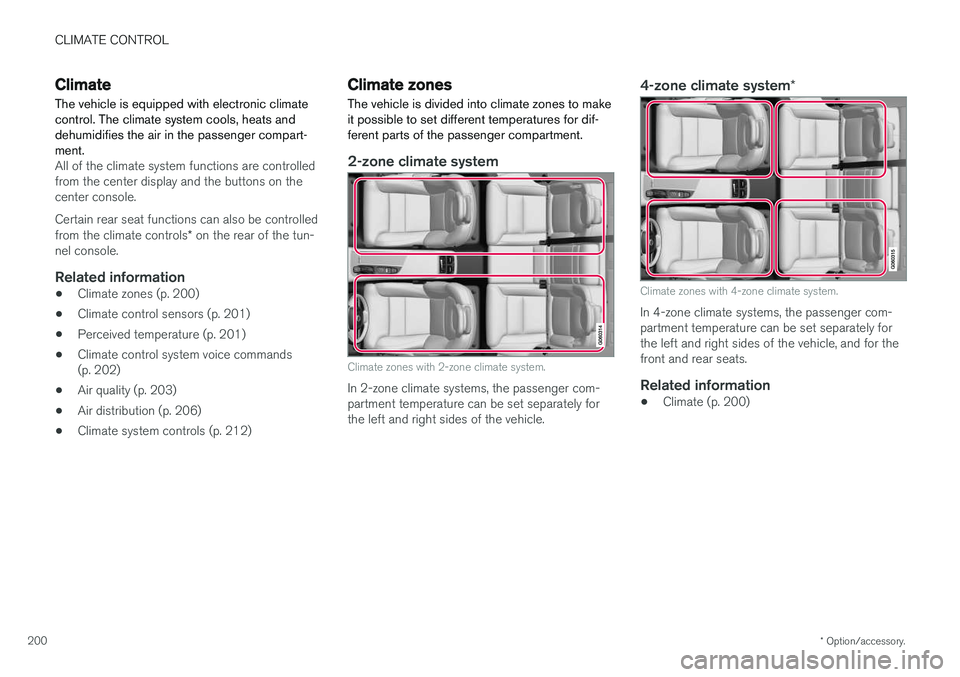
2-zone climate system
Climate zones with 2-zone climate system.
In 2-zone climate systems, the passenger com- partment temperature can be set separately forthe left and right sides of the vehicle.
4-zone climate system *
Climate zones with 4-zone climate system.
In 4-zone climate systems, the passenger com- partment temperature can be set separately forthe left and right sides of the vehicle, and for thefront and rear seats.
Related information
•Climate (p. 200)
Page 214 of 660
CLIMATE CONTROL
* Option/accessory.
212
Climate system controls
The climate system functions are controlled from physical buttons on the center console, the cen-ter display, and the climate panel on the rear side of the tunnel console *.
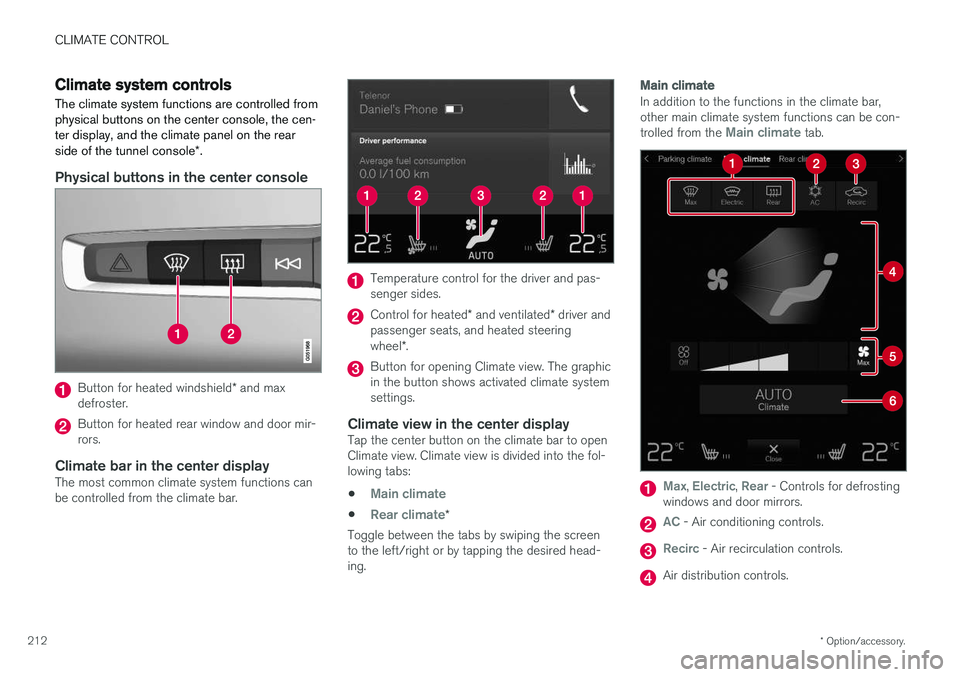
Physical buttons in the center console
Button for heated windshield * and max
defroster.
Button for heated rear window and door mir- rors.
Climate bar in the center displayThe most common climate system functions canbe controlled from the climate bar.
Temperature control for the driver and pas- senger sides.
Control for heated * and ventilated * driver and
passenger seats, and heated steering wheel *.
Button for opening Climate view. The graphic in the button shows activated climate systemsettings.
Climate view in the center displayTap the center button on the climate bar to openClimate view. Climate view is divided into the fol-lowing tabs:
•
Main climate
•Rear climate*
Toggle between the tabs by swiping the screen to the left/right or by tapping the desired head-ing.
Main climate
In addition to the functions in the climate bar, other main climate system functions can be con- trolled from the
Main climate tab.
Max, Electric, Rear - Controls for defrosting
windows and door mirrors.
AC - Air conditioning controls.
Recirc - Air recirculation controls.
Air distribution controls.
Page 215 of 660
CLIMATE CONTROL
}}
* Option/accessory.213
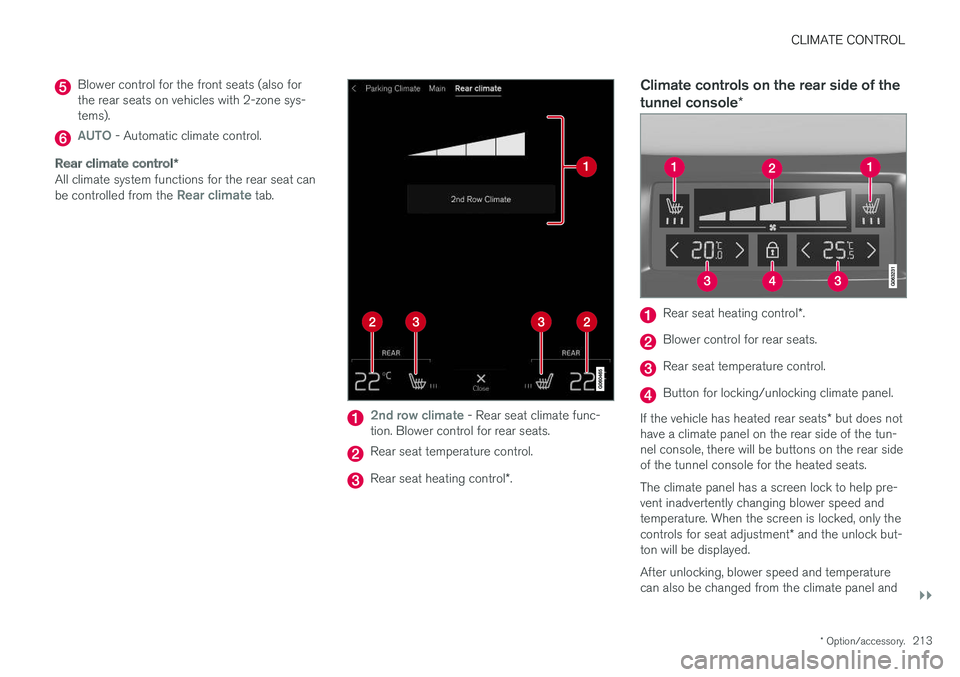
Blower control for the front seats (also for the rear seats on vehicles with 2-zone sys-tems).
AUTO - Automatic climate control.
Rear climate control *
All climate system functions for the rear seat can be controlled from the Rear climate tab.
2nd row climate - Rear seat climate func-
tion. Blower control for rear seats.
Rear seat temperature control.
Rear seat heating control *.
Climate controls on the rear side of the tunnel console *
Rear seat heating control *.
Blower control for rear seats.
Rear seat temperature control.
Button for locking/unlocking climate panel.
If the vehicle has heated rear seats * but does not
have a climate panel on the rear side of the tun- nel console, there will be buttons on the rear sideof the tunnel console for the heated seats. The climate panel has a screen lock to help pre- vent inadvertently changing blower speed andtemperature. When the screen is locked, only the controls for seat adjustment * and the unlock but-
ton will be displayed. After unlocking, blower speed and temperature can also be changed from the climate panel and
Page 216 of 660
||
CLIMATE CONTROL
* Option/accessory.
214 all selected climate settings will be displayed. The screen locks automatically after a period of inac-tivity.
Related information
•
Climate (p. 200)
• Activating and deactivating power front seats
* (p. 214)
• Activating and deactivating the heated rearseats
* (p. 215)
• Activating and deactivating front seat ventila-tion
* (p. 216)
• Activating and deactivating the heated steer-ing wheel
* (p. 217)
• Activating auto climate control (p. 218)
• Activating and deactivating recirculation (p. 219)
• Activating and deactivating max defroster(p. 220)
• Activating and deactivating the heated wind- shield
* (p. 221)
• Activating and deactivating the heated rear window and door mirrors (p. 222)
• Setting the blower speed for the front seats(p. 223)
• Setting the blower speed for the rear seats
*
(p. 224)
• Synchronize temperature (p. 227) •
Activating and deactivating air conditioning(p. 227)
Activating and deactivating power
front seats
*
The seats can be heated for added comfort for the driver and passengers in cold weather.
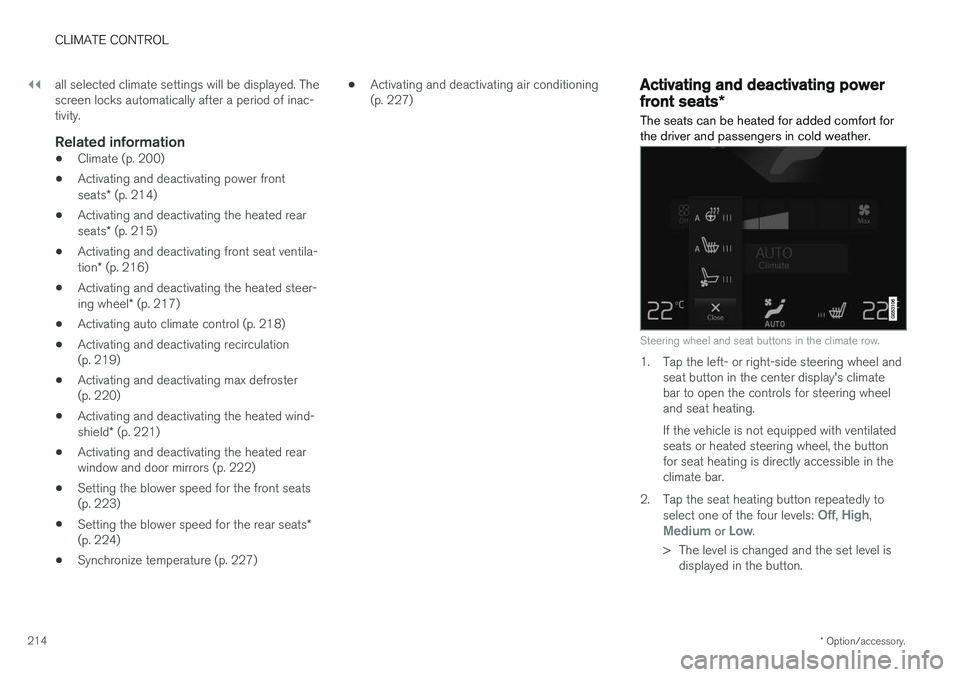
Steering wheel and seat buttons in the climate row.
1. Tap the left- or right-side steering wheel and seat button in the center display's climate bar to open the controls for steering wheeland seat heating. If the vehicle is not equipped with ventilated seats or heated steering wheel, the buttonfor seat heating is directly accessible in theclimate bar.
2. Tap the seat heating button repeatedly to select one of the four levels:
Off, High,Medium or Low.
> The level is changed and the set level is displayed in the button.
Page 217 of 660
CLIMATE CONTROL
}}
* Option/accessory.215
Related information
•Climate system controls (p. 212)
• Activating and deactivating the heated front seat
* (p. 215)
Activating and deactivating the
heated front seat *
The seats can be heated for added comfort for the driver and passengers in cold weather.
Seat heating can be set to automatically activate when the engine is started. When set to automat-ically activate, heating will be turned on at lowambient temperatures. 1. Tap
Settings in the Top view in the center
display.
2. Tap
Climate.
3. Select
Auto Driver Seat Heating Leveland Auto Passenger Seat Heating Levelto activate/deactivate automatic start of heated driver's and passenger seat.
4. Select
Low, Medium or High to select level
after the function has been activated.
Related information
• Climate system controls (p. 212)
• Activating and deactivating power front seats
* (p. 214)
Activating and deactivating the
heated rear seats *
The seats can be heated for added comfort for the driver and passengers in cold weather.
Activating and deactivating the heated rear seats from the front seats *
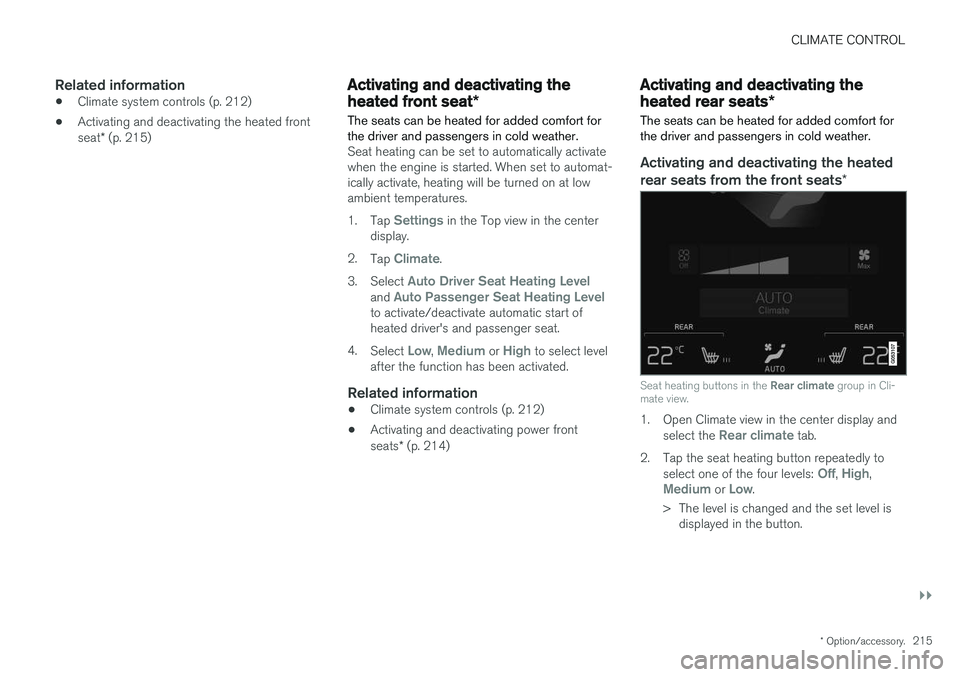
Seat heating buttons in the Rear climate group in Cli-
mate view.
1. Open Climate view in the center display and
select the Rear climate tab.
2. Tap the seat heating button repeatedly to select one of the four levels:
Off, High,Medium or Low.
> The level is changed and the set level is displayed in the button.