ECO mode VOLVO XC90 2004 Owner's Manual
[x] Cancel search | Manufacturer: VOLVO, Model Year: 2004, Model line: XC90, Model: VOLVO XC90 2004Pages: 245, PDF Size: 6.36 MB
Page 137 of 245

2004 VOLVO XC90
state of charge more frequently and spray an antirust oil on the battery\
posts.
l Volvo recommends the use of snow tires on all four wheels for winter driving - see section "Wheels
and tires."
l To prevent the washer fluid reservoir from freezing, add washer solvents containing antifreeze (see
page 126 for the location of the washer fluid reservoir).
This is important since dirt is often splashed on the windshield during \
winter driving, requiring the
frequent use of the washers and wipers. Volvo Washer Solvent should be d\
iluted as follows:
Down to 14° F (-10° C): 1 part washer solvent and 4 parts water \
Down to 5° F (-15° C): 1 part washer solvent and 3 parts water
Down to 0° F (-18° C): 1 part washer solvent and 2 parts water
Down to -18° F (-28° C): 1 part washer solvent and 1 part water \
l Use Volvo Teflon Lock Spray in the locks.
NOTE: Avoid the use of de-icing sprays as they can cause damage to the locks.
W Winter/Wet driving mode-enhanced vehicle traction
l Mode W will only function if the gear selector is in the (D)rive position.
l Press the button at the base of the gear selector to engage/disengage th\
is driving mode.
l An LED in the button will light up to indicate that W is engaged and thi\
s will also be displayed in the
instrument panel (see
page 24).
l This mode may be selected for starting/moving off on slippery roads.
* Synthetic oil is not used when the oil is changed at the normal mainte\
nance intervals except at owner
request and at additional charge. Please consult your Volvo retailer.
pg. 106 Starting and driving
Before a long distance trip
It is always worthwhile to have your vehicle checked at a Volvo retailer\
before driving long distances.
Your retailer will also be able to supply you with bulbs, fuses, spark p\
lugs and wiper blades for your use
in the event that problems occur.
As a minimum, the following items should be checked before any long trip\
:
l Check that engine runs smoothly and that fuel consumption is normal.
l Check for fuel, oil, and fluid leakage
l Check transmission oil level*.
l Check condition of drive belts.
l Check state of the battery's charge.
l Examine tires carefully (the spare tire as well), and replace those th\
at are worn. Check tire pressures.
l The brakes, front wheel alignment, and steering gear should be checked b\
y your Volvo retailer only.
file:///K|/ownersdocs/2004/2004_XC90/04xc90_06b.htm (16 of 17)12/30/20\
06 4:35:23 PM
Page 147 of 245
 winter
tires on all four wheels.
Winter tires wear more quickly on dry roads in warm weather.")
2004 VOLVO XC90
Volvo recommends 225/70 R16 (235/65 R17 on seven-seat models with the T\
6 turbo engine) winter
tires on all four wheels.
Winter tires wear more quickly on dry roads in warm weather. They should\
be removed when the winter
driving season has ended.
Studded tires should be run-in 300 - 600 miles (500 - 1000 km) during \
which the vehicle should be
driven as smoothly as possible to give the studs the opportunity to seat\
properly in the tires. The tires
should have the same rotational direction throughout their entire lifeti\
me. In other words, if you wish to
rotate the wheels, make sure that the same wheels are always on the same\
side of the vehicle.
NOTE: Please consult state or provincial regulations restricting the use of st\
udded winter tires before
installing such tires.
* Where permitted
pg. 110 Wheels and tires
Tire pressure
Tire pressure label
Checking and correcting tire pressure
The tire pressure label is located on the inside of the fuel filler door\
.
l Check the tire pressure regularly.
l The tire pressure should be corrected only when the tires are cold.
file:///K|/ownersdocs/2004/2004_XC90/04xc90_08.htm (4 of 13)12/30/2006\
4:35:25 PM
Page 148 of 245

2004 VOLVO XC90
l With warm tires, correct only when the pressure is too low. The tire tem\
perature rises after driving
just a few miles.
Vehicle loading
The tires on your Volvo will perform to specifications at all normal loa\
ds when inflated as
recommended on the tire information label located on the inside of the f\
uel filler door. This label lists
both tire and vehicle design limits. Do not load your vehicle beyond the\
load limits indicated.
WARNING!
Improperly inflated tires will reduce tire life, adversely affect vehicl\
e handling and can possibly lead
to failure resulting in loss of vehicle control without prior warning.
Temporary Spare
The spare tire in your vehicle is called a "Temporary Spare".
Recommended tire pressure (see decal on Fuel filler door) should be ma\
intained irrespective which
position on the vehicle the Temporary Spare tire is used on. In the even\
t of damage this tire, a new one
can be purchased from your Volvo retailer.
WARNING!
Current legislation prohibits the use of the Temporary Spare" tire other\
than as a temporary
replacement for a punctured tire. It must be replaced as soon as possibl\
e by a standard tire. Road
holding and handling may be affected with the "Temporary Spare" in use. \
Do not exceed 50 mph (80
km/h). Do not drive farther than 50 miles (80 km) on a temporary spar\
e tire.
CAUTION
The vehicle must not be driven with wheels of different dimensions or wi\
th a spare tire other than the
one that came with the vehicle. The use of different size wheels can ser\
iously damage your vehicle's
transmission.
The temporary spare tire is for temporary, low-speed, short-distance use\
only. Replace it with a full-
sized tire as soon as possible, in accordance with "Tire Rotation" in th\
e previous paragraph. Do not drive
on the temporary spare at speeds above 50 m.p.h. (80km/h) or for dista\
nces greater than 50 miles (80
km).
Never install snow chains on a temporary spare.
NOTE: Certain models may be equipped with a full-size spare tire. When used, i\
t should be inflated to
file:///K|/ownersdocs/2004/2004_XC90/04xc90_08.htm (5 of 13)12/30/2006\
4:35:25 PM
Page 208 of 245
 to enter menu mode. Use the menus as follows\
:
l Use the menu keys (3) to navigate up or down in the menus.")
2004 VOLVO XC90
menu alternatives are shown in the display.
Press the menu button (2) to enter menu mode. Use the menus as follows\
:
l Use the menu keys (3) to navigate up or down in the menus. Dots in the\
display indicated that there
are more menu selections from which to choose.
l One long press on EXIT/CLEAR exits menu mode.
l A short press on the EXIT/CLEAR enables you to cancel, undo, or answer n\
o to a menu selection, or
to go back in the menu structure.
l Pressing ENTER confirms a menu selection, or takes you to the next subme\
nu.
pg. 162 Audio
Audio system controls (contd)
Rear headphone connectors and controls (option)
The door panels behind the second row of seats can be equipped with head\
phone connectors for
passengers in the second and optional third row of seats. Several people\
can listen to different sound
sources, such as CDs or the radio at the same time without disturbing ea\
ch other. Two sets of
headphones can be plugged into each connector.
l Use the SEL button (1) to step between the sound sources.
l Press the arrow keys (2) briefly to change CD tracks or switch between\
preset stations.
l Hold down the arrow keys to fast forward/reverse, or search for the prev\
ious/next strong radio station.
l Hold down the SEL button to turn off the sound.
For the best sound reproduction, we recommend headphones with impedance \
between 16-32 ohm. The
sensitivity of these should be equal to or greater than 102 dB. The head\
phone connections are intended
file:///K|/ownersdocs/2004/2004_XC90/04xc90_11a.htm (4 of 17)12/30/200\
6 4:35:31 PM
Page 213 of 245

2004 VOLVO XC90
experience very close to a live performance. The normal left-right stere\
o channels are divided to left-
center-right. In addition, surround sound is produced by the rear speake\
rs. This surround sound mirrors
the resonance of a concert hall. Dolby Surround Pro Logic II functions i\
n CD mode. 3-channel stereo is
recommended for FM and AM radio broadcasts.
Dolby Surround Pro Logic II is only available on the highest level audio\
system - Premium Sound.
Use the following instructions to select PRO LOGIC II, 3-CHANNEL, or to \
turn these functions off. See
also the menu structure on
page 174.
1. Select AUDIO SETTINGS in the menu and press ENTER.
2. Select SURROUND and press ENTER.
3. Select Dolby AM/FM, or Dolby CD and press ENTER.
4. Select PRO LOGIC II, 3-CHANNEL, or OFF and press ENTER.
l The symbol PL II is shown in the display.
l 3-CH is shown when 3-channel stereo is selected.
l OFF indicates normal stereo mode.
Dolby noise reduction is manufactured under license from Dolby Laborator\
ies Licensing Corporation.
"Dolby Surround Pro Logic II", and the double-D symbol
are trademarks of Dolby Laboratories
Licensing Corporation. Dolby Surround Pro Logic II is manufactured under\
licence from Dolby
Laboratories Licensing Corporation.
pg. 167 Audio
Bass speaker - SUBWOOFER (option)
file:///K|/ownersdocs/2004/2004_XC90/04xc90_11a.htm (9 of 17)12/30/200\
6 4:35:31 PM
Page 215 of 245
 or the \
AM/FM button (2).
2. Press briefly on
or to search for the next strong station. The radio wi")
2004 VOLVO XC90
Station search
1. Choose radio mode AM/FM1/FM2 using the SELECTOR control (1) or the \
AM/FM button (2).
2. Press briefly on
or to search for the next strong station. The radio will search for the ne\
xt
audible station and then stop.
3. Press one of the buttons again to start a new search.
Manually search for a known frequency
1. Press and hold the
or button (or the corresponding buttons on the steering wheel
keypad). MAN will be shown in the display. The radio will slowly scroll\
in the desired direction and
then increase speed after a few seconds.
2. Release the button when the desired frequency is displayed.
3. If you need to adjust the frequency, press briefly on
or .
4. The manual search function is available for five seconds after you la\
st pressed the button.
pg. 169 Audio
file:///K|/ownersdocs/2004/2004_XC90/04xc90_11a.htm (11 of 17)12/30/20\
06 4:35:31 PM
Page 218 of 245

2004 VOLVO XC90
pg. 171 Audio
Scanning - SCAN
This function automatically searches for the next strongest AM and FM st\
ations.When the radio finds a
station, it will pause for approximately 8 seconds, after which it will \
continue scanning.
1. Choose radio mode using the SELECTOR control (1) or the AM/FM butto\
n (2).
2. Select SCAN to start searching and press ENTER.
3. SCAN will be shown in the display.
4. Press the EXIT/CLEAR button to stop scanning.
pg. 172 Audio
Radio functions (contd)
file:///K|/ownersdocs/2004/2004_XC90/04xc90_11a.htm (14 of 17)12/30/20\
06 4:35:31 PM
Page 226 of 245
2004 VOLVO XC90
pg. 177 Audio
CD changer (option)
CD changer (option)
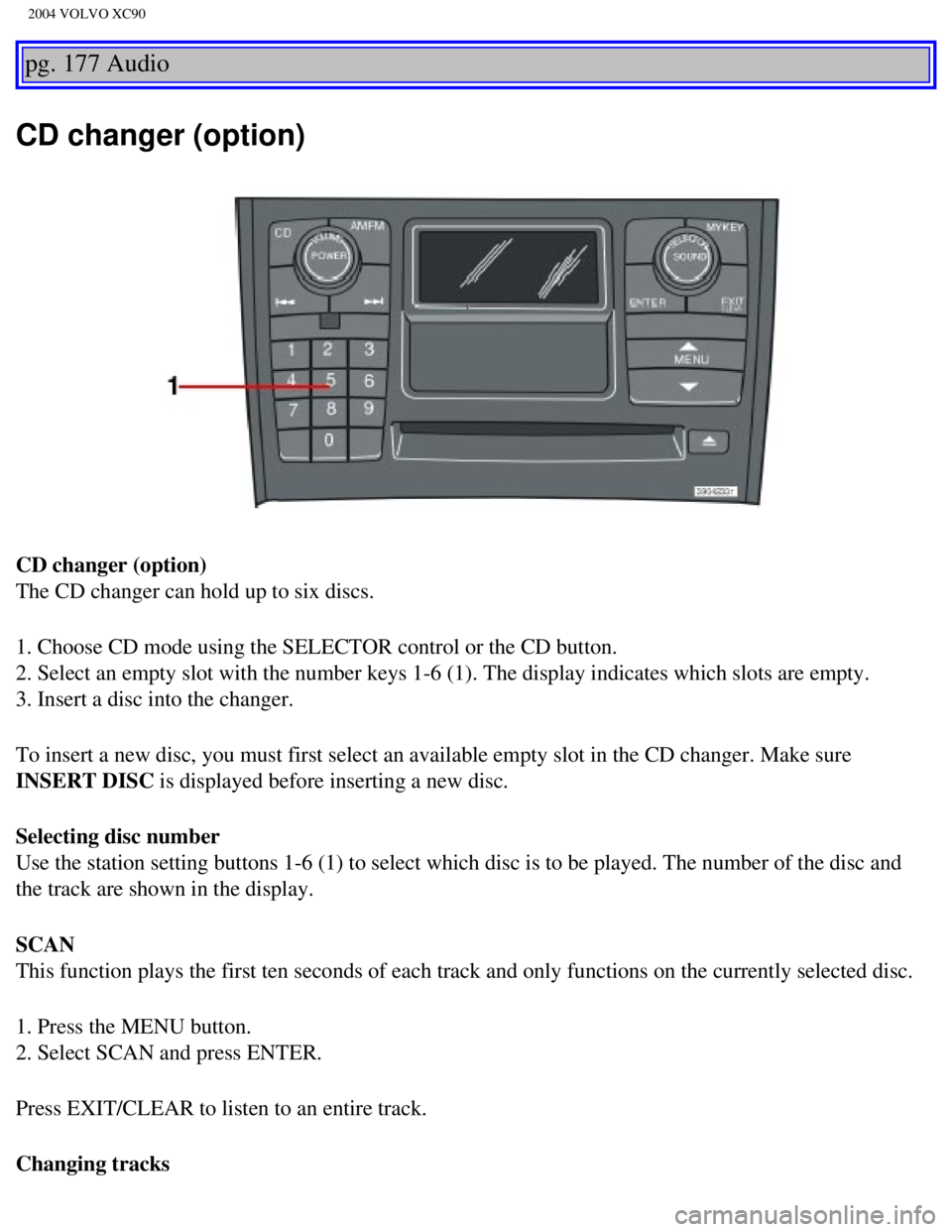
The CD changer can hold up to six discs.
1. Choose CD mode using the SELECTOR control or the CD button.
2. Select an empty slot with the number keys 1-6 (1). The display indi\
cates which slots are empty.
3. Insert a disc into the changer.
To insert a new disc, you must first select an available empty slot in t\
he CD changer. Make sure
INSERT DISC is displayed before inserting a new disc.
Selecting disc number
Use the station setting buttons 1-6 (1) to select which disc is to be \
played. The number of the disc and
the track are shown in the display.
SCAN
This function plays the first ten seconds of each track and only functio\
ns on the currently selected disc.
1. Press the MENU button.
2. Select SCAN and press ENTER.
Press EXIT/CLEAR to listen to an entire track.
Changing tracks
file:///K|/ownersdocs/2004/2004_XC90/04xc90_11b.htm (5 of 11)12/30/200\
6 4:35:32 PM
Page 230 of 245
.
4. Using two hands,")
2004 VOLVO XC90
the HomeLink® surface, keeping the indicator light in view. For place\
ment questions, contact
HomeLink® toll-free 1-800-355-3515 (Internet:
www.HomeLink.com).
4. Using two hands, push and hold both your hand-held transmitter's butt\
on and the transceiver button
you wish to program. The indicator light will flash first slowly, then r\
apidly. Rapid flashing tells you the
HomeLink® button has been successfully programmed. Release both butto\
ns.
5. If you are programming a rolling code-equipped device (e.g., garage \
door opener or entry door lock),
refer to "Programming rolling codes" on the next page to complete the pr\
ogramming process.
Repeat steps 3 and 4 to program the other two transceiver buttons.
If, after several attempts, you are unable to successfully train the Hom\
eLink® Universal Transceiver to
learn your hand-held transmitter's signal, contact HomeLink® toll-fre\
e 1-800-355-3515 (Internet:
www.
HomeLink.com).
pg. 181 Audio
WARNING!
- If you use HomeLink® to open a garage door or gate, be sure no one \
is near the gate or door while it
is in motion.
- Do not use the HomeLink® Universal Transceiver with any garage door\
opener that lacks safety
"stop" and "reverse" features as required by federal safety standards. (\
This includes any garage door
opener model manufactured before April 1, 1982). A garage door opener t\
hat cannot "detect" an
object, signalling the door to "stop" and "reverse" does not meet curren\
t federal safety standards.
Using a garage door opener without these features increases the risk of \
serious injury or death. For
more information on this matter, call toll-free 1-800-355-3515 (Interne\
t:
www.HomeLink.com).
NOTE: Canadian residents: During programming, your hand-held transmitter may automatically stop
transmitting. To successfully train HomeLink®, continue to hold the H\
omeLink® button. At the same
time, repeatedly press and hold your hand-held transmitter's button at t\
wo-second intervals until
HomeLink® has learned your transmitter's code. The HomeLink® indic\
ator light will flash first slowly,
and then rapidly to indicate that the button has been successfully progr\
ammed.
Determining if your garage door uses a rolling code
Determine, in one of the following ways, if your garage door uses a roll\
ing code system and is
manufactured after 1996:
l Refer to the garage door opener owner's manual for verification.
l If your hand-held transmitter appears to program the HomeLink® Univer\
sal Transceiver but the
file:///K|/ownersdocs/2004/2004_XC90/04xc90_11b.htm (9 of 11)12/30/200\
6 4:35:32 PM