radio VOLVO XC90 2014 Owner´s Manual
[x] Cancel search | Manufacturer: VOLVO, Model Year: 2014, Model line: XC90, Model: VOLVO XC90 2014Pages: 308, PDF Size: 13.31 MB
Page 266 of 308
10 Audio
SiriusXM™ satellite radio
10
264
Direct channel entryThe SiriusXM ™ satellite channels are num-
bered consecutively throughout all of the cat- egories. To access a channel directly: 1. Press MENU and scroll to
Direct
channel entry.
2. Use the numerical keypad to enter the channel's number. Press EXIT if neces-
sary to erase a digit.
3. Press ENTER. The radio will tune to this
channel, even if it belongs to a category other than the currently selected one.
NOTE
The numbers of skipped or locked chan- nels will not be displayed.
• If a channel is locked, the access code must be entered before the channelcan be selected. See "Unlocking achannel" on page 266.
Scanning
SCAN
automatically searches through the list
of satellite channels. See page 259 for more detailed information.
Storing a channel
A total of 20 satellite channels can be stored; 10 channels each for SiriusXM ™ 1 and 2. See
page 258 for detailed information on storingchannels.
• A
long press on one of the number keys
stores the currently tuned channel on that key.
• A
short press on a number key while the
radio is in SiriusXM ™ 1 or 2 mode will
tune to the preset satellite channel storedon that button, regardless of the currentlyselected channel category.
Song Seek and Song Memory
The Song Seek and Song Memory func-
tions provide both audio and visual notifica- tion when SiriusXM ™ is broadcasting your
favorite songs. Song Seek enables you tostore the name of the song for future advancenotification when that song is being played. The
Song Memory feature makes it possible
to view all of the current songs that are stored in memory.
Song memoryUp to ten songs can be saved in the system'smemory.
1. Press MENU.
2. Scroll to "
Add song to song mem." and
follow the instructions shown in the dis- play.
If a new song is selected when the memory isfull, you will be prompted to press ENTER to
delete the last song on the list. The remaining songs in the list will move down one position, and the newly addedsong will be placed at the top of the list.
Song seekWhen a satellite radio channel plays one ofthe songs stored in the song memory, the lis-tener will be alerted by a text message and anaudible signal. Press ENTER to listen to the song or EXIT to
cancel.To activate/deactivate the song seek func- tion:
1. Press MENU
2. Scroll to "
Song seek"
3. Press ENTER to activate or deactivate
the function.
Page 267 of 308
10 Audio
SiriusXM™ satellite radio
10
265
NOTE
When the song has ended, the radio will remain tuned to the channel on which thesong was played.
Radio text
The text that is displayed about the song cur- rently playing can be changed. Use the AUTO
button to switch between Artist, Title, Com-poser, or to switch radio text off, or use themenu to display and select among these cat-egories.
Advanced settings
This menu function enables you to make set- tings on certain SiriusXM ™ satellite radio
functions. To access this menu:
1. Press MENU.
2. Select
Adv. settings.
WARNING
Settings should be made when the vehicle is at a standstill.
The following settings can be made in the Sir- iusXM ™ menu: •
Songs can be added to the song list
• Channel skip settings can be made
• Channel lock settings can be made
• The channel access code can be dis- played or changed
• Your SiriusXM
™ ID can be displayed
Skip optionsThis function is used to remove a channel from the list of available channels.
Skip current channel1.
Select CHANNEL SKIP LIST and press
ENTER .
2. Select a category in the list and press ENTER .
3. Skip channels in the list presented by pressing ENTER.
Unskip all channelsThis permanently removes all channels from the skip list and makes them available forselection.
Temp. unskip all ch.This function will temporarily unskip all chan- nels and make them available for selection.The channels remain on the skip list and willagain be skipped the next time the ignition isswitched on.
Channel lockAccess to specific channels can be restricted(locked). A locked channel will not provideaudio, song titles, or artist information.
NOTE
All channels are initially unlocked at deliv- ery.
Locking a channel: 1.
Select "
Adv. settings" in the menu and
select LOCK OPTIONS and press
ENTER .
2. Select
CHANNEL LOCK LIST and press
ENTER
3. Enter the channel access code 1
and
press ENTER .
4. Select a category in the list and press ENTER .
5. Lock channels in the list presented by pressing ENTER.
The channel is now locked and a checked box will be displayed to indicate this. It will benecessary to enter the channel access code.See the section "Unlocking a channel" inorder to listen to a locked channel.
1 The default code is 0000. If you have changed the code and forgotten it, see the section "If you have forgotten the access code."
Page 268 of 308
10 Audio
SiriusXM™ satellite radio
10
266
Unlocking a channel
A channel's access code 1
is required to
unlock a channel.
Unlock all channelsThis permanently removes all channels from the locked list and makes them available forselection.
Temp. unlock all ch.This function will temporarily unlock all chan- nels and make them available for selection.The channels remain on the locked list andwill again be locked the next time the ignitionis switched on.
CHANGE CODE
This function makes it possible to change the channel access code. The default code is0000. To change the code:1. Select
CHANGE CODE and press
ENTER .
2. Enter the current code and press ENTER.
3. Enter the new code and press ENTER.
4. Confirm the new code and press ENTER.If an incorrect code is entered, the text "
Incorrect code!" is displayed.
If you have forgotten the access code1.
Select "SIRIUS ID" in the SiriusXM ™ set-
tings menu and press ENTER.
2. Press and hold the ENTER button for
2 seconds.
The current code will be displayed. Your Volvo retailer can also provide you with assistance.
1 The default code is 0000. If you have changed the code and forgotten it, see the section "If you have forgotten the access code."
Page 269 of 308
10 Audio
Auxiliary equipment
10
* Option/accessory, for more information, see Introduction.267
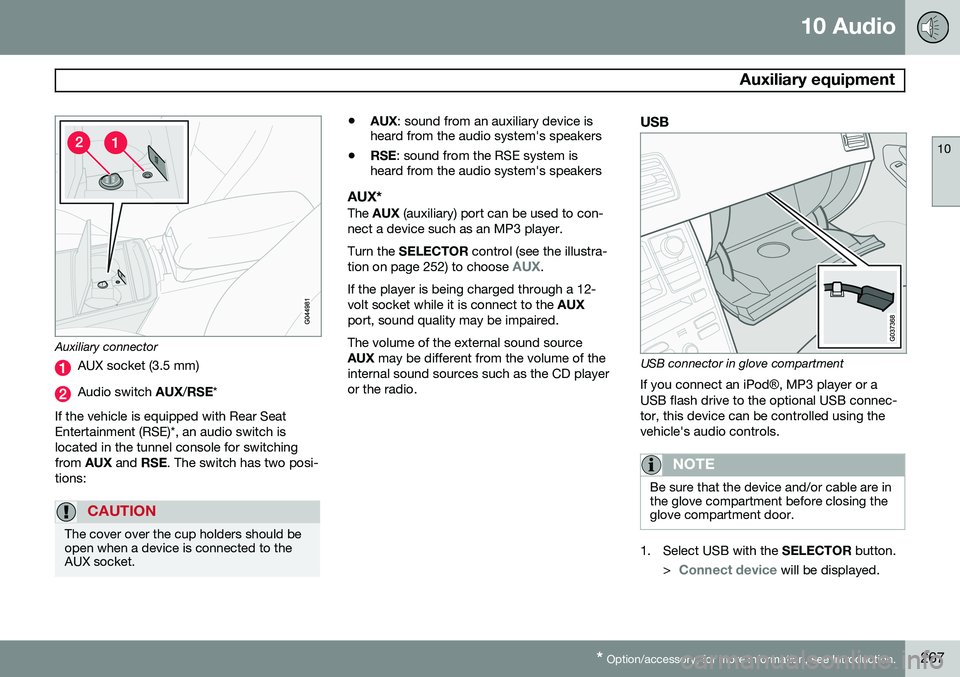
Auxiliary connector
AUX socket (3.5 mm)
Audio switch AUX/RSE *
If the vehicle is equipped with Rear Seat Entertainment (RSE)*, an audio switch islocated in the tunnel console for switchingfrom AUX and RSE. The switch has two posi-
tions:
CAUTION
The cover over the cup holders should be open when a device is connected to theAUX socket.
• AUX
: sound from an auxiliary device is
heard from the audio system's speakers
• RSE
: sound from the RSE system is
heard from the audio system's speakers
AUX*The AUX (auxiliary) port can be used to con-
nect a device such as an MP3 player. Turn the SELECTOR control (see the illustra-
tion on page 252) to choose
AUX.
If the player is being charged through a 12- volt socket while it is connect to the AUX
port, sound quality may be impaired. The volume of the external sound source AUX may be different from the volume of the
internal sound sources such as the CD player or the radio.
USB
USB connector in glove compartment
If you connect an iPod ®, MP3 player or a
USB flash drive to the optional USB connec- tor, this device can be controlled using thevehicle's audio controls.
NOTE
Be sure that the device and/or cable are in the glove compartment before closing theglove compartment door.
1. Select USB with the SELECTOR button.
>
Connect device will be displayed.
Page 271 of 308
10 Audio
Auxiliary equipment
10
269
also possible to change tracks from the phone itself. In order to listen streaming audio,
BT must be
selected as a sound source (see page 255) and a Bluetooth ®
cell phone must be con-
nected (paired) with the audio system. See page 275 for more information.
NOTE
Any Bluetooth cell phones used must sup- port Audio/Video Remote Control Profile(AVRCP) and Advanced Audio DistributionProfile (A2DP). The phone must useAVRCP version 1.3 and A2DP 1.2. If olderversions of these standards are used, cer-tain features (e.g., scan or random) maynot function. Not all cell phones are fully compatible with the vehicle's Bluetooth system. A listof compatible phones is available at youVolvo retailer or at www.volvocars.us.
Listening to streaming audioTurn SELECTOR to select BT as the sound
source. The
/ buttons can be used to fast-
forward/back or change tracks: • Press briefly to change tracks.
• Press and hold to go fast-forward/back. The buttons in the steering wheel keypad can be used in the same way.
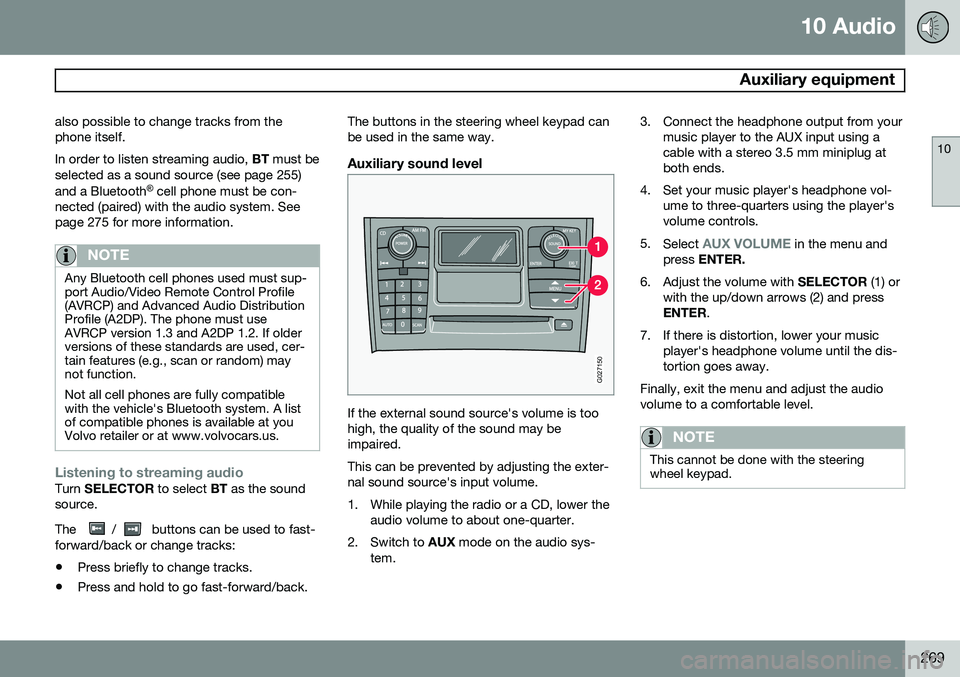
Auxiliary sound level
G027150
If the external sound source's volume is too high, the quality of the sound may beimpaired. This can be prevented by adjusting the exter- nal sound source's input volume.
1. While playing the radio or a CD, lower the
audio volume to about one-quarter.
2. Switch to AUX mode on the audio sys-
tem. 3. Connect the headphone output from your
music player to the AUX input using a cable with a stereo 3.5 mm miniplug atboth ends.
4. Set your music player's headphone vol- ume to three-quarters using the player'svolume controls.
5. Select
AUX VOLUME in the menu and
press ENTER.
6. Adjust the volume with SELECTOR (1) or
with the up/down arrows (2) and press ENTER .
7. If there is distortion, lower your music player's headphone volume until the dis-tortion goes away.
Finally, exit the menu and adjust the audiovolume to a comfortable level.
NOTE
This cannot be done with the steering wheel keypad.
Page 275 of 308
10 Audio
Menu structure
10
273
FM Menu1. Radio Text 2. Audio Settings1
1. Surround 2. Equalizer Fr3. Equalizer Rr4. Reset All
AM MenuSee Audio Settings in the FM Menu.
CD Menu1. Random 2. Disc Text3. Audio Settings See Audio Settings in the FM Menu.
AUX Menu (option)1. AUX input vol 2. Audio Settings See Audio Settings in the FM Menu.
1 Certain audio systems
Page 278 of 308
10 Audio
Bluetooth®
hands-free connection
10
276
Making a call1. Ensure that Phone is shown at the top of
the center console display and that the
symbol is visible (by pressing briefly
on PHONE on the center console).
2. Dial the desired phone number or use the phone book (see page 277).
3. Press ENTER.
End the call by pressing EXIT.
Disconnecting the cell phoneThe cell phone is automatically disconnected from the audio system if it is moved out ofrange. For more information about connec-tions, see page 275. The cell phone can be manually disconnected from the hands-free system by pressingPHONE. The hands-free system is also deac-
tivated when the ignition is switched off. When the cell phone is disconnected from the hands-free system, a call in progress can becontinued using the cell phone’s own speakerand microphone.
NOTE
Certain cell phones may require confirma- tion from the phone’s keypad when a callis transferred from hands-free to the cellphone.
Handling calls
Incoming calls–Press ENTER to answer a call, even if the
audio system is currently in e.g., CD or FM mode.
–Press EXIT to reject a call.
Automatic answerThis function means that incoming calls will be answered automatically. Activate or deac-tivate the function in the menu system under
PHONE MENUCALL OPTIONSAuto.
answer.
Call settingsWhile a call is in progress, press MENU or
ENTER on the center console to access the
following functions:
•
Mute microphone: mute the audio sys-
tem’s microphone.
•
Transf call to cell: transfer the call from
hands-free to the cell phone.
•
Phone book: this feature enables you to
search for a stored telephone number.
NOTE
• On certain cell phones, the connection is broken when the mute function isused, which is normal. If this happens,the hands-free system will prompt youto reconnect.
• A new call cannot be initiated whileanother call is in progress.
Sound settings
Call volumeCall volume can be adjusted while a call is in progress using the buttons in the steeringwheel keypad.
Audio system volumeWhen
PHONE is displayed, volume for the
audio system can be adjusted in the normalway with the audio system's VOLUME con-
trol. In order to adjust volume during a phonecall, the audio system must be switched toone of the other modes (FM, CD, etc). Audio system sound can be automatically muted when a phone call is received in
PHONE MENUPHONE SETTINGS
SOUNDS AND VOLUMEMute radio
and adjust the volume with the / keys
on the center console.
Page 281 of 308
10 Audio
Bluetooth®
hands-free connection
10
279
5.1.2. Ring signals 5.1.3. Mute radio
5.2. Synchronize phone book
Page 297 of 308
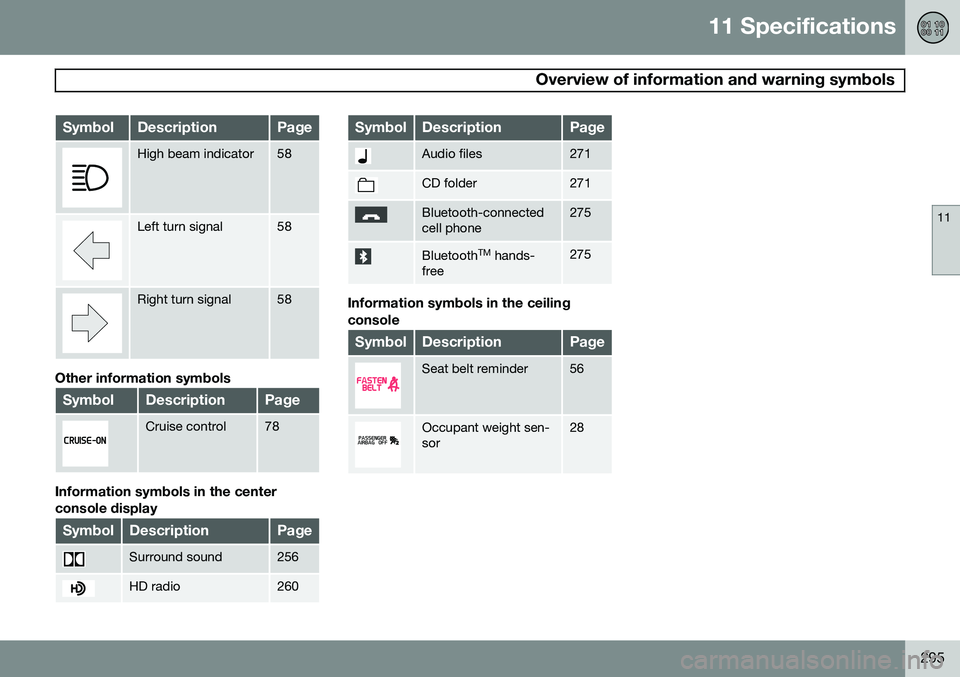
11 Specifications
Overview of information and warning symbols
11
295
SymbolDescriptionPage
High beam indicator58
Left turn signal58
Right turn signal58
Other information symbols
SymbolDescriptionPage
Cruise control78
Information symbols in the center console display
SymbolDescriptionPage
Surround sound256
HD radio260
SymbolDescriptionPage
Audio files271
CD folder271
Bluetooth-connected cell phone275
BluetoothTM
hands-
free275
Information symbols in the ceiling console
SymbolDescriptionPage
Seat belt reminder56
Occupant weight sen- sor28
Page 300 of 308
12 Index
12
298
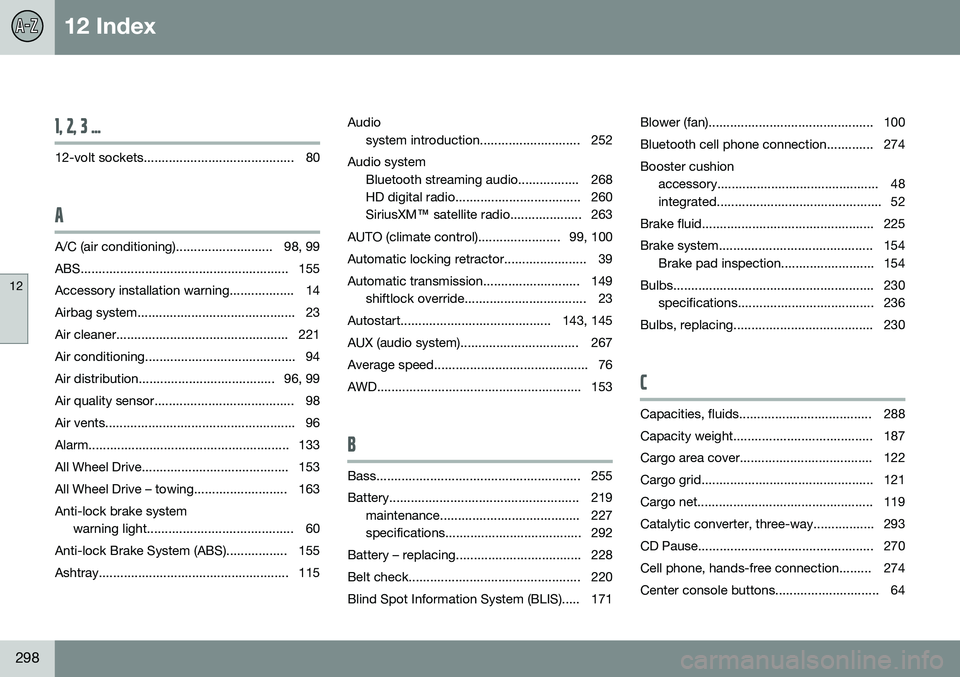
1, 2, 3 ...
12-volt sockets.......................................... 80
A
A/C (air conditioning)........................... 98, 99
ABS.......................................................... 155Accessory installation warning.................. 14
Airbag system............................................ 23
Air cleaner................................................ 221
Air conditioning.......................................... 94
Air distribution...................................... 96, 99
Air quality sensor....................................... 98
Air vents..................................................... 96
Alarm........................................................ 133
All Wheel Drive......................................... 153
All Wheel Drive – towing.......................... 163Anti-lock brake system warning light......................................... 60
Anti-lock Brake System (ABS)................. 155
Ashtray..................................................... 115 Audio
system introduction............................ 252
Audio system Bluetooth streaming audio................. 268
HD digital radio................................... 260SiriusXM ™ satellite radio.................... 263
AUTO (climate control)....................... 99, 100
Automatic locking retractor....................... 39
Automatic transmission........................... 149 shiftlock override.................................. 23
Autostart.......................................... 143, 145
AUX (audio system)................................. 267
Average speed........................................... 76
AWD......................................................... 153
B
Bass......................................................... 255
Battery..................................................... 219 maintenance....................................... 227
specifications...................................... 292
Battery – replacing................................... 228
Belt check................................................ 220
Blind Spot Information System (BLIS)..... 171 Blower (fan).............................................. 100
Bluetooth cell phone connection............. 274Booster cushion
accessory............................................. 48
integrated.............................................. 52
Brake fluid................................................ 225
Brake system........................................... 154 Brake pad inspection.......................... 154
Bulbs........................................................ 230 specifications...................................... 236
Bulbs, replacing....................................... 230
C
Capacities, fluids..................................... 288
Capacity weight....................................... 187
Cargo area cover..................................... 122
Cargo grid................................................ 121
Cargo net................................................. 119
Catalytic converter, three-way................. 293
CD Pause................................................. 270
Cell phone, hands-free connection......... 274
Center console buttons............................. 64