warning VOLVO XC90 2014 Owner´s Manual
[x] Cancel search | Manufacturer: VOLVO, Model Year: 2014, Model line: XC90, Model: VOLVO XC90 2014Pages: 308, PDF Size: 13.31 MB
Page 68 of 308
02 Instruments and controls
Steering wheel adjustment
02
66
G026999
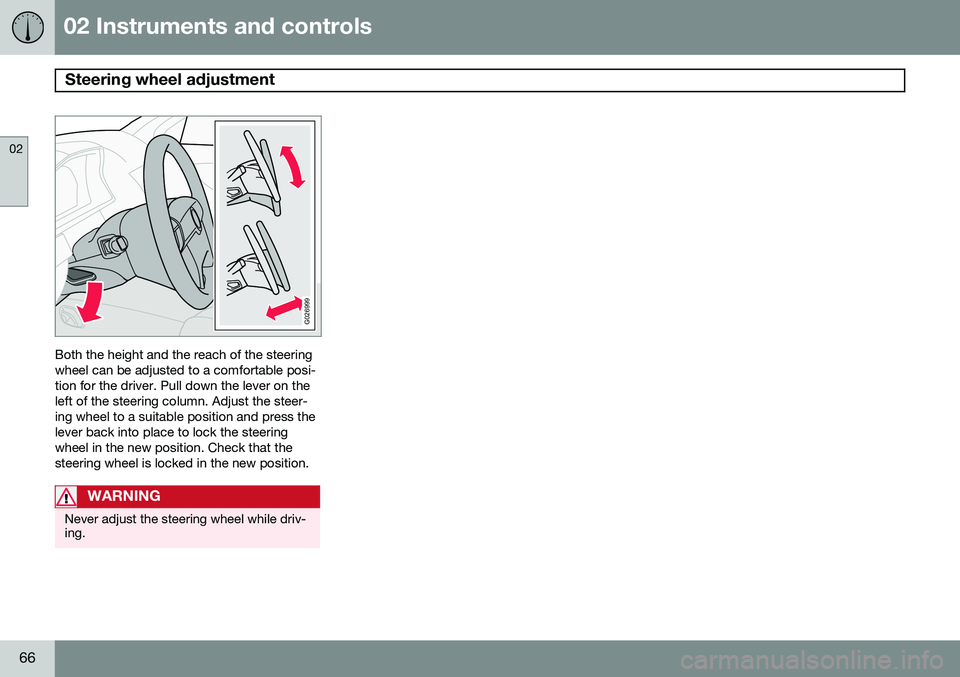
Both the height and the reach of the steering wheel can be adjusted to a comfortable posi-tion for the driver. Pull down the lever on theleft of the steering column. Adjust the steer-ing wheel to a suitable position and press thelever back into place to lock the steeringwheel in the new position. Check that thesteering wheel is locked in the new position.
WARNING
Never adjust the steering wheel while driv- ing.
Page 70 of 308
02 Instruments and controls
Lighting panel
02
68
wheel (see the right-pointing beam in the illustration).
NOTE
When driving in daylight conditions, the headlights will switch off and the daytimerunning lights will come on. In darkness,the daytime running lights will switch offand the Active Bending Lights will switchon.
The ABL function is activated automatically when the engine is started and the headlight switch is in the
position and can be
deactivated/reactivated by pressing the but- ton in the center console (see page 64.
LED Daytime Running Lights (DRL)
To help conserve fuel by reducing the use of electrical current in the vehicle, DRL can beused in daylight conditions instead of the lowbeam headlights, which consume more elec-trical current. The daytime running lights aremounted in the front spoiler and use bright,electricity-saving LEDs (light emitting diodes).
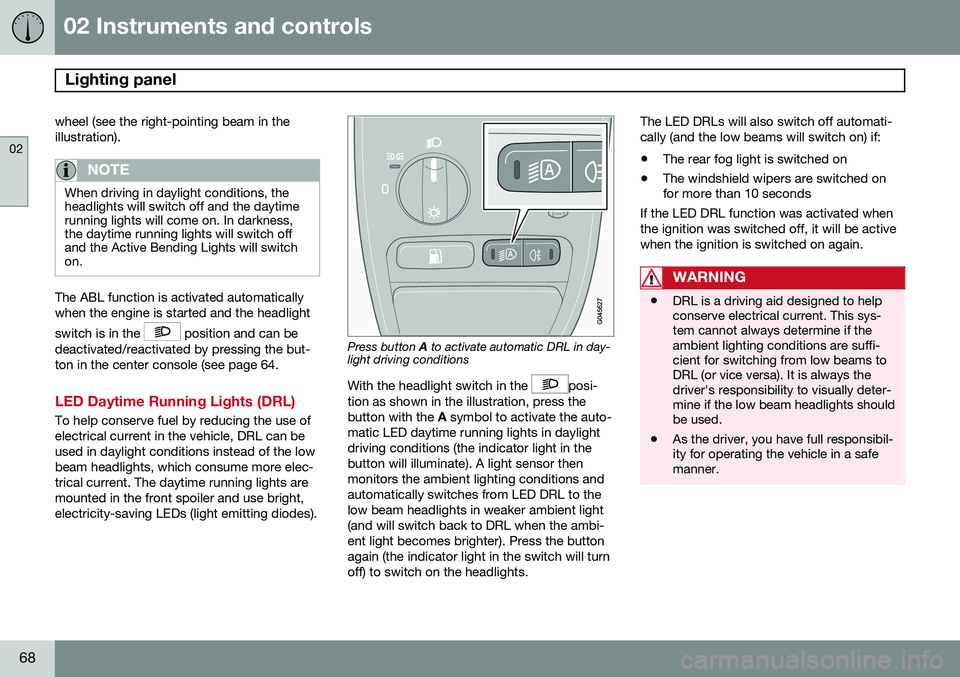
Press button A to activate automatic DRL in day-
light driving conditions
With the headlight switch in the
posi-
tion as shown in the illustration, press the button with the A symbol to activate the auto-
matic LED daytime running lights in daylightdriving conditions (the indicator light in thebutton will illuminate). A light sensor thenmonitors the ambient lighting conditions andautomatically switches from LED DRL to thelow beam headlights in weaker ambient light(and will switch back to DRL when the ambi-ent light becomes brighter). Press the buttonagain (the indicator light in the switch will turnoff) to switch on the headlights. The LED DRLs will also switch off automati-cally (and the low beams will switch on) if:
• The rear fog light is switched on
• The windshield wipers are switched on for more than 10 seconds
If the LED DRL function was activated when the ignition was switched off, it will be activewhen the ignition is switched on again.
WARNING
• DRL is a driving aid designed to help conserve electrical current. This sys-tem cannot always determine if theambient lighting conditions are suffi-cient for switching from low beams toDRL (or vice versa). It is always thedriver's responsibility to visually deter-mine if the low beam headlights shouldbe used.
• As the driver, you have full responsibil-ity for operating the vehicle in a safemanner.
Page 77 of 308
02 Instruments and controls
Hazard warning flashers
02
75
Hazard warning flashers
12
3
4 5
6
7 8
9
ABC
DEF
GHI JKL MNO
PQRS TUVWXYZ
0
* #
POWERVOLUMECD AM FM
G027096
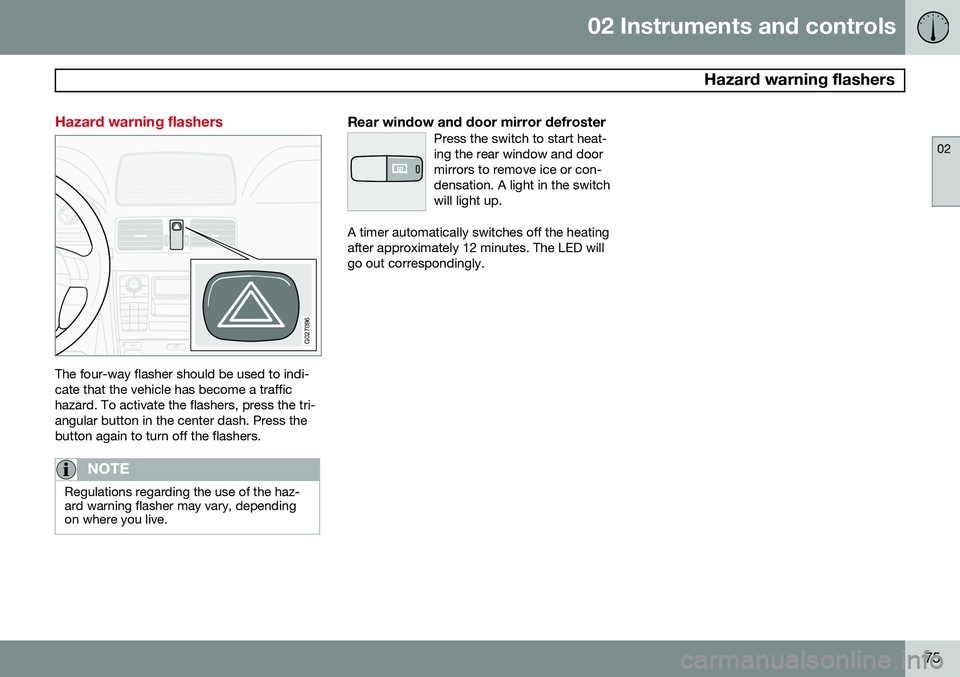
The four-way flasher should be used to indi- cate that the vehicle has become a traffichazard. To activate the flashers, press the tri-angular button in the center dash. Press thebutton again to turn off the flashers.
NOTE
Regulations regarding the use of the haz- ard warning flasher may vary, dependingon where you live.
Rear window and door mirror defrosterPress the switch to start heat- ing the rear window and doormirrors to remove ice or con-densation. A light in the switchwill light up.
A timer automatically switches off the heating after approximately 12 minutes. The LED willgo out correspondingly.
Page 78 of 308
02 Instruments and controls
Trip computer
02
76* Option/accessory, for more information, see Introduction.
Trip computer*
G026956
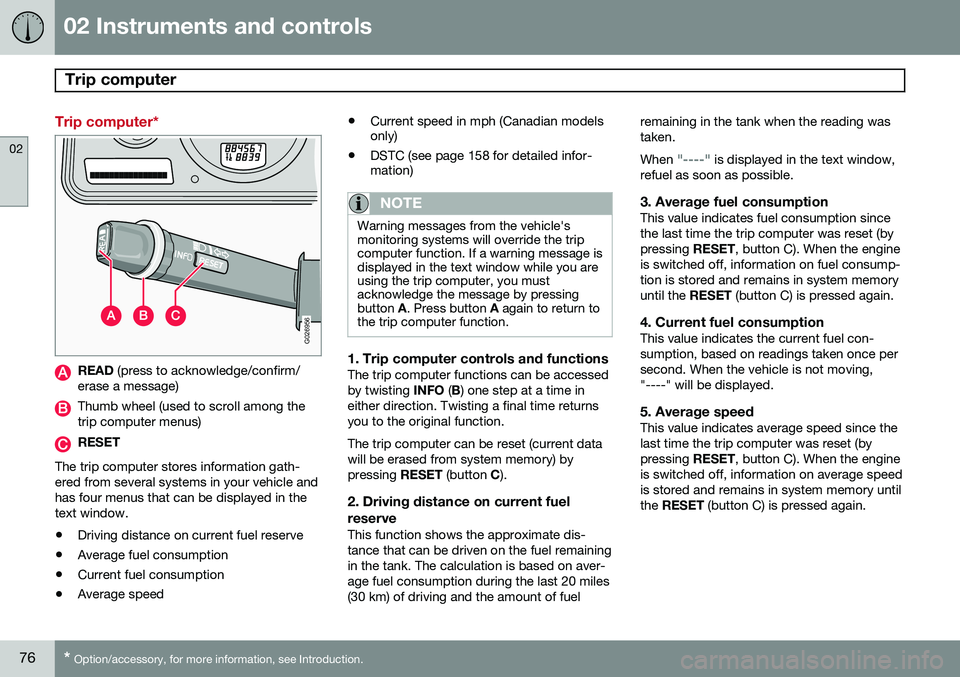
READ (press to acknowledge/confirm/
erase a message)
Thumb wheel (used to scroll among the trip computer menus)
RESET
The trip computer stores information gath- ered from several systems in your vehicle andhas four menus that can be displayed in thetext window.
• Driving distance on current fuel reserve
• Average fuel consumption
• Current fuel consumption
• Average speed •
Current speed in mph (Canadian models only)
• DSTC (see page 158 for detailed infor-mation)
NOTE
Warning messages from the vehicle's monitoring systems will override the tripcomputer function. If a warning message isdisplayed in the text window while you areusing the trip computer, you mustacknowledge the message by pressingbutton
A. Press button A again to return to
the trip computer function.
1. Trip computer controls and functionsThe trip computer functions can be accessed by twisting INFO (B ) one step at a time in
either direction. Twisting a final time returnsyou to the original function. The trip computer can be reset (current data will be erased from system memory) bypressing RESET (button C).
2. Driving distance on current fuel
reserve
This function shows the approximate dis-tance that can be driven on the fuel remainingin the tank. The calculation is based on aver-age fuel consumption during the last 20 miles(30 km) of driving and the amount of fuel remaining in the tank when the reading wastaken. When
"----" is displayed in the text window,
refuel as soon as possible.
3. Average fuel consumptionThis value indicates fuel consumption since the last time the trip computer was reset (bypressing RESET, button C). When the engine
is switched off, information on fuel consump-tion is stored and remains in system memoryuntil the RESET (button C) is pressed again.
4. Current fuel consumptionThis value indicates the current fuel con-sumption, based on readings taken once persecond. When the vehicle is not moving,"----" will be displayed.
5. Average speedThis value indicates average speed since thelast time the trip computer was reset (bypressing RESET, button C). When the engine
is switched off, information on average speedis stored and remains in system memory untilthe RESET (button C) is pressed again.
Page 81 of 308
02 Instruments and controls
Cruise control
02
79
NOTE
Cruise control is automatically disengaged if:
• When the brake pedal is depressed.
• the engine is switched off
• the gear selector is placed in (
N) Neu-
tral
• the wheels start to spin or lock
• if an increase in speed is maintained for more than one minute
• if the vehicle's speed falls belowapproximately 20 mph (30 km/h).
Temporarily disengaging the cruise control
1. Press
0 to temporarily disengage cruise
control. >
CRUISE will be displayed in the infor-
mation window in the instrument panel.
2. Depress the brake pedal. Pressing "resume"
causes the vehicle to
return to the previously set speed.
WARNING
Cruise control should not be used in heavy traffic or when driving on wet or slipperyroads, or when driving on unpaved oruneven road surfaces. Cruise control maynot maintain set speed on steep down-grades.
Page 83 of 308
02 Instruments and controls
Hood/tailgate
02
81
Opening/closing the hood
G026995
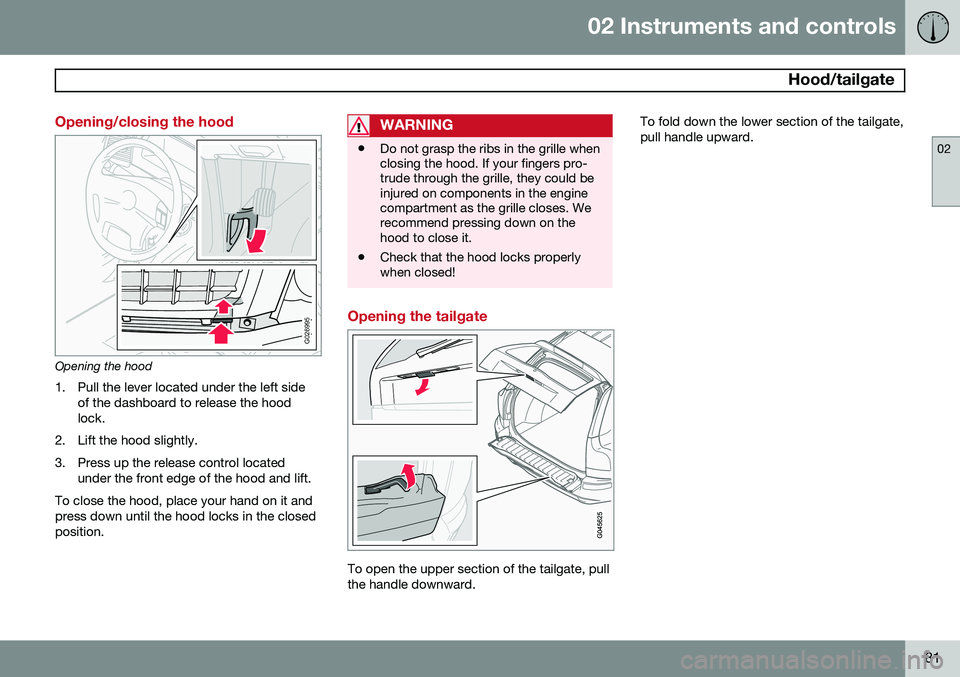
Opening the hood1. Pull the lever located under the left side of the dashboard to release the hood lock.
2. Lift the hood slightly.
3. Press up the release control located under the front edge of the hood and lift.
To close the hood, place your hand on it and press down until the hood locks in the closedposition.
WARNING
• Do not grasp the ribs in the grille when closing the hood. If your fingers pro-trude through the grille, they could beinjured on components in the enginecompartment as the grille closes. Werecommend pressing down on thehood to close it.
• Check that the hood locks properlywhen closed!
Opening the tailgate
To open the upper section of the tailgate, pull the handle downward. To fold down the lower section of the tailgate,pull handle upward.
Page 84 of 308
02 Instruments and controls
Power windows
02
82
Power windows
The power windows are controlled by buttons in the arm rests. The ignition switch must be ON1
(ignition key in position I, II or the engine
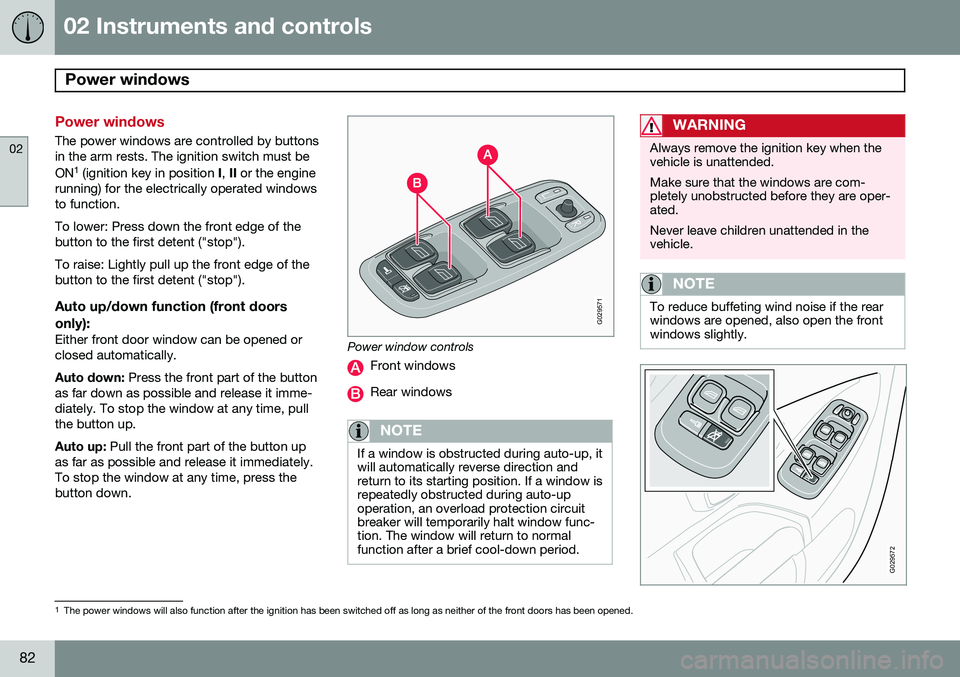
running) for the electrically operated windows to function. To lower: Press down the front edge of the button to the first detent ("stop"). To raise: Lightly pull up the front edge of the button to the first detent ("stop").
Auto up/down function (front doors
only):
Either front door window can be opened orclosed automatically. Auto down: Press the front part of the button
as far down as possible and release it imme- diately. To stop the window at any time, pullthe button up. Auto up: Pull the front part of the button up
as far as possible and release it immediately. To stop the window at any time, press thebutton down.
G029571
Power window controls
Front windows
Rear windows
NOTE
If a window is obstructed during auto-up, it will automatically reverse direction andreturn to its starting position. If a window isrepeatedly obstructed during auto-upoperation, an overload protection circuitbreaker will temporarily halt window func-tion. The window will return to normalfunction after a brief cool-down period.
WARNING
Always remove the ignition key when the vehicle is unattended. Make sure that the windows are com- pletely unobstructed before they are oper-ated. Never leave children unattended in the vehicle.
NOTE
To reduce buffeting wind noise if the rear windows are opened, also open the frontwindows slightly.
G029572
1 The power windows will also function after the ignition has been switched off as long as neither of the front doors has been opened.
Page 88 of 308
02 Instruments and controls
Mirrors
02
86* Option/accessory, for more information, see Introduction.
For information about the optional folding mirror function see page 64.
WARNING
The mirrors should always be adjusted prior to driving. Objects seen in the pas-senger's side wide-angle door mirror arecloser than they appear to be.
Mirror memory function (with the
central locking system)*
If you lock the vehicle and later unlock it with the same remote key and open the driver's
door, the door mirrors (and the driver's seat)will automatically move to the position theywere in when you left the vehicle. This featurewill work in the same way with all of theremote key transmitters (up to 3) that you usewith your vehicle. This feature will not func-tion if you lock your vehicle with the key.
Water repellent glassThe side door mirrors can be treatedwith a water repellent coating. The
symbol to the left indicates these windowshave this coating.
The coating improves vision by causing the water to run off quickly. For information on cleaning this type of glass, see page 210.
CAUTION
Use the heating function to remove ice, snow, or mist from the mirrors.
Page 90 of 308
02 Instruments and controls
Power moonroof
02
88
WARNING
•Never open/close the moonroof if it is obstructed in any way when in opera-tion.
• Never allow a child to operate themoonroof.
• Never extend any object or body partthrough the open moonroof, even ifthe vehicle's ignition is completelyswitched off.
• Never leave a child alone in a vehicle.
If the moonroof is obstructed during auto- close operation, it will automatically reversedirection and return to its starting position. Ifthe moonroof is repeatedly obstructed duringauto-close operation, an overload circuitbreaker will temporarily halt moonroof func-tion. The moonroof will return to normal func-tion after a brief cool-down period.G020157
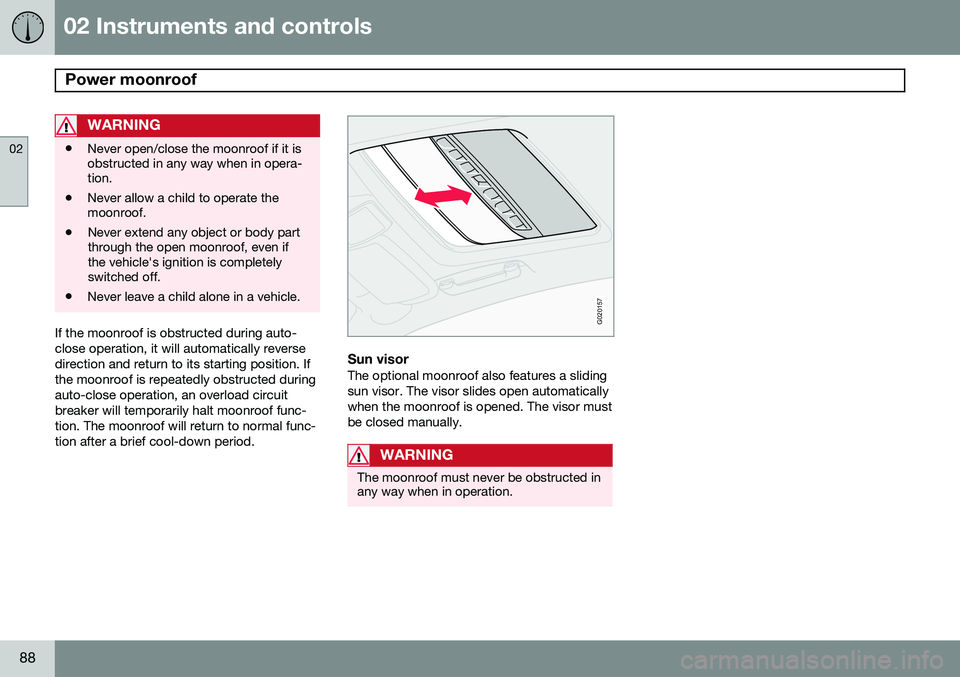
Sun visorThe optional moonroof also features a sliding sun visor. The visor slides open automaticallywhen the moonroof is opened. The visor mustbe closed manually.
WARNING
The moonroof must never be obstructed in any way when in operation.
Page 91 of 308
02 Instruments and controls
HomeLink®
Wireless Control System*
02
* Option/accessory, for more information, see Introduction.89
Introduction
G030070
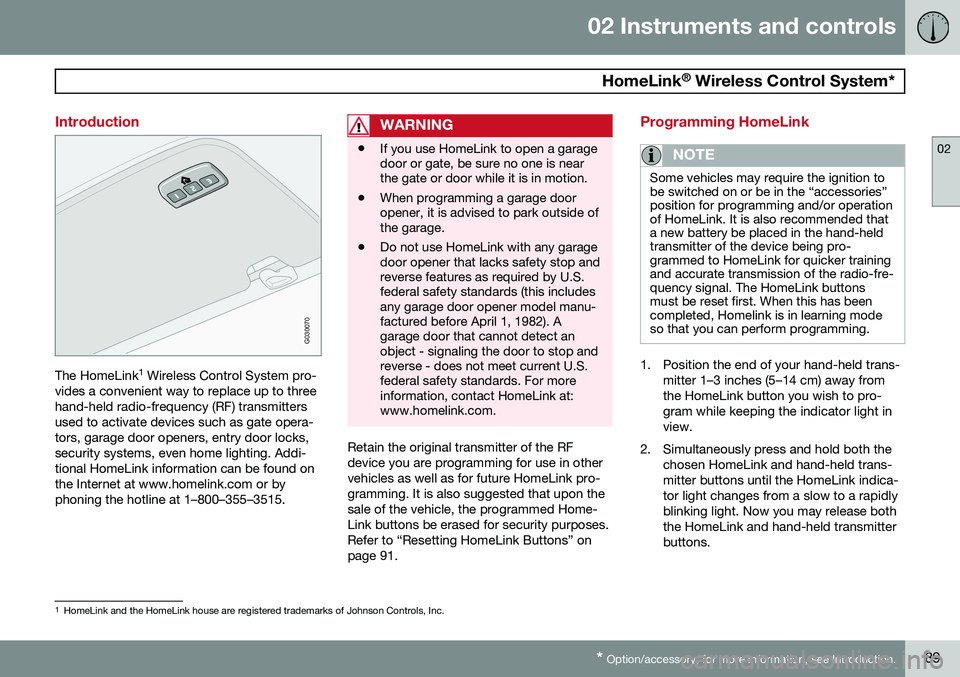
The HomeLink 1
Wireless Control System pro-
vides a convenient way to replace up to three hand-held radio-frequency (RF) transmittersused to activate devices such as gate opera-tors, garage door openers, entry door locks,security systems, even home lighting. Addi-tional HomeLink information can be found onthe Internet at www.homelink.com or byphoning the hotline at 1–800–355–3515.
WARNING
• If you use HomeLink to open a garage door or gate, be sure no one is nearthe gate or door while it is in motion.
• When programming a garage dooropener, it is advised to park outside ofthe garage.
• Do not use HomeLink with any garagedoor opener that lacks safety stop andreverse features as required by U.S.federal safety standards (this includesany garage door opener model manu-factured before April 1, 1982). Agarage door that cannot detect anobject - signaling the door to stop andreverse - does not meet current U.S.federal safety standards. For moreinformation, contact HomeLink at:www.homelink.com.
Retain the original transmitter of the RF device you are programming for use in othervehicles as well as for future HomeLink pro-gramming. It is also suggested that upon thesale of the vehicle, the programmed Home-Link buttons be erased for security purposes.Refer to “Resetting HomeLink Buttons” onpage 91.
Programming HomeLink
NOTE
Some vehicles may require the ignition to be switched on or be in the “accessories”position for programming and/or operationof HomeLink. It is also recommended thata new battery be placed in the hand-heldtransmitter of the device being pro-grammed to HomeLink for quicker trainingand accurate transmission of the radio-fre-quency signal. The HomeLink buttonsmust be reset first. When this has beencompleted, Homelink is in learning modeso that you can perform programming.
1. Position the end of your hand-held trans-
mitter 1–3 inches (5–14 cm) away from the HomeLink button you wish to pro-gram while keeping the indicator light inview.
2. Simultaneously press and hold both the chosen HomeLink and hand-held trans-mitter buttons until the HomeLink indica-tor light changes from a slow to a rapidlyblinking light. Now you may release boththe HomeLink and hand-held transmitterbuttons.
1HomeLink and the HomeLink house are registered trademarks of Johnson Controls, Inc.