turn signal VOLVO XC90 2015 Owner's Manual
[x] Cancel search | Manufacturer: VOLVO, Model Year: 2015, Model line: XC90, Model: VOLVO XC90 2015Pages: 570, PDF Size: 12.44 MB
Page 294 of 570

DRIVER SUPPORT
* Option/accessory, for more information, see Introduction.
292
Park Assist *
The Park Assist system is designed to assist you
when driving into parking spaces, garages, etc. An audible signal and symbols in the instrumentpanel and center display indicate the distance tothe object.
Display view showing object zones and sensor sectors
The center display shows an overview of the vehi- cle in relation to objects that have been detected. The highlighted sector shows which of the sen- sors has detected the object. The closer the vehi-cle symbol is to the highlighted sector, the closerthe actual object is to your vehicle. The Park Assist system uses an intermittent tone that pulses faster as you come closer to anobject. Sound from the infotainment system willbe temporarily turned down. The tone becomes constant when you are withinapproximately 1 ft (30 cm) of an object and theactive sensor fields will be completely filled in. Ifthere are objects within this distance both behindand in front of the vehicle, the tone alternatesbetween front and rear speakers. While an audible signal is being given, its volume level can be raised/lowered using the
>II control
in the center console.
WARNING
Park Assist is an information system, NOT a safety system. This system is designed to bea supplementary aid when parking the vehicle.It is not, however, intended to replace the driv-er's attention and judgement.
Rear park assist
The system's rear sensors are activated automat- ically when the engine is started and are active ifthe vehicle rolls rearward with the gear selector in N or if R has been selected.
The distance monitored behind the vehicle is approximately 5 ft (1.5 m). The audible signalcomes from the rear speakers. The rear sensors will be deactivated automatically when towing a trailer if Volvo genuine trailer wir-ing is used. If a non-Volvo trailer hitch is beingused, it may be necessary to switch off the sys-tem manually.
Side park assist
The system's side sensors are activated automat- ically when the engine is started and are active atspeeds below approximately 6 mph (10 km/h).
Page 295 of 570

DRIVER SUPPORT
* Option/accessory, for more information, see Introduction.293
The distance monitored along the sides of the vehicle is approximately 1 ft (0.3 m). The audiblesignal comes from the side speakers.
Front park assist
The system's front sensors are activated auto- matically when the engine is started and areactive at speeds below approximately 6 mph(10 km/h). The distance monitored in front of the vehicle is approximately 2.5 ft (0.8 m). The audible signalcomes from the front speakers. Front Park Assist is deactivated if the driver presses the brake pedal or if the gear selector is put in
P.
When installing auxiliary headlights, be sure that they do not obstruct the front sensors. Otherwise,these lights could trigger a Park Assist warning.
Related information
• Activating/deactivating Park Assist (p. 293)
• Park Assist limitations (p. 294)
• Park assist symbols and messages (p. 295)
Activating/deactivating Park Assist
The Park Assist system can be turned on or off.
On/OffPark Assist's front and side sensors are activated automatically when the engine is started. Therear sensors activate if the vehicle rolls rearward in N or if P is selected.
This function can be activated/ deactivated in the center dis-play's Function view.
–Tap the Park Assist button.
> Green indicator: the function is active. Gray indicator: the function is deactivated.
Related information
• Park Assist
* (p. 292)
• Park Assist limitations (p. 294)
• Park assist symbols and messages (p. 295)
Page 305 of 570
DRIVER SUPPORT
303
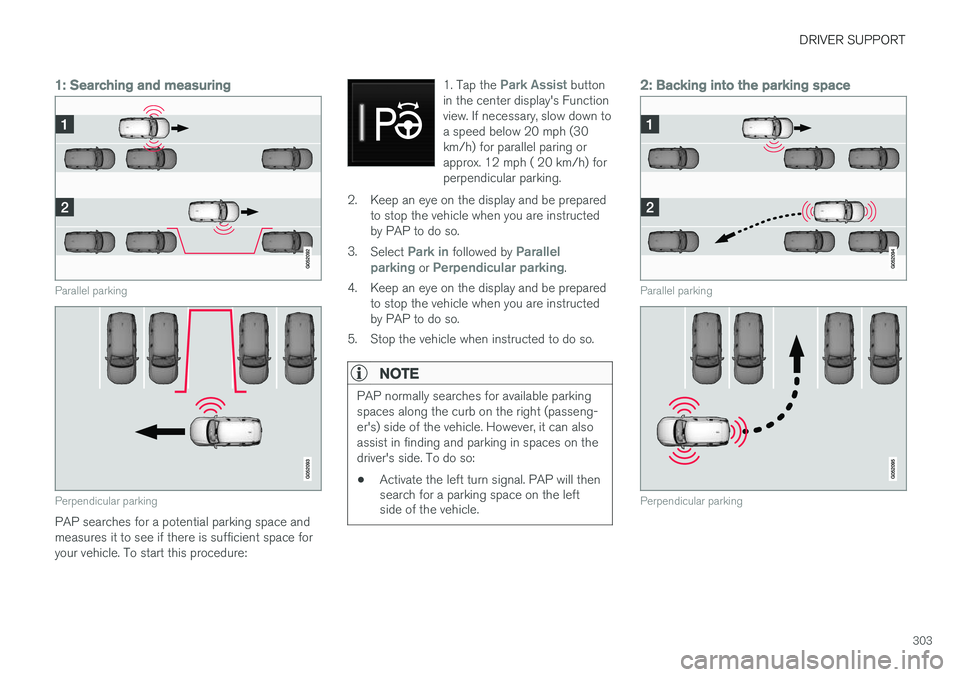
1: Searching and measuring
Parallel parking
Perpendicular parking
PAP searches for a potential parking space and measures it to see if there is sufficient space foryour vehicle. To start this procedure:1. Tap the
Park Assist button
in the center display's Function view. If necessary, slow down toa speed below 20 mph (30km/h) for parallel paring orapprox. 12 mph ( 20 km/h) forperpendicular parking.
2. Keep an eye on the display and be prepared to stop the vehicle when you are instructed by PAP to do so.
3. Select
Park in followed by Parallel
parking or Perpendicular parking.
4. Keep an eye on the display and be prepared to stop the vehicle when you are instructed by PAP to do so.
5. Stop the vehicle when instructed to do so.
NOTE
PAP normally searches for available parking spaces along the curb on the right (passeng-er's) side of the vehicle. However, it can alsoassist in finding and parking in spaces on thedriver's side. To do so:
• Activate the left turn signal. PAP will then search for a parking space on the leftside of the vehicle.
2: Backing into the parking space
Parallel parking
Perpendicular parking
Page 318 of 570
DRIVER SUPPORT
* Option/accessory, for more information, see Introduction.
316
Overview
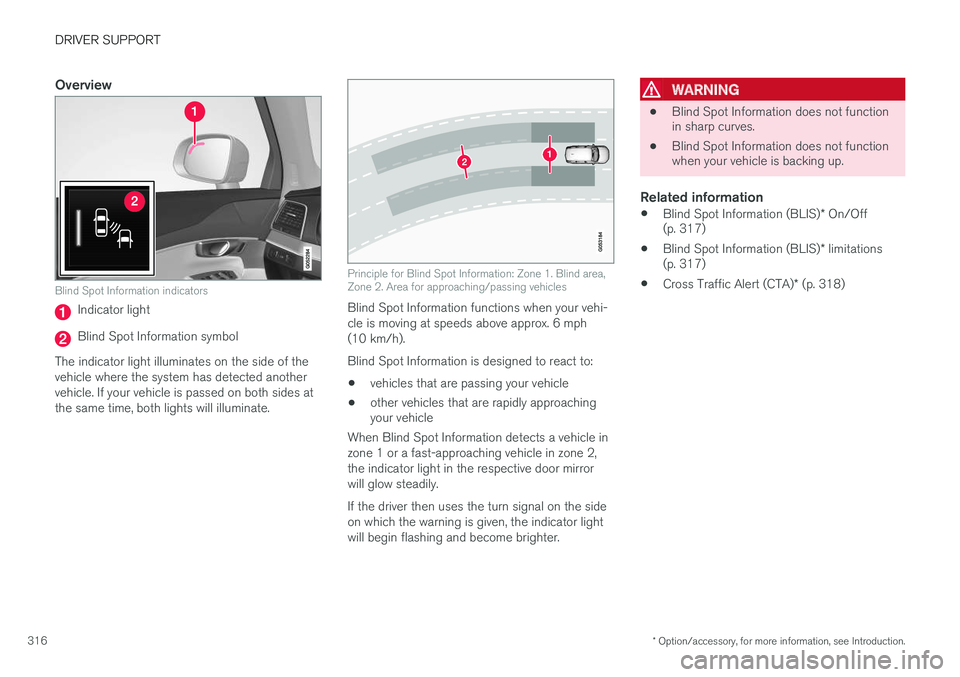
Blind Spot Information indicators
Indicator light
Blind Spot Information symbol
The indicator light illuminates on the side of the vehicle where the system has detected anothervehicle. If your vehicle is passed on both sides atthe same time, both lights will illuminate.
Principle for Blind Spot Information: Zone 1. Blind area, Zone 2. Area for approaching/passing vehicles
Blind Spot Information functions when your vehi- cle is moving at speeds above approx. 6 mph(10 km/h). Blind Spot Information is designed to react to:
• vehicles that are passing your vehicle
• other vehicles that are rapidly approaching your vehicle
When Blind Spot Information detects a vehicle in zone 1 or a fast-approaching vehicle in zone 2,the indicator light in the respective door mirrorwill glow steadily. If the driver then uses the turn signal on the side on which the warning is given, the indicator lightwill begin flashing and become brighter.
WARNING
• Blind Spot Information does not function in sharp curves.
• Blind Spot Information does not functionwhen your vehicle is backing up.
Related information
•
Blind Spot Information (BLIS)
* On/Off
(p. 317)
• Blind Spot Information (BLIS)
* limitations
(p. 317)
• Cross Traffic Alert (CTA)
* (p. 318)
Page 321 of 570
DRIVER SUPPORT
* Option/accessory, for more information, see Introduction.319
•
An audible signal indicates that CTA has detected something that is approaching fromthe side. The signal will come from either theleft or right infotainment system speakers,depending on which the side of your vehiclethe approaching vehicle/ object has beendetected.
• A warning is indicated using the Park Assist
*
system's graphic in the instrument panel.
• An icon is also shown in the Park Assist Camera's
* Top view.
Related information
• Activating/deactivating Cross Traffic Alert(CTA)
* (p. 319)
• Blind Spot Information (BLIS)
* with Cross
Traffic Alert (CTA) * symbols and messages
(p. 322)
• Cross Traffic Alert (CTA)
* limitations (p. 320)
Activating/deactivating Cross Traffic Alert (CTA) *
Cross Traffic Alert (CTA) can be activated/deac- tivated separately from Blind Spot Information(BLIS).
CTA is activated/deactivated in the center display's Functionview.
–Tap Cross Traffic Alert in Function view.
> CTA activates/deactivates (the indicator light in the button will be green/gray).
CTA is activated when the engine is started.
WARNING
• BLIS and CTA are information systems, NOT warning or safety systems and donot function in all situations.
• BLIS and CTA do not eliminate the needfor you to visually confirm the conditionsaround you, and the need for you to turnyour head and shoulders to make surethat you can safely change lanes or backup.
• As the driver, you have full responsibilityfor changing lanes/backing up in a safemanner.
Related information
•
Cross Traffic Alert (CTA)
* (p. 318)
• Blind Spot Information (BLIS)
* On/Off
(p. 317)
Page 325 of 570
DRIVER SUPPORT
* Option/accessory, for more information, see Introduction.323
Driving lane assistance
The
Lane Departure Warning (LDW) and Lane
Keeping Aid (LKA) * functions are designed to
help reduce the risk of accidents in situations where the vehicle unintentionally leaves its laneon highways or other major roads.
Driving lane assistance systems: LDW or
LKA
There are two versions of the driving lane assis- tance system:
• LDW (
Lane Departure Warning): provides
an audible signal or vibrations in the steering wheel.
• LKA (
Lane Keeping Aid): actively steers the
vehicle to help keep it in its traffic lane and/or alerts the driver using an audible sig-nal or through vibrations in the steeringwheel.
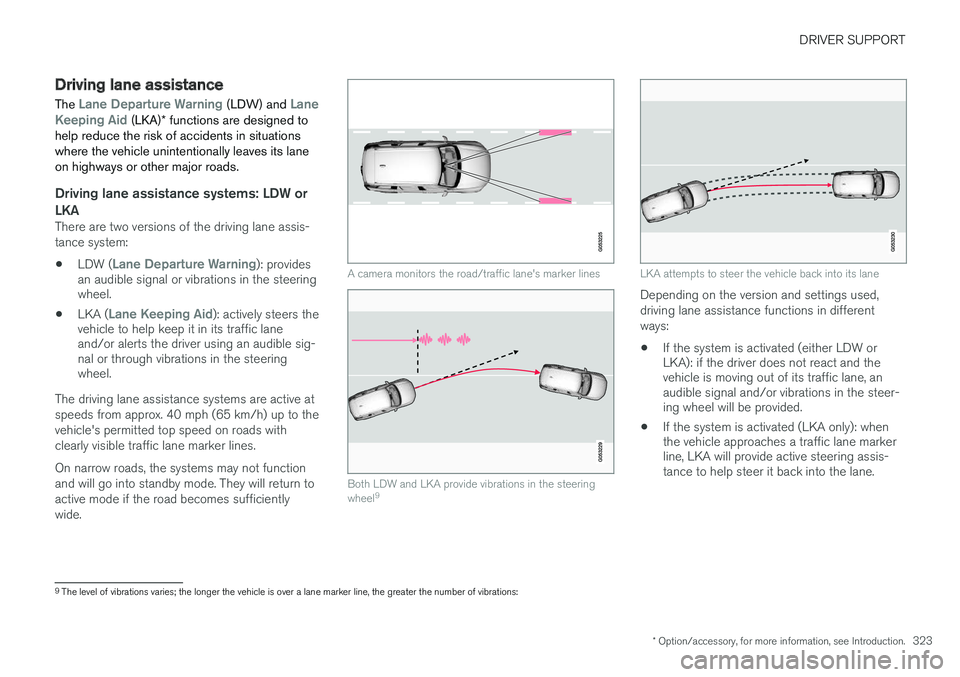
The driving lane assistance systems are active at speeds from approx. 40 mph (65 km/h) up to thevehicle's permitted top speed on roads withclearly visible traffic lane marker lines. On narrow roads, the systems may not function and will go into standby mode. They will return toactive mode if the road becomes sufficientlywide.
A camera monitors the road/traffic lane's marker lines
Both LDW and LKA provide vibrations in the steering wheel 9
LKA attempts to steer the vehicle back into its lane
Depending on the version and settings used, driving lane assistance functions in differentways:
• If the system is activated (either LDW or LKA): if the driver does not react and thevehicle is moving out of its traffic lane, anaudible signal and/or vibrations in the steer-ing wheel will be provided.
• If the system is activated (LKA only): whenthe vehicle approaches a traffic lane markerline, LKA will provide active steering assis-tance to help steer it back into the lane.
9
The level of vibrations varies; the longer the vehicle is over a lane marker line, the greater the number of vibrations:
Page 326 of 570
DRIVER SUPPORT
* Option/accessory, for more information, see Introduction.
324
NOTE
If the turn signal is used, neither of the driving lane assistance systems (LDW or LKA) willprovide an alert or steering assistance.
WARNING
This feature is only intended to assist the driver and does not function in all driving,weather, traffic or road conditions. As the driver, you have full responsibility for operating the vehicle in a safe manner.
Steering assistance (LKA only)In order for LKA's steering assistance to function, the driver's hands must be on the steering wheel,which the system monitors continuously.
If this is not the case, this sym-bol will illuminate in the instru- ment panel and
Lane Keeping
Aid Apply steering will appear
to alert the driver to actively steer the vehicle.
If the driver does not take action, an audible sig- nal will sound and LKA will go into standby mode.The function will not become available again untilthe driver actively steers the vehicle.
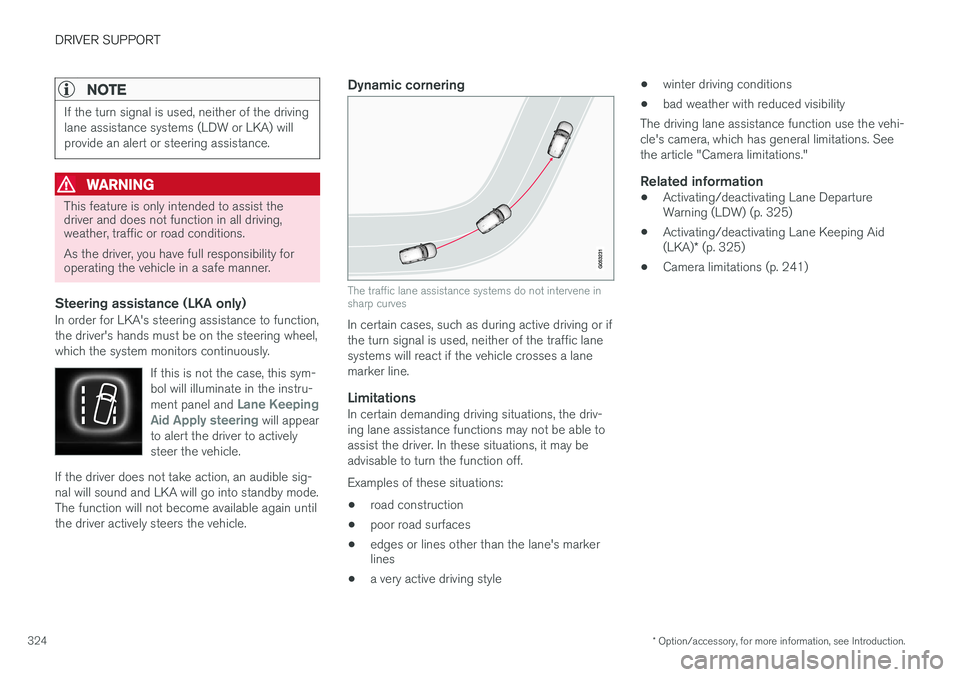
Dynamic cornering
The traffic lane assistance systems do not intervene in sharp curves
In certain cases, such as during active driving or if the turn signal is used, neither of the traffic lanesystems will react if the vehicle crosses a lanemarker line.
LimitationsIn certain demanding driving situations, the driv-ing lane assistance functions may not be able toassist the driver. In these situations, it may beadvisable to turn the function off. Examples of these situations: • road construction
• poor road surfaces
• edges or lines other than the lane's marker lines
• a very active driving style •
winter driving conditions
• bad weather with reduced visibility
The driving lane assistance function use the vehi- cle's camera, which has general limitations. Seethe article "Camera limitations."
Related information
• Activating/deactivating Lane Departure Warning (LDW) (p. 325)
• Activating/deactivating Lane Keeping Aid (LKA)
* (p. 325)
• Camera limitations (p. 241)
Page 339 of 570
STARTING AND DRIVING
337
Symbol in the instrument panel
SymbolExplanation
A
B
The symbol flashes while the park- ing brake is being applied. If the symbol flashes at any other time, this indicates a fault. See themessage in the instrument panel.
AUS models
B Canadian models
Automatic functionThe parking brake is applied automatically:
• If the Auto Hold function is activated and the vehicle has been stationary for approx.5 minutes.
• If the gear selector is moved to
P on a steep
hill.
• When the engine is turned off (this functioncan be selected, see "Parking brake set-tings" below).
Emergency brakingIn an emergency, the parking brake can be applied when the vehicle is moving by pressingand holding up the control. Braking will be inter-rupted when the control is released. An audible signal will sound during this proce- dure if the vehicle is moving at higher speeds.
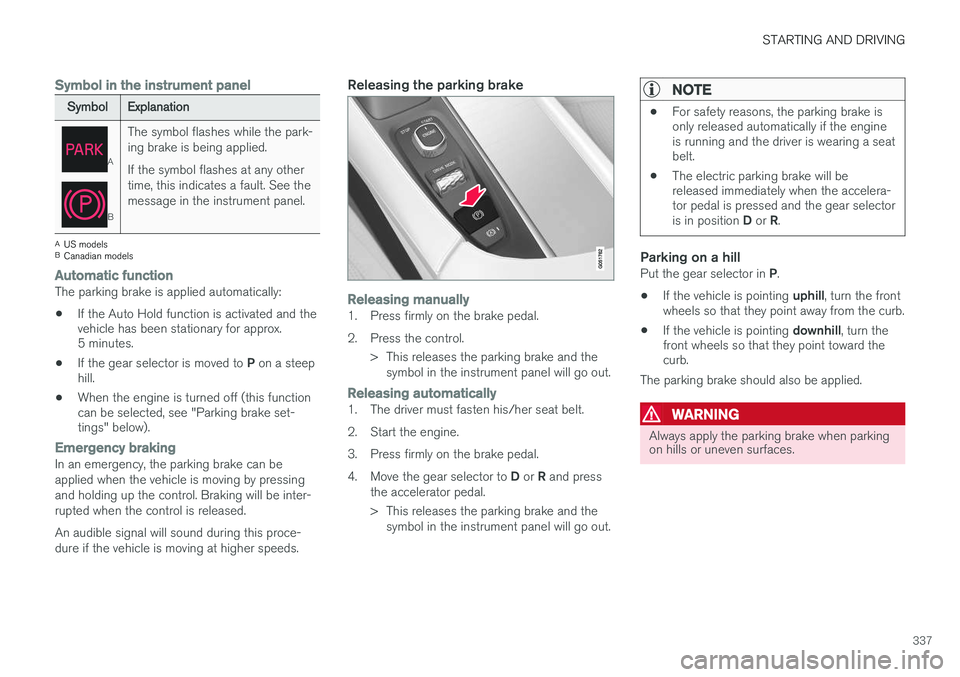
Releasing the parking brake
Releasing manually1. Press firmly on the brake pedal.
2. Press the control.
> This releases the parking brake and thesymbol in the instrument panel will go out.
Releasing automatically1. The driver must fasten his/her seat belt.
2. Start the engine.
3. Press firmly on the brake pedal.4. Move the gear selector to D or R and press
the accelerator pedal.
> This releases the parking brake and the symbol in the instrument panel will go out.
NOTE
• For safety reasons, the parking brake is only released automatically if the engineis running and the driver is wearing a seatbelt.
• The electric parking brake will bereleased immediately when the accelera-tor pedal is pressed and the gear selector is in position
D or R.
Parking on a hillPut the gear selector in P.
• If the vehicle is pointing
uphill, turn the front
wheels so that they point away from the curb.
• If the vehicle is pointing
downhill, turn the
front wheels so that they point toward the curb.
The parking brake should also be applied.
WARNING
Always apply the parking brake when parking on hills or uneven surfaces.
Page 340 of 570
STARTING AND DRIVING
338
Heavy load uphillA heavy load, such as a trailer, can cause the vehicle to roll backward when the parking brakeis released automatically on a steep incline. Tohelp avoid this:
1. Keep the electric parking brake controlpushed in.
2. While pressing the accelerator pedal to pull away, release the parking brake control only after the vehicle begins to move.
Parking brake settingsAutomatically setting the parking brake can beturned on or off in the center display's Top view. 1.Tap
Settings in Top view.
2. Tap
My CarElectric Parking Brake and
deselect Auto Activate Parking Brake.
Related information
• Parking brake (p. 335)
• Parking brake malfunctions (p. 338)
• Auto-hold brake function (p. 332)
Parking brake malfunctions
If it has not been possible to apply or release the parking brake after several attempts, consult atrained and authorized Volvo service technicianor retailer.
An audible signal will sound if the parking brake is applied when the vehicle is being driven. If thevehicle must be parked while the parking brake isnot functioning properly: • Put the gear selector in
P.
• If the vehicle is pointing
uphill, turn the front
wheels so that they point away from the curb.
• If the vehicle is pointing
downhill, turn the
front wheels so that they point toward the curb.
• Put the gear selector in
P.
Low battery charge levelIf the battery is discharged, the parking brake cannot be operated. Connect an auxiliary batteryto the vehicle.
Replacing brake padsThe rear brake pads have to be replaced by atrained and authorized Volvo service techniciandue to the design of the electric parking brake.
Symbols in the instrument panel
SymbolExplanation
A
B
If the symbol flashes, a parking brake fault has been detected.See the message in the instru-ment panel.
A
B
Fault in the brake system.
A
US models
B Canadian models
Related information
• Using the parking brake (p. 336)
• Using the parking brake (p. 336)
• Brake functions (p. 332)
• Jump starting (p. 350)
Page 368 of 570
STARTING AND DRIVING
366•
the road's incline is very steep.
• the hood is opened.
• the transmission has not reached its normal operating temperature.
• driving at high altitude and the engine hasnot reached its normal operating tempera-ture.
• the gear selector is in the manual shiftingposition.
• the ABS brakes have activated.
• hard braking (even if the ABS brakes havenot activated).
• many starts during a short time period havetriggered the starter motor's overheating pro-tection.
• a trailer's electrical system is connected tothe vehicle's electrical system.
The engine does not auto-startIn certain situations or conditions, the engine may not auto-start
after an auto-stop, such as:
• if the driver is not wearing a seat belt
• the gear selector is in the
P position and the
driver's door is open. The engine must be started normally.
The engine auto-starts while the brake
pedal is depressed
In the following situations, the engine will auto-
start even though the brake pedal is depressed: •
condensation forms on the inside of the win-dows.
• the climate system cannot keep the desiredsettings in the passenger compartment.
• electrical current consumption is temporarilyhigh or the main battery's charge is belowthe minimum level.
• the brake pedal is pumped repeatedly.
• the hood is opened.
• the vehicle begins to move or increasesspeed slightly (if the engine auto-stoppedbefore the vehicle was at a standstill).
• the driver's seat belt is unbuckled while the gear selector is in the
D or N positions.
• the gear selector is moved from
D to R or ±.
• the driver's door is opened with the gearselector in
D: an audible signal and a text
message will inform the driver that the igni- tion is on.
WARNING
Do not open the hood if the engine has auto- stopped. The engine could suddenly auto-start. Before opening the hood:
• Switch off the ignition by turning the start knob in the tunnel console toward
STOP.
• Be aware that if the engine has been run- ning, components in the engine compart-ment will be very hot.
Related information
• Using the Start/Stop function (p. 364)