battery VOLVO XC90 T8 2016 Owner´s Manual
[x] Cancel search | Manufacturer: VOLVO, Model Year: 2016, Model line: XC90 T8, Model: VOLVO XC90 T8 2016Pages: 546, PDF Size: 10.26 MB
Page 102 of 546
||
INSTRUMENTS AND CONTROLS
* Option/accessory, for more information, see Introduction.
100 systems, even home lighting. Additional informa- tion can be found on the Internet at,www.homelink.com/www.youtube.com/HomeLinkGentex or by phoning the hotline at 1–800–355–3515.
WARNING
•
If you use HomeLink ®
to open a garage
door or gate, be sure no one is near the gate or door while it is in motion.
• When programming a garage dooropener, it is advised to park outside of thegarage.
• Do not use HomeLink ®
with any garage
door opener that lacks safety stop andreverse features as required by U.S. fed-eral safety standards (this includes anygarage door opener model manufacturedbefore April 1, 1982). A garage door thatcannot detect an object - signaling thedoor to stop and reverse - does not meetcurrent U.S. federal safety standards. Formore information, contact HomeLink at:www.homelink.com.
Retain the original transmitter of the RF device you are programming for use in other vehicles aswell as for future HomeLink programming. It isalso suggested that upon the sale of the vehicle,the programmed HomeLink buttons be erasedfor security purposes. See the article "Program-ming HomeLink."
Related information
• Programming the HomeLink ®
Wireless Con-
trol System * (p. 100)Programming the HomeLink ®
Wireless Control System *
NOTE
Some vehicles may require the ignition to be switched on or be in the “accessories” posi-tion for programming and/or operation ofHomeLink. It is also recommended that a newbattery be placed in the hand-held transmitterof the device being programmed to Home-Link for quicker training and accurate trans-mission of the radio-frequency signal. TheHomeLink buttons must be reset first. Whenthis has been completed, Homelink is inlearning mode so that you can perform pro-gramming.
To program HomeLink®
1. Press the HomeLink ®
button to be pro-
grammed. The HomeLink ®
indicator will
begin flashing yellow once a second. You do not need to continue holding the button.
2. Point the hand-held transmitter toward the HomeLink ®
button to be programmed and
hold it approx. 6–12 inches (15–30 cm) away from the HomeLink ®
button. Do not
obstruct the HomeLink ®
indicator light.
Page 112 of 546
||
INSTRUMENTS AND CONTROLS
110For the power windows to function, the ignition must be in at least mode
I. When the vehicle has
been running, the power windows can be oper- ated for several minutes after the ignition hasbeen switched off, or until a door has beenopened.
NOTE
• Movement of the windows will stop if they are obstructed in any way. If this happenstwice in succession, the automatic func-tion will not work for several minutes andthe window can be closed by holding thebutton up.
• To reduce buffeting wind noise if the rearwindows are opened, also open the frontwindows slightly.
Manual up/down
–Move one of the controls up/down slightly.
> The power windows move up/down as
long as the control is held in position.
Auto up/down
–Move one of the controls up/down as far as possible and release it.
> The window will open or close completely.
ResettingIf the battery has been disconnected, the auto open function must be reset so that it will workproperly
1. Gently raise the front section of the button to close the window and hold it for one second.
2. Release the button briefly.
3. Raise the front section of the button again for one second.
Related information
• Child safety locks (p. 228)
Rearview mirror The interior rearview mirror has an auto-dim function that helps reduce glare from followingvehicle's headlights.
Auto-dim functionThe auto-dim function is controlled by two sen- sors: one pointing forward (located on the for-ward-facing side of the mirror, which monitors theamount of ambient light) and one pointing rear-ward (located on the side of the mirror facing thedriver at the upper edge, which senses thestrength of following vehicles' headlights), andwork together to help eliminate glare.
NOTE
Obstructing the forward sensor with e.g., parking stickers, transponders, etc., or the rearsensor by loading the cargo area or the rearseat in such a way that light is prevented fromreaching the sensor will reduce the auto-dimfunction in the interior rearview mirror andoptional auto-dim function in the door mirrors.
The auto-dim function is always active while the vehicle is being driven except when the reversegear has been selected. The level of sensitivityfor this function can be set to three levels, whichaffect the rearview mirror and door mirrors.
Page 130 of 546
||
INSTRUMENTS AND CONTROLS
128
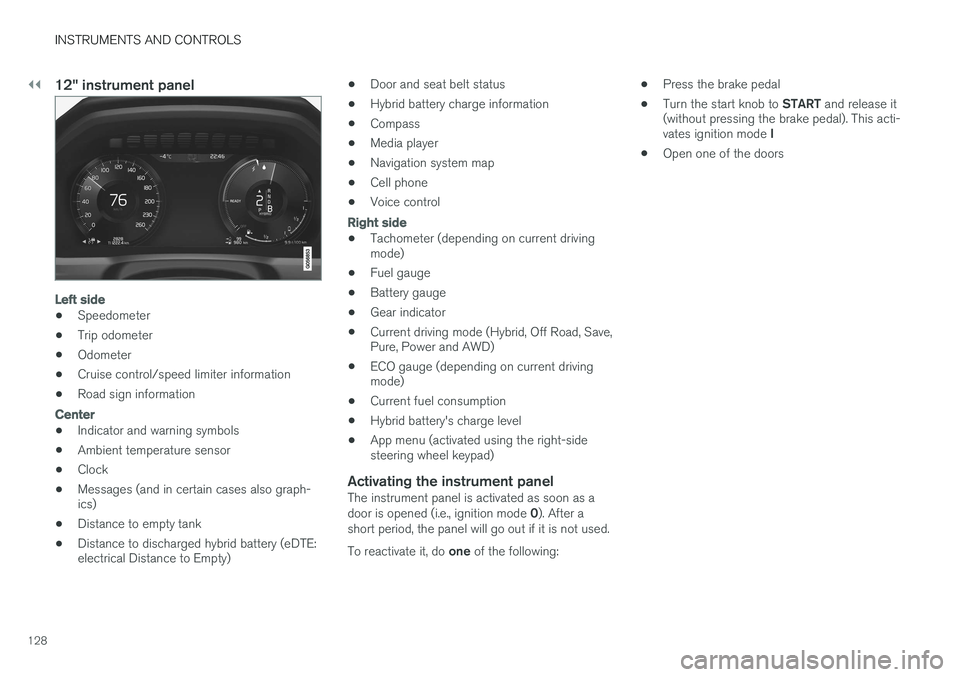
12" instrument panel
Left side
•Speedometer
• Trip odometer
• Odometer
• Cruise control/speed limiter information
• Road sign information
Center
•Indicator and warning symbols
• Ambient temperature sensor
• Clock
• Messages (and in certain cases also graph- ics)
• Distance to empty tank
• Distance to discharged hybrid battery (eDTE:electrical Distance to Empty) •
Door and seat belt status
• Hybrid battery charge information
• Compass
• Media player
• Navigation system map
• Cell phone
• Voice control
Right side
• Tachometer (depending on current driving mode)
• Fuel gauge
• Battery gauge
• Gear indicator
• Current driving mode (Hybrid, Off Road, Save,Pure, Power and AWD)
• ECO gauge (depending on current drivingmode)
• Current fuel consumption
• Hybrid battery's charge level
• App menu (activated using the right-sidesteering wheel keypad)
Activating the instrument panelThe instrument panel is activated as soon as a door is opened (i.e., ignition mode
0). After a
short period, the panel will go out if it is not used. To reactivate it, do one of the following: •
Press the brake pedal
• Turn the start knob to
START and release it
(without pressing the brake pedal). This acti- vates ignition mode I
• Open one of the doors
Page 132 of 546
||
INSTRUMENTS AND CONTROLS
130
AppFunctions
Trip com- puterSelect a trip odometer, make instrument panel display set-tings, etc.
Media playerSelect the active source for the media player.
PhoneCall a contact from the call list.
NavigationPause guidance, start guidance to a recently set destination, etc.
Related information
•Instrument panel (p. 127)
• Center display overview (p. 32)
• Using the instrument panel App menu (p. 156)
Hybrid-related information in the instrument panel
Different types of information will be displayed in the instrument panel, depending on the drivemode selected. These drive modes offer uniqueways of helping the driver achieve the best pos-sible driving economy. The vehicle also stores driving statistics that can be viewed in the form of a bar graph.
Hybrid-unique symbolsThe various gauges and indicators in the instru- ment panel show the relationship between theelectric motor's current power consumption andthe remaining power available.
Indicates the currently available outputfrom the electric motor. A solid symbolindicates that the electric motor isbeing used.
Indicates the currently available output from the electric motor. A hollow sym-bol means that the electric motor is not being used.
Indicates the output level when the gasoline engine starts. A solid symbolindicates that the gasoline engine isbeing used.
Indicates the output level when the gasoline engine will start. A hollowsymbol indicates that the gasoline engine is not being used.
Indicates that the hybrid battery is being charged.
Indicates the current charge level in the electric motor's battery. This indica-tor is located by the hybrid batterygauge in the lower right corner.
eDTE (Electrical Distance To Empty) indicator (distance until the hybrid bat-tery is discharged).
The hybrid gauge
Available electric motor output
This hybrid battery indicator is located between the hybrid gauge and the fuel gauge on the lowerright side of the instrument panel. It indicates thecurrent (charge level) remaining in the hybrid bat-tery, which can be used to power the electricmotor or to heat/cool the vehicle.
Page 133 of 546
INSTRUMENTS AND CONTROLS
131
Power utilized by the driver
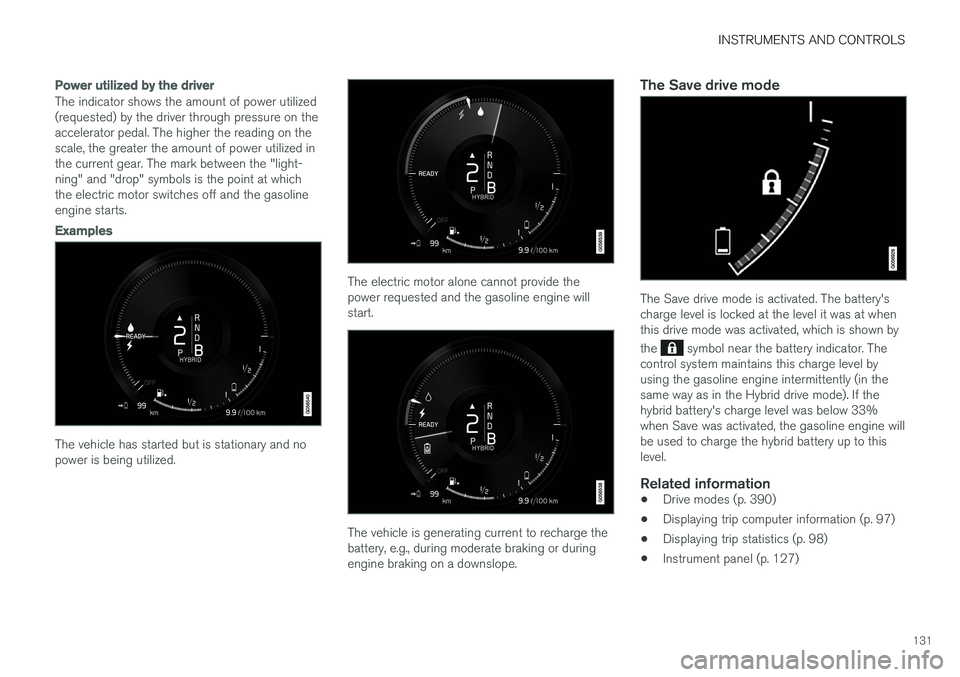
The indicator shows the amount of power utilized (requested) by the driver through pressure on theaccelerator pedal. The higher the reading on thescale, the greater the amount of power utilized inthe current gear. The mark between the "light-ning" and "drop" symbols is the point at whichthe electric motor switches off and the gasolineengine starts.
Examples
The vehicle has started but is stationary and no power is being utilized.
The electric motor alone cannot provide the power requested and the gasoline engine willstart.
The vehicle is generating current to recharge the battery, e.g., during moderate braking or duringengine braking on a downslope.
The Save drive mode
The Save drive mode is activated. The battery's charge level is locked at the level it was at whenthis drive mode was activated, which is shown by the
symbol near the battery indicator. The
control system maintains this charge level by using the gasoline engine intermittently (in thesame way as in the Hybrid drive mode). If thehybrid battery's charge level was below 33%when Save was activated, the gasoline engine willbe used to charge the hybrid battery up to thislevel.
Related information
• Drive modes (p. 390)
• Displaying trip computer information (p. 97)
• Displaying trip statistics (p. 98)
• Instrument panel (p. 127)
Page 182 of 546
||
CLIMATE
* Option/accessory, for more information, see Introduction.
180
PreconditioningPreconditioning the vehicle before driving can help reduce wear and reduce energy consump-tion during a trip.
NOTE
Full preconditioning is only possible when the vehicle's charging cable is connected. In other cases, the passenger compartment can be cooled for 3 minutes in warm weather. This function is started from the
Parking
climate tab in the center display's Climate
view.
With the charging cable connected, precondition- ing can be started immediately or a timer functioncan start this procedure at a later time. This feature utilizes several of the vehicle's sys- tems:
• The High Voltage Coolant Heater (HVCH) warms the hybrid battery and passengercompartment in cold weather.
• In warm weather, the ventilation system willattempt to cool the passenger compartmentto the current ambient temperature.
• In warm weather, the air conditioning systemwill cool the passenger compartment to acomfortable temperature.
• The electrically heated steering wheel andseats can be activated. •
Heating for the windshield, tailgate windowand door mirrors can be activated.
If preconditioning is used in warm weather, a cer- tain amount of water may condense under thevehicle, which is normal. When preconditioning is used, this system will attempt to establish a comfortable temperature in the passenger compartment but not necessarily
the temperature currently set in the climate system .
Maintaining a comfortable passenger compartment climate
The climate in the passenger compartment can be maintained even when the vehicle is parkedand the engine is turned off (e.g., if anyoneintends to remain in the vehicle). This function can only be direct-started.This function utilizes several of the vehicle's sys- tems:
• Residual heat from the engine is used help keep the passenger compartment warm incool temperatures.
• In warm weather, the ventilation system willattempt to cool the passenger compartmentto the current ambient temperature.
This function will not be activated if the vehicle is locked from the outside in order to avoid usingresidual engine heat unnecessarily. This functionis primarily intended for use when the engine isnot running but someone remains in the vehicle.
Related information
• Starting and stopping preconditioning (p. 184)
• Activating/deactivating the climate comfort retaining function
* (p. 181)
• Activating/deactivating the parking climate timer (p. 181)
• Charging the hybrid battery (p. 383)
• Hybrid battery charging cable (p. 375)
Page 183 of 546
CLIMATE
}}
* Option/accessory, for more information, see Introduction.181
Activating/deactivating the parking climate timer
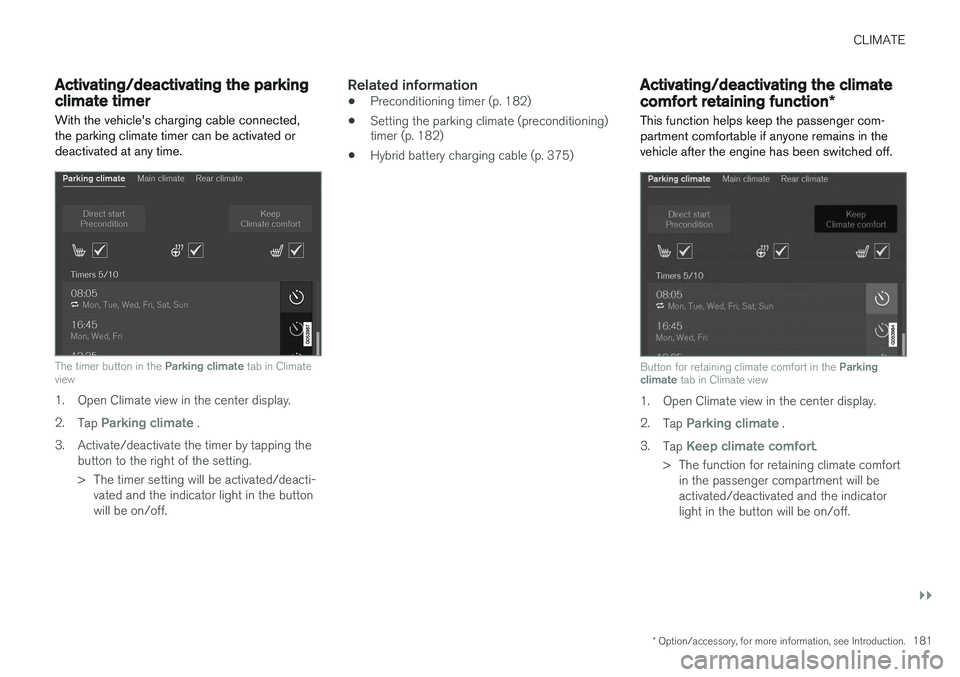
With the vehicle's charging cable connected, the parking climate timer can be activated ordeactivated at any time.
The timer button in the Parking climate tab in Climate
view
1. Open Climate view in the center display. 2. Tap
Parking climate .
3. Activate/deactivate the timer by tapping the button to the right of the setting.
> The timer setting will be activated/deacti-vated and the indicator light in the button will be on/off.
Related information
• Preconditioning timer (p. 182)
• Setting the parking climate (preconditioning) timer (p. 182)
• Hybrid battery charging cable (p. 375)
Activating/deactivating the climate comfort retaining function
*
This function helps keep the passenger com- partment comfortable if anyone remains in thevehicle after the engine has been switched off.
Button for retaining climate comfort in the Parking
climate tab in Climate view
1. Open Climate view in the center display. 2.
Tap
Parking climate .
3. Tap
Keep climate comfort.
> The function for retaining climate comfort in the passenger compartment will be activated/deactivated and the indicatorlight in the button will be on/off.
Page 186 of 546
CLIMATE
* Option/accessory, for more information, see Introduction.
184
Starting and stopping preconditioning
Preconditioning heats/cools the passenger com- partment prior to driving. Please note that thecharging cable must be connected.
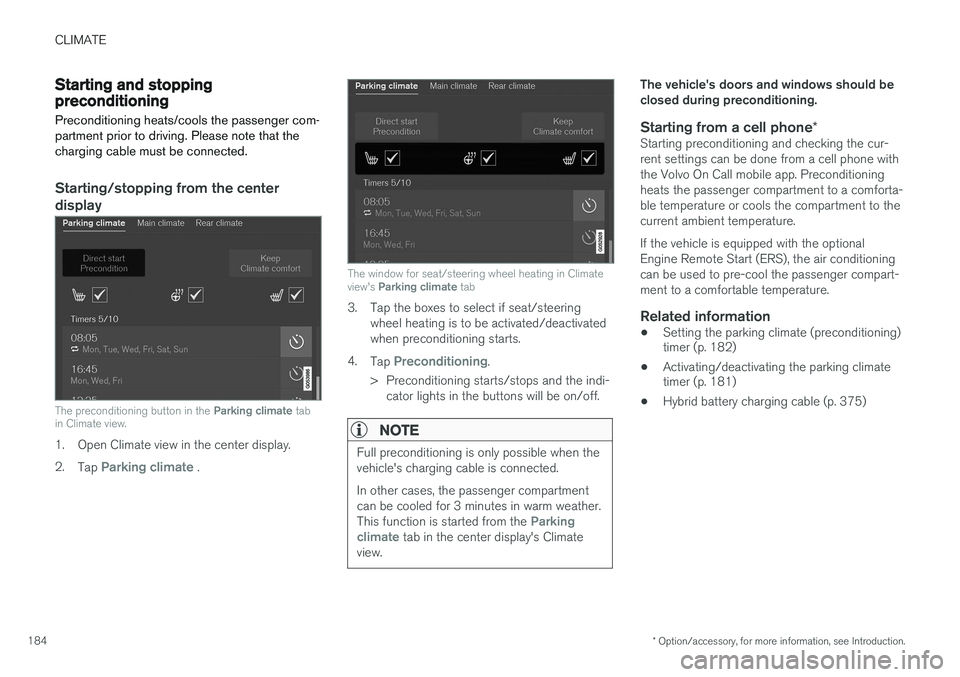
Starting/stopping from the centerdisplay
The preconditioning button in the Parking climate tab
in Climate view.
1. Open Climate view in the center display. 2. Tap
Parking climate .
The window for seat/steering wheel heating in Climate view's Parking climate tab
3. Tap the boxes to select if seat/steering
wheel heating is to be activated/deactivated when preconditioning starts.
4. Tap
Preconditioning.
> Preconditioning starts/stops and the indi- cator lights in the buttons will be on/off.
NOTE
Full preconditioning is only possible when the vehicle's charging cable is connected. In other cases, the passenger compartment can be cooled for 3 minutes in warm weather. This function is started from the
Parking
climate tab in the center display's Climate
view.
The vehicle's doors and windows should be closed during preconditioning.
Starting from a cell phone *Starting preconditioning and checking the cur-rent settings can be done from a cell phone withthe Volvo On Call mobile app. Preconditioningheats the passenger compartment to a comforta-ble temperature or cools the compartment to thecurrent ambient temperature. If the vehicle is equipped with the optional Engine Remote Start (ERS), the air conditioningcan be used to pre-cool the passenger compart-ment to a comfortable temperature.
Related information
•Setting the parking climate (preconditioning) timer (p. 182)
• Activating/deactivating the parking climatetimer (p. 181)
• Hybrid battery charging cable (p. 375)
Page 187 of 546
CLIMATE
185
Preconditioning symbols and messages
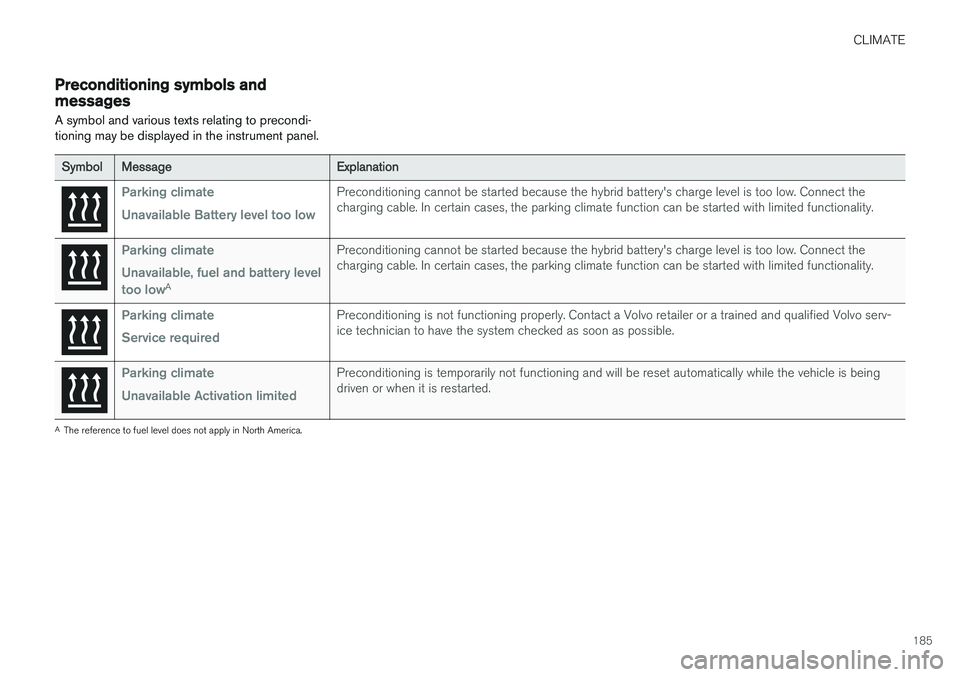
A symbol and various texts relating to precondi- tioning may be displayed in the instrument panel.
SymbolMessageExplanation
Parking climate Unavailable Battery level too lowPreconditioning cannot be started because the hybrid battery's charge level is too low. Connect the charging cable. In certain cases, the parking climate function can be started with limited functionality.
Parking climate Unavailable, fuel and battery level too low
A
Preconditioning cannot be started because the hybrid battery's charge level is too low. Connect the charging cable. In certain cases, the parking climate function can be started with limited functionality.
Parking climate Service requiredPreconditioning is not functioning properly. Contact a Volvo retailer or a trained and qualified Volvo serv- ice technician to have the system checked as soon as possible.
Parking climate Unavailable Activation limitedPreconditioning is temporarily not functioning and will be reset automatically while the vehicle is being driven or when it is restarted.
A The reference to fuel level does not apply in North America.
Page 215 of 546
LOADING AND STORAGE
}}
213
trained and qualified Volvo service techni- cian.
Failure to follow the points above could result in electrical shock and/or serious injury.Status indication
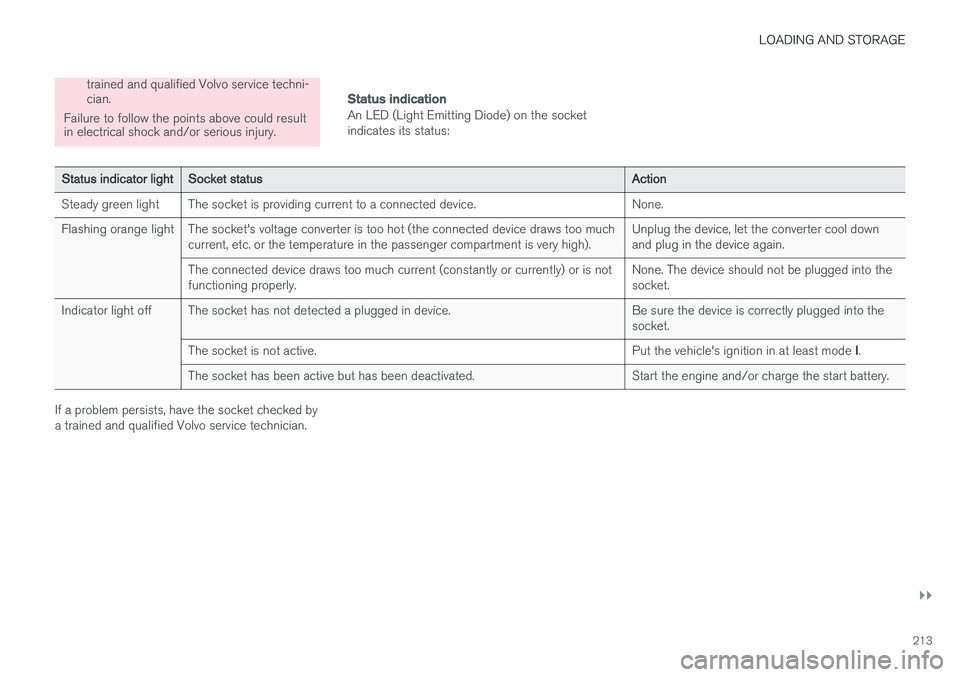
An LED (Light Emitting Diode) on the socket indicates its status:
Status indicator lightSocket statusAction
Steady green lightThe socket is providing current to a connected device.None.
Flashing orange lightThe socket's voltage converter is too hot (the connected device draws too much current, etc. or the temperature in the passenger compartment is very high).Unplug the device, let the converter cool down and plug in the device again.
The connected device draws too much current (constantly or currently) or is not functioning properly.None. The device should not be plugged into the socket.
Indicator light offThe socket has not detected a plugged in device.Be sure the device is correctly plugged into the socket.
The socket is not active.Put the vehicle's ignition in at least mode I.
The socket has been active but has been deactivated.Start the engine and/or charge the start battery.
If a problem persists, have the socket checked by a trained and qualified Volvo service technician.