ECO mode YAMAHA FJR1300AS 2016 Owners Manual
[x] Cancel search | Manufacturer: YAMAHA, Model Year: 2016, Model line: FJR1300AS, Model: YAMAHA FJR1300AS 2016Pages: 126, PDF Size: 3.51 MB
Page 2 of 126
EAU69311
Read this manual carefully before operatin g this vehicle. This manual
shoul d stay with this vehicle if it is sol d.
Date of issue:
Signature of Responsible Person: January 12, 2015
Product: IMMOBILIZER
Model: 1MC-00
Supplied by
YAMAHA MOTOR ELECTRONICS
CO.,LTD.
1450-6 Mori, Mori-machi Shuchi-gun
Shizuoka 437-0292 Japan
EN 60950-1: 2006 + Amd.11:2009 + Amd.1:2010 +
Amd.12: 2011
EN 62479: 2010
Kazuhide Takasugi
GENERAL MANAGER
QUALITY ASSURANCE DIV. 97/24/EC from 17.06.1997
EN 300 330-1 V1.7.1: 2010
EN 300 330-2 V1.5.1: 2010
Technical Construction File held by
YAMAHA MOTOR ELECTRONICS
CO.,LTD.
1450-6 Mori, Mori-machi Shuchi-gun
Shizuoka 437-0292 Japan
R&TTE Directive
(Article 3.1(a) Safety)
R&TTE Directive
(Article 3.1(b) EMC)
R&TTE Directive
(Article 3.2 Spectrum)
DECLARATION of CONFORMITY For
YAMAHA MOTOR ELECTRONICS CO., LTD.1450-6, Mori, Mori-machi, Shuchi-gun, Shizuoka-ken, 437-0292 Japan
Standard used for comply
Means of Conformity
We declare under our sole responsibility that the Product (s) is conformity with the essential requirements and other relevant requirements of the
Radio and Telecommunication Terminal Equipment (R&TTE) Directive (1999/5/EC).
UB95E0E0.book Page 1 Friday, February 19, 2016 2:15 PM
Page 11 of 126

Safety information
1-5
1
operator and may limit control
ability, therefore, such accesso-
ries are not recommended.
Use caution when adding electri-
cal accessories. If electrical ac-
cessories exceed the capacity of
the motorcycle’s electrical sys-
tem, an electric failure could re-
sult, which could cause a
dangerous loss of lights or engine
power.
Aftermarket Tires an d Rims
The tires and rims that came with your
motorcycle were designed to match
the performance capabilities and to
provide the best combination of han-
dling, braking, and comfort. Other
tires, rims, sizes, and combinations
may not be appropriate. Refer to page
6-19 for tire specifications and more in-
formation on replacing your tires.
Transportin g the Motorcycle
Be sure to observe following instruc-
tions before transporting the motorcy-
cle in another vehicle. Remove all loose items from the
motorcycle.
Check that the fuel cock (if
equipped) is in the “OFF” position
and that there are no fuel leaks.
Point the front wheel straight
ahead on the trailer or in the truck
bed, and choke it in a rail to pre-
vent movement.
Shift the transmission in gear (for
models with a manual transmis-
sion).
Secure the motorcycle with tie-
downs or suitable straps that are
attached to solid parts of the mo- torcycle, such as the frame or up-
per front fork triple clamp (and not,
for example, to rubber-mounted
handlebars or turn signals, or
parts that could break). Choose
the location for the straps carefully
so the straps will not rub against
painted surfaces during transport.
The suspension should be com-
pressed somewhat by the tie-
downs, if possible, so that the mo-
torcycle will not bounce exces-
sively during transport.
UB95E0E0.book Page 5 Friday, February 19, 2016 2:15 PM
Page 18 of 126
Instrument and control functions
3-4
3
EAU49398
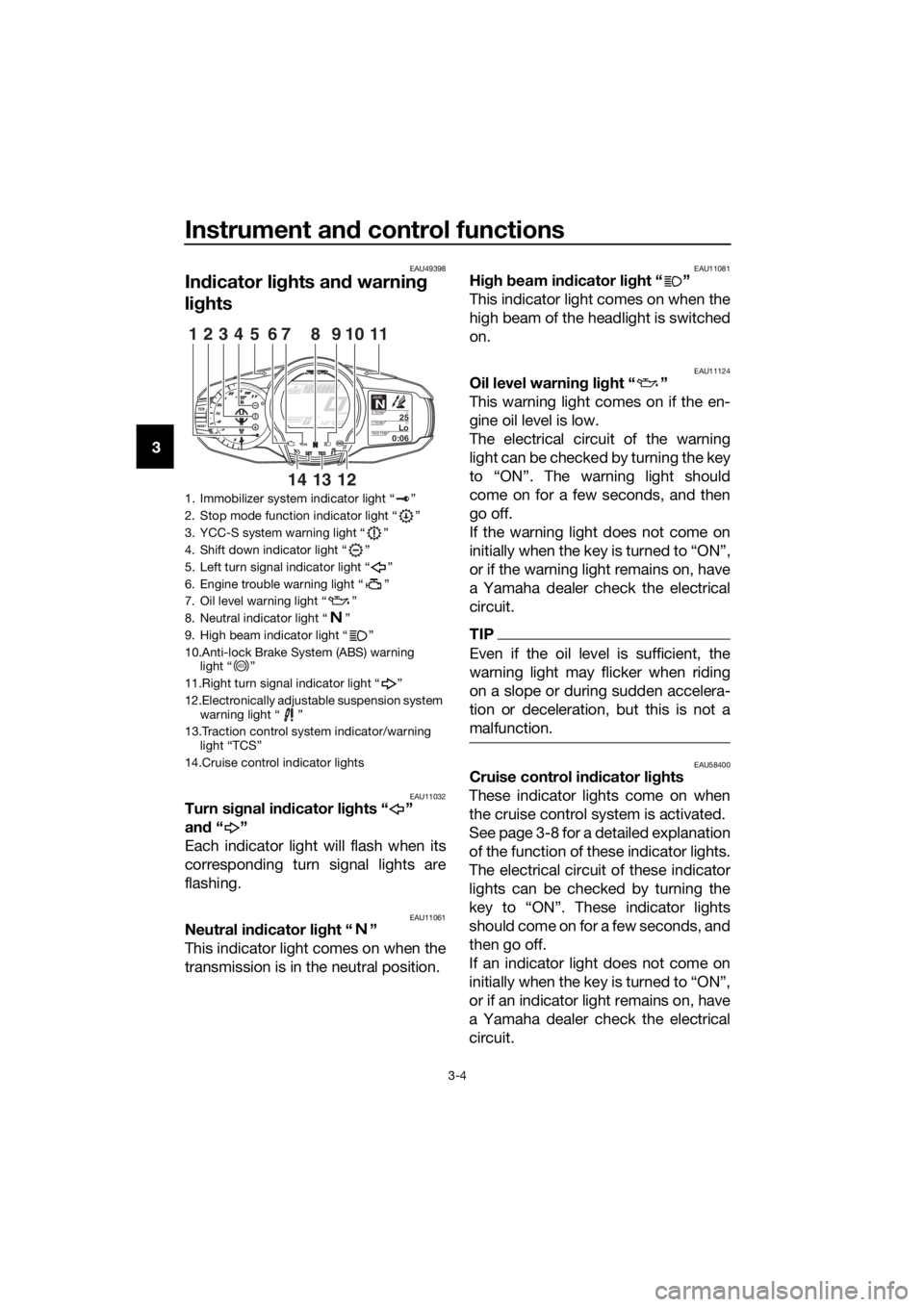
In dicator li ghts and warning
li g hts
EAU11032Turn si gnal in dicator li ghts “ ”
an d“”
Each indicator light will flash when its
corresponding turn signal lights are
flashing.
EAU11061Neutral in dicator li ght “ ”
This indicator light comes on when the
transmission is in the neutral position.
EAU11081Hi gh beam in dicator li ght “ ”
This indicator light comes on when the
high beam of the headlight is switched
on.
EAU11124Oil level warnin g li ght “ ”
This warning light comes on if the en-
gine oil level is low.
The electrical circuit of the warning
light can be checked by turning the key
to “ON”. The warning light should
come on for a few seconds, and then
go off.
If the warning light does not come on
initially when the key is turned to “ON”,
or if the warning light remains on, have
a Yamaha dealer check the electrical
circuit.
TIP
Even if the oil level is sufficient, the
warning light may flicker when riding
on a slope or during sudden accelera-
tion or deceleration, but this is not a
malfunction.
EAU58400Cruise control in dicator li ghts
These indicator lights come on when
the cruise control system is activated.
See page 3-8 for a detailed explanation
of the function of these indicator lights.
The electrical circuit of these indicator
lights can be checked by turning the
key to “ON”. These indicator lights
should come on for a few seconds, and
then go off.
If an indicator light does not come on
initially when the key is turned to “ON”,
or if an indicator light remains on, have
a Yamaha dealer check the electrical
circuit.
1. Immobilizer system indicator light “ ”
2. Stop mode function indicator light “ ”
3. YCC-S system warning light “ ”
4. Shift down indicator light “ ”
5. Left turn signal indicator light “ ”
6. Engine trouble warning light “ ”
7. Oil level warning light “ ”
8. Neutral indicator light “ ”
9. High beam indicator light “ ”
10.Anti-lock Brake System (ABS) warning light “ ”
11.Right turn signal indicator light “ ”
12.Electronically adjustable suspension system warning light “ ”
13.Traction control system indicator/warning light “TCS”
14.Cruise control indicator lights
GEARN25A.TEMP ˚C
LoC.TEMP˚C
0:06TIME TRIP
12345116107
131214
98
ABS
UB95E0E0.book Page 4 Friday, February 19, 2016 2:15 PM
Page 20 of 126
Instrument and control functions
3-6
3 Try to reset the traction control system
and the lights by following the proce-
dures under “Resetting” on page 3-31.
EAU55392Electronically a
djusta ble suspen-
sion system warnin g lig ht “ ”
This warning light comes on if a prob-
lem is detected in the electronically ad-
justable suspension system.
The electrical circuit of the warning
light can be checked by turning the key
to “ON”. The warning light should
come on for a few seconds, and then
go off.
If the warning light does not come on
initially when the key is turned to “ON”,
or if the warning light remains on, have
a Yamaha dealer check the electrical
circuit.
EAU55431Shift down in dicator li ght “ ”
This indicator light flashes when the
transmission gear is too high for the
vehicle speed.
To avoid damaging the YCC-S clutch,
the shift down indicator light flashes
when it is necessary to downshift. If
this occurs, downshift until the indica-
tor light stops flashing.
EAU55442YCC-S system warnin g li ght “ ”
If this warning light comes on while rid-
ing, the YCC-S system may not work
correctly. If this occurs: It may be impossible to shift out of
the gear you are in.
The clutch may stay engaged, so
a shuddering sensation may be
felt as you come to a stop. Stop the vehicle when it is safe to do
so, and park it away from traffic. Have
a Yamaha dealer check the YCC-S
system.
TIP
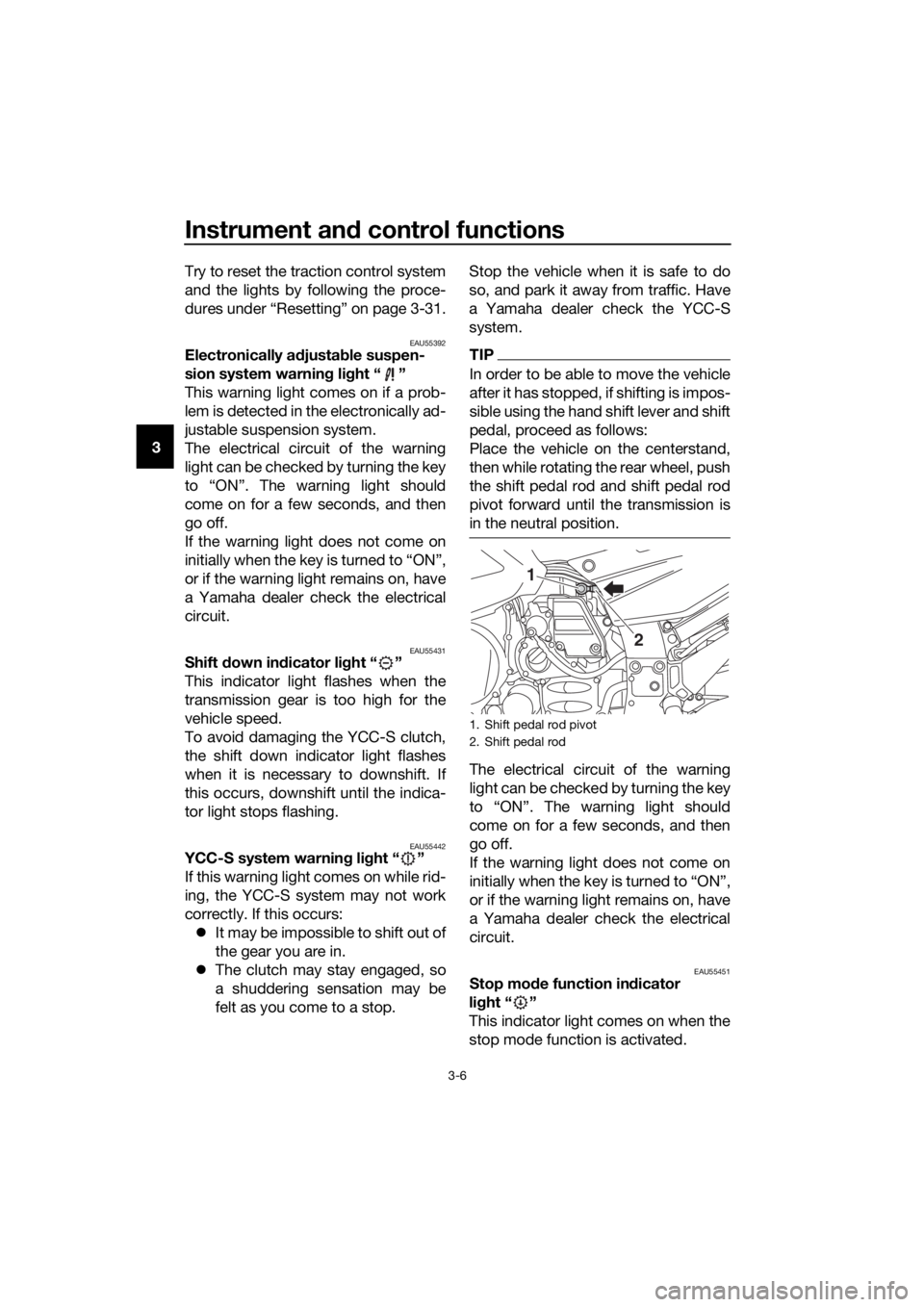
In order to be able to move the vehicle
after it has stopped, if shifting is impos-
sible using the hand shift lever and shift
pedal, proceed as follows:
Place the vehicle on the centerstand,
then while rotating the rear wheel, push
the shift pedal rod and shift pedal rod
pivot forward until the transmission is
in the neutral position.
The electrical circuit of the warning
light can be checked by turning the key
to “ON”. The warning light should
come on for a few seconds, and then
go off.
If the warning light does not come on
initially when the key is turned to “ON”,
or if the warning light remains on, have
a Yamaha dealer check the electrical
circuit.
EAU55451Stop mo
de function in dicator
li g ht “ ”
This indicator light comes on when the
stop mode function is activated.
1. Shift pedal rod pivot
2. Shift pedal rod
1
2
UB95E0E0.book Page 6 Friday, February 19, 2016 2:15 PM
Page 21 of 126
Instrument and control functions
3-7
3
If the stop mode function fails to shift
down, the indicator light will flash.
See page 3-25 for an explanation of
the stop mode function.
EAU73120Immo
bilizer system in dicator
li g ht “ ”
When the key is turned to “OFF” and
30 seconds have passed, the indicator
light will flash steadily to indicate the
immobilizer system is enabled. After 24
hours have passed, the indicator light
will stop flashing, however the immobi-
lizer system is still enabled.
The electrical circuit of the indicator
light can be checked by turning the key
to “ON”. The indicator light should
come on for a few seconds, and then
go off.
If the indicator light does not come on
initially when the key is turned to “ON”,
if the indicator light remains on, or if the
indicator light flashes in a pattern (if a
problem is detected in the immobilizer
system, the immobilizer system indica-
tor light will flash in a pattern), have a
Yamaha dealer check the vehicle.
TIP
If the immobilizer system indicator light
flashes in the pattern, slowly 5 times
then quickly 2 times, this could be
caused by transponder interference. If
this occurs, try the following.
1. Make sure there are no other im- mobilizer keys close to the main
switch. Other immobilizer system
keys may cause signal interfer-
ence and prevent the engine from
starting.
2. Use the code re-registering key to start the engine. 3. If the engine starts, turn it off, and
try starting the engine with the
standard keys.
4. If one or both of the standard keys do not start the engine, take the
vehicle and all 3 keys to a Yamaha
dealer to have the standard keys
re-registered.
UB95E0E0.book Page 7 Friday, February 19, 2016 2:15 PM
Page 25 of 126
Instrument and control functions
3-11
3
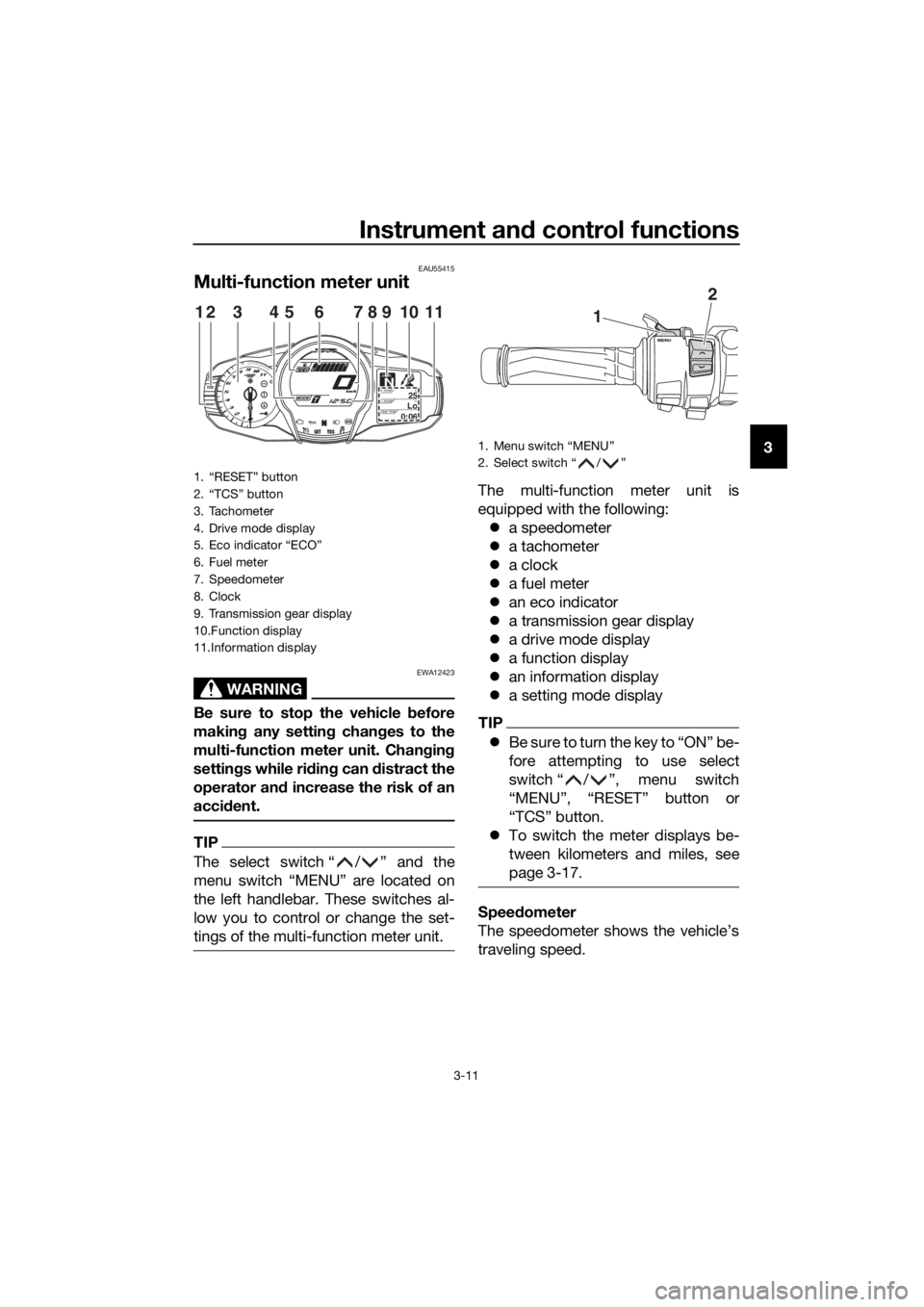
EAU55415
Multi-function meter unit
WARNING
EWA12423
Be sure to stop the vehicle before
makin g any settin g chan ges to the
multi-function meter unit. Chang ing
settin gs while ri din g can d istract the
operator an d increase the risk of an
acci dent.
TIP
The select switch “ / ” and the
menu switch “MENU” are located on
the left handlebar. These switches al-
low you to control or change the set-
tings of the multi-function meter unit.
The multi-function meter unit is
equipped with the following:
a speedometer
a tachometer
a clock
a fuel meter
an eco indicator
a transmission gear display
a drive mode display
a function display
an information display
a setting mode display
TIP
Be sure to turn the key to “ON” be-
fore attempting to use select
switch “ / ”, menu switch
“MENU”, “RESET” button or
“TCS” button.
To switch the meter displays be-
tween kilometers and miles, see
page 3-17.
Speed ometer
The speedometer shows the vehicle’s
traveling speed.
1. “RESET” button
2. “TCS” button
3. Tachometer
4. Drive mode display
5. Eco indicator “ECO”
6. Fuel meter
7. Speedometer
8. Clock
9. Transmission gear display
10.Function display
11.Information display
GEARN25A.TEMP ˚C
LoC.TEMP˚C
0:06TIME TRIP
1231145786910
1. Menu switch “MENU”
2. Select switch “ / ”
1
2
UB95E0E0.book Page 11 Friday, February 19, 2016 2:15 PM
Page 29 of 126
Instrument and control functions
3-15
3
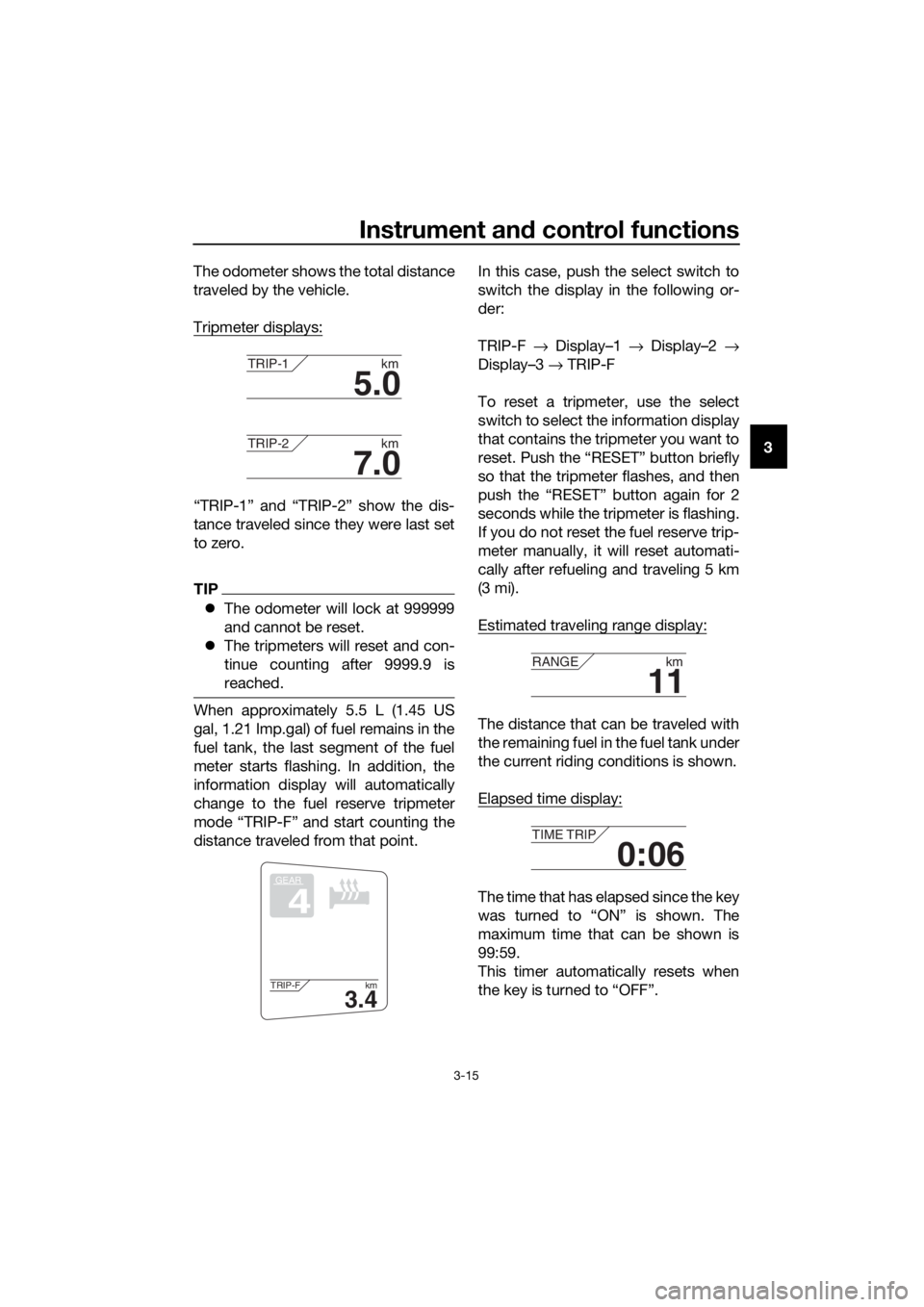
The odometer shows the total distance
traveled by the vehicle.
Tripmeter displays:
“TRIP-1” and “TRIP-2” show the dis-
tance traveled since they were last set
to zero.
TIP
The odometer will lock at 999999
and cannot be reset.
The tripmeters will reset and con-
tinue counting after 9999.9 is
reached.
When approximately 5.5 L (1.45 US
gal, 1.21 Imp.gal) of fuel remains in the
fuel tank, the last segment of the fuel
meter starts flashing. In addition, the
information display will automatically
change to the fuel reserve tripmeter
mode “TRIP-F” and start counting the
distance traveled from that point. In this case, push the select switch to
switch the display in the following or-
der:
TRIP-F
→ Display–1 → Display–2 →
Display–3 → TRIP-F
To reset a tripmeter, use the select
switch to select the information display
that contains the tripmeter you want to
reset. Push the “RESET” button briefly
so that the tripmeter flashes, and then
push the “RESET” button again for 2
seconds while the tripmeter is flashing.
If you do not reset the fuel reserve trip-
meter manually, it will reset automati-
cally after refueling and traveling 5 km
(3 mi).
Estimated traveling range display:The distance that can be traveled with
the remaining fuel in the fuel tank under
the current riding conditions is shown.
Elapsed time display:
The time that has elapsed since the key
was turned to “ON” is shown. The
maximum time that can be shown is
99:59.
This timer automatically resets when
the key is turned to “OFF”.
5.0
TRIP-1 km
7.0
TRIP-2km
GEAR
4
3.4
TRIP-F km
11
RANGEkm
0:06
TIME TRIP
UB95E0E0.book Page 15 Friday, February 19, 2016 2:15 PM
Page 31 of 126
Instrument and control functions
3-17
3
To reset the average fuel consumption
display, use the select switch to select
the information display that contains
the average fuel consumption display.
Push the “RESET” button briefly so
that the average fuel consumption dis-
play flashes, and then push the “RE-
SET” button again for 2 seconds while
the display is flashing.TIP
After resetting the average fuel con-
sumption display, “_ _._” will be shown
for that display until the vehicle has
traveled 1 km (0.6 mi).
NOTICE
ECA15474
If there is a malfunction, “– –.–” will
b
e continuously displaye d. Have a
Yamaha dealer check the vehicle.
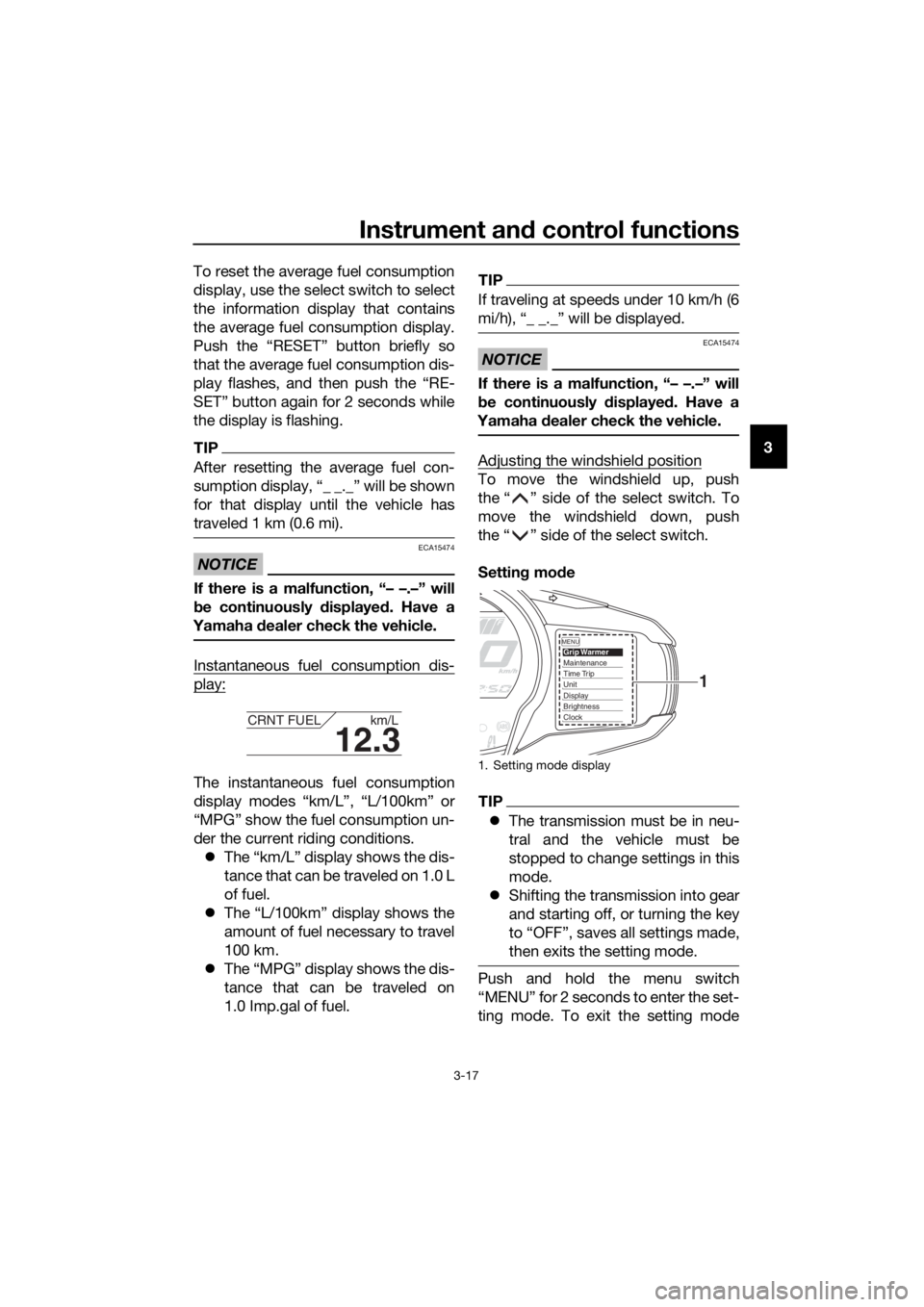
Instantaneous fuel consumption dis-
play:
The instantaneous fuel consumption
display modes “km/L”, “L/100km” or
“MPG” show the fuel consumption un-
der the current riding conditions.
The “km/L” display shows the dis-
tance that can be traveled on 1.0 L
of fuel.
The “L/100km” display shows the
amount of fuel necessary to travel
100 km.
The “MPG” display shows the dis-
tance that can be traveled on
1.0 Imp.gal of fuel.
TIP
If traveling at speeds under 10 km/h (6
mi/h), “_ _._” will be displayed.
NOTICE
ECA15474
If there is a malfunction, “– –.–” will
be continuously displaye d. Have a
Yamaha dealer check the vehicle.
Adjusting the windshield position
To move the windshield up, push
the “ ” side of the select switch. To
move the windshield down, push
the “ ” side of the select switch.
Settin g mo de
TIP
The transmission must be in neu-
tral and the vehicle must be
stopped to change settings in this
mode.
Shifting the transmission into gear
and starting off, or turning the key
to “OFF”, saves all settings made,
then exits the setting mode.
Push and hold the menu switch
“MENU” for 2 seconds to enter the set-
ting mode. To exit the setting mode
12.3
CRNT FUEL km/L
1. Setting mode display
MENUGrip WarmerMaintenanceTime TripUnitDisplayBrightnessClock
1
UB95E0E0.book Page 17 Friday, February 19, 2016 2:15 PM
Page 33 of 126
Instrument and control functions
3-19
3
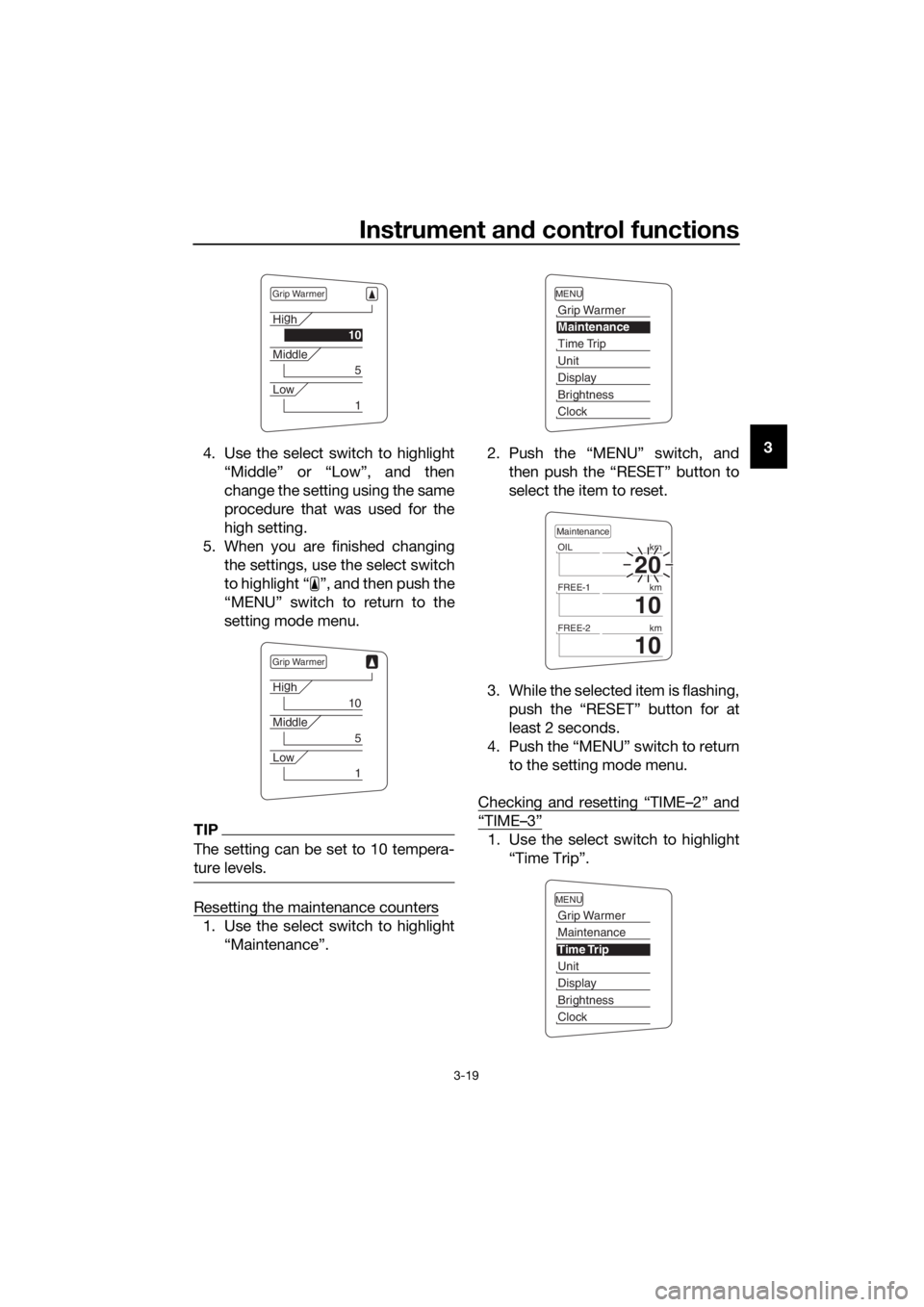
4. Use the select switch to highlight
“Middle” or “Low”, and then
change the setting using the same
procedure that was used for the
high setting.
5. When you are finished changing the settings, use the select switch
to highlight “ ”, and then push the
“MENU” switch to return to the
setting mode menu.
TIP
The setting can be set to 10 tempera-
ture levels.
Resetting the maintenance counters
1. Use the select switch to highlight“Maintenance”. 2. Push the “MENU” switch, and
then push the “RESET” button to
select the item to reset.
3. While the selected item is flashing, push the “RESET” button for at
least 2 seconds.
4. Push the “MENU” switch to return to the setting mode menu.
Checking and resetting “TIME–2” and
“TIME–3”
1. Use the select switch to highlight “Time Trip”.
Grip Warmer
Hig
h
10
Middle
5
Low
1
Grip Warmer
Hi g
h
10
Middle
5
Low
1
MENU
Grip Warmer
Maintenance
Time Trip
Unit
Display
Brightness
Clock
20
OIL km
10
FREE-1km
10
FREE-2km
Maintenance
MENU
Grip Warmer
Maintenance
Time Trip
Unit
Display
Brightness
Clock
UB95E0E0.book Page 19 Friday, February 19, 2016 2:15 PM
Page 34 of 126
Instrument and control functions
3-20
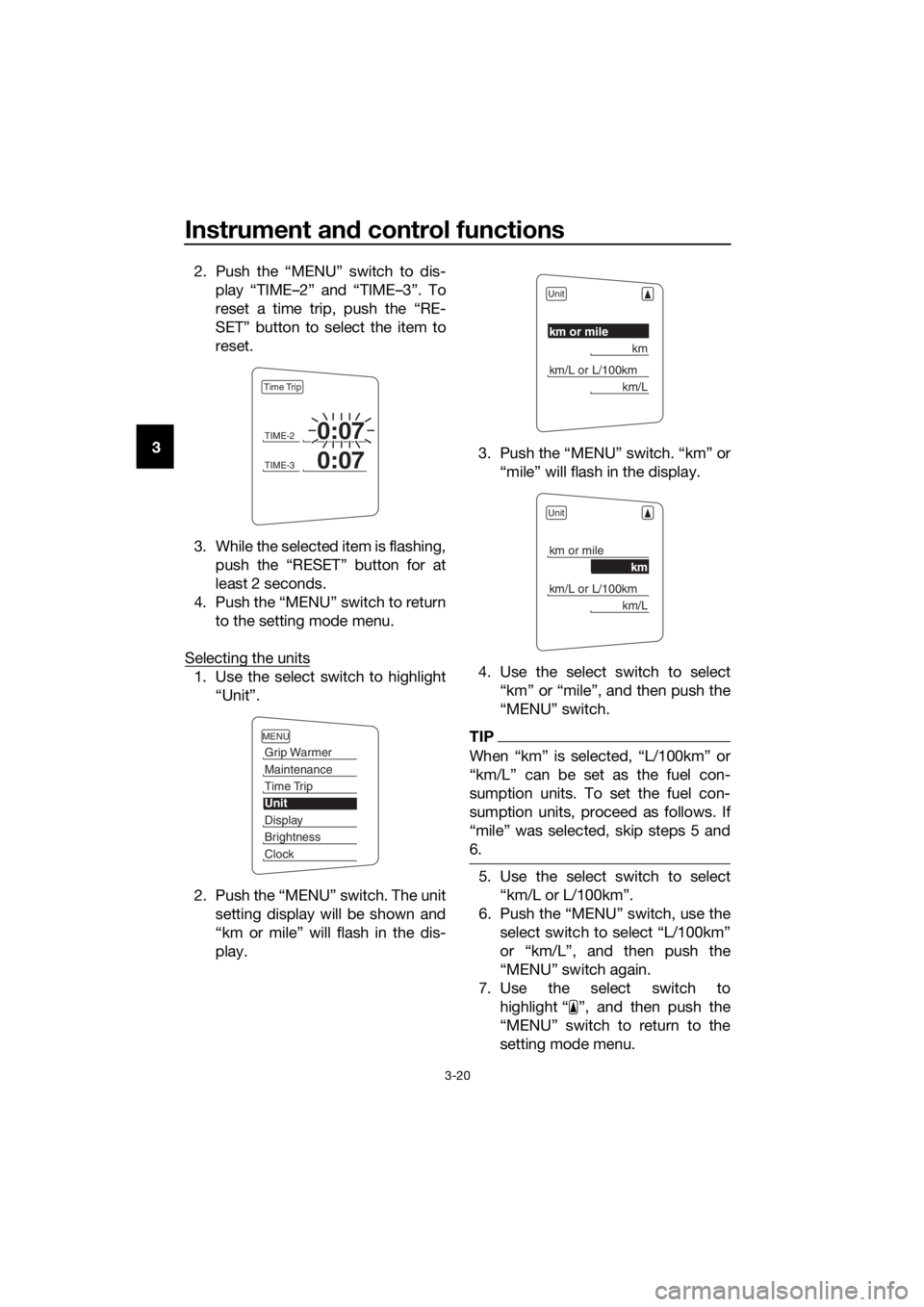
3 2. Push the “MENU” switch to dis-
play “TIME–2” and “TIME–3”. To
reset a time trip, push the “RE-
SET” button to select the item to
reset.
3. While the selected item is flashing, push the “RESET” button for at
least 2 seconds.
4. Push the “MENU” switch to return to the setting mode menu.
Selecting the units
1. Use the select switch to highlight “Unit”.
2. Push the “MENU” switch. The unit setting display will be shown and
“km or mile” will flash in the dis-
play. 3. Push the “MENU” switch. “km” or
“mile” will flash in the display.
4. Use the select switch to select “km” or “mile”, and then push the
“MENU” switch.
TIP
When “km” is selected, “L/100km” or
“km/L” can be set as the fuel con-
sumption units. To set the fuel con-
sumption units, proceed as follows. If
“mile” was selected, skip steps 5 and
6.
5. Use the select switch to select“km/L or L/100km”.
6. Push the “MENU” switch, use the select switch to select “L/100km”
or “km/L”, and then push the
“MENU” switch again.
7. Use the select switch to highlight “ ”, and then push the
“MENU” switch to return to the
setting mode menu.
TIME-20:07
TIME-30:07
Time Trip
MENU
Grip Warmer
Maintenance
Time Trip
Unit
Display
Brightness
Clock
Unit
km or mile
km
km/L or L/100km
km/L
Unit
km or mile
km
km/L or L/100km
km/L
UB95E0E0.book Page 20 Friday, February 19, 2016 2:15 PM