stop start YAMAHA FX HO 2013 User Guide
[x] Cancel search | Manufacturer: YAMAHA, Model Year: 2013, Model line: FX HO, Model: YAMAHA FX HO 2013Pages: 116, PDF Size: 5.56 MB
Page 43 of 116
Watercraft operation
37
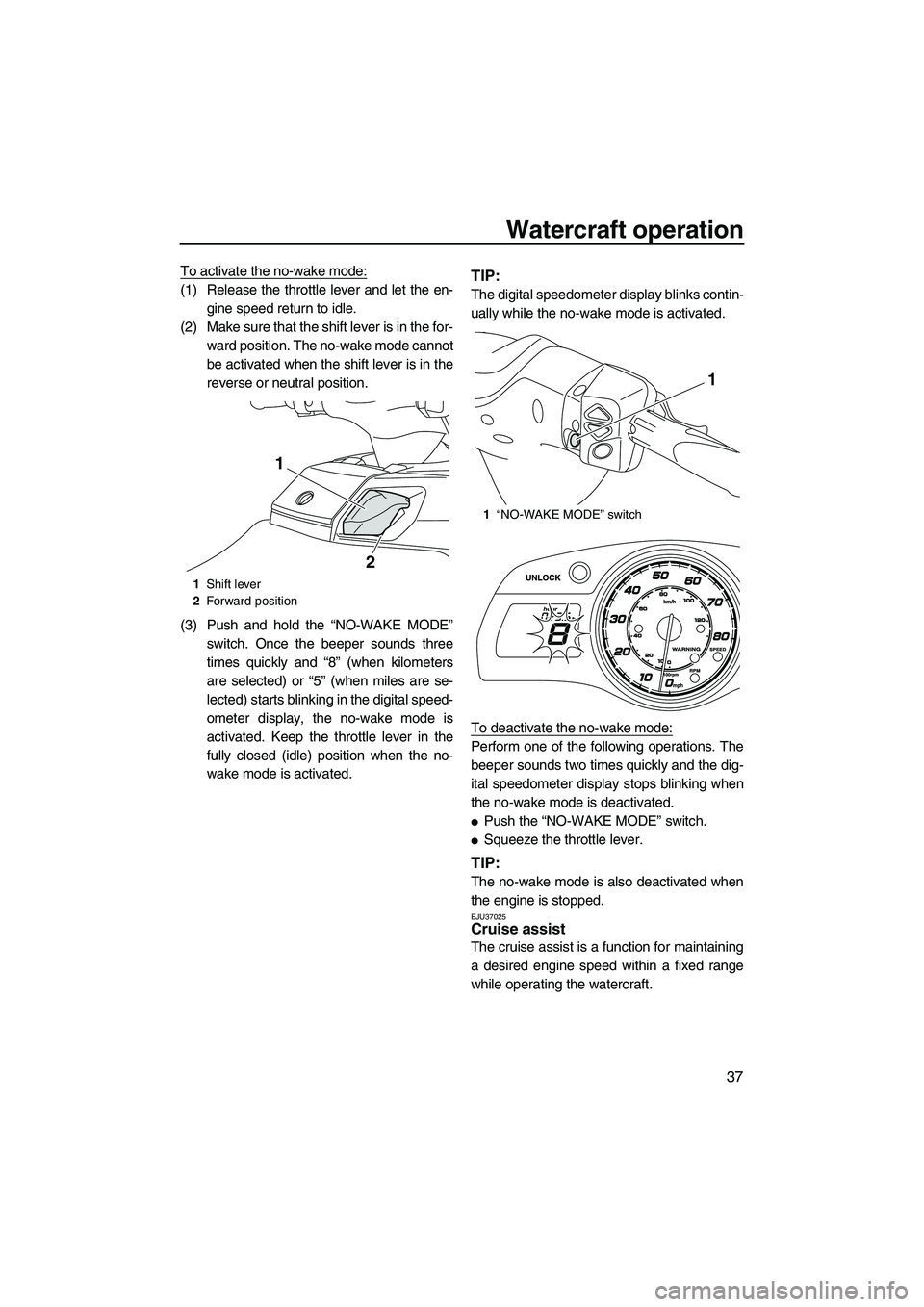
To activate the no-wake mode:
(1) Release the throttle lever and let the en-gine speed return to idle.
(2) Make sure that the shift lever is in the for- ward position. The no-wake mode cannot
be activated when the shift lever is in the
reverse or neutral position.
(3) Push and hold the “NO-WAKE MODE” switch. Once the beeper sounds three
times quickly and “8” (when kilometers
are selected) or “5” (when miles are se-
lected) starts blinking in the digital speed-
ometer display, the no-wake mode is
activated. Keep the throttle lever in the
fully closed (idle) position when the no-
wake mode is activated.TIP:
The digital speedometer display blinks contin-
ually while the no-wake mode is activated.
To deactivate the no-wake mode:
Perform one of the following operations. The
beeper sounds two times quickly and the dig-
ital speedometer display stops blinking when
the no-wake mode is deactivated.
●Push the “NO-WAKE MODE” switch.
●Squeeze the throttle lever.
TIP:
The no-wake mode is also deactivated when
the engine is stopped.
EJU37025Cruise assist
The cruise assist is a function for maintaining
a desired engine speed within a fixed range
while operating the watercraft.
1Shift lever
2 Forward position
1
2
1“NO-WAKE MODE” switch
1
UF2S71E0.book Page 37 Tuesday, August 21, 2012 2:33 PM
Page 44 of 116
Watercraft operation
38
TIP:
●The cruise assist can only be set between
engine speeds of approximately 3000 r/min
and approximately 7000 r/min.
●The cruise assist cannot be activated in the
Low RPM Mode. (See page 35 for Low
RPM Mode activation procedures.)
Activating and deactivating the cruise as-
sist
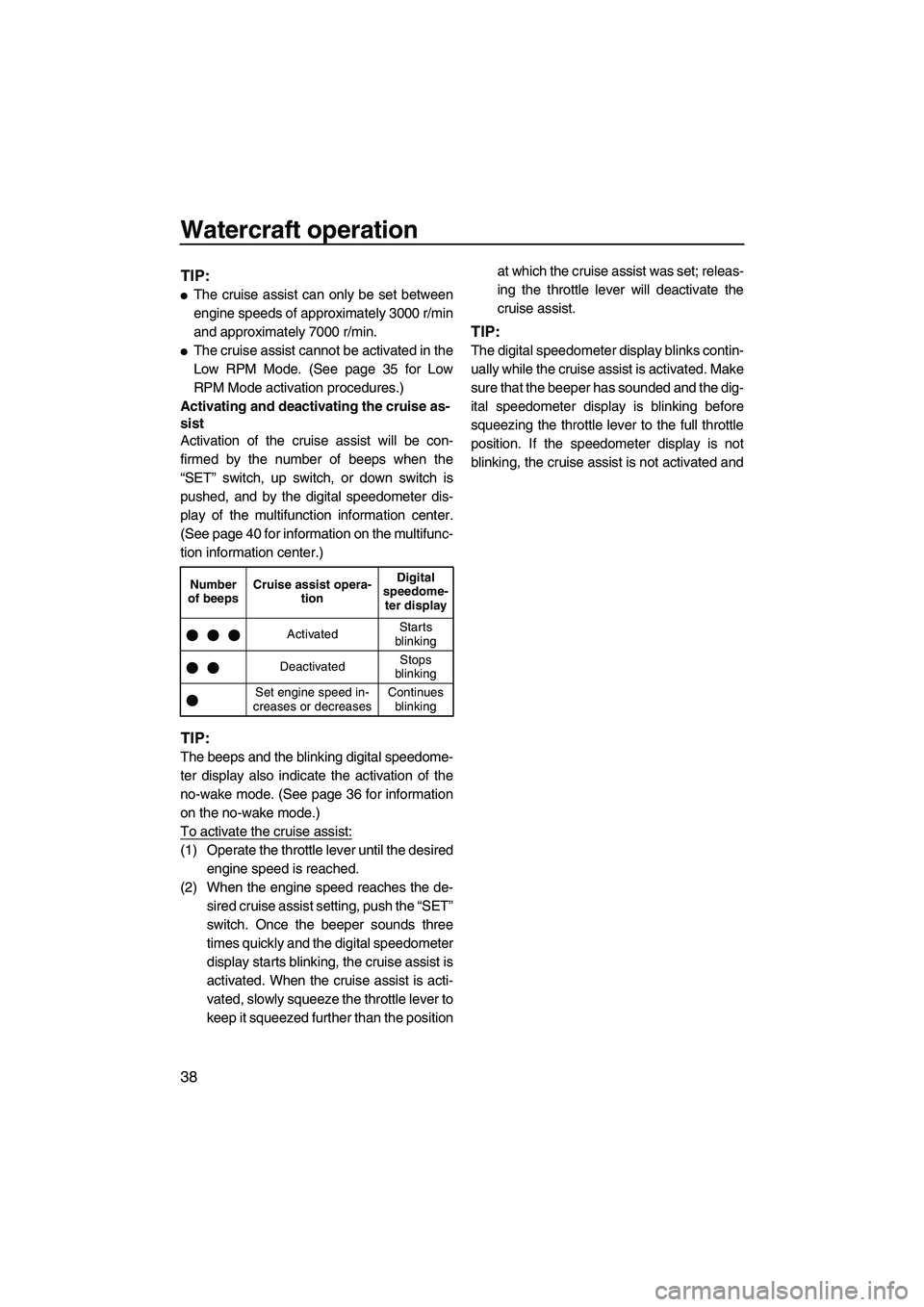
Activation of the cruise assist will be con-
firmed by the number of beeps when the
“SET” switch, up switch, or down switch is
pushed, and by the digital speedometer dis-
play of the multifunction information center.
(See page 40 for information on the multifunc-
tion information center.)
TIP:
The beeps and the blinking digital speedome-
ter display also indicate the activation of the
no-wake mode. (See page 36 for information
on the no-wake mode.)
To activate the cruise assist:
(1) Operate the throttle lever until the desired engine speed is reached.
(2) When the engine speed reaches the de- sired cruise assist setting, push the “SET”
switch. Once the beeper sounds three
times quickly and the digital speedometer
display starts blinking, the cruise assist is
activated. When the cruise assist is acti-
vated, slowly squeeze the throttle lever to
keep it squeezed further than the position at which the cruise assist was set; releas-
ing the throttle lever will deactivate the
cruise assist.
TIP:
The digital speedometer display blinks contin-
ually while the cruise assist is activated. Make
sure that the beeper has sounded and the dig-
ital speedometer display is blinking before
squeezing the throttle lever to the full throttle
position. If the speedometer display is not
blinking, the cruise assist is not activated and
Number
of beeps Cruise assist opera-
tion Digital
speedome- ter display
Activated Starts
blinking
Deactivated Stops
blinking
Set engine speed in-
creases or decreases Continues
blinking
UF2S71E0.book Page 38 Tuesday, August 21, 2012 2:33 PM
Page 46 of 116
Instrument operation
40
EJU42240
Multifunction information center
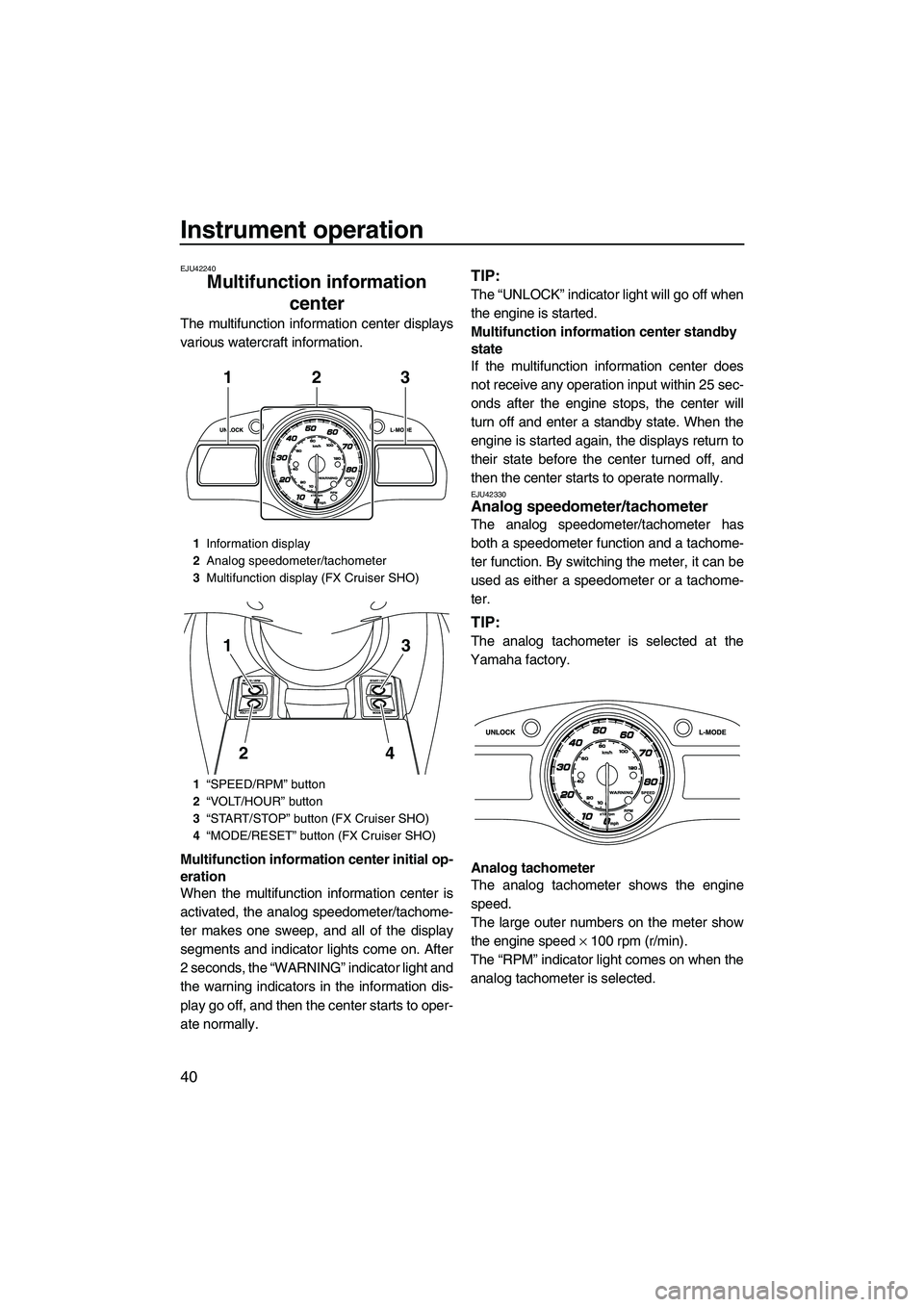
The multifunction information center displays
various watercraft information.
Multifunction information center initial op-
eration
When the multifunction information center is
activated, the analog speedometer/tachome-
ter makes one sweep, and all of the display
segments and indicator lights come on. After
2 seconds, the “WARNING” indicator light and
the warning indicators in the information dis-
play go off, and then the center starts to oper-
ate normally.
TIP:
The “UNLOCK” indicator light will go off when
the engine is started.
Multifunction information center standby
state
If the multifunction information center does
not receive any operation input within 25 sec-
onds after the engine stops, the center will
turn off and enter a standby state. When the
engine is started again, the displays return to
their state before the center turned off, and
then the center starts to operate normally.
EJU42330Analog speedometer/tachometer
The analog speedometer/tachometer has
both a speedometer function and a tachome-
ter function. By switching the meter, it can be
used as either a speedometer or a tachome-
ter.
TIP:
The analog tachometer is selected at the
Yamaha factory.
Analog tachometer
The analog tachometer shows the engine
speed.
The large outer numbers on the meter show
the engine speed × 100 rpm (r/min).
The “RPM” indicator light comes on when the
analog tachometer is selected.
1 Information display
2 Analog speedometer/tachometer
3 Multifunction display (FX Cruiser SHO)
1 “SPEED/RPM” button
2 “VOLT/HOUR” button
3 “START/STOP” button (FX Cruiser SHO)
4 “MODE/RESET” button (FX Cruiser SHO)
312
3
4
1
2
UF2S71E0.book Page 40 Tuesday, August 21, 2012 2:33 PM
Page 48 of 116
Instrument operation
42
TIP:
Miles are selected as the display units at the
Yamaha factory.
Digital speedometer display (mph)
The “SPEED” indicator light blinks three times
if miles are selected as the display units when
the multifunction information center is activat-
ed.
TIP:
If the analog speedometer is selected, the
“SPEED” indicator light blinks three times,
then comes on.
Digital speedometer display (km/h)
The “SPEED” indicator light blinks once if kilo-
meters are selected as the display units when
the multifunction information center is activat-
ed.
TIP:
If the analog speedometer is selected, the
“SPEED” indicator light blinks once, then
comes on.
To switch the digital speedometer display
units:
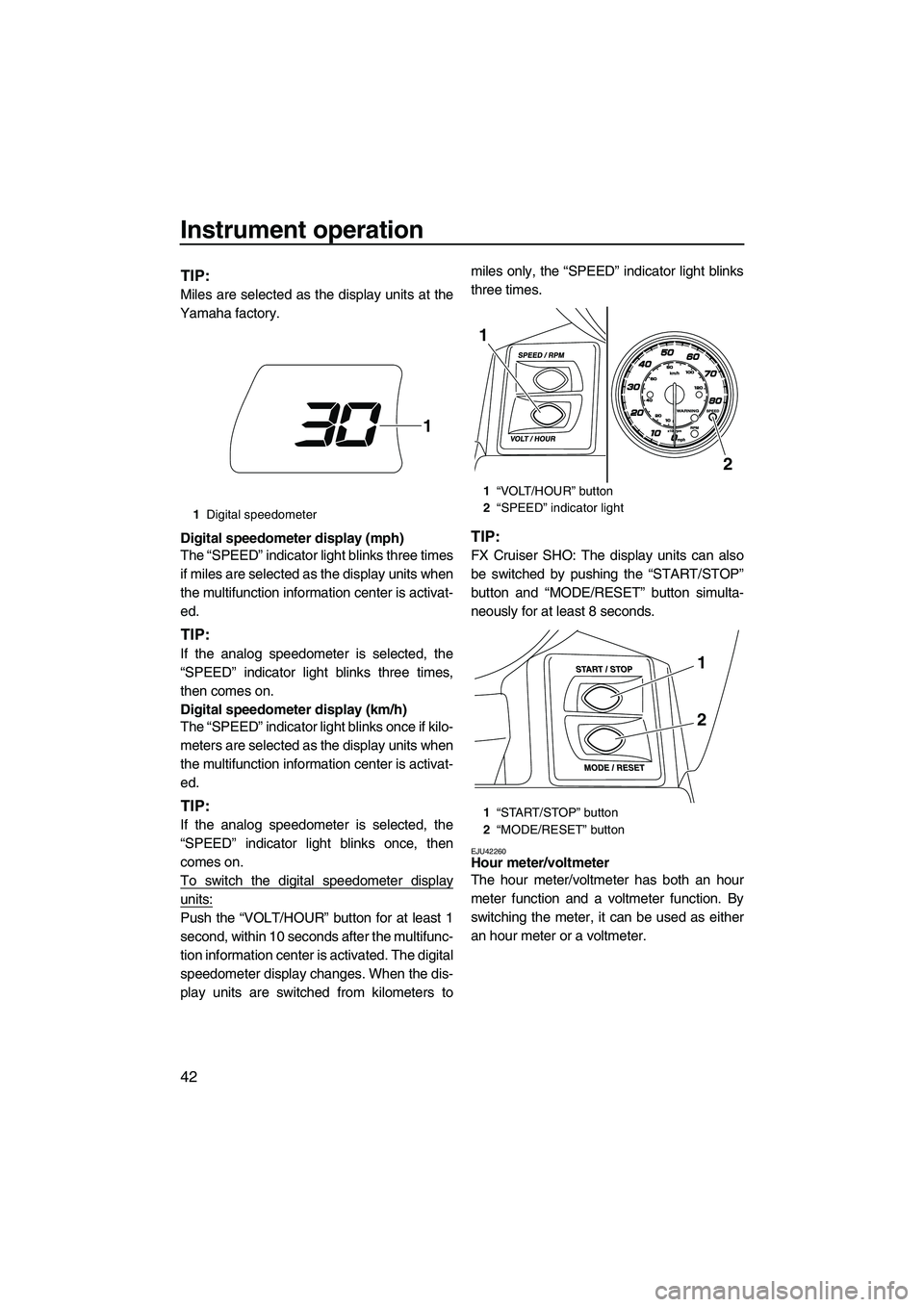
Push the “VOLT/HOUR” button for at least 1
second, within 10 seconds after the multifunc-
tion information center is activated. The digital
speedometer display changes. When the dis-
play units are switched from kilometers to miles only, the “SPEED” indicator light blinks
three times.
TIP:
FX Cruiser SHO: The display units can also
be switched by pushing the “START/STOP”
button and “MODE/RESET” button simulta-
neously for at least 8 seconds.
EJU42260Hour meter/voltmeter
The hour meter/voltmeter has both an hour
meter function and a voltmeter function. By
switching the meter, it can be used as either
an hour meter or a voltmeter.
1
Digital speedometer
1
1“VOLT/HOUR” button
2 “SPEED” indicator light
1 “START/STOP” button
2 “MODE/RESET” button
2
1
1
2
UF2S71E0.book Page 42 Tuesday, August 21, 2012 2:33 PM
Page 50 of 116
Instrument operation
44
TIP:
The accuracy of the fuel level meter varies de-
pending on the operating conditions. Use this
function as a reference only.
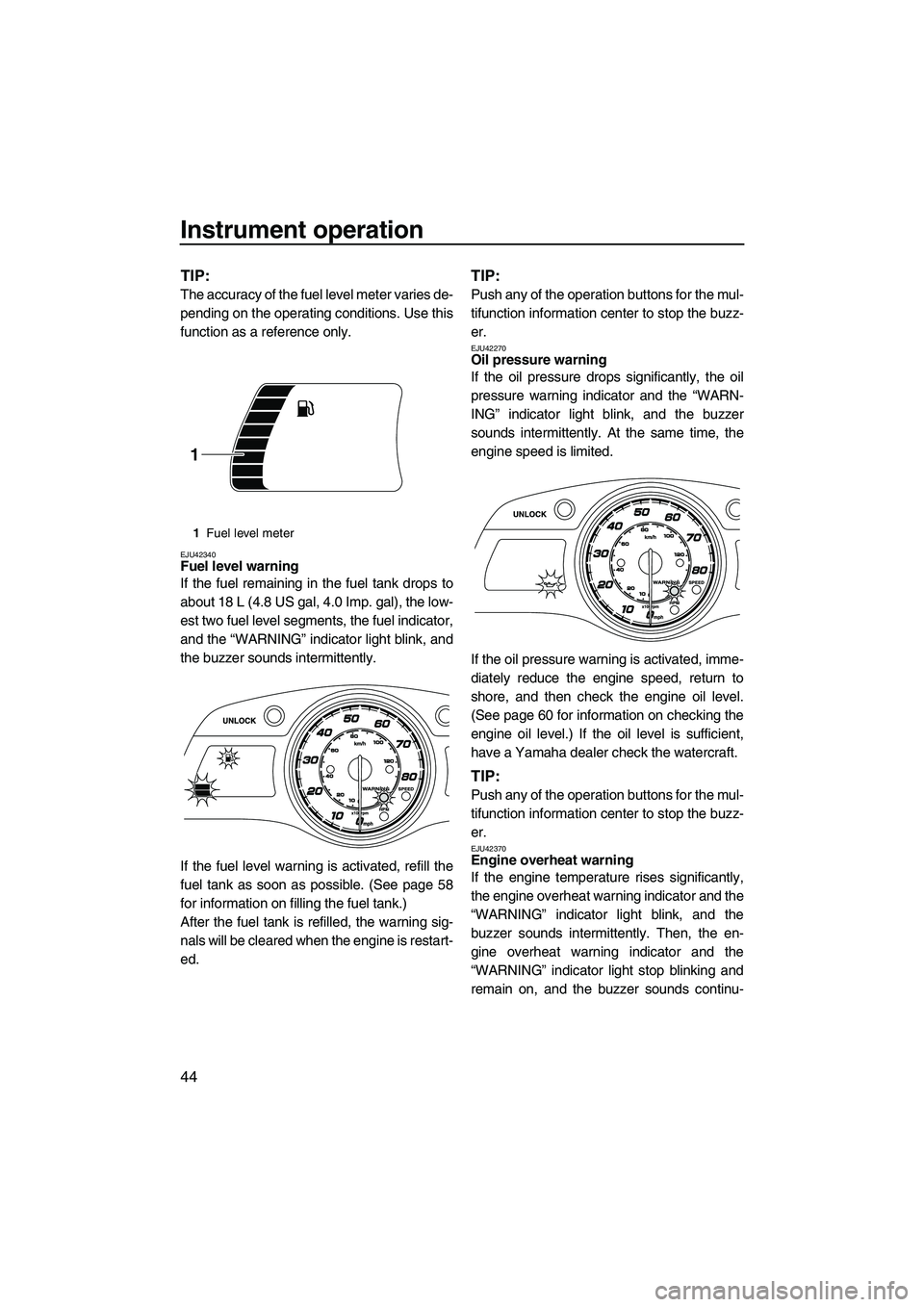
EJU42340Fuel level warning
If the fuel remaining in the fuel tank drops to
about 18 L (4.8 US gal, 4.0 Imp. gal), the low-
est two fuel level segments, the fuel indicator,
and the “WARNING” indicator light blink, and
the buzzer sounds intermittently.
If the fuel level warning is activated, refill the
fuel tank as soon as possible. (See page 58
for information on filling the fuel tank.)
After the fuel tank is refilled, the warning sig-
nals will be cleared when the engine is restart-
ed.
TIP:
Push any of the operation buttons for the mul-
tifunction information center to stop the buzz-
er.
EJU42270Oil pressure warning
If the oil pressure drops significantly, the oil
pressure warning indicator and the “WARN-
ING” indicator light blink, and the buzzer
sounds intermittently. At the same time, the
engine speed is limited.
If the oil pressure warning is activated, imme-
diately reduce the engine speed, return to
shore, and then check the engine oil level.
(See page 60 for information on checking the
engine oil level.) If the oil level is sufficient,
have a Yamaha dealer check the watercraft.
TIP:
Push any of the operation buttons for the mul-
tifunction information center to stop the buzz-
er.
EJU42370Engine overheat warning
If the engine temperature rises significantly,
the engine overheat warning indicator and the
“WARNING” indicator light blink, and the
buzzer sounds intermittently. Then, the en-
gine overheat warning indicator and the
“WARNING” indicator light stop blinking and
remain on, and the buzzer sounds continu-
1Fuel level meter
1
UF2S71E0.book Page 44 Tuesday, August 21, 2012 2:33 PM
Page 52 of 116
Instrument operation
46
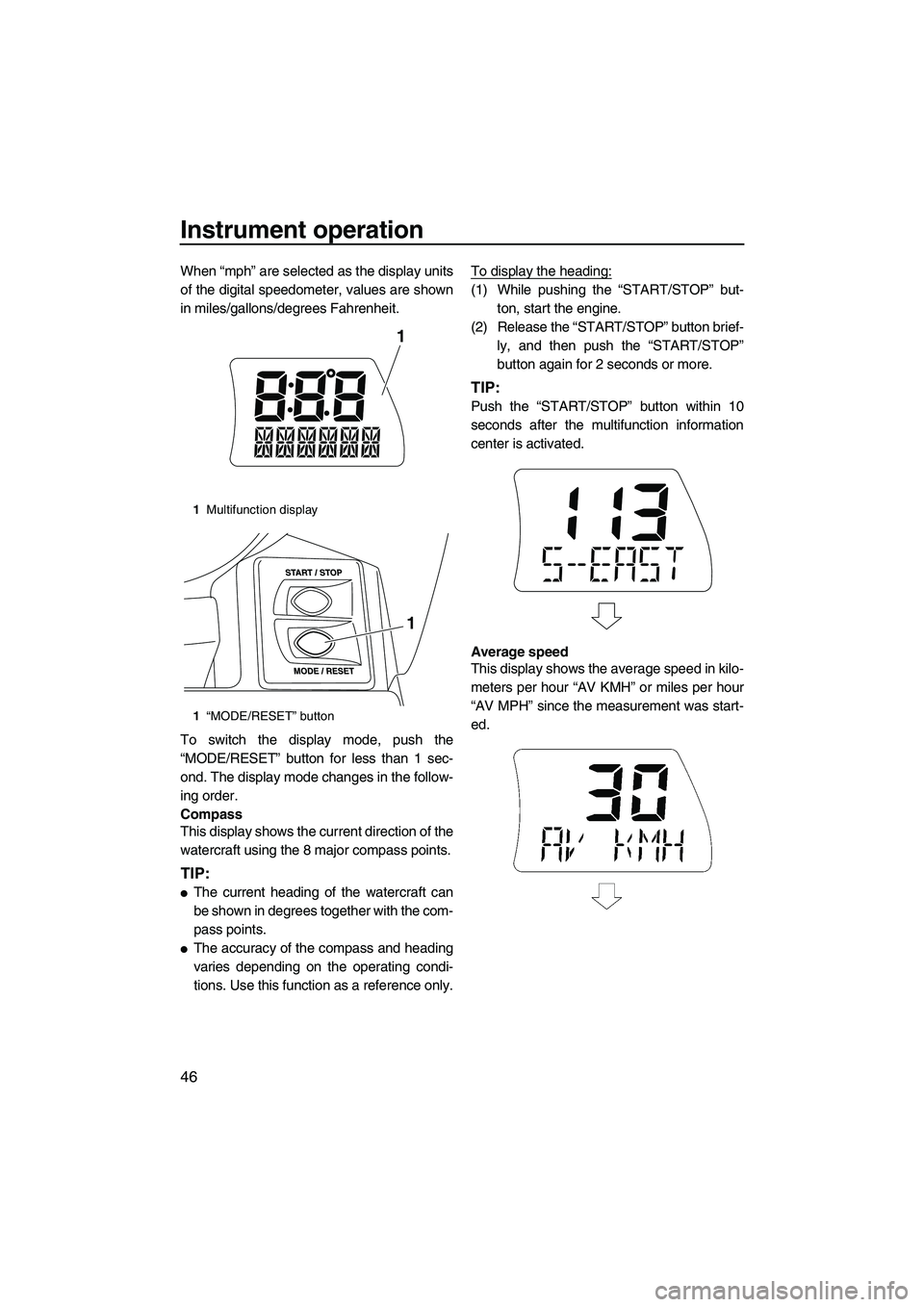
When “mph” are selected as the display units
of the digital speedometer, values are shown
in miles/gallons/degrees Fahrenheit.
To switch the display mode, push the
“MODE/RESET” button for less than 1 sec-
ond. The display mode changes in the follow-
ing order.
Compass
This display shows the current direction of the
watercraft using the 8 major compass points.
TIP:
●The current heading of the watercraft can
be shown in degrees together with the com-
pass points.
●The accuracy of the compass and heading
varies depending on the operating condi-
tions. Use this function as a reference only.To display the heading:
(1) While pushing the “START/STOP” but-
ton, start the engine.
(2) Release the “START/STOP” button brief- ly, and then push the “START/STOP”
button again for 2 seconds or more.
TIP:
Push the “START/STOP” button within 10
seconds after the multifunction information
center is activated.
Average speed
This display shows the average speed in kilo-
meters per hour “AV KMH” or miles per hour
“AV MPH” since the measurement was start-
ed.
1Multifunction display
1 “MODE/RESET” button
1
1
UF2S71E0.book Page 46 Tuesday, August 21, 2012 2:33 PM
Page 54 of 116
Instrument operation
48
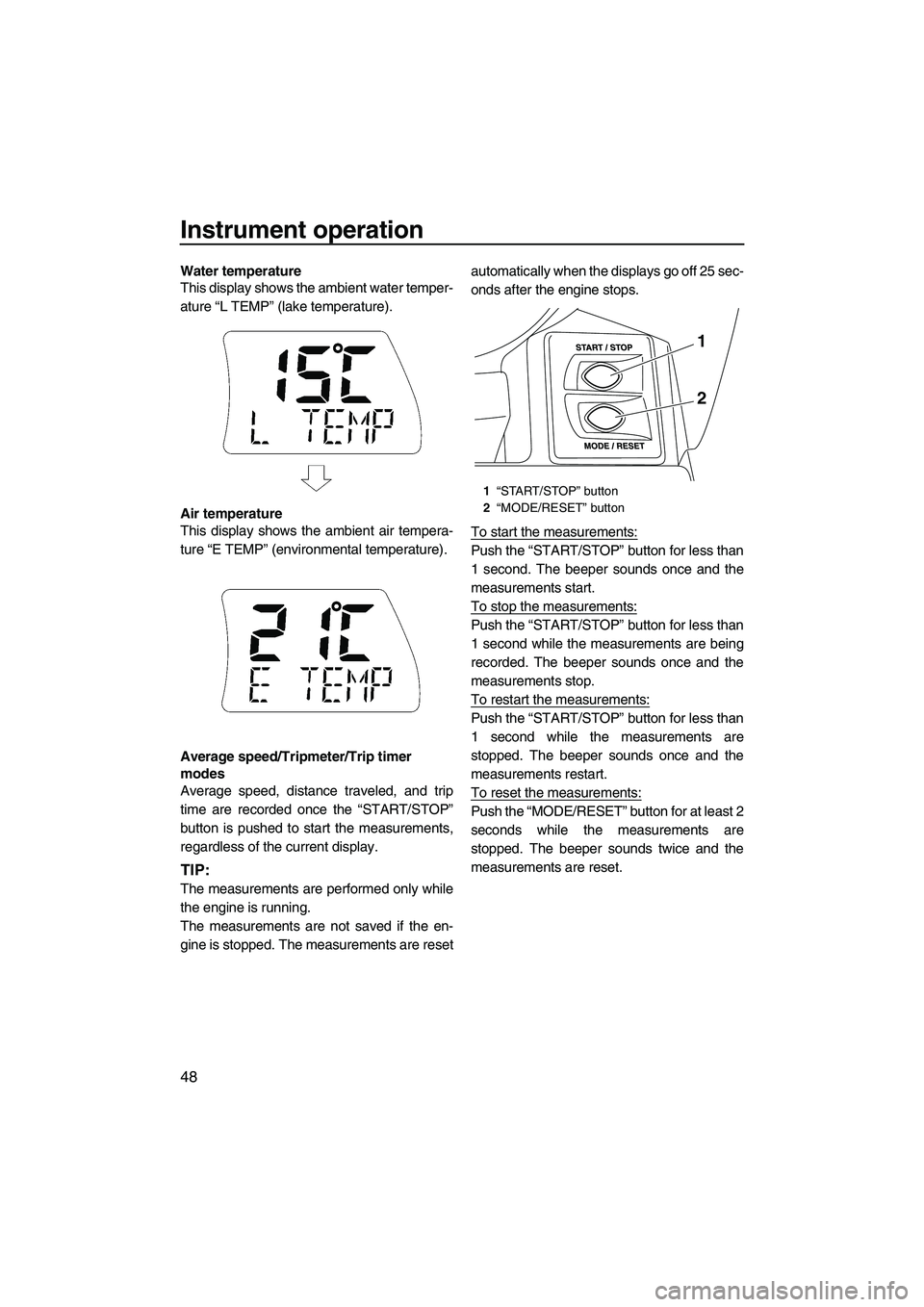
Water temperature
This display shows the ambient water temper-
ature “L TEMP” (lake temperature).
Air temperature
This display shows the ambient air tempera-
ture “E TEMP” (environmental temperature).
Average speed/Tripmeter/Trip timer
modes
Average speed, distance traveled, and trip
time are recorded once the “START/STOP”
button is pushed to start the measurements,
regardless of the current display.
TIP:
The measurements are performed only while
the engine is running.
The measurements are not saved if the en-
gine is stopped. The measurements are resetautomatically when the displays go off 25 sec-
onds after the engine stops.
To start the measurements:
Push the “START/STOP” button for less than
1 second. The beeper sounds once and the
measurements start.
To stop the measurements:
Push the “START/STOP” button for less than
1 second while the measurements are being
recorded. The beeper sounds once and the
measurements stop.
To restart the measurements:
Push the “START/STOP” button for less than
1 second while the measurements are
stopped. The beeper sounds once and the
measurements restart.
To reset the measurements:
Push the “MODE/RESET” button for at least 2
seconds while the measurements are
stopped. The beeper sounds twice and the
measurements are reset.
1
“START/STOP” button
2 “MODE/RESET” button
1
2
UF2S71E0.book Page 48 Tuesday, August 21, 2012 2:33 PM
Page 68 of 116
Operation and handling requirements
62
maining moisture in the engine compart-
ment with a dry cloth.
(4) Securely install the stern drain plugs by tightening them until they stop. NOTICE:
Before installing the stern drain plugs,
clean the drain plug threads to remove
any foreign materials, such as dirt or
sand. Otherwise, the stern drain plugs
could be damaged, allowing water to
enter the engine compartment. Make
sure that the stern drain plugs are
tightened securely before launching
the watercraft. Otherwise, water may
flood the engine compartment and
cause the watercraft to submerge.
[ECJ00361]
EJU42170
Draining the bilge water on water
A small quantity of bilge water will remain in
the engine compartment even after the bilge
water is drained on water. To completely drain
the bilge water, remove the watercraft from
the water and drain the bilge water on land.
Jet vacuum bilge draining system
While the watercraft is operating, bilge water
in the engine compartment is drawn in by the
vacuum that is generated in the jet pump and
discharged from the watercraft through the jet
thrust nozzle.
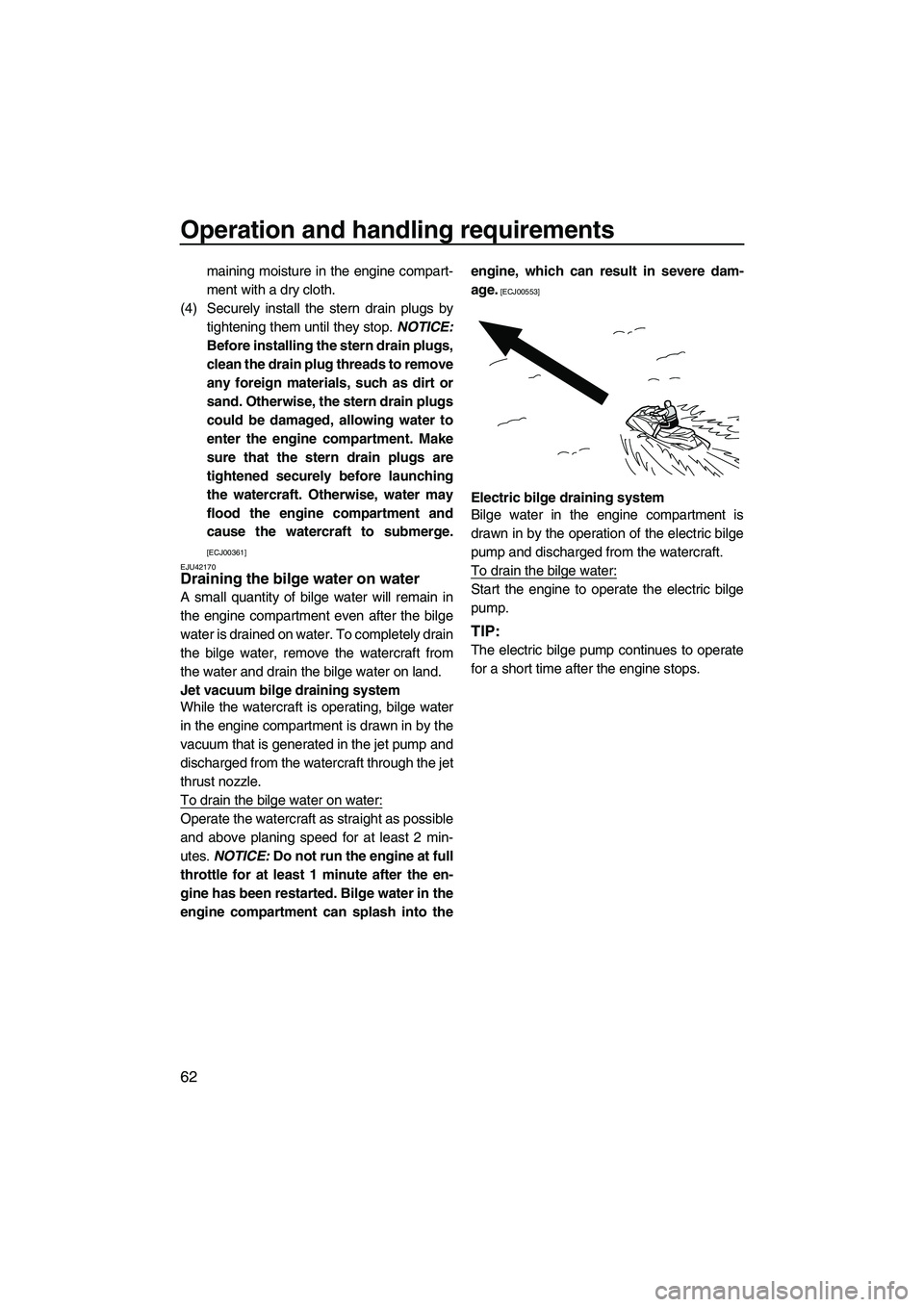
To drain the bilge water on water:
Operate the watercraft as straight as possible
and above planing speed for at least 2 min-
utes. NOTICE: Do not run the engine at full
throttle for at least 1 minute after the en-
gine has been restarted. Bilge water in the
engine compartment can splash into the engine, which can result in severe dam-
age.
[ECJ00553]
Electric bilge draining system
Bilge water in the engine compartment is
drawn in by the operation of the electric bilge
pump and discharged from the watercraft.
To drain the bilge water:
Start the engine to operate the electric bilge
pump.
TIP:
The electric bilge pump continues to operate
for a short time after the engine stops.
UF2S71E0.book Page 62 Tuesday, August 21, 2012 2:33 PM
Page 71 of 116
Pre-operation checks
65
EJU31981
WARNING
EWJ00411
Failure to inspect or maintain the watercraft properly increases the possibility of an ac-
cident or damage to the watercraft. Do not operate the watercraft if you find any prob-
lem. If a problem cannot be corrected by the procedures provided in this manual, have
the watercraft inspected by a Yamaha dealer.
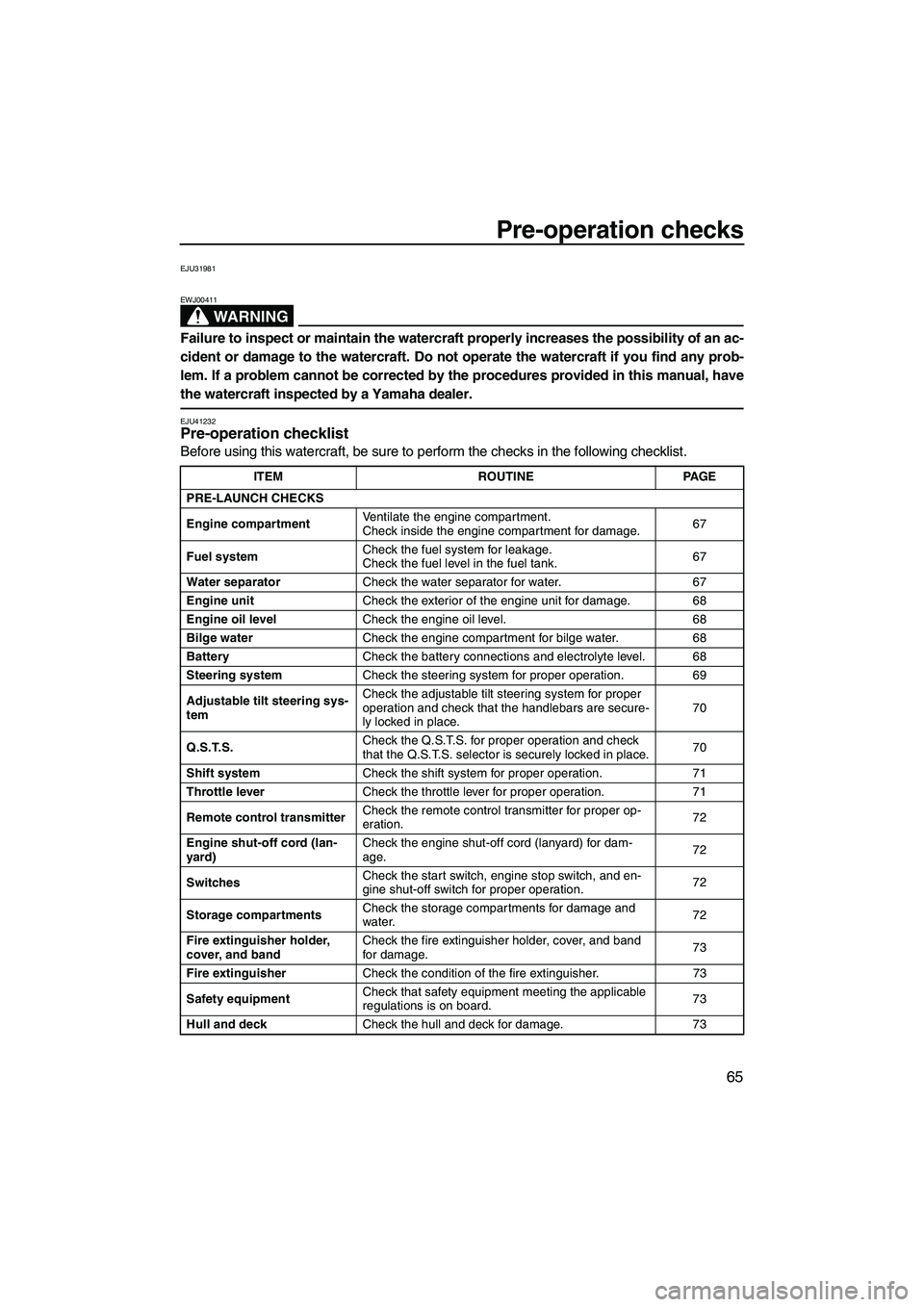
EJU41232Pre-operation checklist
Before using this watercraft, be sure to perform the checks in the following checklist.
ITEM ROUTINEPAGE
PRE-LAUNCH CHECKS
Engine compartment Ventilate the engine compartment.
Check inside the engine compartment for damage.
67
Fuel system Check the fuel system for leakage.
Check the fuel level in the fuel tank.
67
Water separator Check the water separator for water. 67
Engine unit Check the exterior of the engine unit for damage. 68
Engine oil level Check the engine oil level. 68
Bilge water Check the engine compartment for bilge water. 68
Battery Check the battery connections and electrolyte level. 68
Steering system Check the steering system for proper operation. 69
Adjustable tilt steering sys-
tem Check the adjustable tilt steering system for proper
operation and check that the handlebars are secure-
ly locked in place.
70
Q.S.T.S. Check the Q.S.T.S. for proper operation and check
that the Q.S.T.S. selector is securely locked in place.
70
Shift system Check the shift system for proper operation. 71
Throttle lever Check the throttle lever for proper operation. 71
Remote control transmitter Check the remote control transmitter for proper op-
eration.
72
Engine shut-off cord (lan-
yard) Check the engine shut-off cord (lanyard) for dam-
age.
72
Switches Check the start switch, engine stop switch, and en-
gine shut-off switch for proper operation.
72
Storage compartments Check the storage compartments for damage and
water.
72
Fire extinguisher holder,
cover, and band Check the fire extinguisher holder, cover, and band
for damage.
73
Fire extinguisher Check the condition of the fire extinguisher. 73
Safety equipment Check that safety equipment meeting the applicable
regulations is on board.
73
Hull and deck Check the hull and deck for damage. 73
UF2S71E0.book Page 65 Tuesday, August 21, 2012 2:33 PM
Page 78 of 116
Pre-operation checks
72
EJU40112Remote control transmitter check
Make sure that the remote control transmitter
operates properly. (See page 27 for Yamaha
Security System setting procedures and page
35 for Low RPM Mode activation procedures.)
EJU32663Engine shut-off cord (lanyard) check
Make sure that the engine shut-off cord (lan-
yard) is not damaged. If the cord is damaged,
replace it. WARNING! Never try to repair
the engine shut-off cord (lanyard) or tie it
together. The engine shut-off cord (lan-
yard) may not pull free when the operator
falls off, allowing the watercraft to contin-
ue to run and cause an accident.
[EWJ01220]
EJU32675
Switch checks
NOTICE
ECJ01310
Do not run the engine over 4000 r/min on
land. Also, do not run the engine for more
than 15 seconds without supplying water,
otherwise the engine could overheat.
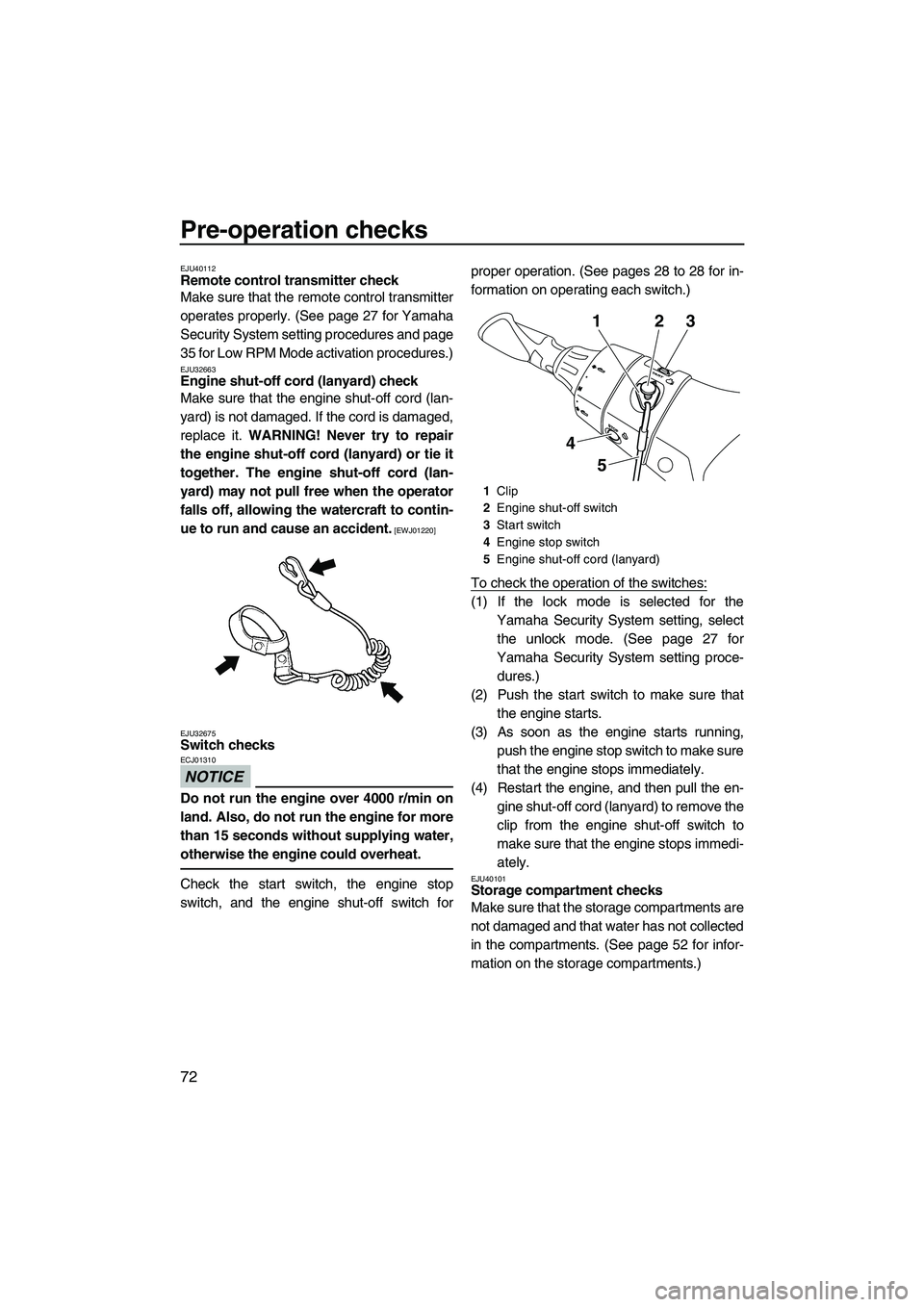
Check the start switch, the engine stop
switch, and the engine shut-off switch for proper operation. (See pages 28 to 28 for in-
formation on operating each switch.)
To check the operation of the switches:
(1) If the lock mode is selected for the
Yamaha Security System setting, selectthe unlock mode. (See page 27 for
Yamaha Security System setting proce- dures.)
(2) Push the start switch to make sure that the engine starts.
(3) As soon as the engine starts running, push the engine stop switch to make sure
that the engine stops immediately.
(4) Restart the engine, and then pull the en- gine shut-off cord (lanyard) to remove the
clip from the engine shut-off switch to
make sure that the engine stops immedi-
ately.
EJU40101Storage compartment checks
Make sure that the storage compartments are
not damaged and that water has not collected
in the compartments. (See page 52 for infor-
mation on the storage compartments.)
1Clip
2 Engine shut-off switch
3 Start switch
4 Engine stop switch
5 Engine shut-off cord (lanyard)
132
5
4
UF2S71E0.book Page 72 Tuesday, August 21, 2012 2:33 PM