fuel YAMAHA XCITY 125 2012 Owners Manual
[x] Cancel search | Manufacturer: YAMAHA, Model Year: 2012, Model line: XCITY 125, Model: YAMAHA XCITY 125 2012Pages: 86, PDF Size: 7.38 MB
Page 6 of 86

TABLE OF CONTENTSSAFETY INFORMATION ..................1-1
Further safe-riding points ................1-5
DESCRIPTION ..................................2-1
Left view ..........................................2-1
Right view ........................................2-2
Controls and instruments.................2-3
INSTRUMENT AND CONTROL
FUNCTIONS.......................................3-1
Immobilizer system .........................3-1
Main switch/steering lock ................3-2
Indicator lights and warning light ....3-3
Speedometer ..................................3-4
Fuel gauge ......................................3-5
Coolant temperature gauge ............3-5
Multi-function display ......................3-5
Handlebar switches ........................3-8
Front brake lever ............................3-9
Rear brake lever .............................3-9
Fuel tank cap ................................3-10
Fuel ...............................................3-10
Catalytic converters ......................3-12
Seat ..............................................3-12
Storage compartments .................3-13
Windshield ....................................3-14
Adjusting the shock absorber
assemblies ................................3-15
Carrier ...........................................3-16
Luggage hook ...............................3-16
Sidestand ......................................3-16Ignition circuit cut-off system ........ 3-17
FOR YOUR SAFETY –
PRE-OPERATION CHECKS............. 4-1
OPERATION AND IMPORTANT
RIDING POINTS................................. 5-1
Starting the engine ......................... 5-1
Starting off ...................................... 5-2
Acceleration and deceleration ........ 5-3
Braking ........................................... 5-3
Tips for reducing fuel
consumption ............................... 5-4
Engine break-in .............................. 5-4
Parking ........................................... 5-5
PERIODIC MAINTENANCE AND
ADJUSTMENT................................... 6-1
Owner’s tool kit ............................... 6-2
Periodic maintenance chart for the
emission control system ............. 6-3
General maintenance and
lubrication chart .......................... 6-4
Removing and installing cowlings
and panels .................................. 6-8
Checking the spark plug ................. 6-9
Engine oil ..................................... 6-10
Final transmission oil .................... 6-13
Coolant ......................................... 6-14
Air filter and V-belt case air filter
elements ................................... 6-15Checking the throttle grip free
play ........................................... 6-16
Valve clearance ........................... 6-17
Tires ............................................. 6-17
Cast wheels ................................. 6-19
Front and rear brake lever free
play ........................................... 6-19
Checking the front and rear brake
pads .......................................... 6-20
Checking the brake fluid level ...... 6-21
Changing the brake fluid .............. 6-22
Checking and lubricating the
cables ....................................... 6-22
Checking and lubricating the
throttle grip and cable ............... 6-23
Lubricating the front and rear
brake levers .............................. 6-23
Checking and lubricating the
centerstand and sidestand ....... 6-23
Checking the front fork ................. 6-24
Checking the steering .................. 6-25
Checking the wheel bearings ....... 6-25
Battery ......................................... 6-25
Replacing the fuses ..................... 6-27
Replacing a headlight bulb .......... 6-28
Replacing a front turn signal light
bulb ........................................... 6-29
Replacing a tail/brake light bulb or
a rear turn signal light bulb ....... 6-30
Replacing the license plate light
bulb ........................................... 6-31U16PE3E0.book Page 1 Tuesday, June 19, 2012 5:17 PM
Page 15 of 86
DESCRIPTION
2-2
2
EAU10420
Right view
2 13 4
5 6 7 8
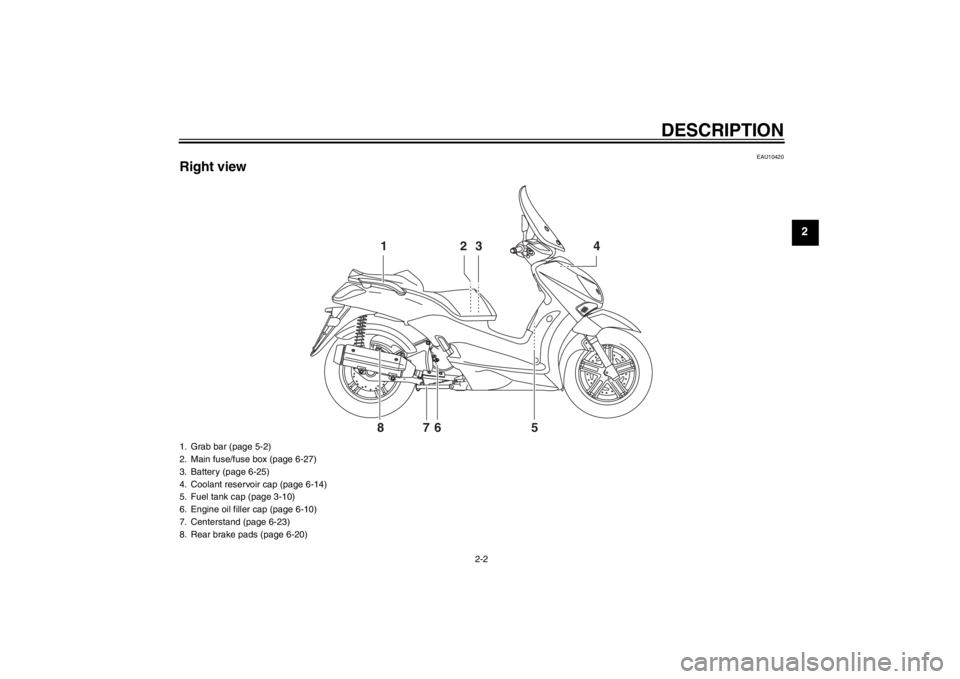
1. Grab bar (page 5-2)
2. Main fuse/fuse box (page 6-27)
3. Battery (page 6-25)
4. Coolant reservoir cap (page 6-14)
5. Fuel tank cap (page 3-10)
6. Engine oil filler cap (page 6-10)
7. Centerstand (page 6-23)
8. Rear brake pads (page 6-20)
U16PE3E0.book Page 2 Tuesday, June 19, 2012 5:17 PM
Page 21 of 86
INSTRUMENT AND CONTROL FUNCTIONS
3-5
3
EAUM1471
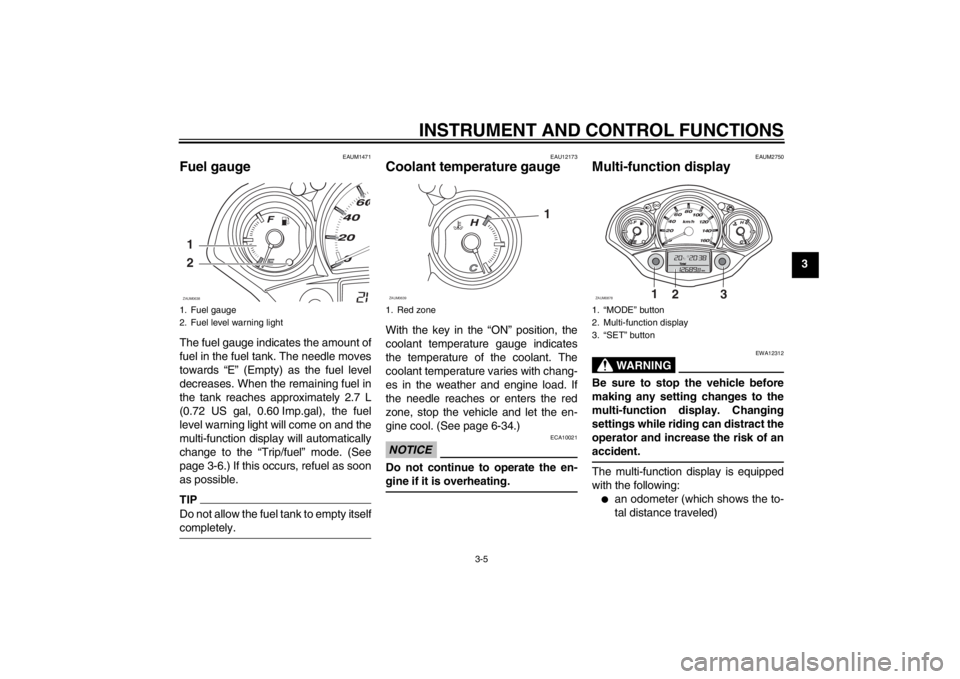
Fuel gauge The fuel gauge indicates the amount of
fuel in the fuel tank. The needle moves
towards “E” (Empty) as the fuel level
decreases. When the remaining fuel in
the tank reaches approximately 2.7 L
(0.72 US gal, 0.60 Imp.gal), the fuel
level warning light will come on and the
multi-function display will automatically
change to the “Trip/fuel” mode. (See
page 3-6.) If this occurs, refuel as soon
as possible.TIPDo not allow the fuel tank to empty itself
completely.
EAU12173
Coolant temperature gauge With the key in the “ON” position, the
coolant temperature gauge indicates
the temperature of the coolant. The
coolant temperature varies with chang-
es in the weather and engine load. If
the needle reaches or enters the red
zone, stop the vehicle and let the en-
gine cool. (See page 6-34.)NOTICE
ECA10021
Do not continue to operate the en-
gine if it is overheating.
EAUM2750
Multi-function display
WARNING
EWA12312
Be sure to stop the vehicle before
making any setting changes to the
multi-function display. Changing
settings while riding can distract the
operator and increase the risk of an
accident.The multi-function display is equipped
with the following:●
an odometer (which shows the to-
tal distance traveled)
1. Fuel gauge
2. Fuel level warning light1
2ZAUM0638
1. Red zone
1
ZAUM0639
1. “MODE” button
2. Multi-function display
3. “SET” button
1
2
3
ZAUM0878
U16PE3E0.book Page 5 Tuesday, June 19, 2012 5:17 PM
Page 22 of 86
INSTRUMENT AND CONTROL FUNCTIONS
3-6
3
●
two tripmeters (which show the
distance traveled since they were
last set to zero, the time passed
since the tripmeters were set to ze-
ro, and the average speed traveled
during this time)
●
a fuel reserve tripmeter (which
shows the distance traveled since
the fuel level warning light came
on)
●
a clock
●
an ambient temperature display
●
an oil change indicator (which
comes on when the engine oil
should be changed)
TIP●
For the UK, the distance traveled
is displayed in miles and the tem-
perature reading is displayed in °F.
●
For other countries, the distance
traveled is displayed in kilometers
and the temperature reading is dis-
played in °C.
Odometer and tripmeter modes
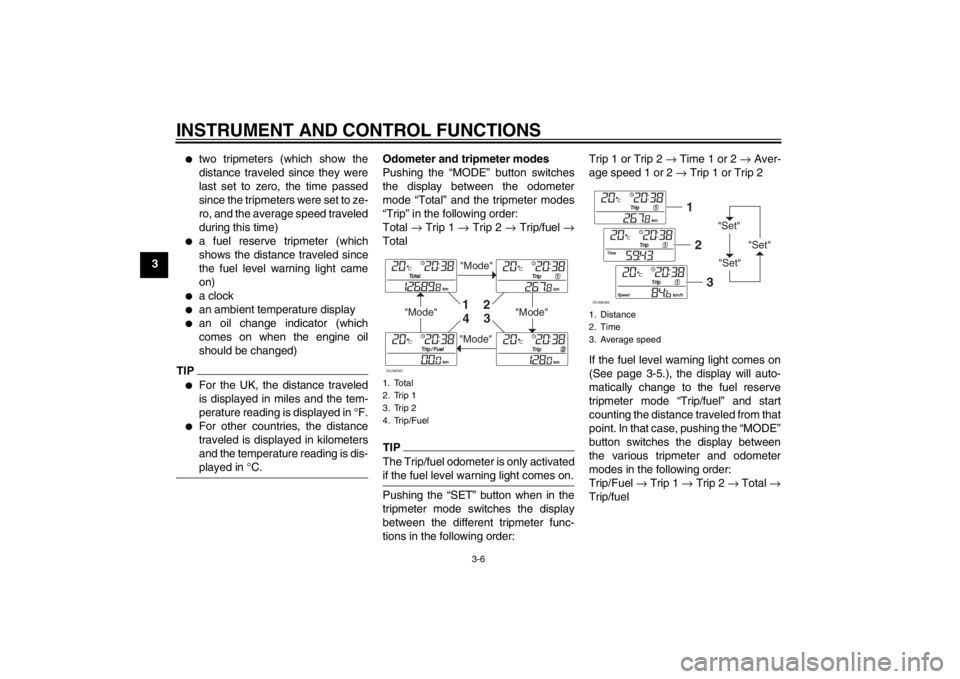
Pushing the “MODE” button switches
the display between the odometer
mode “Total” and the tripmeter modes
“Trip” in the following order:
Total → Trip 1 → Trip 2 → Trip/fuel →
TotalTIPThe Trip/fuel odometer is only activated
if the fuel level warning light comes on.Pushing the “SET” button when in the
tripmeter mode switches the display
between the different tripmeter func-
tions in the following order:Trip 1 or Trip 2 → Time 1 or 2 → Aver-
age speed 1 or 2 → Trip 1 or Trip 2
If the fuel level warning light comes on
(See page 3-5.), the display will auto-
matically change to the fuel reserve
tripmeter mode “Trip/fuel” and start
counting the distance traveled from that
point. In that case, pushing the “MODE”
button switches the display between
the various tripmeter and odometer
modes in the following order:
Trip/Fuel → Trip 1 → Trip 2 → Total →
Trip/fuel1. Total
2. Trip 1
3. Trip 2
4. Trip/Fuel
"Mode"
"Mode"
"Mode"
"Mode"
1
2
3
4
ZAUM0391
1. Distance
2. Time
3. Average speed
"Set"
"Set""Set"
12
3
ZAUM0392
U16PE3E0.book Page 6 Tuesday, June 19, 2012 5:17 PM
Page 23 of 86
INSTRUMENT AND CONTROL FUNCTIONS
3-7
3
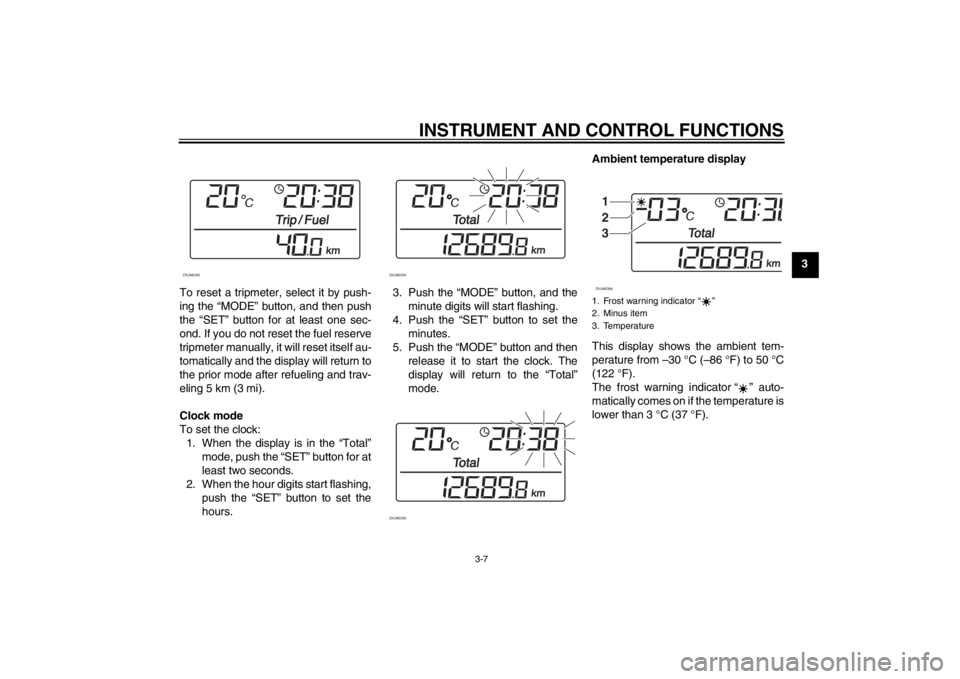
To reset a tripmeter, select it by push-
ing the “MODE” button, and then push
the “SET” button for at least one sec-
ond. If you do not reset the fuel reserve
tripmeter manually, it will reset itself au-
tomatically and the display will return to
the prior mode after refueling and trav-
eling 5 km (3 mi).
Clock mode
To set the clock:
1. When the display is in the “Total”
mode, push the “SET” button for at
least two seconds.
2. When the hour digits start flashing,
push the “SET” button to set the
hours.3. Push the “MODE” button, and the
minute digits will start flashing.
4. Push the “SET” button to set the
minutes.
5. Push the “MODE” button and then
release it to start the clock. The
display will return to the “Total”
mode.Ambient temperature display
This display shows the ambient tem-
perature from –30 °C (–86 °F) to 50 °C
(122 °F).
The frost warning indicator “ ” auto-
matically comes on if the temperature is
lower than 3 °C (37 °F).
ZAUM0393
ZAUM0394
ZAUM0395
1. Frost warning indicator ì î
2. Minus item
3. Temperature
1
2
3ZAUM0396
U16PE3E0.book Page 7 Tuesday, June 19, 2012 5:17 PM
Page 26 of 86
INSTRUMENT AND CONTROL FUNCTIONS
3-10
3
EAUM2161
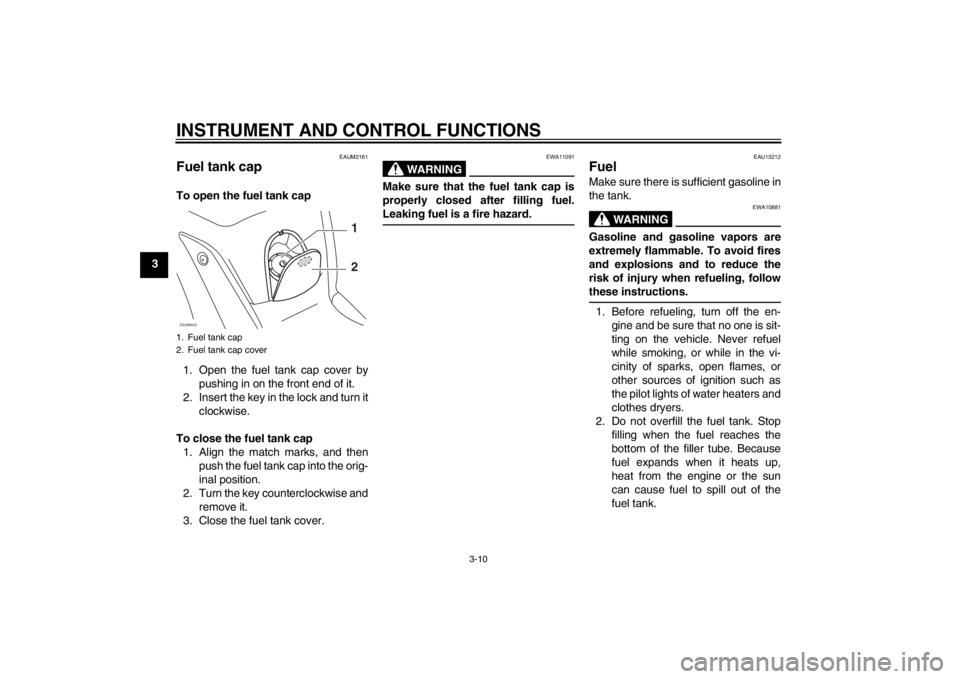
Fuel tank cap To open the fuel tank cap
1. Open the fuel tank cap cover by
pushing in on the front end of it.
2. Insert the key in the lock and turn it
clockwise.
To close the fuel tank cap
1. Align the match marks, and then
push the fuel tank cap into the orig-
inal position.
2. Turn the key counterclockwise and
remove it.
3. Close the fuel tank cover.
WARNING
EWA11091
Make sure that the fuel tank cap is
properly closed after filling fuel.
Leaking fuel is a fire hazard.
EAU13212
Fuel Make sure there is sufficient gasoline in
the tank.
WARNING
EWA10881
Gasoline and gasoline vapors are
extremely flammable. To avoid fires
and explosions and to reduce the
risk of injury when refueling, follow
these instructions.1. Before refueling, turn off the en-
gine and be sure that no one is sit-
ting on the vehicle. Never refuel
while smoking, or while in the vi-
cinity of sparks, open flames, or
other sources of ignition such as
the pilot lights of water heaters and
clothes dryers.
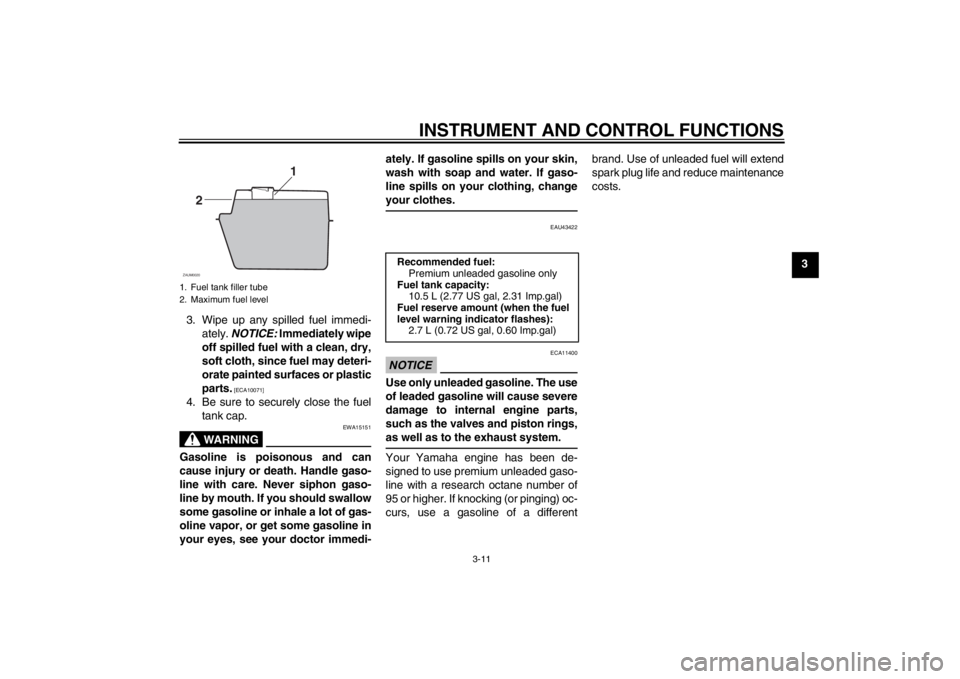
2. Do not overfill the fuel tank. Stop
filling when the fuel reaches the
bottom of the filler tube. Because
fuel expands when it heats up,
heat from the engine or the sun
can cause fuel to spill out of the
fuel tank.
1. Fuel tank cap
2. Fuel tank cap coverZAUM0643
1
2
U16PE3E0.book Page 10 Tuesday, June 19, 2012 5:17 PM
Page 27 of 86
INSTRUMENT AND CONTROL FUNCTIONS
3-11
3
3. Wipe up any spilled fuel immedi-
ately. NOTICE: Immediately wipe
off spilled fuel with a clean, dry,
soft cloth, since fuel may deteri-
orate painted surfaces or plastic
parts.
[ECA10071]
4. Be sure to securely close the fuel
tank cap.
WARNING
EWA15151
Gasoline is poisonous and can
cause injury or death. Handle gaso-
line with care. Never siphon gaso-
line by mouth. If you should swallow
some gasoline or inhale a lot of gas-
oline vapor, or get some gasoline in
your eyes, see your doctor immedi-ately. If gasoline spills on your skin,
wash with soap and water. If gaso-
line spills on your clothing, change
your clothes.
EAU43422
NOTICE
ECA11400
Use only unleaded gasoline. The use
of leaded gasoline will cause severe
damage to internal engine parts,
such as the valves and piston rings,
as well as to the exhaust system.Your Yamaha engine has been de-
signed to use premium unleaded gaso-
line with a research octane number of
95 or higher. If knocking (or pinging) oc-
curs, use a gasoline of a differentbrand. Use of unleaded fuel will extend
spark plug life and reduce maintenance
costs.
1. Fuel tank filler tube
2. Maximum fuel level
1
2
ZAUM0020
Recommended fuel:
Premium unleaded gasoline only
Fuel tank capacity:
10.5 L (2.77 US gal, 2.31 Imp.gal)
Fuel reserve amount (when the fuel
level warning indicator flashes):
2.7 L (0.72 US gal, 0.60 Imp.gal)
U16PE3E0.book Page 11 Tuesday, June 19, 2012 5:17 PM
Page 35 of 86
FOR YOUR SAFETY – PRE-OPERATION CHECKS
4-1
4
EAU15596
Inspect your vehicle each time you use it to make sure the vehicle is in safe operating condition. Always follow the inspection
and maintenance procedures and schedules described in the Owner’s Manual.
WARNING
EWA11151
Failure to inspect or maintain the vehicle properly increases the possibility of an accident or equipment damage.
Do not operate the vehicle if you find any problem. If a problem cannot be corrected by the procedures provided in
this manual, have the vehicle inspected by a Yamaha dealer.Before using this vehicle, check the following points:
ITEM CHECKS PAGE
Fuel Check fuel level in fuel tank.
Refuel if necessary.
Check fuel line for leakage.3-10
Engine oil Check oil level in engine.
If necessary, add recommended oil to specified level.
Check vehicle for oil leakage.6-10
Final transmission oil Check vehicle for oil leakage. 6-13
Coolant Check coolant level in reservoir.
If necessary, add recommended coolant to specified level.
Check cooling system for leakage.6-14
Front brake Check operation.
If soft or spongy, have Yamaha dealer bleed hydraulic system.
Check brake pads for wear.
Replace if necessary.
Check fluid level in reservoir.
If necessary, add specified brake fluid to specified level.
Check hydraulic system for leakage.6-19, 6-20, 6-21
U16PE3E0.book Page 1 Tuesday, June 19, 2012 5:17 PM
Page 37 of 86
OPERATION AND IMPORTANT RIDING POINTS
5-1
5
EAU15951
Read the Owner’s Manual carefully to
become familiar with all controls. If
there is a control or function you do not
understand, ask your Yamaha dealer.
WARNING
EWA10271
Failure to familiarize yourself with
the controls can lead to loss of con-
trol, which could cause an accident
or injury.
EAU45310
TIPThis model is equipped with a lean an-
gle sensor to stop the engine in case of
a turnover. To start the engine after a
turnover, be sure to turn the main
switch to “OFF” and then to “ON”. Fail-
ing to do so will prevent the engine from
starting even though the engine will
crank when pushing the start switch.
EAUM2233
Starting the engine NOTICE
ECA10250
See page 5-4 for engine break-in in-
structions prior to operating the ve-
hicle for the first time.In order for the ignition circuit cut-off
system to enable starting, the side-
stand must be up.
See page 3-17 for more information.
1. Turn the key to “ON”.
The following warning lights and
indicator light should come on for a
few seconds, then go off.
●
Fuel level warning light
●
Engine trouble warning light
●
Immobilizer system indicator
light
NOTICE
ECA11833
If a warning or indicator light does
not come on initially when the key is
turned to “ON”, or if a warning or in-
dicator light remains on, see page
3-3 for the corresponding warning
and indicator light circuit check.2. Close the throttle completely.
U16PE3E0.book Page 1 Tuesday, June 19, 2012 5:17 PM
Page 40 of 86
OPERATION AND IMPORTANT RIDING POINTS
5-4
5
EAU16820
Tips for reducing fuel con-
sumption Fuel consumption depends largely on
your riding style. Consider the following
tips to reduce fuel consumption:●
Avoid high engine speeds during
acceleration.
●
Avoid high engine speeds with no
load on the engine.
●
Turn the engine off instead of let-
ting it idle for an extended length of
time (e.g., in traffic jams, at traffic
lights or at railroad crossings).
EAU16830
Engine break-in There is never a more important period
in the life of your engine than the period
between 0 and 1000 km (600 mi). For
this reason, you should read the follow-
ing material carefully.
Since the engine is brand new, do not
put an excessive load on it for the first
1000 km (600 mi). The various parts in
the engine wear and polish themselves
to the correct operating clearances.
During this period, prolonged full-throt-
tle operation or any condition that might
result in engine overheating must be
avoided.
EAUM2281
0–500 km (0–300 mi)
Avoid prolonged operation above 1/3
throttle.
500–1000 km (300–600 mi)
Avoid prolonged operation above 1/2
throttle. NOTICE: After 1000 km (600
mi) of operation, the engine oil and
final transmission oil must be
changed, and the engine oil filter el-
ement replaced.
[ECAM1091]
1000 km (600 mi) and beyond
The vehicle can now be operated nor-
mally.NOTICE
ECA10270
If any engine trouble should occur
during the engine break-in period,
immediately have a Yamaha dealer
check the vehicle.
U16PE3E0.book Page 4 Tuesday, June 19, 2012 5:17 PM