brake YAMAHA XENTER 150 2012 Owners Manual
[x] Cancel search | Manufacturer: YAMAHA, Model Year: 2012, Model line: XENTER 150, Model: YAMAHA XENTER 150 2012Pages: 84, PDF Size: 1.33 MB
Page 6 of 84
TABLE OF CONTENTSSAFETY INFORMATION .................... 1-1
Further safe-riding points ................. 1-5
DESCRIPTION .................................... 2-1
Left view ........................................... 2-1
Right view ......................................... 2-2
Controls and instruments ................. 2-3
INSTRUMENT AND CONTROL FUNC-
TIONS .................................................. 3-1
Main switch/steering lock ................. 3-1
Indicator lights and warning lights .... 3-2
Multi-function display ........................ 3-3
Handlebar switches .......................... 3-7
Front brake lever .............................. 3-7
Rear brake lever ............................... 3-8
Fuel tank cap .................................... 3-8
Fuel .................................................. 3-9
Catalytic converter ......................... 3-10
Seat ................................................ 3-11
Passenger footrest ......................... 3-12
Front storage compartment ............ 3-12
Rear storage compartment ............ 3-13
Shock absorber assembly .............. 3-13
Carrier ............................................ 3-14
Luggage holder .............................. 3-14
FOR YOUR SAFETY - PRE-OPERATION
CHECKS ............................................. 4-1OPERATION AND IMPORTANT RIDING
POINTS ............................................... 5-1
Starting the engine ........................... 5-1
Starting off ........................................ 5-2
Acceleration and deceleration .......... 5-2
Braking ............................................. 5-2
Tips for reducing fuel consumption .. 5-3
Engine break-in ................................ 5-3
Parking ............................................. 5-4
PERIODIC MAINTENANCE AND
ADJUSTMENT .................................... 6-1
Owner’s tool kit ................................. 6-2
Periodic maintenance chart for the
emission control system ................... 6-3
General maintenance and lubrication
chart .............................................. 6-4
Removing and installing the cowling
and panels .................................... 6-7
Checking the spark plug ................... 6-9
Engine oil and oil strainer ............... 6-10
Final transmission oil ...................... 6-12
Coolant ........................................... 6-13
Air fi lter and V-belt case air fi lter
elements ..................................... 6-15
Checking the engine idling speed .. 6-16
Checking the throttle grip free
play ............................................. 6-16
Valve clearance .............................. 6-17
Tires ............................................... 6-17
Cast wheels .................................... 6-19Checking the front brake lever free
play ............................................. 6-19
Adjusting the rear brake lever free
play ............................................. 6-19
Checking the front brake pads and
rear brake shoes ......................... 6-20
Checking the brake fl uid level ........ 6-21
Changing the brake fl uid ................ 6-22
Checking and lubricating the
cables ......................................... 6-22
Checking and lubricating the throttle
grip and cable ............................. 6-23
Lubricating the front and rear brake
levers .......................................... 6-23
Checking and lubricating the
centerstand ................................. 6-23
Checking the front fork ................... 6-24
Checking the steering .................... 6-25
Checking the wheel bearings ......... 6-25
Battery ............................................ 6-25
Replacing the fuses ........................ 6-27
Replacing a headlight bulb ............. 6-28
Tail/brake light ................................ 6-29
Replacing a front turn signal light
bulb ............................................. 6-29
Replacing an auxiliary light bulb ..... 6-30
Replacing a rear turn signal light
bulb ............................................. 6-31
License plate light .......................... 6-31
Troubleshooting ............................. 6-32
Troubleshooting charts ................... 6-33
52S-F8199-E0_CS.indd 652S-F8199-E0_CS.indd 6
2011/11/16 13:06:592011/11/16 13:06:59
Process BlackProcess Black
Page 12 of 84

1
2
3
4
5
6
7
8
9
1-5
Q
SAFETY INFORMATION
EAU45371
Further safe-riding points●
Make sure to signal clearly when
making turns.
●
Braking can be extremely diffi cult
on a wet road. Avoid hard brak-
ing, because the scooter could
slide. Apply the brakes slowly
when stopping on a wet surface.
●
Slow down as you approach a
corner or turn. Once you have
completed a turn, accelerate
slowly.
●
Be careful when passing parked
cars. A driver might not see you
and open a door in your path.
●
Railroad crossings, streetcar
rails, iron plates on road con-
struction sites, and manhole
covers become extremely slip-
pery when wet. Slow down and
cross them with caution. Keep the
scooter upright, otherwise it could
slide out from under you.
●
The brake pads and linings
could get wet when you wash
the scooter. After washing the
scooter, check the brakes before riding.
●
Always wear a helmet, gloves,
trousers (tapered around the cuff
and ankle so they do not flap),
and a bright colored jacket.
●
Do not carry too much luggage
on the scooter. An overloaded
scooter is unstable. Use a strong
cord to secure any luggage to the
carriers. A loose load will affect
the stability of the scooter and
could divert your attention from
the road. (See page 1-3.) bed, and choke it in a rail to pre-
vent movement.
●
Secure the scooter with tie-downs
or suitable straps that are at-
tached to solid parts of the scoot-
er, such as the frame or upper
front fork triple clamp (and not, for
example, to rubber-mounted han-
dlebars or turn signals, or parts
that could break). Choose the
location for the straps carefully
so the straps will not rub against
painted surfaces during transport.
●
The suspension should be com-
pressed somewhat by the tie-
downs, if possible, so that the
scooter will not bounce exces-
sively during transport.
52S-F8199-E0_CS.indd 1-552S-F8199-E0_CS.indd 1-5
2011/11/16 13:06:592011/11/16 13:06:59
Process BlackProcess Black
Page 14 of 84

1
2
3
4
5
6
7
8
9
2-1
EAU10401
DESCRIPTION1. Headlight (Page 6-28)
2. Auxiliary light (page 6-30)
3. Front turn signal light (page 6-29)
4. Brake fl uid reservoir (page 6-21)
5. Passenger footrest (page 3-12)
6. V-belt air fi lter case cover (page 6-15)
7. Centerstand (page 6-23)
EAU10410
Left view
8. Air fi lter (page 6-15)
9. Carrier (page 3-14)
10. Rear turn signal light (page 6-31)
EAU10401
DESCRIPTION
1, 2 3 4 5 6 7 8 9 10
52S-F8199-E0_CS.indd 2-152S-F8199-E0_CS.indd 2-1
2011/11/16 13:06:592011/11/16 13:06:59
Process BlackProcess Black
Page 15 of 84

1
2
3
4
5
6
7
8
9
2-2
EAU10401
DESCRIPTION
EAU10420
Right view1. Tail/brake light (page 6-29)
2. Muffl er (page 3-10)
3. Fuel tank cap (page 3-8)
4. Coolant reservoir (page 6-13)
5. Shock absorber assembly (page 3-13)
6. Seat (page 3-11)
7. Rear storage compartment (page 3-13)8. Spark plug (page 6-9)
9. Battery (page 6-25)
10. Fuse box (page 6-27)
1 2 3, 4 5 6 7 8 9, 10
52S-F8199-E0_CS.indd 2-252S-F8199-E0_CS.indd 2-2
2011/11/16 13:07:002011/11/16 13:07:00
Process BlackProcess Black
Page 16 of 84

1
2
3
4
5
6
7
8
9
2-3
EAU10401
DESCRIPTION
EAU10430
Controls and instruments1. Rear brake lever (page 3-8)
2. Left handlebar switches (page 3-7)
3. Main switch/steering lock (page 3-1)
4. Multi-function display (page 3-3)
5. Front storage compartment (page 3-12)
6. Luggage holder (page 3-14)
7. Right handlebar switch (page 3-7)8. Front brake lever (page 3-7)
9. Throttle grip (page 5-2)
1 2 3 4 5 6 7 8 9
52S-F8199-E0_CS.indd 2-352S-F8199-E0_CS.indd 2-3
2011/11/16 13:07:002011/11/16 13:07:00
Process BlackProcess Black
Page 23 of 84
1
2
3
4
5
6
7
8
9
3-7
EAU1044E
INSTRUMENT AND CONTROL FUNCTIONS
EAU12349
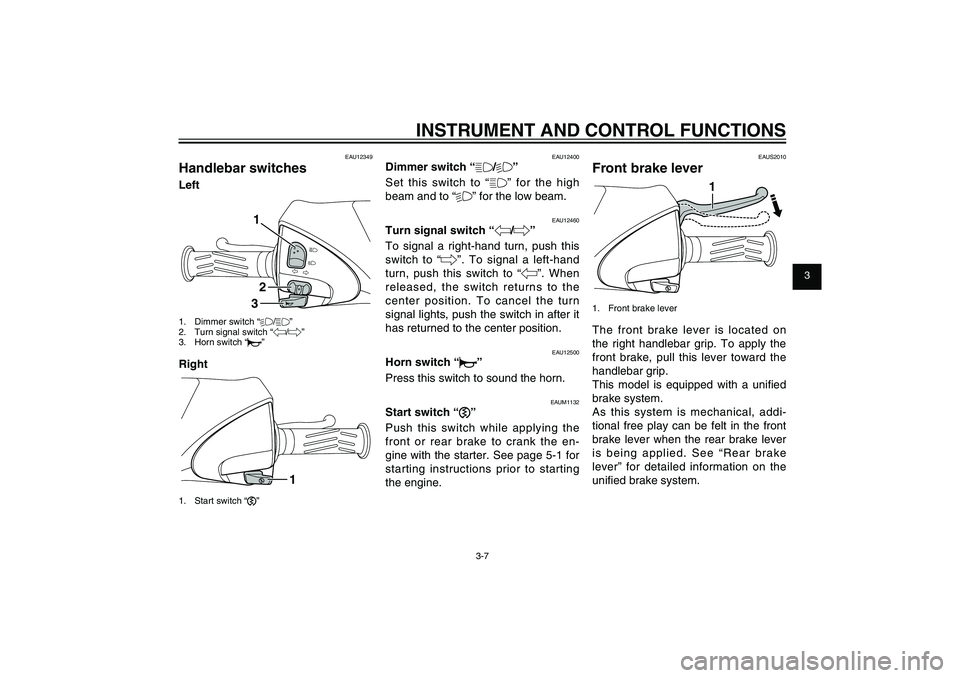
Handlebar switchesLeft
132
1. Dimmer switch “%/&”
2. Turn signal switch “4/6”
3. Horn switch “*”Right
1
1. Start switch “,”
EAU12400
Dimmer switch “&/%”
Set this switch to “&” for the high
beam and to “%” for the low beam.
EAU12460
Turn signal switch “4/6”
To signal a right-hand turn, push this
switch to “6”. To signal a left-hand
turn, push this switch to “4”. When
released, the switch returns to the
center position. To cancel the turn
signal lights, push the switch in after it
has returned to the center position.
EAU12500
Horn switch “*”
Press this switch to sound the horn.
EAUM1132
Start switch “,”
Push this switch while applying the
front or rear brake to crank the en-
gine with the starter. See page 5-1 for
starting instructions prior to starting
the engine.
EAUS2010
Front brake lever
1
1. Front brake leverThe front brake lever is located on
the right handlebar grip. To apply the
front brake, pull this lever toward the
handlebar grip.
This model is equipped with a unifi ed
brake system.
As this system is mechanical, addi-
tional free play can be felt in the front
brake lever when the rear brake lever
is being applied. See “Rear brake
lever” for detailed information on the
unifi ed brake system.
52S-F8199-E0_CS.indd 3-752S-F8199-E0_CS.indd 3-7
2011/11/16 13:07:002011/11/16 13:07:00
Process BlackProcess Black
Page 24 of 84

1
2
3
4
5
6
7
8
9
3-8
EAU1044E
INSTRUMENT AND CONTROL FUNCTIONS
EAUS1961
Rear brake lever
1
1. Rear brake leverThe rear brake lever is located on the
left handlebar grip. To apply the rear
brake, pull the lever toward the han-
dlebar grip.
This model is equipped with a unifi ed
brake system.
When pulling the rear brake lever, the
rear brake and a portion of the front
brake are applied. For full braking
performance, apply both brake levers
simultaneously.TIP● As the unified brake system is
mechanical, additional free play
can be felt in the front brake lever
when the rear brake lever is be-
ing pulled.
● The unified brake system does
not function when the front brake
is applied alone.
EAUT3590
Fuel tank cap
1
2
1. Fuel tank cap
2. Match marksTo remove the fuel tank cap
1. Open the seat. (See page 3-11.)
2. Turn the fuel tank cap counter-
clockwise and pull it off.
To install the fuel tank cap
1. Insert the fuel tank cap into the
tank opening and turn it clockwise
until the “W/X” marks on the cap
and rubber mat are aligned.
2. Close the seat.
EWA11091
WARNING
Make sure that the fuel tank cap
52S-F8199-E0_CS.indd 3-852S-F8199-E0_CS.indd 3-8
2011/11/16 13:07:002011/11/16 13:07:00
Process BlackProcess Black
Page 32 of 84
1
2
3
4
5
6
7
8
9
4-2
EAU15582
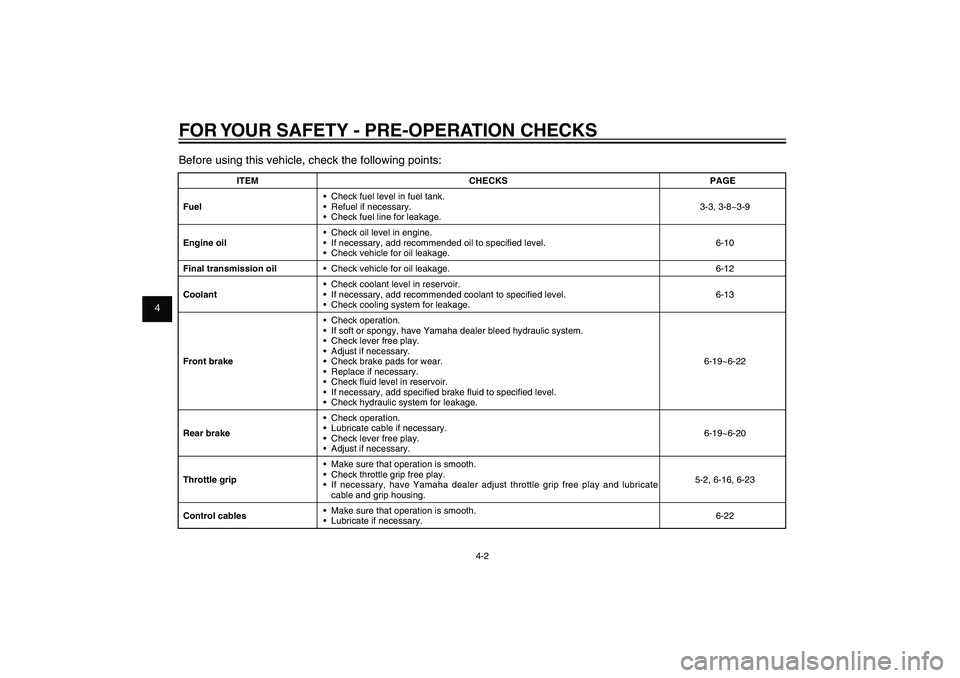
FOR YOUR SAFETY - PRE-OPERATION CHECKSBefore using this vehicle, check the following points:
ITEM CHECKS PAGE
Fuel• Check fuel level in fuel tank.
• Refuel if necessary.
• Check fuel line for leakage.3-3, 3-8~3-9
Engine oil• Check oil level in engine.
• If necessary, add recommended oil to specifi ed level.
• Check vehicle for oil leakage.6-10
Final transmission oil• Check vehicle for oil leakage. 6-12
Coolant• Check coolant level in reservoir.
• If necessary, add recommended coolant to specifi ed level.
• Check cooling system for leakage.6-13
Front brake• Check operation.
• If soft or spongy, have Yamaha dealer bleed hydraulic system.
• Check lever free play.
• Adjust if necessary.
• Check brake pads for wear.
• Replace if necessary.
• Check fl uid level in reservoir.
• If necessary, add specifi ed brake fl uid to specifi ed level.
• Check hydraulic system for leakage.6-19~6-22
Rear brake• Check operation.
• Lubricate cable if necessary.
• Check lever free play.
• Adjust if necessary.6-19~6-20
Throttle grip• Make sure that operation is smooth.
• Check throttle grip free play.
• If necessary, have Yamaha dealer adjust throttle grip free play and lubricate
cable and grip housing.5-2, 6-16, 6-23
Control cables• Make sure that operation is smooth.
• Lubricate if necessary.6-22
52S-F8199-E0_CS.indd 4-252S-F8199-E0_CS.indd 4-2
2011/11/16 13:07:002011/11/16 13:07:00
Process BlackProcess Black
Page 33 of 84

1
2
3
4
5
6
7
8
9
4-3
EAU15582
FOR YOUR SAFETY - PRE-OPERATION CHECKS
ITEM CHECKS PAGE
Wheels and tires• Check for damage.
• Check tire condition and tread depth.
• Check air pressure.
• Correct if necessary.6-17~6-19
Brake levers• Make sure that operation is smooth.
• Lubricate lever pivoting points if necessary.3-7~3-8, 6-23
Centerstand• Make sure that operation is smooth.
• Lubricate pivot if necessary.6-23
Chassis fasteners• Make sure that all nuts, bolts and screws are properly tightened.
• Tighten if necessary.-
Instruments, lights, signals
and switches• Check operation.
• Correct if necessary.3-2~3-7
52S-F8199-E0_CS.indd 4-352S-F8199-E0_CS.indd 4-3
2011/11/16 13:07:002011/11/16 13:07:00
Process BlackProcess Black
Page 34 of 84

1
2
3
4
5
6
7
8
9
5-1
EAU15943
OPERATION AND IMPORTANT RIDING POINTS
EAU15943
OPERATION AND IMPORTANT RIDING POINTS
EAU15951
Read the Owner’s Manual carefully
to become familiar with all controls.
If there is a control or function you
do not understand, ask your Yamaha
dealer.
EWA10271
WARNING
Failure to familiarize yourself with
the controls can lead to loss of
control, which could cause an ac-
cident or injury.
EAU45310
TIPThis model is equipped with a lean
angle sensor to stop the engine in
case of a turnover. To start the en-
gine after a turnover, be sure to turn
the main switch to “OFF” and then to
“ON”. Failing to do so will prevent the
engine from starting even though the
engine will crank when pushing the
start switch.
EAUT3680
Starting the engine
ECA10250
NOTICESee page 5-3 for engine break-in
instructions prior to operating the
vehicle for the rst time.
1. Turn the key to “ON”.
The engine trouble warning light
and coolant temperature warning
light should come on for a few
seconds, then go off.
NOTICE:
If
a warning light does not go off,
have a Yamaha dealer check its
electrical circuit.
[ECAT1170]
2. Close the throttle completely.
3. Start the engine by pushing the
start switch while applying the
front or rear brake.
NOTICE:
For
maximum engine life, never ac-
celerate hard when the engine
is cold!
[ECA11041]
If the engine does not start, re-
lease the start switch, wait a few
seconds, and then try again.
Each starting attempt should be
as short as possible to preserve the battery. Do not crank the en-
gine more than 10 seconds on
any one attempt.
52S-F8199-E0_CS.indd 5-152S-F8199-E0_CS.indd 5-1
2011/11/16 13:07:002011/11/16 13:07:00
Process BlackProcess Black