steering wheel Abarth 124 Spider 2016 Owner handbook (in English)
[x] Cancel search | Manufacturer: ABARTH, Model Year: 2016, Model line: 124 Spider, Model: Abarth 124 Spider 2016Pages: 224, PDF Size: 2.89 MB
Page 160 of 224

the vehicle with all wheels on the
ground:
shift to neutral (manual transmission),
or the N position (automatic
transmission);
switch the ignition to ACC;
release the parking brake.
NOTE Remember that power assist for
the brakes and steering will not be
available when the engine is not
running.
158
IN CASE OF EMERGENCY
Follow these instructions when towing
Page 174 of 224

You should replace the tire before the
band crosses the entire tread.
SNOW CHAINS
50)
The snow chains may be applied only
to the rear wheel tires. Check the
tension of the snow chains after the first
few metres have been driven.
IMPORTANT Using snow chains with
tires with non-original dimensions may
damage the vehicle.
IMPORTANT Using different size or type
(M+S, snow, etc.) tires between front
and rear axle may adversely affect
vehicle driveability, with the risk of losing
control of the vehicle and resulting
accidents.TIRE ROTATION
RECOMMENDATIONS
211)
The single wheel will therefore operate
on a different axle and, where possible,
on the opposite side of the vehicle.
IMPORTANT The following rotation
methods must NOT be used with
one-way tires! This type of tires can
only be switched from the front axle to
the rear axle and vice versa, keeping
them on the same side of the vehicle.
IMPORTANT Rotate tires periodically.
Irregular tire wear is dangerous. To
equalize tread wear for maintaining
good performance in handling and
braking, rotate the tires every 10,000
km, or sooner if irregular wear
develops.
IMPORTANT Because your vehicle is
not equipped with a spare tire, you
cannot do a tire rotation safely with the
jack that comes with your vehicle.
Contact an Abarth Dealership for tire
rotation.
IMPORTANT Rotate unidirectional tires
and radial tires that have an
asymmetrical tread pattern or studs
only from front to rear, not from side to
side. Tire performance will be reduced if
rotated from side to side.
With limited-slip differential
Your vehicle is equipped with
limited-slip differential. Do not use the
following:
tires not of the designated size;
tires of different sizes or types at the
same time;
tires not sufficiently inflated.
If these instructions are not followed,
the rotation of the left and right wheels
will be different and will thus apply a
constant load on the limited-slip
differential. This will cause a
malfunction.
WARNING
207)If the tires are "unidirectional", do not
switch tires from the right-hand side of the
vehicle to the left-hand side, and vice
versa. This type of tires can only be
switched from the front axle to the rear axle
and vice versa, keeping them on the same
side of the vehicle.
208)Travelling with partially or completely
flat tires can cause safety problems and
irreparable damages to the tire.
209)Always use tires that are in good
condition. Driving with worn tires is
dangerous. Reduced braking, steering, and
traction could result in an accident.
15407031403-ALL-001AB
172
MAINTENANCE AND CARE
Page 197 of 224
STEERING WHEEL
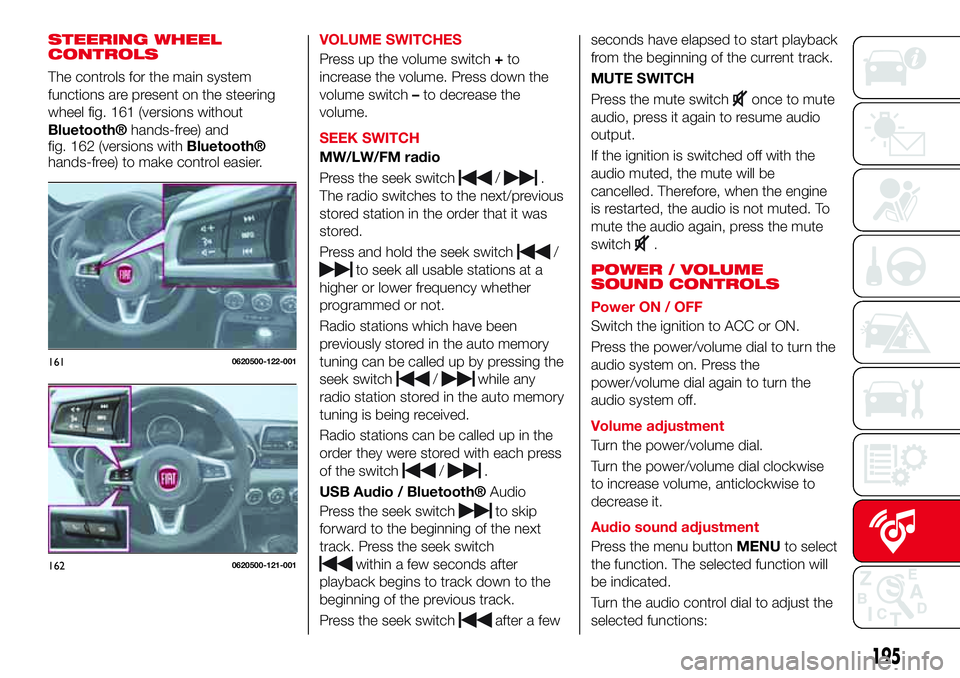
CONTROLS
The controls for the main system
functions are present on the steering
wheel fig. 161 (versions without
Bluetooth®hands-free) and
fig. 162 (versions withBluetooth®
hands-free) to make control easier.VOLUME SWITCHES
Press up the volume switch+to
increase the volume. Press down the
volume switch–to decrease the
volume.
SEEK SWITCH
MW/LW/FM radio
Press the seek switch
/.
The radio switches to the next/previous
stored station in the order that it was
stored.
Press and hold the seek switch
/
to seek all usable stations at a
higher or lower frequency whether
programmed or not.
Radio stations which have been
previously stored in the auto memory
tuning can be called up by pressing the
seek switch
/while any
radio station stored in the auto memory
tuning is being received.
Radio stations can be called up in the
order they were stored with each press
of the switch
/.
USB Audio /
Bluetooth®Audio
Press the seek switch
to skip
forward to the beginning of the next
track. Press the seek switch
within a few seconds after
playback begins to track down to the
beginning of the previous track.
Press the seek switch
after a fewseconds have elapsed to start playback
from the beginning of the current track.
MUTE SWITCH
Press the mute switch
once to mute
audio, press it again to resume audio
output.
If the ignition is switched off with the
audio muted, the mute will be
cancelled. Therefore, when the engine
is restarted, the audio is not muted. To
mute the audio again, press the mute
switch
.
POWER / VOLUME
SOUND CONTROLS
Power ON / OFF
Switch the ignition to ACC or ON.
Press the power/volume dial to turn the
audio system on. Press the
power/volume dial again to turn the
audio system off.
Volume adjustment
Turn the power/volume dial.
Turn the power/volume dial clockwise
to increase volume, anticlockwise to
decrease it.
Audio sound adjustment
Press the menu buttonMENUto select
the function. The selected function will
be indicated.
Turn the audio control dial to adjust the
selected functions:
1610620500-122-001
1620620500-121-001
195
Page 201 of 224
RADIO 7”
STEERING WHEEL
CONTROLS
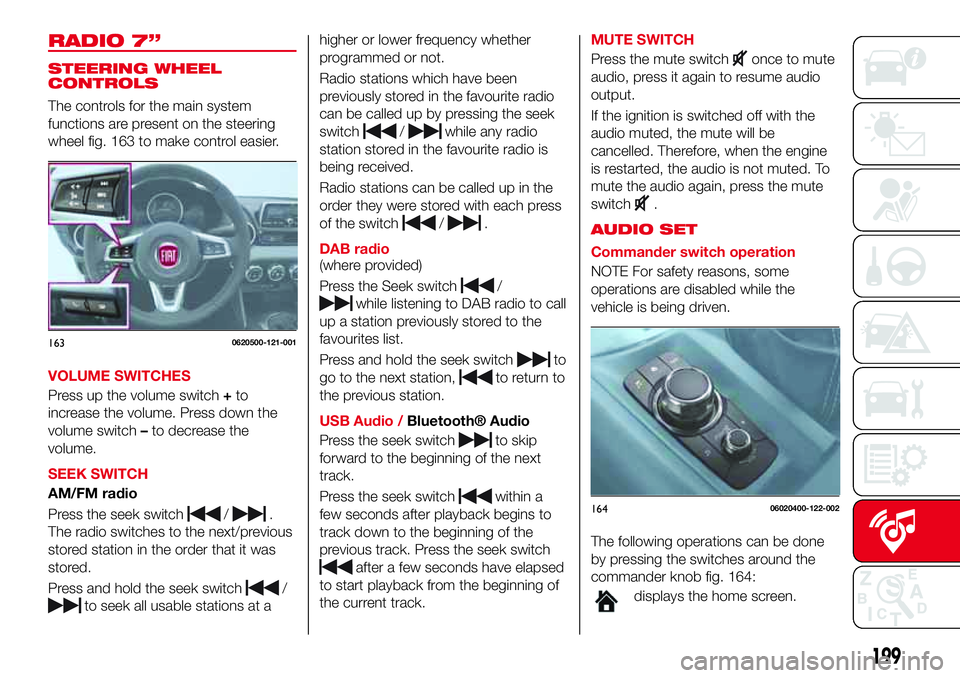
The controls for the main system
functions are present on the steering
wheel fig. 163 to make control easier.
VOLUME SWITCHES
Press up the volume switch+to
increase the volume. Press down the
volume switch–to decrease the
volume.
SEEK SWITCH
AM/FM radio
Press the seek switch
/.
The radio switches to the next/previous
stored station in the order that it was
stored.
Press and hold the seek switch
/
to seek all usable stations at ahigher or lower frequency whether
programmed or not.
Radio stations which have been
previously stored in the favourite radio
can be called up by pressing the seek
switch
/while any radio
station stored in the favourite radio is
being received.
Radio stations can be called up in the
order they were stored with each press
of the switch
/.
DAB radio
(where provided)
Press the Seek switch
/
while listening to DAB radio to call
up a station previously stored to the
favourites list.
Press and hold the seek switch
to
go to the next station,
to return to
the previous station.
USB Audio /
Bluetooth® Audio
Press the seek switch
to skip
forward to the beginning of the next
track.
Press the seek switch
within a
few seconds after playback begins to
track down to the beginning of the
previous track. Press the seek switch
after a few seconds have elapsed
to start playback from the beginning of
the current track.MUTE SWITCH
Press the mute switch
once to mute
audio, press it again to resume audio
output.
If the ignition is switched off with the
audio muted, the mute will be
cancelled. Therefore, when the engine
is restarted, the audio is not muted. To
mute the audio again, press the mute
switch
.
AUDIO SET
Commander switch operation
NOTE For safety reasons, some
operations are disabled while the
vehicle is being driven.
The following operations can be done
by pressing the switches around the
commander knob fig. 164:
displays the home screen.
1630620500-121-001
16406020400-122-002
199
Page 206 of 224
phonebook or the name of a person
whose phone number has been
registered in the
Bluetooth®
hands-free. Press the talk button and
wait for the beep sound, say: “Call
XXXXX... (Ex. “John”) Mobile” and follow
the voice guidance to place the call.
Import contact (download
Phonebook)
Phonebook data from your device
(Mobile phone) can be sent and
registered to your
Bluetooth®
hands-free phonebook using
Bluetooth®.
Automatic downloading: the “Auto
Download Contacts” setting must be
on. When hands-free is connected to
the device, the phonebook is
downloaded automatically.
Manually downloading: if the “Auto
Download Contacts” setting is off,
download the phonebook using the
following procedure:
select theicon on the home
screen to display the “Communication”
screen;
selectContactsto display the
contact list;
selectEdit Contacts;
selectImport All Contactsor
Import Selected Contactto switch to
the device operation. IfImport All
Contactsis selected, select
Download. Download will be startedfrom the mobile phone.
NOTE A maximum of 1000 contacts
can be registered to the phonebook.
Receiving an incoming call
When an incoming call is received, the
incoming call notification screen is
displayed. The “Incoming Call
Notifications” setting must be on.
To accept the callpress steering
wheel button on the audio control
switch or selectAnsweron the screen.
To reject the callpress the hang-up
button on the audio control switch or
selectIgnoreon the screen.
NAVIGATION
SD CARD
To use the navigation system, the SD
card containing the map information
needs to be inserted in the SD card
slot.
When inserting the SD card, never
move the slider on the side of the SD
card to the LOCK position. If the slider
is set to LOCK, the SD card cannot be
read and the navigation system will not
operate.
This SD card is valid for use in only one
vehicle. Never use it in another vehicle.
If the SD card is used first in one vehicle
and then in another, the navigation
system for either one of the vehicles
may become inoperable.NOTE For navigation map updates visit
the http://124spiderinfotainment.com
website or contact an Abarth
Dealership.
NAVIGATION MENU
Select
and open the navigation
menu.
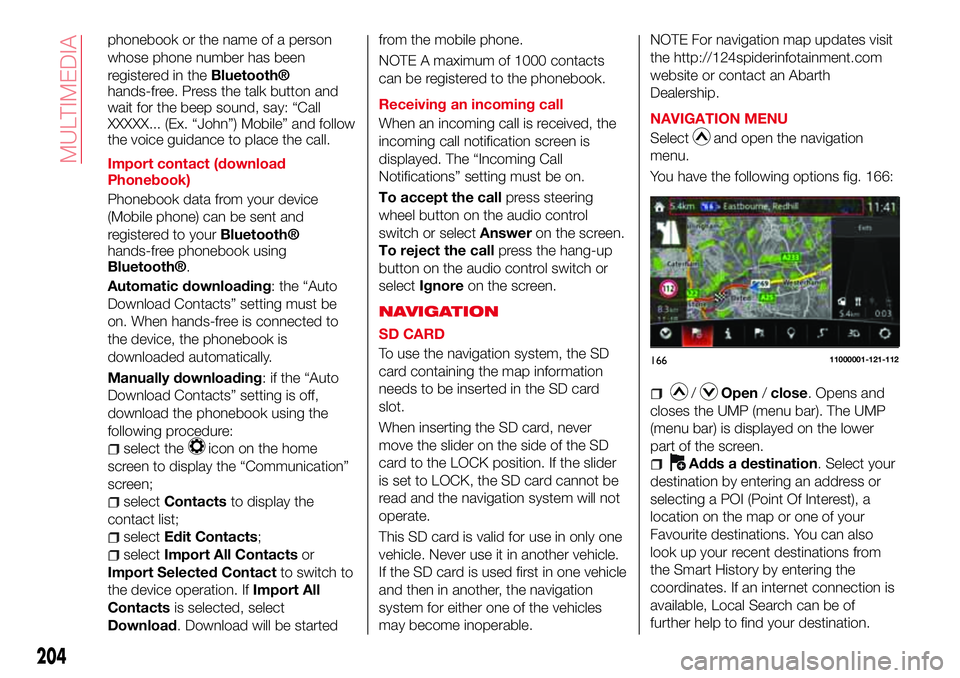
You have the following options fig. 166:
/Open/close. Opens and
closes the UMP (menu bar). The UMP
(menu bar) is displayed on the lower
part of the screen.
Adds a destination. Select your
destination by entering an address or
selecting a POI (Point Of Interest), a
location on the map or one of your
Favourite destinations. You can also
look up your recent destinations from
the Smart History by entering the
coordinates. If an internet connection is
available, Local Search can be of
further help to find your destination.
16611000001-121-112
204
MULTIMEDIA
Page 220 of 224
Jump starting..............153
Jump starting (procedure).......154
Key battery replacement........10
Keyless Entry System...........9
Keys......................9
Lane change signals...........27
Load limiter (pretensioner)........80
Maintaining the finish.........174
Manual climate control system.....32
Manual transmission..........112
Mechanical Limited Slip
Differential................74
Message indicated on display.....66
Mirrors....................22
Multimedia.................192
Navigation................204
Occupant protection systems.....76
Odometer/Trip meter...........49
Outside mirrors...............22
Owner maintenance precautions . . .160
Paintwork (preserving).........173
Parking...................110
Parking brake...............111
Parking Sensor System.........123
Passenger Air Bag............96
Passenger occupant classification
system.................101
Performance...............188Periodic checks (scheduled
servicing)................160
Power mirrors...............23
Power window lock switch.......37
Power windows..............36
Prescriptions for handling the
vehicle at the end of its life.....191
Pretensioners................80
Push button start positions.......11
Radio 3”.................194
Radio 7”..................199
Read this carefully..............2
Rear camera (ParkView rear
backup camera)...........126
Rear fog lights...............26
Refuelling procedure..........125
Refuelling the vehicle..........125
Replacing a bulb.............133
Replacing a tire..............171
Replacing exterior light bulbs.....136
Replacing fuses.............141
Rims and tires..............180
Rims and tires provided........181
SBA system (Seat Belt Alert)......79
Scheduled servicing plan.......162
Seat belt precautions...........77
Seat belt pretensioner and load
limiting systems.............80
Seat Belt pretensioners.........96
Seat belts..................77Seat belts (fastening/unfastening)}.......................77
Seats.....................19
Seats (manual adjustment).......19
Seats and fabric parts (cleaning) . . .175
Shift-lock override (automatic
gearbox)................114
Shift-lock system (automatic
gearbox)................114
Side Air Bags................96
Snow chains...............172
Speed limiter...............120
SPORT mode...............116
Starting the engine.........11,110
Steering wheel...............21
Supplementary restraint system
(SRS) - Air bag.............94
Symbols....................3
TCS (Traction Control System).....68
Theft deterrent system..........15
Tips, controls and general
information...............193
Tire service kit..............148
Tires rotation (recommendations) . .172
Tool storage................148
Towing the vehicle............156
Towing trailers..............130
TPMS (Tire Pressure Monitoring
System)..................72
Turn signals.................27
Turning the engine off...........13
INDEX