transmission Abarth 500 2017 Owner handbook (in English)
[x] Cancel search | Manufacturer: ABARTH, Model Year: 2017, Model line: 500, Model: Abarth 500 2017Pages: 192, PDF Size: 6.46 MB
Page 143 of 192
REFUELLING
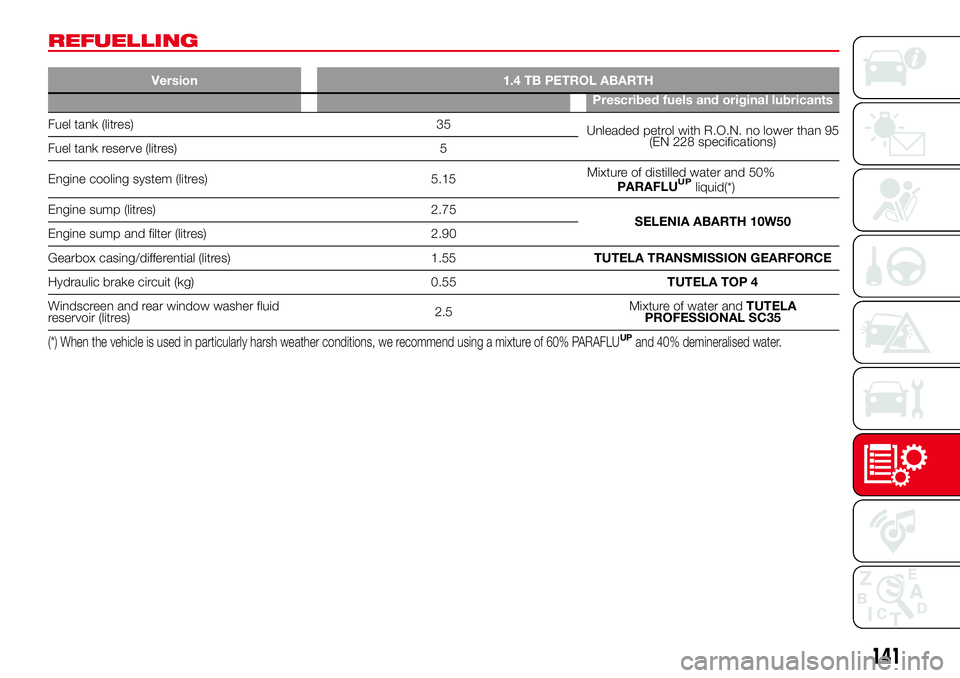
Version 1.4 TB PETROL ABARTH
Prescribed fuels and original lubricants
Fuel tank (litres) 35
Unleaded petrol with R.O.N. no lower than 95
(EN 228 specifications)
Fuel tank reserve (litres) 5
Engine cooling system (litres) 5.15Mixture of distilled water and 50%
PARAFLU
UP
Engine sump (litres) 2.75
SELENIA ABARTH 10W50
Engine sump and filter (litres) 2.90
Gearbox casing/differential (litres) 1.55TUTELA TRANSMISSION GEARFORCE
Hydraulic brake circuit (kg) 0.55TUTELA TOP 4
Windscreen and rear window washer fluid
reservoir (litres)2.5Mixture of water andTUTELA
PROFESSIONAL SC35
(*) When the vehicle is used in particularly harsh weather conditions, we recommend using a mixture of 60% PARAFLUUPand 40% demineralised water.
141
liquid(*)
Page 144 of 192
FLUIDS AND LUBRICANTS
Your vehicle is equipped with an engine oil that has been thoroughly developed and tested in order to meet the requirements of
the Scheduled Servicing Plan. Constant use of the prescribed lubricants guarantees the fuel consumption and emission
specifications. Lubricant quality is crucial for engine operation and duration.
If lubricants conforming to the specific request are not available, products that meet the indicated specifications can be used to
top up; in this case optimal performance of the engine is not guaranteed.
51)
PRODUCT SPECIFICATIONS
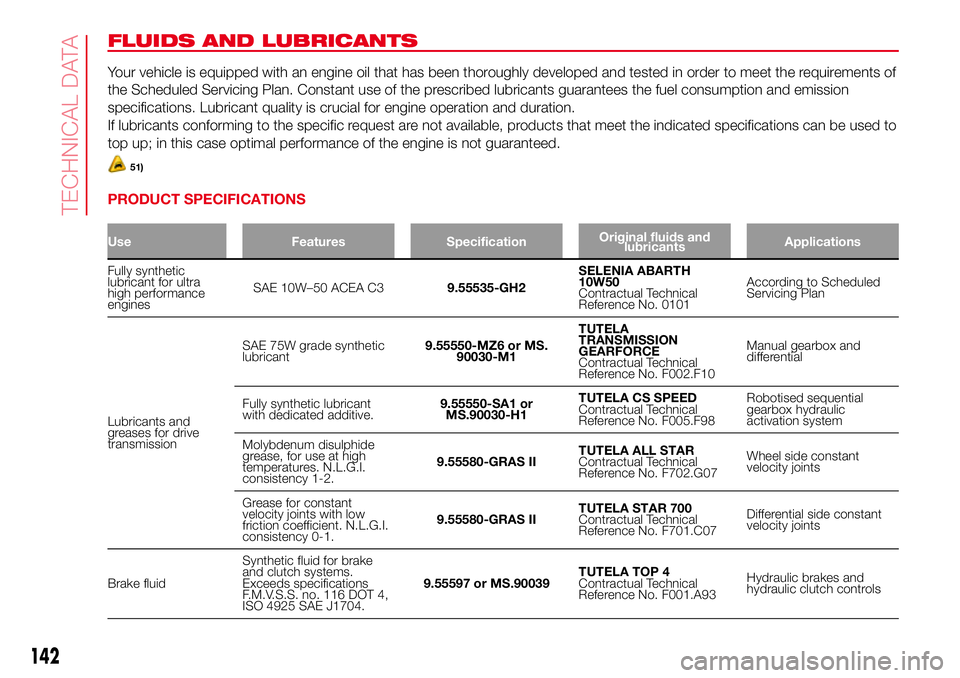
Use Features SpecificationOriginal fluids and
lubricantsApplications
Fully synthetic
lubricant for ultra
high performance
enginesSAE 10W–50 ACEA C39.55535-GH2SELENIA ABARTH
10W50
Contractual Technical
Reference No. 0101According to Scheduled
Servicing Plan
Lubricants and
greases for drive
transmissionSAE 75W grade synthetic
lubricant9.55550-MZ6 or MS.
90030-M1TUTELA
TRANSMISSION
GEARFORCE
Contractual Technical
Reference No. F002.F10Manual gearbox and
differential
Fully synthetic lubricant
with dedicated additive.9.55550-SA1 or
MS.90030-H1TUTELA CS SPEED
Contractual Technical
Reference No. F005.F98Robotised sequential
gearbox hydraulic
activation system
Molybdenum disulphide
grease, for use at high
temperatures. N.L.G.I.
consistency 1-2.9.55580-GRAS IITUTELA ALL STAR
Contractual Technical
Reference No. F702.G07Wheel side constant
velocity joints
Grease for constant
velocity joints with low
friction coefficient. N.L.G.I.
consistency 0-1.9.55580-GRAS IITUTELA STAR 700
Contractual Technical
Reference No. F701.C07Differential side constant
velocity joints
Brake fluidSynthetic fluid for brake
and clutch systems.
Exceeds specifications
F.M.V.S.S. no. 116 DOT 4,
ISO 4925 SAE J1704.9.55597 or MS.90039TUTELA TOP 4
Contractual Technical
Reference No. F001.A93Hydraulic brakes and
hydraulic clutch controls
142
TECHNICAL DATA
Page 150 of 192
RIGHT HAND DRIVE VERSIONS
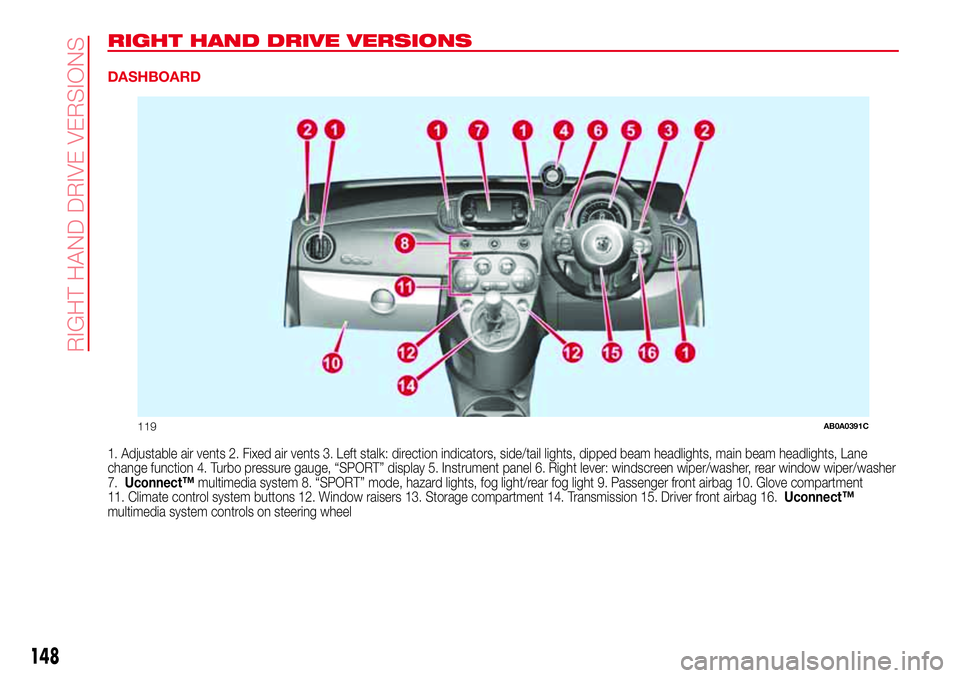
DASHBOARD
1. Adjustable air vents 2. Fixed air vents 3. Left stalk: direction indicators, side/tail lights, dipped beam headlights, main beam headlights, Lane
change function 4. Turbo pressure gauge, “SPORT” display 5. Instrument panel 6. Right lever: windscreen wiper/washer, rear window wiper/washer
7.Uconnect™multimedia system 8. “SPORT” mode, hazard lights, fog light/rear fog light 9. Passenger front airbag 10. Glove compartment
11. Climate control system buttons 12. Window raisers 13. Storage compartment 14. Transmission 15. Driver front airbag 16.Uconnect™
multimedia system controls on steering wheel
119AB0A0391C
148
RI
G
HT
HAND
DRIVE
VER
SIO
NS
Page 164 of 192
eco:Drive™
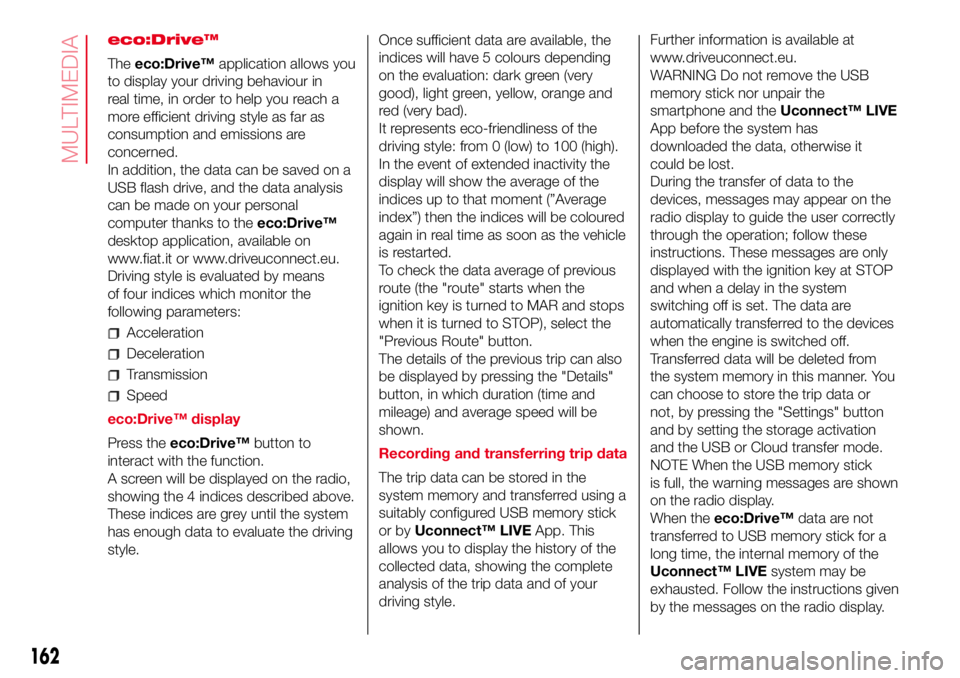
Theeco:Drive™application allows you
to display your driving behaviour in
real time, in order to help you reach a
more efficient driving style as far as
consumption and emissions are
concerned.
In addition, the data can be saved on a
USB flash drive, and the data analysis
can be made on your personal
computer thanks to theeco:Drive™
desktop application, available on
www.fiat.it or www.driveuconnect.eu.
Driving style is evaluated by means
of four indices which monitor the
following parameters:
Acceleration
Deceleration
Transmission
Speed
eco:Drive™ display
Press theeco:Drive™button to
interact with the function.
A screen will be displayed on the radio,
showing the 4 indices described above.
These indices are grey until the system
has enough data to evaluate the driving
style.Once sufficient data are available, the
indices will have 5 colours depending
on the evaluation: dark green (very
good), light green, yellow, orange and
red (very bad).
It represents eco-friendliness of the
driving style: from 0 (low) to 100 (high).
In the event of extended inactivity the
display will show the average of the
indices up to that moment (”Average
index”) then the indices will be coloured
again in real time as soon as the vehicle
is restarted.
To check the data average of previous
route (the "route" starts when the
ignition key is turned to MAR and stops
when it is turned to STOP), select the
"Previous Route" button.
The details of the previous trip can also
be displayed by pressing the "Details"
button, in which duration (time and
mileage) and average speed will be
shown.
Recording and transferring trip data
The trip data can be stored in the
system memory and transferred using a
suitably configured USB memory stick
or byUconnect™ LIVEApp. This
allows you to display the history of the
collected data, showing the complete
analysis of the trip data and of your
driving style.Further information is available at
www.driveuconnect.eu.
WARNING Do not remove the USB
memory stick nor unpair the
smartphone and theUconnect™ LIVE
App before the system has
downloaded the data, otherwise it
could be lost.
During the transfer of data to the
devices, messages may appear on the
radio display to guide the user correctly
through the operation; follow these
instructions. These messages are only
displayed with the ignition key at STOP
and when a delay in the system
switching off is set. The data are
automatically transferred to the devices
when the engine is switched off.
Transferred data will be deleted from
the system memory in this manner. You
can choose to store the trip data or
not, by pressing the "Settings" button
and by setting the storage activation
and the USB or Cloud transfer mode.
NOTE When the USB memory stick
is full, the warning messages are shown
on the radio display.
When theeco:Drive™data are not
transferred to USB memory stick for a
long time, the internal memory of the
Uconnect™ LIVEsystem may be
exhausted. Follow the instructions given
by the messages on the radio display.
162
MULTIMEDIA
Page 189 of 192

– tyres provided ........................... 136
Tyres - maintenance ....................... 126
Uconnect™ 5”
– APPS Mode .............................. 160
– Bluetooth Source ...................... 158
– Controls on front panel .............. 154
– eco:Drive ................................... 162
– Media mode .............................. 158
– my:Car ...................................... 163
– Navigation ................................. 163
– Phone mode ............................. 159
– Settings..................................... 163
– Steering wheel controls ............. 156
– Switching the system on/off ...... 158
– Uconnect™ LIVE Services......... 160
– Voice commands ...................... 165
Uconnect™ 5”/7” HD
– AUX inputs, USB ports and
iPod connector.......................... 153
– Tips, controls and information ... 152
Uconnect™ 7” HD
– AUX source ............................... 175
– Bluetooth Source ...................... 174
– Controls on front panel .............. 167
– Media mode .............................. 173
– Navigation ................................. 178
– Phone mode ............................. 175
– Settings..................................... 178– Steering wheel controls ............. 170
– Switching the system on/off ...... 173
– Uconnect LIVE Services ............ 176
– USB/iPod support ..................... 174
– Voice commands ...................... 179
Use of the Owner Handbook.......... 6
Using the manual gearbox ............. 84
Using the robotised sequential
transmission................................. 84
Vehicle changes/alterations
........... 4
Warning lights and messages
....... 45
Washing and cleaning the soft
top ............................................... 128
Weights.......................................... 138
Wheels and tyres ........................... 126
– tyre inflation pressure................. 136
Window bags (side airbags for
head protection) ........................... 78
Window washing............................ 23
Windows (cleaning) ........................ 128
Windscreen washer (jets) ............... 125
Windscreen/rear window washer
fluid .............................................. 121
Windscreen/rear window wiper
(blades) ........................................ 125